Here is how to create custom workouts on the Apple Watch and Apple Watch Ultra. The ability to create custom workouts is a new feature that has been added to the Apple Workout app during the release of watchOS 9.
In order to create a custom workout, you will first need to:
Go to the app menu
Select the Apple Workout app
Once opened, you see a variety of workout categories to choose from. Once you decide on one, click on the three dots in the upper right-hand corner. This will take you to a list of the current workouts available.
You will likely see some custom workouts already built by Apple that you can use. However, in order to create your own, you will need to scroll all the way to the bottom of the list and select “Create Workout.”
From here, depending on the workout category, you will have up to six workout types to choose from:
Open: which should already be setup as the default workout (and is here in case you delete it)
Calories: workouts set to a custom calorie goal
Distance: workouts set to a custom distance goal
Time: workouts set to a custom time goal
Pacer: workouts that allow you to set both a distance and time goal. This will then create a goal pace for you to achieve. During this type of workout, the Apple Watch will provide feedback to let you know if you are going faster or slower than your goal pace.
Custom: which is where you can create your own workout type or interval training
When creating a custom workout on the Apple Watch, you will see additional warmup and cooldown sections. If you do not want these, you can leave them classified as “Skip.” If you do want them, you can set them up by time, distance, or open if you want it to be open-ended.
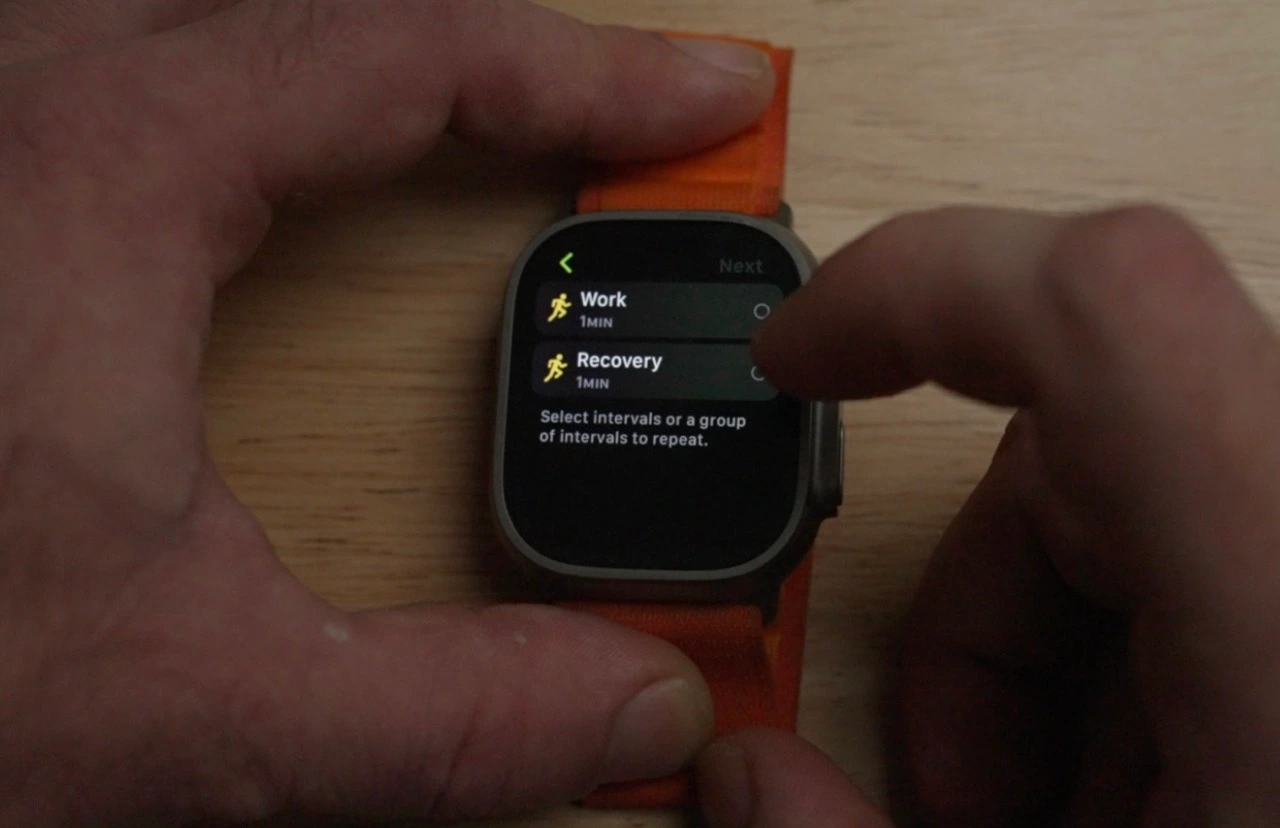
For the workout portion, select “Add,” and then select either “Work” or “Recovery.” The “Repeat” option here will be grayed out until after you have created your first workout section.
For Work and Recovery intervals, you can select distance, time, or open types. Once created, you can group intervals together and set them to repeat. To do this:
Select “Add”
Select “Repeat”
Then select the intervals you would like to be grouped, and select how many times you would like this group repeated.
You also have the ability to reorder the workout by selecting “Reorder,” and then holding and dragging the portion you would like to move.
Once done, you can name the workout whatever you would like. From now on, you will be able to find this workout as an option when you select the workout category on the Apple Watch Workout app.
Apple on Wednesday released iOS 15.6.1 and macOS Monterey 12.5.1 to all users. The updates bring no new features or major changes. Instead, they come with important security improvements. The company also released watchOS 8.7.1, but this update fixes a specific bug affecting Apple Watch Series 3 models.
watchOS 8.7.1 is available only for Apple Watch Series 3
According to the release notes, watchOS 8.7.1 fixes a bug that could cause the Apple Watch Series 3 to reboot unexpectedly for some users. For this reason, the update is only available for Series 3 models, which means that Apple Watch Series 4 and later won’t receive today’s update.
The Apple Security Updates webpage, on which the company provides details about the security enhancements made with each software update, makes it clear that watchOS 8.7.1 doesn’t come with any changes other than fixing the bug affecting Apple Watch Series 3 users. Both iOS 15.6.1 and macOS Monterey 12.5.1 come with security fixes.
According to Apple, one of the fixed vulnerabilities allowed third-party applications to execute arbitrary code with kernel privileges. Another vulnerability found in WebKit, Safari’s web engine, has also been fixed with the update. These vulnerabilities affected both iPhone, iPad, and Mac users.
In the meantime, Apple continues to work on watchOS 9, the next major update for the Apple Watch software. watchOS 9 comes with new watch faces, enhancements to the Workout app, medication reminders, and more. However, watchOS 9 requires Apple Watch Series 4 and later, which means Series 3 won’t get the update.
Just like iOS 16, watchOS 9 is expected to be officially released next month.
iOS 16 beta 6 now available as Apple finalizes features ahead of September launch
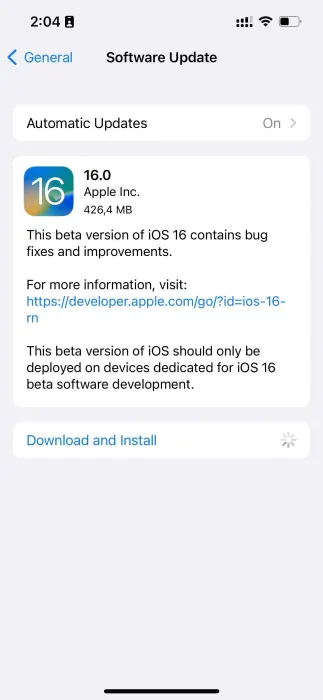
iOS 16 beta 6 and iPadOS 16 beta 6 are now rolling out to developers, one week after the fifth beta was released. iOS 16 brings a number of changes, including updates to the Lock Screen, new wallpaper options, and more. iOS 16 beta 6 will continue refining these new features…
Update: Also now available to public beta testers.
Each new iOS 16 beta usually includes a number of changes, bug fixes, and even new features. Apple keeps a keen eye on the feedback it receives from iOS 16 beta testers, and each subsequent beta aims to address complaints, bug reports, and performance issues.
Notably, Apple has switched to a one-week cycle with this beta, indicating it is ramping up beta testing ahead of next month’s public release.
One thing we’ve learned recently that Apple is planning to delay releasing this update to the public. iPadOS 16 was initially slated to launch in September alongside iOS 16, but it’s now scheduled for sometime in October.
iOS 16 beta 5 was released last week with the notable addition of a new battery percentage icon for the menu bar.
iOS 16 beta 5 finally adds the battery percentage to the status bar
Find My has a new sound alert with iOS 16 beta 5, here’s how it sounds
iOS 16 beta 5 adds ‘Copy and Delete’ option for sharing screenshots without clutter
watchOS 9 beta 6 is now available to developers
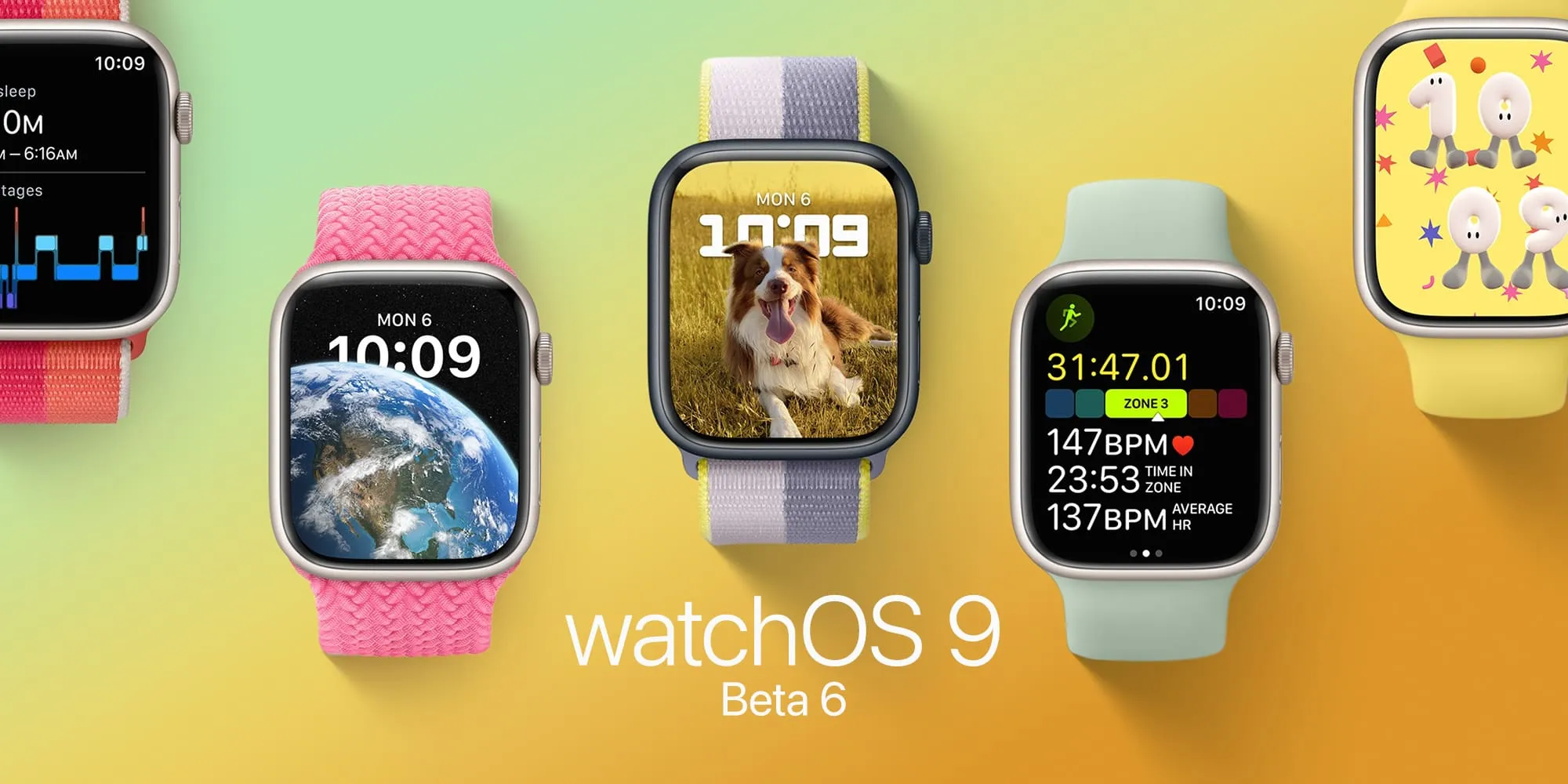
watchOS 9 beta 6 is here. As Apple polishes the Apple Watch’s upcoming operating system after more than two months of beta testing, the company seems to be getting ready for the launch of watchOS 9 in September. Here’s everything new with it.
Today’s build is 20R5353a. watchOS 9 is the biggest update on the Apple Watch software in years and beta testers can take advantage of the features before everyone else.
Now that watchOS 9 doesn’t support Apple Watch Series 3 anymore, the operating system will revamp old Watch Faces, while adding four new ones. With these new faces, Apple makes them look better on bigger displays. In addition, the company is adding QWERTY keyboard support for more languages for the Apple Watch Series 7 and new QuickType technology with watchOS 9.
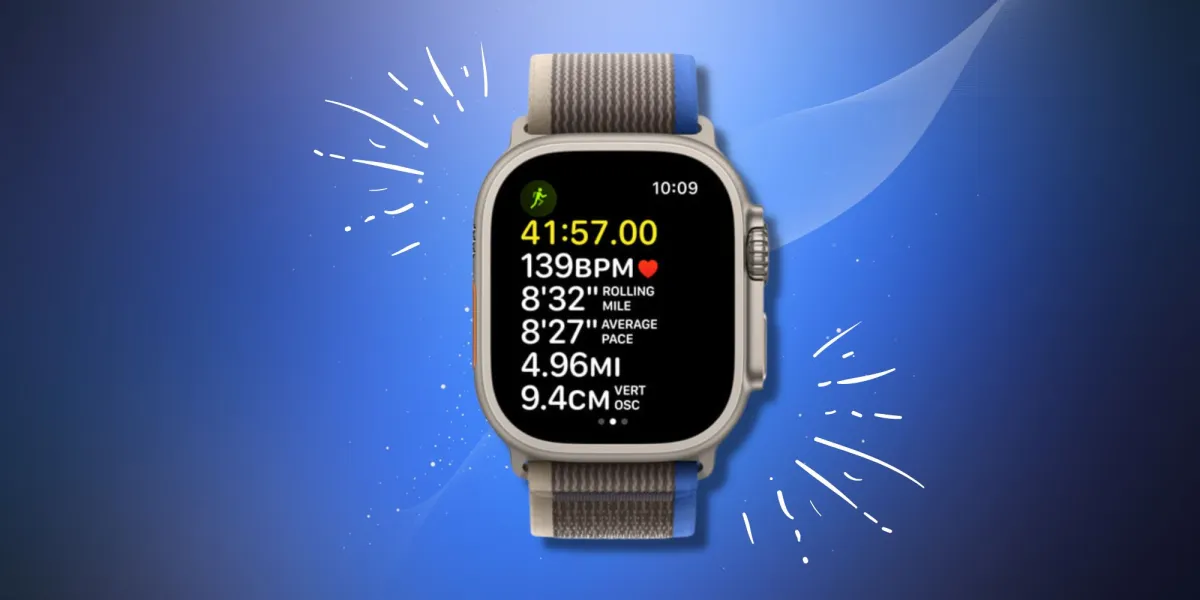
watchOS 9 beta version also brings a significant update to the Workout app with a lot of new features for people who love to exercise. For runners, there’s a new Workout Views where they just need to turn the Digital Crown in order to see lots of metrics, which are available during the run:
Activity rings
Heart Rate Zones
Power
Elevation
Apple is also improving the Sleep app with watchOS 9, which beta testers can now take advantage of. It now brings more sleep data and there’s a new Medications app that helps you track all the pills and vitamins you take every day.
Alongside watchOS 9 beta 6, Apple is seeding iOS 16 beta 6, iPadOS 16 beta 6, and tvOS 16 beta 6
In a report by Bloomberg, the publication says Apple will likely delay the launch of iPadOS 16 by a month, which could mean this software will be available closer to the launch of macOS Ventura, also expected for October. watchOS 9 and iOS 16, on the other hand, are expected to launch next month.
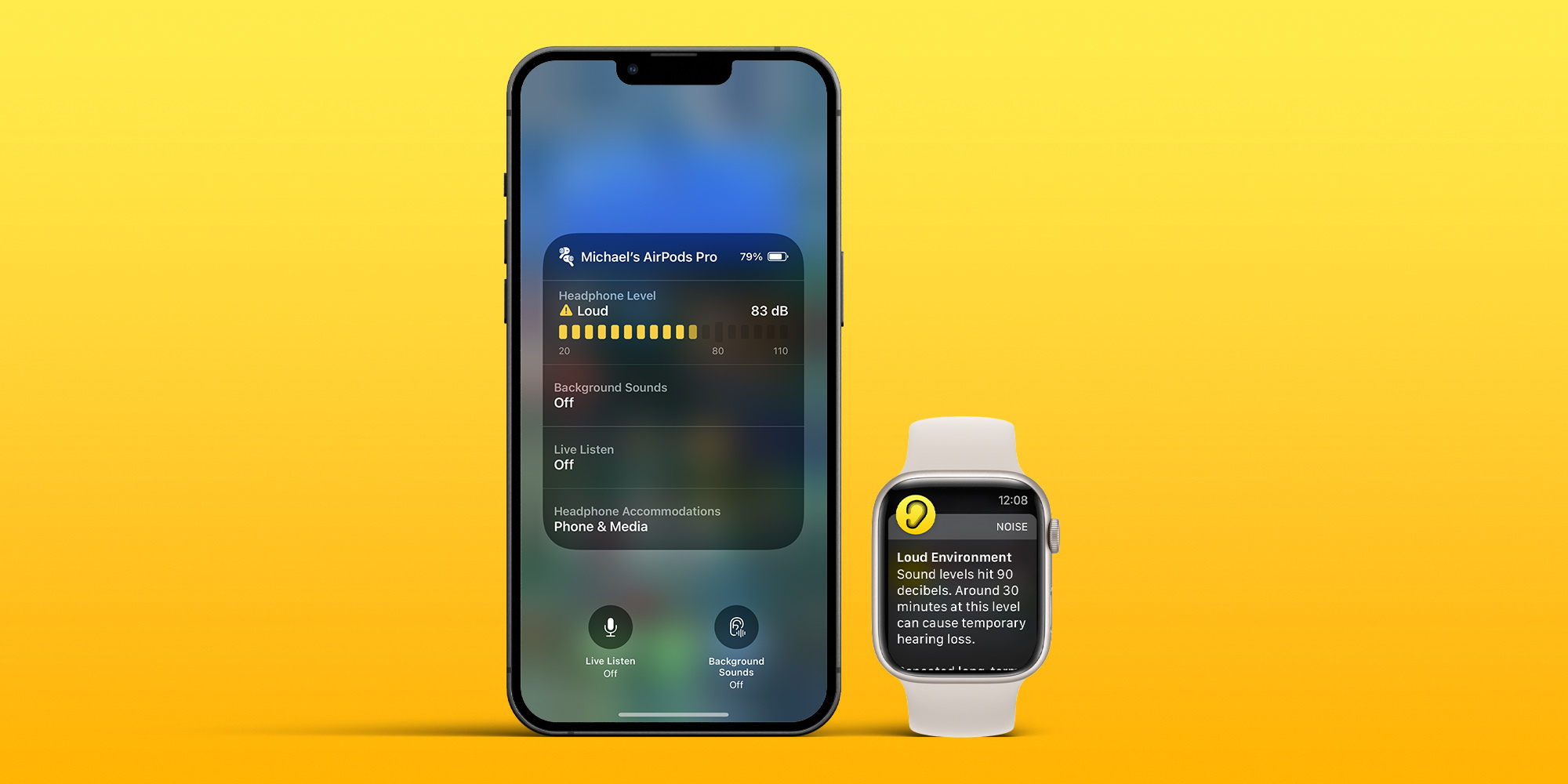
iPhone and Apple Watch include a wide range of valuable health features and a couple of them that don’t get much attention include measuring ambient and headphone noise levels. Read along for a look at how to protect from hearing loss by checking decibel levels on iPhone and Apple Watch.
In the US, an estimated 37.5 million adults have trouble hearing, and men are believed to be twice as likely to experience hearing loss as women (via the National Institute for Deafness and Other Communication Disorders).
Thankfully, iPhone and Apple Watch feature both ambient (environmental) and headphone decibel monitoring that are quick and easy to use, including noise threshold warnings. That makes it much easier to prevent hearing damage and loss by knowing when to turn down the volume, use ear protection, or leave a loud environment.
How loud is too loud?
So what’s a harmful decibel level? That depends on the amount of time you’re exposed along with the level of noise. Here’s what Apple says:
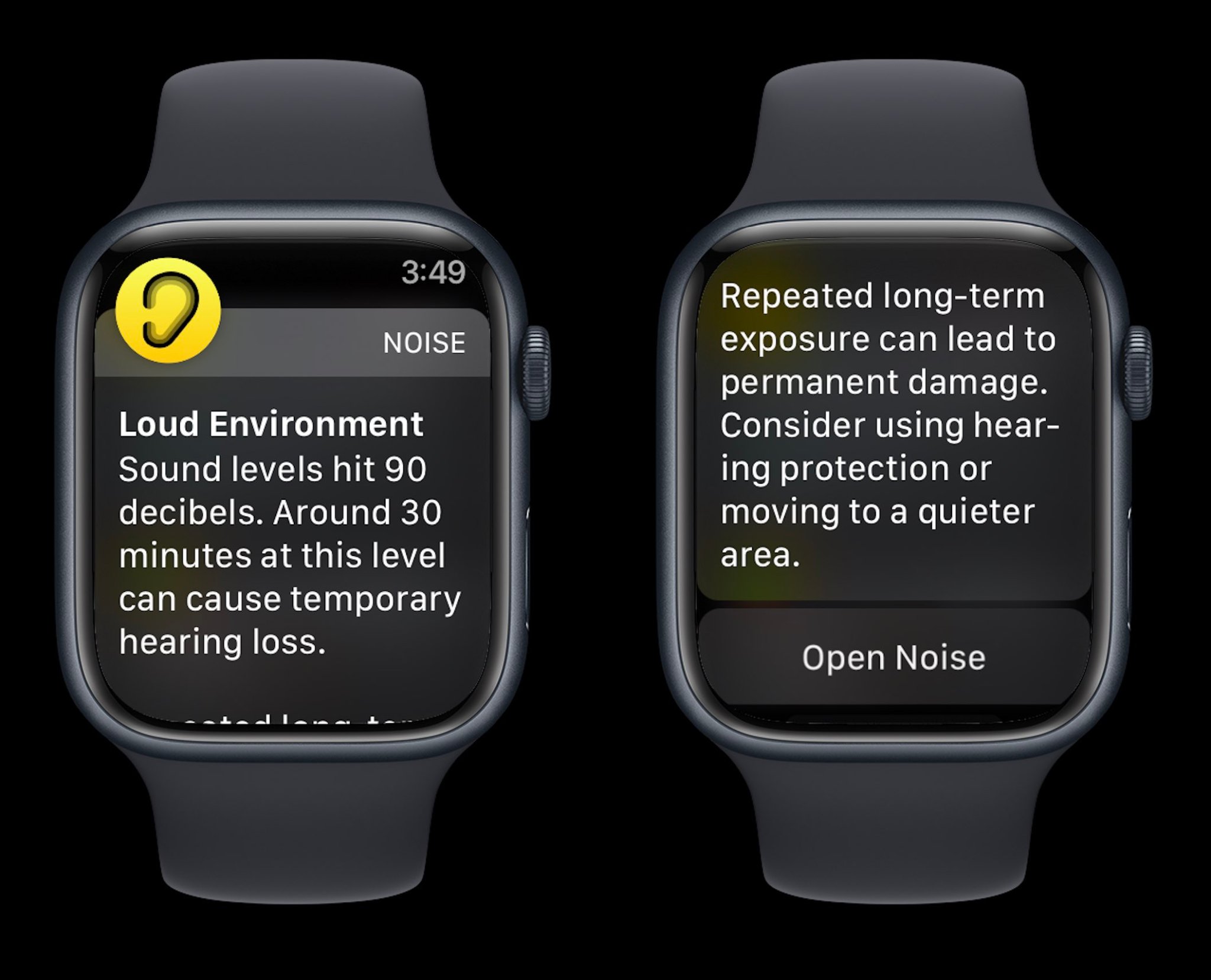
Repeated, long-term exposure to sounds above 80 dB can lead to permanent damage. Consider using hearing protection or moving to a quieter area.
Apple Watch also shares examples of noise levels/time exposure that can lead to temporary hearing loss:
80 db: Around 5 hours and 30 minutes a day
85 dB: Around 1 hour and 45 minutes a day
90 dB: Around 30 minutes a day
95 dB: Just 10 minutes a day
100 dB: Even a few minutes a day
How to check decibel levels with iPhone and Apple Watch
Decibel levels with iPhone and iPad
Interestingly, Apple doesn’t make its watchOS Noise app available on iPhone and iPad, so here’s how to check decibel levels:
Open the Settings app and choose Control Center
If it’s not already showing under the “Included Controls,” swipe below and look for the green + icon next to Hearing
Connect headphones to your iPhone
Now open Control Center (swipe down from the top right corner of your screen) and look for the ear icon to see headphone dB levels
To turn on alerts for loud headphone audio, head to Settings > Accessibility > Audio/Visual > Headphone Notifications and tap the toggle
And you can limit loud sounds in headphones by heading to Settings > Sounds & Haptics > Headphone Safety > toggle on Reduce Loud Sounds
If you’re playing music with headphones connected, you’ll see the decibel meter appear in the Hearing tile in Control Center
Green desinates “OK” levels and yellow marks “Loud” levels that can damage hearing
Tap the Hearing icon to learn more about your headphone noise levels
With music paused, you can use the microphone of your headphones to measure the ambient decibel levels
Tap the microphone icon that says Live Listen in the bottom left corner (or tap the Live Listen rectangle)
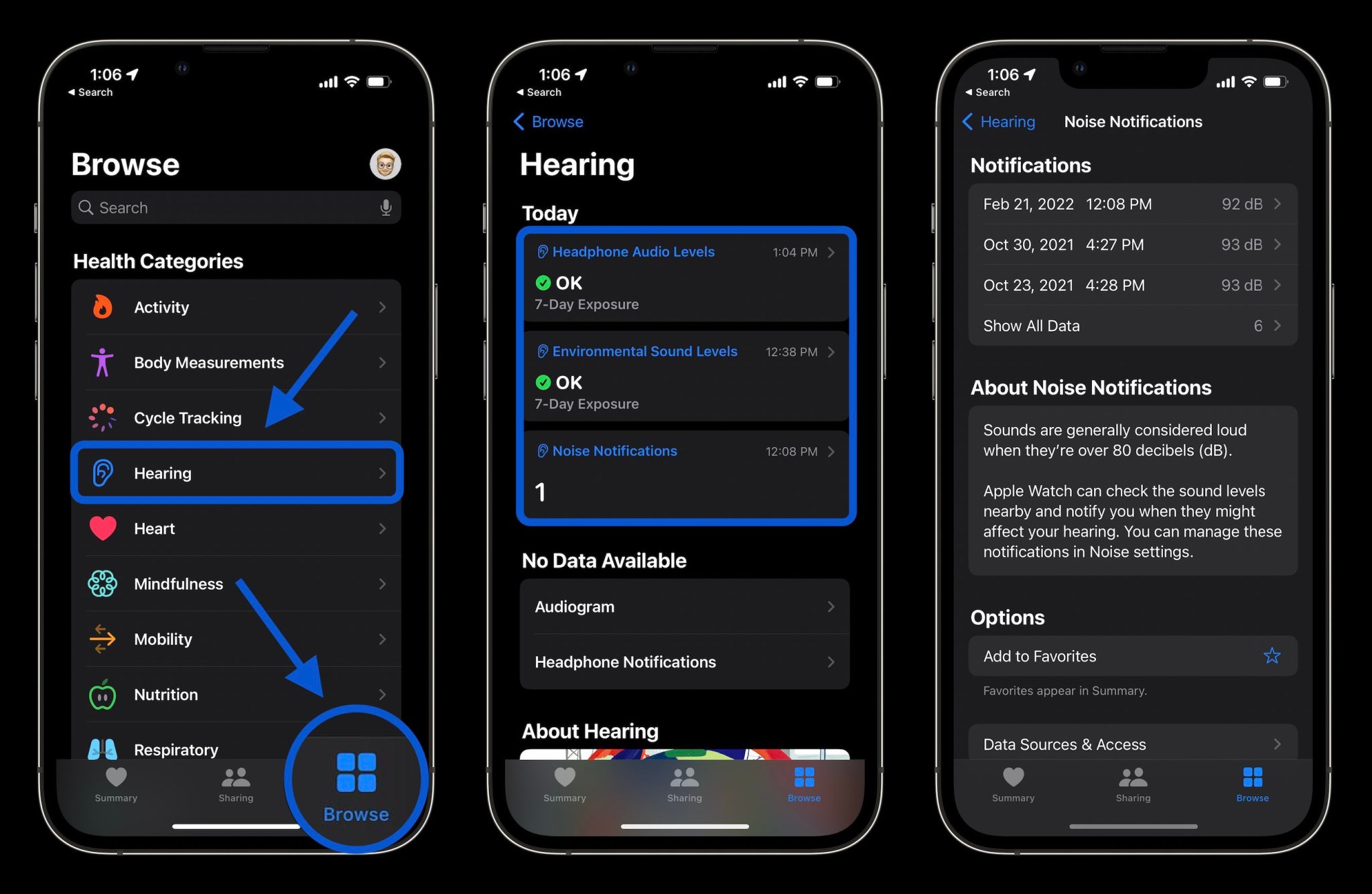
Finally, you can also check your hearing history of both ambient and headphone decibel levels in the Health app
Tap the Browse tab at the bottom
Now choose Hearing
Check decibel levels with Apple Watch
You can measure both ambient and headphone decibel levels with Apple Watch and the former works with the dedicated Noise app. One neat option with the wearable to have quick-access readings is with the Noise app complication.
To check ambient decibel levels, open the Noise app on Apple Watch (you can also turn it on via iPhone in the Apple Watch app > Noise)
If you haven’t used the Noise app before, choose to Enable the feature
You can learn more about the decibel level you’re exposed to by tapping Learn More at the bottom of the Noise app
If you want fast access to decibel levels on Apple Watch, make a watch face with the Noise app compliation
If you don’t enable Noise app notifications when setting up the feature, you can head back to the Watch app on iPhone > Noise > Noise Threshold to change the limit/noise notificiations
To check headphone decibel levels on Apple Watch, open Control Center on your watch (swipe up from the bottom of the screen from your watchface)
Swipe down to the bottom
Tap the ear icon
And here’s a look at how Noise warnings look on Apple Watch:
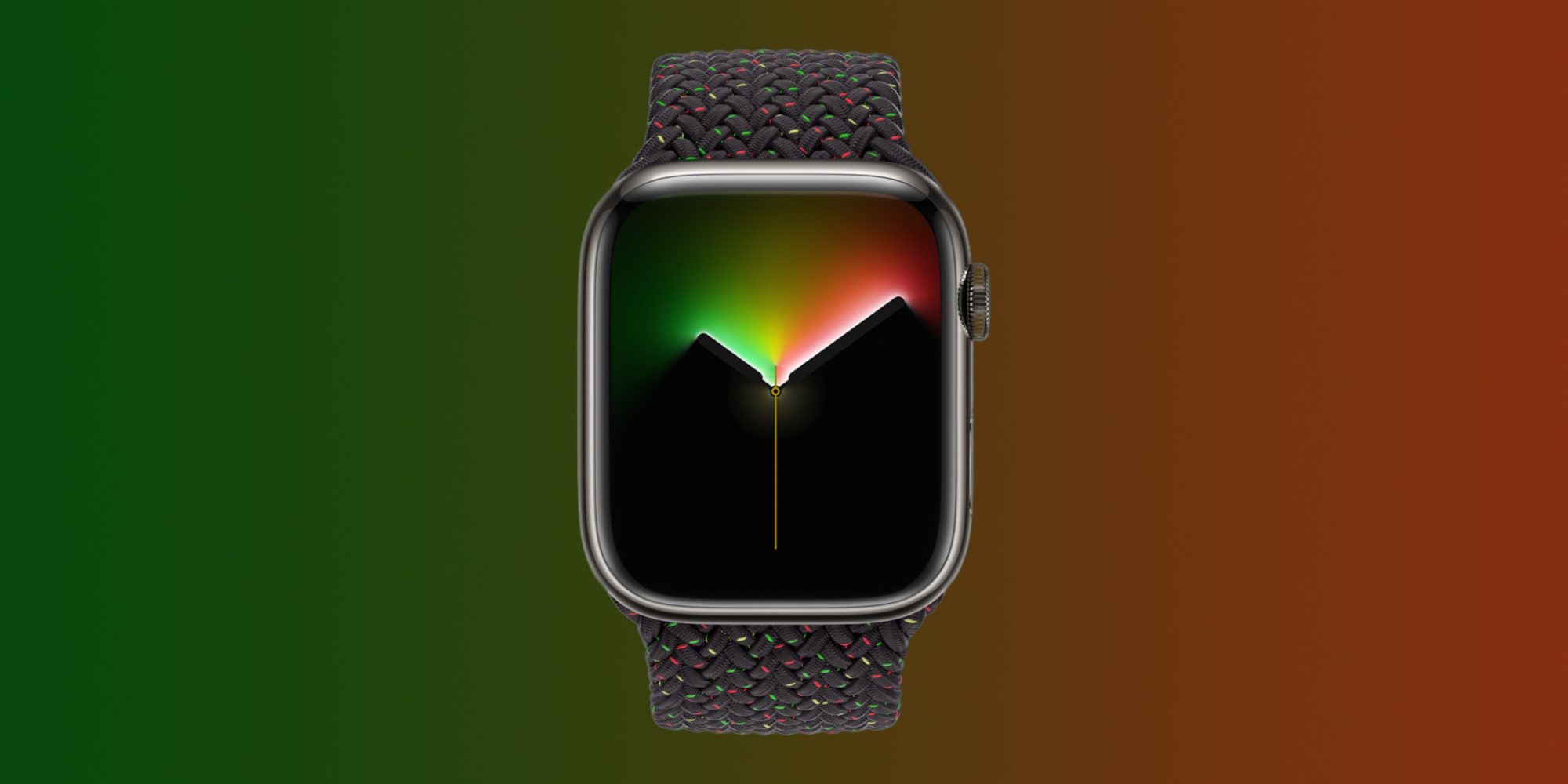
Apple has announced that it is celebrating Black History Month with a number of different initiatives this year. One of the most notable announcements is a new-edition Apple Watch Black Unity Braided Solo Loop and matching Unity Lights watch face, which Apple says are inspired by Afrofuturism.
Here’s how Apple describes the new Apple Watch Braided Solo Loop:
Designed by members and allies of the Black creative community at Apple to celebrate Black history and culture, the Apple Watch Black Unity Braided Solo Loop and matching Unity Lights watch face honors generations of Black people across the African diaspora. This design symbolizes a communal belief in the necessity for a more equitable world. The vibrant red and green colors of the Pan-African flag appear like speckled light across the black band.
To complement the band, Apple has also launched a new Unity Lights watch face for Apple Watch users everywhere. Apple says that this face has been designed “using 2D ray tracing, a technology never before implemented for a watch face.”
Apple explains that this means every pixel on the Apple Watch screen “simulates the light and shadow falling across it and the movement of the clock hands simultaneously reveal and hide the light, changing dynamically throughout the day.” There are a handful of different customization options here, including the option to choose between a full screen or circular dial, black and white color options, tick marks, compilations, and more.
Apple also says it will soon make Afrofuturism-inspired wallpapers available for iPhone, iPad, and Mac via Apple.com.
The Black Unity Braided Solo Loop is available today from Apple’s website and in the Apple Store app. It will also launch in select Apple Store locations on Tuesday, February 1. The band sells for $99. The Unity Lights watch face is available now in the Apple Watch app on your iPhone.
Apple is also planning a wide array of content for Black History Month in Apple Podcasts, Apple Music, and more. You can learn more in the full press release right here.
watchOS 8 brings powerful features to Apple Watch users to help them stay connected, be more active, and better understand their overall health and wellness.
New cycling and wellness features, fresh watch faces, more access with Wallet, and a redesigned Home app arrive for Apple Watch users
Apple launched watchOS 8, bringing powerful features to help Apple Watch users stay connected, be more active, and better understand their overall health and wellness. New workout types, updates to cycling, and the new Mindfulness app expand support for physical and mental well-being, while enhanced capabilities with the Wallet and Home apps enable users to more seamlessly use Apple Watch on the go and at home. The redesigned Photos app, new watch faces, and tools in Messages provide customers with more ways to connect with loved ones.
Workout Updates
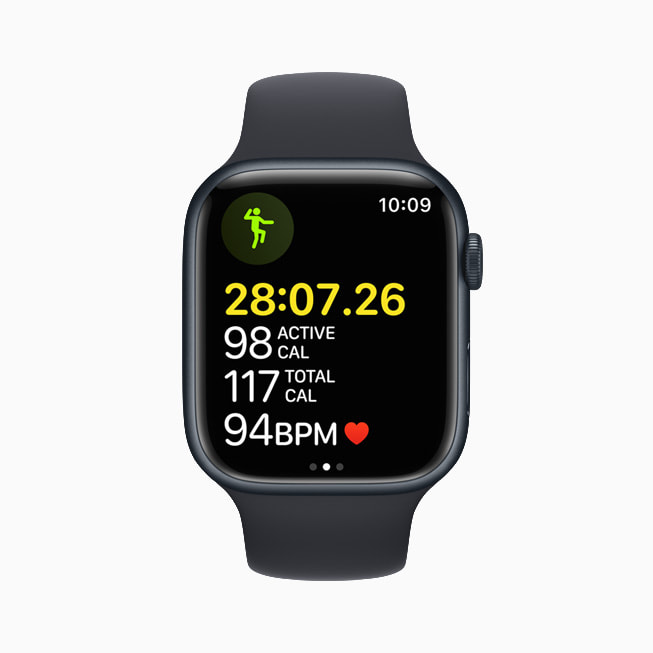
watchOS 8 introduces two new popular workout types that are beneficial for both physical fitness and mindful movement: Tai Chi and Pilates. These new workout types are supported by powerful, validated, custom-built heart rate and motion algorithms to provide users with accurate calorie metrics.
The update also adds new features for anyone who rides a bike. Apple Watch uses advanced algorithms to analyze GPS, heart rate, accelerometer, and gyroscope data to detect when users begin a ride, and prompts them to start an Outdoor Cycle workout if one was not initiated.1 Cycling workouts now have auto-pause and resume so metrics more accurately reflect time spent moving versus stationary, like waiting at a stoplight.
Apple Watch more accurately measures active calories when riding an e-bike, with an updated cycling workout algorithm that evaluates GPS and heart rate data to better determine when users are riding with pedal-assist versus leg power alone. New voice feedback through the built-in speaker of Apple Watch, or through AirPods or other Bluetooth headphones, will automatically announce workout milestones and Activity ring status, helping users stay focused during activities like running or HIIT.
watchOS 8 introduces two new popular workout types that are beneficial for both physical fitness and mindful movement: Tai Chi and Pilates.
watchOS 8 adds several new features for anyone who rides a bike.
Fall Detection Update
With watchOS 8, fall detection algorithms are updated and optimized for detecting falls during workouts — including cycling — and have been tuned to recognize the unique motion and impact of falls from a bike and other workout types.
Fall detection algorithms are updated and optimized for detecting falls during workouts in watchOS 8.
A New Approach to Mindfulness
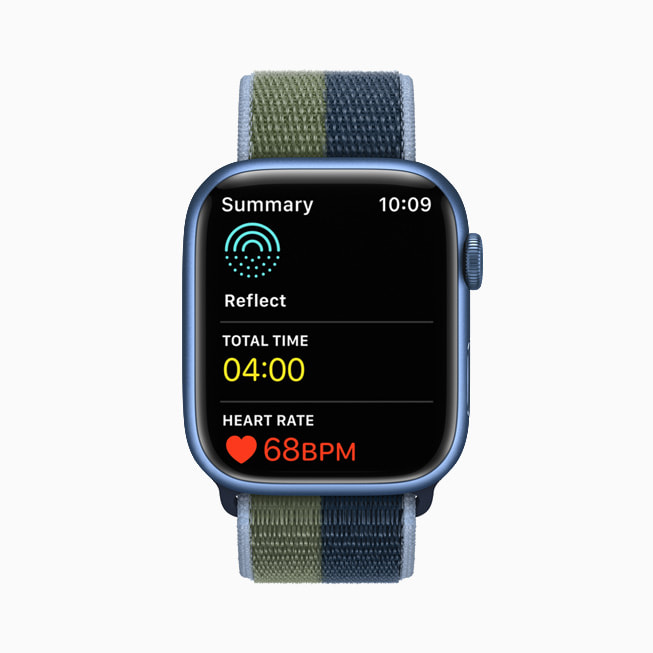
The Breathe app is now the Mindfulness app, featuring an enhanced Breathe experience; a new session type, Reflect; and guided Meditations for Fitness+ subscribers. Reflect offers a mindful intention to focus on for as little as a minute that can be done anywhere and at any time, and each session welcomes the user with a unique, thoughtful notion to consider that invites a positive frame of mind.
Starting Monday, September 27, new guided Meditations will be uploaded each week in audio form in the new Mindfulness app on Apple Watch for Fitness+ subscribers, in addition to being available as an immersive video experience on iPhone, iPad, and Apple TV. These can be played directly from Apple Watch when paired with AirPods or other Bluetooth headphones, so users can experience guided Meditation at their convenience. Users who want to practice meditation while moving will also be able to track their activity with the Workout app.
The Mindfulness app in watchOS 8 features an enhanced Breathe experience; a new session type, Reflect; and guided Meditations for Fitness+ subscribers.
New guided Meditations will be uploaded each week in audio form in the new Mindfulness app on Apple Watch for Fitness+ subscribers.
Sleeping Respiratory Rate
Apple Watch helps users meet their sleep goals by establishing a pre-bedtime routine, and tracks metrics like time asleep, heart rate, and blood oxygen. watchOS 8 provides users even more insight into their overall wellness by tracking sleeping respiratory rate — the number of breaths per minute. This information can be viewed, along with trends over time, in the Health app on iPhone.
watchOS 8 gives users even more insight into their overall wellness by tracking sleeping respiratory rate, which is the number of breaths per minute.
More Access with Wallet
With watchOS 8, Wallet brings even more contact-free ways for users to access the places and things they care about seamlessly, safely, and securely. Ultra Wideband support arrives for digital car keys,3 and Apple Watch users can securely unlock their car from a distance and start it from the driver’s seat. Additionally, users can add home and hotel keys as well as corporate badges to Wallet, and tap their Apple Watch to unlock.
Beginning with Arizona and Georgia, and followed by Connecticut, Iowa, Kentucky, Maryland, Oklahoma, and Utah, users will be able to add their driver’s license or state ID to Wallet, and present it at select TSA checkpoints and lanes.
With digital car keys, Apple Watch wearers can securely unlock their car from a distance and perform other functions.
Apple Watch wearers can add keys for their home or office, and tap their watch to unlock.
Beginning with participating states in the US, Apple Watch wearers will be able to add their driver’s license or state ID to Wallet.
Apple Watch wearers can add keys for a hotel room to Wallet and tap their watch to unlock.
Redesigned Home App
The redesigned Home app offers more convenient control for accessories and scenes, as well as the ability to control accessories by room. Users with a HomeKit-enabled camera can view who is at the door directly on their wrist. Apple Watch users can also tap Intercom to quickly broadcast a message throughout the home or to individual rooms via HomePod mini.
The redesigned Home app in watchOS 8 offers more convenient access to accessories and scenes.
With watchOS 8, Apple Watch users with a HomeKit-enabled camera can view who is at the door directly on their wrist.
New Apple Watch Faces
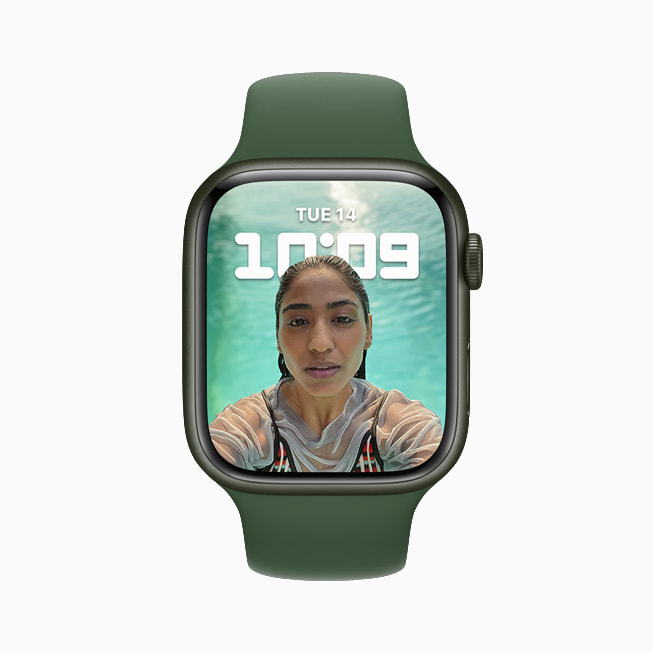
The new Portraits watch face brings to life stunning portrait photos shot on iPhone with an immersive, multilayered effect, intelligently recognizing faces in photos and cropping in to highlight the subject. The classic World Time face, based on heritage watches and ideal for travelers, tracks the time in 24 time zones around a double dial.
The new Portraits watch face brings to life stunning portrait photos shot on iPhone.
The classic World Time face, based on heritage watches and ideal for travelers, tracks the time in 24 time zones around a double dial.
Messages
Communicating on Apple Watch is even easier with new tools in Messages. Users can combine the use of Scribble, dictation, and emoji all within the same message, and for dictated messages, they have the option to edit the presented text. To easily add even more expression to a message, users can simply enter a word or phrase and select from hundreds of trending GIFs.
Apple Watch users can now combine the use of Scribble, dictation, and emoji all within the same message.
To easily add expression to a message, users can simply enter a word or phrase and select from hundreds of trending GIFs.
Focus
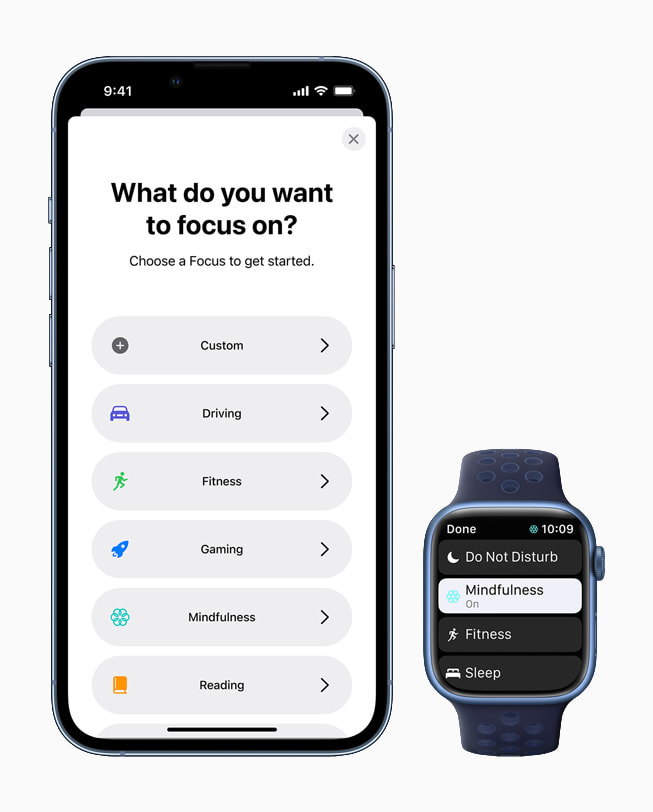
Focus is a new way to help reduce distraction by filtering notifications from people and apps based on what a user is currently doing. Apple Watch automatically aligns with any Focus set on iOS, iPadOS, or macOS. Users can set automations to turn on Focus at relevant times, like the Fitness Focus when starting a workout.
watchOS 8 supports Focus, a powerful set of tools available in iOS 15 to help users reduce distraction and be in the moment.
Additional watchOS 8 Features
The redesigned Photos app offers new ways to view and navigate collections; Memories and Featured Photos now sync to Apple Watch; and photos can be shared through Messages and Mail.
Multiple timers can be given a specific label using Siri (such as “Hey Siri, start a 10-minute pasta timer”).
The Contacts app is now on Apple Watch, providing a simple way for users to browse, add, edit, and share contacts directly from the app.
More Apple Watch apps support the Always-On display, including Maps, Mindfulness, Now Playing, Phone, Podcasts, Stopwatch, Timers, and Voice Memos.
To support Apple Watch users with upper-body limb differences, AssistiveTouch enables one-arm usage of Apple Watch by sensing simple hand gestures to interact without touching the display. Using the built-in motion sensors, users can answer incoming calls, control an on-screen motion pointer, and surface an action menu that can access Notification Center, Control Center, and more.7
A new Find Items app on Apple Watch helps users locate items with an attached AirTag and compatible third-party items using the Find My network, and a new Find Devices app helps users locate lost Apple devices that are signed in with the same Apple ID.
The redesigned Music app enables users to share songs, albums, and playlists through Messages and Mail, and enjoy music and radio all in one place.
The Weather app now supports Severe Weather notifications, displaying government alerts about certain severe weather events. The app also delivers Next Hour precipitation alerts and offers updated complications.
Family Setup now includes the ability to add transit cards from Hong Kong, Japan, and select China mainland and US cities, and Calendar and Mail offer the option to add a Google account.
The Photos app is redesigned in watchOS 8, offering new ways to view and navigate collections.
Multiple timers come to Apple Watch in watchOS 8 and can be given a specific label using Siri.
watchOS 8 brings the Contacts app to Apple Watch, providing a simple way for users to browse, add, and edit contacts, and share contacts directly from the app.
To support Apple Watch users with upper-body limb differences, AssistiveTouch enables one-arm usage of Apple Watch by sensing simple hand gestures to interact without touching the display.
A new Find Items app helps users locate items with an attached AirTag and compatible third-party items using the Find My network.
The redesigned Music app enables users to share songs, albums, and playlists through Messages and Mail in watchOS 8.
The redesigned Weather app supports Severe Weather notifications, delivers Next Hour precipitation alerts, and offers updated complications in watchOS 8.
Availability
watchOS 8 is available as a free software update starting today for Apple Watch Series 3 models and later. For more information, visit apple.com/watchos/watchos-8.
Apple Fitness+ updates will be available beginning Monday, September 27.
Some features may not be available in all regions or all languages, or with all makes and models.
Apple Watch blood pressure measurement has long been rumored, but a Nikkei report yesterday suggested that the feature would be included in the upcoming Series 7 model.
Bloomberg‘s Mark Gurman says not, in a two-word reply to someone querying that on Twitter …
Nikkei‘s report focused on claims of production problems with the latest Watch.
Production of the upcoming Apple Watch has been delayed in large part due to the complicated designs of the new smartwatch, Nikkei Asia has learned.
Manufacturers of Apple Watch 7, as the device is expected to be called, began small-scale production last week but encountered critical challenges in reaching satisfactory production performance, multiple people familiar with the situation said.
Three sources said the current disappointing production quality could be attributed to the complexity of design, which is significantly different from that of previous generations of the watch, and the assemblers found issues when putting together electronics modules, components and displays.
But it said that one example of those “significant” differences was blood pressure measurement.
The next Apple Watch will come with new features such as blood pressure measurement, they said, which means production involves fitting a greater number of components into a similar size body.
That was a surprising claim, given no supporting reports so close to launch, and Gurman has now dismissed this.
There have also been reports of blood sugar monitoring, but these rumors roll around every year, and Bloomberg said that this is still years away yet.
What we are expecting is a new slab-sided design to match the design of current iPhones and iPads; a larger display thanks to a combination of larger casing and smaller bezels; and a faster processor. There have also been suggestions of new color options.
Also said to be included are new watch faces.
This year’s watches will come in 41-millimeter and 45-millimeter sizes, up from 40 and 44 millimeters. I’m told that Apple will bundle multiple new watch faces to take advantage of the bigger screen, including an updated Infograph Modular face. This will be the second time in the Apple Watch’s history that the company has increased the display size, following the Apple Watch Series 4 in 2017.
The folks at Funn Media are out with a new iPhone and Apple Watch app today that gives you a new way to view and analyze health and fitness data. Dubbed FitnessView, the app takes data from from your Apple Watch and the Apple Health app and makes it easy to drill down into more detail about that data, including trends, goals, heart rate graphs, and much more.
FitnessView app integrates with the Apple Watch Activity and Apple Health apps – it allows you to see your health & fitness data in a different way, by allowing you to drill down to more details in an easy and insightful way.
FitnessView takes data from the Apple Health app and Apple Watch, including active calories, stand hours, calories, workout time, heart rate, and more. When you first launched Fitness View, you’ll see a breakdown of all of your data, including details on that day’s goals, your recent workouts, and your Activity Rings for the day.
You can configure goals for every stat in the Settings tab of the app, including steps, calories, caffeine, and more. Here is where you can also configure settings for workouts, the home screen layout, dark and light mode, and activity settings.
In the Stats tab of the app, you can view details for each of your tracked metrics over the last day, week, month, and year. You can tap on each metric to view averages, trends, and insights over time. One of my favorite features of FitnessView is the Workouts tab, which shows all of your recent Apple Health workouts including detailed heart rate data through warmup, fat burn, cardio, and peak stages of the workout.
FitnessView also includes home screen widgets for your iPhone as well as Apple Watch complications for your watch face. This makes it easy to visualize your Activity and Health data from your iPhone home screen and Apple Watch face. You can also configure custom widgets for each metric and goal.
You can download FitnessView on the App Store today for free. In-app subscriptions are available for monthly, yearly, and lifetime access: $1.49 per month, $9.99 per year, and $14.99 for lifetime access.
You don’t have to spend $49 on a band to get the face.
Apple introduced new International Collection bands for Apple Watch on Tuesday, priced at $49 each. There are 22 available and each comes with an accompanying Stripes face you can download from Apple’s website.
But you don’t need to buy a band to get your hands on the new faces. We’ll show you how to download them right now to show support for your country at this year’s Summer Olympics.
Here’s the full list of countries supported: Australia, Belgium, Brazil, Canada, China, Denmark, France, Germany, Great Britain, Greece, Italy, Jamaica, Japan, Mexico, the Netherlands, New Zealand, Russia, South Africa, South Korea, Spain, Sweden and the United States
The faces are based on the existing Stripes design already available on your Apple Watch, so you could replicate them yourself if you wanted to. But there’s really no need; you can download them all, premade, from Apple’s website for free.
Get new international Stripes faces for Apple Watch
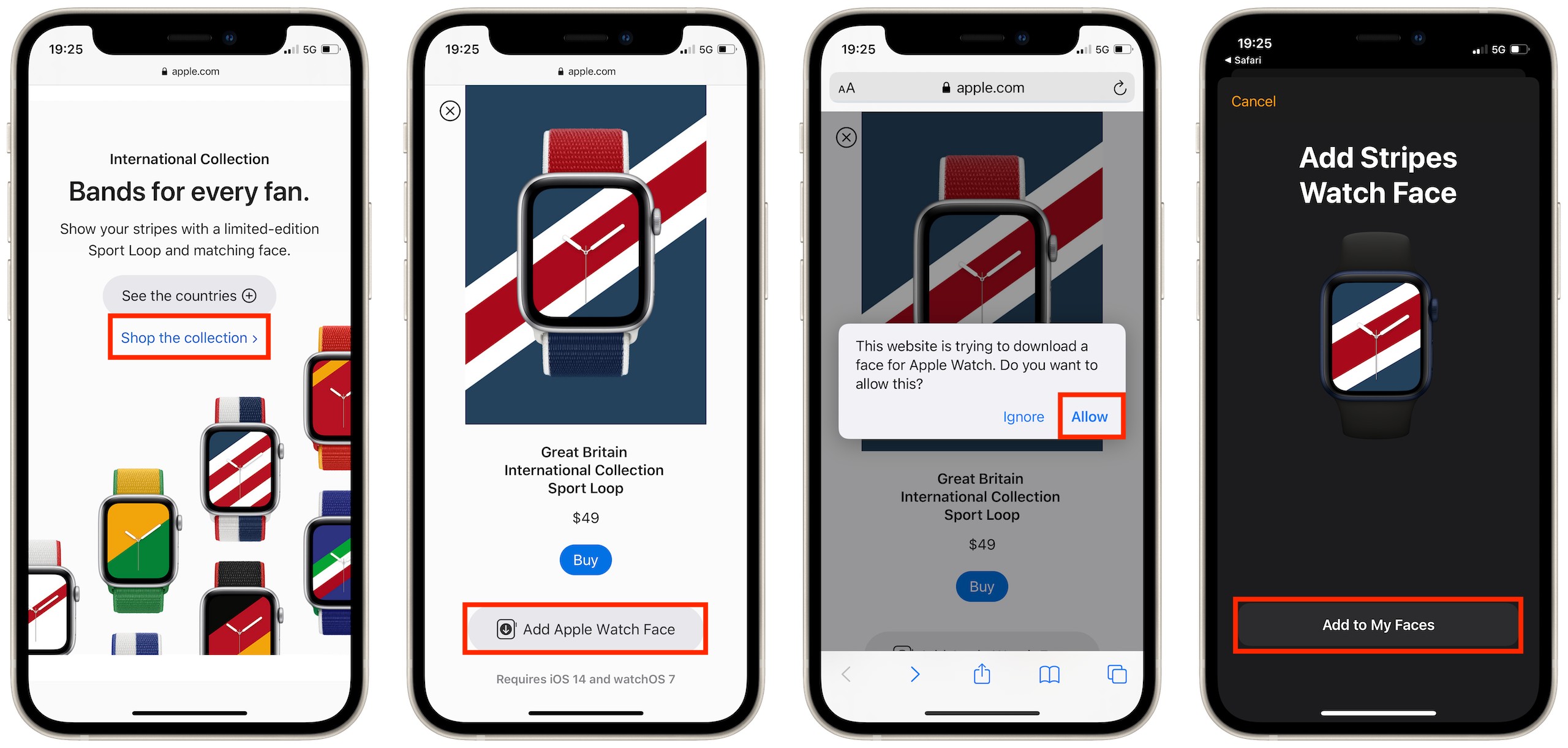
Scroll down until you see the International Collection, then tap See the countries.
Select the country you want, then scroll down and tap the Add Apple Watch Face button.
When prompted, tap the Allow button to confirm the download.
You’ll be redirected to the Watch app. Tap the Add to My Faces button.
Your new face will now appear under My Faces. You can select it to customize it, and tap the Set as current Watch Face to activate it right away.
After adding your new face, you can set it inside the Watch app.
Get your matching International Collection band
You can order a matching International Collection band to go with your new face exclusively from Apple. They’re available in 40mm and 44mm size options, priced at $49 each, and based on the brilliant Sport Loop.
The Apple Watch Series 6 is part of Apple’s latest generation of smartwatches, featuring an always-on display, the S6 chip, an always-on altimeter, and blood oxygen monitoring, at a price of $399.
Announced in September 2020, the Apple Watch Series 6 is one of the newest Apple Watches in Apple’s lineup, but it is approaching the middle of its product cycle. Apple tends to release new Apple Watch models every September, and there is no reason to suggest that a new Apple Watch Series 7 will not be launching as normal this fall.
There are early signs of an Apple Watch Series 7 arriving later this year with a number of upgrades and improvements, but the launch of this device is half a year away. This means that it is still a good time to buy the Apple Watch Series 6 for the vast majority of people, but some customers may now prefer to wait until a new model arrives in the fall.
While the Apple Watch Series 6 is Apple’s most full-featured, high-end smartwatch for those who want features like blood oxygen monitoring, ECG, an always-on display, and more premium finishes, users who are looking for a more affordable option should consider the Apple Watch SE. Starting at $279, the Apple Watch SE offers many key Apple Watch features, such as an optical heart rate sensor and fall detection, but at a lower price that balances functionality and affordability.
On the other hand, if price is your main concern and you don’t need advanced health functions, the Apple Watch Series 3 may be more appropriate than the $399 Apple Watch Series 6 as it offers many of the Apple Watch’s core features for just $199. There are some tradeoffs with the Apple Watch Series 3 because it is a much older model, such as a smaller display, an older chipset, and the lack of a compass, fall detection, ECG, and blood oxygen monitoring.
The Apple Watch Series 6, released in September 2020, is the current iteration of the Apple Watch that originally launched in 2015. The Apple Watch Series 6 is identical in design to the Series 5, but there are some notable health-related features along with a faster chip for better performance.
There’s a new sensor in the Apple Watch Series 6 that enables Blood Oxygen monitoring that measures oxygen saturation in the blood for better understanding of fitness and wellness. When oxygen saturation (also known as SpO2) levels drop, it can be a sign of a serious illness.
Blood oxygen monitoring is enabled through four clusters of red, green, and infrared LEDs along with four photodiodes on the back of the Apple Watch, all of which measure light reflected back from blood. A custom algorithm included in the new Blood Oxygen app measures blood oxygen between 70 and 100 percent. On-demand testing is available through the app, and the watch also occasionally takes background measurements when a person is inactive, including during sleep. Data is available in the Health app.
The Apple Watch Series 6 continues to be available in 40 and 44mm size options, and it has the same thinner, smaller case introduced in the Series 4 along with the low power (LTPO) OLED Always-On display introduced in the Series 5. In the Series 6, the Always-On display is 2.5 times brighter than Apple Watch Series 5 when outdoors, so it’s easier to see in bright sunlight.
Apple Watch owners can access Notification Center and Control Center, tap on complications, and swipe to change faces when their wrists are down with the Always-On display in the Series 6. Apple has also added an always-on altimeter that’s more power-efficient, which can be seen on the watch face at all times and provides information on elevation changes as small as one foot.
Apple Watch Series 6 is water resistant and supports Apple Pay purchases like prior models, plus it has all the same health-related features in addition to blood oxygen monitoring. Apple Watch Series 6 is able to do things like monitor steps taken, calories burned, stairs climbed, and heart rate, plus it can take ECG readings, track sleep, look out for falls with fall detection, make emergency calls with SOS, and watch out for overly loud sounds.
Like the Apple Watch Series 5 models, Series 6 models feature a black ceramic and sapphire crystal backing and a Digital Crown with haptic feedback. The Digital Crown has built-in sensors for ECG readings.
There’s an updated S6 System-in-Package chip in the Apple Watch Series 6, which is based on the A13 Bionic in the iPhone 11. It is up to 20 percent faster, allowing apps to launch 20 percent faster, and it offers the same all-day 18-hour battery life. Apple Watch Series 6 offers faster charging and can be charged to full in 1.5 hours. Battery life has been improved for tracking workouts like indoor and outdoor runs, too.
New to the Apple Watch Series 6 is the same U1 chip and Ultra Wideband antennas introduced in the iPhone 11 models, which Apple says enables short-range wireless location to support new experiences like digital Car Keys. Apple offers the Series 6 with both GPS and GPS + LTE functionality. LTE Apple Watch models can operate over LTE without an iPhone nearby.
This year’s Apple Watch models come in aluminum, stainless steel, and titanium, with Apple introducing new blue and (PRODUCT)RED color options for the aluminum models. Stainless steel Apple Watch models come in silver and a dark gray graphite shade, while titanium models come in silver and space black.
Apple is continuing to sell Apple Watch Nike and Apple Watch Hermès models, with both featuring new band options. Nike models are available only in aluminum, while Hermès models come in stainless steel.
Alongside the Apple Watch Series 6, Apple introduced the lower-cost Apple Watch SE, which is priced starting at $279. The Apple Watch SE is identical in design to the Apple Watch Series 6, but it is lacking several key features to keep costs down. It has an S5 chip that was in the Series 5, but it lacks an always-on display, comes only in aluminum, has no blood oxygen sensor, doesn’t do ECG readings, has no U1 chip, and doesn’t support 5GHz WiFi.
Other than that, it supports all basic Apple Watch functionality such as heart rate monitoring, fall detection, activity monitoring, emergency SOS, Apple Pay support, sleep tracking, water resistance, and more. It comes in cellular and GPS options much like the Series 6.
There are three new Apple Watch band options this year, two of which eliminate closures and straps. The Solo Loop and Braided Solo Loop are available in soft silicone and braided yarn, respectively. Each one slips over the hand and onto the wrist, with Apple offering nine sizing options. There’s also a new Leather Link band that’s a redesigned version of the Leather Loop.
With the new Apple Watch models and watchOS 7, Apple introduced a Family Setup feature that lets kids use Apple Watches without owning an iPhone. Parents can pair multiple Apple Watches to their iPhones for management purposes, so children can use the connectivity, safety, and fitness features of the Apple Watch. There’s a special Activity rings experience for children, along with a new parent-controlled Do Not Disturb mode called Schooltime to help kids stay focused and attentive while learning.
Apple Watch Series 6 and Apple Watch SE models are available for purchase from the online Apple Store. Pricing on the Series 6 starts at $399, while pricing on the Apple Watch SE starts at $279. Apple is also continuing to sell the Apple Watch Series 3 at pricing starting at $199.
How to Buy
Apple Watch Series 6 can be purchased from the online Apple Store and Apple retail stores as of September 18. Pricing on the Apple Watch Series 6 starts at $399 for non-LTE models and $499 for LTE models.
Pricing varies based on case material, band, and collection, with entry-level pricing for each case material and size available below.
40mm Aluminum Non-LTE – $399
40mm Aluminum LTE – $499
44mm Aluminum Non-LTE – $429
44mm Aluminum LTE – $529
40mm Stainless Steel (LTE only) – $699
44mm Stainless Steel (LTE only) – $749
40mm Titanium (LTE only) – $799
44mm Titanium (LTE only) – $849
40mm Nike Non-LTE – $399
40mm Nike LTE – $499
44mm Nike Non-LTE – $429
44mm Nike LTE – $529
40mm Hermès (LTE only) – $1249
44mm Hermès (LTE only) – $1299
Apple Watch Series 6 models are available in many countries around the world, with pricing that varies based on location.
At a Glance
The Apple Watch Series 6 features a faster S6 chip and blood oxygen level tracking.