Apple has officially revealed this year’s September special event, inviting members of the press and the public to tune in remotely to watch on September 15 at 10 am PT. At the event, Apple is expected to unveil all-new hardware including a new iPad Air and new Apple Watch models.
Update: While initial reports suggested that the September event would focus on the iPhone 12 alongside new Apple Watch and iPad hardware, Bloomberg reports that the September event will only include iPad and Apple Watch details. The iPhone 12 will reportedly be saved for October.
Apple September Event details
Much like WWDC 2020, Apple’s September event will be completely virtual due to the COVID-19 pandemic. If the WWDC keynote was any indication, the iPhone 12 will likely be highly-produced and shot at Apple Park and in Steve Jobs Theater.
While the public invite for the September event does not include a tagline, the version sent to the press simply says “Time Flies.”
Apple’s WWDC keynote featured Tim Cook making opening comments from Steve Jobs Theater, then handing the reins to other Apple executives for details on iOS 14, watchOS 7, and more. We expect a similar format for the September event, but it’s always possible that Apple has some sort of surprises in store.
Apple’s September event will be live-streamed across Apple’s website, in the Apple TV app, and likely on YouTube. We’ll have more details on this process, including details on how to tune in for yourself, when event day rolls around.
iPad Air 4
Apple is reportedly developing a new iPad Air model that features an edge-to-edge display. This would serve as a middle-ground option between the $329 iPad and the iPad Pro. The new iPad Air could reportedly feature Touch ID authentication built into the power button for the first time.
The new iPad Air could also feature USB-C connectivity instead of Lightning connectivity, again closing the gap between it and the iPad Pro.
Assuming these reports pan out, it would represent a major upgrade for the iPad Air line, which certainly looks a tad dated compared to the iPad Pro. Giving it the more modern slim bezel look would also help to distance it further from the lowest-end iPad.
Apple Watch Series 6
Also at Apple’s September event this year, we expect the announcement of the Apple Watch Series 6. Rumors on the Apple Watch Series 6 are a bit lighter than the iPhone 12, but there are a couple of things that have surfaced so far.
For instance, one of the tentpole features of this year’s Apple Watch update is expected to be blood oxygen level detection. Code found within iOS 14 by 9to5Mac has indicated that Apple Watch will add it this year, further expanding the Apple Watch’s health monitoring capabilities.
Apple is also developing improved electrocardiograms for the Apple Watch Series 6. Apple Watch Series 4 and 5 currently result in inconclusive ECG readings with heart rates between 100 and 120 beats per minute. A future update, either in software or hardware, will remove that limitation with an upgraded version of the ECG app.
As for the Apple Watch Series 6 design, reports indicate that there aren’t any major changes in store for the Apple Watch Series 6’s industrial design and that it will follow the same general form factor as the Series 4 and Series 5.
iPhone 12
Apple is expected to unveil four new iPhone 12 models this year at an event in October: a 5.4-inch iPhone 12, a 6.1-inch iPhone 12 Max, a 6.1-inch iPhone 12 Pro, and a 6.7-inch iPhone 12 Pro Max. The differentiating factor between these iPhone 12 models will be the camera technology.
The 5.4-inch iPhone 12 and 6.1-inch iPhone 12 Max are expected to feature dual-lens camera set-ups on the back, while the iPhone 12 Pro and iPhone 12 Pro Max will feature triple-lens camera arrays on the back with an all-new LiDAR Scanner as well.
Other features of the iPhone 12 lineup include OLED displays across the board as well as 5G connectivity. The iPhone 12 lineup will reportedly support mmWave 5G as well as sub-6GHz 5G. In terms of design, the devices are expected to feature flat edges similar to the iPhone 4, iPhone 5, and the latest iPad Pro.
Wrap-up
In addition to the aforementioned hardware, there are other possibilities as well. For example, Apple is working on Apple Silicon updates for the Mac lineup. Apple is also reportedly planning Apple Studio over-ear headphones, AirTag item trackers, and more. Some of these announcements are possible at the September event, but others could be saved for a future October event.
Finally, Apple’s September event will also likely include details on the firm release dates for iOS 14, iPadOS 14, macOS 11 Big Sur, watchOS 7, and tvOS 14.
Apple may toss a wrench into expectations for their next big event. Where before this week it was expected that Apple would soon reveal the iPhone 12 and iPhone 12 Pro, rumors today suggest that we’ll see an iPad and an Apple Watch instead. Could this be a major upset for iPhone fans looking to upgrade to a new model this Fall, or is this just a sign that Apple’s switching up their game just a little bit?
It’s likely we’ll see some focus on the future of augmented reality at this event. It’ll be interesting how this will work, given that past augmented reality features on Apple devices were largely relegated to devices with 3D sensors on their fronts and/or backs.
It could be that Apple’s simply preparing audiences for the eventual October event in which they’ll reveal the iPhone 12 and iPhone 12 Pro, complete with the hardware needed to take their aspirations with augmented reality to the next level.
The iPhone XR was the first commercial success that came on the second attempt for making a more affordable iPhone. The iPhone 5c failed to impress in 2013, and we thought we’d never see the maker give this idea another try. Well, last year the iPhone XR was more than well received being the best selling iPhone of the trio, so this year we welcome its sequel – the iPhone 11.
The iPhone XR was indeed a cheaper, toned-down version of the XS generation, with an LCD screen, one camera short, and promised some excellent battery endurance. Well, when we say cheaper, we are not saying cheap, as those words mean something different in Apple’s universe.
But truth be told, this year the iPhone 11 is even cheaper than the XR on launch – now priced at $700 instead of $750. The good news is that nothing has been left out and there are a few welcome additions to the low-tier iPhone.
So, the iPhone 11 keeps absolutely the same form factor and screen as the XR’s. It employs the same 6.1″ IPS LCD screen with 326ppi and a notch on top that contains the Face ID tech. The screen specs are unchanged – same contrast, brightness, Haptic Touch, and whatnot.
The iPhone 11 boasts the new Apple A13 Bionic chip – the same SoC that powers the flagship iPhone 11 Pro duo. It also gets a second camera, and it’s the new 12MP ultra wide-angle snapper, also brought from the Pro models. Features like Crop Out of Frame are available as well, and also shooting 4K videos with all cameras at once.
The new 12MP selfie camera has made it to the iPhone 11, too. It’s another 12MP shooter with 23mm wide lens, and it can do regular 4K clips at 60fps, or 4K at 30fps videos with expanded dynamic range. Cinematic stabilization is available on the front cam on all modes.
Apple managed to squeeze a larger battery in the same body as last year – now the iPhone 11 gets a 3,110mAh battery compared to 2,942mAh unit within the XR.
The iPhone 11 supports 18W charging, but it is not bundled with a fast charger in the box as the Pro models.
So, a new camera and new chip, among some new cool software tricks, are what’s new in the iPhone 11 over the XR. Oh, and Apple is offering the 11 in some new colors like Green and Purple (the latter we have here for review).
Apple iPhone 11 specs
Body: Aluminum frame, Gorilla Glass front with oleophobic coating, Gorilla Glass back with glossy finish, IP68 certified for water and dust resistance. Black, Green, Yellow, Purple, White, and Red color options.
Screen: 6.1″ IPS LCD screen of 828 x 1792 px resolution, 326ppi, 625 nits, 120Hz touch sensing, wide color gamut. True Tone adjustment via a six-channel ambient light sensor.
OS: Apple iOS 13
Chipset: Apple A13 Bionic chip (7nm+) – Hexa-core (2×2.66 GHz Lightning + 4×1.8 GHz Thunder) Apple CPU, four-core Apple GPU, 8-core Apple NPU 3-gen
Memory: 4GB of RAM; 64/128/256GB of internal storage
Camera: Dual 12MP camera: 26mm main wide-angle, F/1.8, OIS, Dual Pixel AF; 13mm ultra wide-angle, F/2.4, 120-degree field of view; quad-LED flash with slow sync
Video recording: 2160p@60/30fps, 1080p@30/60/120/240fps video recording with wider dynamic range and spatial sound, OIS + EIS
Selfie: Dual camera – 23mm 12MP F/2.2 front-facing camera with HDR mode + 3D TOF camera; 2160p@60/30fps, 1080p@30/60/120fps video recording with wider dynamic range and spatial sound, EIS, depth detection for Portrait mode
Connectivity: Dual SIM, 4G LTE (1 Gbps); Wi-Fi a/b/g/n/ac/ax; Bluetooth 5.0; Lightning port; GPS with A-GPS, GLONASS, GALILEO, QZSS; NFC; Apple U1 chip ultrawideband
Battery: 3,110 mAh battery, 18W fast charging, Qi wireless charging
Misc: Face ID through dedicated TrueDepth camera, stereo speakers, Taptic Engine
The iPhone 11 also brings better water protection and may or may not have tougher glass on its back and front. We guess only time and drop accidents will confirm the latter.
Anyway, we are ready to unbox this iPhone 11, so let’s get this review started, shall we?
Unboxing the iPhone 11
The iPhone 11 box is white and just a little bit larger than the phone itself. Inside, you will find the iPhone 11 bundled with a regular Lightning cable, a pair of EarPods ending on a Lightning plug, and the ancient 5W charger.
Apple is no longer shipping the iPhones with a 3.5mm adapter.
While the iPhone 11 supports 18W fast charging through USB Power Delivery, it is not bundled with the new 18W Apple charger that comes with the Pro models. Then again, the iPhone 11 is $50 cheaper than the XR, and we guess with those savings you can buy the said 18W charger ($29), the required USB-C-to Lightning 1m cable ($19) and the 3.5mm adapter ($9).
Design
The iPhone 11 looks like any recent iPhone at the front – a large screen with two horns and nothing else. Over that the back Apple adopted the new square for the camera even though it’s a dual-setup on the iPhone 11 instead of a triple as on the Pro models.
Apple used the same screen from the XR on the iPhone 11 and it has no improvements in contrast or brightness. It’s a 6.1″ IPS LCD panel with a big notch for the Face ID, the selfie snapper, and top speaker. It is protected by the “toughest glass on the planet”, which is a custom Gorilla Glass made by Corning. The glass has minor 2.5D finish around the edge, but we can safely call it flat.
Apple has always used these minor curves around it glass panels to make the iPhones look thinner and prettier, but it has never gone to extremes such as curved or waterfall screens.
The iPhone XR was the first to retire the 3D Touch, but with the iPhone 11 generation – it is gone for good. Its functions were handed over to the Taptic Engine and this is how the Haptic Touch was born. It is just a long tap, but thanks to the taptic feedback – it feels a lot like 3D Touch. And this is what the iPhone 11 offers as 3D Touch replacement, just like the iPhone 11 Pro models.
The notch is not going away anytime soon and it is as big as on the other models. It contains the 3D TOF sensor, the earpiece that also doubles as a speaker, the new 12MP selfie cam, and a bunch of other sensor for True Tone, brightness, and proximity.
We are glad Apple finally upgraded the selfie camera and it’s now a 12MP shooter behind wide 23mm f/2.2 lens. It still lacks autofocus, but now it can do 4K at 60 and 30fps videos with always-on cinematic (fancy word for digital) stabilization. And thanks to the wider lens, the Face ID will supposedly work from wider angles.
The front glass has the usual oleophobic coating that makes fingerprints and smudges harder to stick and when they do, it is very easy to clean – you can do it with one swipe of your (clean) hand or short. We wish more makers use the same coating.
The iPhone 11 has noticeably bigger screen bezels than the Pro models and the same as on the iPhone XR. Its display is an LCD one instead of OLED and this type of panels have a few hardware restrictions that result in such bezels. But they are cheaper, ergo the cheaper iPhone price.
iPhone 11 between the iPhone 11 Pro and iPhone 11 Pro Max
The iPhone 11 has an aluminum frame with a brushed finish – the models before iPhone X had such and the XR offers one as well. All premium iPhones use stainless-steel with glossy finish instead.
Well, the aluminum is still better than plastic and we liked the brushed finish as you can’t see any smudges on it. It is also not as heavy as steel.
The iPhone 11 has the usual stuff on its sides – the silent switch and the volume keys are on the left, the Lightning port with the second speaker and the mouthpiece – at the bottom, and the power key and SIM slot – on the right.
The back of the iPhone 11 looks different than the XR, XS and X, as it is more in line with the new 11 Pro series. It is also protected by a custom version of Gorilla Glass, lost the iPhone inscription in favor of a bigger and centered Apple logo.
The purple color looks really nice on the iPhone 11 and is a cool addition to the series. The back is not textured as on the iPhone 11 Pro, but glossy as it was on any other phone to come before series 11. Smudges stick, but are still easy to wipe clean.
What is textured though is the new square glass at the top left corner that houses the two main snappers and the flash. It’s a bit hard to see that this piece is matte until you touch it, but it is still a nice accent.
The hump looked less than ideal on the press images, but in real life the protrusion is much thinner than we expected from those pictures. In fact, we like it better than the giant knobs the iPhone X and XR had on their backs.
Apple iPhone 11 Pro Max, 11 Pro, and 11
The iPhone XR had just one camera, but now the 11 has two – the regular 12MP main one with OIS, and the new 12MP ultrawide shooter. There is no zoom camera on the iPhone 11.
The iPhone 11 measures 150.9 x 75.7 x 8.3 mm – identical to the XR and it weighs 194g – also same as the XR.
One detail that eyes can’t see is the improved water resistance. The iPhone 11 is IP68-rated for dust and water resistance (up from XR’s IP67) and it can survive in 2m deep (not salty) water for 30 mins.
Handling the iPhone 11 is as iPhone experience as it can get. It is somewhat slippery but thanks to the brushed frame – the grip is not a disaster. And since its size is in between the compact iPhone 11 Pro and the large iPhone 11 Pro Max, it is good in most cases for operating with one hand, though not all of them. We like the glass design and the aluminum frame – it’s a very traditional formula, and we hope this custom Gorilla Glass is as tough as Apple claims it to be. And note that this means it is tough to break, not tough to scratch – a very important detail we’d say.
The iPhone 11 is cheaper, but not cheap. It costs as much as many of the current Android flagships. But in the Appleverse, it is the one you get if you are on the budget. And the maker made sure you will want to get it.
The first step was to ditch any signs, which may diminish its value. Like the letter R meaning it’s no longer a special edition – it’s just the regular iPhone 11 now, and it was the show opener at the launch event. That’s a statement the iPhone 11 is now a fully-fledged member of the flagship iPhone 11 series.
And a flagship it is. The iPhone 11 is the bearer of Apple’s latest and most powerful chip – the A13 Bionic. It also has a dual camera that shows signs of the somewhat forgotten software magic with that expanded viewfinder, crop out of frame options, and multiple camera video recording. Not only that, but the new chip also makes wonders when it comes to dynamic range and digital stabilization in videos. And the new Night Mode is great in both speed and quality.
Apple has also improved a few bits and pieces since the iPhone XR. The sequel has better ingress protection, tougher glass panels, a larger battery, improved audio, and a new selfie camera.
The screen has stayed the same, which is probably iPhone 11‘s only potential deal-breaker. The size is still 6.1″ as on the XR – very thoughtfully positioned between the smaller and bigger Pro, but it has the same 326ppi like the iPhone 8 and the older smaller iPhones. It’s not bad, the text is sharp, and videos look great, but it’s hardly something you’d call 2019.
And yet the iPhone XR sold a lot with that same screen, so we see no reason why the iPhone 11 can’t repeat the same success. It’s got insanely powerful hardware under the hood, it takes some amazing pictures and videos, it excels in the audio and battery departments, and it’s just one zoom camera short of matching the Pro models. Well, that and a fast charger.
The verdict
The iPhone 11 is a very thoughtful upgrade over the XR. It has everything new from Apple, but it costs less, and the tradeoffs seem to be just right.
We aren’t saying you should jump from XR on this one without thinking twice, but once again Apple has made just enough upgrades to make you want to do so. And we won’t judge you for that.
Pros
Tougher and water resistant design, glossy back.
The screen has excellent brightness and contrast.
Apple A13 Bionic is the fastest smartphone chip on the planet.
Excellent battery life, fast charging support.
Stereo speakers with great quality.
iOS provides smooth user experience.
The main camera produces very good photos, Night Mode works as advertised.
Amazing video quality and stabilization across the board.
Excellent selfie photo and video quality.
The calibration between the two snappers is excellent and allows for Crop Outside Frame, simultaneous video capturing, and smooth switching during recording.
Cons
The notch is still enormous, and so are the bezels.
A higher resolution screen would have made it more competitive.
Comes bundled with a meager 5W charger in the box.
No 3.5mm jack, and limited NFC implementation.
The file management and file transfer in iOS is unnecessarily complicated.
Update: As of right now, iOS 13.7 is only available to developers. We will update this post if that changes today. Initially, iOS 13.7 appeared to be rolling out to all users, but we’ve since confirmed that it is a beta release for now.
Apple is releasing iOS 13.7 to developers today with a key focus on expanding the COVID-19 Exposure Notification API. According to Apple, this update will allow users opt-in to COVID-19 Exposure Notifications without the need to download an app from your local public health authority.
Here’s what Apple says about iOS 13.7 for iPhone users:
iOS 13.7 lets you opt-in to the COVID-19 Exposure Notifications system without the need to download an app. System availability depends on support from your local public health authority. For more information see covid19.apple.com/contacttracing. This release also includes other bug fixes for your iPhone.
When Apple and Google announced their partnership on the COVID-19 Exposure Notification API, the companies detailed two phases of the technology. The first phase, which is what we ultimately saw released with iOS 13.5, required that users first download an app from their public health authority to opt-in to Exposure Notifications.
At the time, Google and Apple also teased “phase two” of the technology. This is what is being released as part of iOS 13.7, and it allows users to opt-in to COVID-19 Exposure Notifications without installing an app. In order to verify a positive case, however, you still will need an app from a public health authority to confirm a positive COVID-19 case.
Ideally, this change could expand the availability of the COVID-19 Exposure Notification API. Currently, just a few states in the US are taking advantage of the platform, as are several other countries around the world. Unfortunately, Apple says that the availability of COVID-19 Exposure Notifications will still depend on support from local public health authorities, even as the ability to opt-in is now built directly into iOS 13.7.
Apple has also released iPadOS 13.7 today, which includes bug fixes and performance improvements for iPad users.
Have you spotted this comet that’s been making headlines this month? If you’re in the northern hemisphere and want to catch the photogenic comet in the night sky before it disappears, read on as we explain the best way to hunt down NEOWISE with your iPhone.
NASA describes the comet as a “fuzzy star with a bit of a tail” so you have an idea of what to chase.
For those hoping to catch a glimpse of Comet NEOWISE before it’s gone, there are several observing opportunities over the coming days when it will become increasingly visible shortly after sunset in the northwest sky. If you’re looking at the sky without the help of observation tools, Comet NEOWISE will likely look like a fuzzy star with a bit of a tail, so using binoculars or a small telescope is recommended to get the best views of this object.
Have an iPhone 11 or iPhone 11 Pro? You may also try your luck at capturing the comet using Night Mode on iPhone 11. Just hold your phone firmly or use a tripod for best results, and don’t expect professional results like those produced by multiple images stacked from astronomical photographers. An iPhone shot still makes for a neat souvenir, of course!
What’s NEOWISE?
Comets are icy bodies from deep in the Solar System that create a trail called a coma when they near the Sun. This is caused when the comet warms and gasses are released in what’s called an outgassing phase.
Comet C/2020 F3 was discovered on March 27 through infrared images from the Near-Earth Object Wide-field Infrared Survey Explorer telescope, thus its common name NEOWISE.
The NEOWISE project was founded by NASA’s Planetary Science Division to measure and catalog asteroids and comets. Over 980,000 infrared measurements of 37,009 solar system objects have been made so far — and now the C/2020 F3 comet is one of them.
Observers in the Northern Hemisphere have been able to see the NEOWISE comet with the naked eye this month, and you still have a chance to see it if you can find a clear night sky.
With the help of neowise.whatsupin.space, an online resource developed by Tony Rice, you can enter your city or ZIP code to find the right range of hours when the the NEOWISE comet will be visible in the sky. The tool shows upcoming days and the estimated local times when the C/2020 F3 comet can best be seen.
Comet NEOWISE is seen, upper left, before sunrise over Washington, Sunday, July 12, 2020. Source: NASA
iPhone apps
There are also fantastic iPhone apps that can guide you to find the comet using location and augmented reality to show you where to look. These apps have topped the free and paid App Store charts because of NEOWISE.
Other high-ranking apps climbing the charts because of the the C/2020 F3 comet include Stellarium PLUS (#13) for viewing a realistic night sky and NightCap Camera (#14) for night photography on the iPhone.
Weather apps including Dark Sky (recently acquired by Apple) are also useful for determining weather conditions before heading out to a viewing site with a clear view of the sky.
Source: NASA
Viewing tips
NASA has also shared recommendations for those who want to see the Comet NEOWISE before disappears for 6,800 years. This includes finding a location away from lights and looking to the northwest sky:
Find a spot away from city lights with an unobstructed view of the sky
Just after sunset, look below the Big Dipper in the northwest sky
If you have them, bring binoculars or a small telescope to get the best views of this dazzling display
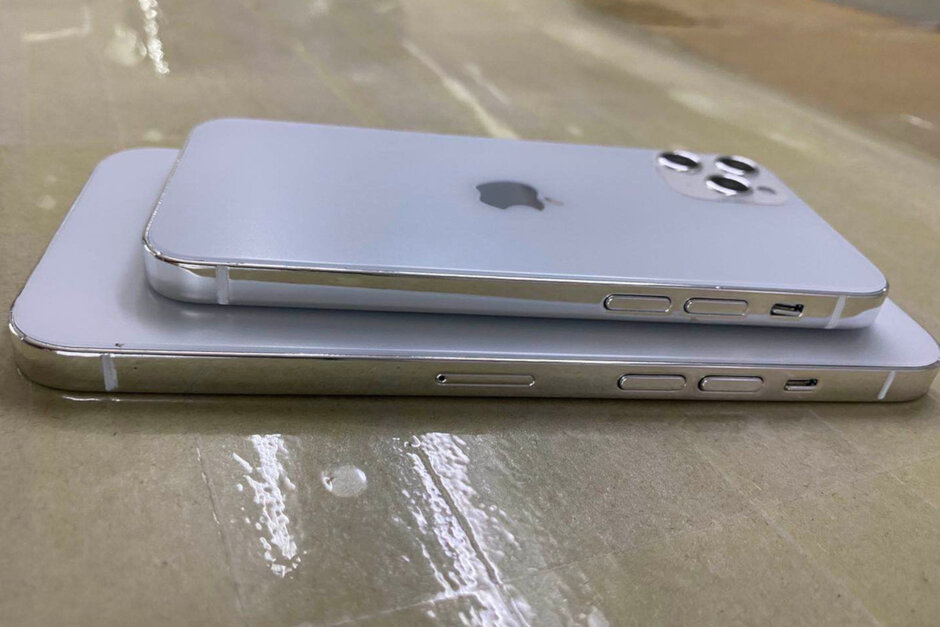
When you think of Apple iPhone dummies, you think of Sonny Dickson. The Australian burst onto the scene as a teen back in 2013 sharing images of iPhone 5s and iPhone 5c mock-up units and has passed along reliable information since. Today, Dickson tweeted the first dummy models of the three iPhone 12 screen sizes (5.4-inches, 6.1-inches, and 6.7-inches). Of course, we still expect Apple to launch four 5G phones in September including the iPhone 12, iPhone 12 Plus, iPhone 12 Pro, and iPhone 12 Pro Max. We get four phones out of three screen sizes because the iPhone 12 Plus and iPhone 12 Pro will both have 6.1-inch displays. The difference between the two will probably be the camera setups and perhaps a larger battery, more memory, and a better battery life on the iPhone 12 Pro.
Dickson’s iPhone 12 dummies “confirm” the throwback design for the iPhone 12 series
The dummies show off the flat sides that the new iPhones will reportedly sport giving the 2020 models a throwback look that resembles the iPhone 4. With the edge-to-edge screen and the notch, the iPhone 12 line will have a higher screen-to-body ratio than the iPhone 4 giving the upcoming handsets a sleeker and more modern look. We should point out that Dickson himself isn’t 100% sure about the rear cameras and the size and look of the notch, but is confident about the chassis of the dummy models
Apple iPhone 12 series dummy models tweeted by Sonny Dickson
WWDC 2020 is about to kick off in less than 24 hours and while Apple is expected to make big waves this week, the iPhones that some might be waiting for are still months away. Of course, if Apple is to meet its self-imposed deadlines, the design of its first batch of 5G iPhones should now be set in stone. Or in this case, metal and plastic models that will give accessory makers as well as the public a preview of what to expect come September’s event.
We’ve already seen the molds that would be used to print out dummy models and now we’re seeing those dummies courtesy of Sonny Dickson. The leaker warns that the notches (not seen here) and cameras might not be their final design which is probably not relevant for these dummies anyway. The molds, after all, are used to inform case makers about the external design of the phone.
To that extent, the chassis that we’re seeing now may be close to final, including the size and shape of the camera bumps which are thankfully still not obscenely thick. The dummies also give the three sizes of the four phones (two 6.1-inch models in the middle) to get a better idea of how they will compare with each other, at least by their appearance.
The locations of the buttons and holes at the very flat edges should also be final, given those are critical parts of a case’s design. The show the volume rocker buttons on the same left (facing the screen) edge as the ringer switch and SIM card tray on the larger iPhone 12 while the opposite edge gets the lone power button. Curiously, there is also another indentation on that side on the 6.7-inch iPhone, perhaps for the mmWave 5G antenna that’s unique to it.
That leaves just the question of the cameras, which some point out are depicted wrong in dummies. Only the largest of the four iPhones is expected to have three cameras, though it isn’t yet certain whether it will indeed be a LIDAR sensor similar to this year’s iPad Pro.
All four phones should be powered by the 5nm A14 Bionic chipset with 15 billion transistors in each chip. The A13 Bionic, the component currently used by Apple on the iPhone 11 series, is produced by TSMC using its 7nm process and contains 8.5 billion transistors. The more transistors inside a chip, the more powerful and energy-efficient they are. The two Pro models should feature the ProMotion display with a 120Hz refresh rate. This means that the screen will update 120 times in a second delivering smoother scrolling and enhanced video game animation.
The Pro models are also believed to come with 50% more memory (6GB of LPDDR5 RAM) than the standard handsets and for the first time, the basic configuration of the iPhone will include 128GB of storage. Rumors pertaining to the rear cameras have been unsettled with some tipsters calling for the inclusion of the time-of-flight based LiDAR depth sensor on all four phones. Others point to a recently leaked CAD image to prove that only the iPhone 12 Pro Max will offer the additional sensor. Introduced on the 2020 iPad Pro tablets, the LiDAR sensor computes the time it takes for an infrared beam to bounce off the subject and return to the sensor. Armed with this data, the sensor can offer users enhanced AR capabilities and improved bokeh blurs on portrait shots.
The new iPhones will supposedly feature the Qualcomm Snapdragon X60 5G modem; the chip supports both sub-6GHz and mmWave 5G signals. However, some analysts believe that only the Pro models will work with the faster 5G mmWave signals. This means that T-Mobile subscribers who want a 5G iPhone this year might be limited to buying the lower-priced standard models. That’s because only a small part of T-Mobile’s 5G network is using mmWave spectrum at this time. And only a small part of the country can use Verizon’s 5G network right now. While there will always be consumers who have to own the latest and greatest iPhone models, and faster 5G speeds are impressive, not too many 5G iPhone users will get the opportunity to download a video in the blink of an eye this year.
The combination of 5G and the ProMotion 120Hz refresh rate is sure to be a battery killer. Apple will reportedly hike the battery capacities on the 2020 iPhones with the iPhone 12 Pro Max rumored to sport a 4400mAh battery. That would be a 10.8% hike over the battery in the iPhone 11 Pro Max; the latter has already delighted users with its remarkable longevity.
Whether you want to take advantage of the 0% interest offers for iPhone, iPad, Mac, and more or have been wanting to get Apple’s credit card for while for another reason, follow along for how to apply for Apple Card on iPhone and iPad.
Apple Card offers a variety of compelling features like its Daily Cash program, strong focus on security and privacy, no fees, a clean, optional Titanium physical card, and a great software experience to track spending and more on iPhone.
While Apple has offered free iPhone financing to Apple Card users for some time, a new addition is the ability to get 0% interest financing for iPad, Mac, AirPods, and more. The interest-free period ranges from 6-12 months depending on the product you’re buying. There’s also a $50 sign up bonus promotion through 7/31/2020.
Here are some of the requirements for Apple Card eligibility:
Be 18 years or older, depending on where you live
Be a U.S. citizen or a lawful U.S. resident with a valid, physical U.S. address that is not a P.O. Box. You can also use a military address
Have a compatible iPhone with the latest iOS version (iPhone 6 or later)
Using two-factor authentication with your Apple ID and be signed in to iCloud with your Apple ID
Apple works with Goldman Sachs to provide the financial end of Apple Card.
How to apply for Apple Card on iPhone and iPad
On iPhone open the Wallet app (on iPad head to Settings > Wallet & Apple Pay > Add Card)
You might see an offer at the top to apply for Apple Card (if not tap the + icon in the top right corner)
Choose Apply for Apple Card
Read the terms and conditions, tap Continue
Confirm your Apple ID, name, date of birth, and phone number, tap Next
Enter your address (no P.O. boxes)
Enter the last four digits of your social security number
Enter your total annual income (required by Goldman Sachs)
Agree to the terms and conditions
It will just take a few moments and you’ll see if you’re immediately approved or not
In some cases, Apple/Goldman Sachs may ask for you to share a photo of your driver’s license or State ID.
Here’s how the process looks:
Once your application is submitted, you should see a screen that lets you know if you’re approved or not. Check out our previous hands-on coverage of using Apple Card, tracking spending, and more with iPhone, iPad, and Apple Watch.
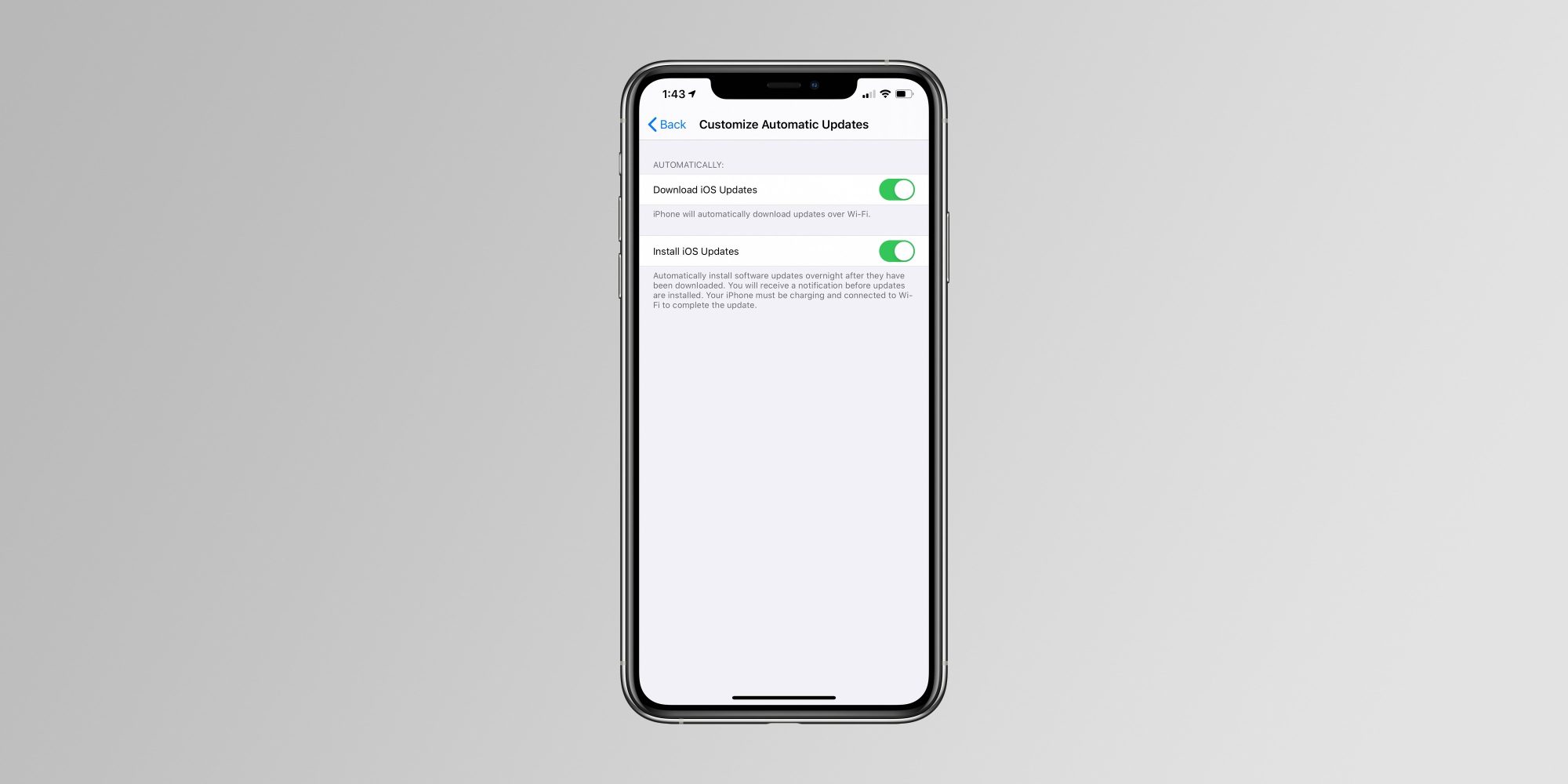
Apple is rolling out the second developer betas of iOS 13.6 and iPadOS 13.6 today. Included in the updates are additional controls to manage software updates going forward, including having updates automatically download and install.
The new Automatic Updates setting allows your iPhone, iPad, or iPod touch to automatically download software updates when you’re connected to Wi-Fi. “iPhone will automatically download updates over Wi-Fi,” is how Apple describes the new toggle.
iOS and iPadOS have long allowed you to automatically install software updates overnight, and today’s new toggle simply builds on that feature. There’s no need to manually download an update, but iOS will still send you a push notification before an update is installed overnight:
Automatically install software updates overnight after they have been downloaded. You will receive a notification before updates are installed. Your iPhone must be charging and connected to Wi-Fi to complete the update.
We’re still digging through iOS 13.6 beta 2 to see if there are any other notable changes.
Apple is also expected to introduce iOS 14 in less than two weeks at WWDC 2020. Whether or not iOS 13.6 is released to the public before iOS 14 beta testing begins remains to be seen.
Also new in iOS 13.6:
Health app adds new “Symptoms” section for tracking symptoms of different illnesses
New data types are available in HealthKit to track symptoms including headaches, chills, sore throat, and more
May 20: iOS 13.5 was released with the new Apple and Google Exposure Notification API
June 1: iOS 13.5.1 released to everyone with a security patch for the unc0ver jailbreak vulnerability.
June 1: iOS 13.5.5 beta 1 released to developers and public beta users with “bug fixes and improvements”
June 9: iOS 13.5.5 renamed to iOS 13.6, beta 2 released to developers
Apple has today released iOS & iPadOS 13.6 Beta 2 to developers along with Xcode 11.6 beta (11N700h). The build number for this update is 17G5045c. There are two new interesting features added to this beta which are:
1. New Toggle for Automatic Updates: With this version of iOS & iPadOS, Apple has added a new toggle which will allow users to enable or disable the option to download updates automatically on your iPhone or iPad when they are connected to WiFi. The option is called “Download iOS updates” and under it, Apple mentions, “iPhone will automatically download updates over Wi-Fi”. To enable or disable this option, go to Settings>General>Software update>Customize Automatic Updates.
2. A new Symptoms Section in the Health App: Apple has added a new Symptoms Section to the the Browse Tab on the Health App. This section will enable users to add their symptoms like pain, coughing, headache, dizziness, etc. This will help users to be aware of their symptoms over time, and will help to discover illnesses developed by the users over time. Apple has described each symptom they have listed under teh new Symptoms category, and has options to add important details like Present/Not Present, Mild, Moderate and Severe.
These are the two interesting changes are present on iOS 13.6 Beta 2. This update is expected to be released after 2-3 betas.
In total, Apple has released four new colors for the Apple Watch Sport Band: linen blue, seafoam, vitamin C, and coastal gray. All four of the new colors are available to order from Apple’s Online Store today in 40mm and 44mm sizes for $49:
It’s common for Apple to introduce new Apple Watch band colors near the start of a new season. As of right now, the Sport Band is the only option to be updated for summer 2020. There have been rumors of a new Leather Loop for Apple Watch, but that was not included with today’s updates.
But in addition to the new Apple Watch accessories, Apple has also released new silicone cases for the iPhone 11, iPhone 11 Pro, and iPhone 11 Pro Max. The new cases are available in three new colors: seafoam, vitamin C, and linen blue.
You can buy the new iPhone 11 silicone cases for $39 from Apple’s Online Store at the links below:
We also expect the new iPhone cases to be available on Apple’s official Amazon storefront soon, alongside the new Apple Watch bands. They will likely also be available in physical Apple Stores that are open sometime this week.
What do you think of Apple’s new iPhone 11 cases and Apple Watch Sport Bands? Are you planning to order anything new? Let us know down in the comments!
Starting today, we’re rolling out a change that enables native support for the W3C WebAuthn implementation for Google Accounts on Apple devices running iOS 13.3 and above. This capability, available for both personal and work Google Accounts, simplifies your security key experience on compatible iOS devices and allows you to use more types of security keys for your Google Account and the Advanced Protection Program.
As long as your iPhone is running iOS 13.3 or later, you’ll find that your security key options are now a lot broader. You’ll be able to use USB-A and Bluetooth Titan Security Keys with your iPhone because those keys have built-in NFC support, meaning all you need to do is tap one of them to the back of your phone for authentication.
You also have the option of using a Lightning security key in place of the Titan – Google calls out the YubiKey 5Ci
Making the Advanced Protection Program and Titan Security Keys easier to use on Apple iOS devices, rolling out a change that enables native support for the W3C WebAuthn implementation for Google Accounts on Apple devices running iOS 13.3 and above. This capability, available for both personal and work Google Accounts, simplifies your security key experience on compatible iOS devices and allows you to use more types of security keys for your Google Account and the Advanced Protection Program.
More security key choices for users
Both the USB-A and Bluetooth Titan Security Keys have NFC functionality built-in. This allows you to tap your key to the back of your iPhone when prompted at sign-in.
You can plug a USB-C security key in directly to an iOS device that has a USB-C port (such as an iPad Pro).
We suggest installing the Smart Lock app in order to use Bluetooth security keys and your phone’s built-in security key, which allows you to use your iPhone as an additional security key for your Google Account.
In order to add your Google Account to your iOS device, navigate to “Settings > Passwords & Accounts” on your iOS device or install the Google app and sign in.
Account security best practices
We highly recommend users at a higher risk of targeted attacks to get security keys (such as Titan Security Key or your Android or iOS phone) and enroll into the Advanced Protection Program. If you’re working for political committees in the United States, you may be eligible to request free Titan Security Keys through the Defending Digital Campaigns to get help enrolling into Advanced Protection.
a USB security key if you’ve got an Apple Lighting to USB Camera Adapter. iOS devices with a USB-C port (hello iPad Pro) can use USB-C keys to secure Google accounts, and finally, Google recommends that users install its Smart Lock app, which will enable functionality with Bluetooth keys and let iPhone adherents use their phone itself as a security key for their Google accounts.
Google first introduced its Titan Security Key back in 2018 after requiring that all of its employees switch to hardware-based two factor authentication. Two-factor authentication, regardless of the form, is better than merely securing your accounts with a password, but hardware-based 2FA using security keys is one of the safer authentication methods.
Google also reminded users of its Advanced Protection Program, which can help keep safe the Google accounts belonging to people at risk of targeted attacks. Those who are working for political committees in the United States can request a free security key from Google, so if you are you might want to check out the Advanced Protection Program website.
Apple is moving quickly to release new software features that improve lives during the COVID-19 health pandemic. One new feature that’s aimed to help first responders will be useful for iPhone and Apple Watch users even after we reach the other side of the coronavirus outbreak. The change is coming in iOS 13.5 and watchOS 6.2.5 later this month.
Medical ID
Apple Watch and iPhone have supported a feature called Medical ID that lets you collect critical health data in one place. Medical ID can include your contact information, date of birth, medical conditions, blood type, and more.
Medical ID can be accessed from the Lock Screen on the iPhone without a passcode, or by holding the Side Button on an Apple Watch even if it’s locked. The idea is that anyone can see important health information about you in a time of need even if you’re not responsive.
Emergency SOS
iPhone and Apple Watch offer a separate feature called Emergency SOS. When you hold down the Side Button on an iPhone and Apple Watch for several seconds, the device can call local emergency services for you.
Emergency SOS also alerts your emergency contact when activated. This feature has been critical in saving lives by notifying first responders when an iPhone or Apple Watch user has an accident.
Medical ID in Emergency Calls
What’s new in iOS 13.5 and watchOS 6.2.5 is a new capability that connects Medical ID and Emergency SOS together. Starting later this month, customers can opt into a new Emergency SOS feature that automatically shares Medical ID information with emergency services.
This helps first responders by reducing the need to ask about allergies, medications, and medical conditions. First responders will automatically receive this vital information from Medical ID when Emergency SOS is activated.
Medical ID data is encrypted to ensure the data is stored privately on-device. This privacy is maintained with the new capability by relying on Enhanced Emergency Data to securely share the data with first responders.
Apple WatchSeries 4 and later also feature Fall Detection which automatically calls emergency services when a fall is detected and a user is unresponsive. The new Medical ID sharing feature will be used for Fall Detection as well.
The new feature is currently available in the beta versions of iOS and watchOS. Update to iOS 13.5 and watchOS 6.2.5 when the software updates are available later this month.