Last week, Apple released iOS 15.7.4 to the general public with notable security patches. Now, Apple is rolling out iOS 15.7.5 as yet another update for older iPhone and iPad devices. This update, along with iPadOS 15.7.5, addresses two vulnerabilities that “may have been actively exploited.”
as Apple stated about iOS 15 Updates iOS 15 brings audio and video enhancements to FaceTime, including spatial audio and Portrait mode. Shared with You resurfaces the articles, photos, and other shared content from your Messages and conversations in the corresponding app. Focus helps you reduce distractions by filtering out notifications based on what you are currently doing. Notifications have been redesigned and a new notification summary delivers a collection of notifications so you can catch up on your own time. Maps delivers a beautiful redesign with a new three-dimensional city experience and augmented reality walking directions. Live Text uses on-device intelligence to recognize text in photos across the entire system and on the web. New privacy controls in Siri, Mail, and more provide transparency and give you more control over your data.
You can update your iPhone to iOS 15.7.5 by heading to the Settings app, choosing General, and then choosing Software Update. The build number for today’s update is 19H332. It’s available for the following devices:
iPhone 6s (all models), iPhone 7 (all models), iPhone SE (1st generation), iPad Air 2, iPad mini (4th generation), and iPod touch (7th generation)
Apple says iOS 15.7.5 addresses two security vulnerabilities that may have been actively exploited in the wild:
IOSurfaceAccelerator
Impact: An app may be able to execute arbitrary code with kernel privileges. Apple is aware of a report that this issue may have been actively exploited.
Description: An out-of-bounds write issue was addressed with improved input validation.
WebKit
Impact: Processing maliciously crafted web content may lead to arbitrary code execution. Apple is aware of a report that this issue may have been actively exploited.
Description: A use-after-free issue was addressed with improved memory management.
In addition to iOS 15.7.5, Apple has also released macOS Big Sur 11.7.6 (20G1231) as well as macOS Monterey 12.6.5 (21G531).
After over a month of beta testing, Apple has released iOS 15.5 RC to developers and public beta users. This suggests that the updates could be released to the public as soon as sometime next week. Head below for the full release notes…
iOS 15.5 new features
Apple says that iOS 15.5 makes enhancements to Apple Cash, with support for more easily requesting and sending money from the Apple Cash card in the Wallet app. There’s also a new feature in Apple Podcasts to help preserve your iPhone’s storage space and some bug fixes for HomeKit.
Here are the full release notes for iOS 15.5 according to Apple:
iOS 15.5 includes the following improvements and bug fixes:
Wallet now enables Apple Cash customers to send and request money from their Apple Cash card
Apple Podcasts includes a new setting to limit episodes stored on your iPhone and automatically delete older ones
Fixes an issue where home automations, triggered by people arriving or leaving, may fail
As a reminder, the “Release Candidate” name usually indicates that this will be the final beta of iOS 15.5 before it’s released to everyone. This is why Apple also concurrently publishes the full release notes of the update.
Here are some other changes in iOS 15.5 we’ve spotted so far, not mentioned in Apple’s release notes:
iOS 15.5 beta 1 changes and features: Wallet updates & handy new HomePod feature [Video]
iOS 15.5 includes support for apps with external purchases
iOS 15.5 hints at Bancomat and Bancontact on Apple Pay
Apple to rebrand iTunes Pass in Wallet app with iOS 15.5
iOS 15.5 beta blocks ‘Sensitive Locations’ for Memories in Photos app
iOS 15.5 beta 1 changes and features: Wallet updates & handy new HomePod feature
Apple released iOS 15.5 and iPadOS 15.5 beta to developers, and it’s likely that the public beta release isn’t far behind. While not packed with new features and changes like iOS 15.4, this latest beta release comes with a modest amount of updates and enhancements.
What’s new in iOS 15.5 beta 1?
New Request and Send buttons for Apple Cash in Wallet app.
Physical Apple Card now called ‘Titanium Card’ in Wallet settings.
Apple Pay has been rebranded as ‘Apple Cash’ Messages app.
Rebrand of iTunes Pass as “Apple Account Card” in the Wallet app.
New Wi-Fi signal bars for HomePod connectivity in Home app.
Home app now features a permissions notification for Critical Alerts.
Universal Control on iPadOS 15.5 requires all devices to be updated to latest betas.
Video: iOS 15.5 beta 1 changes and features
iOS 15.5 is largely focused on Wallet app-related enhancements and changes, so there are no huge standout user-facing features to be found here. However, having Wi-Fi signal strength indicators within the Home app for HomePods is a nice improvement. This change could make it easier to decide on how best to arrange a physical network and corresponding HomePod devices scattered around a home. It can also help with troubleshooting HomePods that aren’t properly connecting to the network.
Even if your HomePod is running 15.4, and not the latest 15.5 beta, you can still see the Wi-Fi signal strength within the Home app. Previously, the Wi-Fi network section of the HomePod preferences only showed the SSID. For HomePods in a stereo pair, you’ll have to venture into the Speakers panel to access the settings for each individual HomePod. If there are any connectivity issues, that will be reflected by an exclamation point on the Wi-Fi signal indicator, as shown below.
iOS 15.5 includes support for apps with external purchases to satisfy regulators, code confirms
Apple was recently required to let developers redirect users to third-party payment platforms instead of using the App Store’s in-app purchases system.
The latest beta version of Apple’s operating system has full support for the new entitlement used by apps to indicate that they let users make external purchases. For instance, if the user deletes an app that offers external purchases, iOS will show an alert saying that it is not possible to manage purchases and subscriptions through the App Store.
While the App Store lets users manage all their purchases in a single place, Apple has no control over what users buy outside of its platform – so it’s important to have a reminder to users.
External purchases from [app’s name] may still exist. You cannot manage or cancel any external purchases through the App Store. For more information, contact the developer.
Apple is implementing another alert that will show up when the user opens an app that offers external purchases for the first time. However, it’s worth noting that this feature won’t be available for every app.
The App Store guidelines make it clear that “External Link Account Entitlement” is only available for “Reader apps,” which are apps that offer digital content such as magazines, books, songs, or video. Another requirement is that the app can’t offer in-app purchases using Apple’s platform. Still, each request must be approved by Apple.
In the Netherlands, dating apps can continue to use Apple’s in-app purchases system along with a third-party payment system or an external link due to a requirement from the Dutch regulator.
iOS 15.5 beta 2 hints at Apple Pay support for Bancomat and Bancontact networks
Apple released the second beta of iOS 15.5 to developers, and while the update doesn’t bring any significant new features, it does hint at some changes Apple has been working on under the hood.
For those unfamiliar, Bancomat (an Italian company) and Bancontact (from Belgium) are interbank networks similar to Mastercard and Visa. Right now, cards issued by these networks are not compatible with Apple Pay, but it seems that this is about to change.
Internal codes from iOS 15.5 beta 2 reveal that Apple is working with both networks to make their cards compatible with Apple Pay, which is Apple’s digital payments platform. It’s unclear when exactly support for these cards will be announced to the public, but we assume it will happen sometime after the release of iOS 15.5.
Apple is also working to rebrand iTunes Pass as “Apple Account Card.” This card will be shown in the Wallet app with the balance on the user’s Apple ID, and it can be used for purchases in the Apple Store, App Store, and app subscriptions.
With today’s beta, more code related to the Apple Account Card has been added to the system, which corroborates that this feature will also be introduced soon.
Apple to rebrand iTunes Pass in Wallet app with iOS 15.5
Apple has just released the first beta of iOS 15.5 to developers, and while we’re still looking for what’s new in today’s update, Apple has been working to rebrand iTunes Pass as “Apple Account Card” in the Wallet app with iOS 15.5.
If you buy an Apple Gift Card or add money to your Apple ID, the balance can be used to buy products in the Apple Store as well as apps, songs, movies, and subscriptions.
Currently, users can check this balance by going to the App Store or by adding the iTunes Pass to the Wallet app. At the same time, this pass has a QR Code that can be used to purchase products in Apple Retail Stores. With iOS 15.5, Apple is finally revamping the iTunes Pass.
iTunes Pass will become a new card called “Apple Account.” This card will be displayed in the Wallet app just like the Apple Card and the Apple Cash card. This way, instead of having to show the QR Code when shopping at an Apple Store, the user will be able to complete the purchase using Apple Pay.
Your account balance can be used to buy products, accessories, apps, games and more online or in store with Apple Pay.
Interestingly, the Apple Account card will have a parallax effect in the Wallet app, just like the Apple Card and Apple Cash card. The feature is currently disabled even for beta users, but it will likely be officially announced with the public release of iOS 15.5.
iOS 15.5 beta blocks ‘Sensitive Locations’ for Memories in Photos app
Apple released the third beta of iOS 15.5 to developers, and while the update doesn’t seem to have any significant changes, Apple has made an interesting tweak to its native Photos app. The system will now block “Sensitive Locations” for Memories in the Photos app.
For those unfamiliar, Memories is a feature of the Photos app on iOS and macOS that recognizes people, places, and events in your photo library to automatically create “curated collections” with a slideshow. Since this feature is entirely based on machine learning, Apple has now made some changes to the app to avoid creating some unwanted memories.
The Photos app now has a list of “Sensitive Locations,” so that any photos taken there will never be added to a memory. Interestingly, all the places banned in this version are related to the Holocaust.
Here’s the list of places that are blocked from the Memories feature in the Photos app with iOS 15.5 beta 3:
Yad Vashem Memorial
Dachau concentration camp
US Holocaust Museum
Majdanek concentration camp
Berlin Holocaust Memorial
Schindler Factory
Belzec extermination camp
Anne Frank House
Sobibor extermination camp
Treblinka extermination camp
Chelmno-Kulmhof extermination camp
Auschwitz-Birkenau concentration camp
Each location has latitude, longitude, and radius assigned, so that the Photos app will ignore images taken at these locations when creating new memories. Of course, Apple can update this list with new places with future iOS updates.
iOS 15.5 beta also brings changes to the Wallet app and reveals upcoming changes to Apple Pay.
Apple Maps features a three-dimensional city experience with more realistic and colorful details, and an interactive globe that offers a new way of looking at the world.
With the release of iOS 15, Apple Maps gets its biggest update ever with a city experience that offers rich details, driving routes with better navigation, immersive walking directions shown in augmented reality, and much more. The update, which expands on the new map that Apple spent years building from the ground up, is now available in London, Los Angeles, New York City, and the San Francisco Bay Area, with more cities to come.
“We are thrilled to offer the new Apple Maps experience. Maps is the best way to navigate the world: It is easy to use, beautifully designed, and built with privacy at its core. With this update, we are pushing Maps even further, providing more ways for users to discover the natural beauty of the world and explore cities through a new 3D view,” said Eddy Cue, Apple’s senior vice president of Services. “Our goal has always been to build the best and most accurate map in the world. The upgrades in Apple Maps are a continuation of that effort, with features and an attention to detail that only Apple can deliver.”
Explore Cities with Highly Detailed Maps
Apple Maps introduces a new way to navigate cities with a visually stunning 3D map that offers unprecedented detail for neighborhoods, commercial districts, marinas, buildings, and more. Now users can see elevation details across a city, new road labels, and hundreds of custom-designed landmarks like Coit Tower in San Francisco, Dodger Stadium in LA, the Statue of Liberty in NYC, and the Royal Albert Hall in London, with more to come. A beautiful nighttime mode with a moonlit glow activates at dusk. The city map experience is now available in London, Los Angeles, New York, and San Francisco, and later this year, it will be available in Philadelphia, San Diego, and Washington, D.C. Support for additional cities, including Montreal, Toronto, and Vancouver, will be available next year.
A visually stunning 3D map shows unprecedented levels of detail and custom-designed landmarks in major cities.
Enhanced Navigation Provides a Better Driving Experience
Maps now features even more road details to help drivers navigate through cities more easily and safely. Turn lanes, medians, bus and taxi lanes, and crosswalks are clearly displayed for navigating busy intersections, and highways with overlapping complex interchanges are rendered in a road-level 3D view, making it easier to see upcoming traffic conditions or the best lane for an approaching exit. Route planning provides the estimated time of arrival for future departures based on expected traffic. The new navigation will be available through CarPlay later this year.
A road-level 3D view makes it easier to see upcoming traffic conditions or the best lane for an upcoming exit.
Maps now offers major improvements for public transit riders. Nearby stations are prominently displayed at the top of the screen, and users can pin their favorite lines in Maps so the best route is just one tap away. Once a transit route is selected, Maps will automatically notify a user when it is time to disembark as they approach their final destination, and riders can even keep track on Apple Watch. These updates build on transit features already available in Maps, including real-time transit, which provides detailed transit schedules, live departure times, arrival times, the current location of a bus or train en route, and system connections to help plan a journey. Maps also includes important real-time information like outages.
Maps automatically follows along a selected transit ride and now notifies users when they are nearing their desired stop, and riders can even keep track on their Apple Watch.
Immersive Walking Directions
With iOS 15, Apple Maps introduces step-by-step walking guidance in augmented reality. Users can simply raise their iPhone to scan buildings in the area, and Maps generates a highly accurate position to deliver detailed directions that can be viewed in the context of the real world.
iPhone users can now receive step-by-step walking guidance in augmented reality.
Discover Great Places with Curated Guides
Maps makes it easy to discover the amazing things to see and do in cities around the world through curated Guides created by a selection of trusted resources. In iOS 15, users can tap the Explore Guides button in Maps to access over a thousand expertly curated guides that include recommendations from respected brands such as Time Out, The Washington Post, the National Park Foundation, Complex, and The Infatuation. Curated Guides can be saved, and they are automatically updated when new places are added, so users always have the latest recommendations. Users can even create their own personal Guides of favorite places to share with friends and family.
Guides make it easy to find great new restaurants, places to visit on vacation, or things to do in a city.
A New Interactive Globe
In iOS 15, Apple Maps offers a rich and interactive three-dimensional globe that introduces a whole new way of looking at the world. The globe shows Earth’s natural beauty with amazing textures and contours. Users can see vibrant details of mountain ranges, deserts, rainforests, oceans, and more. Now even the most remote and precious locations on the planet can be explored right from iPhone.
\
In addition to the new updates available in iOS 15, Apple Maps offers many useful features:
Look Around gives users a way to explore parts of the world through an interactive 3D street-level experience and a smooth, seamless 360-degree view. Customers anywhere in the world can explore places like Dublin, Edinburgh, London, Los Angeles, New York City, Tokyo, Toronto, and the Italian countryside.
Cycling directions show the elevation for a ride, how busy a street is, and whether there are stairs along a route. With voice guidance and Haptic Touch on Apple Watch, users can stay even more focused on the path ahead while enjoying their ride.
Speed cameras let users know when approaching speed and red light cameras along a route, with the added ability to see where cameras are located on the map.
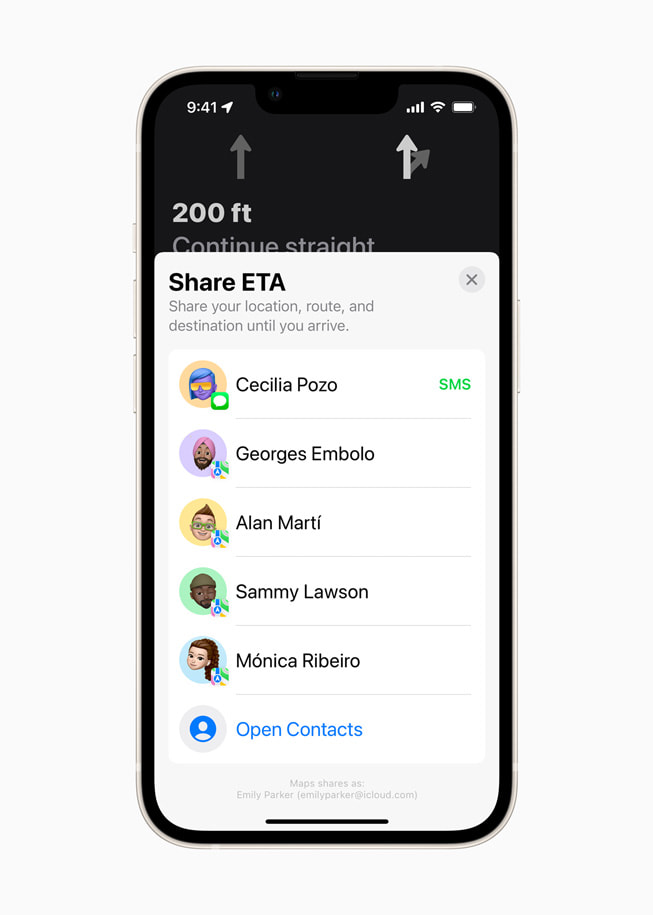
Share ETA enables users to share an estimated time of arrival with family, friends, and coworkers with a simple tap or by asking Siri.
Incident reports make it possible to safely and easily report an accident, hazard, or speed check along a route by simply letting Siri know “There’s an accident up ahead” or “There is something on the road.” Users can even report when incidents displayed on the map have been cleared, all while keeping their focus on the road.
Flyover offers a way to see select major metro areas with photo-realistic, immersive 3D views. Users can move their device through space to view a city from above, or explore in high resolution as they zoom, pan, tilt, and rotate around the city and its landmarks.
Favorites provides one-tap navigation to frequently visited places. Whether they’re headed home, to work, to the gym, or to school, users can simply tap and go once a location is added to Favorites on the launch screen.
Indoor Maps for airports and malls allow users to simply open the Maps app and see what level they’re on, look for restrooms, and even find out which stores and restaurants are open.
Look Around is an interactive way to visually explore a city with 3D imagery.
Maps offers cycling directions along bike lanes, bike paths, and bike-friendly roads.
Maps users can share their estimated time of arrival with friends and family.
Now users can safely report an accident, hazard, or speed check along a route by using Siri.
Explore major metro areas with photo-realistic immersive 3D views with Flyover.
Maps users can see where stores and restaurants are located within malls and airports using Indoor Maps.
Maps and Privacy
Apple is committed to keeping personal information safe and has built privacy into the core of Maps. With Maps, no sign-in is required. Personalized features, such as suggesting departure time to make the next appointment, are created using on-device intelligence. Any data collected by Maps while using the app, including search terms, navigation routing, and traffic information, is associated with random identifiers that regularly reset to prevent connecting search and location data stored on the server to a unique user. Maps goes even further to obscure a user’s location on Apple servers when searching for a location through a process called “fuzzing.” Maps converts the precise location where the search originated to a less-exact one within 24 hours.
One of the features Apple announced for iOS 15 is Legacy Contacts, a way to ensure that your digital life outlives you – if you would like it to.
The company hasn’t yet launched it, saying only that it is “coming in a software update to iOS 15,” but there are signs that Apple is preparing for its introduction …
Background
As we store more and more data digitally, a growing concern is that all of it could be lost in the event of our death. We’ve outlined in the past the risk to family photos in particular.
We’ve previously detailed some steps you can take today, including leaving device passwords and Apple ID credentials with a lawyer, alongside a copy of your will.
First of all, you may want to think about including your device passwords in a letter with a will. Without that, all the data on them may be rendered inaccessible. That could well include things with huge sentimental value, like family photos or that novel you’ve been working on […]
Your Apple ID also holds the key to everything you’ve ever bought from iTunes. Think about that. In the old days, your family could continue to enjoy your music, books and movies simply by reaching onto the shelf for a CD, paperback or DVD. But every app, every piece of music, every TV show, every movie, every book or audiobook you ever bought through iTunes is inaccessible to them without your Apple credentials. That’s a huge volume of valuable assets they can’t easily access.
But Apple is aiming to make the process a little easier with a new feature called Legacy Contacts.
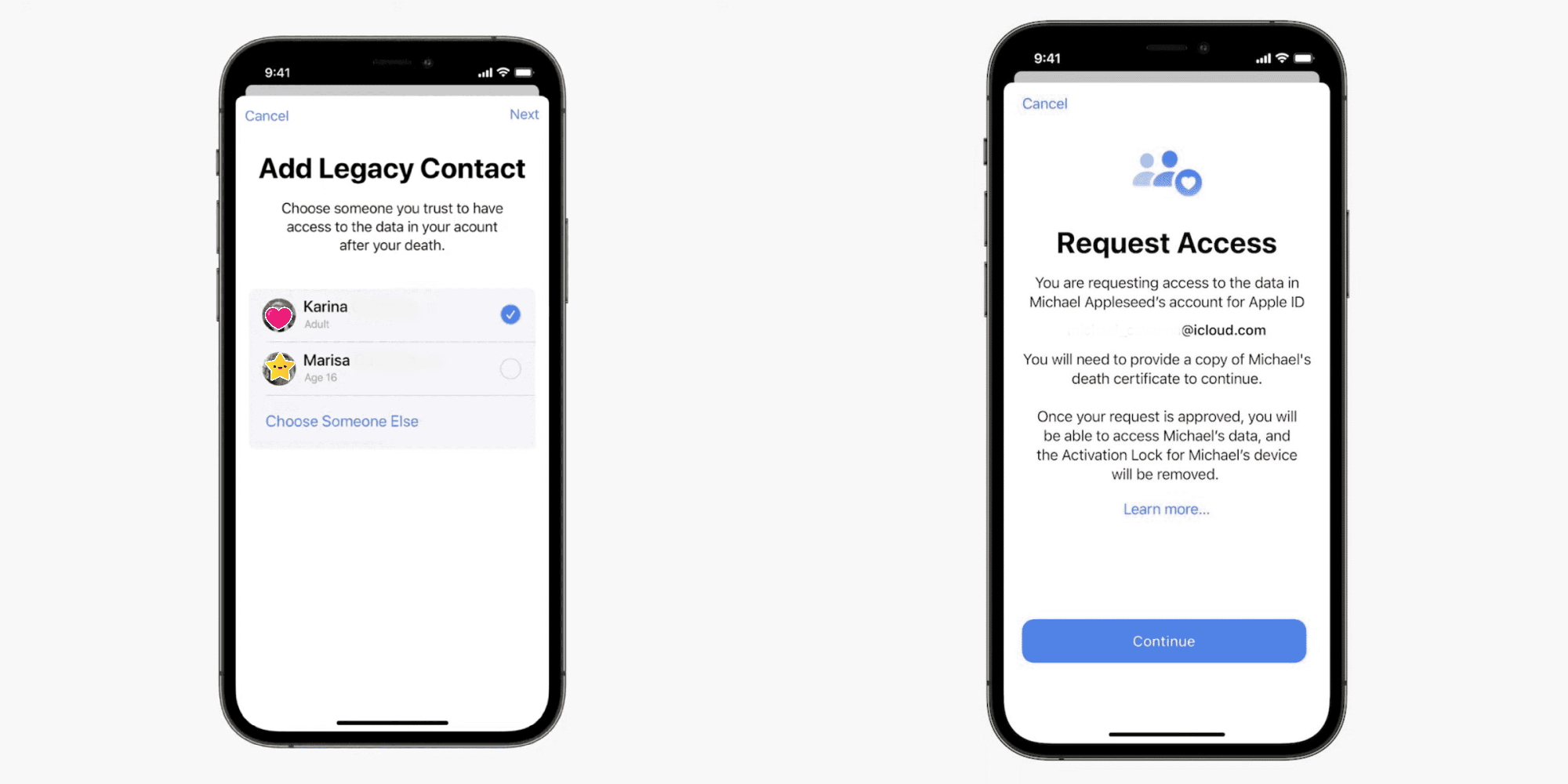
The Digital Legacy programme allows you to designate people as Legacy Contacts so they can access your account and personal information in the event of your death.
The way the feature will work is this. If you want one or more friends or family members to be able to access your iCloud data after your death, you will be able to name them, and provide them with a security key. The key will not be usable while you are alive – Apple will only activate it if supplied with proof of your death, which would normally be a copy of your death certificate.
It’s worth noting that not all of your data will be accessible, as some of it is protected with end-to-end encryption. This includes Apple Card transactions, health data, keychain entries, and browser history.
Macworld spotted two signs of readiness for launch. First, the company has updated the iCloud usage agreement.
With Digital Legacy, you can choose to add one or more contacts to access and download certain data in your account after your death.
If your designated contacts provide proof of death to Apple and have the required key, they will automatically obtain access to that certain account data and activation lock will be removed from all your devices. Thus, it is your responsibility to keep your Digital Legacy contacts up to date.
Second, Apple has a microsite for Legacy Contacts to request access to your account and devices after your death.
Request access to a deceased friend or family member’s account. If you are the legacy contact for a deceased person, you can request access to their account and have the activation lock removed from their devices.
There are links there to two support documents, but these currently redirect to the main support page.
Every year, new iOS releases arrive with headline-grabbing features like SharePlay and Focus. Likewise, every year, iOS includes under-the-radar improvements that aren’t likely to generate headlines. In this hands-on video I consider the top hidden iOS 15 features that I’ve stumbled upon.
While a few of these low-key features were demonstrated in my top iOS 15 features overview, the majority are enhancements that I haven’t yet showcased for the public version of iOS 15. Here’s a full list of all of the sleeper features covered in this video, along with a brief commentary on why I think each feature is beneficial.
Return of the editing loupe
The editing loupe was a staple feature of iOS for years, but was inexplicably removed. The loupe magnifies the immediate area around the cursor to help with precise movement. Needless to say, it’s an iOS 15 features that I welcome back with open arms.
Mute notifications for individual apps
You can now mute notifications via Notification Center on a per-app basis. Simply swipe on the notification, select Options, and mute for 1 hour or for the entire day.
Reorder Home Screen pages
You can now quickly reorder Home Screen pages by going into edit mode and tapping the page dots to enter the page editor.
Delete Home Screen pages
Within the page editor, it’s now possible to outright delete hidden Home Screen pages, sending all of its apps to the App Library.
Drag and drop support
iPadOS has enjoyed true drag and drop support for several years now, and iPhone users can now join in on the fun. Try dragging an image from the Photos app to a Messages app thread, or drag a URL directly from Safari into Notes.
Live Text shortcut
Live Text is one of the headline features in iOS 15, and if you tap in a text field to open the copy paste menu, you’ll see a new capture text shortcut to quickly insert live text from anywhere.
Reduce Bass on HomePod
If you’re an apartment dweller, this is a feature that you’ll surely appreciate. Open the Home app, invoke your HomePod, and flip the Reduce Bass switch.
Background sounds
I often listen to ambient sounds on Apple Music at night to help me sleep. With iOS 15, ambient background sounds are built right into iOS. Simply go to Accessibility → Audio/Visual → Background Sounds.
Voice memos skip silence and adjust playback speed
iOS 15 lets you speed through voice memos with the adoption of skip silence and playback speed adjustments.
Shazam history
Long-press on the Shazam shortcut in Control Center to access Shazam listening history.
Playback speed with default video player
Press the ellipsis button in the bottom right-hand corner of the default video player to access awesome new playback speed options.
Zoom in with Quick Take
When taking a video with Quick Take, slide up or down to zoom in and out.
New QR code UI
A new AR-centric QR code UI appears in the stock camera app when a QR code appears in the viewfinder.
Photo picker order
iOS 15 will now respect the order of your selections when picking photos via the Photo picker.
Markup immediately available when editing photos
No longer are the markup options hidden behind a menu when editing photos in the Photos app.
iCloud Backup Over Cellular
Users on fast cellular connections now have the option to perform backups even when not connected to Wi-Fi. This option is perfect for those connected to speedy 5G cellular service.
Prepare for new iPhone on reset
iOS 15 helps you get ready for the iPhone 13 with a new Prepare for New iPhone checklist.
iCloud Data Recovery service
This service can help you recover data that is not yet end-to-end encrypted, such as photos, notes, and reminders.
Account Recovery Contact
It’s a good idea to establish an account recovery contact just in case you forget your device passcode and Apple ID password.
Use Groups with Files app
You can now group files in the Files app by Kind, Date, and Size.
Hybrid Time Picker
iOS 15 lets you cycle through the time picker old school style, complete with haptic feedback, but it also allows for direct time input with just a tap.
Updated AirPrint interface
An updated AirPrint UI comes with a new presets panel and the ability to select media and quality.
Built-in OTP authenticator
Finally! iOS 15 now supports one-time-passcodes for two-factor authentication. It will also auto-fill your one-time-passcodes for a totally seamless login experience. To set up one-time-passcodes, go to Settings → Password.
Pull to refresh in Safari
Safari gets tons of new additions like Tab Groups, and a new bottom address bar with built-in swipe gestures. But Safari gets an additional swipe gesture by finally bringing support for pull-to-refresh to Apple’s default browser for the first time.
Safari extensions
Definitely don’t sleep on Safari’s new extensions capability, which lets users integrate apps and utilities such as Apollo or 1Password like never before. To activate available extensions, open Safari, tap the ‘Aa’ button, and click Manage Extensions.
Per-app accessibility settings
In the past, enabling an accessibility setting like Smart Invert would apply to iOS as a whole. In iOS 15, it’s now possible to apply accessibility settings on a per-app basis. Simply visit Settings → Accessibility → Per-App Settings.
Keyboard search
If you’re multi-lingual, you’ll no doubt enjoy being able to search through all available keyboards in Settings → General → Keyboard → Keyboards → Add New Keyboard.
Download from Spotlight
A refreshed UI allows you to download apps from Spotlight directly without invoking the App Store.
Modified App Store search results for installed apps
If your App Store search results include apps that you already have installed, iOS 15 will present a minimized view of the app icon with no corresponding screenshots.
Spotlight web image search
You can now easily search the web for images via Spotlight.
Lock Screen access for Spotlight search
You can also access Spotlight search directly from the Lock Screen on an unlocked iPhone.
Uninstall apps via Spotlight
In iOS 15, it’s now possible to search for an app via Spotlight, long-press on the result, and delete the app right from Spotlight.
Continuous Siri dictation
iOS 15 affords users the ability to continually dictate text well beyond the limits of previous versions of iOS.
Share On Screen items with Siri (Screenshot)
You can ask Siri to share on-screen content with a friend.
Control Smart Home Devices at a Specific Time
You can also ask Siri to control Smart Home devices at a certain time, which will create an automation within the Home app.
Find My after power off
Finally, for devices logged in to the Find My network, you can now find your iPhone running iOS 15, even if the device has been powered off.
iOS 15 introduces Live Text using on-device intelligence, redesigned notifications, upgrades to Maps, and more.
iOS 15 introduces new ways to stay connected, powerful updates that help users focus and explore, and intelligent features to get more done with iPhone. FaceTime updates provide more natural video calls, Focus helps users reduce distraction, new features like Live Text use on-device intelligence to surface useful information, upgrades to Maps provide brand new ways to navigate the world, and much more. iOS 15 is available today as a free software update.
Enhancements for More Natural FaceTime Calls
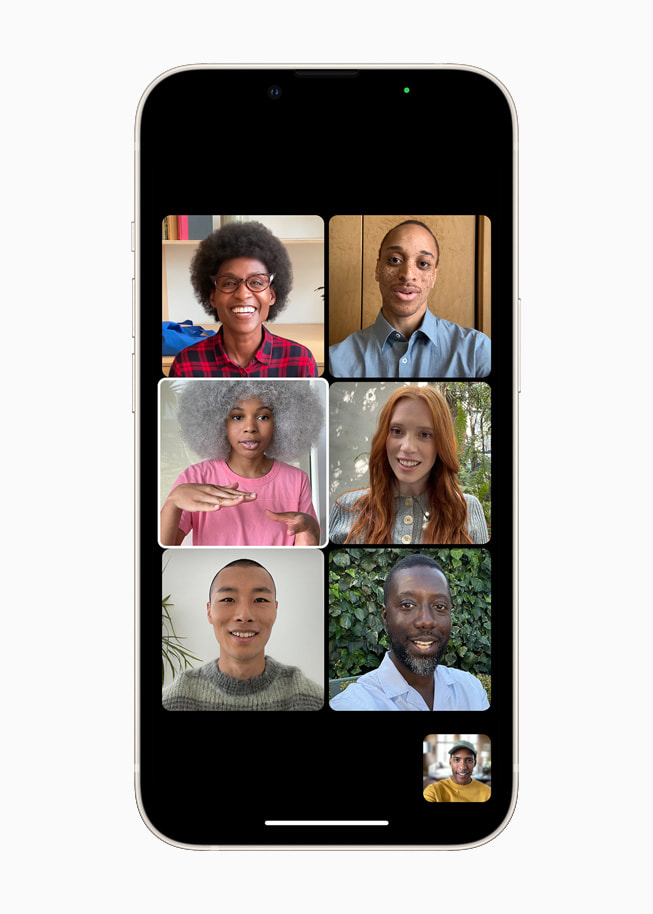
FaceTime is more essential than ever, giving users a way to easily connect with the people who matter most. Powerful updates to FaceTime audio and video features make calls feel more natural and lifelike. With spatial audio, voices in a Group FaceTime call sound like they’re coming from the direction in which the person is positioned on the screen.1 Voice Isolation, a new microphone mode, uses machine learning to eliminate background noise and prioritize the user’s voice, while Wide Spectrum allows for every bit of background sound to come through. Inspired by the stunning portrait photos taken on iPhone, Portrait mode in FaceTime blurs a user’s background and puts them at the focus.2 Voice Isolation, Wide Spectrum, and Portrait mode can also be used with third-party apps, such as Webex, Zoom, and WhatsApp. Group FaceTime gives the option to display participants in same-size tiles in a new grid view.
With iOS 15, Group FaceTime displays participants in same-size tiles in a grid view.
FaceTime calls now extend beyond Apple devices, so people using an Android or Windows device can join from their web browser. FaceTime calls on the web remain end-to-end encrypted so privacy is not compromised. To initiate the call, iPhone, iPad, and Mac users simply create a FaceTime link and share it through Messages, Calendar, Mail, or third-party apps, making it easier than ever to connect with friends and family.
Later this fall, SharePlay will deliver a new way for users to share experiences with friends and family while on a FaceTime call, such as listening to songs together, watching a TV show or movie, completing a workout together, or sharing their screen to view apps. SharePlay will work with apps like Apple Music, Apple TV+, and Apple Fitness+, as well as Disney+, ESPN+, HBO Max, Hulu, MasterClass, Paramount+, Pluto TV, SoundCloud, TikTok, Twitch, and many others. SharePlay can be accessed through iPhone, iPad, and Mac, and with shared playback controls, anyone in a SharePlay session can play, pause, or jump ahead. SharePlay even extends to Apple TV, so users can watch shows or movies on a big screen.
More Ways to Stay Connected with Messages
Shared with You is a new section that appears in Photos, Safari, Apple News, Music, Apple Podcasts, and the Apple TV app that displays the photos, articles, music, and other content shared by friends and family in Messages. Shared with You automatically displays shared photos in the Photos app, news stories in Apple News, and other relevant content in the corresponding app. The Shared with You section shows who sent the content, and makes it easy to view the associated message and restart the conversation.
In iOS 15, Memoji brings even more ways for users to express themselves with multicolored headwear, more glasses styles, and new accessibility options including cochlear implants, oxygen tubes, and a soft helmet. Memoji stickers can be customized with more than 40 outfit options and nine new sticker poses including a shaka, hand wave, and light bulb moment.
The Shared with You section in Photos displays the photos shared by friends and family in Messages.
Powerful Tools to Find Focus in the Day
iOS 15 introduces Focus, a new way to help users reduce distraction by filtering notifications based on what a user wants to focus on in that moment. For example, the Work Focus can be set during work hours to only allow notifications from coworkers and apps that are used for work, the Personal Focus can be used when taking a break with friends and family, or the Fitness Focus can help a user stay in the zone while completing a workout. Users can create a custom Focus or select a provided Focus, which uses on-device intelligence to suggest which notifications from people and apps are allowed. To further extend the ability to focus, users can create dedicated Home Screen pages with relevant apps and widgets to match a specific Focus.
While using Focus, a status is automatically displayed to contacts in Messages and supported third-party communication apps like Slack, so they know not to interrupt. Users will even receive suggestions to turn on a Focus based on factors like time of day or location, and when Focus is set on one Apple device, it automatically applies to all of a user’s Apple devices.
Focus helps users filter notifications to reduce distractions, using a custom Focus or a suggested Focus like Work or Fitness.
A Fresh New Look for Notifications
Notifications have been redesigned, adding contact photos for people and larger icons for apps that make them even easier to identify. The notification summary is a collection of notifications delivered each day at scheduled times determined by the user. Using on-device intelligence, the summary is arranged by priority, with the most relevant notifications rising to the top based on how a user interacts with apps. Time-sensitive notifications, messages, and phone calls will be delivered immediately, so users won’t miss timely alerts, and it’s easy to temporarily mute any app or messaging thread for an hour or for the day.
iOS 15 introduces the notification summary, a collection of notifications delivered each day at the times selected by the user.
On-Device Intelligence Delivers Live Text, Advanced Spotlight Search, and Memories
Live Text makes text in photos interactive. Using on-device intelligence, Live Text recognizes text in photos across the entire system including the web, and allows users to take action, such as copy and paste, look up information, and translate. Users can even tap the image of a phone number to make a call, or the image of a web address to open a page in Safari. With the power of the Neural Engine, the Camera app can also quickly recognize and copy text in the moment, such as the Wi-Fi password displayed at a local coffee shop. With Visual Look Up, users can learn more about popular art, landmarks, and books, plants and flowers found in nature, and breeds of pets.
Spotlight is the universal way to start searches on iPhone and now it can be accessed directly from the Lock Screen, and includes the ability to search photos by location, people, scenes, or objects. Using Live Text, Spotlight can find text and handwriting in photos.
iOS 15 delivers the biggest update ever to Memories. With a fresh new look, interactive interface, and integration with Apple Music that uses on-device intelligence to suggest music tracks, new cinematic Memories makes it easier to relive favorite or forgotten moments.
Live Text uses on-device intelligence to identify text and enhance the photos experience.
Spotlight now searches photos by location, people, scenes, and objects.
Redesigned Browsing with Safari
Safari introduces a newly designed browsing experience that makes controls easier to reach. By default, the new tab bar is positioned at the bottom of the screen, so users can easily swipe between tabs with one hand. Tab Groups allow users to organize tabs and easily access them at any time across iPhone, iPad, or Mac, and a customizable start page and web extensions on iOS make Safari more powerful and personal than ever.
Safari is redesigned with a new tab bar and Tab Groups for an even better browsing experience.
Navigate and Explore with Apple Maps
Maps in iOS 15 introduces a whole new way of looking at the world. A visually stunning map offers unprecedented levels of detail for neighborhoods, commercial districts, buildings, as well as custom-designed landmarks, and a new night-time mode with a moonlit glow. Navigation features a new three-dimensional driving view with road details that help users more easily identify turn lanes, medians, crosswalks, and sidewalks. The enhanced map is available in Los Angeles, New York, and San Francisco, with more to come. A beautifully designed interactive globe provides rich detail for mountain ranges, deserts, rainforests, and bodies of water.
Transit riders can get one-tap access to all departures near them and pin their favorite lines. Maps automatically follows along with a selected transit route, notifying users when it’s nearly time to disembark, and riders can even keep track on Apple Watch. By simply holding up iPhone, users can receive detailed walking directions in augmented reality.
Maps automatically follows along a selected transit ride and now notifies users when they are nearing their desired stop.
A three-dimensional city navigation and exploration experience comes to Apple Maps with more realistic and colorful details.
With iOS 15, users can access even more places with just a tap of their iPhone with new home, hotel, office, and car keys in Wallet. Digital car keys get even better with support for Ultra Wideband technology, so users can securely lock, unlock, and start their supported vehicle without removing their iPhone from a pocket or bag. iPhone can also be used to unlock a user’s home, office, or even a hotel room — all through keys stored in Wallet. Additionally, users will be able to add eligible state IDs and driver’s licenses to Wallet on iPhone as this option becomes available in their state in the future.
House and hotel room keys as well as ID cards come to Wallet for a simple tap-to-unlock experience for everyday places.
Redesigned Weather Experience
Weather includes an all-new design with full-screen maps, graphical displays of weather data, and dynamic layouts that change based on conditions. Beautifully animated backgrounds more accurately reflect sun position, clouds, and precipitation, and notifications indicate when rain or snow is about to start or stop.
The Weather app has been redesigned to include full-screen maps and dynamic layouts that change based on weather conditions.
Organize and Collaborate in Notes
Notes adds user-created tags that make it easy to quickly categorize notes and mentions that allow members of shared notes to notify one another of important updates. An all-new Activity view shows the recent history of a shared note, and Highlights reveals details on who made the changes. Quick Notes created on Mac and iPad can be viewed and edited in Notes.
Notes adds user-created tags that make it easy to quickly categorize notes in line with relevant content.
More Privacy Controls
New privacy features provide even more transparency and control over the data users provide to apps. Mail Privacy Protection prevents senders from learning whether an email has been opened, and hides IP addresses so senders can’t learn a user’s location or use it to build a profile on them. Siri’s protection of user privacy goes even further with on-device speech recognition as users’ audio requests are now processed entirely on device by default, enabling more personalization, offline requests, and faster performance.6
Additional Features
Siri adds Announce Notifications on AirPods and the ability for users to share what’s on their screen just by asking. Siri can now be enabled in third-party HomeKit accessories, so HomePod and HomePod mini users can easily and securely ask Siri to send a message, set a reminder, or broadcast an Intercom message to the family from more devices in the home.7
iCloud+ combines everything users love about iCloud with new premium features, including Hide My Email, expanded HomeKit Secure Video support, and an innovative new internet privacy service, iCloud Private Relay.8 Current iCloud storage subscribers will be upgraded to iCloud+ automatically at no additional cost. All iCloud+ plans can be shared with people in the same Family Sharing group, so everyone can enjoy the new features, storage, and elevated experience that comes with the service.
The Health app gets a new sharing tab that lets users share their health data with family, caregivers, or a care team, trends give users a way to focus attention on meaningful changes in personal health metrics, and Walking Steadiness is a new metric that empowers people to proactively manage their fall risk. Users also have the ability to store verifiable COVID-19 vaccination or test result records directly in the Health app, so they can easily access them at any time.
Translate adds a new Auto Translate feature that automatically detects when a user begins speaking and translates speech without tapping the microphone button, allowing for conversation across languages to flow more naturally. Systemwide translation makes it possible to translate text anywhere on iPhone by selecting it and tapping Translate.
New iPhone setup makes it more seamless than ever to get started with iPhone. Existing iPhone users can temporarily back up data to iCloud — even without a subscription — to easily transfer their data to a new iPhone.9 For those moving to iPhone for the first time, an improved Move to iOS experience easily transfers photo albums, files, folders, and Accessibility settings, so iPhone feels personal right from the start.
Accessibility features include the ability to explore people, objects, text, and tables within images in more detail with VoiceOver, and new background sounds play continuously in the background to mask unwanted environmental or external noise. Sound actions customize Switch Control to work with mouth sounds, and users can customize display and text size settings on an app-by-app basis. Apple is also bringing support for recognizing imported audiograms — charts that show the results of a hearing test — to Headphone Accommodations.
Hide My Email lets users share unique, random email addresses that forward to their personal inbox any time they wish to keep their personal email address private.
Trends in the Health app enables users to easily see how a given health metric is progressing over time.
Translate goes systemwide, allowing users to translate text anywhere on iPhone.
Pricing and Availability
iOS 15 is a free software update that is available starting today for iPhone 6s and later. For more information, visit apple.com/ios/ios-15. Some features may not be available in all regions or all languages.
Apple Inc. will debut major software updates for the iPhone and iPad at its developers’ conference on June 07,2021 to an audience that has grown increasingly critical of the company’s App Store policies.
The virtual event beginning June 07,2021 will also include software updates for the Mac, Apple Watch and Apple TV as well as tools developers can use to build apps. The company plans to discuss new privacy protections for limiting data collection as well as health-tracking, notifications and messaging features. Executives also will promote significant improvements to iPad software, making the device more capable and appealing to more advanced users.
This year’s conference arrives while Apple is facing criticism from some developers over its App Store policies. The controversy was highlighted by a three-week trial last month of a lawsuit filed by Epic Games Inc., which argued that the iPhone maker’s policies and revenue share of as much as 30% are anticompetitive. Unhappy developers have grown more willing publicly to express discontent, Apple executives have been grilled by U.S. lawmakers and companies such as Microsoft Corp. and Spotify Technology SA have chided Apple.
What to Expect From Apple’s WWDC
The Cupertino, California-based iPhone maker will now try to convince developers that Apple’s platform remains the best place for them to sell software and that it has new features to keep consumers glued to the company’s products. Apple, however, isn’t expected to announce wholesale App Store policy changes next week. The company generated about $22 billion from App Store commission in 2020 alone, according to Sensor Tower estimates.
As part of its continued privacy push, Apple is planning new features to counter overly invasive apps. One major new addition will be a control panel that provides in-depth detail on what data are being collected by each third-party app installed on a user’s device. Earlier this year, Apple rolled out a feature to limit the ability of developers to track users across apps and the web for advertising purposes, irking developers like Facebook Inc.
On the iPhone and iPad software updates, users will now be able to set a status — such as whether you are driving, sleeping, working or don’t want to be disturbed — and have that dictate how incoming notifications are handled. The update will also include a larger focus on auto-replying to messages and a new design for incoming notification banners at the top of the screen.
For the iPad, Apple plans to revamp the home screen and support the placement of widgets — snippets of dynamic information like calendar, weather and stocks — anywhere on the screen. This is a commonly requested feature that will bring the iPad in line with Android rivals. The company also plans an improved multitasking system to make it easier to operate multiple apps at the same time.
The Messages app will receive enhancements on the way toward Apple’s eventual goal to turn it into a more direct competitor to messaging services on social networks like Facebook’s WhatsApp and Messenger, Bloomberg News has previously reported. Apple has also been working on a revamped lock screen for the iPhone and iPad, though some of those changes have been pushed back to a future release and won’t appear this year.
Apple’s planned update to macOS is expected to be somewhat minor after the operating system received an overhaul in 2020, while the Apple Watch is expected to gain some health-tracking and interface improvements. The Apple TV will also get enhanced software after the company released a faster model last month.
WWDC kicks off on Monday June 07,2021 or June 08,2021 3am some part of the world.
It’s been two years since we unveiled the list of Apple devices that will receive the next major update. After iOS 13 and then iOS 14, it’s time to talk about iOS 15. On which iPhone, iPod or iPad can we install iOS 15 and iPadOS 15?
If iOS 14 had rolled over the same iPhones and iPads as iOS 13 (like iOS 12 and iOS 11), Apple is expected to remove five models this year, split between smartphones and tablets. Here is a first list of Apple devices that will host iOS 15 beta next June, gleaned once again from our developer friend at Apple and who works in particular on the Plans app. Obviously, needless to say that the iPhone 13 will be delivered directly with iOS 15 and an A15 chip. But for the others, there will be unhappy customers because Apple will have to part with certain models in order to facilitate the deployment of new products and to better unify its fleet.
French publication iPhoneSoft says that the information is coming from within Apple (via Apple Translate):
Here is a first list of apple devices that will host iOS 15 beta next June, once again gleaned from our developer friend at Apple and who notably officiates on the Plans app.
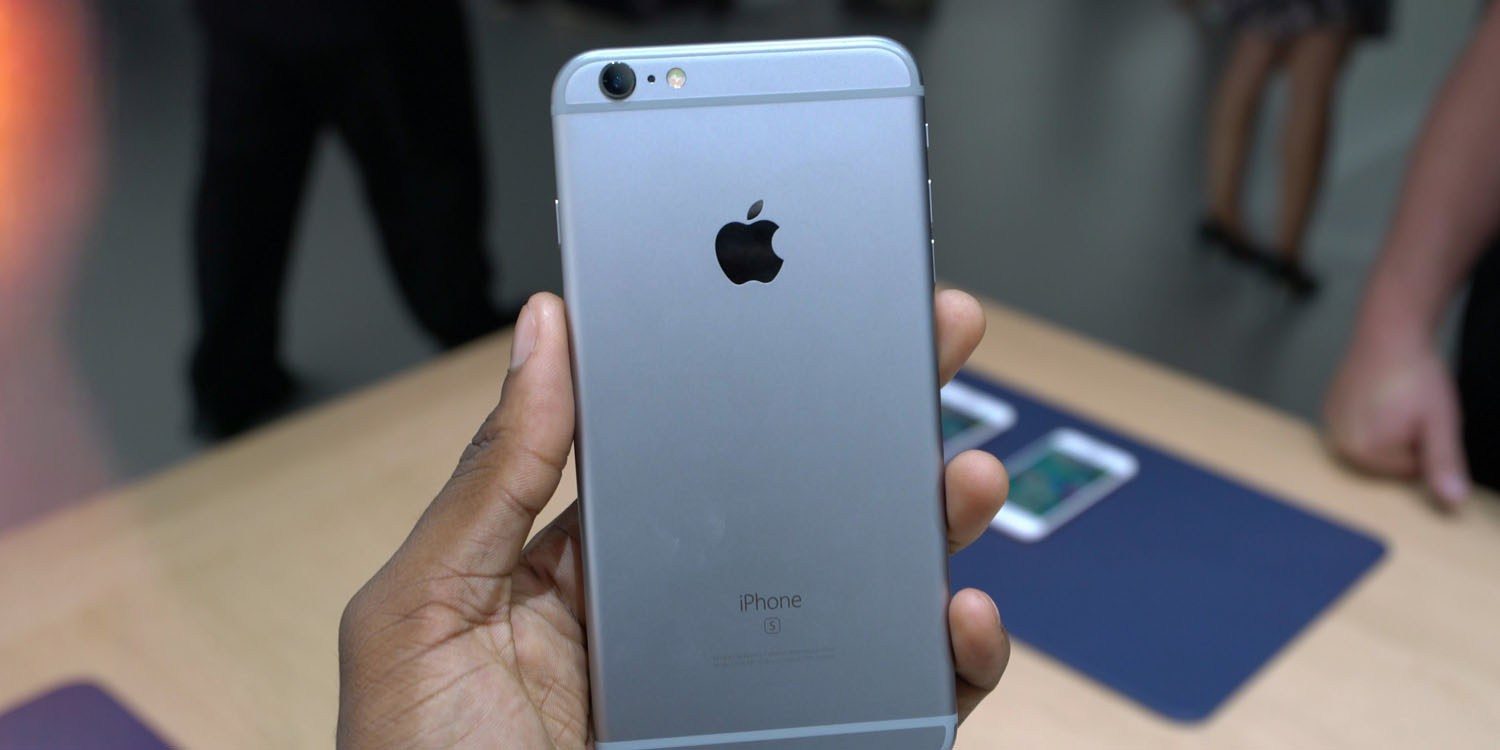
The iPhone 6s and iPhone 6s Plus were originally introduced in September of 2015, followed by the iPhone SE in March of 2016. The devices were incredibly popular and have received over four years of software updates from Apple.
With the iPhone 12 mini and the second-generation iPhone SE, Apple now sells two modern devices that match the form factor of the iPhone 6s design. The second-generation iPhone SE is actually nearly identical to the iPhone 6s in terms of design, but with the modern A13 processor inside. The iPhone 12 mini is physically smaller, but offers a bigger display because of its edge-to-edge design, alongside the A14 processor and an improved camera system.
Not compatible with iOS 15:
iPhone 6s an 6s Plus
iPhone SE 2016
That lines up with the report we saw last November from The Verifier. But going beyond that information, iPhoneSoft says that iOS 15 will also “probably not be available” on:
iPad mini 4
iPad Air 2
iPad 5
Here’s a look at what devices could work with the iOS/iPadOS 15.
Likely compatible with iOS 15:
2021 iPhone lineup
iPhone 12 Pro Max
iPhone 12 Pro
iPhone 12 mini
iPhone 12
iPhone 11
iPhone 11 Pro
iPhone 11 Pro Max
iPhone XS
iPhone XS Max
iPhone XR
iPhone X
iPhone 8
iPhone 8 Plus
iPhone 7
iPhone 7 Plus
iPhone SE (2nd generation)
iPod touch (7th generation)
and for iPad:
2021 iPad lineup
12.9-inch iPad Pro
9.7, 10.5, and 11-inch iPad Pro
iPad Air 3
iPad Air 4
iPad 6/7/8
iPad mini 5
Thank you for using
Themify Popup
This is a sample pop up. Themify Builder or Builder Lite (free) plugin is recommended to design the pop up layouts.