Just a week after iOS 11 was launched to the public, Apple has quickly followed up with iOS 11.0.1, a small update intended to address bugs and fix various issues with the software.
Release notes accompanying iOS 11.0.1 simply state that the update “includes bug fixes and improvements for your iPhone or iPad.”
There are two builds of the software: 15A402 for current iPhones and iPads, and build 15A403 for the forthcoming iPhone X.
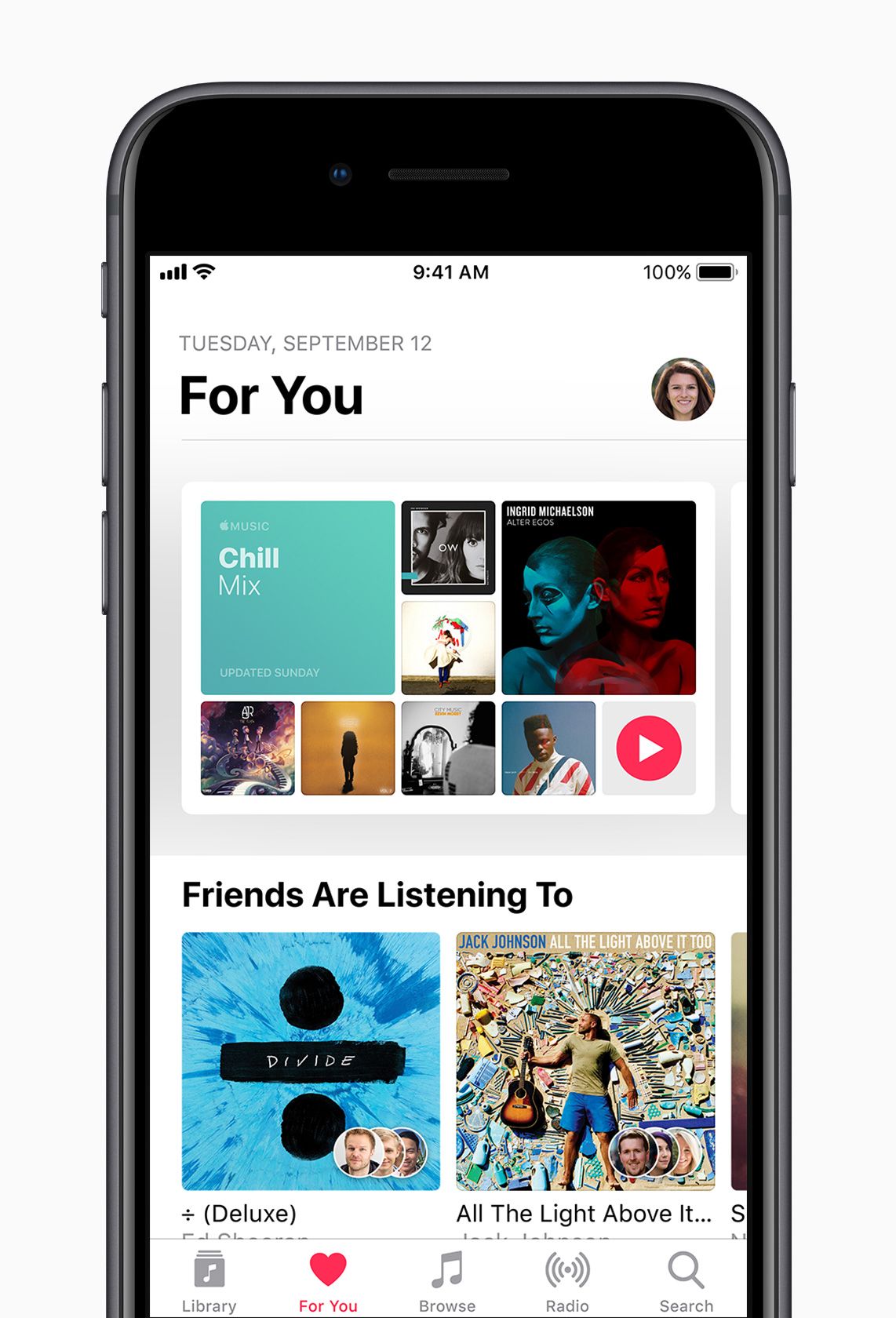
iOS 11 includes a new voice for Siri, as well as the ARKit tools that developers can use to create advanced augmented reality applications. It also boasts a redesigned App Store, and various features like Do Not Disturb While Driving and a revamped Music app.
On the iPad, iOS 11 brings an all-new app dock that can be used for multitasking and app switching, as well as dragging and dropping files in between applications.
iOS 11 is compatible with the iPhone 5s and newer, the iPad 2 and up, the iPad Air and newer, and all iPad Pros. It is also compatible with the sixth-generation iPod touch.
Apple has released Safari 11 for macOS Sierra 10.12.6 and Mac OS X El Capitan 10.11.6. The update to Safari includes various security patches, bug fixes, and includes a handful of new features for the Mac web browser.
Perhaps the most noteworthy feature of Safari 11 is that it stops media from automatically playing audio on most websites, thereby helping to prevent the user from having to mute tabs and tracking down which tab is playing sound when unexpected audio starts playing on sites like Facebook or many news websites.
Mac users can find the Safari 11 software update available in the Mac App Store Updates tab. You must be on the most recent version of Sierra or El Capitan to find the software update available, if you’re running a prior release of either Mac OS version the update does not appear to be available.
The release notes for Safari 11 include a focus on the following features and changes:
Stop media with audio from automatically playing on most websites
Adds the ability to configure Reader, content blockers, page zoom, and auto-play settings on a per-website basis, or for all websites
Improves AutoFill accuracy from Contacts cards
Includes updated media controls for HTML video and audio
Enhances performance and efficiency
Safari 11 as a separate download is only available for Sierra and El Capitan. Safari 11 is included by default in macOS High Sierra 10.13, which is due for widespread public release for Mac users on September 25.
Download iOS 11 to open up new augmented reality experiences, boost productivity, take better photos and more.
Starting Tuesday, iPhone and iPad customers around the world will be able to update their devices to iOS 11, a major update to the world’s most advanced mobile operating system and the biggest software release ever for iPad. iOS 11 brings augmented reality to hundreds of millions of iOS devices and new professional capabilities improve images in Photos and Camera. Siri is more natural and useful and a redesigned App Store makes it easier to discover apps and games.
iPad Becomes Even More Powerful
Work with multiple apps at the same time using Slide Over on iPad.
The all-new Dock provides quick access to favorite and frequently used apps and documents from any screen and makes it easier to work with multiple apps with Split View and now Slide Over. Drag and Drop makes moving images, text and files between apps easier than ever using Multi-Touch. And Apple Pencil is more deeply integrated into iPad Pro with support for inline drawing and a new Instant Notes feature that opens Notes from the Lock Screen by simply tapping Apple Pencil on the display.
Files makes it easy to access and organize files from one central place.
The all-new Files app provides a central place to access and organize files no matter where they are located — on iPad or in the cloud with built-in support for iCloud Drive as well as providers, such as Box, Dropbox and others.
Immersive Augmented Reality
With new AR apps, users can place virtual objects in real-world scenes.
Hundreds of millions of people can now experience AR apps on iPhone and iPad and view virtual content on top of real-world scenes for interactive gaming, immersive shopping experiences, industrial design and more. These apps deliver high-quality AR experiences using the built-in camera, powerful processors and motion sensors in iOS devices.
Photos Look Even More Professional
New Loop and Bounce effects create continuous video loops for Live Photos.
The incredibly popular and innovative Portrait mode now uses optical image stabilization, True Tone flash and HDR, so every shot looks even more professional. Loop and Bounce effects create continuous video loops for Live Photos, while Long Exposure creatively captures time and movement. In Photos, Memory Movies are optimized to play in both portrait and landscape orientation, and more memories, such as photos of pets or birthdays, are automatically created.
The All-New App Store
Redesigned App Store makes discovering apps and games easier than ever.
The App Store is redesigned in iOS 11, making discovering apps and games easier than ever before. New in-depth features and interviews will uncover the stories behind iOS developers, and the incredible apps and games they create. App Store for iMessage is also easier to access with a redesigned app drawer.
Siri is More Natural and Useful
Siri now offers translation, an expressive new voice and more proactive intelligence to help you through your day.
New voices are more natural and expressive, adjusting intonation, pitch, emphasis and tempo while speaking, and can translate US English into Mandarin, French, German, Italian or Spanish. Siri uses on-device learning to deliver more personal experiences and offers suggestions based on personal usage of Safari, News, Mail, Messages and more.
Send Money to Friends with Apple Pay this Fall
Coming this fall, easily and securely send and receive money from friends and family with Apple Pay right in Messages, no extra steps or apps needed.
Coming this fall with an update to iOS 11 and watchOS 4, Apple Pay users will be able to send and receive money from friends and family quickly, easily and securely. Pay and get paid right in Messages, or tell Siri to pay someone, using the credit and debit cards they have in Wallet. When users get paid, they receive the money in their new Apple Pay Cash card in Apple Wallet and can use the money instantly.
Stay Focused on the Road
Do Not Disturb while driving is a new way to help drivers stay more focused on the road.
iOS 11 introduces a new way to help drivers stay more focused on the road with Do Not Disturb while driving. iPhone can detect when a user may be driving through vehicle movement or Bluetooth connections, and automatically silences notifications to keep the screen dark. Users have the option of sending an auto reply to their Favorites, contacts or recents to let them know they are driving and cannot respond until they arrive at their destination.
More Ways to Navigate with Apple Maps
Look inside malls and airports with new indoor maps.
Coming this fall, Apple Maps adds indoor maps for shopping centers and airports around the world, including: Amsterdam (AMS), London Heathrow (LHR), Las Vegas (LAS), Los Angeles (LAX), Miami (MIA), Philadelphia (PHL) and San Jose (SJC).
iOS 11 also introduces lane guidance to help users better prepare for the next turn, as well as speed limits to help users stay informed.
Discover New Music with Friends
Share Music with friends with new features in Apple Music.
Subscribers can create a profile and follow friends to listen to shared playlists and see the music they listen to most. Apple Music subscribers can also begin receiving notifications when friends follow them, new music is released and more — so they never miss a beat.
To learn more ways to get the most out of iOS 11, users can visit the Tips app on iPhone or iPad. For details on how to update iOS devices, visit Apple Support.
The latest version of iTunes removes the App Store and thus the ability to manage iOS apps on an iPhone or iPad directly through iTunes. Instead, Apple wants users to manage and sync their iOS apps directly on the iOS device itself through the built-in App Store.
The removal of App Store and an Apps section from iTunes has confused some users, and annoyed others. But don’t distress, even if this change can take some adapting, because you can still easily manage apps, sync apps, and redownload apps and access apps through the App Store directly on an iPhone or iPad.
It’ll be helpful to think of the concept of app ‘syncing’ as now more like app re-downloading from the App Store, since syncing apps to and from iTunes is largely gone and instead replaced with redownloading apps if need be over the internet. (I say largely gone because you can still sort of work with .ipa files, more on that below.)
How to Redownload Apps to iPhone or iPad from iOS App Store, Without iTunes
You can download existing and old apps, as well as manage apps directly on the iPhone and iPad by using the App Store Purchased section. The Purchased section of the App Store includes all apps you have ever downloaded or bought before at any time with the Apple ID in use, as long as those apps are still on the App Store. This redownloading iOS app ability has been around for a long time in iOS, but now it is perhaps more important than ever before.
Here is how you can access Purchased and use it to download apps back to your iOS device, note the precise actions are slightly different on iPhone compared to iPad but the general behavior is the same:
Open the App Store app in iOS
Go to the Purchased section of the App Store
For iPhone and iPod touch: Go to “Updates” and then “Purchased”
For iPad: Tap your Apple ID account icon in the corner of the open App Store
On iPad App Store, then tap “Purchased”
Choose the “Not on this device” section
Tap the download icons alongside app names you wish to download to the iPhone, iPad, or iPod touch
This allows you to download and access apps that you have previously downloaded, owned, or purchased at some point, but that are not contained on the current iOS device.
These purchase listings will be different per iOS device, changing from “Not on this iPhone” or “Not on this iPad” depending on what device you are using with the same Apple ID, and depending on what apps are on the active iOS device.
Arranging iOS App Home Screen and Icon Layouts on iPhone and iPad
You can still arrange your iOS home screen as you like it to a custom icon layout, but now it must be done on the iPhone or iPad.
Simply tap and hold on an app icon until all screen icons start to jiggle. Once the icons are jiggling on the iOS screen they can be moved around at will. Use this to arrange the Home Screen of an iPhone or iPad to suit your preferences.
If you drag a jiggling icon to the edge of the screen, continue holding and you can move the app icon to a different Home Screen page.
Removing Unwanted Apps from the iPhone or iPad
Removing apps from an iPhone or iPad is a matter of uninstalling the apps from iOS, the easiest way is by the tap-and-hold and then delete method detailed here.
You can also delete apps from an iOS device through the Settings > General section to manage storage.
Manually Syncing / Copying Apps via IPA Files to iPhone or iPad with iTunes
Interestingly, you can still drag and drop ringtones in .m4r format and iOS apps in .ipa file format into iTunes and to the target iOS device, and they should transfer over to the target iPhone, iPad, or iPod touch.
If you happen to have a .ipa file of an iOS app, you can still manually copy it over to the iPhone or iPad via iTunes by using this drag and drop method. This is sort of like syncing, but it’s really just copying a file over from the local computer to the target iOS device by using iTunes.
Apps stored as .ipa files, if you have any stored on a local computer, can be found within the iTunes Library locations on the Mac and Windows PC and a subfolder for Mobile Applications, typically the path would be as follows for Mac and Windows PC respectively:
IPA file path in Mac OS:
~/Music/iTunes/iTunes Media/Mobile Applications/
IPA file path in Windows 7, Windows 8, and Windows 10:
\My Music\iTunes\iTunes Media\
With an iPhone or iPad connected to the computer via USB, simply drag and drop the IPA file into iTunes onto the iOS device in question through the sidebar.
It’s alway possible this particular IPA file feature will disappear from iTunes in the future with another software update, or that the IPA files stored on a computer will vanish if you don’t copy them elsewhere for backup purposes, so it’s probably wise to not depend on this particular ability too much.
A new public beta, which has the same features as the developer-only iOS 11 beta 10 release, is also out for members of the Apple Beta Software Program. The new software has arrived six days following iOS 11 beta 9 and 24 hours following a tenth beta of tvOS 11 for Apple TV.
To install the update on your iOS device with an appropriate configuration profile (available for download through Dev Center), use Apple’s Software Update mechanism in the Settings app.
Here’s Andrew’s hands-on walkthrough of the changes in the previous beta.
Originally released as a developer-only preview at WWDC in June, iOS 11 packs in a surprising number of new features, under-the-hood enhancements and user interface refinements.
Some of them include a customizable Control Center, a redesigned App Store, brand new multitasking features on iPad with the interactive Dock and drag and drop, a dedicated Files app, AirPlay 2 with multi-room audio, new Siri capabilities and more.
As we get closer and closer to Apple’s event next Tuesday, we’re most likely approaching a Gold Master build that should release before the next iPhone launches later in September.
Another privacy issue for Apple as allegations on Messages logging all your contacts reached by the app seems to be messed up. Is it all true?
Messages, Apple\’s SMS proprietary app have many great features and gimmicks like the overlays and stickers. It was brought bundled with the new iOS 10. However, you may want to reconsider using this app if you want a completely discreet chats with your contact list.
Previously known as iMessages, Messages is said to be used by Apple to log contacts reached using this app. This apparently allows the company and law enforcement agencies to get into who you have texted in the past. Now, that\’s a shocker.
The report is based on a document provided to The Intercept by the Florida Department of Law Enforcement\’s Electronic Surveillance Support Team, which details to law enforcement what kind of information can be successfully subpoenaed from a suspect\’s iPhone.
On the more positive side, these logged information won\’t contain and won\’t be extracted with the contents of the messages. However, it will still show the phone numbers that Messages attempted to get in touch with. Not only that, also the time and date of the messages and most probably the location using the IP address.
Why do Apple have this feature?
Apple seems to be using this feature (which we didn\’t know existed until now) to check if an SMS or chat is sent to another Messages user. If this is the case, Messages will enable special features of the app. The difference can be seen through various colors sported by chat bubbles inside Messages. Blue means both users use Messages, green means normal SMS apps and services are used.
Apple says these logs are deleted after 30 days, though any repeated interaction with new members in your contacts list – or any other iOS app with similar access to the servers – may refresh the saved information.
Is it legal?
It is very normal for phone carriers to record contact information of all its users and they can surrender information to law enforcers who have proper warrants to do so.
Maybe we can take Apple\’s word on privacy from last year while they are promoting Messages as a more advanced option compared to conventional SMS texting. However, if you are unsure of this news and wants more updates, you still have other options you can use: Whatsapp, Facebook Messenger, and Allo. You choose.
Local iPhone backups are easier to crack in iOS 10
Though it may not involve iCloud storage, it seems that it is best to wait for the new iOS 10 security updates to back up your iPhone.
It seems that Applehave a problem with the new iOS 10 update that makes security on iPhones weaker. This could lead to a potential breach and unauthorized access to local backups.
This comes from a Russian firm, Elcomsoft, that makes tools to break into iPhones. They discovered this as they are updating their phone breaking tool software. They found out that local backups made to a user’s computer when they update to iOS 10 uses a new verification system that omits some security checks. In short, it’s easier to get inside these local files.
Why would you care?
If you have updated to iOS 10 using your computer, then you should be wary of attacks due to these weaker security mechanisms. Password-protected backups made by iOS 10 are primary targets. If an attacker can get hold of a copy of these backups, Elcomsoft’s new software would allow it to crack the encryption 2500 time faster to the old security mechanism used in iOS 9.
Through this statistics, they can process 2400 passwords per second in iOS 9 while 6 million passwords per second in iOS 10. Pretty huge difference.
The iTunes backups’ weakness may well be a weak link for iPhone security, for iOS 10 users of course. Elcomsoft said that breaking into the physical phone or even iCloud accounts have been more difficult lately, however, an access to a backup stored locally inside a computer allows for some direct access. Forcing an iPhone or an iPad to produce an offline backup and analyze the resulting data are the very few options available for devices running iOS 10.
Apple’s Response
According to a statement provided to Forbes, Appleis aware of the issue and is working to correct it:
“We’re aware of an issue that affects the encryption strength for backups of devices on iOS 10 when backing up to iTunes on the Mac or PC. We are addressing this issue in an upcoming security update. This does not affect iCloud backups,” a spokesperson said. “We recommend users ensure their Mac or PC are protected with strong passwords and can only be accessed by authorized users. Additional security is also available with FileVault whole disk encryption.”
Our suggestion, wait till the next stable update for iOS 10 before backing up your iPhone.
iOS vs Android have been a battle waged for so long but this time we look at the new features of Android Nougat that any iOS version can never compete with.
Android Nougat or Android 7.0 has now been released for all compatible Google devices in use by consumers today. Google even declared that with the new version of Android comes an overwhelming 250 extra features added over Android 6.0 update from last year.
First to taste the sweet Nougat, are the Nexus devices. From other OEMs like Samsung and HTC, those smartphones will have to wait a little bit longer because each OEMs allow those on the air updates to get pushed on to their own hardware. For iOS? Nope. No Nougat for that operating system.
However, iOS 10 is just around the corner with still months until its official release in September. Whatever iOS 10 brings to the table, it seems clear even now that Android 7.0 will be much better than what Apple might be able to come up with.
Here are reasons why Android Nougat will be far better than iOS.
Notification Tricks
Android Nougat now have an even better integration of replying to communications across multiple apps directly from the notification itself. This works for Google Play integrated services like Hangouts and Gmail but also for the third party apps that require quick responses.
Users won’t have to leave their current app just to get into the urgent message and get to give out a reply. iOS have this for iMessage only leaving the user experience clunky at most by switching to different apps to respond to messages.
Quick Multi Tasking
First is the Alt-Tab for your mobile phone is the double tapping of the multi tasker button. Yes, the square one on the right side of your home button. This toggles between the last two used apps. This can be useful when you want to get something from one app and pasting it to the next. Toggling between the two would be convenient for those power users who do more with their smartphones.
Quick settings can also be customized like from Android Marshmallow. But this time its much quicker and easier to setup. In iOS, the settings tray will always stay the same. Whether you always use the feature or not, it will not be moved or removed. Lack of flexibility can be a bad thing.
Multi-Window
Android is now focused on delivering what the users wanted to have in their smartphones. Samsung had this feature long before Marshmallow was released. It was integrated in their Tab and Note series but now, Android Nougat is giving this feature natively on supported devices. That is, the device should be powerful enough to run two apps live at the same time and the display is wide enough for it to work.
iOS had this feature for the iPad but seeing it on the iPhone will be very unprobable. This feature is available for both smartphones and tablets that could make use of the feature.
VR-Ready OS
Google is committed in making Android Nougat VR-Ready with a lot of support for future features of the virtual reality market. This was in support to its Daydream VR platform that makes mobile virtual reality games and apps readily available for its users.
Apple is yet to release any information if it will support VR anytime soon. It will be a great loss for iOS if Apple won’t have a competing product of their own. They can do it, but if not soon enough, Android will be the OS of choice for virtual reality apps.
Improved Doze Mode
Android smartphones now can squeeze every percent of battery charge from their batteries with the new and improved Doze Mode. This feature automatically detects if your smartphone has been inactive and is kept inside your pocket. It will then activate Doze Mode to keep the background apps and incoming data signals to a minimum which will ultimately save you some juice.
iOS is saying it have an efficient power management system but with each iteration of Doze, it seems that Apple’s lagging behind its former second-placer, Android.
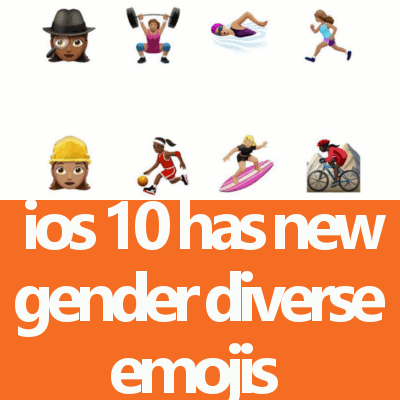
Apple thinks emojis are super important in our daily communications via messages, iOS 10 now comes emojis of women playing basketball, swimming and more!
Apple have their own version of new gender diverse emojis packaged together with iOS 10. There are female options for weight lifting, basketball, and surfing, as well as new job-related emoji for female construction workers and private investigators. Apple has apparently gone forward on its own and included variations of these redesigned icons and a handful of new emoji as well. Users of Apple’s developer version of iOS 10 should see the new emoji included in the iPhone keyboard starting today.
Some new with the 100 different skin color emojis include:
water gun icon replacing the old revolver
a rainbow flag
two different gender options depicting single-parent families
haircut and scalp massage emoji – for men
Apple says in a statement, “This exciting update brings more gender options to existing characters, including new female athletes and professionals, adds beautiful redesigns of popular emoji, a new rainbow flag and more family options. Apple is working closely with the Unicode Consortium to ensure that popular emoji characters reflect the diversity of people everywhere.”
The highly rated app SwiftKey is having a bad day after the bug that was detected in the app is found. Apparently, info that it gets from users are leaked. That’s bad.
Users lauded SwiftKey as one of the best keyboard app for both Android and iOS because it helps predict the words they’re trying to type, and usually, the service works pretty well. However, over the past week, some users reported that their keyboards were populating with other people’s email addresses and searched phrases. The bug relates back to SwiftKey’s cloud sync service, which has since been suspended.
These issues started appearing over Reddit threads. Some users have faulty language suggestions while some have porn search suggestions that makes them wonder what’s going on.
Following user reports, SwiftKey took syncing and backups down. The company released an official statement today that doesn’t detail the bug but clarifies that it “did not pose a security issue.” SwiftKey said it’ll continue to update its blog as more information is released.