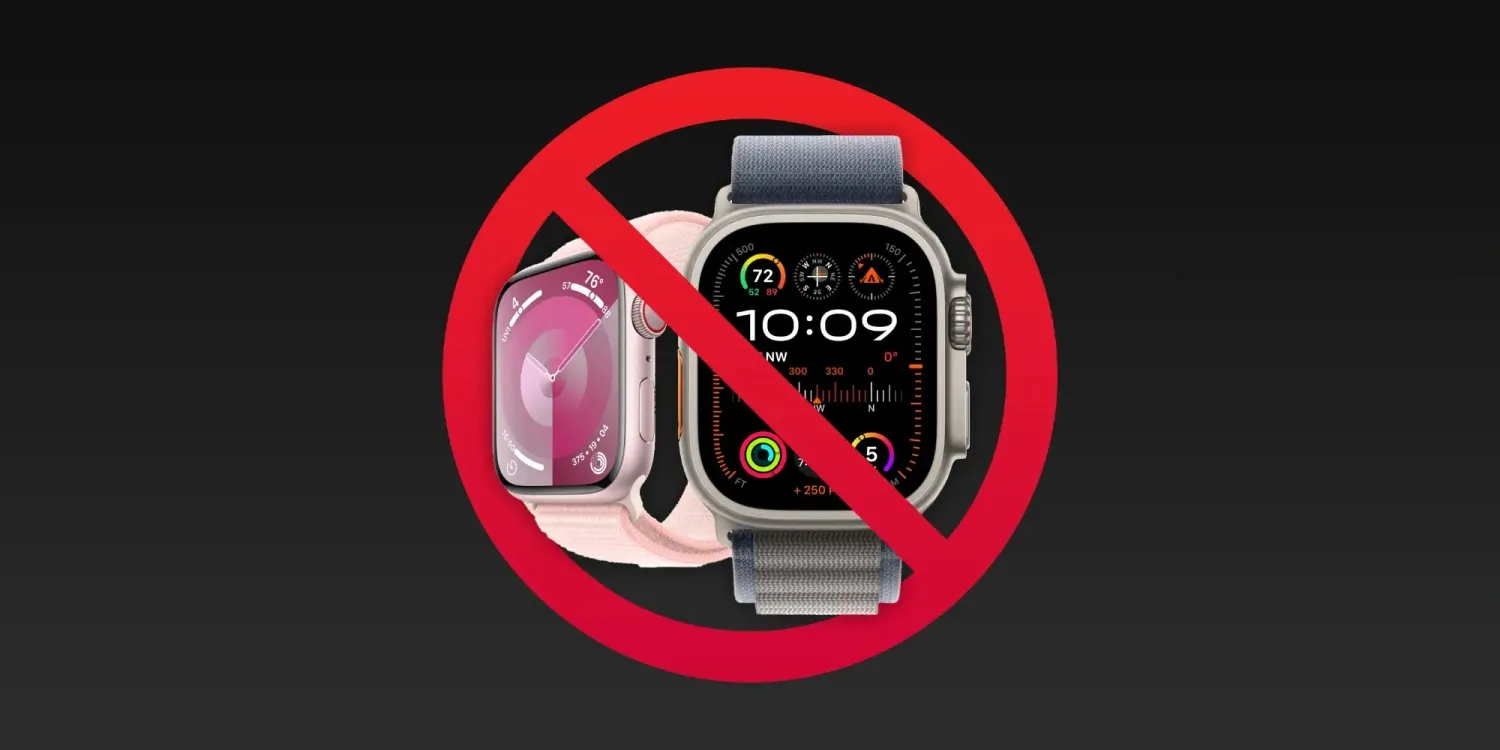
December 21, 2023, Apple removed the Apple Watch Series 9 and Apple Watch Ultra 2 from its US online store in response to an impending ITC ban. Now, more details are emerging about what the ban will mean for existing Apple Watch users when it comes to repairs and servicing.
As reported by Bloomberg, the ITC ban will impact Apple’s ability to service and replace Apple Watch models that are out of warranty. This affects Apple Watch models dating back to the Series 6, Series 7, and Series 8, as well as the first-generation Apple Watch Ultra.
Apple employees were informed of these restrictions in a memo today. Employees are being instructed to tell customers “they will be contacted when hardware replacements are allowed again.”
Apple’s customer service teams were informed in a memo this week that the company will no longer replace out-of-warranty models going back to Apple Watch Series 6. That means if a customer has a broken screen, for instance, they won’t be able to get the issue fixed by Apple. The company will still offer help that can be done via software, such as reinstalling the operating system.
What this means is that if you have an Apple Watch with a blood oxygen sensor that is not covered by warranty, you will be unable to have it serviced, repaired, or replaced in any fashion. For instance, if your Apple Watch Series 6’s screen is damaged, Apple won’t be able to help you in any way, shape, or form.
The restrictions on repairs and replacements won’t impact Apple Watch models that are still covered by warranty. This includes devices covered by Apple’s one-year warranty or covered by AppleCare+.
Additionally, Bloomberg reports that after December 25, Apple won’t be allowed to exchange a watch for a different model, even if it was purchased before the ban.
After Dec. 25, Apple also won’t be able to exchange a watch purchased before the ban, say for a different color or size, during the typical return period. Retail staff was told a product swap won’t be allowed, but Apple will replace accessories like bands. Watches can still be returned for a refund.
This seems particularly bad for Apple and customers, essentially meaning that anyone who is given an Apple Watch for Christmas can’t swap it out if they need or want a different size or color.
For now, the Apple Watch Series 9 and Apple Watch Ultra 2 will remain available for purchase from other outlets, including Amazon and Best Buy.
Overshadowed by the Galaxy S24 Ultra, the Galaxy S24 hasn’t received much attention. Some recent leaks of the base model Galaxy S24 flagship show a minimal change over the S23 of earlier this year in its four main color options.
The Galaxy S24 lineup has seen its fair share of leaks. Most have revolved around the more expensive S24 Ultra, which packs better cameras and, supposedly, a much more premium build. As for the base S24 and S24+, there hasn’t been as much hype building around them.
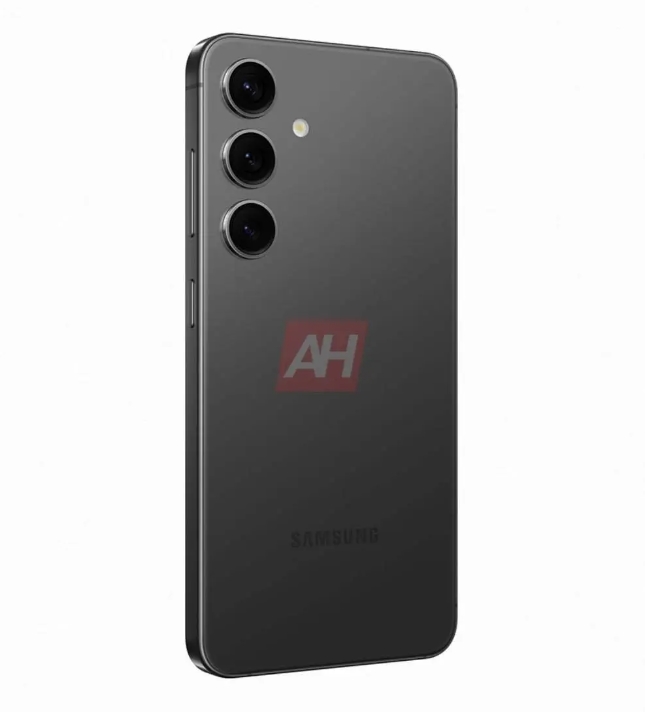
Previous leaks note that the Galaxy S24 won’t house a titanium body like the S24 Ultra. It will, however, retain an aluminum frame with several colors. The Galaxy S24 will come in “Onyx Black,” “Marble Grey,” “Cobalt Violet,” and “Amber Yellow” color choices.
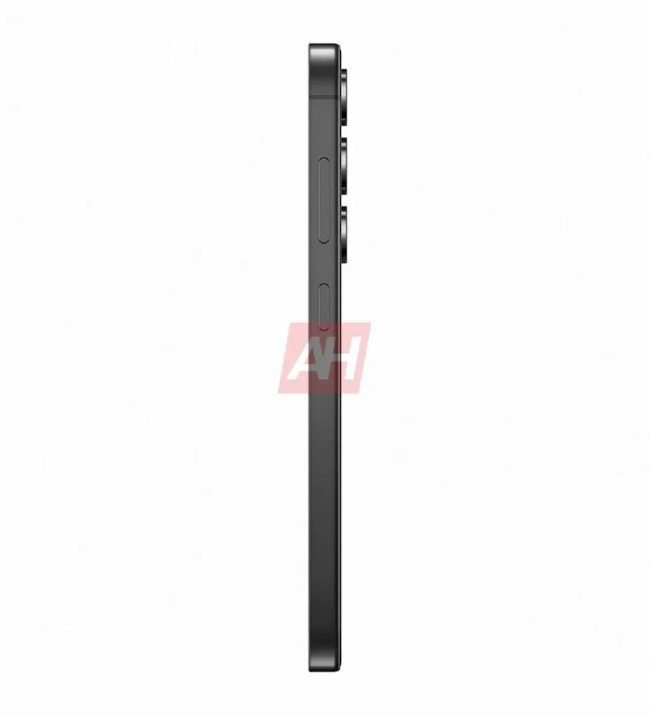
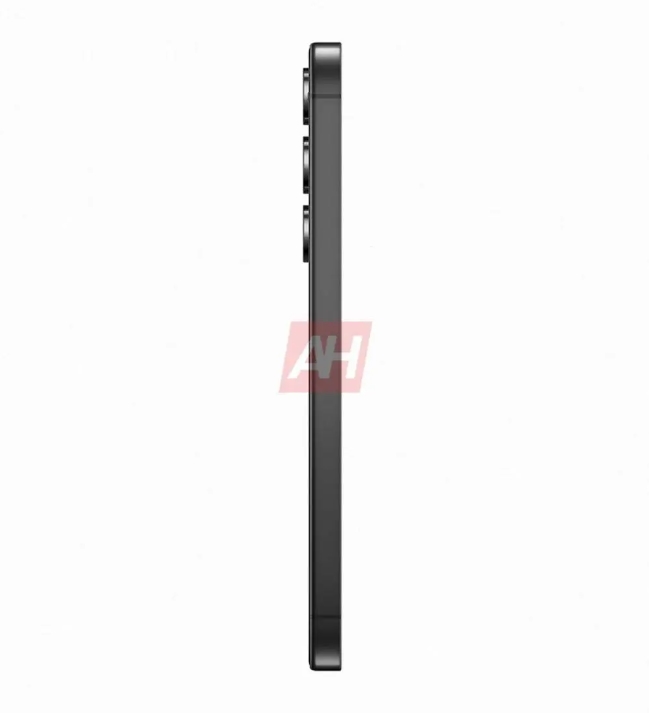
Per Android Headlines, new official-looking renders are available for the Galaxy S24. The renders showcase the colors listed above, as well as a high-definition look at the device from several angles.
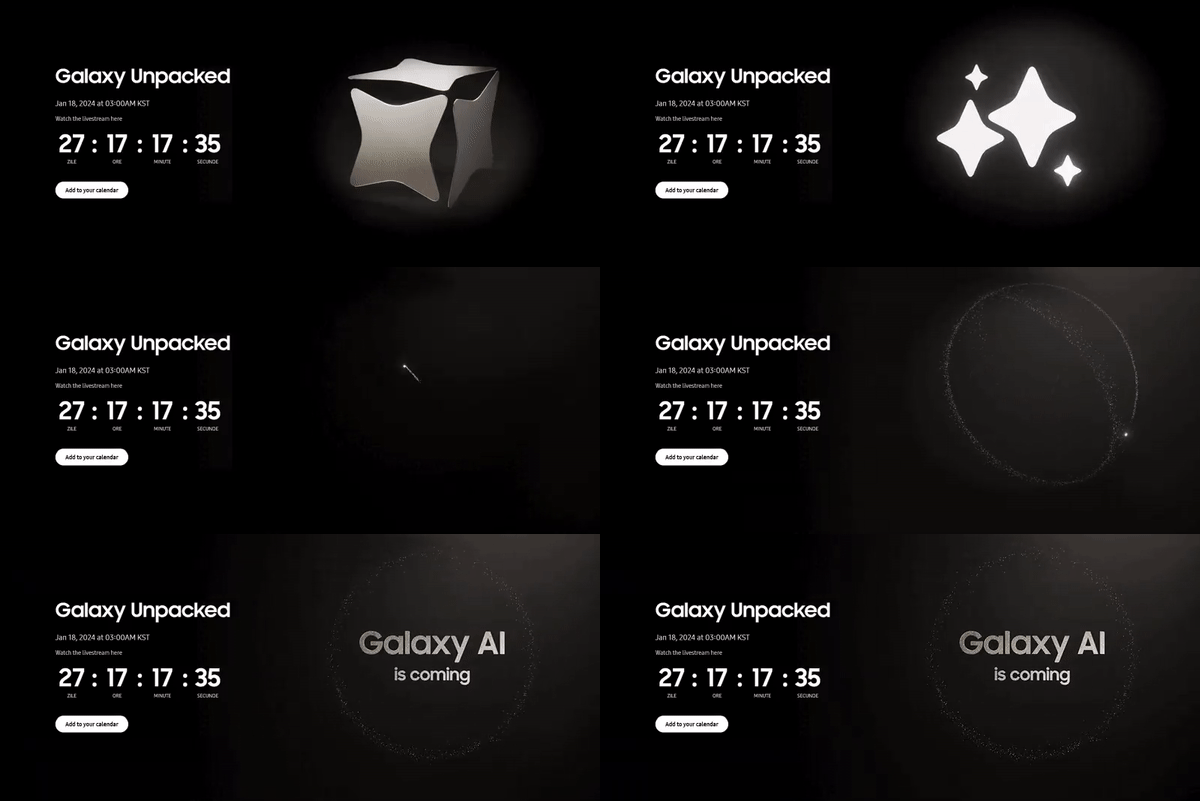
Samsung S24 Series Unpacked sets on January 18,2024 3:00AM KST ( Korean Standard Time )
One of the biggest differences between the S24 and Galaxy S23 is the thickness and radius of the aluminum frame. The S23 had a thicker frame that imposed on the rear and front glass. It was also somewhat rounded. In this generation, the metal recedes a little more and gives the phone the appearance of a metal bezel. Each Galaxy S24 also carries a color-matched frame, which redeems the design a bit.
The Galaxy S24 also retains the same camera design, with no panel surrounding each lens. The phone also retains the same basic and sometimes boring look, at least from the back of the phone.
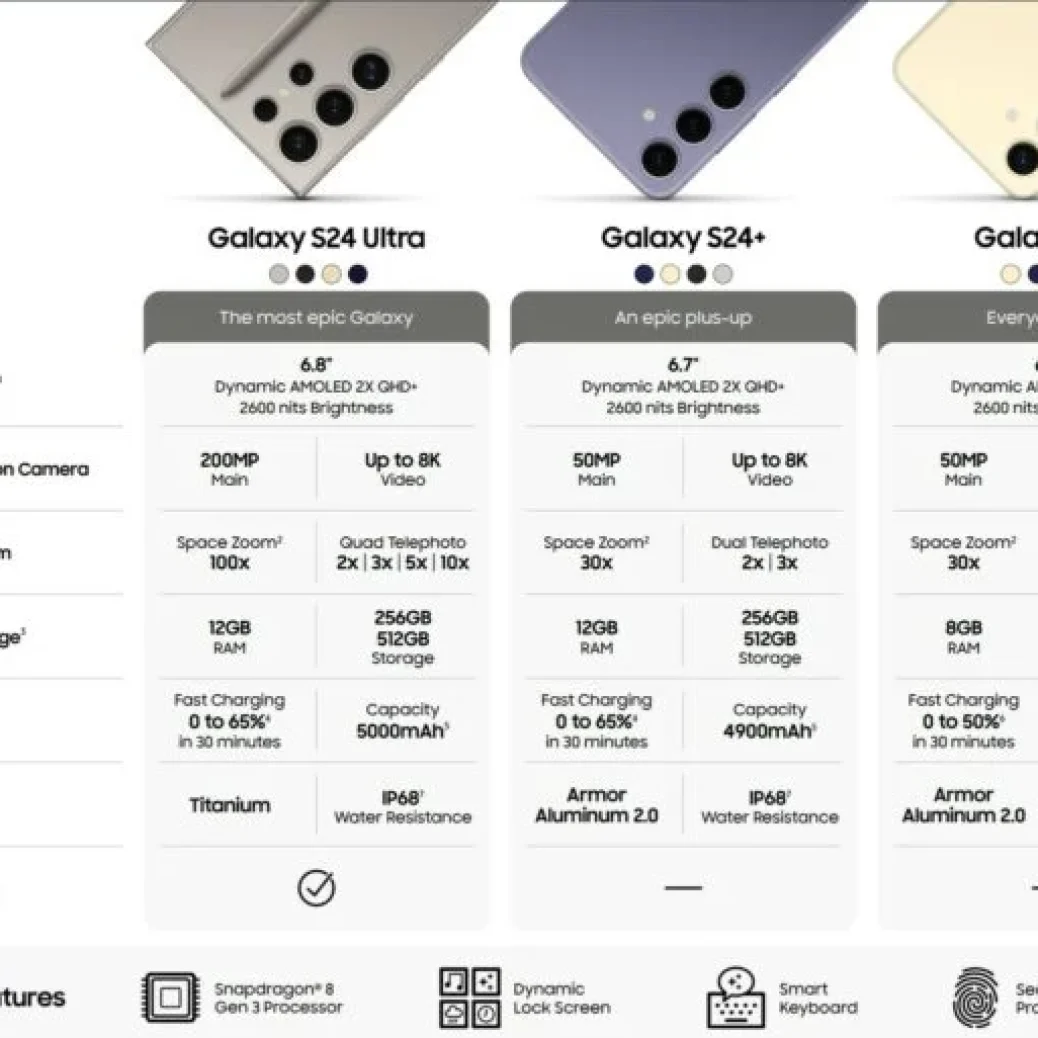
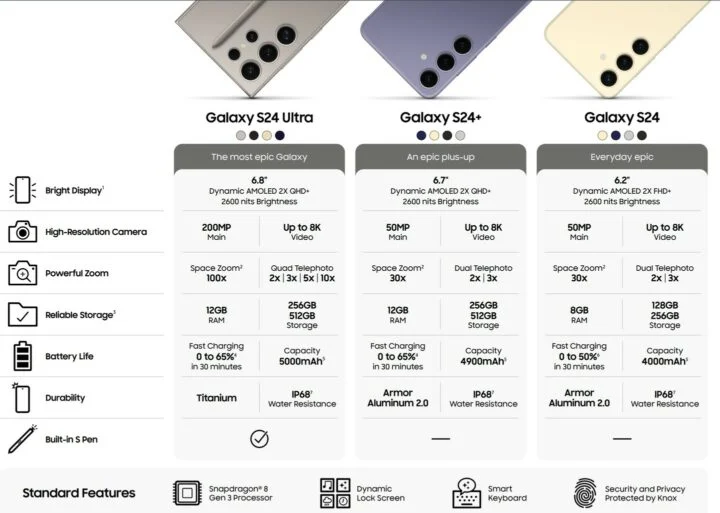
The Galaxy S24 is rumoured to house 8 GB of RAM starting at 128 GB, while the S24+ may house 12 GB of RAM. Respectively, the phones will carry a 4,000 mAh and 4,900 mAh cell. The Galaxy S24+ will house the same SoC as the Ultra – Snapdragon 8 Gen 3 – while the Galaxy S24 base model will carry an Exynos 2400 in some European markets and a Snapdragon 8 Gen 3 in the US.
Galaxy S24 launch event to happen on January 17, 2024, in the US
Leakster Evan Blass has published an image on X (formerly Twitter) that reveals the Galaxy S24 launch event’s date. According to the leaked image, the next Galaxy Unpacked event will be held on January 18, 2024, at 3:00 AM (1 PM EST/6 PM GMT/11:30 PM IST, January 17). The image also says, “Galaxy AI is coming.” Galaxy AI refers to the suite of AI-powered features that will debut with the Galaxy S24 series. The sparkles emoji animation (✨) on the invite is similar to Google Bard, which may mean that Google Bard-like features are coming to Galaxy S24 series smartphones.
Moreover, the model numbers of the carrier-locked and factory-unlocked versions of the Galaxy S24, Galaxy S24+, and Galaxy S24 Ultra were spotted on AT&T’s website. You can view them in the image embedded below.
Galaxy S24 Locked: SM-S921U
Galaxy S24 Unlocked: SM-S921U1
Galaxy S24+ Locked: SM-S926U
Galaxy S24+ Unlocked: SM-S926U1
Galaxy S24 Ultra Locked: SM-S928U
Galaxy S24 Ultra Unlocked: SM-S928U1
Galaxy S24 series to feature Galaxy AI with several AI features
AI will likely be the most important talking point of the Galaxy S24 series. Powered by the Exynos 2400 or the Snapdragon 8 Gen 3, both of which have on-device AI processing capabilities, Galaxy S24 series phones are expected to offer several AI features, including real-time language translation during calls, voice-to-text for up to 10 people in voice recordings, text conversion and summarization in Samsung Notes for both typed and handwritten text, image expansion, wallpaper generation, and more.
The Galaxy S24, Galaxy S24+, and Galaxy S24 Ultra have OLED screens with a 120Hz refresh rate, up to 2,600 nits peak brightness, and Gorilla Glass Armor. The Galaxy S24 and the Galaxy S24+ have aluminum frames, while the Galaxy S24 Ultra has a titanium frame. All three phones have an IP68 rating, an under-display fingerprint reader, Samsung Knox, Samsung Pay, and Wireless DeX. The Galaxy S24 Ultra also has a bundled S Pen.
The Galaxy A34 is here and is doing its best to continue building on top of a successful value formula. The A34 is not unlike the A33 5G before it, but there are a few noteworthy differences.
The A34 has grown noticeably. It now has a 6.6-inch diagonal, up from 6.4 inches in last year’s model, and it’s now got a larger and heavier body. This means the A34 is now bigger even than the current Galaxy A54.
The display on the new A34 is not only bigger but is now also faster at a 120Hz refresh rate. It is also shorter and wider at a 19.5:9 aspect ratio with smaller bezels.
Another notable change is the chipset. Instead of relying on an in-house Exynos chipset like last year, Samsung went for a MediaTek Dimensity 1080 chip this time. That’s one interesting development, given that the Galaxy A54 did get a new Samsung Exynos 1380 chip.
Disclaimer. We can not guarantee that the information on this page is 100% correct.
Aside from these changes, the Galaxy A34 makes sure to stick closely to an already-established formula without major deviations. Some important specs highlights still include an IP67 ingress protection rating and a stereo speaker setup. The Galaxy A34 also retains its large 5,000 mAh battery with 25W fast charging. Its camera looks mostly unchanged from last year, with a 48MP main camera, 8MP ultrawide, a 5MP macro cam and a 13MP selfie. No depth sensor this time around, though.
So, that’s the Galaxy A34 in a nutshell. The question now is whether it is as good as its predecessor and good value in general. Join us on the following pages as we try to find that out.
Unboxing
The Galaxy A34 comes in a thin two-piece cardboard box like its predecessor.
Samsung does not include a charger with the A34. That’s not exactly a new development, but one that still deserves mention, especially in the midrange.
You do still get a USB Type-C to Type-C cable in the box inside the thin paper compartment. The cable is compatible with Samsung‘s 25W fast charging, so that bit is covered.
Alternatives
The Galaxy A34 has a pretty reasonable launch MSRP of right around €400/INR 30,999/KRW499,400. That would be for a base 128GB 6GB RAM unit. As you can probably imagine, there is no shortage of competition in this price bracket.
An instantly viable option would be to consider an alternative Samsung device. While the Galaxy A52s 5G remains viable and a favorite of ours for its superior chipset, it is getting on in age at this point, and we would rather go for the Galaxy A53 5G instead. But only if you find a good deal on it since it is not decidedly any better specs-wise than the A34. It does offer a higher-resolution camera setup with arguably slightly better EIS, but that’s about it. And on the flip side, you will have to settle for briefer software support since it is a 2022 model.
One line that instantly comes to mind is Xiaomi’s Redmi Note 12. It has become fairly confusing with all of the models being released under it, but that should be okay with potential buyers since there is a lot of value to be had. The vanilla Redmi Note 12 is one option that can save you quite a big chunk of change since it retails for under €300. The Redmi Note 12 Turbo is another very popular device in our database that deserves a mention. It might, however, be harder to find at retailers. Hence, we are going to recommend the Redmi Note 12 Pro, which we have already reviewed. For a little over €300, it delivers features like IP53 ingress protection, Gorilla Glass 5 on the front, stereo speakers, a large 5,000 mAh battery with 67W charging, 6.67-inch, 10-bit, 120Hz, Dolby Vision and HDR10+ certified OLED display and a versatile camera system with a 50MP OIS snapper at the helm.
Samsung Galaxy A53 5G • Xiaomi Redmi Note 12 Pro • vivo V27 • Google Pixel 6a
The vivo V27 is another interesting direct competitor to the Galaxy A34. Retailing for about as much, it offers a 10-bit, HDR10+ certified display, a superior Dimensity 7200 chipset with more RAM (8GB) in its base tier and a more versatile camera setup, especially when it comes to video capture, where the V27 has gyro-EIS and 4K@60fps recording. Its 50MP selfie cam also has autofocus and a pair of front-facing LED flash modules, making the V27 a selfie powerhouse. The slightly smaller 4,600 mAh battery on the vivo is also capable of much faster 66W charging. On the flip side, however, you will be giving up on ingress protection by going with the vivo V27.
Why not consider the Google Pixel 6a as well? It offers a premium build with an aluminum frame and Gorilla Glass 3 front, complete with IP67 ingress protection, just like the Galaxy A34. It also comes packing stereo speakers and an HDR OLED panel. Though one that is just 60Hz and notably smaller. While far from a powerhouse, Google’s custom Tensor chipset also offers some nice features like 4K@60fps video capture and Wi-Fi 6e. The main camera on the Pixel 6a also comes with OIS, dual-pixel PDAF and pixel shift technology. It is also backed up by Google’s computational photography algorithms. And last but not least, there is the potential appeal of AOSP software, which is a major draw for many buyers.
The verdict
The Galaxy A34 is a great mid-range device. No question about that. It is not too dissimilar from its predecessor, which is frankly a good thing. Certain staples of the model are here to stay, like the IP67 ingress protection rating, the stereo speakers and the large battery.
This year, in particular, the A34 has grown considerably. With a 6.6-inch panel, it is now bigger than both its predecessor and the Galaxy A54. The new display is 120Hz as well, which is a nice little upgrade over last year’s 90Hz. Even though the A34 lacks automatic refresh rate switching, we still appreciate the jump-up in smoothness. Add the excellent maximum brightness to the mix, and the A34 manages to almost match the display of its more-expensive A54 sans the HDR capabilities.
The chipset choice on the Galaxy A34 is also seemingly working in its favor. While the new Samsung Exynos 1380 does manage to offer a bit higher performance on the A54, the Dimensity 1080 inside the Galaxy A34 holds its own. Plus, it offers great power efficiency, contributing towards the excellent battery life of the A34.
The Galaxy A34 doesn’t improve much over its A33 5G predecessor in the camera department, but it offers a very well-rounded mid-range camera experience. The triple main camera setup is versatile, too.
Struggling to find any major faults with the Galaxy A34. It is an excellent device that deserves plenty of praise and a hearty recommendation.
Pros
IP67-rated design, attractive & sturdy design.
Larger and brighter 120Hz AMOLED screen.
Excellent battery life.
Stereo speakers with good quality.
Latest Android and One UI.
Good performance for this price range and perfect thermal behavior.
Great photo and video quality, lossless 2x zoom, great selfie photos&videos.
In November, Google started the Android 14 QPR2 preview earlier than expected, and Beta 2 is now rolling out for Pixel phones, Fold, and Tablet.
Following the launch of QPR1 at the start of December, QPR2 is expected to hit stable in March. The preview program for that next release and Pixel Feature Drop should have kicked off this month. Instead, it started in mid-November and was followed by a .1 patch less than a week later.
QPRs are relatively stable and launch as betas rather than developer previews. Google officially says they are “suitable for general use.” Known issues include:
Sometimes when a user unlocks the device using their fingerprint, there is no haptic feedback.
For Pixel Fold devices, sometimes after a user unlocks the device while it’s folded, the inner display doesn’t turn on after unfolding the device.
The Assistant At a Glance widget sometimes displays weather information for the wrong location.
Google identifies the following fixes in AP11.231117.006 with the December 2023 security patch:
Fixed an issue where battery usage information that was reported in system settings was sometimes incorrect. (Issue #312121998)
Fixed an issue where the fingerprint icon on the lock screen would sometimes display before other information had loaded in always-on display mode. (Issue #311265905)
Fixed an issue that sometimes caused the biometric prompt to crash, causing it to be dismissed before a user could interact with it.
Fixed an issue that sometimes caused the Internet Quick Settings tile to indicate that there was no Wi-Fi connection, even when the device was connected to a Wi-Fi network.
The Android Beta Feedback app is available on Pixel devices to submit bugs. You can access it from the app drawer or via Quick Settings to file bugs in the Google issue tracker, while the Android Beta community is on Reddit.
Android 14 QPR2 Beta 2 is available for the Pixel 5a, Pixel 6, Pixel 6 Pro, Pixel 6a, Pixel 7, Pixel 7 Pro, Pixel 7a, Pixel Tablet, Pixel Fold, Pixel 8, and Pixel 8 Pro, as well as the Android Emulator.
Most people will install it via the Android Beta Program, but you can also flash or sideload the update.
The Oppo A5 2020 is one of the latest phones to appear in the crowded budget-to-mid-range part of smartphone land, and it proves that Oppo can continue to make compelling devices in this section of the market.
It’s very similar to the Oppo A9 2020, with the major difference being the camera setup. The A9 has a superior rear camera array, and will cost you a bit more, but if you want to spend as little as possible on your next phone then the A5 is definitely worth a look.
You can pick up the Oppo A5 2020 for around £180 online in the UK and AU$300 in Australia on time of launching, though as yet we don’t have confirmation of a US release. That’s not very much money for a smartphone at all, and everything else in this review has to be weighed against the price of admission.
Of course, there’s plenty of competition at the lower end of the market – from the likes of Motorola, Honor, Realme and others – but the Oppo A5 2020 does enough to find a place among the best cheap phones, making it worthy of some serious consideration for the budget-conscious.
Disclaimer. We can not guarantee that the information on this page is 100% correct.
Design
Spacious screen
Tastefully designed
Not waterproof
Take a look at the Oppo A5 2020 and you can tell it’s not a premium-level, flagship phone, and it’s the same when you pick it up. At the same time it’s fair to say that the handset looks more expensive than it actually is – sure, it’s clad in plastic and looks unoriginal, but it’s nicely curved and finished.
Black and white are your rather ho-hum color choices here, with Oppo attaching a plastic screen protector in the factory and bundling a silicone case with the phone too. So if you want some basic protection for your new handset, you won’t necessarily have to go out and buy a separate case.
With that 6.5-inch screen and a thickness of 9.1mm, this is not a compact handset, though you can just about use it with one hand (if you have big-ish hands and dexterous fingers). It’s good for getting a lot on screen at once, but it’s not so good for stuffing into a small pocket.
Oppo has put the power button on the right here, with the volume controls on the left. The headphone jack (yes, there is one) is down at the bottom of the device, together with a speaker grille. Oppo has thankfully gone for USB-C as the data port, with some budget models still resorting to micro USB.
The fingerprint scanner is up on the back. The phone isn’t dust or waterproof, but then you wouldn’t really expect that from a phone at this price – corners have to be cut somewhere, so just make sure you don’t drop it in the bath or leave it out in a sandstorm.
While the design of the Oppo A5 2020 won’t exactly set hearts racing, we’ve seen a lot worse down at the budget end of the Android market, so we can’t really fault Oppo too much in this department. You’re not going to be embarrassed to take this out in front of friends and family at least.
Verdict
The Oppo A5 2020 when judged against its price comes out very well indeed: for not much money at all, you get a device that is competent in most areas and really good in a couple.
Samsung has officially launched its Android 14 update, One UI 6, with new features, updated design, and more. Here’s everything that’s new, a list of Samsung Galaxy devices getting Android 14, and everything else you’ll need to know.
What’s new in Android 14 on Samsung Galaxy?
Android 14 is, in itself, a not-so-major update, but it does bring some key changes to the world’s most popular smartphone operating system. Those changes, which we’ve previously detailed, include additions such as support for UltraHDR, improvements to the share menu, lockscreen changes, official support for flash notifications, and more.
Many of the features new on Pixel phones, though, have been in place already on Samsung smartphones, such as the new lockscreens. So what’s new on Galaxy?
One UI 6 is Samsung’s latest Android skin, and built on top of Android 14 it brings some notable changes such as the new “Quick Panel” design for Quick Settings, an option to change the wallpaper based on the time of day or certain modes, expansions to the lockscreen customization options, a new camera widget, new weather widgets, as well as new emoji and a new default system font.
Samsung devices with Android 14 – The full list
On October 30, 2023, Samsung officially launched its Android 14 update to its current flagship phones, just 26 days after Google Pixel devices were updated. That’s six days after last year’s release, but much faster given Pixels were updated much earlier in 2022.
Here’s the full list of Samsung Galaxy devices that currently have Android 14.
This list will be continuously updated over the coming months with the latest additions marked in bold text. Check back regularly!
Galaxy S devices with Android 14
In October 2023, Samsung started pushing One UI 6 to the Galaxy S23, S23+, and S23 Ultra in select countries across the globe. This primarily started in Europe, but has since expanded globally including the United States. In mid-November, Samsung expanded the update to the Galaxy S22 series, as well as to the newly-released Galaxy S23 FE, but only on Exynos models, and the update has also shown up on Galaxy S21 devices.
Galaxy S23 – Available globally
Galaxy S23+ – Available globally
Galaxy S23 Ultra – Available globally
Galaxy S23 FE – Exynos models only
Galaxy S22 – Available globally
Galaxy S22+ – Available globally
Galaxy S22Ultra – Available globally
Galaxy S21 – Available in Europe
Galaxy S21+ – Available in Europe
Galaxy S21 Ultra – Available in Europe
Galaxy S21 FE – Available in Europe, US carriers
Galaxy Foldables with Android 14
On November 21, Samsung started rolling out Android 14 to its latest foldables, the Galaxy Z Fold 5 and Galaxy Z Flip 5, but only on Verizon Wireless in the US so far.
The first Galaxy A series device to get the One UI 6 update was the Galaxy A54, which picked up the update on AT&T in the US on November 21. A day later, the Galaxy A73 was updated in Iran, and the super-affordable Galaxy A34 and Galaxy A14 5G weren’t too far behind. Samsung has also since released Android 14 for the Galaxy A24 and Galaxy A53.
Galaxy A54 – Available on AT&T US
Galaxy A53 – Available in UK
Galaxy A34 – Available in Europe
Galaxy A24 – Available in Middle East, North Africa
Galaxy A14 – Available globally
Galaxy A73 – Available in Iran
Meanwhile, in Samsung’s Galaxy M series, the Galaxy M53 has been updated in Germany thus far.
Galaxy M53 – Available in Germany
Galaxy Tablets with Android 14
On November 22, Samsung released its first Android 14 update for a tablet, with the Galaxy Tab S9 series now eligible to be updated in most countries, as is the Galaxy Tab S8 series in select regions.
In December, Samsung has also released the One UI 6 update for its newest tablets, the Galaxy Tab S9 FE and Tab S9+ FE, as well as expanding it to other regions on Tab S8.
Galaxy Tab S9 – Available in Europe, US, Canada
Galaxy Tab S9+ – Available in Europe, US, Canada
Galaxy Tab S9 Ultra – Available in Europe, US, Canada
Galaxy Tab S9 FE – Available in Europe
Galaxy Tab S9+ FE – Available in Europe
Galaxy Tab S8 – Available in Europe, US, Korea
Galaxy Tab S8+ – Available in Europe, US, Korea
Galaxy Tab S8 Ultra – Available in Europe, US, Korea
Will my Galaxy device get Android 14?
Of course, not every Samsung smartphone or tablet will get Android 14. The update is being provided in line with Samsung’s current update policy. That means any flagship released since 2021 is eligible, as they all have at least four major Android OS updates. The 2020-released Galaxy S20 series, Galaxy Note 20 series, Galaxy Z Fold 2, and Galaxy Z Flip/5G however, will not be updated as Samsung has confirmed following a slip-up on the company’s part.
Generally speaking, any Samsung smartphone or tablet released in the past two years will be updated to Android 14. For slightly older devices, the update will still be available, but only to the more expensive hardware such as the Galaxy S, Galaxy Z, and Galaxy Tab S lineups.
Samsung Android 14 update schedule
The state of Samsung’s official schedule for Android 14 and One UI 6 updates has been a little hit or miss, with one schedule being removed early on. But, in November, the company posted a pretty official-looking schedule to its Samsung Members app in some countries, which gives us a good idea of what to expect.
The list below is based on Samsung’s official Android 14 schedule, and we’re constantly updating it as new devices are updated.
If last year’s Android 13 update is anything to go by, Samsung will likely blow through its core lineup well before 2024 rings in.
After a week off, Samsung is expanding its Android 14 update yet again, with OTAs hitting several Galaxy A devices as well as the Galaxy Tab S9 FE and Galaxy S21 FE.
Samsung has already launched Android 14 and One UI 6 for over a dozen devices, with more and more to come. This week that includes several more affordable devices, starting with the recently launched Galaxy Tab S9 FE.
The Galaxy Tab S9 FE series is seeing updates across both the smaller and larger Tab S9+ FE models, but only in Europe so far. Cellular models and other regions are sure to follow in the weeks to come.
Meanwhile, Samsung is giving another Fan Edition device a boost with Android 14, specifically with the Galaxy S21 FE getting One UI 6 this week. The update has appeared on the Verizon-specific Galaxy S21 FE in the US, with unlocked models and other regions likely around the corner as well.
Also, a bunch of Galaxy A devices are being updated. The Galaxy A52s is being updated in select European countries, as is the Galaxy A33. Following its 5G sibling getting the update in recent weeks, too, the Galaxy A14 LTE is now getting One UI 6 in Kazakhstan.
Samsung‘s journey toward updating all eligible Galaxy devices to One UI 6.0 continues, and the company has just added two new tablets to the list. The Galaxy Tab S9 FE and Tab S9 FE+ are now getting One UI 6.0.
The Android 14-based update is available for the Fan Edition tablets in Europe. Users can identify the update by firmware versions X516BXXU1BWK9 and X616BXXU1BWK9. The new release includes the November 2023 security patch.
The Galaxy Tab S9 FE and Tab S9 FE+ are Samsung’s first Fan Edition tablets in more than two years. They went on sale in October with Android 13 and One UI 5.1 out of the box, and One UI 6.0 is the first major OS update of the promised four.
The Fan Edition tablets barely got any use out of One UI 5.1
Samsung released its new tablets at an awkward moment in time, when One UI 5.1 was on its way out, and One UI 6.0 was readying for a widespread public release. It almost feels like one of the four promised OS upgrades went to waste. Nevertheless, One UI 6.0 is here and should enable an improved user experience.
One UI 6.0 brings better multi-tasking and redesigns some UI elements, such as the quick toggle area. Many Samsung apps have new features or slight UI enhancements.
If you own the Galaxy Tab S9 FE or Tab S9 FE+ in Europe, you should be able to download the One UI 6.0 update via the Settings app on the tablet. Navigate to “Software update” and tap “Download and install.” You can also download the official firmware files from our website and install the update manually using a PC.
Apple is continuing its annual tradition of donating a portion of all Apple Pay sales during the holiday shopping season to The Global Fund. This is an extension of Apple’s ongoing partnership with (RED), which has raised more than a quarter of a billion dollars so far.
Apple always donates a portion of proceeds from every (PRODUCT)RED purchase to the Global Fund. This includes purchases from (PRODUCT)RED iPhones, cases, Apple Watch bands, and more.
This limited-time promotion expands the donation eligibility to include every purchase made with Apple Pay on Apple’s website, in the Apple Store app, and at Apple Stores.
“From November 28 through December 8, Apple is donating $1 to the Global Fund for every purchase made with Apple Pay on apple.com, in the Apple Store app, or at an Apple Store,” Apple says on its website.
“Donations are limited to a maximum of one million dollars ($1,000,000). The donation goes to the Global Fund to fight AIDS and help fund critical health programs that save lives,” it continues.
You can learn more about Apple’s partnership with (RED) on the company’s website.
Apple’s support for World AIDS Day 2023 includes in-app purchases
Apple’s annual support for World AIDS Day this year includes donating all proceeds from in-app purchases in three popular games.
Apple is also suggesting the (PRODUCT)RED Apple Watch Series 9 and Sport Band combo as a holiday gift …
Apple has supported the (RED) Global Fund since 2006, with Apple’s contribution helping to fund HIV/AIDS programs in sub-Saharan Africa.
Over the last 17 years, Apple customers have helped raise more than a quarter of a billion dollars, giving millions of people access to lifesaving antiretroviral treatment and HIV testing, and helping HIV-positive mothers prevent passing the virus on to their babies.
Apple is supporting the fund in three ways. First by promoting (PRODUCT)RED versions of a range of products.
Apple Watch Series 9, iPhone 14, iPhone 14 Plus, iPhone 13, and iPhone SE, and accessories, including the Silicone Case with MagSafe for the entire iPhone 14 and iPhone 13 lineups.
A portion of the sale price on all these goes to the Global Fund. Apple is highlighting the special edition Apple Watch S9 as a potential gift choice.
The world’s most popular watch is available in a (PRODUCT)RED aluminum case with a (PRODUCT)RED Sport Band. Powered by the new S9 SiP, Apple Watch Series 9 is packed with the most advanced health, fitness, and safety capabilities in Apple Watch to date, plus a magical new double tap gesture and Precision Finding for iPhone.
New Palette and Solar Analog watch faces will also be available in red, joining Metropolitan, World Time, Numerals Mono, Gradient, Stripes, and Typograph in a collection of specially customized watch faces celebrating World AIDS Day.
Second, with a one dollar donation on any purchase made this week.
Now through December 8, Apple will donate $1 for every purchase made using Apple Pay on apple.com, through the Apple Store app, or at an Apple Store location. Customers can buy any Apple product or accessory and help save lives.
Third, special in-app purchases for three popular games.
Beginning today through December 4, the App Store will donate all proceeds from select, exclusive in-app purchases for three amazing games — MONOPOLY GO!, Gardenscapes, and EA Sports FC Mobile — to the Global Fund, including playful avatars, cool shields, and star soccer players.
As usual, the company will also be highlighting World AIDS Day in Apple Stores, likely including turning the logo red.
The Apple Watch’s fall detection feature came to the rescue for a man in Georgia, according to a new report from Fox5 Atlanta. Mike Menand was on a hike in the Chattahoochee River National Recreation Area earlier this year when his two dogs spotted a coyote in the distance, leading Menand to suffer a near-fatal fall.
“They got spooked and knocked me down and dragged me off the trail,” Menand said, referring to what happened when his dogs saw the coyote. This triggered his Apple Watch’s fall detection feature, which kicked in to call emergency services on his behalf.
“I couldn’t even get to the phone because my phone was in my pocket, which I was lying on,” Menand said. He suffered a broken leg in the accident and had a titanium rod put in his leg during surgery.
Menand said that he isn’t sure what would’ve happened if he wasn’t wearing an Apple Watch. “There’s no telling how long I would’ve been laying there,” he recalled. “I realized I couldn’t move, I couldn’t get up. I was in a lot of pain.”
In fact, just a month after Menand suffered his fall, a woman fell while hiking in the same park and did not survive. “When I read that, I thought that could’ve been me,” Menand said. “Because I was by myself, no one around me, no one really knew where I was.”
Fall detection works by intelligently detecting when a sudden fall occurs, automatically calling emergency services if the person doesn’t dismiss the alert within one minute of falling. If the person’s emergency contact information is filled out, that contact will be notified with a text message and a map of the watch’s location at the time of the fall.
Here’s how Apple Watch fall detection works, how to customize, and use it
One of Apple Watch’s potentially life-saving features is fall detection that’s paired with auto emergency SOS calling. Whether you’ve never enabled it or have but later turned it off, follow along for how Apple Watch fall detection works, how to customize, and use it.
Apple Watch fall detection can be used by anyone 18 years of age and up with the option of having it enabled just during workouts or all the time.
The feature is automatically turned on for those 55 years old+. But it’s not only valuable for the elderly, even young users have seen their lives saved by Apple Watch fall detection.
While it can be an important safety feature, Apple notes it “cannot detect all falls” and also that Apple Watch may interpret “high-impact” activity” as a fall and trigger a false alert.
If Apple Watch SE or Apple Watch Series 4 or later detects a hard fall while you’re wearing your watch, it taps you on the wrist, sounds an alarm, and displays an alert. You can choose to contact emergency services or dismiss the alert by pressing the Digital Crown, tapping Close in the upper-left corner, or tapping “I’m OK.”
How to turn on Apple Watch fall detection
Apple Watch fall detection is available for users 18 years old+ on SE and Series 4 and later
Launch the Apple Watch app on iPhone
Choose the My Watch tab in the bottom left corner
Now swipe down and tap Emergency SOS
To turn on Apple Watch fall detection, tap the toggle next to it
You can also choose if you want the feature always on or just activated during workouts
If you’re under 55, fall detection – when turned on – will default to “Only on during workouts” – but can be changed to “Always on”
It can be worth double-checking your Medical ID and emergency contacts data at the bottom of the Emergency SOS page your on, tap “Edit These Contacts in Health” to make changes
You can check your fall history (excludes when you report you didn’t fall) by heading to the Health app on iPhone > Browse tab > Other data > Number of Times Fallen.
Here’s how the process looks to turn on fall detection:
And here are more specifics on how emergency SOS calls via fall detection work:
If your Apple Watch detects that you’re moving, it waits for you to respond to the alert and won’t automatically call emergency services. If your watch detects that you’ve been immobile for about a minute, it will make the call automatically.
After the call ends, your watch sends a message to your emergency contacts with your location letting them know that your watch detected a hard fall and dialed emergency services. Your watch gets your emergency contacts from your Medical ID.
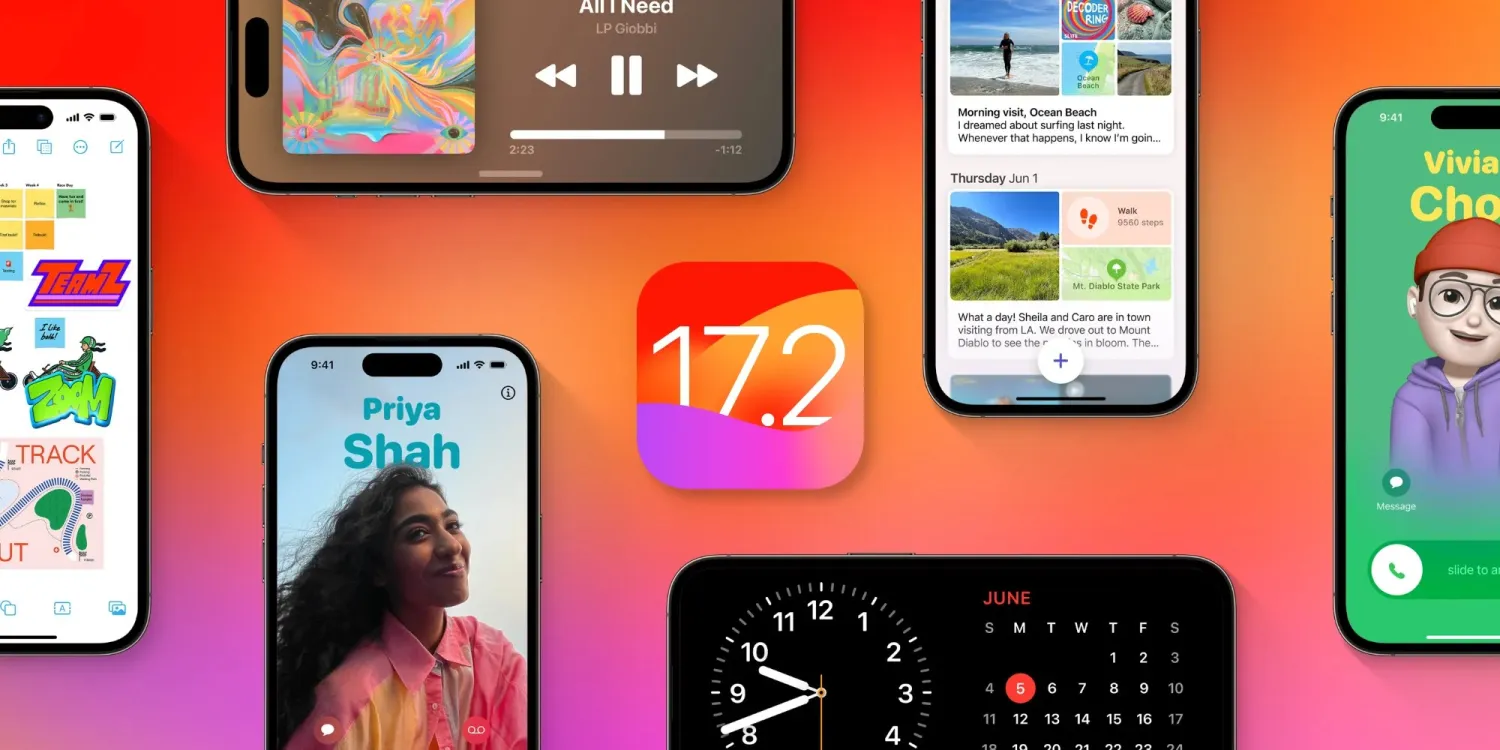
After the release of iOS 17.1 in October, Apple is hard at work on iOS 17.2 with a collection of new features and changes. iOS 17.2 is currently in beta testing with developers and public beta users. Here’s everything new so far.
When will iOS 17.2 be released?
Thus far, Apple has released four betas of iOS 17.2. This leads us to believe that the update will be released to the public sometime within the next several weeks. The update will almost certainly be released before the end of 2023.
Last year, iOS 16.2 was released on December 13 with major new features like Apple Music Sing and the all-new Freeform app.
What’s new in iOS 17.2?
Journal app
The headlining change in iOS 17.2 is the addition of the new Journal app, which Apple first unveiled at WWDC in June. Apple describes the new Journal app as an “all-new way to appreciate life’s moments and preserve your memories.”
At launch, the Journal app is only available on iPhones. There’s no word on when or if Apple plans to expand it to the iPad and Mac.
Collaborative playlists in Apple Music (maybe?)
The first three betas of iOS 17.2 included the ability to create collaborative playlists in Apple Music. This feature was announced by Apple at WWDC in June and teased as coming sometime later this year.
iOS 17.2 beta 4, however, removes the ability to create collaborative Apple Music playlists. Whether or not Apple adds the feature back before iOS 17.2 is released to everyone remains to be seen.
More changes to Apple Music
Also in iOS 17.2, there is a new default playlist called “Favorite Songs” that is automatically generated based on songs you’ve “favorited.” This builds upon the “Favorites” feature that was first introduced in iOS 17.1.
iOS 17.2 can now automatically add songs to your music library when you favorite them. You can find this option by going to the Settings app and then choosing “Music.”
Finally, iOS 17.2 adds the ability to disable Apple Music Listening History when a Focus Mode is on. “Choose if music played will influence recommendations and mixes, appear in Recently Played, or be shown to others on Apple Music,” Apple explains.
This means that when you have a particular Focus mode enabled, you can toggle on the Apple Music Focus Filter to prevent any songs played from affecting your listening data.
Spatial Video recording
With iOS 17.2, iPhone 15 Pro and iPhone 15 Pro Max users can record spatial video for Vision Pro. You can enable the new spatial video toggle by going to the Settings app, choosing the Camera menu, then choosing Formats and toggling the “Spatial Video for Apple Vision Pro” option.
Spatial video is recorded in 1080p resolution at 30 frames per second. Apple estimates that one minute of spatial video takes up around 130MB of storage space.
iOS 17.2 beta 2 enables Vision Pro spatial video capture on iPhone 15 Pro
Apple has allowed some press to view their own spatial videos in Vision Pro, Final Cut gaining editing ability next year
Default notification sounds
At long last, iOS 17.2 adds the ability to change the default notification sound. This comes after iOS 17 changed the default notification sound from “Tri-tone” to “Rebound,” which has proven to be a controversial decision.
In iOS 17.2, you can go to the Settings app and choose “Sounds & Haptics” to find a new “Default Alerts” option. Here, you can change the default sound and haptic feedback for alerts.
Reactions in Messages
Another feature coming with iOS 17.2 is the ability to react to messages using any sticker or emoji in the Messages app. This is done by long-pressing on a message and choosing the new “Add Sticker” option.
Action Button adds “Translate” option
With iOS 17.2, iPhone 15 Pro users can assign their Action button to a new “Translate” option. With this enabled, pressing the Action button initiates an automatic voice-to-text translation between two languages.
Although this capability was first introduced during the announcement of the iPhone 15 Pro in September, it wasn’t added until iOS 17.2.
New widgets
Apple has added three new widgets for the Weather app:
Details: See the chance of precipitation, UV index, wind, and more.
Daily forecast: See the current weather conditions and daily forecast for a location.
Sunrise and sunset: See the upcoming sunrise and sunset information for your location.
For the Clock app, there’s a new “Clock Digital” widget that displays the current time in a digital format rather than analog. This is the first digital clock widget Apple has offered.
‘Local Awareness’ for Emergency Alerts
iOS 17.2 includes a new “Local Awareness” option for Emergency Alerts. “Apple can use your approximate location to improve the timeliness, accuracy, and reliability of emergency,” Apple says.
To enable this option, go to the Settings app, head to Notifications, then choose Emergency Alerts and look for the new “Local Awareness” toggle.
Contact Key Verification
A year ago, Apple unveiled a feature called Contact Key Verification to enhance the security of iMessage. This feature has now been added with iOS 17.2.
Contact Key Verification enables users of iMessage to ensure that their messages are reaching only the intended recipients.
iOS 17.2 adds a new “AirPlay Receiver” option for Vision Pro. “Stream or share content from Apple Vision Pro to your iPhone,” Apple explains.
Vision Pro is currently expected to be released sometime in “early 2024.” The new toggle is in the Settings app under the AirPlay menu.
iTunes Store changes
Bloomberg has reported that Apple plans to phase the dedicated iTunes movie and TV show apps in favor of the TV app. iOS 17.2 lays the groundwork for these changes, including new messaging that redirects users to the TV app.
Software update feature
iOS 17.2 also lays the groundwork for a new feature that will allow iPhones to be updated even if they are still sealed in the box.
For instance, Apple retail employees will be able to update iPhones without taking them out of the box. Currently, iPhones are shipped from the factory with whatever build of iOS was available at that time. This means millions of iPhones out there ship with software that is multiple updates old by the time that phone arrives to the customer.
More changes in iOS 17.2
The new “Sensitive Content Warning” feature in iOS 17 is expanding to stickers in the Messages app and Contact Posters in the Contacts app.
Siri can now tell you your ETA when using Apple Maps and tell you your current altitude.
iOS 17.2 lets users disable inline text predictions without turning off predictive text.
Apple says that iOS 17.2 fixes Wi-Fi slowdowns and connectivity issues.
In the App Store’s “Apps” and “Games” sections, there are new sub-categories that appear along the top for additional filtering options.
There’s a new rainbow text option when designing a Contact Poster in iOS 17.2.
The Apple Books app has added a new “Fast Fade” option for page turning.