watchOS 8 will be shown off for Apple Watch in just one month, and we’re hoping for a feature-packed update this year. While there’s still time to dream about what could come in the next Apple Watch software update, we’re sharing four short feature requests that would be welcome in watchOS 8 or any future version of the Apple Watch software.
Always-on display
Apple Watch Series 5 introduced the always-on display for select instances, and Apple Watch Series 6 improved the brightness for always-on display in outdoor settings. In terms of hardware, Series 5 and 6 are already mature for this feature, but the software experience hasn’t changed in two years.
Always-on display works great with watch faces and Apple’s Workout app, but it’s just a digital clock with a blurry background in every other instance.
Some basic expansions for always-on display support include Apple’s Now Playing view, navigation in Maps, and active countdowns in the Timer app. Now Playing and Maps actively take over the watch face by default, yet neither of these features support always-on display. I would argue that the Timer app should also take over the watch face when actively counting down, but I would settle for proper always-on display support to start.
every Apple app in watchOS should have some level of always-on display support and not just the blurry overlay with the digital clock presented. And speaking of digital time, having a proper always-on display version of an analog clock would be highly welcome. It’s as jarring to see your analog watch face turn into a digital clock if always-on display mode kicks in when you’re in an app, using navigation, or playing audio.
Apple Notes
Bringing a scaled-back version of Apple Notes to the Apple Watch has long felt like a no-brainer idea for two reasons.
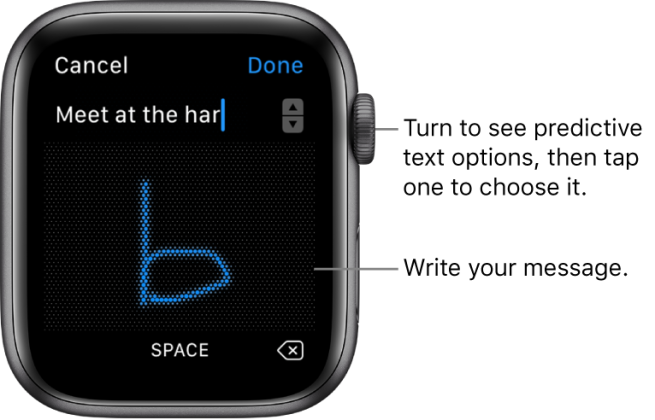
Bringing the ability to capture quick ideas through dictation, voice recording, or drawing characters through Scribble could be the modern day version of jotting down something on the back of your hand.
The third-party app Drafts is the best example of how this could work for Apple Notes users. And like with Voice Memos, notes created from the Apple Watch could be timestamped and geotagged. There could also be an Apple Watch spin to Apple Notes on watchOS: the ability to save heart rate and blood oxygen levels to notes created on the Apple Watch.
Referencing notes created on other devices is also long overdue. For example, you can already view your shopping list on your Apple Watch if you use Reminders, but it’s common for people to create grocery lists in Notes too. You could also subtly reference bits of information at a glance instead of pulling out your iPhone in discreet situations.
Breathe schedule
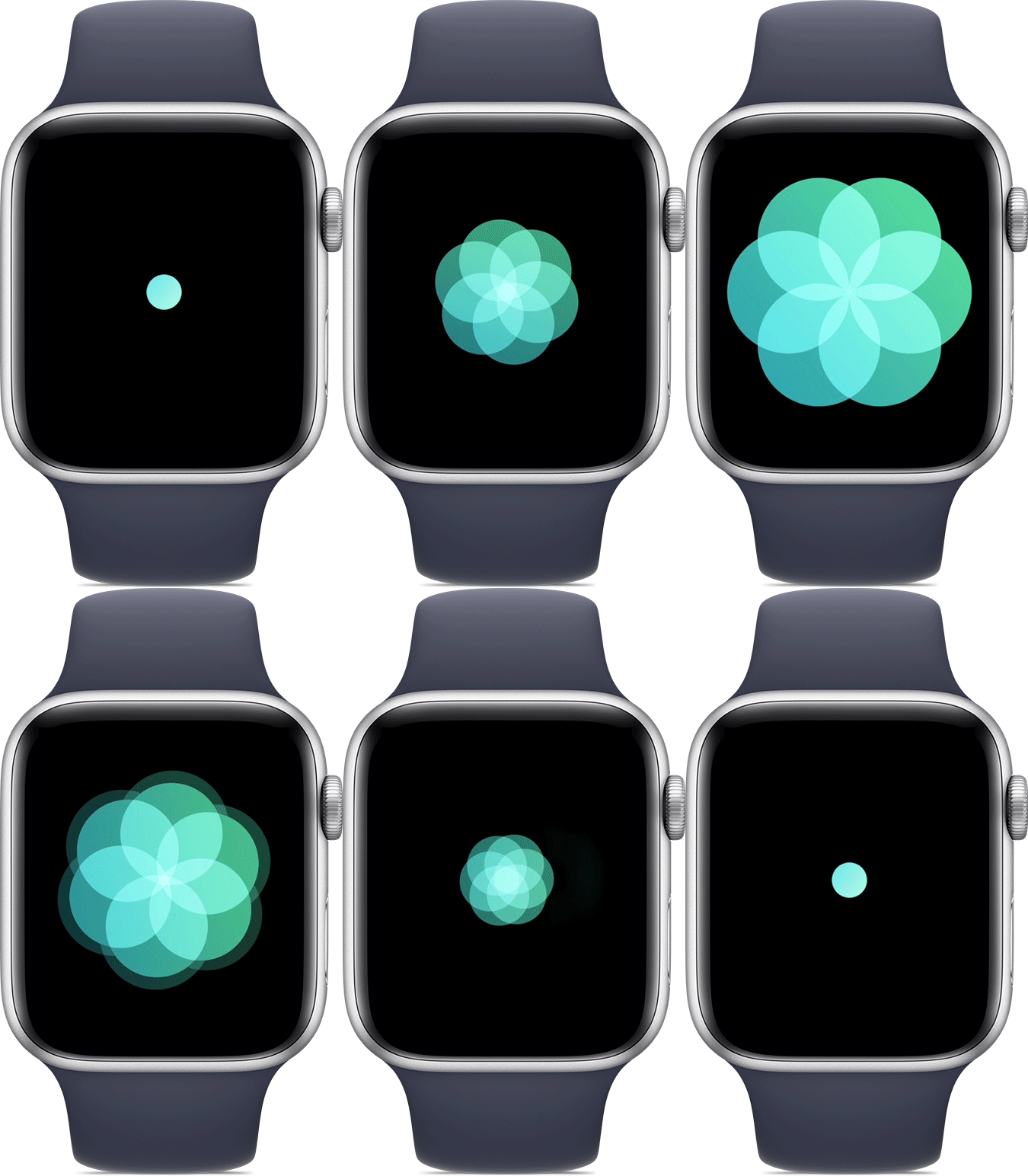
I’m admittedly not a frequent user of the built-in Breathe app on Apple Watch, but I never regret taking the time to focus myself when I do use the app. This is partly because I’m not a huge fan of how the Breathe reminders are currently handled in watchOS.
You can be alerted to use the Breathe app for a specific number of times if you haven’t yet in a day, but you can’t schedule when these alerts should come in. That’s probably intentional to promote pausing and meditating at different times each day, but I think I would be more likely to regularly use the app if I could schedule alerts.
The simplest method would be choosing specific times of the day for being reminded to use the Breathe app. You could go deeper and add Breathe alerts to part of your wake-up routine or wind-down routine for added encouragement. Finally, Breathe alerts could work sort of like the hand-washing reminders in watchOS. Rather than based on intervals of a certain number of hours, Breathe alerts could be triggered when you change locations.
Live lyrics
You know how Apple Music can show live lyrics for many songs with a focus on the current part of the track? I want that, but for Apple Watch. Visually, it’s a challenge to bring the feature from medium-sized rectangles to much smaller squares. What I have in mind is filling the screen with what would currently be in focus on the iPhone. This could make for instant, hands-free karaoke sessions or just make keeping up with current lyrics in solo listening sessions easier.
Scrolling through the lyrics with the Digital Crown to jump to a specific part of the song is a natural fit for Apple Watch. You could even bring the new lyric-based song-sharing feature from iPhone to Apple Watch with a long press.
More
While details are light so far on what we’ll actually see in watchOS 8 at WWDC, 9to5Mac has some other ideas for future watchOS versions that we’ve recently shared.
In my piece on toning down the Apple Watch, I recommended a new default for managing mirrored iPhone alerts. Currently, you have to manually turn off mirrored iPhone alerts per app. You also have to remember to turn off iPhone alert mirroring each time you install a new app on your iPhone. In practice, you’re probably unlikely to remember this step until you actually get an alert from some app you installed recently. Adding an option to make iPhone alert mirroring opt-in instead of opt-out by default would be terrific.
More recently, Parker Ortolani forecasted a useful addition to the newly launched AirTag experience. You can locate lost items from your iPhone, iPad, or Mac, and you can find people with location sharing on the Apple Watch. What you can’t yet do is find or trigger AirTags from the Apple Watch. Here’s hoping watchOS 8 remedies this.
Want more ideas for what watchOS 8 and upcoming versions of the Apple Watch software could bring in the future? Parker published a two-part concept in January that goes even further, and other creative minds have dreamed up revamps to watchOS as well.
Apple kicks off its virtual Worldwide Developer Conference on June 7 this year. This is where we can expect to see iOS and iPadOS 15, watchOS 8, tvOS 15, and macOS 12 for the first time.
Apple’s AirTag is reasonably small and lightweight, but the accessory may be too thick for those who want to put it in a wallet. Because Apple only offers AirTag with a single design option, Andrew Ngai decided to make his own version of Apple’s tracking accessory that looks like a card — and the result is quite impressive.
The process is not exactly easy, as you might imagine, but Andrew managed to do it all himself with just a few tools and a lot of patience. As he demonstrated, removing the back of the AirTag was quite simple, but the components are all glued to the plastic shell with the exception of the removable battery.
Andrew had to heat the AirTag to 150ºF (or 65℃) to get the AirTag logic board out of the plastic shell. However, the biggest challenge in making the AirTag thinner was relocating the CR2032 battery, which is 3.2 millimeters thick by itself. Together with the whole structure, each AirTag is 8 millimeters thick.
By using extra wired connections, it was possible to connect the battery to the AirTag side by side instead of keeping them together on top of each other. The final step was to create a 3D card made to fit the AirTag’s disassembled components together so that they would not come loose. The result was a fully functional AirTag card that can be placed in a wallet just like a credit card.
This, of course, is not something you should do with your AirTags as the process can permanently damage the accessory, but it’s nice to see the possibilities with this product.
Each AirTag costs $29 and there’s also a 4-pack for $99, while Apple also sells multiple accessories like ring holders and leather loops. You can also check Amazon’s website for deals on AirTag and related accessories.
Asus Zenfone 3 Deluxe is a much better Android phone than its predecessor thanks to its full metal body design and, for the price, leading specs, including 6GB of RAM, 64GB of storage and a 23MP camera. It also now has the Android Oreo update.
FOR
6GB of RAM onboard
Slick antenna-less metal design
Starts at 64GB of storage
AGAINST
Hidden cost: Snapdragon 821 version
1080p display unfit for VR
Single, bottom-firing speaker
Zenfone 3 Deluxe represents a major upgrade to Asus‘ spelling-challenged smartphone series with a component design and specs you won’t find on many other Android phones at this price range.
Update: Although the Asus Zenfone V is the newest Asus phone you can buy, the you can still find the Asus Zenfone 3 Deluxe on Amazon for cheap, and it’s been updated with Google’s new Android Oreo software. Here’s our updated Zenfone 3 Deluxe review.
The smartphone is made a name for itself at Computex 2016 with 6GB of RAM. All but one (the OnePlus 3T) of our best phones ended 2016 with 4GB of RAM, which prevents slowdown with multiple apps open.
This phone also debuted the Snapdragon 821 chipset worldwide (though the Google Pixel and Pixel XL launched with the chip first in the West) and starts with 64GB of internal storage (going up to 256GB).
Of course, there’s also a more reasonably priced Snapdragon 820 version – the one we tested – but you wouldn’t know that from Asus’s 821-touting product page. The 820 is in fine print.
The Zenfone 3 Deluxe camera puts big numbers on the specs sheet, too, with a 23MP sensor, and so does the 5.7-inch display and it dual SIM/microSD card unlocked phoned capabilities.
But do these specs compute into anything meaningful now that it runs Android Oreo? Let’s explore this ‘fone.’
the design of this all-metal, 5.7-inch phone. Asus has done some clever engineering to hide the antenna lines and the result is a clean-looking metal device. The phone’s display is bright and vibrant. As for the Deluxe‘s charging lifespan, I’m pleased to report the embedded 3,000mAh battery is more than sufficient to last you a full day’s use and then some. In our video looping tests, the phone lasted 13 hours 55 minutes.
Now for the negatives. While the diagnostic benchmark scores were pretty good — thanks to the Qualcomm Snapdragon 820 processor — actual day-to-day performance can be laggy. My best guess is that bloatware (a lot of preloaded apps) uses up precious memory and slows everything down, especially keeping all those apps updated in the background. In addition, I find the keyboard unwieldy. It keeps the settings button where the number switch key is usually located, and also has the worst autocorrect feature I’ve come across. You’re better off downloading and installing Google’s keyboard (which I did, after struggling for 2 hours with the Asus keyboard).
The rear 23-megapixel camera does a wonderful job snapping pictures when there’s enough light, but low-light situations are a bit hit and miss. The default auto mode keeps the shutter open longer for a brighter image, but if your subjects are constantly moving (like my cat), then all you get is a bright but blurry shot. Check out the test shots gallery below for a more in-depth look at the camera.
Laser/phase detection autofocus, OIS (4-axis), fingerprint doubles as shutter button
Notifications toggle, dual-SIM, Dash Charging
Price off-contract (USD)
$500
$249
$439 (16GB), $479 (128GB)
Price (GBP)
Converts to £410
Converts to £170
£399 (16GB), £439 (128GB)
Price (AUD)
AU$735
Converts to AU$350
Converts to AU$590 (16GB), AU$650 (128GB)
The GoodAll-metal body looks premium; sleek design feels great. Has a whopping 6GB of RAM. Battery life is fantastic.
The BadRear camera can be sluggish in low light. Performance can be laggy. The cluttered user interface and bloatware make it a pain to use.
The Bottom LineThe Asus ZenFone 3 Deluxe has a luxurious build that’s overshadowed by bloatware and poor performance — you’re better off with the OnePlus 3T or a cheaper ZenFone 3.
One week after the release of iOS 14.5, Apple today is releasing iOS 14.5.1 to the public with bug fixes and performance improvements. Apple is also releasing iOS 12.5.3 for older iPhones that are not supported by iOS 14.5.
Today’s new release iOS 14.5.1 is available via an over-the-air update in the Settings app. As usual, if the update does not immediately appear for download, keep checking, as it sometimes takes a few minutes to roll out to all users. The build number for today’s release is 18E212.
iOS 14.5 was a major update for iPhone users, bringing new features such as App Tracking Transparency, Appel Watch Unlock, Siri improvements, and more. For such a big update, it is unsurprising to see Apple release a point update with bug fixes.
Apple says iOS 14.5.1 fixes a bug that prevented some users from seeing App Tracking Transparency prompts:
This update fixes an issue with App Tracking Transparency where some users who previously disabled Allow Apps to Request to Track in Settings may not receive prompts from apps after re-enabling it. This update also provides important security updates and is recommended for all users.
Notably, iOS 14.5.1 does not fix an issue that causes the App Tracking Transparency toggle in Settings to be grayed out. After updating to iOS 14.5.1, the “Allow Apps to Request to Track” toggle is still grayed out for some users in the Settings app.
iOS 14.5.1 is rolling out today and you can update by going to the Settings app on your device, choosing General, then choosing Software Update. Apple is also rolling out iPadOS 14.5.1 today as well.
The stable version of Android 11 was released a few months ago, and while it isn’t the most revolutionary update we’ve ever seen, there are plenty of reasons to get excited about it. Whether you’re looking forward to the new conversation notifications, chat bubbles for messaging apps, or the upgraded permission handling, it may be a while before you can actually start messing around with all of these software goodies.
The update is available for the Pixels and selects OnePlus phones, while the Galaxy S20 and Note 20 lineups have also received their One UI 3.0 update which is based on Android 11. We’ve rounded up all of the current info to help give you a better idea of when Android 11 will arrive on your device.
The timelines change based on manufacturer and region, but the list below should give you a broad overview of if and when you will get the Android 11 update on your phone.
The phrase “fast Android updates” is usually an oxymoron, but Google‘s lineup of Pixel phones is the exception to that rule. Whenever a new update or security patch is released, Pixels are the first-in-line for that software — making this one of the biggest benefits of owning a Pixel in the first place.
The Android 11 stable update is now available to download on all Pixels starting with the Pixel 2 series. Here’s the full list:
Samsung used to be one of those manufacturers that you couldn’t rely on for good software support, but within the last year, it’s improved significantly. Samsung announced that it’s now committed to three years of major OS updates for all of its flagship phones, starting with the Galaxy S10 series.
The company has been on a tear as of late, releasing the final version of One UI 3.0 (based on Android 11) to the likes of the Galaxy S20, Note 20, and even the Galaxy Z Flip 5G. A few other devices are seeing the update as well that weren’t exactly expected as soon as they have arrived.
We can look forward to all of the following phones to get an Android 11 update:
Galaxy S10
Galaxy S10+
Galaxy S10e
Galaxy S10 Lite
Galaxy S20
Galaxy S20+
Galaxy S20 Ultra
Galaxy S20 FE
Galaxy S21
Galaxy S21+
Galaxy S21 Ultra
Galaxy Note 10 Lite
Galaxy Note 10
Galaxy Note 10+
Galaxy Note 20
Galaxy Note 20 Ultra
Galaxy Fold
Galaxy Z Fold 2
Galaxy Z Flip 5G
Galaxy A52 / A52 5G
Galaxy A72 / A72 5G
Galaxy A32 5G
Galaxy A71
Galaxy A51
Galaxy M21
Galaxy M31 / M31s
Galaxy M42
The Galaxy S9 series should be able to run Android 11, but Samsung revealed its roadmap for which devices would see the update. Sadly, the S9 was not on the list. However, the company did commit to bringing security updates to these devices for at least the next year.
As for the speed at which Samsung will roll out Android 11 to its phones, we’re anticipating the update to drop within a few months of the initial launch. Google introduced Android 10 on September 3, 2019. The Galaxy S10 and Galaxy S9 got the update in December and January, and Samsung has been following the same trajectory with Android 11 for its enormous lineup of smartphones, with many devices being updated in late December 2020 or throughout January and into February 2021.
What started out as a small enthusiast brand has transformed itself into a mainstream player in the U.S. smartphone space. OnePlus kicks out some of the best Android phones, and thankfully, it’s quite good when it comes to updating them to new software builds.
OnePlus is rolling out the Android 11 stable update to the OnePlus 8 and OnePlus 8 Pro. There’s a new visual layout in OxygenOS 11, along with a host of exciting features.
Despite seeing a few issues with the official OxygenOS 11 rollout for the OnePlus Nord, it seems that everything is back on track.
Here are the OnePlus devices that will make the switch to Android 11:
OnePlus 9
OnePlus 9 Pro
OnePlus 9R
OnePlus 8T
OnePlus 8 Pro
OnePlus 8
OnePlus Nord
OnePlus 7T Pro McLaren Edition
OnePlus 7T Pro
OnePlus 7T
OnePlus 7 Pro 5G
OnePlus 7 Pro
OnePlus 7
OnePlus 6T McLaren Edition
OnePlus 6T
OnePlus 6
With the OnePlus 9 and OnePlus 9 Pro making their arrival, that adds a couple of more devices that are running Android 11. Plus, both of those devices will see the update to Android 12 and at least Android 13. Which is more than we can say about the OnePlus Nord N10 5G and Nord N100 which are slated for only one major Android release. Meanwhile, those are still running Android 10, and the company has not given any indication as to when Android 11 will come to the budget-friendly handsets.
OnePlus 6 and OnePlus 6T owners who have been waiting patiently for the arrival of Android 11 will have to keep waiting a little bit longer. The company has confirmed that the Android 11 update won’t be arriving until after the release of Android 12, which is currently slated to launch this fall.
Xiaomi is one of the world’s largest phone manufacturers, and the brand has turned its attention to Western markets in the last two years. Xiaomi sells phones from $100 all the way to $1,200, and it has made a name for itself as the go-to player for value.
The company has already pushed the Android 11 update live for owners of the Xiaomi Mi 10 and has turned its focus onto the Mi 10T and Mi 10T Pro. A new beta program has opened for these devices, as Xiaomi continues to bring the latest version of Android to its vast lineup of smartphones.
Based on a post that showed up on Xiaomi‘s MIUI community forums, the Android 11 update will be going out to 30 models across Xiaomi, POCO, and Redmi product lines. More phones will be added to the list, but for now, these are the Xiaomi phones that will be updated to Android 11:
OPPO is also turning its attention to Western markets. The Chinese manufacturer made a lot of changes to its ColorOS interface over the last 12 months, making it more palatable to a global audience.
OPPO has introduced ColorOS 11 based on Android 11 in closed beta for the Find X2 series and the Reno 3 Pro series, with a stable update slated to arrive before the end of the year.
We have a tentative timeline for when OPPO phones will get the ColorOS 11 beta based on Android 11. These are the OPPO devices that have already received the update to ColorOS 11:
A94 5G
A93 5G
A74 / A74 5G
A54 5G
Find X2 / X2 Pro
Find X3 Pro
Ace2
A9
Reno 2 F
Reno3
Reno3 Pro
Reno 4 5G
Reno 4 Pro 4G / Pro 5G
Reno 5 Lite
Reno 5 Pro+
Reno 5 Pro 5G
Reno 5 Z
F15
F17 Pro
F19
Note that these are the expected timelines for the beta builds and not the stable update:
From October: Reno 4 Pro 5G
From November: Reno 4 5G, Reno 4 Pro 4G
From December: Reno 4 4G, F11, F11 Pro, F11 Pro Avengers Edition, A9, A92, A72, A52, Find X2 Pro Automobili Lamborghini Edition
From Q1 2021: Reno 10x Zoom, Reno 2, Reno 2F, Reno 2Z, Reno 3 Pro 5G, A91, F15
From Q2 2021: Reno, Reno Z, A5 2020, A9 2020
When will my Realme phone get Android 11?
Realme is also doing a closed Android 11 beta based on Realme UI 2.0 for the X50 Pro. Realme UI 2.0 comes with a host of new features, but at this moment, there’s no indication of when the stable build will be made available.
We don’t know how many Realme phones will be updated to Android 11, but most devices released in the last 18 months should qualify for the update. Here’s the list:
Although Huawei phones aren’t very common/popular in the United States, the manufacturer gets a lot of attention in other parts of the world.
Huawei‘s Android 11 update will take the form of EMUI 11, and the company has finally shared its roadmap for what devices will receive this update. The list is surprisingly long, with even some tablets getting in on the Android 11 action.
There are a lot of Huawei phones we expect to get Android 11/EMUI 11, including:
Huawei Mate 40 series
Huawei P40 series
Huawei P30 series
Huawei Mate 30 series
Huawei Mate 20 series
Huawei Mate X/Xs
Huawei Nova 5T
Regarding how fast those updates will be pushed out, you’ll likely have to wait a few months. The Huawei P30 and P30 Pro received Android 10 in mid-November, shortly followed by the Mate 20 series.
This past year has been an exciting one for Motorola. The company is still churning out high-quality budget devices, and alongside those, we’re seeing Moto‘s return to the flagship space. However, it’s still straggling behind in an area that’s been a pain point for years — software updates.
After staying mum for a little while, Motorola finally revealed which of its latest devices will be receiving an update to Android 11, and the list is as follows:
Motorola Edge+
Motorola Edge
Motorola RAZR / RAZR 5G
Moto G Stylus
Moto G Power
Moto G Fast
Moto G 5G / 5G Plus
Moto G Pro
Motorola One Fusion / Fusion+
Motorola One Hyper
Motorola One Zoom
Motorola One Action
Motorola One Macro
Motorola One 5G
Moto G8
Moto G8 Plus
Moto G8 Power
Moto G10
Moto G40 Fusion
Moto G50
Moto G60
Moto G100
Moto G9
Moto G9 Play
Moto G9 Plus
Moto G9 Power
Lenovo K12 Note
That’s a solid list at first glance, but it comes with a big caveat. For every phone but the Edge+ and RAZR, Android 11 is the one and only software update they’ll receive. There’s also the fact that Motorola took its time with the Android 10 update, with the platform version not coming to the Moto G7 until May 11, 2020.
Keeping with the theme of manufacturers that often drop the ball for software updates, we have LG. With no update roadmap in place, here are the devices we think will get Android 11:
LG Wing
LG Velvet
LG G8
LG G8X
LG V60
LG V50
LG V50S
Android 10 was made available for the LG G8 in December 2019, with the LG V50 starting its Android 10 update in February 2020. We don’t consider that to be a fast turnaround time, but it is better than what we usually see from LG.
Our fingers are crossed that LG gets even faster with rolling out Android 11, but we’ll have to wait and see if that pans out.
Nokia has announced its Android 11 update schedule, with the first slate of devices set to receive the update by the end of 2020. While Nokia’s devices fall under the Android One initiative, phones like the Nokia 7.2 and Nokia 9 PureView won’t get the Android 11 update until Q2 2021.
After officially rolling out Android 11 to the Nokia 8.3 5G, the company’s Chief Product Officer took to Twitter, suggesting that the rollout would be coming much quicker than expected for the rest of Nokia’s devices. Only time will tell if that’s to be believed, but Nokia seems to be sticking to its timeline that was laid out late in 2020.
AT&T, Delta, and Apple have announced a new partnership that will see the airline upgrade its fleet of devices to 5G-capable iPhone 12 models. Through this partnership, Delta will equip all 19,000 of its flight attendants with an iPhone 12 device.
In a press release, AT&T explains that this is part of Delta’s efforts to “lead the commercial airline industry into the 5G era.”
Delta Air Lines will help lead the commercial airline industry into the 5G era. Together with AT&T Business and Apple, Delta will equip every one of their 19,000+ flight attendants with iPhone 12, enabling them to harness the power of AT&T’s nationwide 5G network to enhance the travel experience for all passengers.
While a variety of smartphones support 5G nowadays, Delta and AT&T also point to the iPhone 12’s AR capabilities as reasons for choosing it over the competition:
More accurately assessing in-cabin inventory quickly using AR with the camera on iPhone 12.
Immersive training using AR to help flight attendants perform critical tasks – from safety checks to passenger assistance – from nearly anywhere.
Delta will also work with AT&T and Apple going forward to “develop new use cases and applications that will help Delta continue to set new standards for service.”
Delta is not the first airline to team up with Apple on rolling out iPhones to flight attendants. In 2019, British Airways gave all 15,000 of its cabin crew members an iPhone XR to help enhance the customer support experience. Apple and IBM also worked with United Airlines to distribute iPhones and iPads to its employees in 2017.
Delta Air Lines will help lead the commercial airline industry into the 5G era. Together with AT&T Business and Apple, Delta will equip every one of their 19,000+ flight attendants with iPhone 12, enabling them to harness the power of AT&T’s nationwide 5G network to enhance the travel experience for all passengers.
2021 is a crucial year as pandemic-driven travel behaviors continue to change. This new infusion of technology and connectivity from AT&T and Apple will help Delta and its flight attendants better adapt to whatever the future of travel holds.
The powerful capabilities in performance, durability and connectivity on iPhone 12 combined with the high-speed, low-latency connectivity of the AT&T 5G network opens entirely new possibilities on the ground and in the air.
This could mean unleashing the potential of augmented reality (AR) to shape the future of air travel and the passenger experience with capabilities like:
More accurately assessing in-cabin inventory quickly using AR with the camera on iPhone 12.
Immersive training using AR to help flight attendants perform critical tasks—from safety checks to passenger assistance— from nearly anywhere.
These new capabilities are not only possible, but are on the horizon, and Delta will continue work with AT&T and Apple to develop new use cases and applications that will help Delta continue to set new standards for service.
The Apple-designed A14 Bionic — the fastest chip in a smartphone — powers every experience on iPhone 12 while efficiently managing battery life.
It also features a new flat-edge design with an aerospace-grade aluminum enclosure, and the breakthrough Ceramic Shield front cover, with 4x better drop performance.iPhone 12 also has an industry-leading IP68 rating for water-resistance, giving flight attendants peace of mind while on the go. Viewing training and customer itineraries even in dim cabin lighting will be made easy with an expansive, edge-to-edge Super Retina XDR display with OLED for a brighter, more immersive viewing experience.
Flight attendants can also feel confident knowing that AT&T was recently named the fastest network for iPhones according to Speedtest® by Ookla. The iPhone 12 can also access AT&T’s fast, reliable and highly secure 5G network, reducing the need to connect to public Wi-Fi hotspots in between flights. AT&T’s 5G network reaches over 230M Americans in more than 14,000 cities and towns. The iPhone 12 is also capable of tapping into the AT&T 5G+ network, which is available in parts of 38 cities in the U.S.
In addition, Delta utilized the trade-in value of iPhones to enable a cost-effective lease from AT&T Capital Services and Apple Financial Services.
Telegram founder Pavel Durov announced the app will add group video calls starting next month. This feature has been long anticipated by many Telegram users.
Telegram often taunts rivals over their tardiness to add new features but on video calls it has been a laggard, only adding the ability to make one-on-one video calls last August — rather than prioritizing a launch of group video calls, as it had suggested it would a few months earlier.
In an April 2020 blog post, to mark passing 400M users, it wrote that the global lockdown had “highlighted the need for a trusted video communication tool” — going on to dub video calls in 2020 “much like messaging in 2013”.
However it also emphasized the importance of security for group video calling — and that’s perhaps what’s caused the delay.
(Another possibility is the operational distraction of needing to raise a large chunk of debt financing to keep funding development: Last month Telegram announced it had raised over $1BN by selling bonds — its earlier plan to monetize via a blockchain platform having hit the buffers in 2020.)
In the event, rather than rolling out group video calls towards the latter end of 2020 it’s going to be doing so almost half way through 2021 — which has left videoconferencing platforms like Zoom to keep cleaning up during the pandemic-fuelled remote work and play boom (even as ‘Zoom fatigue’ has been added to our lexicon).
How secure Telegram’s implementation of group video calls will be, though, is an open question.
Durov’s post mades repeat mention of “encryption” — perhaps to make a subtle dig at Zoom’s own messy security claims history — but doesn’t specify whether it will use end-to-end encryption (we’ve asked).
Meanwhile Zoom does now offer e2e — and also has designs on becoming a platform in its own right, with apps and a marketplace, so there are a number of shifts in the comms landscape that could see the videoconferencing giant making deeper incursions into Telegram’s social messaging territory.
The one-to-one video calls Telegram launched last year were rolled out with its own e2e encryption — so presumably it will be replicating that approach for group calls.
However the MTProto encryption Telegram uses is custom-designed — and there’s been plenty of debate among cryptography experts over the soundness of its approach. So even if group calls are e2e encrypted there will be scrutiny over exactly how Telegram is doing it.
Also today, Durov touted two recently launched web versions of Telegram (not the first such versions by a long chalk, though) — adding that it’s currently testing “a functional version of web-based video calls internally, which will be added soon”.
He said the Webk and Webz versions of the web app are “by far the most cross-platform versions of Telegram we shipped so far”, and noting that no downloads or installs are required to access your chats via the browser.
“This is particularly good for corporate environments where installing native apps is now always allowed, but also good for users who like the instant nature of web sites,” he added, with another little nod toward enterprise users.
As reported by Yahoo Finance, Durov made the announcement via a text message posted to his official Telegram channel today. He wrote:
“We will be adding a video dimension to our voice chats in May, making Telegram a powerful platform for group video calls”.
“Screen sharing, encryption, noise-canceling, desktop and tablet support — everything you can expect from a modern video conferencing tool, but with Telegram-level UI, speed, and encryption. Stay tuned!”.
While Telegram usually taunts its competitors over their delay in offering new features, the app is behind WhatsApp, which already offers end-to-end encrypted video calls.
Also today, Durov touted two recently launched web versions of Telegram, adding that it’s currently testing “a functional version of web-based video calls internally, which will be added soon.”
“He said the Webk and Webz versions of the web app are ‘by far the most cross-platform versions of the app we shipped so far’, and noting that no downloads or installs are required to access your chats via the browser.”
While Telegram is focusing on this new feature, WhatsApp is currently testing ways to integrate Facebook Messenger and WhatsApp, as well as migrating chat history between an iPhone and an Android device.
AirTag is a small and elegantly designed accessory that can be personalized with free engraving, and enables iPhone users to securely locate and keep track of their valuables using the Find My app.
Apple expands the Find My ecosystem with AirTag, an iPhone accessory that provides a private and secure way to easily locate the items that matter most, available beginning Friday, April 30
Apple introduced AirTag, a small and elegantly designed accessory that helps keep track of and find the items that matter most with Apple’s Find My app. Whether attached to a handbag, keys, backpack, or other items, AirTag taps into the vast, global Find My network and can help locate a lost item, all while keeping location data private and anonymous with end-to-end encryption. AirTag can be purchased in one and four packs for just $29 and $99, respectively, and will be available beginning Friday, April 30
“We’re excited to bring this incredible new capability to iPhone users with the introduction of AirTag, leveraging the vast Find My network, to help them keep track of and find the important items in their lives,” said Kaiann Drance, Apple’s vice president of Worldwide iPhone Product Marketing. “With its design, unparalleled finding experience, and built-in privacy and security features, AirTag will provide customers with another way to leverage the power of the Apple ecosystem and enhance the versatility of iPhone.”
Precision Finding gives users the exact distance and direction to their AirTag, guiding them through a combination of sound, haptics, and visual feedback.
Lightweight Design with Magical Setup
Each round AirTag is small and lightweight, features precision-etched polished stainless steel, and is IP67 water- and dust-resistant. A built-in speaker plays sounds to help locate AirTag, while a removable cover makes it easy for users to replace the battery. AirTag features the same magical setup experience as AirPods — just bring AirTag close to iPhone and it will connect. Users can assign AirTag to an item and name it with a default like “Keys” or “Jacket,” or provide a custom name of their choosing.
A simple setup magically connects AirTag with iPhone, iPad, or iPod touch.
Customers can personalize AirTag with free engraving, including text and a selection of 31 emoji, when purchasing from apple.com or the Apple Store app. Users can easily place AirTag into a bag or pocket on its own, or utilize a wide range of Apple-designed AirTag accessories, including the Polyurethane Loop, which is both lightweight and durable, and the Leather Loop and Leather Key Ring, featuring specially tanned European leather. The enclosure of each accessory fits securely around AirTag, while conveniently attaching to a user’s belongings, further personalizing AirTag while making sure it is always with their important items.
AirTag can be placed into a bag or pocket on its own, or utilized with a wide range of Apple-designed AirTag accessories, with personalized free engraving including text and a selection of emoji.
The Apple-designed Leather Key Ring features specially tanned European leather and comes in three elegant colors.
The Apple-designed Polyurethane Loop is both lightweight and durable, and fits securely around AirTag.
A Comprehensive Finding Experience
Once AirTag is set up, it will appear in the new Items tab in the Find My app, where users can view the item’s current or last known location on a map. If a user misplaces their item and it is within Bluetooth range, they can use the Find My app to play a sound from the AirTag to help locate it. Users can also ask Siri to find their item, and AirTag will play a sound if it is nearby.
Users can keep track of AirTag in the new Items tab within the Find My app.
Each AirTag is equipped with the Apple-designed U1 chip using Ultra Wideband technology, enabling Precision Finding for iPhone 11 and iPhone 12 users. This advanced technology can more accurately determine the distance and direction to a lost AirTag when it is in range. As a user moves, Precision Finding fuses input from the camera, ARKit, accelerometer, and gyroscope, and then will guide them to AirTag using a combination of sound, haptics, and visual feedback.
Precision Finding with AirTag fuses input from the camera, ARKit, accelerometer, and gyroscope on iPhone to provide a more precise, directionally aware finding experience.
If AirTag is separated from its owner and out of Bluetooth range, the Find My network can help track it down. The Find My network is approaching a billion Apple devices and can detect Bluetooth signals from a lost AirTag and relay the location back to its owner, all in the background, anonymously and privately.
Users can also place AirTag into Lost Mode and be notified when it is in range or has been located by the vast Find My network. If a lost AirTag is found by someone, they can tap it using their iPhone or any NFC-capable device and be taken to a website that will display a contact phone number for the owner, if they have provided one.
AirTag includes support for the accessibility features built into iOS. Precision Finding using VoiceOver, for example, can direct users who are blind or low-vision to AirTag with directions like “AirTag is 9 feet away on your left.”
If AirTag goes missing, the Find My network can help track it down, providing a notification to the user if it has been located.
Privacy and Security Built In
AirTag is designed from the ground up to keep location data private and secure. No location data or location history is physically stored inside AirTag. Communication with the Find My network is end-to-end encrypted so that only the owner of a device has access to its location data, and no one, including Apple, knows the identity or location of any device that helped find it.
AirTag is also designed with a set of proactive features that discourage unwanted tracking, an industry first. Bluetooth signal identifiers transmitted by AirTag rotate frequently to prevent unwanted location tracking. iOS devices can also detect an AirTag that isn’t with its owner, and notify the user if an unknown AirTag is seen to be traveling with them from place to place over time. And even if users don’t have an iOS device, an AirTag separated from its owner for an extended period of time will play a sound when moved to draw attention to it. If a user detects an unknown AirTag, they can tap it with their iPhone or NFC-capable device and instructions will guide them to disable the unknown AirTag.
iOS devices can detect an AirTag that isn’t with its owner, and notify the user if an unknown AirTag is seen to be traveling with them from place to place over time.
AirTag and Hermès
Apple and Hermès are introducing AirTag Hermès, featuring an elegant assortment of handcrafted leather accessories including the Bag Charm, Key Ring, Travel Tag, and Luggage Tag. Hermès accessories will be sold with a custom-engraved AirTag based on the brand’s iconic Clou de Selle signature.
AirTag Hermès features an elegant assortment of handcrafted leather accessories, including the Bag Charm, Key Ring, Travel Tag, and Luggage Tag — all of which will be sold with a custom-engraved AirTag based on the brand’s iconic Clou de Selle signature.
The Find My Network Accessory Program
Third-party products and accessories can also add support for finding with the new Find My network accessory program. Through the program, device and product manufacturers can now build finding capabilities directly into their products using the advanced Find My network with uncompromising privacy built in, allowing customers to use the Find My app to locate other important items in their lives. Details about the program can be found at mfi.apple.com.
With the Find My network accessory program, the vast and secure Find My network now helps users locate and keep track of even more important items in their lives using the Items tab in the Find My app.
Committed to the Environment
Today, Apple is carbon neutral for global corporate operations, and by 2030, plans to have net zero climate impact across the entire business, which includes manufacturing supply chains and all product life cycles. This means that every Apple device sold, from material collection, component manufacturing, assembly, transport, customer use, charging, all the way through recycling and material recovery, will be 100 percent carbon neutral. AirTag will utilize 100 percent recycled tin in the solder of the main logic board, is free of harmful substances and highly energy efficient, and uses wood fiber in the packaging that is recycled or comes from responsibly managed forests.
Six months after announcing Immersive View, Zoom is finally launching the feature, which introduces a “more engaging and collaborative way to meet.”
Immersive View resembles Microsoft Teams’ Together Mode, where users in a meeting can appear in a classroom, old-fashioned boardroom, etc.
Announced at Zoomtopia 2020, Immersive View allows hosts to arrange video participants and webinar panelists into a single virtual background, bringing people together into one scene to connect and collaborate in a cohesive virtual meeting space.
It’s possible to use the Immersive View feature with up to 25 participants, creating a classroom ambient, boardroom, conference auditorium, or your favorite place to catch up with friends.
Meeting and webinar hosts can select Zoom’s Immersive View in the same way they would select the Speaker or Gallery View. Hosts will have the option to automatically or manually place participants into a virtual scene of their choosing.
When a host wants to share their screen, the Immersive View feature will end and be replaced by the shared screen. When sharing stops, the Immersive View will begin again with the same positions as before.
This feature is available in the web and macOS apps with Zoom’s version 5.6.3 or higher and is enabled by default for all Free and single Pro accounts.
Following the announcement of the new M1 iPad Pro and M1 iMac on Tuesday, Apple executives John Ternus and Greg Joswiak have sat down with the Independent for an in-depth interview. The two Apple executives spoke in the interview about Apple’s plans for the iPad and Mac, the new features of the 2021 iPad Pro, and more.
On merging the iPad and Mac
The most notable comments during the interview came from Joswiak, who serves as Apple’s senior vice president of worldwide marketing. When asked about the future of the iPad and Mac, as the lines start to blur in terms of power, Joswiak explained that Apple has no plans to merge the two platforms.
“There’s two conflicting stories people like to tell about the iPad and Mac,” says Joz, as he starts on a clarification that will lead him at one point to apologise for his passion. “On the one hand, people say that they are in conflict with each other. That somebody has to decide whether they want a Mac, or they want an iPad.
“Or people say that we’re merging them into one: that there’s really this grand conspiracy we have, to eliminate the two categories and make them one.
“And the reality is neither is true. We’re quite proud of the fact that we work really, really hard to create the best products in their respective category.”
(Joz, however, is reluctant to name the category he’s talking about: he jokes that he “can’t even stand using” the word, because the “iPad is better than tablets”. “I hate to diminish it by calling it the category name,” he says.)
Ternus, who is Apple’s senior vice president of hardware engineering, echoed Joswiak’s sentiment. He explained that Apple does not look at things with the lens limiting what one device can do in order to note “step on the toes” of another device.
“But we’re just going to keep making them better. And we’re not going to get all caught up in, you know, theories around merging or anything like that.”
“We don’t think about well, we’re going to limit what this device can do because we don’t want to step on the toes of this [other] one or anything like that,” he says. “We’re pushing to make the best Mac we can make; we’re pushing to make the best iPad we can make. And people choose.
“A lot of people have run both. And they have workflows that span both – some people, for a particular task, prefer one versus the other.
On the new iPad Pro’s M1 chip
When asked about the M1 processor in the new iPad Pro and the software part of that story, Joswiak explained that Apple has “provided that performance even before the need was there.”
“It needs to exist first, right? You can’t have an app that requires more performance than the system’s capable of – then it doesn’t work. So you need to have the system be ahead of the apps.
Joswiak went on to list examples of powerful third-party apps from companies like Adobe and Affinity, but he wouldn’t say whether Apple was working on its own ways to tap into the new power of the M1:
(When asked again, the morning after the reveal, whether Apple is one of those developers that is planning to take advantage of the extra headroom with its professional app, Joz jokes that he’s not going to let something like that slip out.)
Joswiak also explained that this gives users more headroom and ensures their new iPad Pro purchase “isn’t going to be immediately obsolete.”
On mini-LED in the new iPad Pro
Terns also provided some interesting detail on the mini-LED display in the new 12.9-inch iPad Pro. He explained that one of the biggest undertakings in this process was shrinking the display technology — which is also used in the Pro Display XDR — into the 12.9-inch form factor.
“Shrinking it was a huge undertaking,” says Ternus. “If you just look at the two products, obviously the iPad is a lot thinner than a Pro Display XDR, and the way the architecture works – you have the LED backlight behind the display.
As you shrink it down, you necessarily need to add more LEDs; you need to kind of increase the density, because you don’t have as much room for mixing the light and creating zones.
From the very beginning it was: how do we create a backlight with sufficient density? So we had to design a new LED. We had to to design the process for putting down 10,000 LEDs on this backlight in this incredibly precise manner.”
Ternus and Joswiak also noted that one of the reasons Apple is able to make technological leaps like this is because it develops so much of the technology in-house.
On the new Center Stage front-facing camera technology in the iPad
One of the most interesting new features of the 2021 iPad Pro is something called Center Stage. The new iPad Pros pack a 12MP Ultra Wide camera sensor on the front, and Apple is using this to follow users during video chats to ensure that they are always in the frame.
Ternus explained:
“One of the things that I found really cool about it is – spending all this time in these meetings, you sit a lot,” says Ternus. “And it’s so liberating to be able to just stand up and stay framed in the image, and stretch and move around and sit down,” he says, noting that it is a neat way to still be able to close rings on the Apple Watch.
“And one of the things I found sometimes is in group scenarios – you may be FaceTiming with your family and be able to get the family in the frame, or those kind of things, I think are going to be really, really big and powerful. It’s certainly an amazing technology for the times we’re in.”