AI has taken over just about every new tech product, and Samsung is officially joining in with “Gauss,” a generative AI model that will run on-device starting with the Galaxy S24 series.
Announced today in Korea, Samsung “Gauss” is a generative AI model that, as reported by The Korea Times, will launch the Galaxy S24 series in the “first half of 2024. The AI model was developed by Samsung Research and includes image generation alongside typical text generation, with use cases including editing photos, composing emails, and summarizing documents.
Samsung explains that the AI would be used for “core functions.”
We plan to apply generative AI to core functions used by customers daily. This is aimed at providing more meaningful and innovative experiences based on individual usage patterns and preferences starting from 2024.
The name “Gauss,” Samsung explains in a blog post, is inspired by Carl Friedrich Gauss, the “legendary mathematician who established normal distribution theory, the backbone of machine learning and AI.”
Where Samsung’s generative AI differs from the likes of Google Bard is in that, at least in part, it can run on-device for tasks such as summarizing small portions of text, correcting grammar, and more. “Gauss” would also be applied outside of smartphones, with Samsung saying it “will be expanded to a variety of Samsung product applications to provide new user experience in the near future.”
Samsung is expected to put a heavy focus on AI as a selling point of the Galaxy S24 series, with its own Exynos 2400 chip as well as the “Snapdragon 8 Gen 3 for Galaxy” touting stronger AI capabilities. This also comes after Google’s debut of the Pixel 8 series, which ships with a large list of AI features and more on the way. Many of Google’s AI features run through the cloud, but the company is set to expand on-device offerings.
The Samsung Galaxy S24 series is expected to debut in mid-January 2024.
Samsung Galaxy S24 series reportedly launches on January 18
Samsung might be moving up the release date of its next flagship, the Galaxy S24 series, to January of next year.
Over the past several years, Samsung’s launch events for Galaxy S flagships have moved around a lot. Prior to the COVID-19 pandemic, the launch events were largely in March, but have creeped up earlier in the year every year. Following last year’s Galaxy S23 series debuting in mid-February 2023, the Galaxy S24 series will apparently move into the earliest release date yet.
Ice Universe reports on Weibo that Samsung is aiming for January 18 as the release date (or at least the rough timing for the launch event) for the Galaxy S24 series. That’s a month earlier than last year, and a couple of weeks earlier than the last January launch for Samsung, the Galaxy S21 series.
Why the early date? Really, that’s not clear, but it is worth remembering that Samsung moved up the launch of the Galaxy Z Fold 5 and Galaxy Z Flip 5 by a few weeks to land in July, where the company’s foldables have traditionally debuted in August. Notably, this early date still doesn’t put Samsung within the timing of the annual Consumer Electronics Show (CES) in Las Vegas, which in 2024 will run from January 9 through January 12, but that doesn’t really come as a surprise – CES hasn’t really ever been about phones.
Translated Weibo post
Also rumored to launch with the Galaxy S24 series is the “Galaxy Ring” health tracker, and the event also presents Samsung with a fresh opportunity to show off its anticipated XR headset.
Apple has released iOS 17.1.1 for iPhone. The software update includes fixes for wireless charging and the recently discovered snow glitch. The update follows the iOS 17.1 update from October 25 which introduced new AirDrop and Apple Music features. Apple is also working on iOS 17.2 and the new Journal app for iPhone.
Release notes
This update provides bug fixes for your iPhone including:
In rare circumstances, Apple Pay and other NFC features may become unavailable on iPhone 15 models after wireless charging in certain cars
Weather Lock Screen widget may not correctly display snow
It’s not just you: Apple Weather widget is showing a file icon instead of snow
Apple released a watchOS update that fixed an annoying bug affecting the Weather app complication, which had been broken for months since the watchOS 10 beta. But it seems that Apple still has other bugs to fix in its Weather app, as some users have been seeing a random file icon in the Lock Screen widget instead of a representation of snow.
Apple Weather widget can’t handle snow
As noticed by many users on the web and also by the 9to5Mac staff, the Apple Weather Lock Screen widget has been showing a generic file icon. Interestingly, this only happens when the weather forecast for the set location is snow and doesn’t seem to affect any other weather conditions shown by the widget.
On X (formerly Twitter), iPhone users have been making jokes about the fact that the Apple Weather widget isn’t ready for snow. The “iPhone weather widget apparently can no longer handle snow (neither can I, but that’s a different story),” a user posted on the social network. “The snow image isn’t even loading on my weather widget. It’s too soon for this,” said another user.
The snow image isn’t even loading on my weather widget. It’s too soon for this. pic.twitter.com/BMWP7A2ls3
It is unclear whether the bug is caused by something that can be fixed remotely on the Apple Weather servers or if it’s a more serious glitch that will require an iOS update. Either way, Apple hasn’t had much luck when it comes to its Weather app.
Back in 2020, the company acquired the weather app Dark Sky and has since implemented some of its features right into the Apple Weather app. However, it’s been a while since users began complaining about its lack of accuracy when it comes to weather alerts and forecasts.
With the November security patch, Google today is rolling out the first update to Android 14 since launch for the following Pixel devices: 4a 5G, 5, 5a, 6, 6 Pro, 6a, 7, 7 Pro, 7a, Tablet, Fold, 8, and 8 Pro.
There are 17 security issues resolved in the Android 14 November patch dated 2023-11-01 and 22 for 2023-11-05. Vulnerabilities range from high to critical. The dedicated bulletin for Google devices lists eight additional security fixes. As of today, there are just global builds.
Google lists seven fixes across Display & Graphics, NFC, System, User Interface, and Touch.
Of note, the 4a 5G and 5 are still seeing updates. While the Pixel 5 technically met its “guaranteed security updates” date in October, the 4a 5G doesn’t hit it until November. Google might as well update both. The Pixel 4a also sees another Android 13 ipdate.
Monthly Pixel security bulletin now includes changelog of ‘Functional updates’ & fixes
Several months ago, Google added a section in the main Android Security Bulletin that listed patches specific to Pixel and Nexus devices. For October, that list was broken out into a dedicated “Pixel / Nexus Security Bulletin.” With the November patch, Google has added a section detailing “Functional updates” like bug fixes for its devices.
After listing the various security issues that have been patched for Pixel/Nexus devices, Google displays a new section called “Functional updates” or “issues not related to the security of Pixel devices.”
These updates are included to address functionality issues not related to the security of Pixel devices. The table includes associated references; the affected category, such as Bluetooth or mobile data; and a summary of the issue.
Notably, it only references “Pixel devices,” though this changelog of sorts does not specifically identify any particular phone or tablet, leaving the original Pixel, Pixel 2, and Pixel C as possible recipients of these fixes.
Each entry includes a description of the “Improvements” and a category, like Audio, Bluetooth, Camera, Mobile data, and Stability. There are also reference numbers, though it does not correlate to any publicly accessible bug tracker.
In November, 12 items are listed, with the bulk related to Bluetooth, including resolving issues related to cars and general pairing.
This is a very good step towards transparency and provides a centralized repository to list what has been resolved. In the past, Google has relied on posts in the User Community. This comes as the Pixel 2 and Pixel 2 XL are due for a slate of fixes for display issues, high-pitched noises, and clicking sounds.
Last week, some Apple Watch users reported on an increasingly widespread battery drain problem plaguing Apple Watch users. Following our report, Apple has confirmed the existence of the problem and says a fix is coming soon via a software update.
This Apple Watch battery drain problem appears to affect a wide range of Apple Watch users. This includes the newest models like the Apple Watch Series 9 and Apple Watch Ultra 2, as well as older models like the Apple Watch Series 4. Affected users say that their Apple Watch battery life started draining abnormally quickly after updating to watchOS 10.1.
In an internal memo shared with Apple Authorized Service Providers on Saturday, Apple confirmed that it is aware of the battery drain problem affecting Apple Watch users. The company said that a fix is “coming soon” via a software update for watchOS 10. Unfortunately, Apple didn’t provide any further details on when that update will be released (via MacRumors).
Apple’s memo also doesn’t offer specific details on how widespread the problem is. A quick search on Twitter, however, offers some context. One user says that their Apple Watch Series 9 went from 100% to dead in just three hours. Another user reports that their Apple Watch Series 7 battery drained 25% in just 30 minutes.
@AppleSupport watchOS 10.1 has a battery bug. My brand new S9 went from 100% to dead in 3 hours. Multiple people with the same problem. pic.twitter.com/MadJJYFl44
@9to5mac Since I updated my Series 7 to watchOS 10.1, my battery has drained a ton. It barely charged overnight (was even going backwards on the charger at one point) and, after 100% this morning, lost 25% in 30 minutes. Definitely a bug in there. Might be worth investigating.
Seemingly coinciding with the release of watchOS 10.1, a number of Apple Watch users are complaining of abnormal battery drain issues.
This problem appears to be rather widespread, but it does not affect all Apple Watch users. The people who are affected, however, are using a range of different Apple Watch models. This includes older devices like the Apple Watch Series 4 as well as Apple’s newest Apple Watch Series 9 and Apple Watch Ultra 2.
Affected Apple Watch users are reporting battery drain at far more rapid rates than usual. One user on Twitter says that their Apple Watch Series 9 went from 100% to dead in just three hours. Another user reports that their Apple Watch Series 7 battery drained 25% in just 30 minutes.
Simultaneously, many of these people also say that they are having problems charging their Apple Watch due to apparent overheating problems. In the Settings app, users are seeing this message: “Charging was on hold due to Apple Watch temperature.” This leads to the Apple Watch battery actually draining while it’s on the charger for some people.
Since the rise of generative AI tools like ChatGPT, many people have wondered when Apple will introduce its own generative AI. Rumors suggest that this could happen next year. Until then, Apple CEO Tim Cook has been talking a lot about AI in recent months and has now reinforced that Apple is investing in generative AI.
Tim Cook says Apple will have its own generative AI
During a call with investors on Thursday to reveal Q4 2023 fiscal results, Cook was asked how Apple has been experimenting with generative AI, given that many other tech companies have already launched AI-based tools.
Unsurprisingly, Apple’s CEO highlighted many features in Apple devices that are based on artificial intelligence and machine learning, such as Personal Voice, Crash Detection, and ECG in the Apple Watch. But when it came specifically to generative AI tools like ChatGPT, Cook responded that “obviously, we have work going on.”
He didn’t give any details about what exactly Apple is doing but said that the company wants to have its own generative AI responsibly and that customers will see these technologies become the “heart” of future products.
In terms of generative AI, obviously, we have work going on. I’m not going to get into details about what it is, because as you know, we really don’t do that. But you can bet that we’re investing. We’re investing quite a bit. We’re going to do it responsibly, and it will… you will see product advancements over time where those technologies are at the heart of them.
This is not the first time Tim Cook has talked about AI. In an interview a few months ago, he said that Apple has been “doing research across a wide range of AI technologies, including generative AI, for years.” In May, the executive praised the potential of AI, although he claimed that there are “issues that need to be sorted.”
According to Bloomberg’s Mark Gurman, Apple has been ramping up the development of AI-based tools, targeting a release with iOS 18 next year. This technology would be implemented in apps such as Apple Music, Xcode, and of course, Siri.
Report: AI features in development for iOS 18, Siri, Apple Music, Xcode and more
In his Power On newsletter, Bloomberg’s Mark Gurman says that Apple was caught by surprise at the sudden swell of generative AI tools this year. But they are working hard to catch up with Apple SVPs Craig Federighi, John Giannandrea, and Eddy Cue all in charge of integrating AI-powered functionality into Apple’s products and services.
That will include various new AI features in iOS 18, such as smarter reply suggestions in Messages. Cue is pushing to include features like AI-generated playlists in Apple Music, and exploring how generative AI can be utilized in Apple’s productivity apps like Pages and Keynote. Giannandrea’s team is working on a new, smarter, version of Siri that should be ready to debut next year.
Gurman says embracing AI in end-user features is one of the primary objectives for Apple right now, as it looks to catch up to rivals like OpenAI, Google and Microsoft. Apple is consequently set to spend about $1 billion a year on AI research and product development.
In addition to new features in iOS 18 and Siri, Apple is also looking at ways to enhance the developer experience with AI-enhanced features in Xcode. This would likely include advanced code completion similar to what Github Copilot offers. The company is also looking at ways to streamline its internal AppleCare tools with artificial intelligence.
There is apparently some internal tension about whether to base these features off of AI neural network models running on device, or passed through Apple’s cloud services. Running on-device maximizes privacy, but large language models running on a server farm enable much more sophisticated capabilities. Gurman says Apple will likely decide on a case-by-case approach, with some features running wholly on-device and others relying on a cloud backend.
There are 34 bug fixes in U1B2.230922.013, which is still on the October 2023 security patch. This release is available for all devices out of the gate, with the on-device Android 14 QPR1 Beta 2.2 OTA coming in at 40.35 MB on a Pixel Fold.
There’s a fix for the pink text issue on the Pixel 8 Pro AOD.
Fixed an issue that sometimes prevented devices from receiving calls. (Issue #298747690)
Fixed an issue where tapping or long-pressing a Quick Settings tile sometimes failed to launch the corresponding app or settings menu. (Issue #302147272)
Fixed an issue that sometimes caused the Settings app to crash when checking for system software updates. (Issue #303739210)
Fixed an issue that sometimes caused the Camera HAL to apply the wrong tuning profile when an app requested a certain camera mode.
Fixed an issue that sometimes caused the system UI or device to crash if accessibility magnification mode was toggled rapidly.
Fixed an issue that sometimes caused the package installer to crash due to a null pointer exception.
Fixed an issue that sometimes caused the system launcher to crash due to a null pointer exception.
Fixed an issue that interfered with Bluetooth and Wi-Fi connectivity until the device was rebooted.
Fixed issues with Face Unlock reliability.
Fixed an issue that sometimes caused the device unlock animation to stutter.
Fixed an issue that sometimes caused the screen to flicker when transitioning from always-on display mode to the lock screen.
Fixed an issue that caused the animation to display incorrectly when a user gestured to open the notification shade.
Fixed an issue that sometimes caused the system UI to crash or consume more memory than necessary.
Fixed an issue that caused the picture-in-picture window to stop displaying with rounded corners after locking and unlocking the device.
Fixed an issue that sometimes caused device-to-device transfer data to be saved to an incorrect account.
Fixed an issue that caused some UI elements to render incorrectly when the device font scale was increased.
Fixed an issue that sometimes caused the work profile badge for an app icon to be displayed in the wrong place while viewing the list of recent apps.
Fixed an issue that caused some text to display in the wrong colors when always-on display features were enabled.
Fixed issues that sometimes caused a device to crash and reboot.
Fixed an issue where additional power was still being consumed by mobile network connectivity even after a device connected to Wi-Fi.
Fixed an issue where audio failed to play back or was interrupted if Adaptive Sound was enabled.
Fixed issues with audio playback when using spatial audio.
Fixed an issue that sometimes caused Wi-Fi service to be interrupted and fail to connect until the device was restarted.
Fixed an issue where the battery level in the status bar sometimes displayed temporarily as 0%.
Fixed an issue for Pixel Fold and Pixel Tablet devices where the “All Apps” button on the taskbar was slow to appear immediately after launching an app.
Fixed an issue for Pixel Fold devices where the lock screen was sometimes still displayed if the device was unlocked and unfolded at the same time.
Fixed an issue for Pixel Tablet devices where a primary user’s live wallpaper selection would sometimes be overridden after a secondary user selected a different live wallpaper.
Fixed an issue for Pixel Tablet devices that caused an unsmooth animation when tapping to return to an app from the list of recent apps.
Fixed an issue for Pixel Tablet devices that caused audio to pop when adjusting the volume if a wired headset was connected.
Fixed an issue for Pixel Tablet where a user was returned to the Home screen instead of the app that was open when the device was locked if they unlocked the device using their fingerprint while a screen saver was active.
Fixed an issue that caused memory corruption in rare cases.
Fixed various issues that were impacting system stability, performance, and connectivity.
Most will install via the Android Beta Program, but you can also flash or sideload. If you need help, here’s our full guide on installing Android 14. Google says:
Your device will be automatically updated to Android 14 QPR1 Beta 2.2 within 5 days.
Apple’s proud boast that the entire Scary Fast event was shot on the iPhone 15 Pro Max has lead to a lot of discussion and debate about what that really means, and whether or not it’s a big deal.
There are those suggesting it really does mean the camera is something special, while other are suggesting that it’s at best meaningless, and at worst a cheat …
The Verge’s Jess Weatherbed was one of the naysayers.
Still images and a video reveal that (unsurprisingly) a great deal of fancy equipment — from drones, gimbals, dollies, industrial set lighting, and other recording accessories — is still required to make iPhone footage look this good […]
It’s a neat way to promote the recording quality of iPhone cameras, but it’s not like everyday folks can recreate these kinds of results at home unless they happen to own a shedload of ludicrously expensive equipment. The gear shown in the “Scary Fast” behind-the-scenes footage is fairly standard for big studio productions, but Apple’s implication with these so-called “shot on iPhone” promotions is that anyone can do it if only they buy the newest iPhone.
I saw a few folks mocking Apple for this on Mastodon and Threads, too. This is ridiculous. Do these people think that previous Apple keynote films were shot with just a single camera person wielding something like a $40K RED cinema camera and no crew, no lighting, no cranes? That the iPhone “needs help” that traditional cinema cameras do not? I mean, guess what, they used professional microphones too.
The whole point is that an iPhone 15 Pro camera is so good that it can fit right in on a high-budget commercial film shoot, and produce world-class results. There’s no implication that a casual user can get results like this by just hitting the shutter button in the iPhone Camera app.
Personally, I fall somewhere between the two views.
There’s one cheat Apple didn’t use
First, there is one cheat that is often used on ‘Shot on iPhone’ video footage, and that’s the use of high-end lenses.
You can buy adapters that allow you to use either DSLR or even full-on cinema lenses with iPhones. While those still have to go through the built-in lenses, of course, they do allow you to achieve things that simply cannot be achieved with the built-in lenses, like anamorphic perspectives and really shallow depth of field (DoF).
Since Apple showed us behind-the-scenes footage, and we saw no sign of external lenses, we can be reasonably confident that the company didn’t use that particular cheat.
But set control is a very good workaround
Very often, you want shallow DoF because there are distractions in the background. When you or I are filming on the street, or in a public area, there are other people around, trash cans, litter, all kinds of distracting elements.
A big-budget production, in contrast, has complete control of the set. You can either build the background you need, or simply take complete control of it.
Clear out all the people, ensure there’s nothing untidy to clutter up the scene, add a bit of dry ice, and voila: a setting in which everything being in focus is just fine.
Lighting is everything
When I introduced a friend to studio photography, he was amazed that camera settings were set-and-forget. Manual mode, ISO 100, f/11, 1/125th, done.
All the control is achieved with the lights. High-key, low-key, upbeat, moody, colorful, monochromatic, background visible, background invisible – lighting is the route to achieving the exact look you want.
The same is true with video. But more than this, studio or cinema lighting enables you to overcome weaknesses in a sensor. Almost any modern camera phone does just fine in bright light; it’s in low-light conditions that we see the difference between a high-end sensor and a mediocre one. Throw in the kind of lighting rigs we see in the BTS video and it’s no surprise that the iPhone sensor can cope.
Now, you might argue that this was a Halloween theme, and a lot of it was pretty dimly lit – and that’s true. But the presenters are very well-lit indeed, and it’s them we’re looking at. If we turn our attention to the low-lit background, that has nothing like the same clarity or sharpness. Those areas are as muddy and noisy as we’d expect from low-light filmed with a smartphone sensor (and bear in mind this is the result after professional editors have done their very best to clean it up):
Camera angles, movement, and transitions do a lot
The other factor to bear in mind is that a lot of heavy lifting was done by all the rest of the kit we got to see in the BTS videos. Dollies, jibs, gimbals, drones, you name it.
Plus some absolutely superb editing, with Apple’s trademark transitions.
The result was a lot of camera movement, a lot of angles, a lot of fast-paced transitions to capture our attention. So we don’t have much time to take in the wider framing and notice the noise and muddiness in the background areas.
Is Apple pulling a fast one?
The debate essentially comes down to whether Apple is trying to give the impression that the iPhone 15 Pro Max camera is so good that anyone can get these types of results.
There are those who say: No, of course not. The very fact that Apple chose to share the BTS video acknowledges that you need all the extra kit to get these results. You’d use exactly the same additional kit if you were shooting with Arri movie cameras.
That much is true. But … you could take your Alexa Mini into an ordinary room, partly lit by window light alone, without all those fancy lighting rigs, and still get very good results. The results from the iPhone wouldn’t even come close. And it’s that latter situation where most of us would find ourselves shooting.
So while Apple does acknowledge that it used movie-grade kit, at the same time the implied message is ‘See? The iPhone can get similar results to movie cameras’ – when that is, in most circumstances, very much not the case.
You decide
Ultimately, this comes down to opinion. What Apple did was real, and used exactly the same kit it has used with cinema cameras in the past. At the the same time, those are the least-challenging conditions for any camera – and there are a lot of weaknesses in the images that simply flashed past unnoticed.
One UI 6 is finally available for some users in full, bringing a list of changes to the OS. One change is the addition of a new security tool called “Auto Blocker” which acts as additional security for Samsung Galaxy phones.
According to Samsung, Auto Blocker is intended to be somewhat of an expansion of additional and optional security tools at your disposal. Heading into the settings with bring you to a new page with a suite of options that are entirely a matter of preference, similar to how some would use malware protection on a computer.
One security option on this page is the familiar “Block app installation from unauthorized sources” feature. Normally, that option would be on a different page, but has since moved with One UI 6/ The option is now also off by default, which is a big change from previous versions of One UI where the first time users tried to sideload an app, it was blocked.
Now, users can sideload as much as they want with the knowledge that it’s not always entirely safe. The option will act as a prevention tool whenever apps are not being sideloaded intentionally.
Auto Blocker also brings app security checks to keep third-party programs in check, as well as a blocker for USB commands. Turning Samsung’s Auto Blocker on with the toggle at the top of that page looks to enable all three of these features at the same time. Below is an “Advanced” section with more tools that can be turned on and off individually, like Message Guard, to protect users from Zero Click attacks and malicious code in direct messages.
Auto Blocker is available for every Samsung Galaxy device running One UI 6, which is rolling out globally now.
Samsung confirms a list of over 20 Galaxy smartphones that will get Android 14
Earlier today Samsung officially announced that its Android 14 update is now rolling out to the Galaxy S23 series, and the company has also confirmed the first few Galaxy smartphones that will be eligible for Android 14 in the coming months.
Android 14 for Samsung devices comes in the form of One UI 6.0, an update that delivers platform improvements from Google as well as updates to Samsung’s skin. Those updates include a bunch of new camera features, updated emoji, and more. But, to start, it’s all exclusive to the Galaxy S23 series which is getting the update now.
What comes next?
According to a small list that Samsung has provided, other Galaxy smartphones getting Android 14 will begin with the past few years of flagships, foldables, and a couple of A-Series devices.
In talking about the new features coming to “Enhance-X,” Samsung also confirmed over 20 devices that will be updated to One UI 6.0, many of which come as no surprise. That initial list includes devices released in 2020 and newer, starting with Galaxy S series devices.
Galaxy S23 series
Galaxy S22 series
Galaxy S21 series
Galaxy S20 series
Beyond that, almost every Samsung foldable is going to get One UI 6.0 except for the original Galaxy Fold.
Galaxy Z Fold 5
Galaxy Z Fold 4
Galaxy Z Fold 3
Galaxy Z Fold 2
Galaxy Z Flip 5
Galaxy Z Flip 4
Galaxy Z Flip 3
Galaxy Z Flip 5G
Galaxy Z Flip
And, finally, Samsung has also confirmed that Galaxy Note 20, Galaxy A54, and Galaxy A53 will all be eligible, as well as some M-series devices.
Galaxy Note 20 series
Galaxy A54
Galaxy A53
Galaxy A34
Galaxy A33
Galaxy M54
Galaxy M53
Galaxy M34
Galaxy M33
Update: To address the elephant in the room, the Galaxy S20 series, Note 20 series, Flip/5G, and Fold 2 were not expected to get One UI 6.0, but Samsung’s wording here is pretty clear. The quote below is a footnote on Samsung’s blog post and refers to a new camera feature which requires One UI 6.0 or higher, meaning that the devices listed would need to be getting the update.
Available on Galaxy S23 series, S22 series, S21 series, S20 series, Note20 series, Z Fold5, Z Flip5, Z Fold4, Z Flip4, Z Fold3, Z Flip3, Z Fold2, Z Flip 5G and Z Flip LTE, A54, A53, A34, A33, M54, M53, M34, M33 devices operating on One UI 6.0 or above.
We have reached out to Samsung for comment on the status of 2020 device updates.
These devices will all get One UI 6.0 in time, and likely pretty quickly if last year’s Android 13 rollout serves as any indication. For now, though, we’re still waiting on Samsung to release Android 14 to the Galaxy S23 series in the US, which is coming “soon.”
This initial list, notably, is by no means complete. Samsung’s current policy for software updates means that many more smartphones and tablets will be updated to Android 14, but the company has not officially confirmed anything outside of this initial list.
Exit iPhone mini, enter iPhone Plus! Indeed, the rumors came true, and this year Apple launched a bigger non-Pro model instead of a mini one. We can only guess what Apple‘s plans are about the mini model, but today’s review is about Apple’s newest addition to the iPhone series – the iPhone 14 Plus.
We thought the iPhone 13 would go down in history as the most insignificant iPhone update ever, but the iPhone 14 snatched that title. See, the iPhone 14 and iPhone 14 Plus are based on the same Apple A15 Bionic chipset as the iPhone 13 models, and even the screen specs have stayed the same – OLEDs with about 460ppi, 800nits brightness and 60Hz refresh.
In fact, there are only four notable upgrades on the iPhone 14 when compared to the iPhone 13 – the new primary rear camera (lifted from iPhone 13 Pro), the updated selfie camera with the new lens and AF, 2GB more RAM, and the Emergency SOS via satellite feature.
The new iPhone 14 Plus adds a couple of extra ones – the larger screen and the larger battery. The Plus model brings a Max-sized screen to the regular series – even if it’s only 60Hz.
The selfie camera, while retaining its 12MP sensor, has a new brighter aperture lens with optical stabilization, and autofocus. We always wondered why Apple didn’t introduce AF capabilities sooner, as the Face ID tech is there to provide a massive assist to that, but alas, it is finally here.
The iPhone 14 Plus is as waterproofed as the rest of the recent iPhones – it can last for 30minbs in up to 6m deep clean water. And it should be a desirable smartphone for its large screen and yet thin and lightweight design. It is also touted as the iPhone with the best battery life, and we will surely test this out.
Disclaimer. We can not guarantee that the information on this page is 100% correct.
Just like the iPhone 13 and iPhone 14, the iPhone 14 Plus has one glaring omission – high refresh rate support. And the size of the notch is an eyesore you need to put up for a few more years, apparently. At least, it looks subjectively smaller on this large screen.
We are glad the non-Pro iPhones are getting the new software features like Action Mode for the video camera, the improved Cinematic Mode, and the satellite connection, too.
Unboxing the iPhone 14 Plus
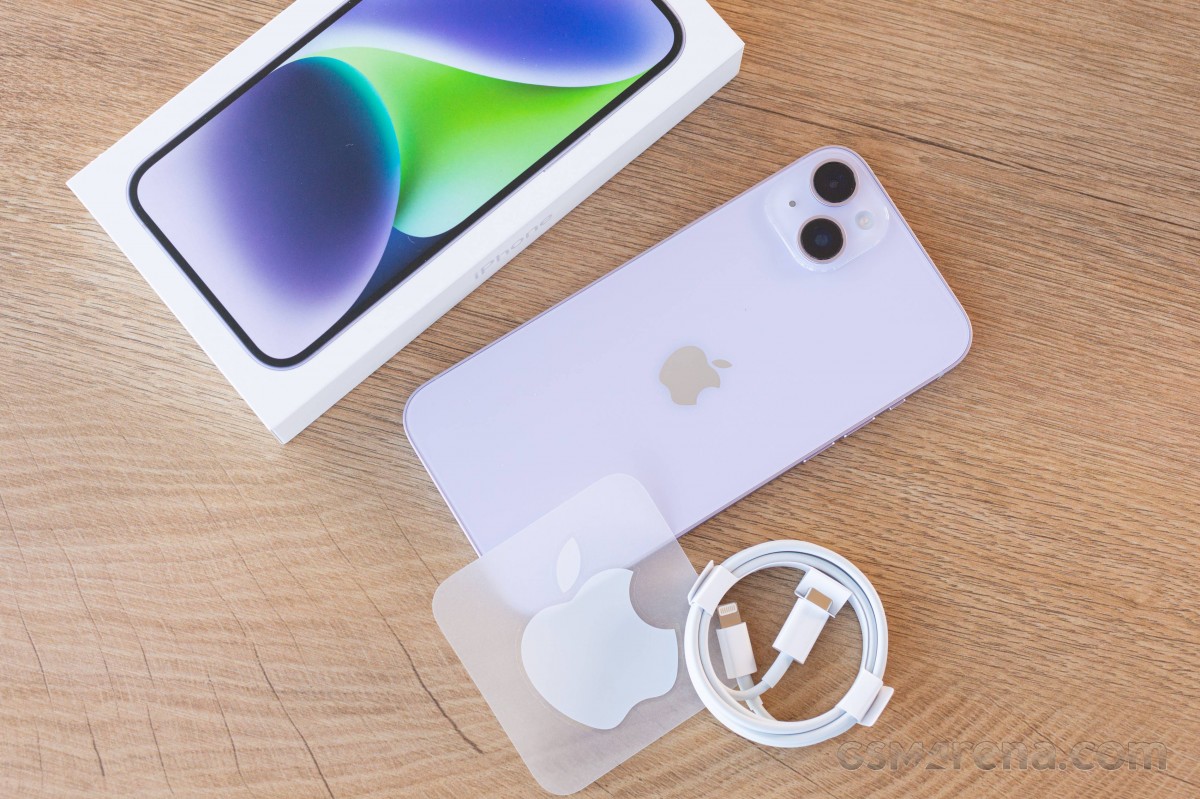
The eco-friendly iPhone box contains a USB-C-to-Lightning cable and the iPhone 14 Plus. There is also a SIM ejection pin, some paperwork, and an Apple sticker.
Apple was among the first manufacturers to ditch the headphones and the charger from its boxes.
If you have a 20W+ USB-PD power adapter with a USB-C port, you should be good.
Alternatives
The iPhone 14 Plus makes total sense in the grand Apple design – the maker has turned the SE model into a special mini edition iPhone, and that’s why the mini had to go from the flagship series. In fact, the vanilla iPhone 14 is so compact and lightweight that we can argue it has been the mini one all along.
Meanwhile, the absence of a larger iPhone for the masses has been quite obvious for the last couple of years, and it was only time for Apple to answer that call. And it did, in its own way.
The iPhone 14 Plus is essentially a supersized iPhone 14 and not much else. What you get is a Max-size display of non-Pro quality and better battery life thanks to the larger battery.
Now, all those Apple users who wanted a large iPhone that’s not overweight and ‘oh so premium’ can have the iPhone 14 Plus.
But, if you are still on the fence about this new Plus model, probably because of its €1,150 price tag, we can understand why you would want to explore more options.
For example, you can get the iPhone 13 Pro Max, which is pretty much the same phone but with an additional zoom camera, a better ultrawide shooter with AF, and a 120Hz ProMotion display. It can be purchased for €1,200 – which is quite an offer to consider. Yes, it is heavy because of the stainless-steel frame and the extra parts like LiDAR and the telephoto, but it’s a tradeoff many would take.
The iPhone 14, as we established, is the most compact current iPhone in circulation, and it’s quite the treat despite the 60Hz screen. It has the same specs as the Plus; it’s just smaller in size and incredibly pocketable. Oh, and it’s €150 cheaper.
Finally, Apple is also selling the older iPhone 12, which is basically an iPhone 13, and so on, starting at €800 for the 64GB model at Apple Store, or about €650 from third-party retailers. So, if you want the cheapest premium iPhone officially available, that’s the one.
Apple iPhone 13 Pro Max • Apple iPhone 14 • Apple iPhone 12
Of course, there are plenty of cheaper offers you can consider for their large screens outside Apple’s lineup. The €780 Xiaomi 12T Pro impressed us with its screen, charging speed, all-around performance and camera quality. The same goes for the Motorola Edge 30 Ultra – a phone with a 144Hz OLED screen, one of the first 200MP imagers, a 60MP selfie camera, and 125W fast charging. Finally, the Samsung Galaxy S22+ 5G has a large 120Hz OLED, one of the fastest Android chips, and an excellent trio of cameras on the back, including a zoom one.
The iPhone 14 Plus is one of the best iPhones Apple has ever made, as usual. It does exactly what it is supposed to do – offering the non-Pro experience on a larger display. A big bonus from the new size is the larger battery capacity and hence – the better battery life.
The iPhone 14 Plus is one of the lightest 6.7-inch smartphones around with a flagship-grade design, screen, speakers, battery life, performance and video quality. Meanwhile, its new cameras, including the AF-capable selfie one, are as controversial as usual – it’s like their quality hasn’t changed for generations because of the heavy processing and over-sharpening.
Still, this iPhone 14 Plus finds its way to the hearts and pockets of people despite the lack of a high refresh rate screen or zoom camera. A lot of users won’t mind this.
Its price tag may be too close to the 13 Pro Max for its own good, but last year’s flagship model has been officially discontinued, so you’d have to source it from an independent retailer but it’s definitely the better one between the two.
That doesn’t make the iPhone 14 Plus a bad smartphone and it’s well worth considering if you don’t need the extra features that the Pro models bring.
Pros
Sturdy design and sleek looks.
Excellent OLED, Dolby Vision, HDR10, high brightness.
Very good battery life.
Top-notch stereo speakers.
Flagship-grade performance even if not the latest chipset.c
Dependable photo quality from the main and selfie cameras.
Outstanding video quality and stabilization across the board, great action clips.
Every iPhone gets at least five years of iOS updates.
Cons
Wide feature gap with the 14 Pro family: no 120Hz refresh rate, A16 Bionic, zoom camera or AF on the ultrawide.
Priced too close to last year’s iPhone 13 Pro Max, which has most of the above.
No charger in the box, somewhat slow charging.
Apple’s iOS restrictions can be off-putting to newcomers to the ecosystem.
Depending on the device, this issue can result in the primary user being unable to access media storage. Alternatively, the issue can reboot the device with a “Factory data reset” message. If this message is accepted, data that is not backed up can be lost, and if it is declined, the device repeatedly reboots with the “Pixel is starting” message.
Google starts by saying that this storage issue impacts the “Pixel 6 and later models” that “have both received the Android 14 update and have multiple users (other than the primary user) set up.” This includes “users, guests, restricted profiles, and child users,” but not simply having more than one Google Account signed in “within the primary user or work profiles.”
The company has already rolled out a Google Play system update to “help prevent this issue from being triggered on additional devices.” To install, open Settings > Security & privacy > System & update > Google Play system update. The latest version we’re seeing today is October 1, 2023.
For those currently “unable to access media storage,” Google is working on a system update that “will repair the issue and restore access to media files without requiring a factory reset.”
Google is also “investigating methods that may be able to recover some data” for devices in a “Pixel is starting” boot loop. However, this seems more tentative: “We’ll provide more information as soon as it is available.”
For all other users, including those that factory reset their device, Google says to avoid “creating or logging into a secondary user on the device until the OTA update is available.”
Google ends with an apology:
We’re sorry for the inconvenience this has caused, and we appreciate your patience.
Android 14 breaks storage on Pixel 6 phones with multiple user profiles
Android 14 is a solid update to Google’s smartphone OS, but the update does seem to be causing some significant issues regarding user profiles on Pixel 6 series devices.
Following the update to Android 14 that rolled out earlier this month, some Google Pixel 6, Pixel 6 Pro, and Pixel 6a owners are seeing some considerable issues with their devices, specifically around storage becoming unusable. A growing number of users across Google’sforums, Reddit, and elsewhere reporting that their Pixel 6 and Pixel 6 Pro devices are drastically hindered, to the point of breaking most tasks users would perform on their devices.
The storage problem takes effect if the user, before installing Android 14, had multiple profiles on the device.
Following the installation of Android 14, the main profile on a Pixel 6 series device seems to lose access to storage, which prevents users from taking photos or videos, downloading files, and both installing or uninstalling applications. However, on the second profile, things seem to work as expected.
Other limitations include that apps report the device as having no available storage, Google Photos can’t refresh a user’s library (only showing low-quality previews), and files can’t be accessed via USB from a connected PC, as one of our readers explained in an email.
Given that Android’s user profiles are more of a niche feature on smartphones (primarily used for personal and work profiles), this issue doesn’t appear excessively widespread, but the symptoms of the problem are affecting users pretty consistently.
Google has, so far, not offered any solution for this issue or public statement.