Why You Should Never Fix Your Own Phone Screen – 7 Critical Reasons That Could Cost You More
📱 Introduction
A cracked screen might look like a quick fix with a screwdriver and a YouTube tutorial. But the truth is, DIY phone screen repair often leads to more damage, lost time, and extra costs. Here’s why it’s a mistake most users regret, and why seeking professional repair services—like Sydney CBD Repair Centre—is the better path.
Technically yes, but without training, the risk of damaging your phone outweighs the cost saved.
2. What happens if I break the Face ID during DIY repair?
Face ID and fingerprint sensors are paired to the logic board—once damaged, they cannot be replaced without manufacturer tools.
3. Are third-party screens safe?
Many are not. They may cause ghost touches, lower brightness, and display color mismatches.
4. Can I save money by repairing my phone myself?
Initially, it may seem cheaper—but most DIY jobs end up costing more when professionals need to correct the damage.
5. Will a professional repair affect my data?
At Sydney CBD Repair Centre, your data is safe—we don’t erase anything unless you request it.
6. Is it really worth paying extra for professional repairs?
Absolutely. You gain peace of mind, safety, warranty, and quality—all things DIY can’t guarantee.
✅ Conclusion
Fixing your own phone screen may seem smart, but it’s often a recipe for disaster. From damaging internal components to voiding your warranty and risking injury, DIY screen repair is simply not worth it.
For safe, professional, and same-day screen replacements using genuine parts, trust Sydney CBD Repair Centre—where quality meets reliability.
Is It Worth Repairing Your Old Phone? – Top 10 Reasons Why You Should Consider It
📱 Introduction
With new smartphones costing upwards of $1,500 in Australia, many are asking the question: Is it really worth repairing my old phone? The short answer is—yes, in most cases it is. Unless your device is completely unusable or obsolete, a simple repair can extend its lifespan, save you money, and keep your personal data intact.
At Sydney CBD Repair Centre, we see hundreds of phones brought in every month that just need minor repairs to perform like new. Here’s why fixing your current device could be the smartest move.
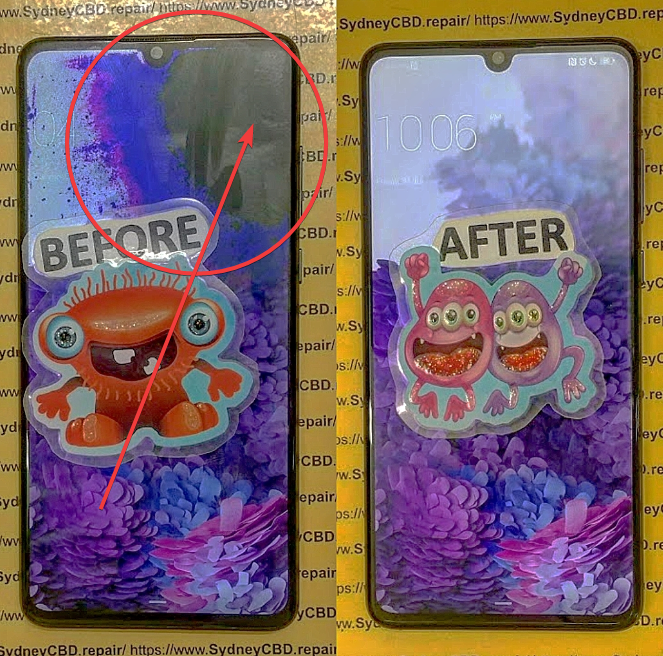
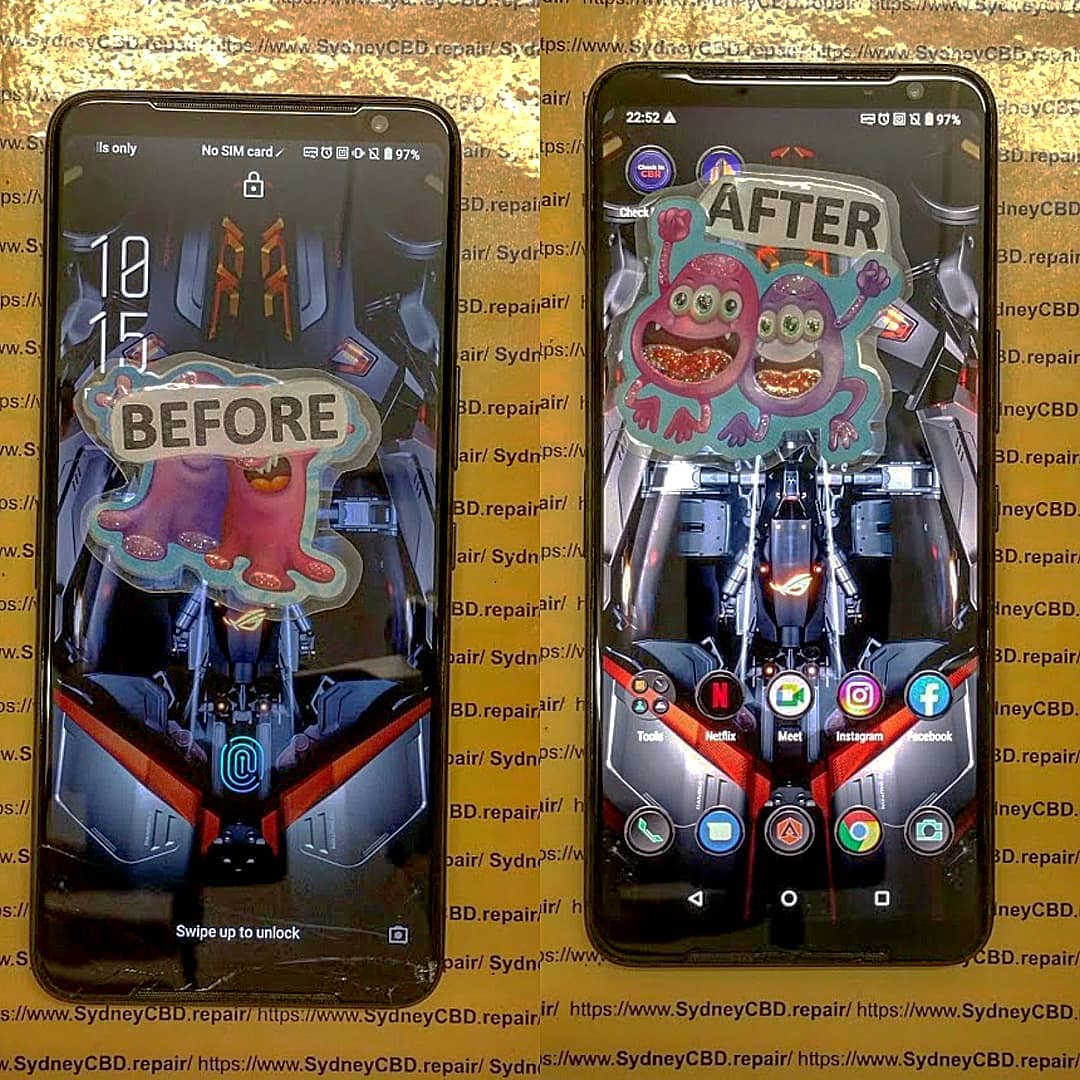
4 ROG 3 Phone Screen Before & After
🔧 The Rise of Smartphone Repair Over Replacement
With the rise in sustainable tech practices and right-to-repair movements, more users now opt to repair rather than replace. Repair shops have become faster, more reliable, and offer better warranties than ever before. Plus, with same-day repairs and genuine parts, you can skip the hassle of buying a new device.
💡 Key Benefits of Repairing an Old Phone
💸 1. Save Money
Buying a new phone can set you back anywhere from $800 to $2,000, while most repairs cost under $300. A screen replacement, battery swap, or charging port fix is often all you need to make your phone feel new again.
🔐 2. Keep Your Data Safe
Replacing a phone means setting up from scratch and transferring everything. A repair retains all your apps, settings, and files—saving you time and stress.
🚫 3. Avoid Setting Up a New Phone
No need to reinstall apps, enter passwords, or re-link accounts. Just pick up your phone post-repair and get back to life.
📲 4. Maintain Functionality
Most “old” phones are still perfectly functional, especially models from the last 2–4 years. They often have:
High-resolution displays
Powerful processors
Great cameras
Reliable performance
With a quick repair, they’re good to go for another couple of years.
🌱 5. Reduce Electronic Waste
E-waste is one of the fastest-growing pollution issues globally. By repairing your device, you’re contributing to environmental sustainability.
✅ When Repair Makes More Sense Than Replacement
Your phone is under 4 years old
Only 1–2 components are damaged (screen, battery, camera, etc.)
You want to avoid spending $1,000+
You’re happy with your current phone’s features and performance
Absolutely—if you choose a trusted, professional repair centre using genuine parts and proper equipment.
2. How long does a typical repair take?
Most repairs are completed in 1 to 2 hours. Same-day service is available for common fixes like screens and batteries.
3. Will repairing my phone erase my data?
No. We take all precautions to ensure your data remains intact. However, backing up is always recommended.
4. What if my phone has multiple issues?
We can assess it and bundle repairs into one affordable quote. You may still spend less than buying a new device.
5. Can I still get parts for older phones?
Yes—for most models up to 5 years old. We’ll inform you if parts are limited or discontinued.
6. Do you offer warranty on repairs?
Yes—all our repairs come with a 90-day warranty for peace of mind.
✅ Conclusion
So, is it worth repairing your old phone? In most cases, yes. Whether it’s a cracked screen, weak battery, or broken port, a quick fix could save you hundreds of dollars and extend your phone’s life by years.
Visit Sydney CBD Repair Centre for expert repairs done right—fast, affordable, and guaranteed.
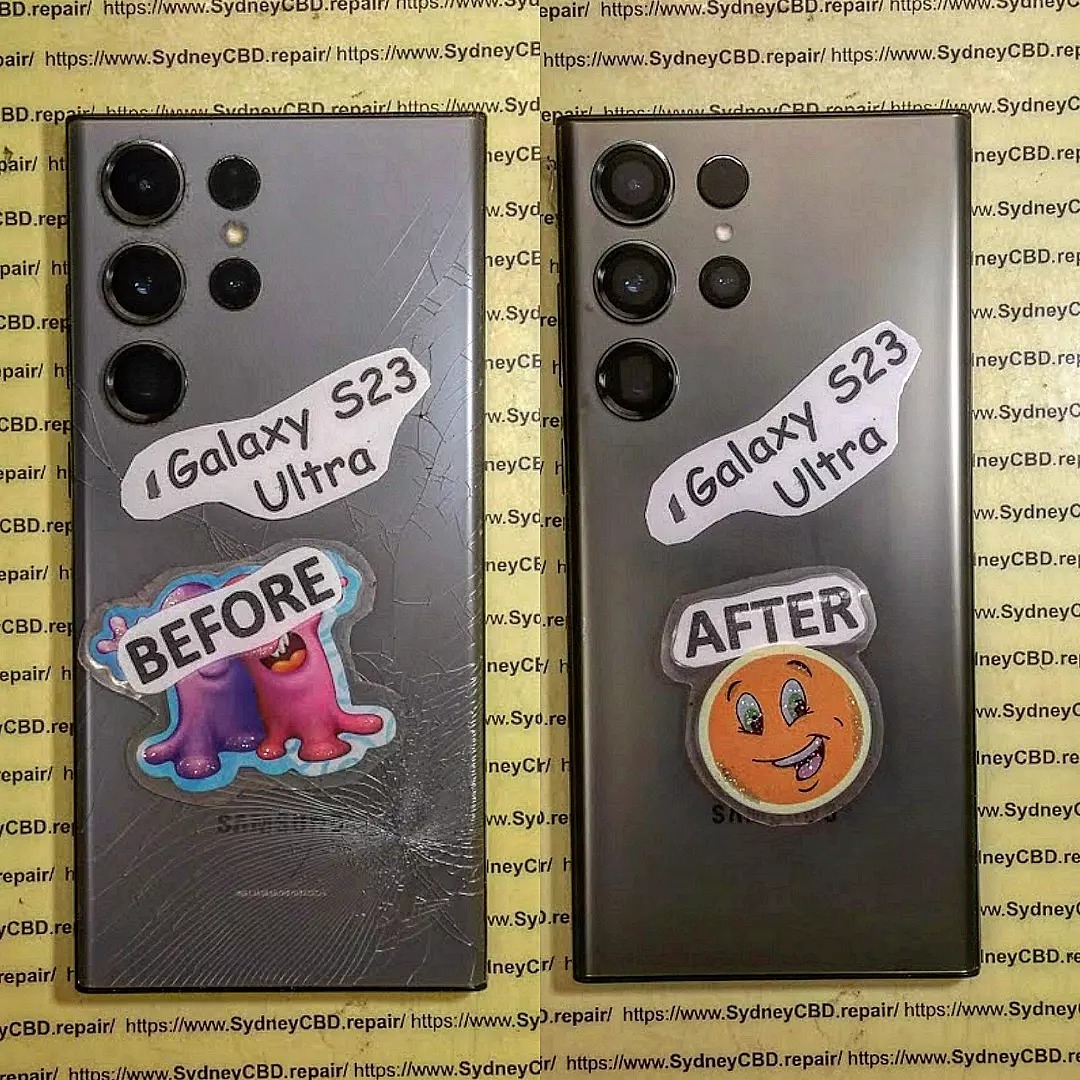
How to Replace Samsung Galaxy S23 Ultra Back Glass – Step-by-Step Guide for a Professional Repair
📱 Introduction
The Samsung Galaxy S23 Ultra is a flagship masterpiece, but its sleek glass back, while stunning, is vulnerable to drops and cracks. If the rear glass is shattered, scratched, or coming loose, it’s more than a cosmetic issue—it could affect your phone’s water resistance and internal components.
This guide explains how to replace the back glass of your Samsung S23 Ultra, the tools you need, risks of DIY, and why professional repair might be your best bet.
🧩 Why Back Glass Replacement is Important
The back glass serves more than aesthetic purposes. It:
1. How long does it take to replace the back glass of the S23 Ultra?
Typically 30–60 minutes if done by a professional repair shop.
2. Will the repair affect wireless charging?
Not if you use genuine parts and follow proper installation steps. All features remain functional.
3. Is the S23 Ultra still waterproof after the repair?
The IP68 seal can be compromised if not resealed correctly. We apply water-resistant adhesive, but water resistance is not guaranteed post-repair.
4. Can I use a skin or case after back glass replacement?
Absolutely. In fact, it’s recommended to prevent future damage.
5. Can the camera glass also be replaced?
Yes, the camera lens covers can be replaced separately if damaged.
6. Do I need to back up my phone before the repair?
It’s good practice, though back glass repair doesn’t affect internal data.
✅ Conclusion
Replacing the Samsung Galaxy S23 Ultra’s back glass might seem simple, but it involves delicate steps that, if done incorrectly, could lead to more costly repairs. Whether you’re aiming to restore functionality, preserve wireless charging, or maintain the premium feel of your device, it’s best done by professionals.
Trust Sydney CBD Repair Centre—we’ve repaired thousands of Samsung devices with care, speed, and expertise.
Smartphone Screen Repair: Do-It-Yourself vs Professional
A cracked or malfunctioning smartphone screen can be more than just an inconvenience—it can disrupt your communication, work, and daily routine. When faced with screen damage, many people are torn between fixing it themselves or turning to a professional repair service.
At Sydney CBD Repair Centre, we’ve helped thousands of customers make the smart choice. Here’s a breakdown of DIY vs professional smartphone screen repair, so you can decide what’s right for you.
broken-iphone-15-pro-max-screen-before-after.png
🔧 The DIY Route: Is It Worth It?
Do-it-yourself screen repair might sound like a cost-saving option. After all, there are countless YouTube tutorials, affordable toolkits, and aftermarket parts available online.
Pros of DIY Repair
Lower upfront cost (if done right)
Satisfaction of fixing it yourself
Convenient for tech-savvy users
Cons of DIY Repair
High risk of further damage
Mishandling components like the digitizer, battery, or Face ID sensors can lead to more expensive issues.
No warranty or guarantee
Time-consuming and complex
Loss of features like waterproofing, True Tone, or brightness calibration if not reassembled correctly
Limited access to genuine parts
Even the most careful DIYer can run into issues that require a second (or third) repair attempt, potentially costing more than just getting it fixed professionally from the start.
At Sydney CBD Repair Centre, we’re proud to offer expert smartphone screen repairs using genuine parts and industry-grade tools. Whether you use an iPhone, Samsung Galaxy, or Google Pixel, our trained technicians know how to handle delicate components properly.
Benefits of Choosing a Professional Repair
✅ Same-day service for most repairs
✅ Genuine replacement parts used
✅ Warranty coverage (90 days)
✅ Data remains intact
✅ Advanced calibration to restore True Tone, brightness levels, and more
✅ Preserves waterproof integrity (where possible)
Professional repairs aren’t just about fixing the issue—they’re about maintaining your phone’s performance and longevity.
👩🔧 Expertise You Can Trust: Sydney CBD Repair Centre
We’ve been Sydney’s top mobile phone repair destination six years in a row, thanks to our:
📍 Central CBD location
⭐ 2000+ 5-star reviews
🧰 Certified technicians
💯 Commitment to using genuine parts
Whether it’s a shattered iPhone 14 Pro Max screen or a flickering Galaxy display, we have the tools and expertise to fix it fast—and fix it right.
📝 Final Verdict: DIY or Professional?
If you have the tools, time, and confidence, a DIY repair can be a rewarding project. But for most users, especially those with newer models or data concerns, professional repair is the smarter, safer, and more reliable option.
Sydney CBD Repair Centre is your go-to repair destination. We offer same-day repairs, transparent pricing, and customer-first service that ensures your phone is back in your hands—good as new.
Can You Replace Your iPhone 15 Pro Screen Yourself? + The Truth + 10 Must-Know Facts
📱 Understanding the iPhone 15 Pro’s Screen Technology
The iPhone 15 Pro boasts a cutting-edge Super Retina XDR OLED display with Ceramic Shield protection, which is not only brighter and more responsive than previous models but also more intricate in its engineering. This makes replacing it far more complicated than older iPhones.
Key specs:
6.1-inch OLED display
ProMotion 120Hz refresh rate
Dynamic Island
True Tone, HDR10, Dolby Vision
Ceramic Shield front for extra durability
But even with these premium specs, the screen can still crack, shatter, or become unresponsive due to accidental drops or impact. And that’s when you start thinking—should you repair it yourself or leave it to the pros?
You might consider a screen replacement for a few of the following reasons:
Cracked or shattered display
Dead pixels or screen burn-in
Touchscreen unresponsiveness
Ghost touches
Display discoloration or flickering
Face ID not working due to display damage
While the symptoms might seem fixable, diving into DIY repair without adequate prep could make things worse.
🛠️ DIY Screen Repair: Is It Even Possible?
Technically, yes—you can attempt to replace the iPhone 15 Pro screen yourself, but should you? Let’s weigh the tools and knowledge required first.
🧰 Tools and Materials You’ll Need
To even consider a DIY screen replacement, you’ll need:
Pentalobe screwdriver (P2)
Tri-point screwdriver (Y000)
Plastic spudger and opening picks
Suction handle
Heat gun or iOpener
Anti-static mat and gloves
Replacement OLED screen (genuine or high-quality third-party)
Even experienced DIYers often lack the tools to safely remove Apple’s display adhesives and micro-connectors.
🛒 Where to Source Genuine Parts
Apple allows access to original parts via its Self Service Repair program in select countries. However, for most people outside this circle, parts come from third-party vendors. Be cautious—cheap knock-offs can damage your logic board or result in poor display performance.
Warning: This is a high-risk repair. Even a small mistake can permanently damage your iPhone.
🔌 Step 1: Power Off and Disassemble
Before anything, power off your iPhone. Use a Pentalobe screwdriver to remove the two screws next to the Lightning port. Gently heat the display edges with a heat gun or iOpener to loosen the adhesive.
Use a suction handle to lift the display slightly while sliding an opening pick along the edges to break the seal. Take extreme care—pulling too hard may damage flex cables underneath.
🔋 Step 2: Disconnect the Battery
After lifting the screen, use a tri-point screwdriver to remove the cover plate that shields the battery and display connectors. Disconnect the battery first to avoid short-circuits.
📱 Step 3: Remove the Damaged Display
Once disconnected, carefully remove the display by detaching the remaining connectors. Don’t force anything—most connectors are delicate and sit snugly.
🔄 Step 4: Install the New Screen
Place the new screen and reconnect all display flex cables. Ensure each one clicks gently into place. Misaligned connections could disable Face ID or display functions.
🔧 Step 5: Reassemble and Test
Reattach the battery and cover plate. Close the screen gently, ensuring proper alignment, then reinstall the Pentalobe screws. Turn the iPhone on and test:
Display brightness and responsiveness
Face ID functionality
ProMotion refresh
True Tone (may be lost without Apple calibration)
⚠️ Challenges of DIY Repairs
Repairing an iPhone 15 Pro screen isn’t like swapping out batteries on older models. Here’s what makes it risky:
😟 Face ID & OLED Issues
Face ID components are tied to your logic board. Damaging them disables facial recognition permanently unless you go through Apple.
OLED screens are fragile and require precision handling. One wrong flex and you’ll see flickering, ghosting, or dead zones.
💧 Dust, Water Resistance & Internal Damage Risks
Opening your iPhone breaks its waterproof seal. Reapplying adhesive rarely restores its original IP68 water resistance.
You also risk puncturing the battery, bending logic board contacts, or damaging the speaker/mic seals.
📜 Apple’s Official Policy on Third-Party Repairs
Apple allows third-party and self-service repairs but warns that:
Certain features like True Tone, Face ID, and brightness calibration may not work correctly without proprietary tools.
Damage during third-party repair voids the warranty, even if the original fault was unrelated.
Post-repair errors may not be resolved through Apple Store support.
iOS feature limitations (like True Tone or Auto-Brightness malfunctioning)
Apple’s diagnostic tools will detect third-party displays, which could result in service refusals later.
💵 Professional vs DIY: A Cost Comparison
Repair Method
Average Cost
Time Required
Risk Level
Warranty
DIY (with tools)
AUD $400–$600
2–4 hours
High
None
Professional Repair
AUD $480–$550
1 hour
Low
90-day or more
Though DIY may appear cheaper at first, consider the long-term costs of screen failure, re-repair, or disabling Face ID. Most users save money by doing it right the first time.
⚡ Safety Concerns with DIY Repairs
🔋 Battery puncture can cause fire
🧲 Static discharge may damage components
👁️ Sharp OLED shards can cause injury
🧪 Exposure to glue fumes can irritate skin/eyes
Unless you’re confident and well-equipped, the risk is often not worth the reward.
🛠️ What to Expect from a Professional Repair Shop
⏱️ Turnaround Time
Shops like Sydney CBD Repair Centre offer same-day screen replacement. Most customers are in and out within 1–2 hours.
📜 Warranty and Support
You’ll get:
90-day warranty on parts and labor
Genuine Apple-compatible parts
Expert calibration for Face ID, True Tone, and display settings
And most importantly, peace of mind.
⭐ Sydney CBD Repair Centre: Your Trusted Repair Partner
Located in the heart of the Sydney CBD, we are:
🛠️ 6-time winner for best mobile phone repair
✅ Over 2000 verified 5-star Google reviews
📱 Specialists in Apple, Samsung, and Google Pixel repairs
💯 Only use genuine parts with full functionality
Walk-in or book online for same-day service:
🔗 Locate us here
❓ 6 FAQs About iPhone 15 Pro Screen Replacement
1. Can I replace the iPhone 15 Pro screen myself?
Technically yes, but it’s risky and may void your warranty. Always weigh the risks before proceeding.
2. Will Face ID still work after replacement?
Only if done professionally. DIY repairs may break the Face ID sensor permanently.
3. Does Apple allow third-party screen repairs?
Yes, but they won’t cover any resulting damage under warranty unless it’s done through official channels.
4. How long does a professional repair take?
Most professional screen replacements are completed within 60–90 minutes.
5. What’s the average cost in Sydney?
Expect to pay between AUD $480 to $550 for a professional iPhone 15 Pro screen replacement with genuine parts.
6. Can I keep my True Tone feature after repair?
Only if the repair technician transfers the original screen data correctly—which most DIYers cannot do.
✅ Conclusion
So, can you replace your iPhone 15 Pro screen yourself? Sure. Should you? Probably not—unless you’re highly experienced and fully equipped.
DIY repairs are tempting but carry major risks: broken Face ID, water damage, or complete phone failure. For most people, the smartest choice is turning to professionals like Sydney CBD Repair Centre—where quality meets reliability.
How to Choose the Right Phone Screen Replacement – A Complete Buyer’s Guide for 2025
📱 Introduction
Cracked or unresponsive screen? It’s a common issue with smartphones today—and fixing it properly is crucial. But with so many screen types and suppliers out there, how do you choose the right phone screen replacement?
Whether you’re using an iPhone, Samsung, or Google Pixel, this guide will help you understand screen types, cost factors, compatibility concerns, and how to ensure your repair is safe, effective, and long-lasting.
🕵️ When Should You Replace Your Phone Screen?
Signs Your Screen Needs Replacement
Cracked or shattered display
Ghost touches or delayed touch response
Screen flickering or going black
Vertical/horizontal lines appearing
Face ID or fingerprint scanner no longer working
Can You Delay the Replacement?
You can—but it’s not recommended. Using a damaged screen may cause:
Further internal damage
Data loss due to hardware failure
Injury from glass shards
Compromised water resistance
If your screen is more than just scratched, it’s time for a replacement.
Failure to consider this may break your phone’s biometrics.
🧰 What’s Included in a Screen Replacement Kit?
Full Display Assembly vs Just the Glass
Full assembly includes LCD/OLED + digitiser + frame
Glass-only kits are cheaper but require advanced skills to separate layers without damage
Adhesives, Tools, and Accessories
Kits should include:
Suction cup or heat pad
Pry tools
Screwdrivers (pentalobe, tri-point, Phillips)
Pre-cut adhesive seals
Anti-static gloves
If these aren’t included, you’ll need to purchase them separately.
🔧 DIY vs Professional Screen Replacement
Risks of DIY Repairs
Screen damage during installation
Loss of water resistance
Face ID/Touch ID failure
Warranty void
Electrical shorts or battery puncture (⚠️ Fire risk!)
DIY is only advised for users with technical knowledge and proper tools.
Why Professional Repair Is Safer
Professionals offer:
Clean, dust-free workspace
OEM tools and calibration devices
Experience with screen bonding and sensor transfer
Warranty on parts and labour
💰 Cost Breakdown of Screen Replacement in Australia
Brand
Model
Estimated Cost (AUD)
Apple
iPhone 14 Pro
$400–$650
Samsung
S23 Ultra
$450–$700
Google
Pixel 7 Pro
$350–$500
Prices vary depending on screen type, part quality, and technician expertise. Sydney CBD Repair Centre offers genuine parts at competitive prices.
🚫 How to Avoid Counterfeit Parts
Red flags include:
Unusually cheap prices
No logo or serial number on flex cables
Washed-out colours or dim backlight
No warranty offered
Stick with certified repair centres like Sydney CBD Repair Centre to avoid costly mistakes.
🛡️ Benefits of Choosing Genuine Parts
True Tone and Face ID remain functional
Brightness and colour match the original
Longer screen life
Proper adhesive and waterproofing
Manufacturer compliance (especially for Apple & Samsung)
🌟 Why Sydney CBD Repair Centre is a Trusted Choice
6-time award-winning repair shop
2000+ ⭐⭐⭐⭐⭐ Google Reviews
Only genuine or premium OEM parts
90-day warranty on all screen repairs
Same-day service for most models
Skilled technicians experienced in Apple, Samsung, and Pixel repairs
📍 Convenient location in Sydney’s CBD
📞 Call us: +61280114119
🔗 Locate us here
❓ FAQs
1. Can I upgrade my screen to a better one?
No. Phone screens are model-specific. Upgrades like OLED instead of LCD usually aren’t compatible.
2. Is it safe to buy replacement screens online?
Only if purchased from reputable sources with verified reviews. Avoid unknown marketplaces.
3. How long does a screen replacement take?
At Sydney CBD Repair Centre, most replacements are done within 1–3 hours, depending on model and availability.
4. Will a new screen fix ghost touches or flickering?
If those issues are caused by screen damage, yes. But if it’s a board-level issue, further diagnosis may be needed.
5. What happens if I install a screen myself and it doesn’t work?
You risk damaging connectors or voiding your warranty. We recommend professional help unless you’re experienced.
6. Will I lose data during screen replacement?
No. Screen repairs don’t affect internal storage, but backing up your data is always a good idea.
✅ Conclusion
Choosing the right phone screen replacement is about more than just swapping glass—it’s about compatibility, safety, and restoring your phone’s full functionality. While DIY might seem cost-effective, the risks often outweigh the rewards.
For fast, reliable, and warranty-backed screen replacements using only genuine parts, trust the experts at Sydney CBD Repair Centre. Walk in today and experience why we’re Sydney’s #1 mobile phone repair destination.
DIY Phone Repair: Replacing Only the LCD Screen – What You Need to Know Before You Begin
📱 Introduction
Got a blank screen but an otherwise working phone? If your touchscreen doesn’t display anything or shows weird colours, you may be dealing with a damaged LCD. While full screen replacements are common, some DIYers wonder: “Can I replace just the LCD?”
In this guide, we’ll break down DIY phone repair focused on replacing only the LCD screen. You’ll learn the process, the tools required, and the risks—plus when it’s better to visit professionals like Sydney CBD Repair Centre.
🧠 What is the LCD Screen and Why Replace Only It?
Understanding Phone Display Layers
Most smartphones have three display components:
Glass (Digitizer): The outermost layer you touch
Touch Sensor: Detects finger movement
LCD (or OLED): Displays images, colours, and brightness
If the LCD is damaged but the glass and touch still work, you may be able to replace just the LCD panel.
Many older or mid-range phones (especially LCD-based models) allow for separate replacements.
When Full Screen Replacement is Better
Modern phones (especially iPhones, Samsung AMOLED, or flagship models) use a fused screen assembly. Trying to separate layers often causes more damage. In such cases, it’s safer—and often more cost-effective—to replace the entire screen unit.
🧰 Tools & Materials You’ll Need
Replacement LCD panel (specific to your phone model)
Precision screwdriver set
Plastic pry tools / spudger
Heat gun or hairdryer (for softening adhesive)
Suction cup (to lift screen)
Tweezers
Anti-static wrist strap (recommended)
Microfiber cloth and isopropyl alcohol
Magnetic mat (optional but helpful)
🛠️ Step-by-Step Guide to Replacing the LCD Screen
⚠️ Note: Proceed only if you’re confident and the LCD is not fused. This process varies depending on your phone model.
1. Power Off and Disassemble the Device
Turn off the phone
Remove SIM tray and screws (usually near charging port)
Use a suction cup and pry tool to separate the screen from the frame
Be cautious of fingerprint sensors or ribbon cables
2. Remove the Broken LCD
Carefully detach ribbon connectors using a spudger
Remove any shielding plates or adhesive layers
Gently lift out the damaged LCD panel
3. Install the New LCD Panel
Align the new LCD properly
Reconnect ribbon cables
Secure it back into the frame
Apply new adhesive (if needed)
4. Reassemble and Test the Phone
Put everything back together
Power on the device
Test the display, touch, brightness, and screen responsiveness
⚖️ Pros and Cons of DIY LCD Replacement
✅ Pros:
Lower upfront cost (just parts and tools)
Learn a new skill
Can be done at home (if confident)
❌ Cons:
High risk of permanent damage
No warranty
May void manufacturer or insurance cover
Complex for modern smartphones with fused displays
⚠️ Common Mistakes and How to Avoid Them
Mistake
How to Avoid It
Damaging internal components
Use plastic tools and work gently
Choosing the wrong screen
Double-check model number
Forgetting to disconnect battery
Always remove power first
Skipping re-adhesion
Use new adhesive to avoid loose fit
Not testing before reassembly
Power on to test before closing the phone
👨🔧 When to Call a Professional Instead
You’re not comfortable handling electronics
Your screen is glued or fused
Your phone has multiple issues (e.g., battery, motherboard)
You want a warranty-backed repair
In these cases, save yourself the stress and visit an expert like Sydney CBD Repair Centre.
🌟 Why Sydney CBD Repair Centre is the Smart Alternative
1. Is it really possible to replace only the LCD screen?
Yes—but only if the screen is not fused. Most modern phones use fused assemblies, so this is usually an option for older or budget models.
2. How do I know if my LCD is fused?
Search your phone model online or consult a technician. You can also check teardown videos to confirm.
3. Will replacing only the LCD affect phone performance?
If done correctly with a compatible part, no. But improper installation can cause ghost touch or brightness issues.
4. Is it cheaper to replace only the LCD?
Yes, but it’s harder to do, and not always possible. Whole screen assemblies are often more practical.
5. Can I damage my phone during DIY repair?
Absolutely. Incorrect tools or too much pressure can damage the logic board, battery, or other internal components.
6. Do you offer LCD-only replacement at Sydney CBD Repair Centre?
We always inspect devices first. If only the LCD needs replacing and it’s not fused, we’ll perform the most cost-effective and safest repair.
✅ Conclusion
Replacing just the LCD screen on your phone can be a rewarding DIY project—but it’s not without risks. If your device allows separate LCD replacement and you’re confident in your skills, it may save money. But if you’re unsure, or using a flagship model, professional repair is the best route.
At Sydney CBD Repair Centre, we ensure your device gets top-tier service, fast turnaround, and peace of mind through genuine parts and warranty. Don’t take chances—get it done right the first time.
How To Fix A Cracked Screen On Your Phone – Expert Repair Advice You Can Trust
📱 Introduction
A cracked phone screen is one of the most common issues smartphone users face. Whether it’s a minor surface crack or a major shatter, it can affect usability, safety, and even your phone’s internal components.
So, what’s the best way to fix a cracked screen on your phone? In this guide, we’ll cover your repair options, cost expectations, and expert insights from Sydney CBD Repair Centre, Sydney’s most trusted repair shop.
🕵️ Assessing the Severity of the Crack
Surface Crack vs Deep Screen Damage
Not all cracks are created equal. Here’s how to distinguish them:
Surface Crack: Cosmetic damage; phone usually works fine
Deep Crack: May affect touch sensitivity or screen visibility
Shattered Screen: Cracked glass and broken display; urgent replacement needed
1. Can I keep using my phone if the screen is cracked?
Yes, but it’s not advisable. It may worsen and pose safety risks like glass splinters or internal damage.
2. Will fixing the screen erase my data?
No. Screen replacement doesn’t affect your data, but back up your phone just in case.
3. How do I know if the repair shop uses genuine parts?
Ask for transparency. Sydney CBD Repair Centre guarantees genuine parts and provides a warranty.
4. Is it cheaper to replace just the glass?
In some cases, yes. However, most modern phones require full screen assembly replacement.
5. Can a cracked screen affect battery life?
Yes. A damaged screen can put stress on your phone’s components and lead to battery drain.
6. What if my phone has water damage and a cracked screen?
We offer comprehensive diagnostics and can handle both issues in a single repair session.
✅ Conclusion
Cracked screens are frustrating—but they don’t have to be the end of your phone’s life. Whether you need a quick fix or a full screen replacement, the safest option is always professional repair.
Sydney CBD Repair Centre is your trusted partner in restoring your phone to like-new condition. With genuine parts, expert technicians, and same-day service, we’re Sydney’s go-to solution for all screen repair needs.
This blog post details the journey of a customer from Byron Bay, Australia, who needed his broken Galaxy Note 20 Ultra repaired. He chose to ship the device to Sydney CBD Repair Centre despite being closer to other repair shops because of the company’s reputation for using genuine parts and having exceptional customer service. The document then provides a step-by-step breakdown of the repair process, including the communication with the customer and the shipping of the device back to Byron Bay. The customer’s positive review highlights the company’s efficiency, quality, and customer satisfaction. Finally, the blog post discusses why Sydney CBD Repair Centre is a popular choice for mobile phone repairs, noting their five years as one of Sydney’s top three repair shops, their over 18,000 positive Google reviews, and their ability to offer same-day repairs.
Arthur M., a resident of the beautiful Byron Bay, found himself in a frustrating situation. His Galaxy Note 20 Ultra, the last in the Galaxy Note series to feature an external SD card, had suffered a cracked screen and a dying battery. While there were repair shops closer to him in nearby Brisbane, he made a wise decision. After thorough research, Arthur chose Sydney CBD Repair Centre to restore his beloved device.
Why? Because Sydney CBD Repair Centre is renowned for its professional service, use of genuine parts, and exceptional customer reviews. Arthur was well aware that this would be the best place for his repair, even if it meant sending his phone across hundreds of kilometers.
Once Arthur made contact with Sydney CBD Repair Centre, the process was seamless. They gave him detailed instructions about how to ship his device, where to send it, and how to make the payment. Trusting Australia Post with his package, Arthur sent his Galaxy Note 20 Ultra on a journey from Byron Bay to Sydney.
The next part of the story is where David, the expert technician at Sydney CBD Repair Centre, took swift action. That very morning, David replaced the broken screen and battery of Arthur’s phone, ensuring that the S-Pen worked flawlessly. To top it off, a complimentary screen protector was applied for extra protection.
By noon, David contacted Arthur to confirm the repair and verify the return delivery details. On the same day, Arthur’s phone was posted back to Byron Bay, wrapped in secure packaging and ready for the journey home.
Tracking History – Sydney to Byron Bay:
Wed, 25 Sep, 1.04 pm – “We’ve got it,” confirmed by Australia Post. The phone was back on the road to Byron Bay.
Thu, 26 Sep, 1.48 pm – The package arrived at Lismore.
Fri, 27 Sep, 10.55 am – Delivered! Arthur’s Galaxy Note 20 Ultra was finally home.
Arthur was ecstatic. His phone looked and worked as if it were brand new. Overjoyed by the fast, reliable service and the genuine parts used in the repair, he left a glowing 5-star review:
“Top service, same-day turnaround! Genuine parts, even sent the old parts back to prove what was done. Will definitely use again!”
For David and Sydney CBD Repair Centre, another happy customer and another Galaxy Note 20 Ultra brought back to life. Arthur’s wise decision to trust the best in the business was clearly worth the extra distance.
sydney-cbd-repair-centre-thank-you2.png
Sydney CBD Repair Centre: Recognized as one of the Top 3 Mobile Phone Repair Shops in Sydney for five years in a row, with over 18,000 positive reviews on Google. Same-day repairs with genuine parts!
How Sydney CBD Repair Centre Became the Go-To Repair Shop for a Galaxy Note 20 Ultra Owner from Byron Bay
Introduction
Byron Bay, a stunning coastal town in New South Wales, is renowned for its breathtaking beaches, laid-back lifestyle, and vibrant community. It’s not the first place you’d think of when it comes to mobile phone repairs, especially considering its distance from major cities like Sydney. Despite Byron Bay being relatively close to Brisbane with plenty of repair options there, one customer with a broken Galaxy Note 20 Ultra made the decision to send his device to Sydney CBD Repair Centre after extensive research.
Why would someone from Byron Bay bypass local and nearby repair shops to send their phone all the way to Sydney? The reasons are simple yet compelling. In this article, we dive into the customer’s journey, why Sydney CBD Repair Centre was the best choice, and how the entire process unfolded smoothly.
The Last of Its Kind: The Galaxy Note 20 Ultra
Why Is the Galaxy Note 20 Ultra So Special?
The Galaxy Note 20 Ultra holds a unique place in the smartphone world. It’s the last Galaxy Note model to feature an external SD card slot, a beloved feature for users needing expandable storage. Combine that with its powerful performance, and many owners still hold onto this model. Even years after its release, it’s a device that can be revitalized with the right repairs, like battery replacements and screen fixes.
The Importance of Keeping the Galaxy Note 20 Ultra in Working Condition
For many, the Note 20 Ultra is not just a phone; it’s a tool for productivity, creativity, and entertainment. The S Pen, powerful processor, and large screen make it ideal for professionals and artists alike. When something goes wrong with this device, finding a repair center that can handle it with care and expertise is essential.
Our customer, Arthur M**, from Byron Bay, knew his Galaxy Note 20 Ultra was worth repairing. After doing his research, he came across Sydney CBD Repair Centre. Despite the distance, Arthur chose this repair center because of its stellar reputation, expertise with high-end Samsung models, and the use of genuine parts.
Genuine Parts and Expertise
The quality of the parts used in a repair can make all the difference. Sydney CBD Repair Centre is known for its use of genuine parts, which reassured Arthur that his Galaxy Note 20 Ultra would receive the best possible care. Plus, with over 18,000 positive reviews and being recognized as one of the top 3 repair shops in Sydney for five consecutive years, the decision seemed clear.
How the Repair Process Worked: A Step-by-Step Breakdown
Step 1: Initial Contact
Arthur reached out to Sydney CBD Repair Centre, inquiring about the repair process. He was quickly provided with all the necessary details: where to send his device, how to make the payment, and what to expect. The communication was smooth and efficient, making the process straightforward.
Step 2: Posting the Device to Sydney
After confirming all the details, Arthur sent his Galaxy Note 20 Ultra via Australia Post. Here’s the tracking history of the device as it traveled from Byron Bay to Sydney:
Received by Australia Post, Suffolk Park NSW – Mon 23 Sep, 1.53 pm
Processed at sorting facility, Sydney West NSW – Tue 24 Sep, 1.23 pm
Arrived at facility, Sydney South NSW – Wed 25 Sep, 12.12 am
Awaiting collection at Haymarket Post Shop, Sydney NSW – Wed 25 Sep, 8.54 am
Once the phone arrived at the repair center, David, one of the top technicians at Sydney CBD Repair Centre, got to work. The phone’s broken screen was replaced with a genuine Samsung screen, and the battery was swapped out for a new one. To ensure everything was working correctly, the S Pen function was tested, and a free screen protector was applied as an added bonus.
Step 4: Communication with Arthur
After completing the repairs, David contacted Arthur to confirm the delivery address and receiver name. The process was swift, and before long, the phone was ready to be sent back.
Step 5: Posting the Device Back to Byron Bay
Arthur’s repaired Galaxy Note 20 Ultra was sent back to Byron Bay the very same day. Here’s the tracking history from Sydney back to Byron Bay:
Received by Australia Post, Sydney NSW – Wed 25 Sep, 1.04 pm
Processed at sorting facility, Sydney South NSW – Wed 25 Sep, 5.54 pm
This review speaks volumes about the quality of the service offered by Sydney CBD Repair Centre. The use of genuine parts, the transparency in sending back the old parts, and the fast same-day turnaround are all key factors that led to this stellar review.
Why Sydney CBD Repair Centre Is the Best Choice for Phone Repairs
5 Years as One of Sydney’s Top 3 Mobile Phone Repair Shops
With a track record of excellence, Sydney CBD Repair Centre has been ranked among the top 3 mobile phone repair shops in Sydney for five years in a row. This achievement is a testament to their expertise, customer service, and consistent quality.
Over 18,000 Positive Reviews
It’s not just Arthur who had a great experience. With over 18,000 positive reviews on Google, Sydney CBD Repair Centre has built a reputation for excellence that spans across thousands of satisfied customers.
Same-Day Repairs
One of the standout features of this repair center is their ability to offer same-day repairs. In Arthur’s case, the repair was done and posted back within the same day, minimizing the time he had to be without his phone.
Conclusion
Arthur’s experience with Sydney CBD Repair Centre highlights the importance of choosing the right repair shop for your device, no matter how far away you are. The combination of genuine parts, expert technicians, and a commitment to customer satisfaction sets Sydney CBD Repair Centre apart from the competition. Whether you’re in Byron Bay or right in the heart of Sydney, this repair center is the go-to destination for quality mobile phone repairs.
FAQs
1. Why should I choose Sydney CBD Repair Centre over local repair shops?
Sydney CBD Repair Centre is renowned for its expertise with high-end devices and uses genuine parts, ensuring your device gets the best possible care. Their excellent customer service and fast turnaround make them worth considering, even if you’re far from Sydney.
2. How long does the repair process take?
In most cases, Sydney CBD Repair Centre offers same-day repairs, meaning your device will be fixed and sent back to you quickly.
3. Do they use genuine parts?
Yes, Sydney CBD Repair Centre uses genuine parts for all repairs, ensuring the highest quality and longevity for your device.
4. How do I send my phone for repair if I’m not in Sydney?
The process is simple. Contact Sydney CBD Repair Centre to receive details on how to send your device via Australia Post. Once your device arrives, it will be repaired and sent back to you promptly.
5. What if I have other issues with my device besides the screen?
Sydney CBD Repair Centre can handle a wide range of issues, from battery replacements to internal repairs. Just let them know what needs fixing, and they’ll provide a solution.
People also ask
What are the benefits of choosing Sydney CBD Repair Centre for Galaxy Note 20 Ultra repairs?
How does the cost of repairing a Galaxy Note 20 Ultra compare to purchasing a new phone with similar features?
What are the long-term advantages of maintaining a Galaxy Note 20 Ultra, considering its unique features like the external memory slot?
📱 **Galaxy Note 20 Ultra Overview**
-The Samsung Galaxy Note 20 Ultra is a high-end smartphone known for its large display, advanced camera system, and integrated S Pen stylus. It was released in August 2020.
💾 **Expandable Storage and S Pen**
-The Note 20 Ultra supports expandable storage via microSD and features an S Pen with 9ms latency, making it ideal for note-taking and drawing.
-If you value the S Pen and expandable storage, repairing might be worthwhile. Consider the repair cost against the price of a new device with similar features.
Here are the factors that influenced the customer’s decision to choose Sydney CBD Repair Centre for their Galaxy Note 20 Ultra repair, based on the provided sources:
Sydney CBD Repair Centre’s positive reputation: The customer, Arthur M., chose Sydney CBD Repair Centre after conducting research and discovering its excellent reputation. The repair center is known for its expertise in repairing high-end Samsung phones and for using genuine parts.
Use of genuine parts: Sydney CBD Repair Centre is known for using genuine parts, which gave Arthur confidence that his phone would receive the best possible care.
Positive customer reviews: Arthur was influenced by the repair center’s overwhelmingly positive reviews. Sydney CBD Repair Centre has over 18,000 positive Google reviews and has been recognized as a top-three repair shop in Sydney for five years running.
The sources also mention that Sydney CBD Repair Centre offers same-day repairs, which was likely a factor in Arthur’s decision. However, the sources do not explicitly state that this influenced his choice.
Sydney CBD Repair Centre differentiated itself from other repair shops by cultivating a strong reputation for professionalism, the use of genuine parts, and positive customer reviews. This emphasis on quality, combined with clear communication and a streamlined repair process, convinced Arthur, the customer from Byron Bay, to entrust his Galaxy Note 20 Ultra to them despite the distance.
Here’s a breakdown of the key factors:
Reputation and Expertise: Arthur’s research led him to Sydney CBD Repair Centre due to their stellar reputation and expertise in repairing high-end Samsung models. They have consistently been ranked among the top 3 mobile phone repair shops in Sydney for five years running, further solidifying their standing.
Genuine Parts: The use of genuine parts was a major deciding factor for Arthur. Sydney CBD Repair Centre emphasizes this, assuring customers that their devices will receive the best possible care. This commitment to quality is further evidenced by their practice of returning the replaced parts to customers, offering transparency and building trust.
Positive Customer Reviews: The abundance of positive customer reviews, exceeding 18,000 on Google, contributed to Sydney CBD Repair Centre’s appeal. These reviews, along with Arthur’s own positive experience, demonstrate a consistent track record of customer satisfaction.
Efficient Communication and Processes: From the initial inquiry to the final delivery, Sydney CBD Repair Centre maintained clear and efficient communication with Arthur. This, coupled with their streamlined repair process and commitment to same-day repairs, ensured a smooth and hassle-free experience for the customer.
In essence, Sydney CBD Repair Centre differentiated itself through a combination of technical expertise, a commitment to quality parts, transparent communication, and a customer-centric approach. This resonated with Arthur, who prioritized these factors over geographical proximity.
Implications of Customer Experience for Sydney CBD Repair Centre’s Success
The overwhelmingly positive customer experience detailed in the sources has several implications for the overall success of Sydney CBD Repair Centre:
Attracting Customers from Afar: Arthur’s willingness to ship his device from Byron Bay to Sydney, bypassing closer repair options, demonstrates the potential for Sydney CBD Repair Centre to attract customers beyond their immediate geographical location. This is largely due to their strong reputation for quality repairs and exceptional customer service.
Building a Loyal Customer Base: Arthur’s positive experience, culminating in a glowing 5-star review and his stated intention to use their services again, highlights how positive customer experiences can translate into repeat business and build brand loyalty.
Generating Positive Word-of-Mouth Marketing: Arthur’s positive review, added to over 18,000 others on Google, contributes to a strong online reputation that can attract new customers. This organic marketing is invaluable for building trust and credibility.
Justifying Premium Pricing: While the sources don’t mention specific prices, the use of genuine parts, same-day service, and excellent customer service potentially allows Sydney CBD Repair Centre to command a premium price point compared to competitors. Customers like Arthur are willing to pay more for the peace of mind and quality assurance that comes with a premium service.
Long-Term Business Growth: Continued positive customer experiences like Arthur’s can lead to sustained business growth for Sydney CBD Repair Centre. Their reputation for quality, speed, and customer care positions them as a leader in the competitive mobile phone repair market.
In today’s digital age, smartphones are more than just gadgets—they’re essential tools for communication, work, entertainment, and more. The screen, often considered the heart of any smartphone, is our window to the digital world. When it gets damaged, everything seems to come to a halt. If you own a Huawei P30 and are facing screen issues, you may be wondering about your repair options. Is it worth repairing your Huawei P30 screen in Sydney? Let’s explore the Huawei P30 screen repair process at Sydney CBD Repair Centre to help you decide.
The Huawei P30: A Flagship Device
Before diving into repair options, it’s important to understand why the Huawei P30 is a favourite among tech enthusiasts. Released as part of Huawei’s flagship P series, this smartphone is known for its powerful features.
Key Features of the Huawei P30
The Huawei P30 boasts the following standout features:
Kirin 980 Processor: A powerful chipset that ensures smooth performance.
Triple-Camera System: Versatile camera capabilities, ideal for both amateurs and pros.
Sleek Design: Its compact, stylish design turns heads.
However, one of its most prized features is the 6.1-inch OLED display, offering Full HD+ resolution (2340 x 1080 pixels). This high-quality screen delivers vivid colours, deep blacks, and exceptional contrast—perfect for everything from browsing to gaming.
Common Huawei P30 Screen Issues
Despite its durable design, the Huawei P30 screen is still susceptible to damage. Here are the most common problems P30 owners encounter:
Cracks and Shatters: Accidental drops can cause cracks or completely shatter the screen.
Display Malfunctions: Dead pixels, flickering, or colour distortions can occur, affecting the viewing experience.
Touch Sensitivity Problems: The touchscreen may become unresponsive or overly sensitive, making the device difficult to use.
Why Choose Sydney CBD Repair Centre?
Conveniently Located in Sydney CBD-red.png
When facing screen issues, many Huawei P30 owners in Sydney trust the Sydney CBD Repair Centre for their repair needs. But what sets this repair centre apart?
Prime Location
Conveniently located in the heart of Sydney’s Central Business District, the repair centre is easily accessible, whether you’re travelling by public transport or by car.
Trusted Reputation
With numerous positive reviews online, Sydney CBD Repair Centre is highly regarded for its:
sydney-cbd-repair-centre-thank-you2.png
Fast service: Many repairs are completed in just a few hours.
Skilled technicians: Experienced professionals handle your device with care.
Transparent pricing: Clear pricing without hidden fees.
Comprehensive Services
In addition to Huawei P30 screen repairs, the centre offers a variety of services, including:
Battery replacements
Water damage repairs
Software troubleshooting This makes Sydney CBD Repair Centre a one-stop solution for all your smartphone repair needs.
What to Expect: Huawei P30 Screen Repair Process
If you decide to repair your Huawei P30 screen at Sydney CBD Repair Centre, here’s what you can expect:
Diagnosis: The repair process starts with a thorough diagnosis to assess the extent of the damage.
Repair Options: Based on the diagnosis, technicians will offer you different repair options. This might involve just replacing the glass or, in some cases, the entire display unit.
Quick Turnaround: One of the best features of Sydney CBD Repair Centre is its fast service. Many screen repairs are completed within a few hours, allowing you to get back to using your phone quickly.
How Much Does a Huawei P30 Screen Repair Cost in Sydney?
Now for the big question—how much does it cost to repair a Huawei P30 screen in Sydney?
Average Costs
On average, you can expect to pay between $200 and $300 for a Huawei P30 screen replacement in Sydney. While this may seem expensive, it’s crucial to consider the quality of the replacement parts and the expertise of the technicians.
Factors That Affect Pricing
Several factors can influence the cost of a screen repair:
Extent of the damage: Minor cracks may be cheaper to fix than a shattered screen.
Type of replacement: Whether you need to replace just the glass or the entire display unit.
Quality of parts: High-quality replacement parts may cost more but offer better performance and longevity.
Is It Worth Repairing Your Huawei P30 Screen?
Challenging-the-Replace-Not-Repair-Culture.png
When deciding whether to repair your Huawei P30, consider the following:
Device condition: If your P30 is otherwise in good shape, a screen repair can extend its life for years.
Repair quality: Professional repairs, like those at Sydney CBD Repair Centre, use high-quality parts and experienced technicians, ensuring your phone functions like new.
Cost: While the price might seem high, it’s far more affordable than purchasing a new device.
In summary, repairing your Huawei P30 screen at Sydney CBD Repair Centre is a reliable, cost-effective solution. With fast service, skilled technicians, and a trusted reputation, it’s definitely worth considering. If you’re in Sydney and facing screen issues, Sydney CBD Repair Centre can get your phone back in action quickly, with minimal disruption to your day.
For more details or to book a repair, visit Sydney CBD Repair Centre today!