Apple today released iOS 15 and iPadOS 15 beta 5 to developers. These updates don’t include as many changes as the previous betas did, but they do include a handful of smaller tweaks. Head below as we roundup everything knew in iOS 15 and iPadOS 15 beta 5.
With the fifth betas of iOS 15 and iPadOS 15, Apple is focusing more on refinement than major changes. There are no major changes to the controversial Safari redesign in this beta, unlike the previous releases.
iOS 15 beta 5 features the build number of 19A5318f. Developers can update from beta 4 via the Settings app. Open the Settings app, choose General, then choose Software Update.
iOS 15 is also available to public beta users, but no new beta has been released to those users this week. It’s possible that the next iOS 15 public beta build is released later today or tomorrow, but a release next week is not out of the question. Apple has also not released new betas of macOS Monterey or watchOS 8.
What’s new in iOS 15 beta 5?
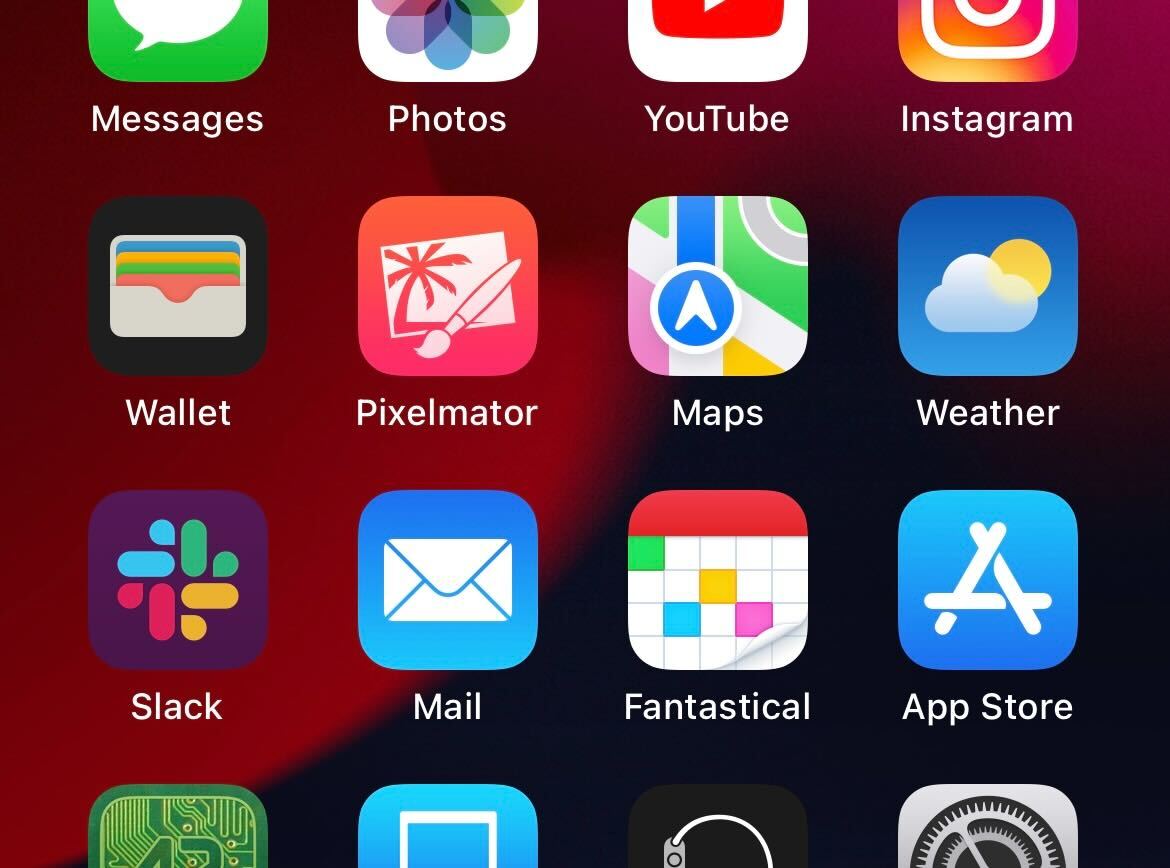
The Weather app has a new icon that adds depth, making it similar to the Maps icon in iOS 15
New onboarding screens for the Maps, Home, and Photos applications
In iPadOS 15 beta 5, Apple has made a small change to the Safari interface, so the address bar is now outlined instead of filled in
Safari
iPadOS 15 beta 5 also brings a new “Use Large Icons” setting to the “Home Screen & Dock” area of the Settings app. This was previously located in the “Display & Brightness” settings area
In the Settings app under Safari then Accessibility, there is a new option for “Show Color in Top and Bottom Bars”
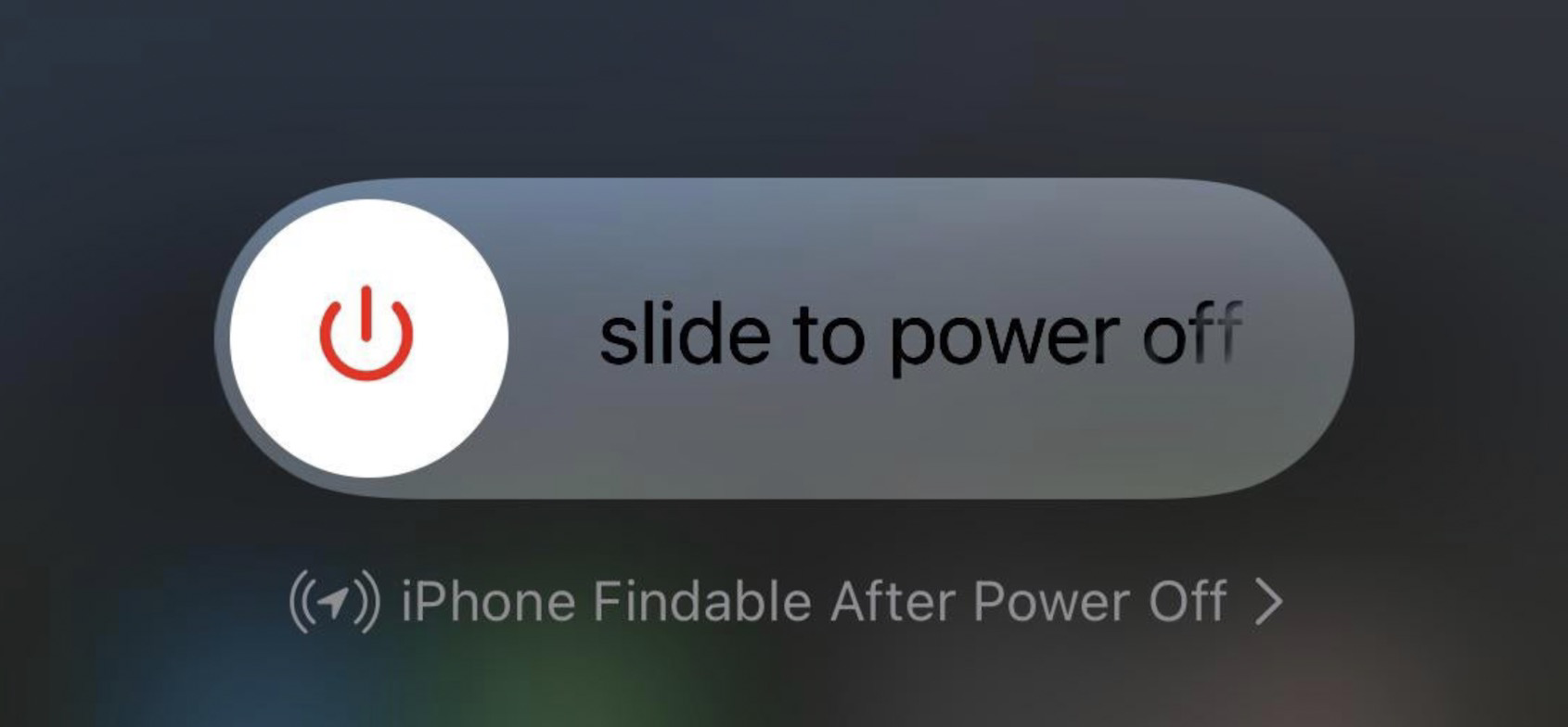
New tappable message for “iPhone Findable After Power Off”
Tweaks to the “Notifications while in Focus” design in Notification Center
According to Apple’s release notes: “Legacy Contacts has been removed from iOS & iPadOS 15 beta 5 and will return in a future release.”
New indicator in the App Store for when you have a TestFlight beta version of an app installed
You can ensure your data remains safe through erasure.
One of the most powerful features added years ago to macOS and iOS was Find My iPhone—and iPad and Mac. The iCloud-connected service lets you track an accidentally misplaced item and potentially recover a stolen one. With the service active on a device, you can use Find My for macOS, iOS, or iPadOS or via iCloud.com to erase your computer, phone, or tablet or to queue an erasure signal for the next time the device is on the Internet. iPhones and iPads with a Secure Enclave and Macs with FileVault enabled simply delete the encryption keys for storage. This renders the data irretrievable. (It doesn’t affect your local or iCloud backups, so don’t worry.) On a Mac with a T2 Security Chip or M1 Apple silicon, disk encryption is always enabled even if FileVault isn’t, allowing Secure Enclave to destroy the disk encryption keys instantly even with FileVault disabled. Pre-Secure Enclave iPhones and iPads and Macs that predate the T2 Security chip and have FileVault disabled take longer to delete files, as each byte of data has to be overwritten. If you’re not sure whether your iPhone, iPad, or Intel Mac has a Secure Enclave, consult the list Apple provides here. You can determine if FileVault is enabled by going to the Security & Privacy preference pane’s FileVault tab.
How to erase a device
Apple warns you about the consequences when you’re about to erase your Mac remotely.
Apple’s tweaked the process slightly for its native apps but left iCloud.com virtually untouched for years. In macOS, iOS, or iPadOS, launch the Find My app. Tap the Devices tab and then tap your hardware. (If you have Family Sharing enabled, you can also see the devices of family members.) On an iPhone or iPad, tap Erase This Device and follow the prompts. On a Mac, right-click the device and select Erase This Device.
With iCloud.com, log in to your account and click the Find iPhone link—no “My” in there. Enter your iCloud password again if prompted. Click the All Devices menu and select your hardware:
For a Mac, click Erase Mac and follow prompts; you’ll note the text says it “may take up to a day to complete,” the worst-case example for a hard-drive-equipped Mac without FileVault enabled and neither a T2 nor M1 chip.
For an iPhone or iPad, just click Erase iPhone or Erase iPad.
If the device is connected to the internet via whatever method it has at its disposal—Wi-Fi, cellular, tethering, a…dial-up modem—erasure begins immediately after the Mac receives the signal relayed via Apple’s servers. In the cases noted above, the drive or flash storage almost instantly becomes irretrievable.
The erase command is queued by Apple, so if the device ever is briefly back on the internet, it erases itself. Once your device starts wiping its data, finding its location via Find My is no longer possible.
For devices that ne’er-do-wells have taken offline or put in a metal box, they may never return online to receive an erase command. But for iPhones, iPads, and Macs with a Secure Enclave, the stored data can’t be interacted with unless someone also obtained the password. (For a running Mac, there might be cracks that work, but it’s unlikely; if powered down and FileVault is enabled, effectively impossible.)
Find My lets you see all your devices and select among them for several purposes—including erasure.
It can be wiped, which securely removes your data—and then Activation Lock kicks, a part of Find My. (Macs have a few additional requirements.) Activation Lock prevents an erased device from being set up again without knowing the iCloud password associated with the account that turned on Find My on it.
Criminal groups have apparently figured out ways to bypass Activation Lock in at least some cases, but those methods still require erasing the device, so your data remains inaccessible.
A future of remote erasure?
I can imagine a future in which the Find My Network could be used to trigger erasure, too. Right now, the system is used entirely as a passive relay: an AirTag tracker and most Apple devices can broadcast their position over Bluetooth in a carefully encrypted manner. Nearby Macs, iPhones, and iPads with Find My Network enabled relay this data via Apple so you can get updates about location without the party relaying it knowing who you are or which device is transmitting.
But AirTags point the way to a potential two-way process. If Apple determines an AirTag has been traveling with you and you’re not the owner of it, you’re presented with a dialog on an iPhone or iPad that lets you play a sound. That command is passed via Bluetooth.
An iPhone that spots an unknown AirTag traveling with it over time can send a signal to prompt an action on the AirTag.
that preserves privacy and yet could be turned to device erasure, too. In Apple and Google’s joint notification system, your smartphone recorded all specially formatted Bluetooth signals around you and retained for those a period of time; this is quite similar to the signals emitted for the Find My Network by Apple devices.
If someone who had been near you receives a COVID diagnosis and enters a code into their smartphone provided by their healthcare provider, the encrypted Bluetooth IDs associated would then be uploaded to a database that all devices in your region or country regularly downloaded and compared to stored IDs.
Now, consider this: what if you could report your device as stolen and that you wanted it erased. That signal would then be distributed in encrypted form across all Apple hardware in your area or an expanded region. If any of those devices picked up an encrypted Bluetooth signal that matched, they could transmit a similarly encrypted erasure instruction. Thieves try to disable all the wireless on a device, but Bluetooth is often harder to block than Wi-Fi or cellular.
The safeguards around this would have to be strong, but it’s not far-fetched—just far-reaching!
Apple introduced iOS 15 beta 2 and iPadOS 15 beta 2 to developers, which are the first updates since the initial release at WWDC 2021 earlier this month. Now that we have the new betas in our hands, here’s a look at what’s new in today’s updates.
Not available for some devices
According to the iPadOS 15 beta 2 release notes on the Apple Developer website, today’s release cannot be installed on the Wi-Fi + Cellular version of the 9.7-inch iPad Pro. The reason is unknown, but probably Apple found some serious issue and chose to skip this release for the affected iPad models.
Bug fixes for iCloud Private Relay
iCloud Private Relay makes web browsing more secure for iCloud subscribers, but this feature was causing some problems for users in beta 1. According to Apple in today’s release notes, iOS 15 beta “resolved an issue that caused iCloud Private Relay to function unexpectedly.”
New Maps icon
Apple revealed a new icon for its Maps app at WWDC 2021, but it was not included in iOS 15 beta 1. Now with beta 2, the new Maps icon is there. It also shows animated driving directions within the app.
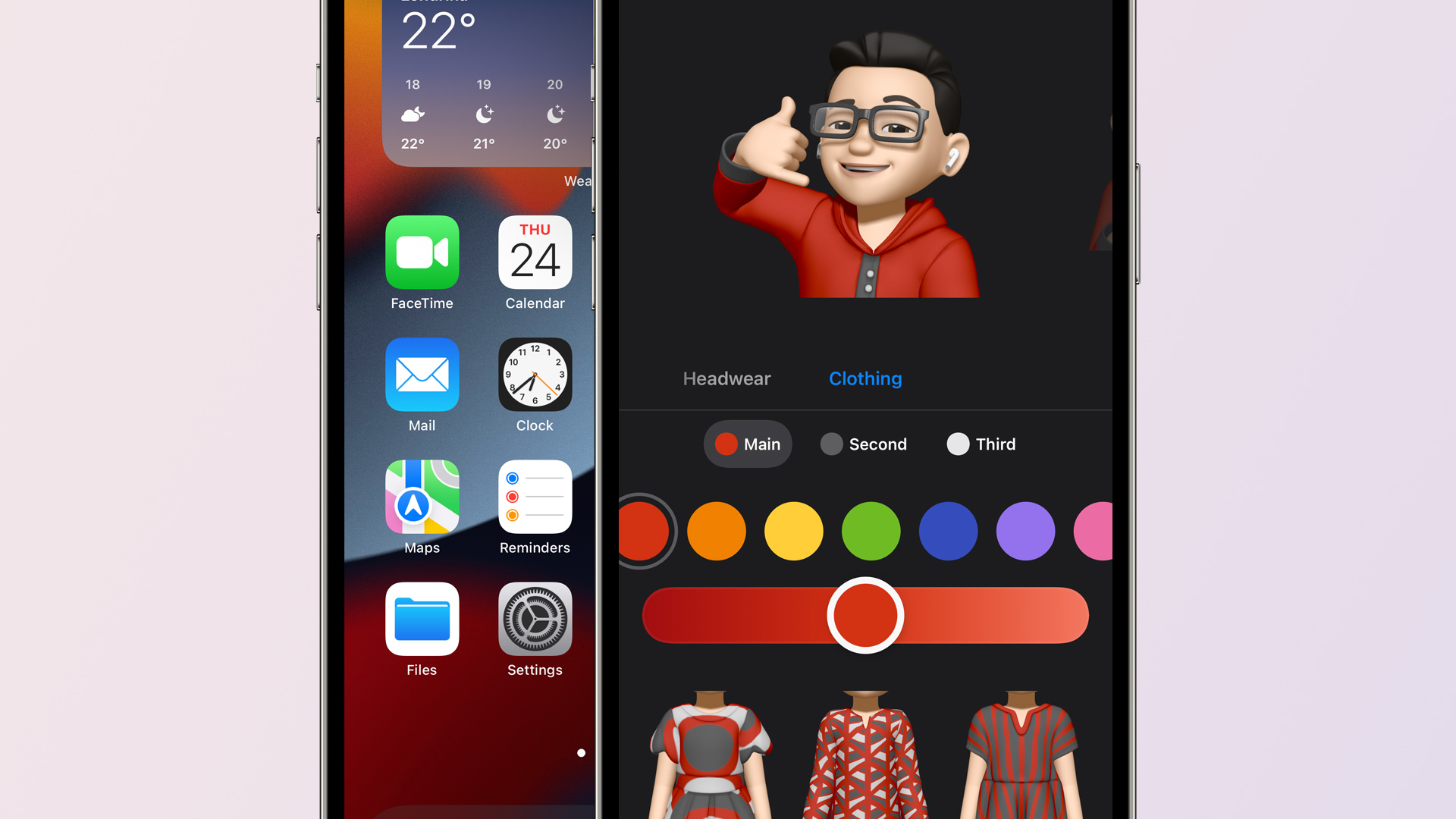
Apple also mentioned earlier this month that Memojis would be updated with new looks, including the option to set a custom outfit. These options are now available with iOS 15 beta 2.
Welcome screen in the Weather app
When you open the Weather app in iOS 15 beta 2 for the first time, you will now see a welcome screen highlighting its new features and refreshed design.
Quick Note on iPad
Quick Note was already available in iPadOS 15 beta 1, but now with beta 2 users can swipe from the bottom right corner to trigger Quick Note.
Apple’s iPadOS 15 features page claims that you’ll be able to swipe a finger to access Quick Note, but this doesn’t seem to work in Dev 1. Hopefully it makes into a future update because I don’t always carry my Pencil. (Or it’s often out of charge. 😂) pic.twitter.com/PinUT70VZF
SharePlay is a new feature to let users share a song, video, or even the screen of their devices during a FaceTime call. This feature is now working with iOS 15 beta 2.
Lossless on HomePod removed
Apple has removed the option to enable Lossless audio on HomePod with iOS 15 beta 2. Previously there was an option to stream Lossless songs on HomePod within the Home app. Most likely this option has been temporarily removed due to some issue and will return in a future release.
Safari
Apple has brought back the Refresh button for the Safari address bar, but it only shows up when using a mouse or trackpad.
The Shortcuts app can now see what is displayed on the screen for receiving input from an app without the share sheet.
Also new in iOS/iPadOS 15 beta 2: Shortcuts, like Siri, can see what's displayed on screen.
There's a new 'Receive What's On Screen' option for Shortcuts. Enable this, and a shortcut will receive input from an app without the share sheet. Right now, it works in Safari. pic.twitter.com/wxrzDlavbY
Two weeks after unveiling iOS 15 and iPadOS 15 to the public at WWDC 2021, Apple is rolling out the second developer betas. iOS 15 beta 2 and iPadOS 15 beta 2 are now available to registered developers ahead of a public beta release in July and a release to everyone in the fall.
iOS 15 beta 2 details
iOS 15 beta 2 and iPadOS 15 beta 2 are available to developers via an over-the-air update in the Settings app. As usual, if the update does not immediately appear for download, keep checking, as it sometimes takes a few minutes to roll out to all registered developers. The build number for today’s iOS 15 beta 2 release is 19A5281h .
Apple’s new software version won’t be complete until the fall, at which point it will be released to the general public. Testers should still expect performance and stability issues when running the iOS 15 beta on primary devices for the time being.
In addition to the second developer betas of iOS 15 and iPadOS 15, Apple is also releasing tvOS 15 beta 2 for Apple TV and HomePod and watchOS 8 beta 2 for Apple Watch. The second beta of macOS Monterey is not yet available.
Instagram users can already access it from a computer or even iPad through the desktop website, but there’s no option to upload photos, videos, or even stories. However, this is expected to change soon, as the company is now working on an update to its website that will allow users to create posts from there.
As revealed by developer and app analyst Alessandro Paluzzi, the update brings the post creator to the web version of Instagram — which was previously only available on the mobile Instagram website besides the official app.
Paluzzi managed to enable the new option on his profile through undisclosed methods, and he shared some images on Twitter of how Instagram’s post creator will work on the web. The interface has been tweaked with a preview of the content next to the publishing options. Users will also find options to crop the image, apply filters (the same as in the app), and set a description.
While the developer did not mention when this new feature will be available to everyone, this is great news for iPad users. While you can install the Instagram app on the iPad, it just runs as an iPhone app without taking advantage of the entire screen.
Unfortunately, Instagram CEO said last year that an iPad version of the app is not in the company’s plans, but being able to create posts from the desktop website makes things less bad, at least. Posting Stories through the web version, however, should take a bit longer to become a reality.
Following the announcement of the new M1 iPad Pro and M1 iMac on Tuesday, Apple executives John Ternus and Greg Joswiak have sat down with the Independent for an in-depth interview. The two Apple executives spoke in the interview about Apple’s plans for the iPad and Mac, the new features of the 2021 iPad Pro, and more.
On merging the iPad and Mac
The most notable comments during the interview came from Joswiak, who serves as Apple’s senior vice president of worldwide marketing. When asked about the future of the iPad and Mac, as the lines start to blur in terms of power, Joswiak explained that Apple has no plans to merge the two platforms.
“There’s two conflicting stories people like to tell about the iPad and Mac,” says Joz, as he starts on a clarification that will lead him at one point to apologise for his passion. “On the one hand, people say that they are in conflict with each other. That somebody has to decide whether they want a Mac, or they want an iPad.
“Or people say that we’re merging them into one: that there’s really this grand conspiracy we have, to eliminate the two categories and make them one.
“And the reality is neither is true. We’re quite proud of the fact that we work really, really hard to create the best products in their respective category.”
(Joz, however, is reluctant to name the category he’s talking about: he jokes that he “can’t even stand using” the word, because the “iPad is better than tablets”. “I hate to diminish it by calling it the category name,” he says.)
Ternus, who is Apple’s senior vice president of hardware engineering, echoed Joswiak’s sentiment. He explained that Apple does not look at things with the lens limiting what one device can do in order to note “step on the toes” of another device.
“But we’re just going to keep making them better. And we’re not going to get all caught up in, you know, theories around merging or anything like that.”
“We don’t think about well, we’re going to limit what this device can do because we don’t want to step on the toes of this [other] one or anything like that,” he says. “We’re pushing to make the best Mac we can make; we’re pushing to make the best iPad we can make. And people choose.
“A lot of people have run both. And they have workflows that span both – some people, for a particular task, prefer one versus the other.
On the new iPad Pro’s M1 chip
When asked about the M1 processor in the new iPad Pro and the software part of that story, Joswiak explained that Apple has “provided that performance even before the need was there.”
“It needs to exist first, right? You can’t have an app that requires more performance than the system’s capable of – then it doesn’t work. So you need to have the system be ahead of the apps.
Joswiak went on to list examples of powerful third-party apps from companies like Adobe and Affinity, but he wouldn’t say whether Apple was working on its own ways to tap into the new power of the M1:
(When asked again, the morning after the reveal, whether Apple is one of those developers that is planning to take advantage of the extra headroom with its professional app, Joz jokes that he’s not going to let something like that slip out.)
Joswiak also explained that this gives users more headroom and ensures their new iPad Pro purchase “isn’t going to be immediately obsolete.”
On mini-LED in the new iPad Pro
Terns also provided some interesting detail on the mini-LED display in the new 12.9-inch iPad Pro. He explained that one of the biggest undertakings in this process was shrinking the display technology — which is also used in the Pro Display XDR — into the 12.9-inch form factor.
“Shrinking it was a huge undertaking,” says Ternus. “If you just look at the two products, obviously the iPad is a lot thinner than a Pro Display XDR, and the way the architecture works – you have the LED backlight behind the display.
As you shrink it down, you necessarily need to add more LEDs; you need to kind of increase the density, because you don’t have as much room for mixing the light and creating zones.
From the very beginning it was: how do we create a backlight with sufficient density? So we had to design a new LED. We had to to design the process for putting down 10,000 LEDs on this backlight in this incredibly precise manner.”
Ternus and Joswiak also noted that one of the reasons Apple is able to make technological leaps like this is because it develops so much of the technology in-house.
On the new Center Stage front-facing camera technology in the iPad
One of the most interesting new features of the 2021 iPad Pro is something called Center Stage. The new iPad Pros pack a 12MP Ultra Wide camera sensor on the front, and Apple is using this to follow users during video chats to ensure that they are always in the frame.
Ternus explained:
“One of the things that I found really cool about it is – spending all this time in these meetings, you sit a lot,” says Ternus. “And it’s so liberating to be able to just stand up and stay framed in the image, and stretch and move around and sit down,” he says, noting that it is a neat way to still be able to close rings on the Apple Watch.
“And one of the things I found sometimes is in group scenarios – you may be FaceTiming with your family and be able to get the family in the frame, or those kind of things, I think are going to be really, really big and powerful. It’s certainly an amazing technology for the times we’re in.”
Apple released iOS 14.5 beta 1 to developers, and as you’ve no doubt heard, it’s quite the update. Headlined by the ability to unlock your iPhone with Apple Watch while wearing a face mask, iOS 14.5 beta 1 brings forth a number of practical improvements and overall enhancements to iPhone. Watch our hands-on commentary as we discuss the top iOS 14.5 beta 1 changes and features.
What’s new in iOS 14.5 beta 1?
Updated Software Update screens
Both the Software Update page in the Settings app and the Watch app have received more informative details regarding updates. Apple now includes a green check mark to indicate that you’re on the latest version of software, along with a message stating that “Your iPhone is up to date with all of the latest bug fixes and security enhancements.” In addition, iOS 14.5 now displays a time stamp that shows the last time you successfully checked for an update.
Unlock with Apple Watch
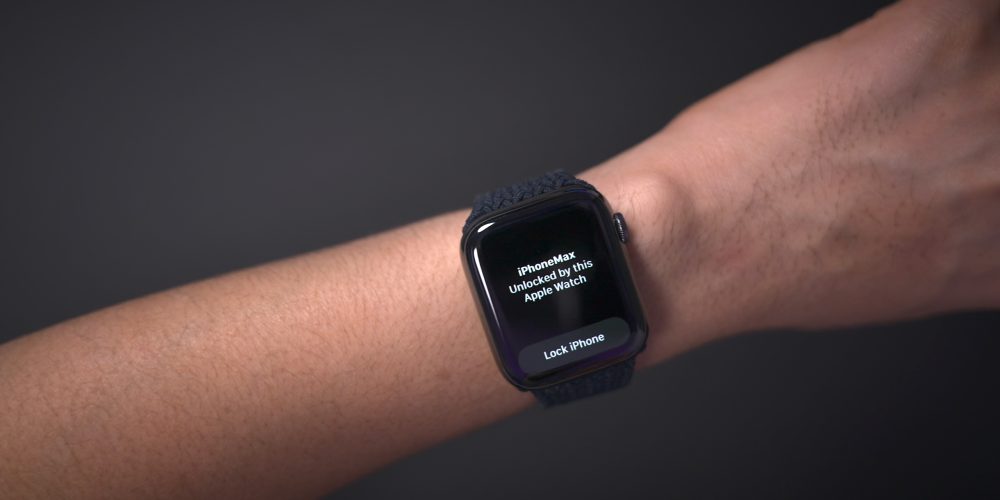
As noted, the biggest feature to come to iOS 14.5 is support for Apple Watch Unlock when Face ID detects a face with a mask. Users must be wearing an unlocked Apple Watch protected by a passcode in order for the feature to work. When attempting to unlock your iPhone using Face ID while wearing a face mask, you’ll feel a vibration on your Apple Watch, along with a notification that your iPhone was unlocked successfully.
Horizontal boot screen iPad
When connected to the Magic Keyboard, iPadOS 14.5 will display the startup Apple logo in horizontal/landscape mode instead of the default portrait orientation. If you restart your iPad when disconnected from the Magic Keyboard, even if you’re holding the device in landscape mode, the startup screen will appear in portrait mode.
As a side note, iPadOS 14.5 now supports emoji search, which iPhone users have been enjoying since iOS 14’s release, but has been inexplicably missing on iPad up until now.
Cellular connectivity updates
One of the biggest changes found in iOS 14.5 is the ability to enable dual SIM functionality while maintaining 5G connectivity. In previous versions of iOS, enabling the iPhone 12’s dual SIM feature would cause cellular connectivity to fall back to standard LTE. With iOS 14.5, users have the option of keeping both connections active simultaneously while still enjoying the benefits of 5G.
In addition to 5G dual SIM support, iOS 14.5 surfaces a new 5G Standalone cellular switch in system settings. Initial 5G implementations piggybacked on existing LTE networks to speed up adoption of 5G, but this method imposes propagation limits based on the LTE limitations. With Standalone (or SA) 5G, the limits of LTE are no longer in play. Keep in mind that your carrier will need to support 5G SA, and Apple warns that enabling SA at this early stage may cause degraded performance.
Apple Music updates
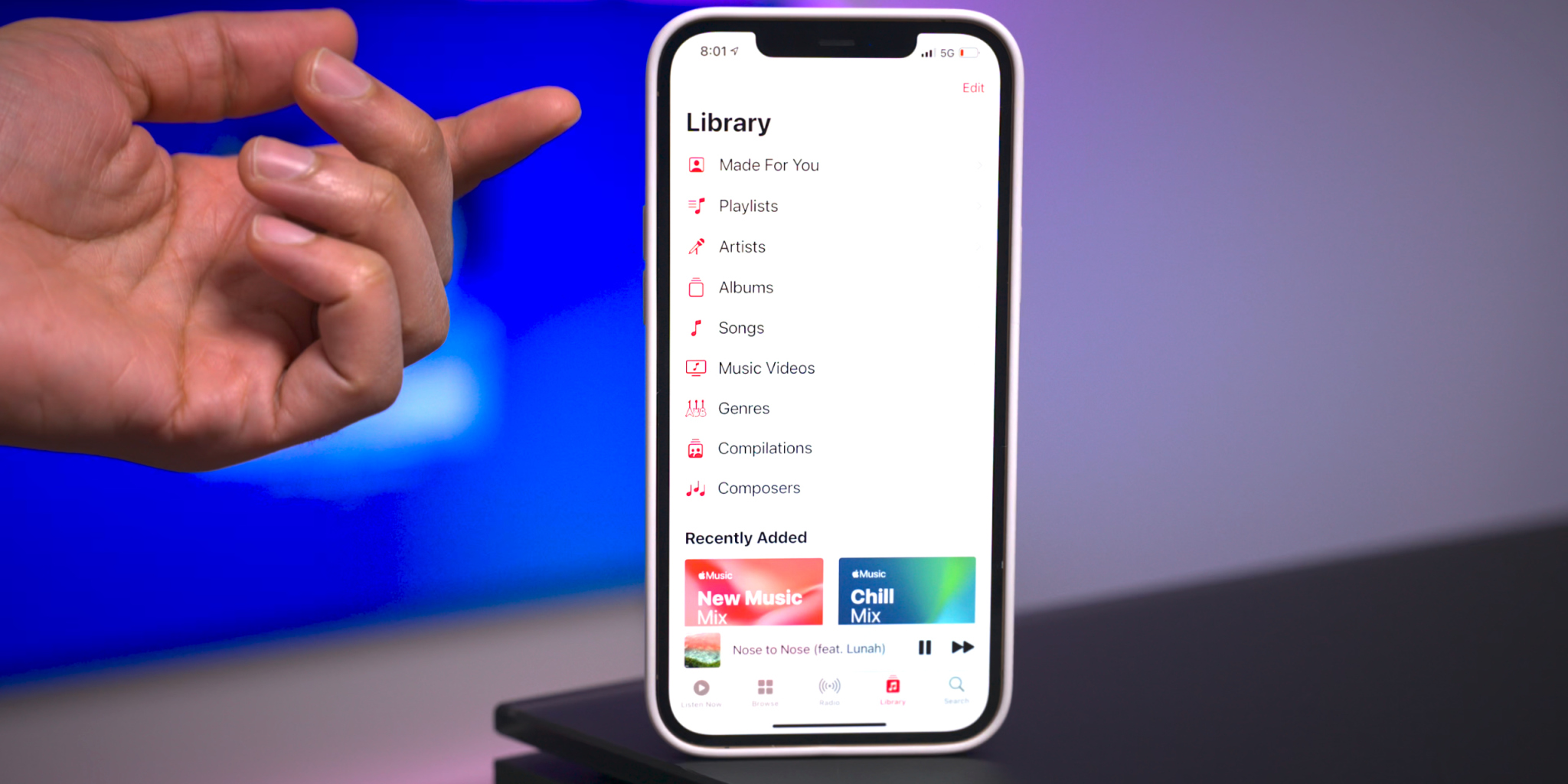
Apple Music gets some noteworthy updates in iOS 14.5, headlined by a new “Made For You” section under the Library tab. Made For You houses all of the algorithmic-curated music suggestions that are normally found within playlists like Favorites Mix, Chill Mix, and New Music Mix within the Listen Now tab.
Another handy feature found in iOS 14.5 is the inclusion of release dates for all music content featured on Apple Music. Prior versions of iOS would showcase release info, but in this latest beta version of iOS, users are treated with the exact release month, day, and year.
Users will also be happy to know that the scrolling metadata view on the Now Playing Lock Screen interface has now returned. This is a big improvement over the truncated metadata view that’s been around in the last few versions.
Reminders app enhancements
It’s crazy that we’ve not been able to sort Reminders based on parameters like modification date or title up until now, but at least we finally receive such features in iOS 14.5. Users can still sort reminder lists manually, but now there are several metadata sorting options, along with ascending and descending preferences.
The ability to directly print a reminders list joins the updated sorting options, allowing users to quickly send a list to a configured AirPrint printer.
Updated Podcast app
The stock Podcasts app gets lots of subtle changes and enhancements alongside a bigger update to the look and feel of the official show page for each podcast. New enhancements include a full-bleed header with color-matched backgrounds and a refreshed Library page with new glyphs.
Apple Fitness+ Workouts AirPlay 2 support
AirPlay 2 compatibility comes to Apple Fitness+ workouts, allowing users to stream workouts directly to an AirPlay 2-compatible set-top box or television. The problem with this method, as opposed to just playing on an Apple TV or iPad, is that you lose on-screen metric support. But that might not be a huge deal since metric details remain readily available on your Apple Watch.
Maps app redesigned guides
Apple has redesigned the Guides feature on the Maps app, which now includes a full-bleed header, redesigned buttons, and beautiful animations when minimizing and maximizing each guide.
PS5 / Xbox Series X controller support
Support for next-generation console controllers, including the Playstation 5 Dual Sense controller and the Xbox Series X controller, is now available in 14.5. Next-gen controller support is a welcome new addition for controller-compatible Apple Arcade games, and for taking advantage of console-centric remote play features.
Dedicated Search tab in News app
Similar to the Search tab in the Music app and TV app, the News app gains a dedicated search interface for quickly finding channels, topics, or stories.
Siri interface updates
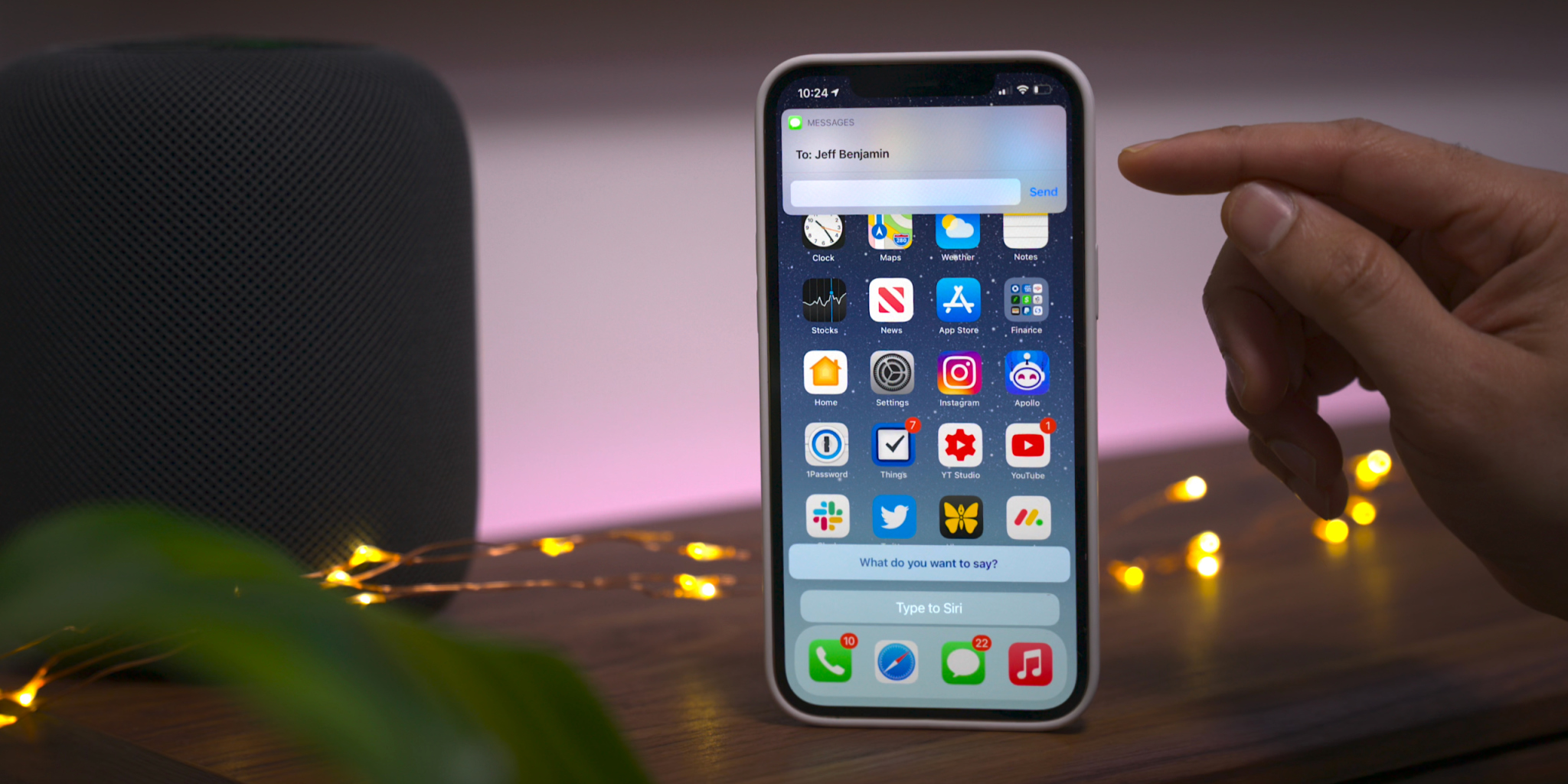
Those using the Type to Siri accessibility option will notice an updated interface that no longer opens to a dedicated Siri screen, allowing the user to maintain context of their current position in iOS. This update is similar to the changes first implemented in iOS 14 when invoking Siri using voice. You’ll also find an updated interface that appears when sending iMessages via Siri.
Apple Card updates
Although these updates are not-yet user facing, we’ve also highlighted a couple of forthcoming changes related to Apple Card:
Apple Card Family feature for multi-user accounts
New financial health features coming to the Wallet app
To commemorate Data Privacy Day, Apple is sharing “A Day in the Life of Your Data,” a report that illustrates how companies track user data.
Data tracking is more widespread than ever. Learn how Apple’s privacy features help users take control over their data
Cupertino, California — January 28 is Data Privacy Day, a time to raise awareness about the importance of protecting people’s personal information online. Apple is commemorating Data Privacy Day by sharing “A Day in the Life of Your Data,” an easy-to-understand report illustrating how companies track user data across websites and apps. The report also shares how privacy features across Apple’s products give users more transparency and control, empowering people with the tools and knowledge to protect their personal information.
“Privacy means peace of mind, it means security, and it means you are in the driver’s seat when it comes to your own data,” said Craig Federighi, Apple’s senior vice president of Software Engineering. “Our goal is to create technology that keeps people’s information safe and protected. We believe privacy is a fundamental human right, and our teams work every day to embed it in everything we make.”
“A Day in the Life of Your Data” helps users better understand how third-party companies track their information across apps and websites, while describing the tools Apple provides to make tracking more transparent and give users more control. The explainer sheds light on how widespread some of these practices have become. On average, apps include six “trackers” from other companies, which have the sole purpose of collecting and tracking people and their personal information.1 Data collected by these trackers is pieced together, shared, aggregated, and monetized, fueling an industry valued at $227 billion per year.
The new privacy nutrition label requires every app — including Apple’s — to give users an easy-to-view summary of the developer’s privacy practices.
Last year, as part of iOS 14 and iPadOS 14, Apple launched a number of important privacy features intended to help users make more informed decisions about their data. Two in particular have the potential to make a big difference in helping users protect their privacy:
With the new privacy information section on App Store product pages, a feature called the privacy nutrition label, Apple is requiring every app — including its own — to give users an easy-to-view summary of the developer’s privacy practices. Every product page on the App Store includes standardized, easy-to-read information based on the developer’s self-reported data practices. The privacy nutrition labels give users key information about how an app uses their data — including whether the data is used to track them, linked to them, or not linked to them.
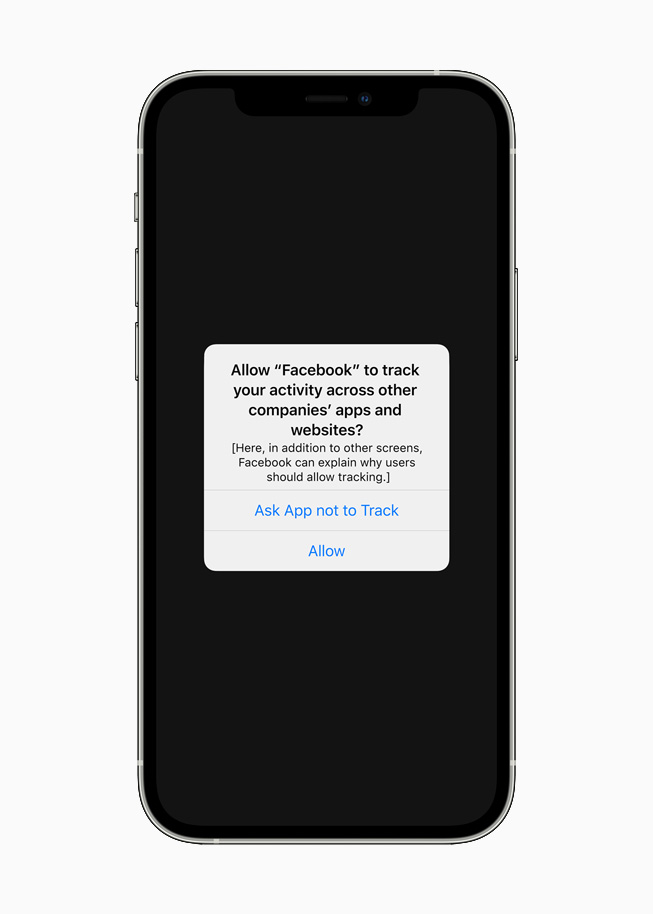
And starting soon, with Apple’s next beta update, App Tracking Transparency will require apps to get the user’s permission before tracking their data across apps or websites owned by other companies. Under Settings, users will be able to see which apps have requested permission to track, and make changes as they see fit. This requirement will roll out broadly in early spring with an upcoming release of iOS 14, iPadOS 14, and tvOS 14, and has already garnered support from privacy advocates around the world.
A new App Tracking Transparency feature across iOS, iPadOS, and tvOS will require apps to get the user’s permission before tracking their data across apps or websites owned by other companies.
Gus Hosein, Privacy International: “PI’s investigations into data brokers and ad tech companies reveal a complex, fast-growing industry that is opaque to the average user. Where there is a lack of transparency, exploitation thrives. Invisible and gratuitous data collection leaves users unable to exercise their rights and protect their privacy. Apple’s nutrition labels require industry to be clear and upfront with consumers, and tools like App Tracking Transparency will help people to assert control over the invisible leakage of their data. With these commendable innovations, industry will finally feel pressure to change. Consumer awareness and technical solutions are important parts of the solution, but in order to prevent a cat-and-mouse game between industry actors, we need substantive, enforceable regulation to stop this exploitation of our data.”
Jeff Chester, Center for Digital Democracy: “Apple’s new data privacy tools ensure that people have greater control over their personal information. Data brokers and online advertisers will now have to act more responsibly when dealing with consumers who use third party applications on Apple devices.”
Michelle Richardson, Center for Democracy and Technology: “Too often, consumers are unknowing participants in a web of data tracking and targeting. These changes will help rebalance the ecosystem so that data collection and sharing is more transparent and tracking is no longer the default. Systemic change of this breadth is a huge leap forward for consumers.”
Tristan Harris, Center for Humane Technology: “Today’s Apple announcement moves the ecosystem further away from the malicious effects of secretive profiling and microtargeting that enable many of the problems outlined in The Social Dilemma.”
Awareness of industry practices like data tracking is only the first step toward a better privacy experience. Users also need the features and controls to decide how their data is used, and by whom. Apple has led the industry by building privacy protections into every one of its products and services.
For years, Apple has introduced dozens of technologies that safeguard user privacy and help keep users’ data safe. For example, Safari was the first browser to block third-party cookies by default as far back as 2005. In iOS 11 and macOS High Sierra, Safari added Intelligent Tracking Prevention to further limit tracking while still enabling websites to function normally. In 2018, Apple introduced protections to prevent companies from fingerprinting Mac — a practice in which third parties try to identify users devices based on data like fonts and plug-ins.
These technologies represent only a small selection of the many privacy features and controls Apple has introduced across its products. For more information, visit Apple’s privacy website at apple.com/privacy.
It’s been two years since we unveiled the list of Apple devices that will receive the next major update. After iOS 13 and then iOS 14, it’s time to talk about iOS 15. On which iPhone, iPod or iPad can we install iOS 15 and iPadOS 15?
If iOS 14 had rolled over the same iPhones and iPads as iOS 13 (like iOS 12 and iOS 11), Apple is expected to remove five models this year, split between smartphones and tablets. Here is a first list of Apple devices that will host iOS 15 beta next June, gleaned once again from our developer friend at Apple and who works in particular on the Plans app. Obviously, needless to say that the iPhone 13 will be delivered directly with iOS 15 and an A15 chip. But for the others, there will be unhappy customers because Apple will have to part with certain models in order to facilitate the deployment of new products and to better unify its fleet.
French publication iPhoneSoft says that the information is coming from within Apple (via Apple Translate):
Here is a first list of apple devices that will host iOS 15 beta next June, once again gleaned from our developer friend at Apple and who notably officiates on the Plans app.
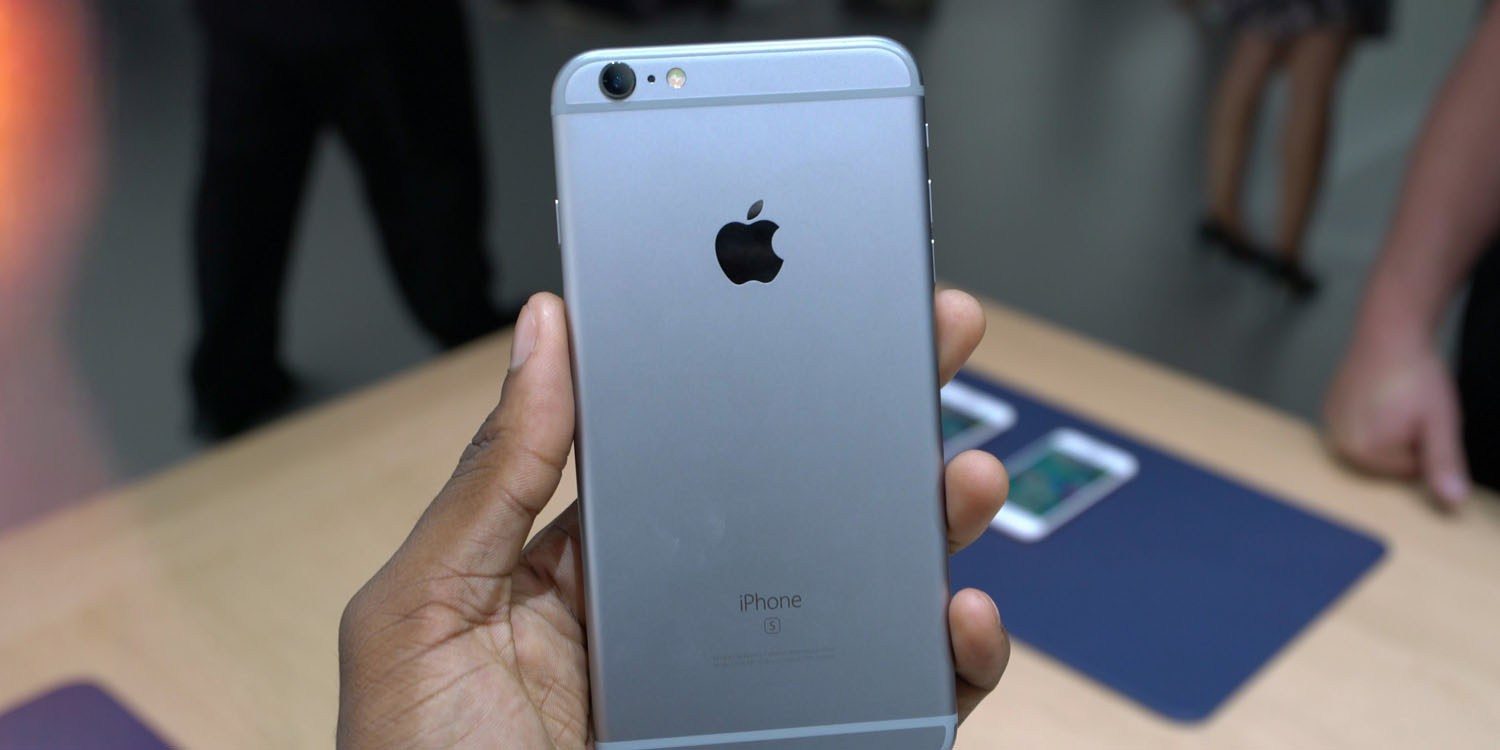
The iPhone 6s and iPhone 6s Plus were originally introduced in September of 2015, followed by the iPhone SE in March of 2016. The devices were incredibly popular and have received over four years of software updates from Apple.
With the iPhone 12 mini and the second-generation iPhone SE, Apple now sells two modern devices that match the form factor of the iPhone 6s design. The second-generation iPhone SE is actually nearly identical to the iPhone 6s in terms of design, but with the modern A13 processor inside. The iPhone 12 mini is physically smaller, but offers a bigger display because of its edge-to-edge design, alongside the A14 processor and an improved camera system.
Not compatible with iOS 15:
iPhone 6s an 6s Plus
iPhone SE 2016
That lines up with the report we saw last November from The Verifier. But going beyond that information, iPhoneSoft says that iOS 15 will also “probably not be available” on:
iPad mini 4
iPad Air 2
iPad 5
Here’s a look at what devices could work with the iOS/iPadOS 15.
Apple’s best-ever lineup of iPhone and iPad is available October 23.
Best-ever lineup of iPhone and iPad will be available October 23 through redesigned virtual and in-person experiences
When iPhone 12, iPhone 12 Pro, and iPad Air are available Friday, October 23, customers can get their all-new products directly from Apple through tailored purchase experiences offered online, by phone, or in store. From a chat session with a Specialist that starts online and finishes with contactless delivery, to visiting select Apple Store locations for a one-on-one session with an Apple Specialist, customers can find the best way to get the products they’re looking for. And unprecedented offers from AT&T, T-Mobile/Sprint, and Verizon give customers more choice and flexibility than ever, with offers starting as low as $0 per month for iPhone 12.
“There’s never been a better time to get a new iPhone, and there’s never been a better destination than Apple Retail,” said Deirdre O’Brien, Apple’s senior vice president of Retail + People.
“We’re offering new ways for our customers to get to know all of our products before they buy, so they can be sure to get the product that’s right for them. Whether our customers choose to connect with us in person, by phone, or online, our entire retail team is ready to deliver the world-class personalized service they’ve come to expect from Apple.”
New at Apple Retail this year:
Unprecedented carrier offers are now available from Apple, in store or online, with savings of up to $800.1
With Shopping Sessions, customers can now book a one-on-one session with a Specialist at an Apple Store for personalized help selecting a new product, carrier plan, or financing option. The same expert advice is available online, where customers can chat with a Specialist anytime.
Pickup options include in-store, curbside, same-day delivery, or Express storefront.2 Customers can check apple.com/retail for services available at their local store.
Contactless delivery is available for all products, including iPhone and iPad. Delivery drivers may ask for verbal confirmation from a safe distance, replacing the need for a physical signature.
And now with Apple Card, customers in the US get 3 percent Daily Cash back when they buy directly from Apple and have the option to choose Apple Card Monthly Installments so they can pay over time, interest-free.
Though this year’s iPhone launch looks different from years past, Apple Retail continues to offer the services customers love:
After a customer gets their new Apple product, an Online Personal Session allows them to schedule a free session with a Specialist to set up their new product, learn the basics, or get pro tips.
Apple Trade In lets iPhone or iPad owners get up to $500 credit toward the purchase of a new product.4
The vast majority of Apple Store locations around the world are open and operating in various service models to protect the health and well-being of customers and employees. Before visiting, customers should check apple.com/retail for details on their local Apple Store. For more information about services and support available from Apple Retail, visit apple.com/shop.
Apple today introduced the all-new iPad Air — the most powerful, versatile, and colorful iPad Air ever.
The most powerful iPad Air ever features new all-screen design with larger 10.9-inch display, new 12MP rear camera, next-generation Touch ID sensor, and more
Apple introduced an all-new iPad Air — the most powerful, versatile, and colorful iPad Air ever. Now available in five gorgeous finishes, iPad Air features an all-screen design with a larger 10.9-inch Liquid Retina display, camera and audio upgrades, a new integrated Touch ID sensor in the top button, and the powerful A14 Bionic for a massive boost in performance, making this by far the most powerful and capable iPad Air ever made. The new iPad Air will be available starting next month.
“Today we’re excited to introduce a completely redesigned and far more powerful iPad Air, debuting Apple’s most powerful chip ever made, the A14 Bionic,” said Greg Joswiak, Apple’s senior vice president of Worldwide Marketing. “With its gorgeous new all-screen design, larger 10.9-inch Liquid Retina display, next-generation Touch ID, and a massive boost in performance with A14 Bionic, the new iPad Air brings customers powerful pro features at an even more affordable price. Along with major upgrades to the iPad Pro and eighth-generation iPad this year, and the powerful new features of iPadOS 14, this is our strongest iPad lineup ever, giving our customers even more ways to enrich their daily lives.”
iPad Air features an all-screen design with a larger 10.9-inch Liquid Retina display, a new Touch ID sensor integrated into the top button, camera and audio upgrades, and debuts the powerful A14 Bionic, Apple’s most powerful chip ever.
All-New iPad Air Design in Five Beautiful Finishes
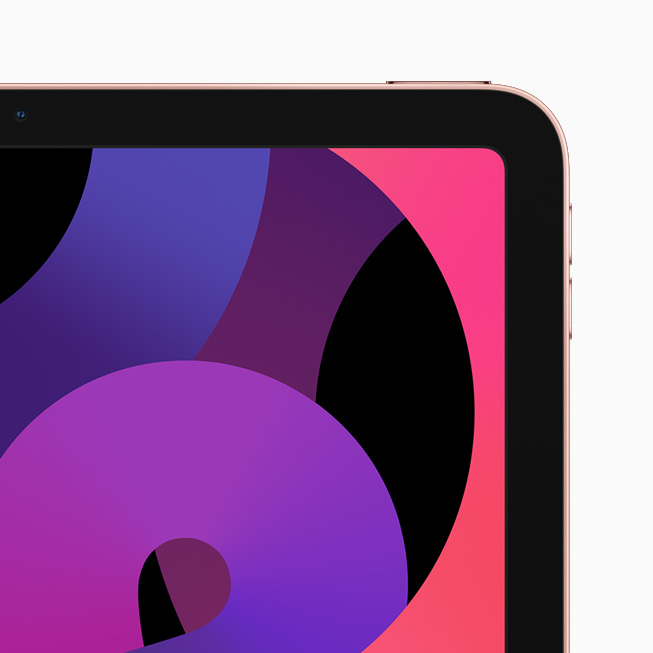
The new iPad Air features a completely new thin and light design in five gorgeous finishes: silver, space gray, rose gold, green, and sky blue. The new all-screen design features a larger 10.9-inch Liquid Retina display for a stunning visual experience, with 3.8 million pixels and advanced technologies, including full lamination, P3 wide color support, True Tone, and an anti-reflective coating for an amazing visual experience. To allow the display to extend on all sides, a next-generation Touch ID sensor is integrated into the top button, providing the same fast, easy, and secure way to unlock iPad Air, log in to apps, or use Apple Pay that customers know and love. iPad Air is compatible with Magic Keyboard and its floating design, and built-in trackpad, Smart Keyboard Folio, and new Smart Folio covers, as well as Apple Pencil, which attaches magnetically to the side for easy pairing, charging, and storing.
The new iPad Air features a completely new thin and light design in five gorgeous finishes: silver, space gray, rose gold, green, and sky blue.
Most Powerful iPad Air with A14 Bionic
iPad Air delivers a massive boost in performance with Apple’s most advanced chip, A14 Bionic. Handling even the most demanding apps, A14 Bionic makes it even easier for users to edit 4K videos, create gorgeous works of art, play immersive games, and more. Using breakthrough 5-nanometer process technology, A14 Bionic is packed with 11.8 billion transistors for increased performance and power efficiency in nearly every part of the chip. This latest-generation A-series chip features a new 6-core design for a 40 percent boost in CPU performance, and a new 4-core graphics architecture for a 30 percent improvement in graphics.2 To deliver breakthrough machine learning capabilities, A14 Bionic includes a new 16-core Neural Engine that is twice as fast, and capable of performing up to 11 trillion operations per second, taking machine learning apps to a whole new level. A14 Bionic also includes second-generation machine learning accelerators in the CPU for 10 times faster machine learning calculations. This combination of the new Neural Engine, CPU machine learning accelerators, and high-performance GPU enables powerful on-device experiences for image recognition, natural language learning, analyzing motion, and more.
A14 Bionic includes a new 16-core Neural Engine that’s capable of performing up to 11 trillion operations per second, taking machine learning apps like djay Pro AI to a whole new level.
Upgraded Camera and Immersive Audio
iPad Air, which includes a 7MP front-facing FaceTime HD camera, now features the same 12MP rear camera used in iPad Pro for higher resolution photos and 4K video capture. The new design of iPad Air features stereo speakers in landscape mode, elevating the audio experience so users can enjoy wider stereo sound while watching video.
iPad Air now features a USB-C port for up to 5Gbps data transfer, which is 10 times faster,2 for connecting to cameras, hard drives, and external monitors up to 4K. With Wi-Fi 6 performance and 60 percent faster LTE connectivity,3 along with A14 Bionic, this is by far the most powerful iPad Air ever.
The new design of iPad Air features stereo speakers in landscape mode so users can enjoy wider stereo sound while watching video.
Distinct iPad Experience with iPadOS 14
iPadOS 14, available beginning Wednesday, September 16, brings new features and designs that take advantage of the unique capabilities of iPad, such as its large Multi-Touch display, and versatile accessories. iPadOS 14 further integrates Apple Pencil into the iPad experience for better note-taking capabilities, and new ways to work with handwritten notes. When taking notes on iPad, Smart Selection uses on-device machine learning to distinguish handwriting from drawings, so handwritten text can easily be selected, cut, and pasted into another document as typed text using the same familiar gestures. Shape recognition allows users to draw shapes that are made geometrically perfect and snap right into place when adding diagrams and illustrations in Notes. Data detectors work seamlessly with handwritten text, recognizing phone numbers, dates, addresses, and links, making it easy for users to perform actions like tapping a handwritten number to make a call.
iPadOS 14 also brings Scribble to iPad, allowing Apple Pencil users to handwrite directly in any text field, making actions like replying to a quick iMessage or searching in Safari fast and easy — all without ever needing to put Apple Pencil away. Scribble uses on-device machine learning to convert handwriting into typed text in real time, so writing is always kept private and secure.
iPadOS 14 makes the iPad experience even more distinctive and powerful in other ways, including:
New compact designs for incoming FaceTime and phone calls, Siri interactions, and Search to help users stay focused on the task at hand.
Universal Search to quickly find practically anything, from locating and launching apps, to accessing contacts, files, and information, to getting answers to common questions about people or places.
New sidebars for many apps including Photos and Files, and streamlined toolbars that consolidate controls into a single place, making them more useful than ever.
Beautifully redesigned widgets that present timely information at a glance right on the Home Screen.
iPadOS 14 brings powerful new features and capabilities, making the iPad experience even more distinctive and versatile.
Most Environmentally Friendly, Most Advanced iPad Lineup Ever
The new iPad Air is designed to be environmentally friendly and supports Apple’s plan to become carbon neutral by 2030. The iPad Air uses a 100 percent recycled aluminum enclosure and 100 percent recycled tin for the solder on its main logic board. The new speakers in iPad Air also use magnets with 100 percent recycled rare earth elements. iPad Air remains free of harmful substances, is highly energy efficient, and uses wood fiber packaging that is recycled or comes from responsibly managed forests.
The new iPad Air joins the powerful iPad Pro, the eighth-generation iPad, and iPad mini to form the most advanced iPad lineup ever.
iPad Air joins the powerful iPad Pro, the eighth-generation iPad, and iPad mini to form the most advanced iPad lineup ever. With support for Apple Pencil, best-in-class performance, advanced displays, and all-day battery life,4 whether customers prioritize portability, power, or price, there’s an iPad for everyone. Learn more about the iPad family at apple.com/ipad/compare.
Pricing and Availability
The new iPad Air will be available starting next month on apple.com and in the Apple Store app in 30 countries and regions, including the US. Wi-Fi models of iPad Air will be available with a starting price of $599 (US) and Wi-Fi + Cellular models start at $729 (US). The new iPad Air, in 64GB and 256GB configurations, will be available in five beautiful finishes including silver, space gray, rose gold, green, and sky blue.
iPadOS 14, the powerful operating system designed specifically for iPad, ships for free with the new eighth-generation iPad and new iPad Air, and will be available as a free software update tomorrow for all iPad Pro models, iPad Air 2 and later, iPad 5th generation and later, and iPad mini 4 and later.
Apple Pencil (2nd generation), available for purchase separately for $129 (US), is compatible with iPad Air.
Magic Keyboard and the Smart Keyboard Folio for iPad Air are available for purchase separately for $299 (US) and $179 (US), respectively, both with layouts for over 30 languages, including simplified Chinese, French, German, Japanese, and Spanish.
Smart Folios are available for iPad Air for $79 (US) in black, white, and three new seasonal colors including deep navy, cyprus green, and pink citrus.
Education pricing for individuals, including current and newly accepted college students and their parents, as well as faculty, staff, and homeschool teachers of all grade levels, is available for $549 (US) for the new iPad Air. The second-generation Apple Pencil is available for $119 (US), the Smart Keyboard Folio is available for $159 (US), and Magic Keyboard for $279 (US). For more information, visit apple.com/us-hed/shop.
Apple One is the easiest way to get many Apple subscription services at a great value, so customers can choose the one plan that is right for them or their whole family. Customers can sign up for Apple One starting this fall.
For a limited time, customers who purchase a new iPad, iPhone, Apple TV, Mac, or iPod touch can enjoy one year of Apple TV+ for free.5
Customers looking for convenient, contactless service are able to find many of the same shopping and support services from apple.com. Customers can chat with an Apple Specialist and get shopping help, choose monthly financing options, trade in eligible devices, and get Genius support and no-contact delivery. In-store pickup is also available. Customers are encouraged to check apple.com/retail for more information on the health and safety measures in place, and the services available at their local store.
Customers in the US can trade in their eligible device for an Apple Gift Card or credit toward their purchase. If the device isn’t eligible for credit, Apple will recycle it for free.6
When customers buy online from Apple, they can make iPad and Apple Pencil (2nd generation) their own with free engraving.
Customers in the US who buy directly from Apple can choose Apple Card monthly installments to pay for their iPad over 12 months, interest-free, and get 3 percent Daily Cash back all upfront. Customers who choose to pay in full with their Apple Card also get 3 percent Daily Cash back.
Customers can extend their limited warranty with AppleCare+ and get 24/7 priority access to technical support.
Every customer who buys iPad from Apple can enjoy a free Online Personal Session with an Apple Specialist to help them explore and discover all of the amazing things they can do with their new iPad.