Starting next month, YouTube Music is getting free background listening in a major revamp of the streaming service’s ad-supported tier. As part of that, the YouTube Music app is going audio-only and will no longer play videos if you don’t pay for Premium.
With background play, the application will keep streaming music when it’s no longer open or your screen is off. This previously required a paid YouTube Premium (or Music Premium) subscription. Today, those that don’t pay can watch videos found in the Home and Explore feeds, as well as search. They cannot, however, use the seamless “Song/Video” switcher at the top of the Now Playing screen.
To balance the upcoming change, free YouTube Music users will no longer be able to watch music videos in the app. This is becoming a YouTube Premium perk as Google shifts YouTube Music for free users to be an audio-only experience. Users are advised to use the main YouTube client for their regular video-watching.
This change starts on November 3, when free background play rolls out. It’s first coming to Canada with “global expansion plans” not yet detailed. Google confirmed to us this change to videos in YouTube Music, while a help post lays out the new tiering system.
That that don’t pay for YouTube Music (and see an “Upgrade” tab” in the bottom bar) can:
listen to music in the background
shuffle play personalized mixes (that are made just for you!)
find the perfect mood mixes for activities like workout, commute and more
explore millions of songs & thousands of playlists, free of cost
Meanwhile, YouTube Premium lets users:
listen to songs on-demand
watch videos on YouTube Music
skip tracks an unlimited number of times
enjoy YouTube Music without ads
It comes as Apple Music on Monday introduced a cheaper “Voice Plan.” As per usual, Google and YouTube are just combating that with a free “radio-like” tier that is supported with advertising.
The fact that we haven’t seen a stable Android 12 release means that at least Samsung has the opportunity to catch up to Google with their One UI 4.0 Beta 2 update.
Although it’s quite unlikely, we could have a situation where the first stable Android 12 update comes to a non-Pixel device. That would be a real shock, but given that Samsung is only pushing the second One UI 4.0 beta based upon Android 12, we’d be very surprised, to say the least.
Here’s everything notable in the latest Android 12-based update for Samsung Galaxy devices:
Color theme
A huge component of Android 12 on Pixel phones is now available as part of One UI 4.0 Beta 2 but with a few Samsung-ish tweaks in tow. “Color theme,” as Samsung has renamed it, is the Korean firm’s take on Dynamic Color and the “Monet” theming system seen on Pixel hardware.
From your homescreen, long-press in an empty space or pinch to zoom outwards and head to Wallpapers > Color theme. From this new panel you’ll be able to choose a three-color theme based upon your on-device wallpaper. You can leave it as the preset blue, white, and black setup or select one of up to four patterns determined by your device.
You’ll see a nice preview pane above showing just what colors will be adopted across your device too. The effect isn’t nearly as obvious as it is on Pixels, but it does work across almost all core One UI 4.0 system areas — including notification toggles and the lockscreen.
It’s worth noting that the change is very noticeable but not quite as extensive as you might expect. Instead, it’s more of an accent addition that tweaks some UI elements but doesn’t appear to work with any of Google’s recently updated and tuned first-party applications including Messages, Gmail and many more.
You’ll still see the Material You tweaks on those apps, but for now at least, most will just adhere to the stock or standard colors applied. Some apps are fully themed but will depend heavily upon which version you have installed or have updated. A fine example is the Google Podcasts app, which will adjust based upon your wallpaper-based “Color theme” accenting.
Because of the inherent changes to apps as a result of your system accent color, “Color theme” changes just how you’ll experience Android 12 on your Samsung Galaxy device. Google is pushing it hard for Pixel, and it was initially expected to be limited to Made by Google devices but the arrival here in One UI 4.0 Beta 2 is far earlier than expected.
RAM Plus
To explain, “RAM Plus” is a feature that uses a portion of your on-device storage to create “virtual RAM” that ups the limit on your Galaxy smartphone. For higher-end Samsung Galaxy smartphones in excess of 8-12GB of RAM, this probably isn’t even an issue, but for the low-end devices with hardware limits, this could be a real way to expand or improve general performance levels.
In One UI 4.0 Beta 2 you can’t actually disable “RAM Plus” as it’s simply enabled by default. You can see just how much space is being used by heading to Settings > Device care > Memory. Here you’ll be able to clear or free up RAM as well as see just how much “virtual memory” is being adopted where the system deems necessary.
We’re not sure if this will decrease or automatically disable if you lack the available space, but it appears to be capped at 4GB. It’s also worth noting that this isn’t the same as physically adding 4GB of RAM to your device, but it might help if heavy apps are taking up system resources or you want to play more demanding games and are happy to sacrifice other app performance levels. It’s worth noting that this has already been released to some mid-rangers from Samsung, including the Galaxy A52 and even the brand-new Z Fold 3, but joining the main One UI 4.0 build could expand it to all devices.
Enhanced video calling options and effects
When initiating a video call, you have more options at your fingertips as part of the “Video call effects” floating panel after updating to One UI 4.0 Beta 2. These include the ability to adjust background blur effects or add a color/image. Effectively, this simply mimics the kind of things you can already do in the various calling apps like Zoom, Google Meet, and others, but this works on any app that your Galaxy device detects as a video calling app.
Enhancing those controls is a new “Mic mode” option that lets you choose just what audio is picked up when making video calls. There’s a “Standard” mode that works just as you expect, a “Voice focus” option that attempts to cut out any annoying background noise but a neat option for group or family calls is an option labeled “All sound.” When making large group calls — something fairly normal since the start of the pandemic — this might help as it boosts the audio picked up in the vicinity of your phone.
Gallery metadata editing
It’s almost as if Samsung lifted the ability to edit and adjust the time and date metadata from images in the Gallery app right from Google Photos — although it’s simply a highly requested feature. Tapping the overflow menu and then selecting details opens up the metadata menu for any image within the Samsung Gallery app.
From here you’re able to edit everything from the photo name, the location it was taken, and even the time and date — complete with Dynamic Color supporting time and date picker. Not having to upload to Google Photos or use another third-party app is likely a massive added feature for many that use the default gallery app on their Galaxy devices.
Android 12 easter egg with Dynamic Color
Not necessarily a massive update but provided you are using “Color theme” on your device, the Android 12 easter egg will adhere to your preset theme — just like it does on Pixel smartphones running the Android 12 Beta. Is this is an important change? No, but it’s nice all the same.
Should I install One UI 4.0 Beta 2 on my Galaxy S21?
If you want to try this modest set of additional features alongside the previous — and more extensive add-ons — then you’ll need to sign up the One UI 4.0 Beta via the Samsung Members app. At this stage it has only rolled out in the US and UK, but more regions will get access to this Android 12 preview over the coming days.
However, at this stage, we’d suggest holding on a little longer. Although this update includes a number of bug fixes, performance can be quite unstable at times with texture pop-in and lag in certain apps when scrolling. Beta 3 will hopefully add a bit more stability.
Bottom line: Samsung’s Galaxy S21 is a great overall package, delivering 5G, the latest hardware, and all the extras you could ask for in a 2021 flagship.
Display
6.2-inch AMOLED, 2400×1080, 120Hz refresh rate
Processor
Qualcomm Snapdragon 888
RAM
8GB
Storage
128 or 256GB
Cameras
12MP primary, 12MP ultra-wide, 64MP telephoto
Charging
25W wired, 15W wireless
Battery
4,000 mAh
Water Resistance
IP68
Dimensions
151.7 x 71.2 x 7.9mm
Weight
172g
Pros:
Compact and lightweight design
Snapdragon 888 is a performance beast
120Hz AMOLED display
Very capable cameras
All-day battery life
Cons:
Doesn’t have expandable storage
No MST for Samsung Pay
In 2021, Samsung has released a smaller and more affordable smartphone in the regular Galaxy S21. For shoppers that want a fully-fledged smartphone experience without completely breaking the bank, it’s well worth your consideration.
One of the best things the Galaxy S21 has going for it is the display. It’s a Full HD+ AMOLED panel, and when paired with a smooth 120Hz refresh rate, it is nothing short of excellent. It’s not quite as sharp as the Quad HD+ resolution found on the S21 Ultra, but the picture still looks really crisp thanks to a smaller 6.2-inch display size. Combine that smaller display with plastic construction, and the S21 ends up being a really comfortable phone to use thanks to its small size and lightweight design.
Another highlight is performance; the Galaxy S21 features the Snapdragon 888 and 8GB of RAM. No matter what tasks you throw at the phone, it’ll handle them with ease. There’s also a 4,000 mAh battery for all-day endurance, an IP68 dust/water resistance rating, and your choice of 128GB or 256GB of storage. The camera experience isn’t as jaw-dropping as what you’ll find with the S21 Ultra, though it is a bit better than the S20 FE. Once again, it’s a nice middle-ground between the two.
You get three guaranteed Android updates and four years of security patches on the software front, making the Galaxy S21 one of the best phones for long-term use. That said, the Galaxy S21 shares the same cons as the S21 Ultra, meaning there’s no expandable storage or MST for Samsung Pay. Those are two features you do get with the S20 FE, but the S21 still manages to stand out thanks to its improved cameras, faster performance, nicer design, and more pocketable form factor.
Bottom line: The S21 Ultra stands out as the phone to get if you don’t want to spare any expense. Everything from the display, performance, cameras, and more are among the very best you can get — just be prepared for it to cost you a pretty penny.
What Samsung achieved with the Galaxy S20 FE is nothing short of amazing, and for the vast majority of you reading this, it’s the phone you should probably buy. But if you’re itching for a device that has even more to offer and you’re OK spending more to get that kind of experience, you’ll want to turn your attention towards the Galaxy S21 Ultra.
This is Samsung’s top-of-the-line flagship for 2021, and in virtually every regard, the premium nature of the S21 Ultra is easy to see. Starting first with the display, you’re treated to a massive 6.8-inch panel that’s capable of running a Quad HD+ resolution with a 120Hz refresh rate at the same time — something very few smartphones are capable of doing. This means you get razor-sharp text, buttery smooth animations, and the stunning colors of Samsung’s Dynamic AMOLED screen technology.
Powering the S21 Ultra is the Snapdragon 888 chipset, paired with either 12 or 16GB of RAM. In real-world use, that means the Galaxy S21 Ultra is one of the fastest phones money can buy. Keeping with the theme of high-end specs, other niceties include a 5,000 mAh battery, up to 512GB of storage, an IP68 water/dust resistance rating, and a larger in-screen fingerprint sensor that’s much faster and easier to use than the one found on the S20 FE.
As if that wasn’t enough, the tour de force of the Galaxy S21 Ultra is its camera system. The primary camera is a 108MP sensor that captures extremely detailed and colorful shots. The 8MP ultra-wide lens is a strong performer. The two telephoto cameras — featuring 3x and 10x zoom distances — allow for some of the very best zoom pictures we’ve ever seen.
There’s no denying the impressiveness of the S21 Ultra, but that’s not to say it’s without its faults. Samsung got rid of expandable storage and MST for Samsung Pay, two hallmark features of Galaxy phones before it. If you’re alright with losing out on those features, the Galaxy S21 Ultra experience is well well worth the price of admission.
Bottom line: The OnePlus 9 Pro delivers a gorgeous new design combined with top-notch internal hardware, cameras tuned by Hasselblad, and clean software. OnePlus finally has a phone that measures up to Android’s best, and the OnePlus 9 Pro is an affordable alternative to the Galaxy S21 Ultra.
The OnePlus 9 Pro is gunning straight for the Galaxy S21 Ultra. The phone features the latest hardware you’ll find today, including the Snapdragon 888 chipset, along with LPDDR5 RAM and UFS 3.1 storage modules, and a marquee addition this year is the cameras.
OnePlus always nailed the hardware, but it just couldn’t deliver cameras that held up to Samsung, Google, and Xiaomi. That has changed with the OnePlus 9 Pro. The device comes with an upgraded 48MP camera at the back that takes fantastic photos. OnePlus also partnered with German camera giant Hasselblad to deliver outstanding photos to capture every moment. The result: the OnePlus 9 Pro takes amazing shots in just about any lighting condition. There’s also a 50MP wide-angle lens that may just be the best on any phone today, and you get an 8MP module that offers 3x digital zoom.
The OnePlus 9 Pro is one of the fastest phones you can buy today, and a new 120Hz AMOLED display joins the top-notch hardware. The phone uses an LTPO display to dynamically change the refresh all the way from 1Hz to 120Hz, allowing it to conserve battery life while delivering a smooth and fluid user experience in daily use.
You’ll also find clean software without any bloatware at all in the Android 11-based OxygenOS 11. The interface has plenty of customizability, and unlike Samsung’s One UI, you will not find any errant ads anywhere. The clean UI combined with a focus on performance and customization make OxygenOS the default choice for enthusiasts.
The phone doesn’t miss out in other areas either — you get IP68 dust and water resistance, 5G connectivity over both Sub-6 and mmWave, and dual-band GPS along with NFC. But a key highlight is around battery tech — the OnePlus 9 Pro offers 65W wired charging along with 50W wireless charging, with the phone taking just 29 minutes to fully charge using the bundled charger. OnePlus also recently announced that its flagship phones would begin receiving three major Android updates — up from the two promised previously.
While it’s exciting to see the gains in this area, the one downside is that battery life itself isn’t on par with other Android flagships. For example, the OnePlus 9 Pro barely manages to last a day with heavy use, so you may want to take the charger along if you’re heading out.
That said, the OnePlus 9 Pro is a great overall package that nails the fundamentals. So if you’re not sure about the Galaxy S21 Ultra and are looking for an alternative, you will love what the OnePlus 9 Pro has to offer.
Bottom line: There are many good smartphone deals out there, but none of them are as amazing as the Pixel 4a. From its flagship-grade cameras, reliable performance, all-day battery life, and long-term software support, no other phone gives you this much for so little.
Display
5.81-inch OLED, 2340×1080, 60Hz refresh rate
Processor
Qualcomm Snapdragon 730G
RAM
6GB
Storage
128GB
Cameras
12.2MP primary
Charging
18W wired
Battery
3,140 mAh
Water Resistance
❌
Dimensions
144 x 69.4 x 8.2mm
Weight
143g
Pros:
Flagship camera on a budget phone
Easy to use in one hand
AMOLED display looks great
Snappy performance
Three years of software support
Cons:
Boring design
The Pixel 4a is the best phone value available today, period. Google’s packed most of what makes the Pixel 4/5 series good into a smartphone that costs over 50% less. You also get a compact device that, despite its size, excels in the battery life department. Seriously, this phone lasts all day and then some.
Perhaps the most impressive part of the 4a is its camera, which is nearly on par with the Pixel 4 that preceded it. The main camera shoots exceptional photos in all lighting conditions, with Night Sight really showing its strength in poor lighting. Google even added Astrophotography mode this time around and improved the already impressive Portrait Mode. The front-facing camera is also tack-sharp and focuses more quickly than on the Pixel 3a from 2019. Both front and back, you’re getting flagship-level camera quality out of a phone that’s a fraction of the price. Google’s also improved the video quality on the 4a, thanks to an improved Snapdragon 730 chipset and 6GB of RAM standard.
So what do you lose by spending a third of the price of a more traditional flagship? Well, the Pixel 4a is made of plastic and lacks both water resistance and wireless charging, features you can take for granted at a higher price point. It also only comes in one size, a 5.8-inch variant, and one color, black. There are no storage size options, either: you get 128GB of internal memory, which should be plenty for most people, but a lack of microSD expansion may be a problem for the content collectors out there. Also, there’s no 5G support here.
All of these limitations shouldn’t impede your desire to buy the Pixel 4a, which proved to be one of the best smartphone surprises of 2020 — even if it did launch a few months late. Google’s latest budget phone is a winner, from the size to the performance to the battery life and camera quality.
Bottom line: They say that the best camera you have is the one you have with you, so make sure it’s the best it can be. Google’s Pixel 5 takes incredible photos in virtually any setting, and thanks to the company’s top-notch image processing, you don’t even have to be a pro photographer to get impressive shots.
Display
6.0-inch OLED, 2340×1080, 90Hz refresh rate
Processor
Qualcomm Snapdragon 765G
RAM
8GB
Storage
128GB
Cameras
12.2MP primary, 16MP ultra-wide
Charging
18W wired, 15W wireless, 5W reverse wireless
Battery
4,080 mAh
Water Resistance
IP68
Dimensions
144.7 x 70.4 x 8.0mm
Weight
151g
Pros:
Among the best cameras on the market
Compact and comfortable to hold
90Hz AMOLED display
Great battery life
Three years of software updates
Cons:
Might be too small for some users
The Pixel 5 is Google’s latest flagship smartphone that you can buy. Compared to past releases, it’s a huge departure. Rather than trying to have the absolute best specs possible, the Pixel 5 focuses on offering a great all-around user experience at a competitive price. And, in just about every regard, it succeeds.
First thing’s first, we have to talk about the Pixel 5’s camera performance. Simply put, if camera quality is a key priority for you, the Pixel 5 should be at the very top of your shopping list. The 12.2MP primary and 16MP ultra-wide cameras may not look all that impressive on paper, but combined with Google’s unmatched image processing, they kick out truly incredible results. The detail is sharp, colors are true-to-life, and the Pixel 5 handles low-light environments without a hitch. The best part? The Pixel 5 does all of this more reliably than any other smartphone.
Outside of killer cameras, the Pixel 5 has a bunch more to offer. We’re in love with its design, which is refreshingly compact and is made entirely out of aluminum. The paint job gives it an exceptional in-hand feel, and if you ask us. The Sorta Sage color is one of the best we’ve ever seen on a phone. Period.
Rounding out the Pixel 5 experience is a 90Hz AMOLED display, fast performance thanks to the Snapdragon 765G processor, and long-lasting battery life. For considerably less money than a lot of other flagships, the Pixel 5 is well worth your consideration.
Bottom line: Samsung’s Galaxy S20 FE is a solid, affordable 5G phone that offers most of what makes Samsung flagships so good in a cheaper, colorful package.
Display
6.5-inch OLED, 2400×1080, 120Hz refresh rate
Processor
Qualcomm Snapdragon 865
RAM
6GB
Storage
128GB
Cameras
12MP primary, 8MP telephoto, 12MP ultrawide
Charging
15W wired, Qi wireless charging
Battery
4,500 mAh
Water Resistance
IP68
Dimensions
161.6 x 71.1 x 9.3mm
Weight
190g
Pros:
Flat 120Hz display is terrific
All-day battery life
Promised three years of software updates
Impressive cameras with 3x optical zoom
Sturdy design with fun color options
Cons:
Not every color option is available everywhere
Camera can be slow to load
Samsung clearly understands that this is a time for people to pare back their expenses because the Galaxy S20 FE is a value flagship that really doesn’t skimp. It’s based on the successful foundation of the Galaxy S20+, featuring a spacious 6.5-inch 1080p AMOLED display with a luxurious 120Hz refresh rate, a Snapdragon 865, 6GB of RAM, 128GB of storage, and an all-day 4,500mAh battery.
Of course, to hit its affordable price point, Samsung needed to make some sacrifices, so it traded the Galaxy S20 series’ back glass for colorful plastic — the FE is available in six delicious colors — and cut back on the quality of the triple-camera setup ever-so-slightly.
Still, the S20 FE has everything you’d expect in a high-end phone and performs just as well. We especially love the IP68 water resistance and wireless charging, two features rare in this price bracket. Plus, it shares the same primary camera sensor as the Galaxy S20 and S20+, ensuring beautiful results in good light and bad.
Samsung’s One UI 3.0 is also on-board, and the company’s promising three years of platform and security updates, ensuring that you’ll be getting the latest Android features well into the next decade.
Finally, Samsung includes sub-6Ghz 5G in all variants of the Galaxy S20 FE, and we found performance to be excellent on both AT&T’s and T-Mobile’s 5G networks. If you want a Verizon version that supports mmWave, it’s also available for purchase.
Bottom line: The Moto G Power 2020 has reliable hardware combined with outstanding battery life and clean software. There are a few downsides — it’s limited to 10W charging and will only get one Android update, but you are getting a great entry-level package overall.
Display
6.4-inch LCD, 2300×1080, 60Hz refresh rate
Processor
Qualcomm Snapdragon 665
RAM
4GB
Storage
64GB
Cameras
16MP primary, 8MP wide-angle, 2MP macro
Charging
10W wired
Battery
5000mAh
Water Resistance
❌
Dimensions
159.9 x 75.8 x 9.6mm
Weight
199g
Pros:
At least two-day battery life
Clean software
Reliable hardware
Large 1080p display
3.5mm jack
Cons:
Will get only one Android update
Charging limited to 10W
Average cameras
If you’re in the market for an entry-level phone, the Moto G Power 2020 is still a great choice in 2021. Motorola has nailed the basics here, delivering a robust phone with all the features you’re looking for in a budget option.
The standout feature on the Moto G Power 2020 is the battery: featuring a large 5000mAh battery, the phone manages to last over two days without fail. The charging situation isn’t ideal, though; the Moto G Power 2020 has 10W wired charging, so you will want to plug in the device overnight.
The phone holds up pretty well in other areas too. You get a 6.4-inch 1080p LCD that’s decent enough in its own right, and the Snapdragon 665 is a reliable performer in normal use. The phone has stereo sound, a 3.5mm jack, a rear-mounted fingerprint sensor, and a microSD card slot. And as the phone is officially sold in the U.S., it works on all the major carriers.
In fact, it’s a better option than the Moto G Power 2021 in key areas — the 2021 model has fewer LTE bands, a lower-resolution 720p display, and a less powerful chipset. You’ll find positives on the software side as well, with Motorola offering a clean interface without any bloatware. The downside here is that the phone will get just one Android update — to Android 11 — and if you’re okay with that, the Moto G Power 2020 has plenty to offer in 2021.
Bottom line: If you’re looking for a value flagship and want a phone with a gorgeous design, the latest hardware, stellar cameras, fast charging, and clean software, the OnePlus 9 is the obvious choice.
Display
6.5-inch AMOLED, 2400×1080, 120Hz refresh rate
Processor
Qualcomm Snapdragon 888
RAM
8GB/12GB
Storage
128GB/256GB
Cameras
48MP primary, 50MP wide-angle, 2MP portrait
Charging
65W wired, 15W wireless
Battery
4500mAh
Water Resistance
❌
Dimensions
160 x 74.2 x 8.7 mm
Weight
192g
Pros:
Sublime 120Hz AMOLED display
Top-tier hardware
Clean software with no bloat
Standout cameras
65W wired / 15W wireless charging
Three years of Android updates
Cons:
Single-SIM in the U.S.
With the OnePlus 9, OnePlus sets its sights on the Galaxy S20 FE. The phone delivers on the same fundamentals as Samsung’s value flagship, offering the latest internal hardware, a 120Hz AMOLED display, reliable cameras, and many extras from the OnePlus 9 Pro.
The 120Hz AMOLED display on the OnePlus 9 is one of the best you’ll find in this particular category, and thanks to the Snapdragon 888 chipset, the phone handles anything you throw at it without breaking a sweat. You also get 5G connectivity over Sub-6, Wi-Fi 6, NFC, AptX HD audio codecs, and an excellent vibration motor.
The phone has the same 4500mAh battery as the OnePlus 9 Pro, and you get 65W wired charging. What’s new this generation is the addition of 15W Qi wireless charging. It may not be quite the same as the insane 50W wireless charging on the 9 Pro, but the upside is that the OnePlus 9 works with any Qi-enabled wireless charger available today. This particular feature is missing on the Indian and Chinese models, but you’ll find it on the OnePlus 9 variants sold in North America and Europe.
Coming to the software, OxygenOS 11 continues to set the standard in terms of customizability. The bloatware-free UI is a delight to use, and recently OnePlus announced that it would begin supporting its flagship phones with three years of Android platform updates.
Overall, the OnePlus 9 is a solid contender to the Galaxy S20 FE. It has the latest hardware, great cameras, clean software, and fast charging, and for what it costs, you are getting a great overall value.
Bottom line: The ASUS ZenFone 8 is a bit of a departure from its predecessors, but it is the best smallest Android flagship you can buy right now. It has an excellent build, clean software, great cameras, 5G, and the powerful Snapdragon 888 SOC.
Display
5.9-inch OLED, 2400×1080, 120Hz refresh rate
Processor
Qualcomm Snapdragon 888
RAM
6/8/16GB
Storage
128/256GB
Cameras
64MP primary, 12MP ultra-wide
Charging
30W wired
Battery
4,00 mAh
Water Resistance
IP68
Dimensions
148 x 68.5 x 8.9 mm
Weight
169g
Pros:
Easy to use one-handed
Gorgeous screen with 120Hz refresh rate
Solid cameras
3.5mm headphone jack
Killer price
Cons:
Boring design
No wireless charging
No telephoto camera
If you’re one of those people who still pines for a smaller, flagship-level phone, then we have some good news for you. The ASUS ZenFone 8 delivers one of the best Android experiences that you can get in mid-2021 for much less than the competition. Plus, it’s one of the smallest Android flagships around.
Unlike the ZenFone 6 and 7 series and the ZenFone 8 Flip, the ZenFone 8 has done away with the flipping camera module in favor of a more traditional design. While this new (older) form factor makes the device more pocketable, ASUS was able to retain an excellent camera setup nonetheless. It also means that it is now IP68 water-resistant. The ZenFone 8 features a gorgeous AMOLED display with a 120Hz refresh rate, and it even retains an old-school fan favorite with its 3.5mm headphone jack.
The ZenFone 8 has top-notch internal specs, too, including the powerful Snapdragon 888 processor, fast 20W wired charging, and one of the cleanest builds of Android we’ve seen this year. However, you miss out on wireless charging, and ASUS’s track record for updates has left us wanting in the past.
This is the perfect phone for someone who admires the size and capabilities of something like the Google Pixel 4a but who also wants a more premium and performant Android phone.
Bottom line: Folding phones are here, and the Galaxy Z Fold 2 is the best one we’ve seen yet. It’s basically a smartphone and tablet in one device, and while it is costly, it’s also the best attempt yet we’ve seen for this form factor.
Cover Display
6.23-inch AMOLED, 2260×816, 60Hz refresh rate
Inner Display
7.6-inch AMOLED, 2280×1768, 120Hz refresh rate
Processor
Qualcomm Snapdragon 865+
RAM
12GB
Storage
256GB
Cameras
12MP primary, 12MP telephoto, 12MP ultra-wide
Charging
25W wired and 11W wireless
Battery
4,500 mAh
Water Resistance
❌
Dimensions
159.2 x 128.2 x 6.9mm (unfolded) and 159.2 x 68 x 16.8mm (folded)
Weight
282g
Pros:
Bleeding-edge design
Puts a mini-tablet in your pocket
Excellent displays
Great cameras and battery
Well-optimized software
Cons:
Price tag
App compatibility issues
Just like any piece of technology, smartphones evolve and change as time goes on. We’ve seen screens get bigger, cameras get a lot more capable, and processors rival those found in computers. The next big thing for phones is the folding form factor, and so far, the best yet in this niche is the Samsung Galaxy Z Fold 2.
The best way to think about the device is as a phone and tablet in one. When the Z Fold 2 is closed, you’re treated to a 6.23-inch AMOLED display that you can use for anything you’d like — checking email, scrolling through Twitter, watching YouTube videos, you name it. Should you find yourself wanting a larger canvas, however, all you need to do is open up the Z Fold 2 up. There, you’re treated to a larger 7.6-inch AMOLED screen with a 120Hz refresh rate. It’s a lot like having an iPad Mini that you can fold up and take with you wherever you want, and if you ask us, that’s pretty amazing.
As you might expect for a new technology like a folding phone, the Z Fold 2 does come with some unique dilemmas. For example, the Ultra-Thin Glass for the tablet display is prone to scratches more than traditional glass. The folding design raises questions about long-term durability, and not all apps are properly optimized for that larger display size. There’s also the matter of price, with the Galaxy Z Fold 2 costing more than two OnePlus 8 Pros.
This isn’t a phone that we recommend everyone go out and buy right now, but as far as folding phones go, the Galaxy Z Fold 2 is the best we’ve seen to date. If you’re willing to spend the money and put up with those quirks, the Z Fold 2 has a lot to offer.
Bottom line: The Galaxy A52 5G gives you amazing hardware in the form of a 120Hz AMOLED screen and a Snapdragon 750G chipset with 5G connectivity. Although the design looks similar to the S21 series, you also get great cameras and all-day battery life, which is much more affordable.
If you want to switch to a 5G phone but don’t want to pay too much money, then the Galaxy A52 5G may just be the ideal option for you. Samsung has always delivered value packages with the Galaxy A series, and it is taking things to a whole new level in 2021.
The Galaxy A52 5G offers considerable upgrades over its predecessor; the 6.5-inch AMOLED panel now has a 120Hz refresh rate, giving you a level of immediacy during daily interactions that was missing in last year’s Galaxy A51. The internal hardware has also received a boost, and the Snapdragon 750G chipset is faster in almost every day-to-day scenario.
The camera has received some attention as well, with the A52 5G now offering a 64MP lens at the back. There’s even a MicroSD slot and a 3.5mm jack, two features you won’t find on the Galaxy S21 series. And thanks to a generous 4500mAh battery and 25W fast charging, you don’t have to worry about battery life.
Samsung added IP67 dust and water resistance to the Galaxy A52 5G, making it just that little more enticing. Oh, and there’s, of course, 5G connectivity here, so if you’re thinking of switching to a 5G plan this year and need a mid-range phone, the Galaxy A52 5G ticks all the right boxes.
Bottom line: The ASUS ROG Phone 5 is designed for gamers. It has an incredible build, a stunning 144Hz AMOLED display, and is paired with a massive 6,000mAh battery and 65W wired fast charging. There are also great accessories and extras to help you get the most out of your mobile gaming experience.
Display
6.78-inch AMOLED, 2448×1080, 144Hz refresh rate
Processor
Qualcomm Snapdragon 888
RAM
8/12/16/18GB
Storage
128/256/512GB
Cameras
64MP primary, 13MP ultra-wide, 5MP macro
Charging
65W wired
Battery
6,000 mAh
Water Resistance
❌
Dimensions
172.8 x 77.2 x 10.2mm
Weight
238g
Pros:
Huge battery (6,000mAh)
144Hz refresh rate
3.5mm headphone jack
Gaming inspired design
Fast and fluid performance
Cons:
This phone is BIG
No wireless charging
No water resistance
Gaming phones are definitely a niche category, but the folks who are interested in these devices really care how they perform. ASUS knows this subset extremely well and has been cranking out heavy-duty gaming phones for several years now. Its ROG line of phones complements its gaming PCs quite well, and there is undoubtedly a lot of crossover between owners of these computers and phones.
The latest in the vaunted ROG series is the ROG Phone 5. It boasts one of the largest capacity batteries we’ve seen (6,000mAh) for extended play sessions, as well as a brilliant AMOLED display with an high 144Hz refresh rate to make your content fly. You also get a 3.5mm headphone jack, so you don’t have to worry about audio latency, and it’s all powered by the latest and greatest Snapdragon 888 chipset.
There are several great accessories that you can purchase separately to help you get even more out of the experience, such as gamepads, coolers, and cases, but the phone looks great au naturale. The biggest drawbacks of the phone are that it doesn’t have wireless charging or an official IP rating, and it is quite a big and heavy device.
Bottom line: The Redmi Note 10 Pro takes things to a whole new level in the budget segment. The phone has a 120Hz AMOLED display, robust internal hardware, a 64MP camera that takes great photos in any lighting, and a gigantic 5020mAh battery with 33W fast charging. You can’t ask for much more in a budget phone.
Xiaomi knows how to deliver a value-focused package, and with the Redmi Note 10 Pro, it is setting a new standard for budget phones. The phone has features previously only seen on flagships, including a 120Hz AMOLED display that makes an immediate difference in day-to-day use.
The Snapdragon 732G delivers decent performance for most tasks, including intensive gaming. The phone also has generous memory and storage options, and you get a 3.5mm jack, microSD slot, NFC, and even an IR blaster that lets you control your TV or other AV gear. The phone also has IP53 dust and water resistance to withstand the occasional splash of water or be submerged in a pool without any issues.
The 5,020mAh battery on the Redmi Note 10 Pro easily delivers over a day’s worth of use as for battery. When you need to charge the phone, the bundled 33W charger ensures the battery is full in just over an hour. You won’t find wireless charging here, but honestly, the battery life is good that you don’t need to plug it in during the course of a day.
The 64MP camera is also new, and it takes great photos in just about any lighting condition. This may just be one of the best cameras you’ll find for under $300, making the Redmi Note 10 Pro that much more enticing. Xiaomi has made a lot of changes on the software front as well. MIUI 12 comes with Android 11 out of the box, and the UI is cleaner than earlier iterations. You get more customization options than you’ll end up using, and there are genuinely useful features here.
Ultimately, the main drawback is that the phone isn’t available officially in the U.S. You can pick up the global version of the Redmi Note 10 Pro from Amazon, but you miss out on the warranty.
How to pick the best Android phone
Android phones have never been better than they are right now. So regardless of how much or little money you can spend, you can go out and buy a phone that you’ll be thoroughly happy with. Out of every single phone on the market in 2021, however, we have to give our top recommendation for the best Android phone to the Samsung Galaxy S21.
Samsung makes amazing phones every year, but you need to pay out the nose for the privilege of owning one more often than not. With the Galaxy S21, you get a top-tier Samsung experience for less than previous years, and that makes it a better overall value.
Compared to a more expensive Galaxy handset like the S21 Ultra, the standard S21 does an admirable job of holding its own. It has a 120Hz AMOLED screen, excellent performance, great battery life, and the same One UI software experience. Even wireless charging and an IP68 rating are here, and the only area it misses out on is the Quad HD+ display and a glass back.
There are plenty of other options on this list if something about the Galaxy S21 just isn’t clicking for you, but we think it’s easy to see why it has our highest recommendation at the end of the day.
1. What size screen should I get?
You should consider many different things when buying a new Android phone, and it all starts with the display. This is the component you interact with more than anything else, so you must get one that you’ll enjoy using. Things like the resolution and refresh rate of a screen are worth talking about, but more so is the size.
Smartphones come in different shapes and sizes, and the biggest determining factor for that is the display. A 6.8-inch screen results in a much larger phone than one with a 5.8-inch one, and because of that, you need to know how big or small you’re willing to go.
Take the Galaxy S21 Ultra, for example. It has the largest display on this list (outside of the Z Fold 2, but that’s different), and because the screen is so huge, it’s a phenomenal canvas for watching movies, playing games, and browsing the web. Basically, any kind of content consumption you do looks better on a larger display because the more room you have, the bigger and easier to see your media is. The downside to this, however, is that phones like the S21 Ultra can be rather unwieldy. Especially if you’re someone with smaller hands, managing a phone like that can be a pain in the butt.
Then there are smaller-sized phones, such as the Pixel 4a. It’s substantially easier to manage and can actually be used with one hand, but you have less room for your movies and games on the flip side. It also means you can fit less content on the screen at one time, and if you’re someone who likes to increase your font size, things are easier to read, which could result in you having to do a lot of scrolling.
And, of course, there are plenty of phones that fall somewhere in the middle between these two extremes. If you’re really concerned about whether or not a phone will be too big or small, your best bet is to honestly go hands-on with it yourself at your local carrier store or Best Buy before making your purchase.
2. Are software updates important?
It’s easy to compare displays, processors, and cameras, but something that’s just as important to talk about is software updates. Android is constantly evolving and getting better, and unfortunately, only certain phones are backed by a few years of software support.
As it currently stands, Google, Samsung, and OnePlus are the best in the business when supporting their phones with long-term updates. All of the Pixels, Galaxy devices, and OnePlus phones mentioned on this list are backed by three years of major OS updates from their initial release, which is by far the best support any Android phone maker has to offer. Google even goes a step further with three years of guaranteed monthly security patches, and while Samsung does the same for its flagships, it is now starting to follow suit for its mid-range devices.
On the complete opposite end of the spectrum, you have a company like Motorola. Take the Motorola G Power, which is only promised to get a single update to Android 11. Security patches are even worse, with Motorola having a track record of falling multiple months behind on updates.
So, how important is it that your phone gets software updates? That ultimately depends on how much you care about new Android features. Google releases a new version of Android every year, and while these updates don’t tend to be that drastic from year to year, they give your phone important features and security settings that help keep it running in tip-top shape for a long time. It also ensures that your phone stays compatible with all the apps and games on the Play Store because as Android versions become too outdated, app developers eventually drop support.
A phone like the Motorola G Power won’t be unusable two years down the road just because it’s running Android 11 and not Android 13, but it’s also a bit disheartening to buy a product and know it’s backed by such a small window of post-purchase support. This divide in updates is something Android has been faced with for years, and while companies are gradually getting better in these regards, we still have plenty of room to grow.
3. How many cameras and megapixels do I really need?
Over the last couple of years, there’s been a trend going on with certain phone companies where they throw as many cameras onto their devices as possible. As it’s become more common for phones to ship with two, three, or even four cameras, there’s something of an expectation that phones have to have multiple camera sensors to be any good.
Spoiler alert — this isn’t true.
Let’s look at the OnePlus Nord 9, for example. It has a 48MP primary camera, 50MP ultra-wide, and a 2MP monochrome portrait camera. Compared to the single 12.2MP camera on the Pixel 4a, one would assume that the OnePlus 9 takes better photos, but that’s not always the case.
Having those extra camera sensors can be a lot of fun, but only if they’re high-quality. Far too often, we see companies throw in a bunch of extra cameras on their phones only to have these secondary lenses not be very good. The primary camera sensor is always the most important, so that’s the one you want to be concerned about the most.
On a similar note, more megapixels (referred to as MP) don’t always mean you’re getting a better camera. As mentioned above, the 48MP camera on the OnePlus 9 sometimes takes photos that aren’t as good as those taken from the 12.2MP camera found on the Pixel 4a. There are so many other factors that come into play with phone cameras, so don’t let the megapixel count be your only factor for judging them when you’re out shopping. Read reviews, look at camera samples, and you’ll have a much better understanding of what kind of camera you’re dealing with.
4. What size battery should I get?
Battery life isn’t the most fun thing to talk about with smartphones, but ultimately, it’s one of the most important components. Your phone can have the best display and processor around, but if it’s constantly dying throughout the day, what’s the point?
There are many different battery capacities for all of the phones on this list, and if you don’t regularly keep up with them, it can be difficult to know what a good size is and what isn’t. So, here’s a general rule of thumb. If you’re buying an Android phone in 2021, the ideal capacity is 4000mAh or larger. As phones move toward larger displays with faster refresh rates, more battery is needed to keep them powered throughout the day.
Of course, this can vary a bit depending on the type of phone you’re buying. The Pixel 4a, for example, only has a 3140mAh battery but can still get through a full day of use without a hitch. What gives? It has a small display by 2021 standards and only has a 60Hz refresh rate, resulting in substantially less power use.
These are factors you’ll need to consider when shopping for your phone, but generally, more mAh means more battery life.
5. What smaller features should I look out for?
Last but certainly not least, there are a few smaller features and specs that can be easy to overlook when doing your shopping — a prime example being NFC. NFC stands for Near Field Communication, and it’s the chip in most phones that allows you to pay with your smartphone with Google Pay at grocery stores, restaurants, etc. Most of the phones on this list support NFC, but many cheaper Motorola phones often lack the feature. You may not care about Google Pay, but if you do, it’s worth double-checking that the phone you want to buy does, in fact, have NFC.
Another spec to check for is an IP68 rating. This is a seal of protection many phones have, and it ensures they’re protected from a certain amount of dust and water. If you happen to get caught outside in the rain or take your phone to the beach, an IP68 rating is nice peace of mind that your phone should survive just fine.
Some phones lack this IP rating yet boast water resistance or have a water-repellent coating. Those devices are also probably fine to get splashed with water here and there, but you don’t have that same guaranteed protection. The best-case scenario is to avoid getting your phone wet whenever possible, but if you happen to be around the water a lot, it’s probably worth getting something with that IP68 protection.
We should also address a trend that’s been going through the smartphone space for a few years now — the death of the headphone jack. The vast majority of new phones coming out these days no longer have the port, but few holdouts continue to offer it. It’s certainly nice to have if you’re someone that primarily uses wired headphones or earbuds, but if you’ve moved on to the wireless bandwagon, it’s not something you need to be all that concerned with.
This year’s Android 12 update is shaping up to be Google’s biggest release in years, judging by all the cool new features we’re finding. Earlier today, XDA Recognized Developer and friend of the site Quinny899 gave us our first look at Android 12’s hidden Conversation widget, but that’s not the only feature he enabled. Thanks to some reverse engineering, he managed to get Google’s hidden Gaming Dashboard feature working. It’s currently extremely barebones and only has a floating toolbar with two non-functional buttons, but it’s our first look at yet another unreleased Android 12 feature.
As you can see in the screenshot below, two icons are overlaid on top of the screen: A record icon and a controller icon.
According to the code for Gaming Dashboard contained within Android 12’s SystemUI, the record button simply starts a screen recording session. That’ll be useful when you want to record your screen without interrupting gameplay by pulling down the Quick Settings panel. As for the button with the controller icon, we don’t know what it’ll do because it doesn’t work and there’s no obvious functionality tied to it in the code.
The Gaming Dashboard classes are part of the com.google.android.systemui namespace rather than com.android.systemui, which suggests this feature may be Pixel-exclusive. However, many OEMs already have their own Gaming Mode features, and there’s nothing about this version that stands out right now. Before the first Developer Preview dropped, we learned that Google is working on a game mode for Android 12. We don’t know if this new Gaming Dashboard and the Game Mode we heard of are one and the same, or if the former is simply a feature built on top of the new GameManager service. We’ll probably learn more information from subsequent Android 12 Developer Previews, though.
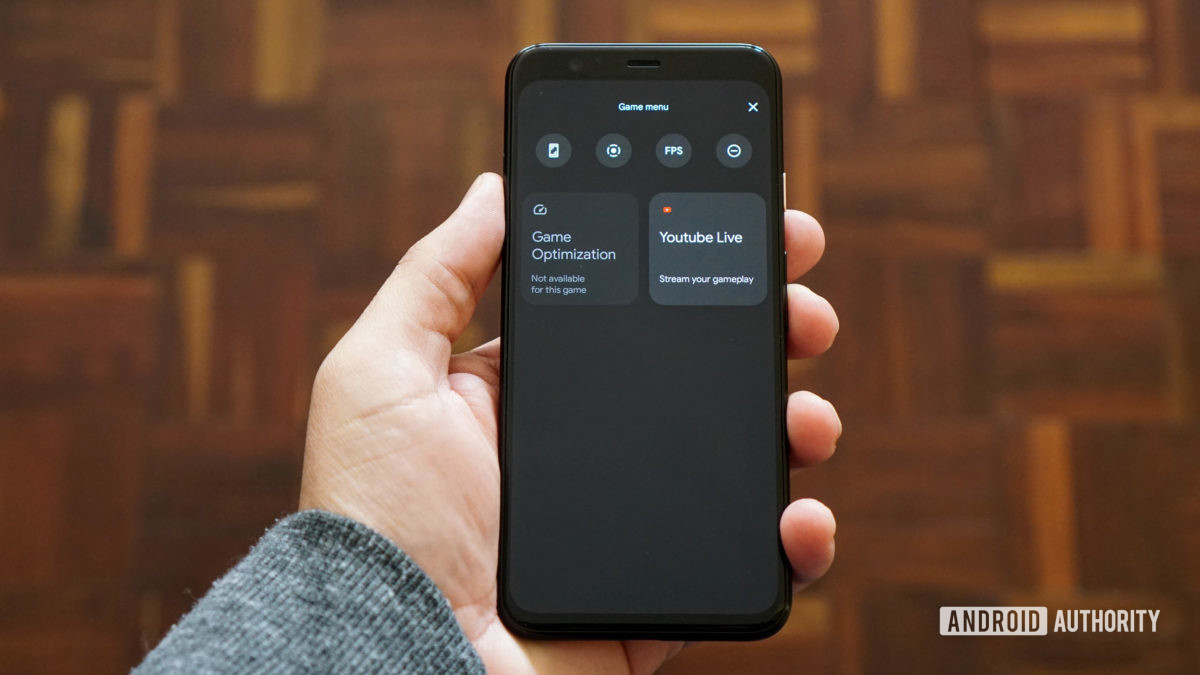
The Android 12 beta contains a hidden game mode within Digital Wellbeing.
This feature will allow mobile gamers to take screenshots, record gameplay, live-stream, and more.
We first heard murmurings in February that Android 12 could support a game mode, following in the footsteps of a ton of OEMs that already offer this feature. Now, it looks like the Android 12 beta does indeed have a game mode hidden away.
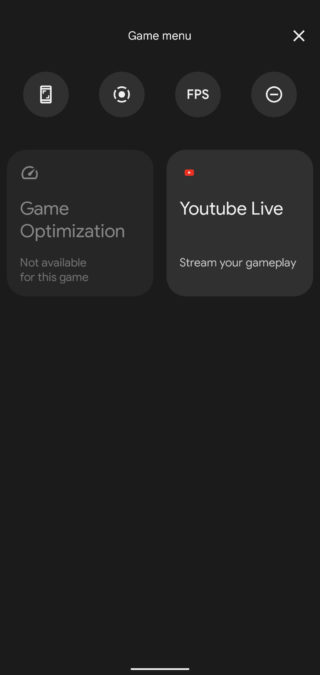
Redditor Kilarasx discovered the game mode by tapping Settings > Digital Wellbeing > Do Not Disturb > Schedules. Alongside the expected “sleep” and “event” schedules for Do Not Disturb functionality, there’s a “Game Mode” schedule. We were able to find this on our Pixel 4 running the Android 12 beta — check out the screenshots below and the featured image above.
It looks like this is near-identical to the menu found by XDA with the third Android developer preview. Tapping the gear icon takes you to the game mode menu (image on the right), showing six options in total. The four options at the top are taking a screenshot, recording the screen, presumably viewing the frames per second, and activating/deactivating Do Not Disturb.
All these options bar the FPS toggle seem to work right now, with the screen recorder tool also letting you choose the audio you’d like to record (microphone, device audio, or both) and whether you want touches to be displayed.
Meanwhile, the bottom two options allow you to optimize the game you’re currently playing or stream your session via YouTube Live. The former doesn’t appear to work right now, and I didn’t meet YouTube’s requirements for mobile live streaming.
Presumably you won’t have to dig to find the game mode in the final version of Android 12, as this would be a very inconvenient departure from manufacturer implementations. Many manufacturers automatically display a game mode/tools via a small screen overlay, floating toolbar, or in the notification shade when you’re playing a game.
XDA-Developers previously posted an early Android 12 screenshot showing a floating toolbar for games, so it seems like Google is/was thinking about a similar approach as OEMs.
One of the most attractive features of the popular password manager LastPass is that, if you choose to, you can use it pretty effectively without paying a dime. That comes to an end in March, as LastPass has just announced that its free tier will be restricted to only one device type starting next month.
LastPass works across nearly every platform, from Android to iOS to Windows to Mac, and that’s what makes it useful. For the most part, the services we use today are available on multiple platforms, so being able to use the service on both your mobile phone and your desktop/laptop computer is crucial to most users.
Starting on March 16, 2021, LastPass will start restricting its free service to only one device type, meaning those who sign up will be required to pick between accessing the service on their computer or their smartphone. The latter also includes LastPass access on tablets (iPads) and smartwatches. You’ll pick an “active device type” to decide on where you’ll use the service. For current free users, the first device type you log in to after March 16 will set your active type. You’ll have three chances to pick between device types before the choice is locked in. After that, you’ll need to sign up for LastPass Premium to access the service on two different platforms.
As a Free user, your first login on or after March 16 will set your active device type. You’ll have three opportunities to switch your active device type to explore what’s right for you. Please note, that all of your devices sync automatically, so you’ll never lose access to anything stored in your vault or be locked out of your account, regardless of whether you use computer or mobile devices to access LastPass.
Further, LastPass will also restrict some support options starting on May 17. Email support, most notably, will be restricted only to Premium customers and those with a LastPass family account. Free users will then be limited only to the LastPass Support Center for self-help resources.
Changes to LastPass Free
You’re spending more time online than ever before. Work. School. Connecting with family and friends. Each week, millions of LastPass users add millions of new passwords, notes, files, payment cards and more to their encrypted vault. We love being a part of the security routines of more than 20 million users across the world. As our community of users continues to grow, we need to adapt our offerings to keep up with the constantly evolving digital world. With that, we have some changes to our LastPass Free offering.
Here’s What’s Changing
We’re making changes to how Free users access LastPass across device types. LastPass offers access across two device types – computers (including all browsers running on desktops and laptops) or mobiledevices (including mobile phones, smart watches, and tablets). Starting March 16th, 2021, LastPass Free will only include access on unlimited devices of one type.
To further clarify what we mean by active device type, we’ve included two examples below:
Sarah is a Free user with Computers as her active device type. She can use LastPass on her laptop, desktop and her dad’s laptop (anyone’s computer!), but she can’t use LastPass on her phone, tablet, or smart watchunless she upgrades to LastPass Premium, which has unlimited device type access.
Steve is a Free user with MobileDevices as his active device type. He can use LastPass on his iPhone, Android work phone, tablet, and smart watch, but he can’t use LastPass on his desktop or laptop unless he upgrades to LastPass Premium, which has unlimited device type access.
As a Free user, your first login on or after March 16th will set your active device type. You’ll have three opportunities to switch your active device type to explore what’s right for you. Please note, that all of your devices sync automatically, so you’ll never lose access to anything stored in your vault or be locked out of your account, regardless of whether you use computer or mobile devices to access LastPass. Learn more about device types in our Support Center.
In addition to this change, as of May 17th, 2021, email support will only be available for Premium and Families customers. LastPass Free users will always have access to our Support Center which has a robust library of self-help resources available 24/7 plus access to our LastPass Community, which is actively monitored by LastPass specialists. Free users will continue to receive email support for technical issues until May 16th to assist through the transition of selecting an active device type. Learn more about our customer support offerings in ourSupport Center.
LastPass Premium is your single and secure one-stop shop to your digital life. It includes dark web monitoring, emergency access, unlimited device type access, a security score dashboard, dedicated personal support, advanced multi-factor authentication and more. At only $3 per month (billed annually), LastPass Premium enables you to not only store your passwords but also protect your digital life, which is more important than ever in this new era of working from anywhere. As a current Free user, you can upgrade to Premium now for an exclusive, limited time discount and receive Premium for $2.25 per month (billed annually). *
Next Steps for Free Users
We understand how much you rely on LastPass in your daily life, so we wanted to let you know well in advance and give you resources to make this adjustment easier. Here’s what you need to know:
Whether you continue using LastPass Free on one device type, or across all your devices types with LastPass Premium, we’re committed to offering you a best-in-class password management experience. We sincerely thank you for continuing to be part of our LastPass community.
*Additional Terms and Conditions: Advertised price valid for new users on their first year of LastPass Premium. Price not valid for renewals or existing customers and cannot be used for other LastPass plans, products or services.
Google is set to release its next major version of Android — Android 12 — later this year, following a series of Developer Previews and Betas that will likely start rolling out later this month. Ahead of the stable release, Google shares documentation and source code with its major partners in order to give them time to prepare for the release. Today, an alleged early draft of a document that Google made to summarize changes in Android 12 leaked online, and screenshots showcasing the new UI and functional changes were extracted from the document. While we can’t fully confirm the authenticity of these screenshots, we have seen evidence that the document in question is, in fact, real, and furthermore that these screenshots indeed came from said document. With that in mind, here’s what we’re seeing right now.
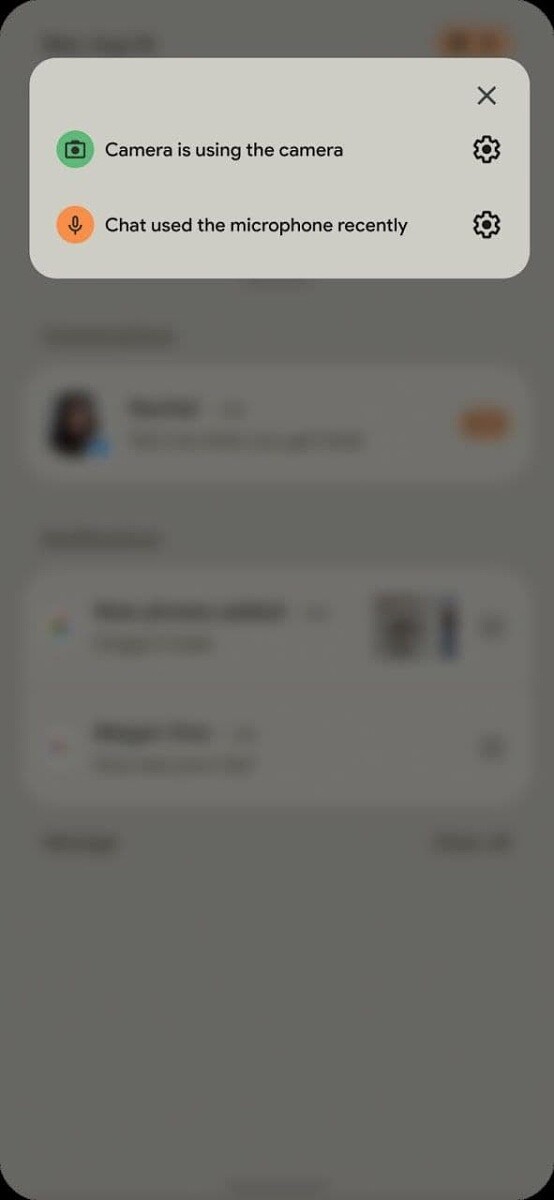
One of the alleged Android 12 screenshots showcases a new notifications panel UI. The transparency is gone and replaced with an opaque light beige background, though the color likely depends on the current theme and/or whether or not Dark Mode is enabled. The separation between the “conversations” section with the rest of the notifications is still there, and the rounded corners of each notification are now more pronounced. The number of Quick Settings tiles that are shown when the notification panel is partially expanded has been reduced from 6 to 4, causing each icon to become larger. The positions of the date and clock have been swapped, while there are also new privacy indicators in the top right-hand corner.
Speaking of which, it seems that Google may add new privacy features in Android 12. In the new Android version, you may receive a warning in the form of status bar indicators whenever an app is using the camera or microphone. Tapping on these status bar icons may show a pop-up at the top of the screen that tells you exactly which app(s) are using the camera or microphone. Google has been testing these privacy chips for over 2 years now, so it would be nice to see them finally make an appearance in Android 12.
Related to this change is an alleged revamp to the “Privacy” settings in Android 12. The new Privacy settings may contain toggles to disable the camera and mute the microphone entirely, in addition to toggling location access. You can already disable all sensors on your device by using the “sensors off” Quick Setting tile, but this tile can only be shown once you enable Developer Options. Android 12 may make these sensor toggles more user-accessible by placing them in the Privacy settings.
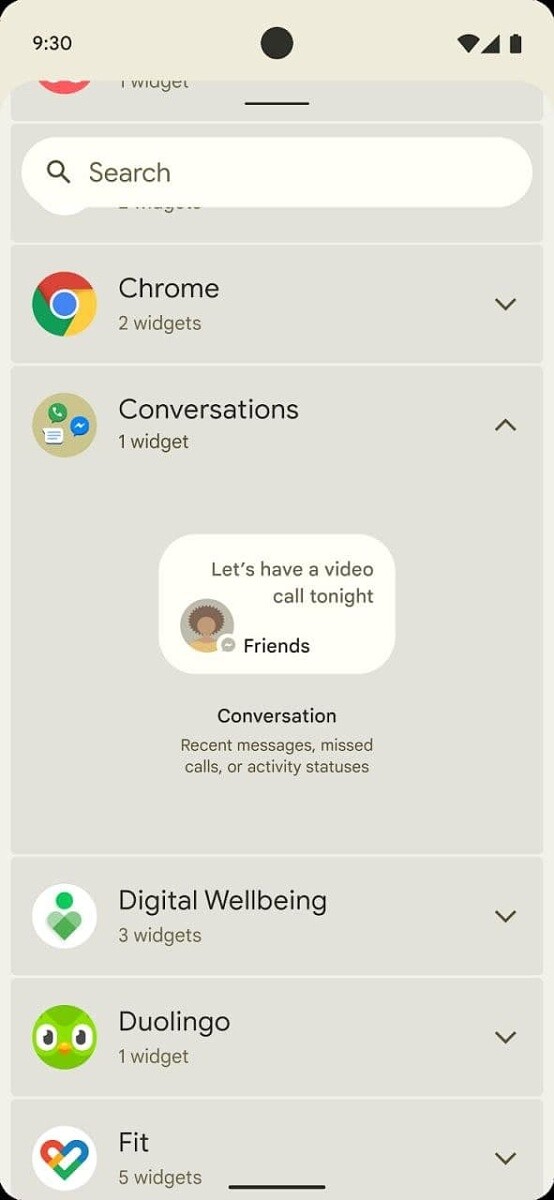
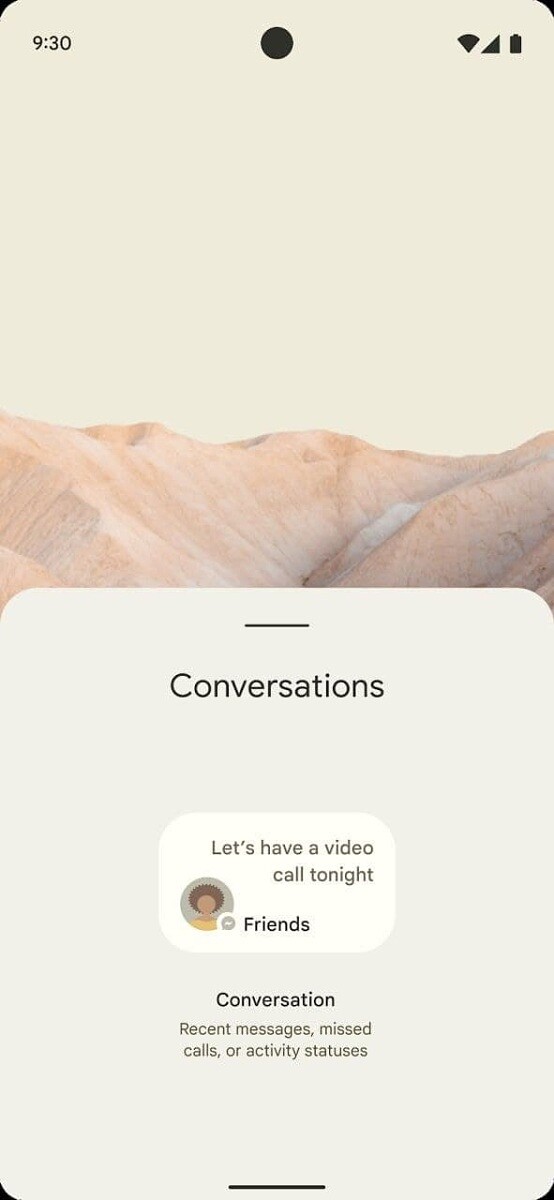
Lastly, we have what appears to be a new addition to Android’s widget selection. When Apple recently added widgets to iOS, we argued that they’re better than Android’s implementation in some ways. While we don’t know if Google is planning a major overhaul of widgets, it does look like they at least plan to make a few changes. In a few screenshots, we can see an alleged new “Conversations” widget in Android 12 that may highlight recent messages, missed calls, or activity statuses. The widget that’s shown is small and only seems to be big enough to accommodate showing one message/call/status at a time in its smallest size.
One of the documents we viewed shortly after the publication of this article reveals that Google plans to make “conversation widgets” a mandatory feature for all Android 12 devices. These widgets provide access to “People Shortcuts” which contain an avatar, name, notification content, and status information, all set in the PeopleManager class.
According to a screenshot of the document we viewed, Google is also planning to mandate the inclusion of camera and microphone indicators in Android 12. These indicators must be shown prominently at the top of the screen, always be visible whenever the camera or microphone is being accessed, and must have the same color across the ecosystem. We don’t know what other changes will be mandated until we get our hands on the full Compatibility Definition Document (CDD) for Android 12.
Again, since we haven’t received the full document in question, we can’t 100% verify the authenticity of these images. However, the screenshot we received of the document comes from a trusted source who has, in recent times, shared other confidential documents with us. If we receive more evidence corroborating these alleged screenshots of Android 12, we’ll follow-up in a separate post. We also asked Google to comment on this leak and will update this article if we hear back.
If you’re interested in learning more about what’s in store in the next major Android release, check out XDA Android 12 tag. We expect there’ll be a better theming system, decoupled emojis, an app hibernation feature, and many more features that have yet to be uncovered. When Google unveils its first Developer Preview in the next few weeks, don’t expect to see all of these changes show up. That’s because the builds that Google releases prior to its I/O developer conference tend to miss out on a lot of the more interesting user-facing features.
Thanks to XDA Senior Member RKBD for bringing these images to our attention, and thanks to their tipster (who wishes to remain anonymous) for their help in corroborating these images!
Ever since Android 11 rolled out, users have been facing issues while trying to connect a gaming controller with their smartphones. According to the reports, phones running Android 11 are either not able to recognize controllers as input devices or they don’t let users map their keys properly.
As per a thread regarding the bug on the official Android Issue Tracker, several Pixel users and beta testers are facing the issue and they’re not able to use Bluetooth game controllers like the Xbox One controller, Sony’s DualShock 4, and even Google’s own Stadia controller with their devices. While a vast majority of the reports are from Google 2, Pixel 3, Pixel 3a, Pixel 4, and Pixel 4a owners, a few Samsung and OnePlus users running Android 11 builds have also reported similar behavior.
As of now, there is no confirmation as to what exactly is causing the issue. But it’s worth noting that Google had already acknowledged the issue back in August 2020, right when the initial Android 11 builds started reaching users. Currently, it seems that the development team is still trying to figure out the underlying cause and is working to bring a solid solution.
While Google hasn’t figured out a solution yet, some users have shared temporary workarounds. According to a few reports, the issue can be fixed by turning off certain accessibility options. For instance, a user suggests, “Can confirm, there’s a certain accessibility service that, if I disable it, controller immediately starts working, no reboot or anything. I can actually task switch back and forth from Stadia back to Settings, disable that one service on Accessibility, back to Stadia, and controller works; switch back to Settings, enable, back to Stadia, it’s suddenly dead just like before. That’s with no rebooting, no pairing or conn/disconnecting controllers, nothing.”
In case you’re facing the issue, you can try the workaround mentioned above. Until then, all we can do is wait for Google to address the issue and release a fix in a future update.
Android 11 has been out for over a month now and OEMs have already started working on their in-house OS updates.
However, the latest OS update brings along its own set of issues and Google Pixel devices appear to be the most affected for the time being.
It was reported recently that Pixel users were experiencing excessive battery drain and performance issues after the Android 11 update.
Now, several Pixel users and beta testers are reporting issues related to Bluetooth game controllers like Google Stadia, Nvidia GeForce Now, and more after updating their devices to Android 11.
Reports clearly indicate that users are unable to connect and use game controllers via Bluetooth and the devices are getting listed as other devices.
Multiple Pixel 2, Pixel 3, and Pixel 4 series users have reported on Google IssueTracker that such issues occurred only after the Android 11 update.
While the game controller issues have been to the developers, it is unclear how long it will take to fix these problems.
However, it is good to see that the OEM has promptly acknowledged these issues on a wider scale, hence, fixes will also arrive accordingly.
In the meantime, a Pixel user has posted a temporary workaround for the connectivity problems on Reddit which seems to have fixed the issues for them.
The user has stated that after some manual troubleshooting they simply switched off the Magnification gestures on their Android 11 powered Pixel device which fixed the game controller issues.
Also, several other users have posted similar workarounds on Google IssueTracker suggesting that tweaking the Accessibility settings seems to be doing the trick.
Nevertheless, a proper fix will still be required and Pixel users running Android 11 will have to wait till Google addresses these issues.
Meanwhile, you can check out our Google Android 11 update and bug trackers to get the latest updates on the topics.
Moreover, we have curated a consolidated Android 11 update tracker for all major OEMs and carriers so be sure to go through it as well.
It appears that Samsung and OnePlus users who have installed the Android 11 update on their devices are also facing similar issues with gaming controllers. We’ve shared some a couple of reports from users below:
I am not able to use my PS4 controller on ONEPLUS 8T. I have managed to pair the controller and phone with Bluetooth but the phone won’t recognise any input. (Source)
I updated my note20 to android 11! Since the update I can’t connect my ps4 controller to call of duty mobile anymore and all so I’m having screen trouble (Source)
Google recently rolled out the January patch for supported Pixel phones, however, there is no indication that the problem was fixed. Therefore, it seems users may have to wait a bit longer before the problem is addressed.
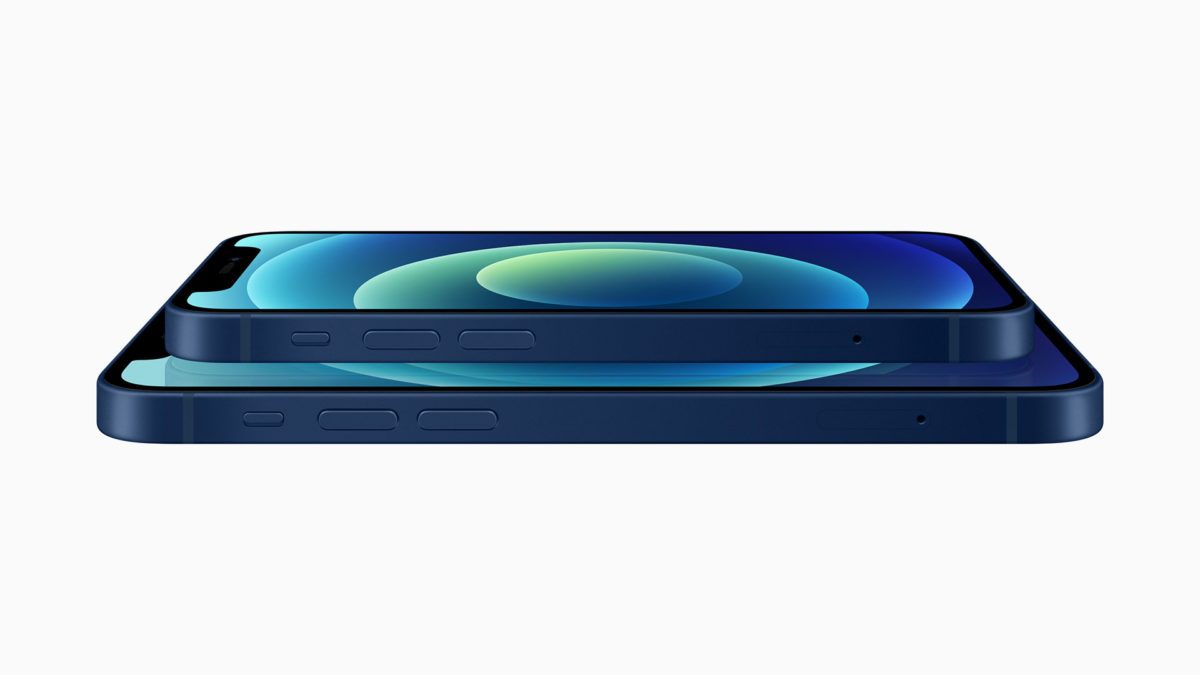
Apple frequently lays down a gauntlet for Android vendors when it introduces new iPhones, and that’s truer than ever for the iPhone 12 series. While there are places where Apple falls short, the new iPhones also embarrass Android phone makers in a few key areas — and not just simple aspects like performance. Here’s how the iPhone 12, 12 Pro, and 12 Pro Max stack up vs. their Android counterparts.
High-quality designs across whole phone lines
If there’s an area where Android OEMs could most stand to learn from the iPhone 12, it’s in the consistently high quality of the design, even in more affordable devices.
Every iPhone 12 model, from the Mini to the Pro Max, has a string of features you don’t always see in Android equivalents. They all have high-resolution OLED screens; each one has extra-durable front glass thanks to a new Ceramic Shield; they’re all IP68-rated for water resistance; all of them have a new MagSafe wireless charging system (more on that later). That’s not including the consistency in performance-related features, like the A14 Bionic chip, 5G, and strong camera quality. While the lower-end iPhone 12 models have aluminum sides instead of stainless steel, that’s about the only obvious external compromise.
Many mid-range Android phones have stellar features, but there are usually gotchas. Samsung’s Galaxy S20 FE is fast and boasts a great display, but makes obvious compromises in design — unless you like “glasstic,” that is. Google’s Pixel 5 is better-built, but it’s not powered by top-tier silicon. Even the OnePlus 8T may struggle with camera quality. While Xiaomi’s Mi 10 series offers both a quality design and features at good price, it’s not readily available in North America and other parts of the world.
And those sacrifices are a problem. As a rule, iPhone 12 buyers can assume they’re getting first-class treatment no matter what model they buy. You can’t often guarantee that with Android. If someone is comparison shopping, they might pick the iPhone 12 simply because it looks and feels more like a premium device vs. its Android rivals.
Small phones with big features
iPhone 12 Mini is smaller than an iPhone SE, it packs features that put many Android phones to shame, let alone compact models. It has the same A14 chip, cameras, and MagSafe charging as its larger sibling. The OLED screen is only slightly lower-resolution than in the standard iPhone 12. And like we mentioned earlier, there are no major design sacrifices compared to larger versions.
Take a look at your Android options and… it’s not pretty. Many small Android phones are old, slower, or both. Even a Pixel 4a is relatively pokey, and it’s slightly larger than the iPhone 12 Mini (if also considerably more affordable). The Sony Xperia 5 II is an impressive phone all-around, but it’s much more expensive and some could argue that it’s not really a “small” phone.
Simply put, Apple’s offering is one of the better choices in a sea of lackluster small smartphones.
Easier wireless charging
Apple was undoubtedly slow to adopt wireless charging, having introduced it only with 2017’s iPhone X and iPhone 8. It’s catching up, though, and the iPhone 12 family includes a few features that Android vendors could stand to adopt in some form.
MagSafe, which uses magnets to align your iPhone for wireless charging, is the textbook example of a “why didn’t someone think of this earlier?” invention. You don’t have to worry that your phone might be off-center — you just drop it on the pad and walk away. Then there’s the accessories this enables, like snap-on cases and even a wallet.
There are certainly areas where Android phones fare better. MagSafe on the iPhone 12 line charging tops out at 15W where it’s not uncommon to see 30W or more from some Android phones. There’s no mention of reverse wireless charging to top up your other devices, either. But those features don’t address ease of use, and Apple might have an edge simply by eliminating one of the most common hassles of wire-free power.
More camera features aimed at enthusiasts and pros
Android phones are often chock-full of camera features, but they tend to be aimed at everyday users outside of the occasional manual mode. Samsung’s Single Take feature in the Galaxy S20 family is helpful in case you’re unsure of which shot you need, but it doesn’t offer much help if you’re an exacting mobile photographer. The notable exceptions are newer Sony phones like the Xperia 1 II, and they’re a handful of models in a much larger sea.
The iPhone 12 line bucks that trend. Although Apple’s official camera app won’t provide extensive control over shots, all the new phones can not only shoot Dolby Vision HDR videos (they’re the first phones to do this), while the Pro and Pro Max deliver RAW photo support through a new ProRAW format. In other words, you can create images that could be suitable for a TV show or photo spread, let alone your Instagram feed. A Night Mode that works across all cameras is helpful, too.
Yes, you’ve had RAW shooting on Android since Lollipop, but it’s inconsistently available. HDR video recording is also hit-or-miss. And that’s not counting more explicitly hardware-dependent features like sensor-shift image stabilization (again, new to phones) or LiDAR. Simply put, Apple is giving iPhone buyers a series of powerful camera features that are genuinely aimed at enthusiasts and working pros, and that could tip the balance for some buyers.
Custom processing power
As blisteringly fast as the current crop of Android phones can be, they tend to lag iPhones in performance to some degree. AnandTechnoted that even last year’s iPhone 11 models were sometimes outperforming Snapdragon 865 phones released several months later, let alone the iPhone 12. The Android phone market’s progress is largely dictated by one company, Qualcomm, and it hasn’t been moving at a breakneck pace.
Apple, meanwhile, doesn’t have that restriction. It designs the chips it uses in its devices, and the iPhone 12’s A14 Bionic illustrates the advantages of that approach. There’s no outside designer holding it back, and it’s targeting improvements for specific phones rather than trying to make a one-size-fits-all design. Whether or not Apple’s claims of up to a 50% speed advantage over rivals are true, its expected lead is evidence that custom processing power matters.
A few Android phone builders appreciate this as well, even if their execution isn’t flawless. Samsung has its (sometimes underpowered) Exynos chips, and Huawei had its high-end Kirin chips until the US blocked that option. Most others just follow the pack, though, and that lack of customization helps the iPhone 12 stand out that much more.
Where the iPhone 12 falls short
This doesn’t mean the iPhone 12 vs. Android battle is strictly one-sided. Apple falls short in a number of categories, at least if you’re used to what Android has offered. There’s no 120Hz screen. You still won’t find microSD expansion, a USB-C port, or very high-zoom cameras. You won’t even find a 1440p display on the iPhone 12 Pro Max.
There’s also the matter of software. As much progress as iOS 14 has made, additions like home screen widgets, changeable app defaults and iPhone picture-in-picture are catch-up features. You won’t be feeling a twinge of regret if Android’s flexibility is important to you, even if you may wish you had Apple’s timelier and longer-running OS updates.
Even so, the very fact that Android vendors could take multiple major cues from the new iPhones is important. It suggests that Apple is plugging some of the more glaring holes in its iPhone strategy. Android phone creators may have to step up if they plan to go head-to-head with Apple, particularly in that upper mid-range sweet spot occupied by the iPhone 12 and 12 Mini.
Back in January, Google was testing biometric authentication support for its first-party Autofill service. Now, this feature appears to be rolling out to Google Autofill via a recent update to Google Play Services.
The new feature means that users can require successful biometric authentication before information can be filled into a form. Before, Google’s Autofill service had no additional safeguards on top of the user’s lockscreen, making it less secure than most third-party password managers.
According to Android Police, the feature appears to have become widely available for users on Google Play Services v20.33.13, but it’s also available for some on version v20.26.14. It appears this is rolling out via a server-side update, so it’s just a matter of waiting for a flag to be flipped on your device.
The new feature can be found by heading to Settings > Google > Autofill > Autofill with Google. You’ll see a new menu called Autofill Security, where you can toggle biometrics. Once toggled, users can use any biometric authentication hardware that’s supported by the BiometricPrompt API, which includes fingerprint scanners, iris scanners, or secure facial recognition hardware like on the Pixel 4 and Pixel 4 XL. Of course, you’ll also need to turn on the Autofill with Google service in Settings > System > Languages & input > Autofill service.
Adding biometric authentication not only makes logging in more secure, but it also makes it more convenient and accessible to users.
Apple and Google announced their partnership two weeks ago to develop contract-tracing via Bluetooth in iOS and Android. Last week we shared details about how it will work and roll out, and today we’ve got answers to frequently asked questions about COVID-19 contact tracing for iOS and Android as well as updates on the Bluetooth and cryptography specifications.
We learned last week how contact tracing will work and roll out as well as how people will be able to participate. Those details should also help to further qualm security and privacy concerns from US Senators as well as the public.
Today we’ve got more details from Apple and Google representatives that cover some of the most frequently asked questions about contact-tracing in iOS and Android, now called Exposure Notification.
How can contact tracing help slow down COVID-19?
Smartphones can be an important part of slowing down the pandemic as they offer an automated solution that scales to understand when people are exposed to someone who has tested positive for the virus. This gives valuable anonymous data to public health authorities to make the best decisions to slow down COVID-19.
Contact tracing is being used by public health authorities and governments around the world.
How does the software ensure privacy and security?
Users have explicit choice whether or not to turn on and use COVID-19 contact-tracing
Users control all data and if they want to share it
No location data is tracked, the software works via Bluetooth-based rotating beacons
Contact-tracing from Apple and Google will only be available to be used by apps from public health authorities
Apple and Google can turn off COVID-19 exposure notification on a regional basis
Will the government have access to information through contact tracing?
Approved apps from public health authorities will have access to Bluetooth beacon data that retains user privacy and security.
Explicit user consent is required for their anonymous data to be shared
Where is contact tracing data stored and who can see it?
Contact tracing data is only stored on a user’s device
Contact tracing data is only processed on a user’s device
Public health authorities will be able to see anonymous Bluetooth beacon data for those who have tested positive for COVID-19 and those that receive exposure notifications
Data will also include the day the contact occurred and how strong the Bluetooth signal was
Will Apple and Google monetize contact tracing data?
There will not be any monetization for contact tracing data
Apple and Google reiterate that the software relies on a user’s device for processing and data storage
Where can you find contact tracing apps for iOS and Android?
As public health authorities develop and update apps to work with Apple and Google’s contact tracing software they will be made available in the App Store and Google Play Store.
Apple and Google are partnering with public health authorities to see about ways they might be able to contact users about available apps
Apple and Google will highlight contact tracing apps when they become available on their app stores.
How will the software know if I’ve been exposed to someone who has tested positive?
Each public health authority will decide how each determines if someone has been exposed.
Apple and Google’s software supports data that includes how long someone has been in contact with someone who has tested positive
Health authorities will determine a minimum threshold for the time in contact with someone who has tested positive and Apple and Google will have a 30-minute maximum set to retain user privacy.
Apple and Google representatives highlighted that contact tracing is just one part of the solution for the coronavirus pandemic.
More resources can be found on Apple’s website. There are also updates today on the Bluetooth specification, Cryptography specification, and framework API for the iOS software. These include the API keys being randomly generated, changing the encryption algorithm from HMAC to AES, associated metadata is now encrypted, and more.