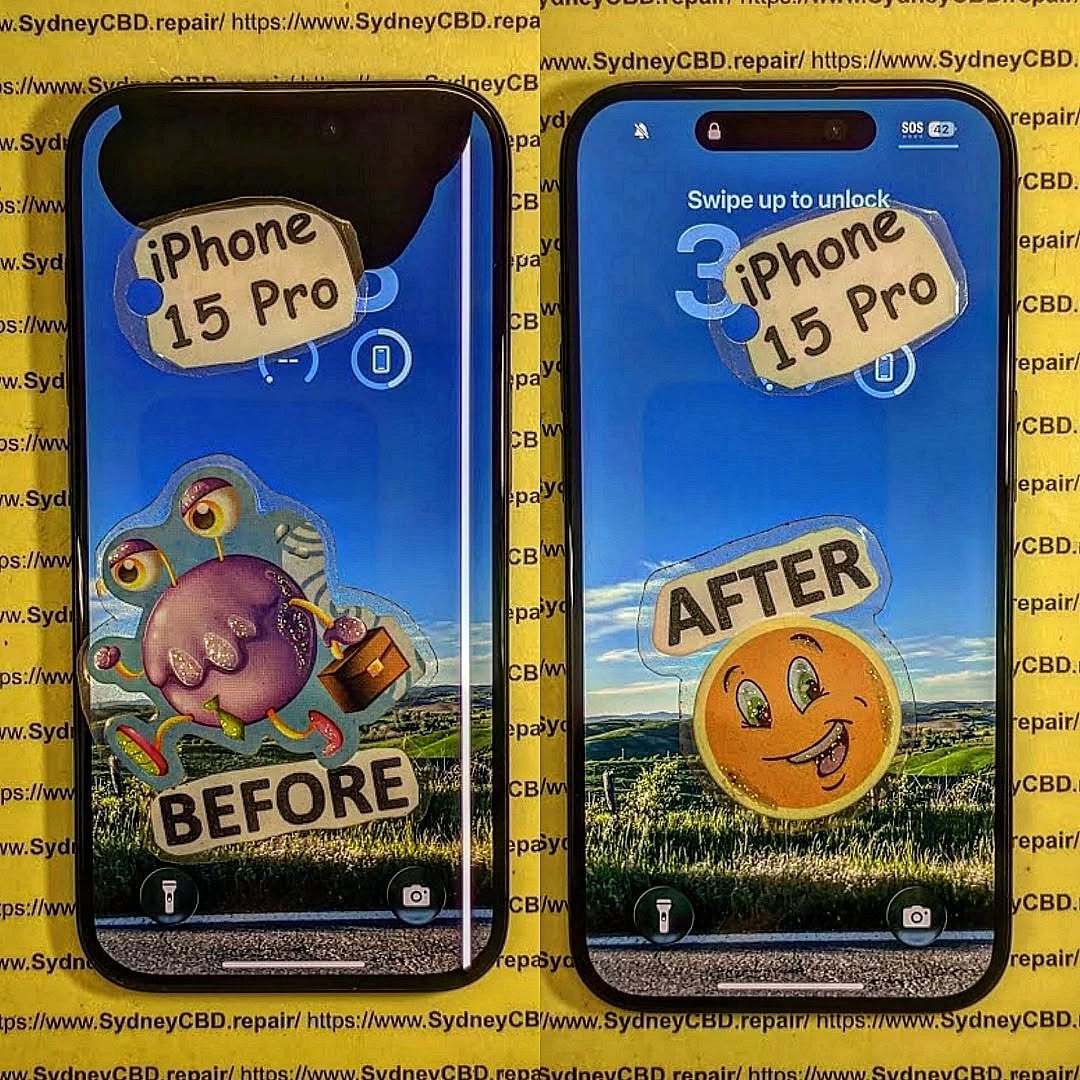
SALVAGING THE UNFIXABLE! The Professional Restoration Of A Bent Frame iPhone 15 Pro + 7 Expert Secrets
Introduction to Bent Frame iPhone 15 Pro Repairs
A bent smartphone frame can feel like a death sentence for your device. However, when it comes to Professional Restoration Of A Bent Frame iPhone 15 Pro, the story isn’t over just yet. In fact, with the right expertise and tools, even severely deformed devices can be brought back to life.
Modern smartphones, especially premium ones like the iPhone 15 Pro, are engineered with precision. Still, accidents happen—drops, pressure in tight pockets, or even sitting on your phone can cause frame distortion. While it might look “unfixable,” professionals know that restoration is often possible.
This guide walks you through everything—from identifying damage to understanding professional repair techniques—so you can make informed decisions.
Frame bending typically occurs due to excessive force. Unlike older devices, the iPhone 15 Pro uses a lighter yet rigid titanium structure, which improves durability but isn’t completely immune to stress.
Common Causes
Sitting on the device
Accidental drops on hard surfaces
Tight jeans or pockets
Heavy objects pressing against the phone
Signs Your iPhone Frame Is Bent
Screen lifting from edges
Gaps between display and body
Buttons misaligned or stuck
Difficulty inserting SIM tray
Uneven surface when laid flat
If you notice any of these, it’s time to consider Professional Restoration Of A Bent Frame iPhone 15 Pro.
The iPhone 15 Pro features a titanium alloy frame. It’s strong, lightweight, and corrosion-resistant. However, titanium behaves differently than aluminum—it doesn’t flex as easily and can retain deformation once bent.
Internal Component Layout
Inside the device, components are tightly packed:
Logic board
Battery
Camera modules
Taptic engine
A bent frame can affect all of these. That’s why restoration must be precise and controlled.
Tools Required for Professional Restoration
Essential Tools
Precision screwdrivers
Heat gun or heating pad
Frame alignment jig
Microscope or magnifying lens
Plastic pry tools
Safety Equipment
Anti-static gloves
Eye protection
ESD-safe workstation
Without these, attempting repair can make things worse.
Step-by-Step Restoration Process
Initial Inspection
Professionals begin by assessing:
Degree of bend
Internal damage
Screen integrity
This step determines whether repair is viable.
Frame Realignment Techniques
Here’s where the magic happens. Using specialized jigs, technicians gradually apply controlled pressure to reshape the frame. It’s not brute force—it’s calculated precision.
Key Techniques:
Heat-assisted reshaping
Incremental pressure alignment
Structural reinforcement
Reassembly Process
After straightening:
Internal components are reinstalled
Adhesives are reapplied
Device is sealed and tested
This ensures full functionality.
Common Mistakes to Avoid
Even experienced DIYers can slip up. Watch out for:
Overheating the frame
Applying uneven pressure
Ignoring internal damage
Skipping calibration tests
These mistakes can permanently damage your device.
Cost vs Replacement Analysis
Repairing a bent frame is often cheaper than replacing the entire phone.
Option
Cost Range
Outcome
Professional Repair
Moderate
Restored device
Full Replacement
High
Brand new device
In most cases, Professional Restoration Of A Bent Frame iPhone 15 Pro is the smarter financial choice.
Preventing Future Frame Damage
Prevention is always better than cure.
Tips
Use a shockproof case
Avoid tight pockets
Don’t sit with phone in back pocket
Use screen protectors
These small habits go a long way.
Professional vs DIY Repair
DIY repair might sound appealing, but it comes with risks.
DIY Pros
Lower cost
Immediate action
DIY Cons
High risk of damage
No warranty
Limited tools
Professional Repair Benefits
Precision tools
Experienced technicians
Warranty coverage
Advanced Repair Techniques Used by Experts
Professionals don’t just “bend it back.” They use:
Laser alignment systems
Structural integrity testing
Micro-soldering for damaged circuits
These techniques ensure long-term reliability.
Data Protection During Repair
Before any repair:
Backup your data
Remove SIM card
Log out of accounts
Professionals also follow strict data privacy protocols.
Environmental Impact of Repair vs Replacement
Repairing your phone reduces electronic waste. It’s a greener choice compared to buying a new device.
Benefits
Less landfill waste
Reduced manufacturing demand
Lower carbon footprint
Choosing repair isn’t just smart—it’s responsible.
FAQs
1. Can a severely bent iPhone 15 Pro be fixed?
Yes, in many cases, professionals can restore even heavily bent frames using specialized tools.
2. Will the phone be as strong as before?
It depends on damage severity, but most repairs restore structural integrity effectively.
3. How long does the repair take?
Typically 1–3 hours for professional services.
4. Is it safe to use a bent phone?
Not really. It can damage internal components over time.
5. Does repair affect water resistance?
Yes, water resistance may be reduced after repair.
6. Should I attempt DIY repair?
Only if you have proper tools and experience. Otherwise, it’s risky.
Conclusion
A bent phone frame might look like the end of the road, but it doesn’t have to be. With Professional Restoration Of A Bent Frame iPhone 15 Pro, even the most damaged devices can be revived.
From understanding the structure to applying advanced repair techniques, the process is both technical and precise. While DIY options exist, professional repair offers the best balance of safety, reliability, and performance.
If your device has suffered frame damage, don’t rush to replace it. Restoration might just save your phone—and your wallet.
David from Sydney CBD Repair Centre – The Best place to fix mobile phones as 7 Years In A Row! Top Mobile Phone Repair In Sydney. More than 2000 Positive Reviews on Google and Same Day Repairs.
We take pride in delivering exceptional repair services for all major phone brands including Apple, Samsung, Google, and more. Our expert technicians use only genuine parts and offer 90days warranty on repairs. Located in the heart of Sydney CBD, we’re your one-stop solution for all mobile device repairs.
Our commitment to excellence has earned us the trust of thousands of satisfied customers. Whether it’s a cracked screen, battery replacement, or water damage repair, we handle it all with professional care and expertise. Walk in today and experience why we’re Sydney’s #1 choice for mobile phone repairs.
Visit us for:
✓ Same Day Express Repairs
✓ Genuine Parts Guarantee
✓ Professional Technicians
✓ Competitive Pricing
✓ 2000+ 5-Star Google Reviews
✓ 7-Time Award Winner for Best Phone Repairs
Phone Price vs. Phone Repair: When Is a Phone Repair Worth It? (Budget Breakdown) – Ultimate Guide + 7 Smart Decisions
Introduction: Price vs. Repair – Making the Smart Choice for Your Phone
In today’s fast-paced digital world, our smartphones are more than just communication devices—they’re our calendars, wallets, entertainment hubs, and even workstations. With so much reliance on these pocket-sized gadgets, the moment a phone suffers damage—whether it’s a cracked screen, a failing battery, or water exposure—it triggers a critical question: should I repair it or replace it?
The price vs. repair dilemma is more than just a financial decision. It involves evaluating the phone’s current value, the cost of repair, potential resale value, and even environmental impact. Many people default to replacing their phones without fully understanding how repairs can often extend the device’s life while saving money. On the other hand, some choose repairs that exceed the phone’s actual value, which can be an inefficient use of funds.
This article aims to guide you through the complex landscape of phone repairs, offering a detailed budget breakdown, practical frameworks, and expert advice to help you make informed decisions. From understanding depreciation to evaluating repair costs for screens, batteries, and logic boards, this guide covers everything you need to weigh costs, benefits, and long-term value.
By the end of this guide, you’ll have the knowledge to confidently decide when a repair is worth it and when it’s time to replace your phone, ensuring you maximize both your budget and your phone’s performance.
Smartphones are expensive. These days, the price vs. repair debate isn’t just about money—it’s about value, longevity, and smart budgeting. If you’ve ever stared at a cracked screen and wondered whether it’s worth fixing or time to upgrade, you’re not alone.
In the first 10% of this article, let’s be clear: a phone repair is often worth it, but only when the numbers, usage, and future value line up. This guide breaks it all down in plain English, using real-world examples, practical frameworks, and expert insight from years in the mobile repair industry.
By the end, you’ll know exactly when repairing your phone makes financial sense—and when replacing it is the smarter move.
Most people focus on the upfront cost of a phone, but that’s just the beginning. A $1,500 flagship phone isn’t expensive if it lasts four or five years with minor repairs. On the other hand, replacing a $600 phone every 18 months quickly adds up.
When considering price vs. repair, long-term ownership cost matters more than sticker price.
Ask yourself:
How long have you owned the phone?
How many repairs has it already had?
Does it still receive software updates?
A phone that’s still supported by the manufacturer usually deserves a second chance.
Depreciation of Smartphones Over Time
Phones lose value fast—often 20–30% in the first year alone. By year three, many devices are worth less than half their original price.
Here’s where repairs shine:
A $150 screen repair on a phone still worth $600 is a smart investment.
The same repair on a phone worth $150? Not so much.
Understanding depreciation helps you make rational decisions instead of emotional ones.
How Repairs Affect Resale Value
A professionally repaired phone with genuine parts often sells for significantly more than a damaged one. In many cases, a repair pays for itself at resale.
For example:
Cracked-screen iPhone resale value: low
Same phone after professional screen repair: up to 40% higher resale
Screen damage is the most common issue—and often the easiest to justify fixing.
Typical screen repair costs:
Budget phones: $80–$150
Mid-range phones: $150–$250
Flagship phones: $250–$450
If the phone works perfectly otherwise, screen repairs are almost always worth it, especially for premium devices.
Battery Replacement Economics
Batteries degrade naturally. After two years, most phones operate at 70–80% capacity.
Battery replacement costs are relatively low:
$60–$120 for most models
A new battery can make your phone feel brand new. From a price vs. repair perspective, battery replacement is one of the highest-value repairs you can make.
Water Damage and Logic Board Repairs
These are more complex and riskier. Costs vary widely depending on damage severity.
When water damage repair is worth it:
Phone is less than 2 years old
High-end or flagship model
Data recovery is critical
If the repair cost approaches replacement cost, replacement may be wiser.
The 50% Rule: A Simple Budget Framework
When the Rule Works
A common industry guideline is the 50% rule:
If repair costs exceed 50% of the phone’s current value, replacement may be better.
This rule works well for:
Older phones
Budget models
Devices near end-of-life software support
When to Break the Rule
However, rules aren’t laws.
Break the 50% rule if:
The phone is still under warranty
You rely on it for work
Replacement would require expensive accessories
In real life, convenience and reliability matter just as much as numbers.
Repair vs Replace: Budget Scenarios Explained
Budget Phones
Budget phones depreciate quickly. Repairs are only worth it if:
The repair is inexpensive
The phone is less than a year old
Otherwise, replacement often offers better value.
Mid-Range Phones
Mid-range devices hit the sweet spot. Repairs are often worthwhile for:
Screen replacements
Battery issues
These phones usually have 3–4 years of usable life.
Flagship Devices
Flagships are built to last. From a price vs. repair standpoint, repairing high-end phones is almost always the smarter choice.
A $350 repair on a $1,500 phone still makes financial sense.
Hidden Costs People Forget to Calculate
Data Transfer and Setup Costs
Replacing a phone isn’t free:
Time spent setting up
App reinstallation
Authentication headaches
Your time has value—don’t ignore it.
Accessories and Add-ons
New phones often mean:
New cases
New chargers
New screen protectors
These hidden costs add up fast.
Environmental and Sustainability Considerations
E-Waste Impact
According to global environmental data, millions of phones end up in landfills every year. Repairing instead of replacing significantly reduces e-waste.
For more insight, see this sustainability resource from the United Nations Environment Programme: https://www.unep.org
Repair as a Sustainable Choice
Choosing repair isn’t just cheaper—it’s responsible. Extending your phone’s life by even one year reduces carbon emissions tied to manufacturing.
Professional Repair vs DIY: Cost Comparison
Risks of DIY Repairs
DIY repairs seem cheaper but often cost more long-term:
Incorrect installation
Damaged components
Voided warranties
One mistake can turn a small repair into a total loss.
Warranty and Quality Differences
Professional repairs:
Use proper tools
Offer warranties
Use genuine or premium-grade parts
That peace of mind matters.
Frequently Asked Questions (FAQs)
1. Is phone repair really worth it in 2026?
Yes, especially for mid-range and flagship phones with ongoing software support.
2. How much should I spend on a phone repair?
Ideally under 50% of the phone’s current market value.
3. Are genuine parts important?
Absolutely. They ensure performance, longevity, and resale value.
4. Does repairing a phone void warranty?
Not if done by an authorized or professional repair centre using approved parts.
5. Is battery replacement better than buying a new phone?
In most cases, yes. It’s one of the most cost-effective repairs.
6. How long should a repaired phone last?
With quality repairs, another 1–3 years is common.
Conclusion: Making the Smart Choice
The price vs. repair decision isn’t black and white. It’s about understanding value, usage, and long-term cost. In many cases, phone repair is worth it, saving you hundreds of dollars while extending your device’s life.
When in doubt, consult a professional repair expert who can assess your phone honestly—without pushing unnecessary replacements.
David from Sydney CBD Repair Centre – The Best place to fix mobile phones as 7 Years In A Row! Top Mobile Phone Repair In Sydney. More than 2000 Positive Reviews on Google and Same Day Repairs.
We take pride in delivering exceptional repair services for all major phone brands including Apple, Samsung, Google, and more. Our expert technicians use only genuine parts and offer 90 days warranty on repairs. Located in the heart of Sydney CBD, we’re your one-stop solution for all mobile device repairs.
Our commitment to excellence has earned us the trust of thousands of satisfied customers. Whether it’s a cracked screen, battery replacement, or water damage repair, we handle it all with professional care and expertise. Walk in today and experience why we’re Sydney’s #1 choice for mobile phone repairs.
Visit us for:
✓ Same Day Express Repairs
✓ Genuine Parts Guarantee
✓ Professional Technicians
✓ Competitive Pricing
✓ 2000+ 5-Star Google Reviews
✓ 7-Time Award Winner for Best Phone Repairs
Beyond Cracked Phone Screens: When Is a Phone Repair NOT Worth It? + 10 Key Insights
Introduction: The Cost vs. Value Dilemma
Phones have become central to our daily lives—communication, banking, work, and entertainment all rely on them. Yet, when a phone suffers damage, many owners face the same question: is repairing it really worth it?
While a cracked screen might seem minor, repair decisions can become tricky when you factor in the device’s age, repair cost, and potential for future issues. This article explores the key insights every phone owner should know before committing to a repair.
Understanding common repair types and their average costs is the first step in evaluating whether a repair is worthwhile.
Screen Repairs
Screen replacement is the most frequent repair, often needed after drops or impact damage. Prices vary widely depending on model and manufacturer. For flagship devices like the iPhone 15 Pro or Samsung Galaxy Z Fold 6, costs can exceed $400-$600, while mid-range phones might range from $150-$300.
Considerations:
Risk of touch sensitivity issues after repair
Warranty on replaced screens
Availability of genuine parts
Battery Replacement
A battery’s lifespan is typically 2–3 years. Signs it’s failing include rapid discharge, unexpected shutdowns, or slow charging. Professional battery replacement usually costs $80-$150, while DIY kits are cheaper but carry higher risk.
Red flags:
Older devices may need more than just battery replacement
Replacing a battery on a cracked or worn phone might not be cost-effective
Water Damage Restoration
Water exposure is unpredictable. Even if a phone is waterproof-rated, full submersion or corrosion can lead to expensive repairs. Costs range $150-$400, often without guaranteed results.
Key caution:
Hidden issues can appear months later
Internal corrosion may continue even after professional repair
Certain factors make repair a poor investment. Being aware of these can save time and money.
Age of the Device
Phones older than 3–4 years are often at risk of becoming obsolete soon, with software updates slowing and hardware failing. Repairing an older device may only extend its life briefly.
Repair Cost vs. Replacement Cost
Compare the cost of repair with a replacement. Spending $400 on a phone that could be replaced for $500 might not make financial sense.
Repair Type
Average Cost
New Phone Equivalent
Worth Repairing?
Screen
$200-$600
$500-$1200
Sometimes
Battery
$80-$150
$400
Usually worth it
Water Damage
$150-$400
$500+
Rarely
Availability of Parts
Rare or discontinued models can have limited parts. Repair shops may charge premiums or be unable to source genuine components.
Potential for Future Issues
Even after repair, older or extensively damaged phones may develop new problems quickly. Users may face repeated repairs, increasing costs cumulatively.
When Warranty or Insurance Covers It
Manufacturer warranties, AppleCare, and phone insurance can shift the cost-benefit equation. Repairs may be nearly free if covered. Always check:
Coverage limits
Deductibles
Whether accidental damage is included
DIY vs. Professional Repair
DIY repairs can save money but carry risks:
DIY Pros:
Cheaper than professional service
Learn new skills
DIY Cons:
Void warranty
Risk further damage
Limited tools and expertise
Professional repairs offer:
Warranty on the repair
Experienced technicians
Proper tools and parts
Alternatives to Repair
When repairs aren’t worth it, other options include:
Trade-ins: Get partial value toward a new phone
Selling for parts: Especially for premium or rare models
Recycling: Environmentally responsible disposal
Environmental Considerations
Repairing a phone can reduce e-waste, but repeated repairs on old devices may be less eco-friendly than replacing with a more energy-efficient model.
Signs Your Phone Should Be Replaced
Some indicators suggest replacement is better than repair:
Phone older than 4–5 years
Multiple hardware issues
Slow performance despite repairs
Battery life remains poor after replacement
Software updates no longer available
Cost-Benefit Case Studies
Case 1: iPhone 13 Cracked Screen
Repair: $350
Replacement: $700
Verdict: Repair is viable
Case 2: Samsung Galaxy S10 Battery + Water Damage
Repair: $300 battery + $400 water fix = $700
Replacement: $450 refurbished
Verdict: Replacement recommended
Tips for Maximizing Phone Longevity
Use protective cases and screen protectors
Avoid exposure to water and heat
Regularly update software
Replace batteries before total failure
FAQs
1. How do I know if my phone repair is worth it?
Compare repair cost, age of the phone, and future reliability. If costs near replacement price or device is old, consider replacement.
2. Can water-damaged phones be fully repaired?
Not always. Corrosion may cause lingering issues, even after professional restoration.
3. Are DIY repairs reliable?
DIY repairs can save money but are risky. Professionals reduce risk of further damage and often offer warranty.
4. When is battery replacement enough?
If your phone is less than 3 years old and in good condition, a battery replacement can restore full functionality.
5. Do insurance plans cover accidental damage?
Most do, but coverage limits and deductibles vary. Always check policy details.
6. How can I extend my phone’s lifespan?
Use protective cases, avoid drops and water exposure, and perform regular software updates.
Conclusion
Deciding whether a phone repair is worth it requires evaluating cost, device age, repair risks, and available alternatives. Sometimes repairing is cost-effective, especially for newer phones with minor issues. Other times, replacement or trade-in is smarter financially and environmentally.
In the end, informed decisions can save money, reduce frustration, and keep you connected longer without unnecessary expenses.
David from Sydney CBD Repair Centre – The Best place to fix mobile phones as 6 Years In A Row! Top Mobile Phone Repair In Sydney. More than 2000 Positive Reviews on Google and Same Day Repairs.
We take pride in delivering exceptional repair services for all major phone brands including Apple, Samsung, Google, and more. Our expert technicians use only genuine parts and offer 90days warranty on repairs. Located in the heart of Sydney CBD, we’re your one-stop solution for all mobile device repairs.
Our commitment to excellence has earned us the trust of thousands of satisfied customers. Whether it’s a cracked screen, battery replacement, or water damage repair, we handle it all with professional care and expertise. Walk in today and experience why we’re Sydney’s #1 choice for mobile phone repairs.
Visit us for:
✓ Same Day Express Repairs
✓ Genuine Parts Guarantee
✓ Professional Technicians
✓ Competitive Pricing
✓ 2000+ 5-Star Google Reviews
✓ 6-Time Award Winner for Best Phone Repairs
When To Upgrade you Phone vs. Repair your Phone: The Phone Cost-Benefit Analysis + Ultimate 2026 Guide
Introduction:
Phones have become indispensable, blending communication, productivity, and entertainment into one sleek device. But when something goes wrong—be it a cracked screen, dead battery, or slow performance—you face a common dilemma: should you repair or upgrade? Understanding the cost-benefit analysis of this decision can save you both money and frustration. Let’s break it down, step by step.
Several key factors should guide your choice. Evaluating these objectively will make the decision easier.
Age of Your Phone
Older phones often struggle with software updates and app compatibility. Most smartphones last about 3–5 years before performance degradation becomes noticeable. If your device is nearing this threshold, upgrading might provide a longer-term solution than patching issues repeatedly.
Type of Damage
The kind of damage matters significantly. A cracked screen or failing battery can often be repaired affordably. Water damage or motherboard issues, however, may cost more than a new device. Understanding repair complexity is essential for making a smart decision.
Cost of Repair vs Replacement
Compare repair costs to a new phone. For example, replacing an iPhone battery might cost $100–$150, whereas a new model could be $800+. If repair costs exceed 50% of the new device’s price, upgrading may be more practical.
Budget is always a major factor. Understanding the real costs of repairing versus upgrading will help you make a financially sound decision.
Repair Cost Analysis
Repair Type
Typical Cost (USD)
Notes
Screen Replacement
100–300
Depends on model and quality of parts
Battery Replacement
50–150
Usually straightforward
Water Damage Repair
150–400
Often unpredictable
Motherboard Repair
200–600
Sometimes nearly the cost of a new phone
Upgrade Cost Analysis
Upgrade Option
Average Cost (USD)
Notes
Latest Flagship
800–1200
High-end performance and features
Mid-Range
400–700
Decent performance, limited premium features
Trade-In
100–400
Can offset new device cost if old phone is functional
Hidden Costs
Time spent transferring data
Learning curve on new features
Replacement of accessories (cases, chargers, earbuds)
Performance & Feature Gaps
Sometimes your phone is functional but outdated. Consider whether its performance or missing features justify an upgrade.
Software Support & Updates
Manufacturers often limit OS updates after 3–5 years. Without updates, apps may crash or security vulnerabilities may remain unpatched.
Hardware Limitations
Older phones may struggle with multitasking, camera quality, or storage. If these limitations interfere with daily use, upgrading could offer better efficiency and user experience.
Environmental & Sustainability Perspective
Repairing your device can reduce e-waste and environmental impact. Upgrading creates more waste unless you responsibly recycle your old device. Consider eco-friendly repair shops or donation programs.
DIY vs Professional Repairs
Choosing between repairing yourself or hiring a professional is crucial.
DIY Repair Tips
Use genuine parts
Follow step-by-step video guides
Understand warranty implications
Professional Repair Advantages
Quality assurance with genuine parts
Warranty protection (e.g., 90 days at Sydney CBD Repair Centre)
Expert troubleshooting for complex issues
Timing Your Upgrade Strategically
Purchasing a new device just before a major release can save money through trade-in deals or seasonal promotions. Awareness of the market cycle is a simple but effective strategy.
Case Studies: When Repair Makes Sense
Battery Replacement – Device performs well but dies quickly. Repair is cost-effective.
Screen Crack – Minor cosmetic damage; function remains intact. Repair is cheaper than replacement.
Case Studies: When Upgrading Makes Sense
Outdated OS – Phone cannot run essential apps. Upgrade improves functionality.
Motherboard Failure – Repair cost is nearly equal to new phone price. Upgrading is smarter.
FAQs
1. How do I know if my phone repair is worth it?
Compare the repair cost to the price of a new device. Repairs under 50% of a new phone’s cost are usually worth it.
2. Can repairing my phone improve its resale value?
Yes, fixing cosmetic or performance issues can increase resale price and appeal.
3. Is it environmentally better to repair or upgrade?
Repairing reduces e-waste and extends the device lifespan, making it more eco-friendly.
4. How long does a typical phone repair take?
Simple repairs like battery or screen replacement can be same-day; complex issues may take a few days.
5. Are DIY repairs safe?
They can be, if you follow instructions carefully and use genuine parts, but professional repairs are safer and often warrantied.
6. How often should I upgrade my phone?
Typically every 3–5 years, depending on performance needs, software support, and repair history.
Conclusion
Deciding when to upgrade vs repair boils down to balancing costs, device performance, personal needs, and environmental considerations. By carefully evaluating repair costs, upgrade benefits, and hidden expenses, you can make a financially and practically sound decision. Remember: sometimes repairing is smarter, sometimes upgrading is essential—but informed choices always win.
For expert repairs in Sydney with genuine parts and same-day service, visit Sydney CBD Repair Centre.
David from Sydney CBD Repair Centre – The Best place to fix mobile phones as 7 Years In A Row! Top Mobile Phone Repair In Sydney. More than 2000 Positive Reviews on Google and Same Day Repairs.
We take pride in delivering exceptional repair services for all major phone brands including Apple, Samsung, Google, and more. Our expert technicians use only genuine parts and offer 90days warranty on repairs. Located in the heart of Sydney CBD, we’re your one-stop solution for all mobile device repairs.
Our commitment to excellence has earned us the trust of thousands of satisfied customers. Whether it’s a cracked screen, battery replacement, or water damage repair, we handle it all with professional care and expertise. Walk in today and experience why we’re Sydney’s #1 choice for mobile phone repairs.
Visit us for:
✓ Same Day Express Repairs
✓ Genuine Parts Guarantee
✓ Professional Technicians
✓ Competitive Pricing
✓ 2000+ 5-Star Google Reviews
✓ 7-Time Award Winner for Best Phone Repairs
Is Your Phone Repair Worth It Calculating Phone Screen Replacement Value + Ultimate Guide + 7 Smart Factors
Introduction
Is your cracked phone screen worth fixing, or is it time to upgrade? It’s a question millions of smartphone owners ask every year—and the answer isn’t always obvious. With rising repair costs and constantly changing phone prices, understanding phone screen replacement value has never been more important. A damaged screen doesn’t automatically mean your phone is finished, but repairing it without doing the maths can be an expensive mistake.
In this guide, we’ll break down how to calculate phone screen replacement value in a clear, practical way. You’ll learn how repair costs compare to resale prices, how phone age and brand affect value, and when a screen replacement truly makes financial sense. More importantly, we’ll share expert insights used by professional technicians to help you make a confident, informed decision—without the guesswork.
Whether you’re holding onto a premium flagship or a reliable mid-range device, this article will help you decide if repairing your phone is a smart investment or if replacing it is the better move.
When customers ask, “Is my phone screen repair worth it?”, they’re really asking about phone screen replacement value. This value isn’t just about dollars and cents. Instead, it’s a balance of cost, usability, lifespan, and resale potential.
What “Value” Really Means in Phone Repairs
At its core, phone screen replacement value is calculated by comparing:
The cost of the repair
The current market value of the phone
The expected lifespan after repair
If your screen replacement costs $300, but the phone is worth $900 after repair, the phone screen replacement value is strong. On the other hand, spending $250 to repair a device worth only $300 doesn’t make much financial sense.
However, value isn’t always purely financial. For many users, data security, familiarity, and reliability also matter.
Emotional vs Financial Value
Let’s be honest—people get attached to their phones. Photos, apps, and daily routines all live there. While emotional value shouldn’t override logic entirely, it does play a role in determining phone screen replacement value.
That said, professional technicians always recommend grounding decisions in objective repair economics, not just sentiment.
Understanding today’s phone market is essential when calculating phone screen replacement value. Smartphones depreciate quickly, but not evenly.
Depreciation Rates by Brand
Here’s a simplified breakdown:
Brand
Value After 1 Year
Value After 3 Years
Apple iPhone
~75%
~55%
Samsung Galaxy
~65%
~45%
Google Pixel
~60%
~40%
Budget Android
~45%
~25%
Premium brands hold value longer. Therefore, screen replacement on newer iPhones and Samsung Galaxy devices usually delivers better phone screen replacement value.
How Resale Platforms Set Prices
Platforms like eBay, Facebook Marketplace, and trade-in programs evaluate:
Cosmetic condition
Screen quality
Original vs replaced parts
Functional integrity
A professionally replaced genuine screen maintains resale trust, which directly improves phone screen replacement value. According to data shared by reputable refurbishers and sources like GSMArena , phones with documented professional repairs sell faster and at higher prices.
True Cost of Screen Replacement
To calculate phone screen replacement value accurately, you must understand what you’re paying for.
Parts, Labour, and Warranty Breakdown
A professional screen replacement typically includes:
Genuine or premium-grade screen
Skilled labour
Calibration and testing
Warranty (often 90 days or more)
This bundled service ensures reliability. While DIY kits may seem cheaper upfront, they rarely offer long-term value.
Genuine vs Aftermarket Screens
Screen Type
Cost
Durability
Resale Impact
Genuine OEM
High
Excellent
Strong
Premium Aftermarket
Medium
Good
Moderate
Low-Grade Copy
Low
Poor
Negative
Using genuine parts improves phone screen replacement value by ensuring brightness, touch sensitivity, and longevity remain close to factory standards.
When Screen Repair Makes Financial Sense
Not every cracked screen is a deal-breaker. In fact, many repairs deliver excellent phone screen replacement value.
Flagship Phones Under 3 Years Old
If your phone:
Is less than three years old
Has no internal damage
Still receives software updates
Then screen replacement almost always makes sense. Flagship phones are designed to last, and replacing the screen often extends usability by several years.
Mid-Range and Budget Devices
Here, the calculation becomes tighter. If repair costs exceed 40–50% of the phone’s market value, phone screen replacement value declines rapidly. However, if the phone is otherwise flawless, repair can still be justified.
When Screen Repair Is NOT Worth It
Sometimes, walking away is the smarter move.
Multiple Component Failures
If your phone has:
Battery degradation
Charging port issues
Camera or motherboard faults
Then a screen repair alone won’t restore full value. In these cases, phone screen replacement value drops significantly.
Obsolete or Unsupported Models
Phones no longer receiving security updates pose risks. Even with a new screen, the device may be unsafe for banking or personal data, reducing overall value.
How Professionals Calculate Phone Screen Replacement Value
Repair Cost ÷ Post-Repair Market Value = Repair Ratio
If the ratio is under 0.4, the phone screen replacement value is generally considered good.
Risk Assessment by Technicians
Technicians also assess:
Frame integrity
Water damage indicators
History of previous repairs
This risk assessment protects customers from investing in devices unlikely to last.
DIY Repair vs Professional Repair
DIY repairs are tempting, but they rarely maximise phone screen replacement value.
Hidden Risks of DIY
Common DIY issues include:
Face ID or fingerprint sensor failure
Display calibration problems
Loss of water resistance
These issues reduce both usability and resale value.
Warranty and Longevity Factors
Professional repairs typically include warranties, which increase confidence and long-term value. A documented repair from a reputable centre significantly boosts phone screen replacement value.
Environmental and Sustainability Benefits
Repairing instead of replacing isn’t just economical—it’s responsible.
Reducing E-Waste Through Repair
Every repaired phone keeps harmful materials out of landfills. Choosing screen replacement supports sustainability while preserving phone screen replacement value.
Frequently Asked Questions (FAQs)
1. How do I calculate phone screen replacement value quickly?
Compare repair cost to your phone’s resale value. If repairs cost less than 40% of resale value, it’s usually worth it.
2. Does a replaced screen reduce resale value?
Not if it’s professionally installed using genuine parts. In many cases, it improves resale appeal.
3. Are aftermarket screens ever worth it?
Premium aftermarket screens can offer good phone screen replacement value for mid-range phones.
4. Is phone insurance better than screen repair?
Insurance helps, but deductibles can be high. Direct repair is often cheaper.
5. How long does a professional screen replacement last?
With quality parts, it should last as long as the original screen.
6. Can I trade in a phone with a replaced screen?
Yes. Many trade-in programs accept professionally repaired devices.
Conclusion
So, is your repair worth it? When you understand phone screen replacement value, the answer becomes clear. By evaluating repair costs, market value, device age, and long-term usability, you can make confident, informed decisions.
In most cases—especially for newer flagship phones—screen replacement is a smart investment that restores functionality, preserves value, and reduces environmental impact.
David from Sydney CBD Repair Centre – The Best place to fix mobile phones as 7 Years In A Row! Top Mobile Phone Repair In Sydney. More than 2000 Positive Reviews on Google and Same Day Repairs.
We take pride in delivering exceptional repair services for all major phone brands including Apple, Samsung, Google, and more. Our expert technicians use only genuine parts and offer 90 days warranty on repairs. Located in the heart of Sydney CBD, we’re your one-stop solution for all mobile device repairs.
Our commitment to excellence has earned us the trust of thousands of satisfied customers. Whether it’s a cracked screen, battery replacement, or water damage repair, we handle it all with professional care and expertise. Walk in today and experience why we’re Sydney’s #1 choice for mobile phone repairs.
Visit us for:
✓ Same Day Express Repairs
✓ Genuine Parts Guarantee
✓ Professional Technicians
✓ Competitive Pricing
✓ 2000+ 5-Star Google Reviews
✓ 7-Time Award Winner for Best Phone Repairs
Comparing Samsung S21 Ultra Longevity Against Modern S25 Repairability Standards in Sydney: The Ultimate 2026 Expert Guide (7 Powerful Insights)
Introduction
The smartphone market moves incredibly fast. Every year, manufacturers introduce faster processors, brighter displays, smarter cameras, and more advanced artificial intelligence features. Yet one question remains surprisingly common among Sydney smartphone users:
Should you repair your Samsung Galaxy S21 Ultra or invest in the latest Galaxy S25?
This isn’t simply a comparison between an older flagship and Samsung’s newest innovation. Instead, it’s about understanding long-term value, repairability, device lifespan, and ownership costs.
Many Australians continue using the Samsung Galaxy S21 Ultra because it remains one of Samsung’s most successful premium smartphones. Even several years after its release, it still delivers excellent photography, premium performance, and an impressive Dynamic AMOLED display.
Meanwhile, the Samsung Galaxy S25 introduces modern hardware, Galaxy AI enhancements, stronger efficiency, and redesigned internal engineering intended to simplify servicing in certain repair scenarios.
For Sydney residents, the decision often comes down to practical considerations:
Is repairing an S21 Ultra worthwhile?
Does the S25 offer better longevity?
Which phone costs less over five years?
Which model is easier for professional technicians to repair?
Should a cracked screen automatically mean it’s time to upgrade?
Throughout this guide, we’ll compare both devices from the perspective of experienced repair professionals who work on Samsung smartphones every day.
The Galaxy S21 Ultra has reached an interesting stage of its life cycle. While it’s no longer Samsung’s latest flagship, it continues to outperform many mid-range smartphones released years later.
That longevity is one reason many owners hesitate before replacing it.
Hardware That Still Impresses
Samsung designed the S21 Ultra with premium materials that remain competitive today.
Key specifications include:
Feature
Galaxy S21 Ultra
Display
6.8-inch Dynamic AMOLED 2X
Refresh Rate
120Hz Adaptive
Resolution
Quad HD+
Main Camera
108MP
Telephoto
Dual Optical Zoom Cameras
RAM
Up to 16GB
Water Resistance
IP68
Wireless Charging
Yes
Even in 2026, these specifications remain highly capable for everyday users.
Whether you’re editing photos, streaming videos, attending virtual meetings, or playing demanding mobile games, the S21 Ultra still delivers flagship-level performance for most workloads.
The Display Continues to Set High Standards
Samsung has long been recognised for manufacturing some of the world’s finest OLED displays, and the S21 Ultra remains one of its standout achievements.
Users still appreciate:
Rich colours
Deep contrast
Exceptional brightness
Smooth scrolling
HDR video support
Excellent outdoor visibility
Unfortunately, premium displays are also among the most expensive smartphone components to replace.
A cracked AMOLED panel may still function temporarily, but issues such as dead pixels, green lines, black spots, or unresponsive touch areas can quickly develop if the damage worsens.
Professional replacement using genuine-quality parts helps restore the original viewing experience while preserving display performance.
Cameras That Continue to Compete
One reason many S21 Ultra owners delay upgrading is the camera system.
Even several years after launch, it remains capable of producing outstanding photographs thanks to:
108MP primary sensor
Ultra-wide lens
Dual telephoto zoom cameras
Laser autofocus
Optical image stabilisation
Advanced Night Mode
For many users, photography quality remains more than sufficient for travel, family events, business content creation, and social media.
Instead of upgrading solely for camera improvements, replacing a damaged screen or worn battery can often restore the phone to excellent everyday usability.
Software Support Still Matters
While hardware longevity is impressive, software support is equally important.
Samsung has significantly extended software support for newer flagship models, meaning newer devices like the Galaxy S25 will continue receiving Android and security updates for much longer.
However, that doesn’t immediately make the S21 Ultra obsolete.
Many users continue operating securely by:
Installing the latest available updates
Using trusted applications
Avoiding unknown downloads
Replacing ageing batteries when performance declines
Repairing damaged hardware promptly
For customers who primarily use messaging, photography, navigation, email, banking, and streaming services, the S21 Ultra remains a dependable daily driver.
Every new Samsung flagship introduces improvements, but the Galaxy S25 represents more than just a routine annual update. It reflects Samsung’s continued focus on performance, efficiency, sustainability, and serviceability.
For repair professionals in Sydney, these engineering changes influence how devices are diagnosed, disassembled, repaired, and reassembled.
A New Generation of Internal Engineering
Compared with earlier Galaxy models, the S25 benefits from years of refinement in component layout and manufacturing techniques.
Some of the most notable advancements include:
More efficient chipset architecture
Improved thermal management
Better power efficiency
Stronger adhesive design
Enhanced battery protection
Optimised internal cable routing
These refinements help improve reliability during daily use while also reducing the likelihood of certain hardware failures over time.
However, modern smartphone construction remains highly compact. Precision tools, specialist equipment, and experienced technicians are still essential for safe repairs without causing secondary damage.
Galaxy AI Brings New Everyday Advantages
One of the defining features of the Galaxy S25 is its deeper integration of on-device artificial intelligence.
Users can benefit from features such as:
Live translation
AI writing assistance
Intelligent photo editing
Smarter search
Voice summarisation
Productivity enhancements
These capabilities improve convenience without requiring users to constantly rely on cloud-based processing.
Although AI features enhance the user experience, they don’t eliminate the need for hardware maintenance. A damaged display, degraded battery, or faulty charging port will still require professional repair regardless of how advanced the software becomes.
Repairability Continues to Evolve
Modern smartphone repair is no longer just about replacing broken glass.
Today’s technicians must also consider:
Display calibration
Biometric sensor alignment
Waterproof sealing
Camera positioning
Wireless charging functionality
Thermal performance
Software diagnostics
As Samsung devices become more sophisticated, choosing an experienced repair centre becomes increasingly important. Proper installation techniques, high-quality replacement parts, and post-repair testing help ensure that repaired devices continue to perform reliably for years.
Longevity vs Repairability: Which Phone Offers Better Long-Term Value?
When comparing the Samsung Galaxy S21 Ultra with the Galaxy S25, it’s important to separate two different concepts:
Longevity – How long the device remains useful and performs well.
Repairability – How practical and cost-effective it is to repair when something goes wrong.
A phone can have excellent longevity but poor repairability, or vice versa.
The Samsung S21 Ultra has already proven its durability over several years of real-world use. Many owners continue to enjoy smooth performance thanks to its premium processor, high-quality AMOLED display, and flagship camera system.
The Galaxy S25, however, is built with future software support and newer hardware technologies in mind, giving it a longer expected lifespan from the day of purchase.
Software Support Comparison
Samsung has significantly improved its software support policy over recent generations.
Feature
Galaxy S21 Ultra
Galaxy S25
Android Updates
Nearing end of support
Extended multi-year support
Security Updates
Limited future availability
Long-term support
Galaxy AI Features
Limited
Full support
Performance Optimisation
Mature software
Latest optimisation
For users planning to keep their phone for another four to six years, the Galaxy S25 naturally offers a longer software roadmap.
However, software support isn’t the only factor worth considering. If your S21 Ultra still performs well and meets your daily needs, repairing it can remain a financially sensible decision.
Battery Health: The Biggest Factor Affecting Older Phones
One of the first components to show its age is the lithium-ion battery.
Over hundreds of charging cycles, batteries gradually lose their ability to hold a full charge.
Common symptoms include:
Faster battery drain
Unexpected shutdowns
Overheating
Slow charging
Reduced peak performance
Fortunately, battery replacement is one of the most effective repairs available.
Replacing an ageing battery can dramatically improve:
Daily battery life
Charging reliability
Device responsiveness
Thermal management
Many S21 Ultra owners are surprised by how “new” their phone feels after a professional battery replacement.
The Galaxy S25 naturally starts with a fresh battery, but every battery will eventually experience wear. Proper charging habits and timely replacement help maximise the lifespan of either device.
Display Reliability Over Time
Samsung’s AMOLED displays are among the best in the smartphone industry, but they’re not immune to damage.
Typical display issues include:
Cracked glass
Green screen flickering
Vertical green or pink lines
Dead pixels
Black spots
Ghost touch
Touchscreen failure
While accidental drops remain the leading cause of display repairs, prolonged exposure to impact or pressure can also affect internal display layers.
Professional screen replacement restores not only the appearance of the phone but also touch sensitivity, brightness, and colour accuracy.
Screen Repairs Compared
Screen replacement is the most common smartphone repair in Sydney.
Because both devices use premium AMOLED panels with high refresh rates, repairs require specialist equipment and careful handling.
Samsung S21 Ultra Screen Repairs
The S21 Ultra display features:
Curved AMOLED technology
Integrated fingerprint reader
120Hz adaptive refresh rate
HDR capability
Replacing this screen requires precise installation to ensure:
Accurate fingerprint recognition
Proper display calibration
Uniform adhesive sealing
Responsive touch performance
Professional technicians also inspect the frame for hidden bending or structural damage before fitting a replacement display.
Samsung Galaxy S25 Screen Repairs
The Galaxy S25 introduces updated display technologies and refined internal construction.
Repair procedures may involve:
New calibration routines
Enhanced display diagnostics
Updated waterproof sealing methods
Improved adhesive systems
Although engineering has evolved, the importance of expert installation remains unchanged.
Improper repairs can lead to:
Dust intrusion
Display lifting
Reduced water resistance
Fingerprint sensor issues
Premature screen failure
Choosing experienced technicians helps minimise these risks.
Battery Replacement Comparison
Battery replacement is one of the highest-value repairs available for extending a smartphone’s usable life.
S21 Ultra Battery Replacement
Benefits include:
Longer daily usage
Faster charging consistency
Reduced overheating
Improved standby time
Better gaming performance
Many customers report noticeable improvements immediately after replacing an ageing battery.
S25 Battery Service
Although newer devices won’t require battery replacement immediately, all lithium-ion batteries degrade over time.
Professional battery replacement ensures:
Safe removal
Genuine-quality replacement cells
Proper adhesive installation
Charging system verification
Battery health testing
Preventative maintenance extends the usable life of premium smartphones considerably.
Water Resistance After Repairs
One of the most common questions customers ask is:
“Will my phone still be waterproof after repair?”
The answer depends on several factors.
Samsung devices are originally manufactured with precision-installed adhesive seals that contribute to their IP68 water-resistance rating.
During any repair involving the display, battery, or rear glass, these seals are removed.
Professional repair centres replace the adhesive with high-quality waterproof sealing materials and perform careful reassembly.
However, no independent repair can guarantee restoration to the exact factory-certified IP68 rating. For this reason, it’s always wise to avoid intentionally exposing any repaired phone to water.
Using proper sealing techniques greatly improves resistance to dust and everyday splashes, but caution is still recommended.
Genuine Parts vs Aftermarket Components
One of the biggest factors influencing repair quality is the replacement parts used.
Genuine-Quality Components
Advantages include:
Better colour accuracy
Correct brightness levels
Reliable touch sensitivity
Accurate fingerprint functionality
Longer lifespan
Better compatibility
Low-Quality Aftermarket Parts
Inferior components may initially appear attractive because of their lower cost, but they often result in:
Poor colour reproduction
Lower brightness
Reduced durability
Increased battery drain
Touchscreen lag
Display flickering
For premium devices like the Galaxy S21 Ultra and Galaxy S25, investing in high-quality replacement parts helps preserve the original user experience and reduces the likelihood of repeat repairs.
Cost of Ownership in Sydney
When deciding whether to repair or replace a smartphone, it’s important to look beyond the upfront price.
Consider the total cost of ownership, including:
Initial purchase price
Repair expenses
Battery replacements
Protective accessories
Insurance (if applicable)
Resale value
For many users, repairing a well-maintained Galaxy S21 Ultra is significantly more economical than purchasing a brand-new flagship.
However, if your device has multiple major faults—such as a damaged screen, worn battery, failing motherboard, and camera issues—the cumulative repair costs may approach the value of a newer device.
Evaluating the overall condition of the phone with a professional technician can help determine the most cost-effective path forward.
Professional Repairs vs DIY Repairs
Online repair videos make smartphone repairs appear simple, but modern flagship devices are engineered with tightly integrated components and specialised adhesives.
DIY repairs can lead to:
Torn display flex cables
Battery punctures
Damaged fingerprint sensors
Broken wireless charging coils
Improper waterproof sealing
Stripped screws
Frame damage
Professional repair technicians use:
Precision heating equipment
Anti-static workstations
Specialised opening tools
Factory-grade adhesives
Calibration software
Diagnostic testing
These tools and procedures help ensure repairs are completed safely and reliably, preserving the performance of premium Samsung devices.
Should You Repair Your S21 Ultra or Upgrade to the S25?
The right decision depends on your needs and the condition of your current phone.
Repairing your S21 Ultra is often worthwhile if:
The phone still performs well.
Only one or two components need replacing.
You are satisfied with the camera quality.
You want to save money.
You prefer reducing electronic waste.
Upgrading to the Galaxy S25 may be the better choice if:
Your phone has multiple hardware failures.
You want the latest Galaxy AI features.
Long-term software support is important to you.
You need maximum battery efficiency.
You are ready for the newest Samsung ecosystem experience.
Ultimately, a professional assessment can help you compare repair costs against the benefits of upgrading.
Frequently Asked Questions (FAQs)
1. Is the Samsung Galaxy S21 Ultra still worth repairing in 2026?
Yes. If your Samsung Galaxy S21 Ultra only has a cracked screen, weak battery, damaged charging port, or rear glass damage, repairing it is often a cost-effective solution. Its premium hardware, excellent cameras, and high-resolution AMOLED display still provide flagship-level performance for most users.
2. How long can a Samsung Galaxy S21 Ultra last?
With proper care and professional repairs, many Galaxy S21 Ultra devices can remain reliable for five to seven years or more. Regular battery replacements, quality screen repairs, and protective accessories significantly extend the phone’s lifespan.
3. Does replacing the screen affect fingerprint recognition?
A professionally installed, high-quality display should maintain accurate fingerprint sensor performance when the repair is completed correctly and the device is properly tested. Low-quality replacement screens, however, may reduce fingerprint accuracy or responsiveness.
4. Should I replace my battery before upgrading?
If your phone still meets your needs, replacing an ageing battery can be a smart investment. A new battery often restores all-day battery life, improves charging performance, and makes the device feel much more responsive, delaying the need for an expensive upgrade.
5. Are genuine-quality parts important?
Absolutely. Genuine-quality replacement parts provide:
Better display brightness
Accurate colours
Reliable touch sensitivity
Longer service life
Improved compatibility
Better overall performance
Choosing high-quality components also reduces the risk of future repair issues.
6. Can water resistance be maintained after a repair?
Professional repair centres replace the original adhesive seals with high-quality waterproof adhesive during reassembly. While this helps restore resistance against dust and everyday splashes, no independent repair can guarantee restoration to the original factory IP68 certification. It is always advisable to keep repaired devices away from unnecessary water exposure.
7. Is repairing my phone better for the environment?
Yes. Repairing a smartphone instead of replacing it helps reduce electronic waste, conserves valuable raw materials, and lowers the environmental impact associated with manufacturing new devices. Extending the life of a premium smartphone is both an economical and environmentally responsible choice.
8. How do I know whether to repair or replace my Samsung phone?
Consider the following:
Situation
Best Option
Cracked screen only
Repair
Battery degradation
Replace battery
Charging port failure
Repair
Rear glass damage
Repair
Multiple major hardware faults
Compare repair costs with upgrading
Desire for latest AI features and longer software support
Upgrade to Galaxy S25
A professional diagnostic assessment can provide the clearest recommendation based on your device’s condition and the expected repair costs.
Conclusion
Comparing Samsung S21 Ultra longevity against modern S25 repairability standards in Sydney highlights that there is no one-size-fits-all answer. Both devices have compelling strengths, and the best decision depends on your priorities, budget, and the current condition of your phone.
The Galaxy S21 Ultra has proven itself to be one of Samsung’s most enduring flagship smartphones. Its outstanding AMOLED display, versatile camera system, premium build quality, and powerful performance continue to satisfy many users years after its launch. When issues such as battery wear or accidental screen damage occur, professional repairs can restore the device and extend its usable life significantly.
The Galaxy S25, meanwhile, represents Samsung’s latest advancements in smartphone engineering. With improved internal design, enhanced efficiency, advanced Galaxy AI features, and longer software support, it is an attractive option for users seeking the newest technology and a device designed for many years of future updates.
From a repair professional’s perspective, the key takeaway is simple:
Repair when the device remains fundamentally healthy and the repair cost is reasonable.
Upgrade when multiple critical components require replacement or when you want the latest hardware and software innovations.
For Sydney residents, choosing a trusted repair centre ensures that your investment is protected through expert workmanship, high-quality replacement parts, and comprehensive post-repair testing. Whether you decide to repair your trusted Galaxy S21 Ultra or transition to the latest Galaxy S25, making an informed decision will maximise both the lifespan and value of your smartphone.
For additional information about Samsung device care and maintenance, visit the official Samsung Australia support page: https://www.samsung.com/au/support/
Final Thoughts
Smartphones have become indispensable tools for work, communication, entertainment, and everyday life. Keeping them in excellent condition is not just about saving money—it is about maintaining reliability, reducing electronic waste, and ensuring your device continues to perform when you need it most.
By understanding the balance between longevity and repairability, you can confidently decide whether repairing your current Samsung Galaxy S21 Ultra or investing in the Galaxy S25 is the right choice for your lifestyle. Consulting experienced technicians and opting for quality repairs will help you get the maximum value from whichever device you choose.
David from Sydney CBD Repair Centre – The Best place to fix mobile phones as 7 Years In A Row! Top Mobile Phone Repair In Sydney. More than 2000 Positive Reviews on Google and Same Day Repairs.
We take pride in delivering exceptional repair services for all major phone brands including Apple, Samsung, Google, and more. Our expert technicians use only genuine parts and offer 90 days warranty on repairs. Located in the heart of Sydney CBD, we’re your one-stop solution for all mobile device repairs.
Our commitment to excellence has earned us the trust of thousands of satisfied customers. Whether it’s a cracked screen, battery replacement, or water damage repair, we handle it all with professional care and expertise. Walk in today and experience why we’re Sydney’s #1 choice for mobile phone repairs.
Visit us for:
✓ Same Day Express Repairs
✓ Genuine Parts Guarantee
✓ Professional Technicians
✓ Competitive Pricing
✓ 2000+ 5-Star Google Reviews
✓ 7-Time Award Winner for Best Phone Repairs
Sydney CBD Repair Centre – Where Quality Meets Reliability.
Cracked Screen Repair: When Is It Worth It? Smart Ways to Save Money (2025 Guide)
Introduction
Dealing with a cracked phone screen is frustrating, but it’s also incredibly common. One quick drop and suddenly your once-perfect display is covered in lines, chips, or shattered glass. The big question is: When is cracked screen repair actually worth it?
In 2025, screen repair costs vary widely depending on technology, brand, and damage level. Yet repairing your device can often save you money, protect your data, and extend the phone’s lifespan. At the same time, there are cases where repairing a broken screen doesn’t make financial sense—especially if hidden damage or high repair costs outweigh the value of your device.
This guide breaks down everything you need to know before making a decision. From understanding repair costs to comparing replacement vs. upgrade options, you’ll learn the smartest, most cost-efficient way to handle screen damage. Whether your phone has a minor crack or a completely shattered display, this introduction gives you the clarity you need to move forward with confidence.
A cracked screen is one of the most common phone problems today. It happens fast—one slip, one drop, and suddenly you’re staring at lines, black spots, or shattered glass. But here’s the big question: Cracked screen repair — when is it worth it?
In many cases, repairing your cracked screen saves money, protects your data, and extends your device’s life. But sometimes, it may not be the best choice. This guide helps you understand when repair is worth it and when replacement or upgrade makes more sense.
In this article, we’ll explore the true cost of screen repairs, hidden damage you might not notice, situations that make repairs a smart investment, and cases where fixing the screen doesn’t pay off. You’ll also learn how to choose between DIY and professional repairs, plus get practical tips to prevent future damage.
People often assume screen cracks are only cosmetic, but there’s usually more happening underneath. Before deciding if cracked screen repair is worth it, you need to understand the different types of screen damage and how they impact your device.
Visible vs. Hidden Damage
A crack is obvious, but hidden damage is what catches most users off guard. Here are two major types:
Glass Damage
This is the outer layer — the protective glass. If only this layer is broken, repairs are cheaper.
Display Damage (LCD/OLED/AMOLED/LTPO)
This includes touch issues, discoloration, flickering, dead pixels, and black ink spots. When you see these, the internal display is damaged.
Even a small crack can cause:
Touch delays
Ghost touch
Pressure spots
Bright white lines
Screen bleeding
This means repair is no longer optional — it’s necessary.
How Screen Damage Affects Device Performance
A cracked screen weakens the entire device. Over time, moisture, dust, and debris slip through the cracks, damaging internal components.
A damaged screen can:
Drain your battery faster
Cause overheating
Break the front camera
Damage the microphone
Reduce water resistance
In short: a small crack today can become a costly repair tomorrow.
Repairing a cracked screen is often worth it — more than most people think. Here’s how to know.
Repair Costs Compared to Device Value
A common rule is:
If the repair cost is less than 40–50% of the device value, repairing is worth it.
For example:
Device
Market Value
Screen Repair Cost
Worth Repairing?
iPhone 14
$900
$280
Yes
Samsung S22 Ultra
$950
$380
Yes
Google Pixel 7
$600
$220
Yes
Most screen repairs fall between $150–$450, depending on the model.
Situations Where Repair Saves You More Money
Repair is worth it when:
Your phone is less than 3 years old
You’re not ready to upgrade
The device still performs well
Repair cost is reasonable
You want to avoid data migration or setup
You plan to resell your device later
A repaired screen increases resale value by as much as 40–60%.
Environmental Reasons to Repair
Repairing instead of replacing helps reduce electronic waste — one of the fastest-growing waste streams globally. Extending the life of your device reduces your carbon footprint and saves natural resources.
Sometimes repairing doesn’t make financial sense. Here are situations where repairing might not be the best choice.
Severe Internal Damage
If your device has:
Dead motherboard
Total display failure
Black screen with no response
Water damage on top of screen damage
Severe frame bending (common in drops)
…then screen repair alone may not fix your phone.
When Replacement Is Cheaper Than Repair
Replace your phone instead of repairing when:
Repair cost exceeds 60% of device value
Parts are unavailable or too expensive
The phone is more than 4–5 years old
Battery, camera, and ports are failing too
When Upgrading Makes More Sense
If your device is nearing the end of its lifespan (3–5 years), putting money into repairs may not be ideal. Modern phones offer better battery life, stronger glass, improved cameras, faster charging, and software support.
Factors That Influence Screen Repair Costs
Not all screens are made equal. Several factors affect repair cost.
Brand and Model
Here’s a general breakdown:
Apple — Mid to high price
Samsung — High price (especially curved displays)
Google Pixel — Moderate
Oppo & Xiaomi — Affordable to moderate
Foldables — Very high cost
OLED, AMOLED, LTPO, and Foldable Displays
Newer screen technologies cost more:
Technology
Cost Level
Notes
LCD
Low
Common in budget phones
OLED
Medium
Better color & brightness
AMOLED
High
Premium Samsung screens
LTPO
Very High
Adaptive refresh rate
Foldable Screens
Extremely High
Most fragile, most expensive
OEM vs. Aftermarket Parts
OEM (Original) — Best quality, long-lasting, expensive
Premium Aftermarket — Good quality, cheaper
Low-Grade Aftermarket — Cheap but prone to failure
Professionals usually recommend OEM or high-grade aftermarket screens.
DIY vs. Professional Repair: What’s Best in 2025?
Pros & Cons of DIY Screen Repair
Pros:
Low cost
Educational experience
Cons:
No warranty
Hard to find proper tools
High risk of damaging other parts
YouTube guides often skip important steps
99% of failed DIY repairs end up costing more.
Why Professional Repairs Offer Better Value
Professionals provide:
OEM parts
Warranty
Precision tools
Trained expertise
Faster turnaround
Cleaning & diagnostics
Proper adhesive sealing
This is especially important for water-resistant devices.
How to Prevent Screen Cracks in the Future
Best Screen Protectors
Choose:
Tempered glass
Ceramic hybrid protectors
UV adhesive protectors (for curved screens)
Avoid plastic protectors — outdated and low-protection.
Protective Cases
Best case types:
Shockproof TPU
Rugged armor
Magnetic ring cases
Hybrid bumper cases
Smart Handling Tips
Don’t keep your phone in your back pocket
Avoid using it while walking on concrete
Use a wrist strap for extra security
Keep your phone away from edges of tables
Simple habits go a long way.
FAQs
1. How much does cracked screen repair cost in 2025?
Most repairs range from $150 to $450, depending on brand, model, and screen type.
2. Is it safe to keep using a phone with a cracked screen?
Not really. Cracked screens can cause further internal damage, weaken touch performance, and even pose safety risks due to tiny glass shards.
3. How long does a screen repair take?
A professional shop can finish repairs within 30–90 minutes for most models.
4. Are aftermarket screens good?
High-quality aftermarket screens can be good alternatives, but low-grade versions may have poor brightness, weak colors, and slow touch response.
5. Will repairing my screen restore water resistance?
Not fully. Only manufacturers can guarantee full water resistance, but professionals can get very close through proper sealing and adhesive application.
6. Should I repair my screen before selling my phone?
Yes. A repaired screen increases resale value significantly and makes the phone easier to sell.
Conclusion
Cracked screen repair is worth it in most cases — especially when the device is still valuable, functional, and less than a few years old. Repairing protects your data, extends your phone’s life, and saves money compared to buying a new device.
But in cases of severe internal damage, high repair cost, or outdated hardware, it may be smarter to upgrade or replace your device instead.
If you’re unsure, consult a reputable repair centre. Expert technicians can diagnose hidden issues and help you decide the best option for your situation.
David from Sydney CBD Repair Centre – The Best place to fix mobile phones as 6 Years In A Row! Top Mobile Phone Repair In Sydney. More than 2000 Positive Reviews on Google and Same Day Repairs.
We take pride in delivering exceptional repair services for all major phone brands including Apple, Samsung, Google, and more. Our expert technicians use only genuine parts and offer 90days warranty on repairs. Located in the heart of Sydney CBD, we’re your one-stop solution for all mobile device repairs.
Our commitment to excellence has earned us the trust of thousands of satisfied customers. Whether it’s a cracked screen, battery replacement, or water damage repair, we handle it all with professional care and expertise. Walk in today and experience why we’re Sydney’s #1 choice for mobile phone repairs.
Visit us for:
✓ Same Day Express Repairs
✓ Genuine Parts Guarantee
✓ Professional Technicians
✓ Competitive Pricing
✓ 2000+ 5-Star Google Reviews
✓ 6-Time Award Winner for Best Phone Repairs