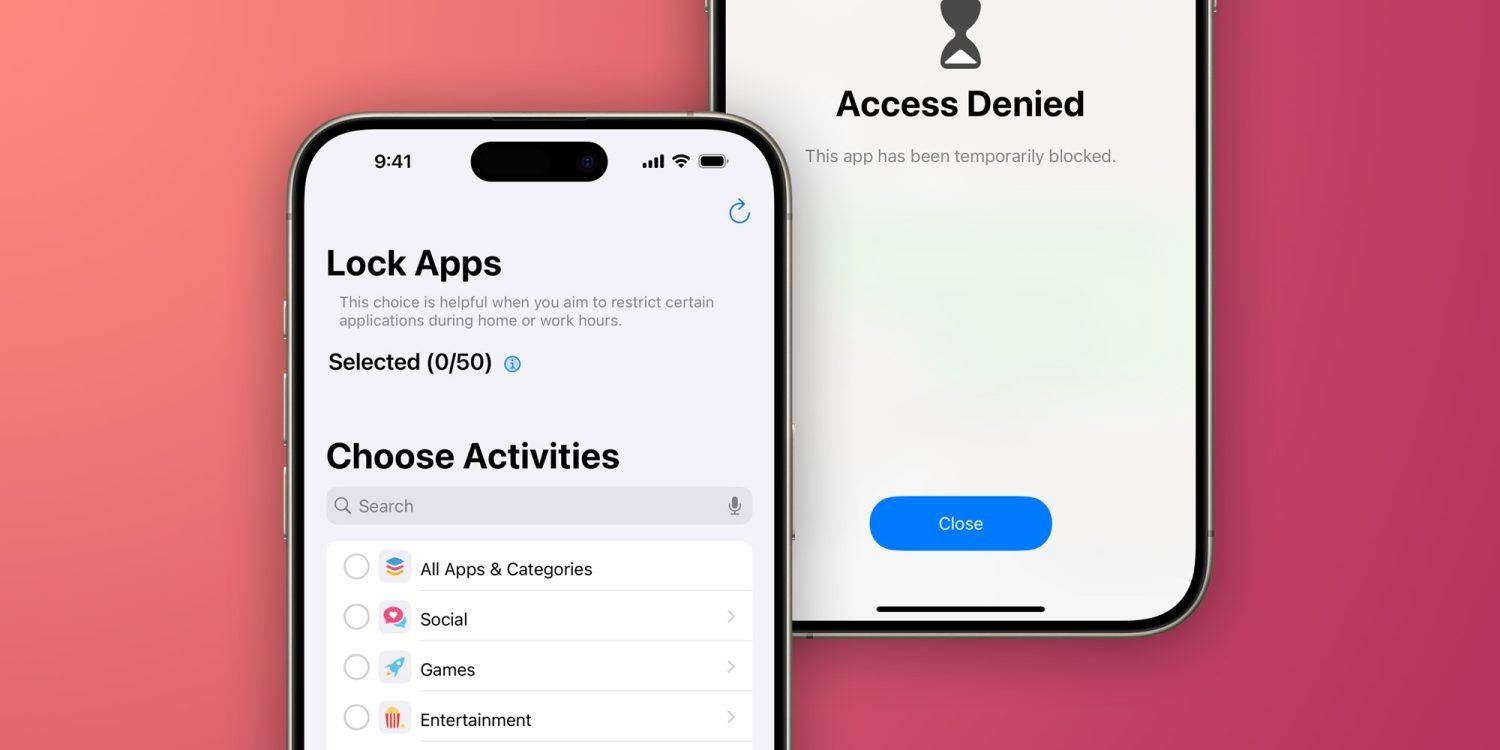
iOS provides developers with an API to lock apps with Face ID or Touch ID. However, not every app has this option, and there’s no way to completely hide apps from your device. Luckily, “App Lock” is a simple but powerful app that helps users protect and even hide any apps on their iPhone and iPad. Read on as we detail how the app works.
Lock and hide apps on your iPhone with App Lock
App Lock essentially brings a long-awaited feature for iOS users: the option to completely hide apps or lock them with Face ID or Touch ID. The app doesn’t rely on complex modifications or tricks. Instead, it uses the Screen Time API to control access to apps and system settings.
Once you open App Lock, you’ll see a list of all the apps installed on your iPhone or iPad. Just like the Screen Time settings, App Lock will show your apps organized by category, making it easy to hide or lock multiple apps at once. For example, you can hide all your banking apps with just a few taps by selecting the Productivity & Finance category.
The first tab of the app lets you lock your apps with biometrics, while the second “Conceal” tab completely hides the apps you’ve chosen – even from the App Library. Once you’ve chosen the apps you want to lock or hide, tap Start and you’re done.
In addition to being more intuitive than Screen Time’s native settings, a major advantage of App Lock is that it immediately locks apps, whereas Screen Time forces users to set a time limit for apps before locking them. Of course, to access or unhide apps, you must open App Lock again – which is protected by biometrics and a PIN code.
App Lock also has advanced options for blocking the installation and removal of apps, disabling in-app purchases, and restricting changes to iOS settings.
You can try App Lock for free. However, unlocking the full app requires a paid subscription. It’s a bit pricey, but it can be worth it for its privacy and security features. It’s worth noting that it requires an iPhone or iPad running iOS 16 or later.
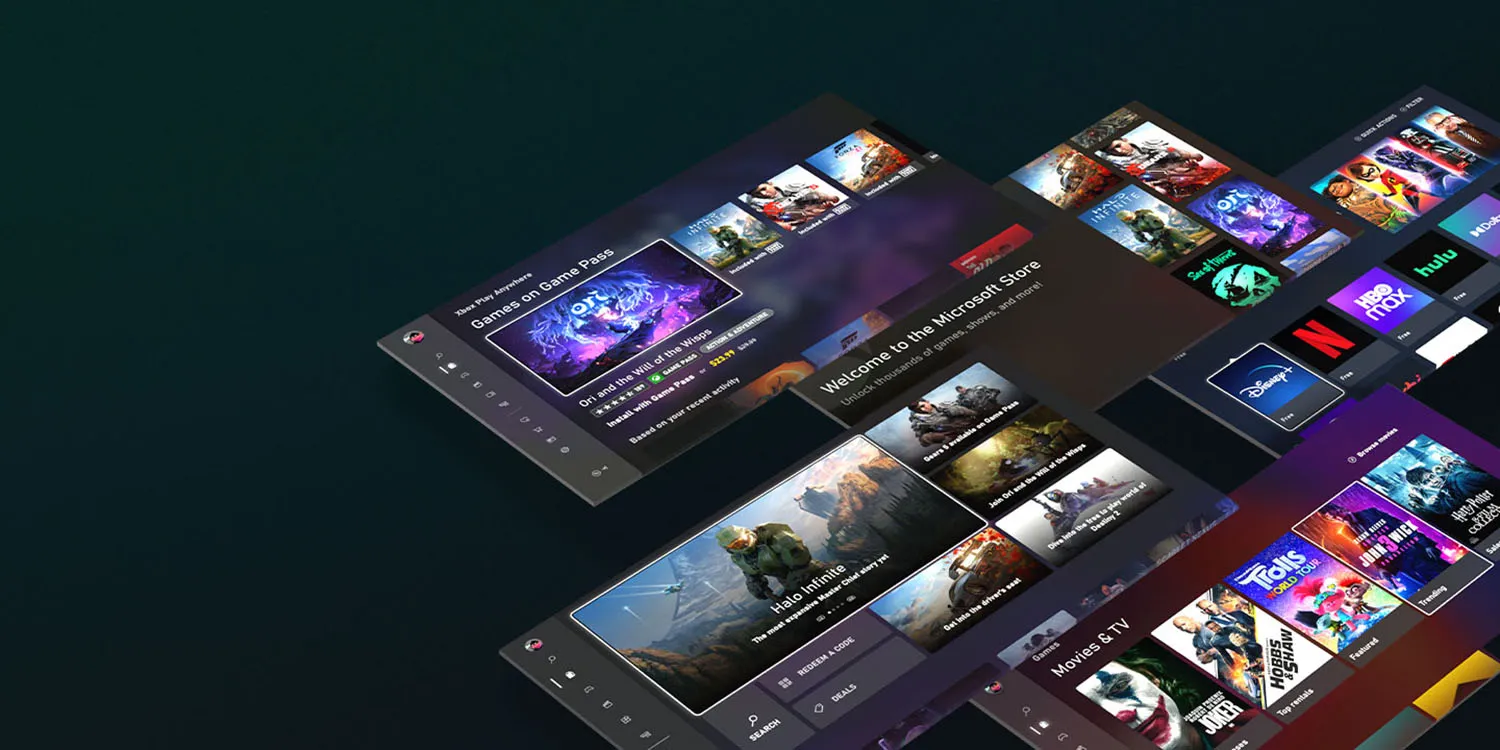
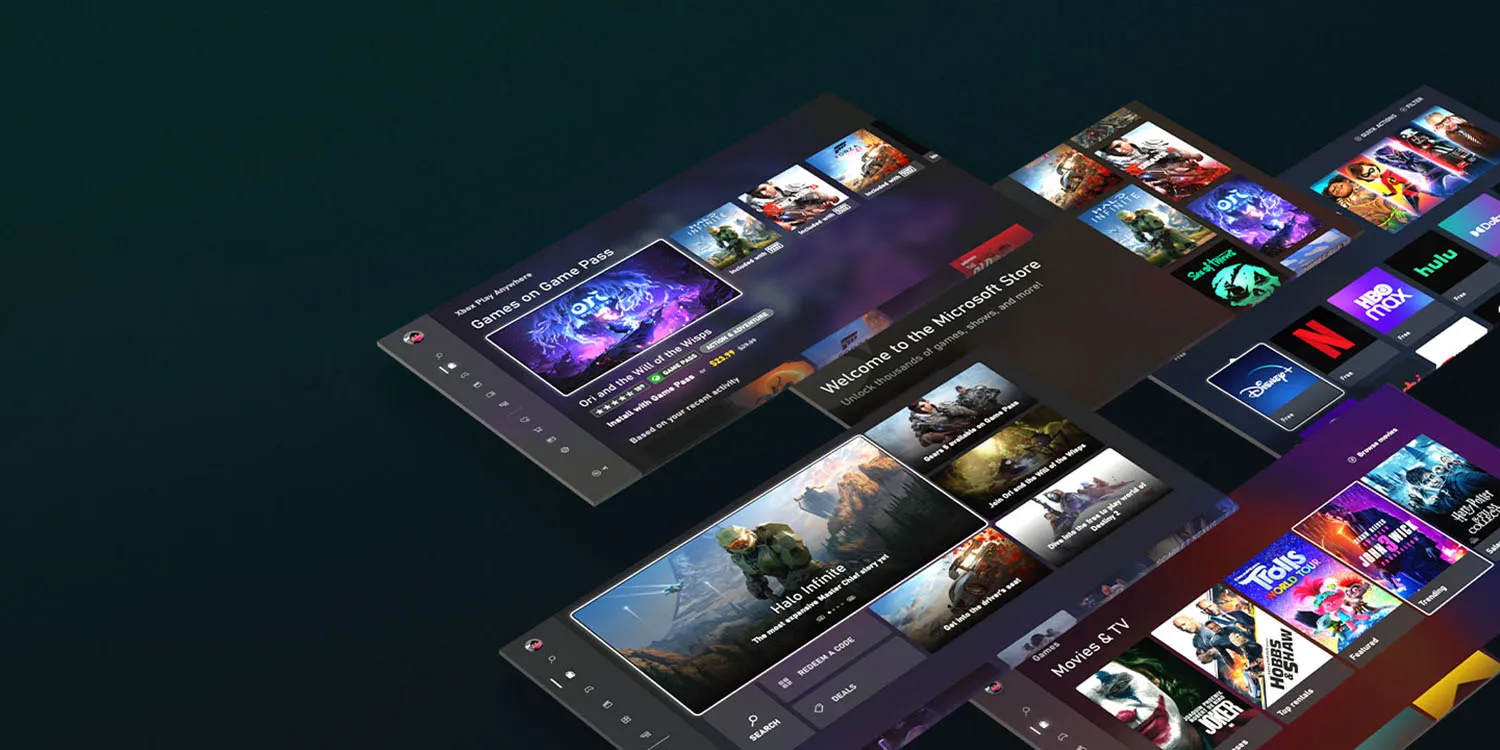
It was confirmed back in September that Apple will need to comply with antitrust requirements relating to app sales, and it seems most likely this will require the company to allow third-party app stores on iPhones. Microsoft has now indicated its intention to run one of these.
One key driver for the plan is likely Microsoft’s $69 billion acquisition of mobile gaming giant Activision Blizzard …
The App Store is officially a monopoly
Currently, the only place you can buy and download iOS apps is from the App Store. Apple had argued that consumers and developers were free to buy and sell Android versions of apps, therefore it didn’t have a monopoly on mobile apps as a whole – but the European Union rejected this as irrelevant, as Apple has an undeniable monopoly on the sale of iPhone and iPad apps.
Apple eventually conceded the point, and the matter was finally settled in September. The EU named the companies which will be subject to the Digital Markets Act (DMA) antitrust law, with the iPhone maker on the list.
Apple will likely have to allow third-party app stores
We still don’t know for certain what action Apple will have to take to comply with the DMA.
As a minimum, Apple must allow developers to use third-party payment platforms for European app sales, and in-app purchases. However, it seems more likely that it will need to permit third-party app stores to fully comply.
All indications are that Apple has reluctantly accepted this. The company has for some time had a senior team working on permitting third-party app stores.
This work is being spearheaded by Andreas Wendker, a software engineering vice president within Apple. Wendker reports directly to Craig Federighi. In addition to the engineering teams, Apple’s services team is also involved. Jeff Robbin, Apple’s “top engineering manager for its services,” is leading the effort on that side. Robbin reports to Eddy Cue.
Apple has until March 6 2024 to comply.
It’s not known whether the company will limit the changes to EU countries, or make the change globally. Apple faces similar antitrust pressures in the US and elsewhere, so may decide it’s best to bite the bullet and make one change worldwide.
Microsoft plans to offer an app store for games
Bloomberg reports that Microsoft has confirmed reports that it plans to offer an iOS app store for games.
Microsoft Corp. is talking to partners to help launch a mobile gaming store that will take on Apple Inc. and Google’s dominant position in the business, according to Phil Spencer, who leads the company’s Xbox video-game division.
“It’s an important part of our strategy and something we are actively working on today not only alone, but talking to other partners who’d also like to see more choice for how they can monetize on the phone,’’ Spencer said in an interview in Sao Paulo during the CCXP comics and entertainment convention.
Earlier reports said that it plans to launch the store next year, and the company more-or-less confirmed this.
The executive declined to give a specific date for a launch of the online store, which earlier reports suggested could be next year. “I don’t think this is multiple years away, I think this is sooner than that,’’ he said.
What does this mean for iPhone users?
What will likely happen is that you’ll be able to go to Apple’s App Store, and download apps for third-party app stores, like the planned Microsoft one.
If you do, you’ll then be able to choose where to buy your apps – either from the official App Store, or from any of the third-party ones.
You may pay the same price or different ones; that will be up to developers. However, the most likely outcome is that third-party stores will offer lower commissions to developers, and they will pass on at least some of the savings or offer other incentives to encourage you to use the stores which charge them the lowest commissions.
But most iPhone owners likely to stick to Apple
However, while the law will give you the option of buying apps from other stores, the choice will be yours. We’d expect most iPhone owners to stick to Apple’s own store, for three reasons.
First, interia. The average iPhone user probably won’t even know that third-party app stores exist, and even those who do will likely continue to use the App Store out of habit.
Second, comfort with Apple. If you need a refund, or want to cancel a subscription, you know that Apple will take care of that for you. If you buy elsewhere, you’d be dependent on the third-party store to handle those issues.
Third, security. Apple has long argued that it does more than other app stores to exclude scam apps. Even if that might be a somewhat questionable claim, people may be less inclined to trust Microsoft.
After launching a big overhaul of the Apple Support app in May and expanding it to Vietnam, Apple has released a small but useful update for the app today that brings more details about nearby locations.
Along with performance improvements and bug fixes, the new feature is store hours, accesssibility details, and specialty services showing up for nearby locations.
Apple Support 5.1 release notes:
Added helpful information about nearby locations, including store hours, accessibility details, and specialty services available
Performance enhancements and bug fixes
This release follows Apple Support 5.0 which launched in May with a new UI, the ability to browse nearby Apple service providers, improvements to managing calls, chats, reservations, and more.
Apple Support app overhauled with new layout, quicker access to nearby providers, more
Apple is rolling out a notable update to the Apple Support app for iPhone and iPad today. The update brings a revamped layout that makes it easier to manage your activity, expands the app to new regions, and more. Head below for the full details.
Apple says that the revamped Apple Support app layout streamlines the process of viewing and managing your support account, including calls, chats, reservations, and more. There’s also a new feature that allows customers to easily browse the providers in their area to find the quickest way to get support and service for their devices.
Today’s update to the Apple Support app also brings the app to Vietnam and adds Vietnamese as a supported language. In total, Apple says the app is now available in 32 languages and 174 regions.
Here is the full changelog:
Browse the providers in your area to see what’s nearby.
New layout makes it easier than ever to view and manage your calls, chats, reservations, and other activity.
Expanded region availability to Vietnam and added Vietnamese as a supported language. The Apple Support app is now available in 32 languages and 174 regions.
Performance enhancements and bug fixes.
The Apple Support app is a useful resource for finding help for any problem you might face with your Apple hardware or your Apple ID. You can download it on the App Store for free. Today’s new update is still rolling out, so you might not see it right away in the App Store on your device.
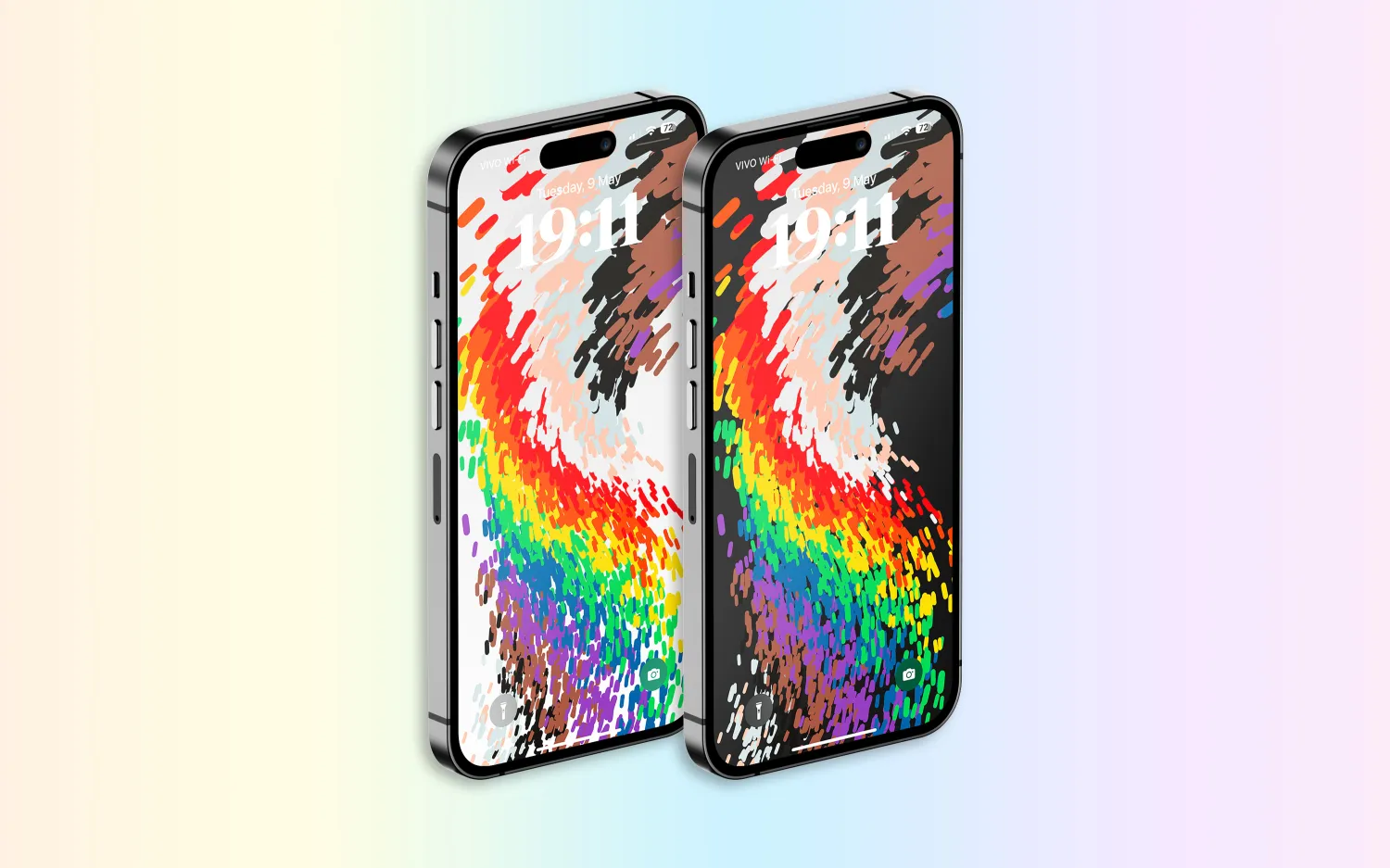
Following over a month of beta testing, iOS 16.5 is now available to the general public. This update includes changes to Apple News, the addition of a new “Pride Celebration” wallpaper, and more. Head below for the full release notes with details on bug fixes, new features, and more.
What’s new in iOS 16.5?
Here are Apple’s official release notes on iOS 16.5 new features and bug fixes. The build number for today’s update is 20F66.
A new Pride Celebration wallpaper for the Lock Screen to honor the LGBTQ+ community and culture
Sports tab in Apple News gives easy access to stories, scores, standings, and more, for the teams and leagues you follow
My Sports score and schedule cards in Apple News take you directly to game pages where you can find additional details about specific games
Fixes an issue where Spotlight may become unresponsive
Addresses an issue where Podcasts in CarPlay may not load content
Fixes an issue where Screen Time settings may reset or not sync across all devices
Earlier iOS 16.5 betas included the addition of a new Siri command for starting and stopping a screen recording. Apple removed this feature in subsequent iOS 16.5 betas, and it’s not included in the final version of the update.
iOS 16.5 will be the final major point-release update to iOS 16 before WWDC in June. This is where Apple will debut iOS 17 and release the first developer betas.
Apple is, however, expected to continue releasing updates to iOS 16 through the summer and likely even alongside iOS 17. iOS 16.6 is expected to enter beta testing soon.
You can update your iPhone by going to the Settings app, choosing General, then choosing Software Update.
watchOS 9.5 debuts with new Pride Celebration watch face
Alongside iOS 16.5, Apple has also released watchOS 9.5 for Apple Watch users today. The headlining change in this update is an all-new Pride Celebration watch face to honor the LGBTQ+ community and culture.
What’s new in watchOS 9.5?
watchOS 9.5 is rolling out now to all users. You can update your Apple Watch by going to Settings, choosing General, then choosing Software Update. You can also install the update via the Apple Watch companion app on your iPhone.
Here are Apple’s release notes for watchOS 9.5:
watchOS 9.5 includes new features, improvements and bug fixes, including a new Pride Celebration watch face to honor the LGBTQ+ community and culture.
And some more details on the new Pride Celebration watch face:
Inspired by multiple pride flags, this new watch face combines colors to represent the strength and mutual support of the LGBTQ+ movement. Mirroring the woven loops of the Sport Loop, each strand of vibrant thread contributes to the overall composition of the watch face. The colorful threads move as the Digital Crown on Apple Watch is rotated, the display is tapped, or the user’s wrist is raised.
The new Pride Celebration face included in watchOS 9.5 pairs with the similarly-designed wallpaper for iPhone users. The new wallpaper is included with iOS 16.5, which is also available starting today.
macOS Ventura 13.4 with new sports-related features
After months of beta testing, Apple has finally released macOS Ventura 13.4 to the public. The update, which is now available for macOS users, comes with new sports-related features, as well as a new system for installing beta software. Read on as we detail what’s new with macOS Ventura 13.4.
One big change coming with macOS Ventura 13.4 is the new system for installing betas that was introduced with iOS 16.4. The operating systems now asks for the Apple ID to show and download beta software updates.
macOS checks whether the account is associated with a developer or user registered in the public beta program. It then shows the beta update available for that program. With this change, regular users will no longer be able to install developer betas, for example.
macOS 13.4 full release notes
Sports feed in the sidebar of Apple News gives easy access to stories, scores, standings, and more, for the teams and leagues you follow
My Sports score and schedule cards in Apple News take you directly to game pages where you can find additional details about specific games
Resolves an issue where Auto Unlock with Apple Watch does not log you into your Mac
Fixes a Bluetooth issue where keyboards connect slowly to Mac after restarting
Addresses a VoiceOver issue with navigating to landmarks on webpages
Fixes an issue where Screen Time settings may reset or not sync across all devices
You can install macOS Ventura 13.4 by going to the Software Update menu in the System Settings app. It may take a while before the update shows up on your computer; make sure that your Mac is compatible with macOS Ventura.
The update build number is XXXXX.
OpenAI launches free ChatGPT for iPhone app with Whisper support and more
OpenAI has announced that it is releasing a dedicated iPhone app for its ChatGPT service. The app, which is available via the App Store, gives users the ability to use ChatGPT through a native app on their iPhone. The app is free to download and includes no ads. It’s currently only available in the United States, but OpenAI says availability will expand “in the coming weeks.”
ChatGPT for iPhone now available
As announced by OpenAI in a blog post, ChatGPT for iPhone will offer the same set of features as the web version of the service. This will include ChatGPT Plus support, which lets users subscribe to pay for more advanced versions of the service.
The app will also sync your ChatGPT history across all your devices, including the web. It also includes support for Whisper, OpenAI’s open-source speech-recognition system. This integration with Whisper enables voice input for the ChatGPT app on iPhone. The ChatGPT app is also completely ad-free.
As ChatGPT has gained popularity over the last six months, a number of copycat and scam apps have surfaced on the App Store. Apple has cracked down on these apps, in part by blocking apps that use “GPT” in their name. By releasing its own version of ChatGPT for iPhone, OpenAI hopes to directly control the experience of using the service on an iPhone.
Additionally, Microsoft’s Bing app for iPhone has seen a major boost in popularity since it added ChatGPT integration.
ChatGPT for iPhone is rolling out starting today to users in the United States. OpenAI availability will “expand to additional countries in the coming weeks.”
Moving menstrual health forward with iPhone and Apple Watch
Ahead of International Women’s Day, new preliminary findings from the Apple Women’s Health Study underscore the importance of paying attention to menstrual cycles and their connection to overall health.
Many physicians consider periods a vital sign, but this area of health is notably under-researched. The Apple Women’s Health Study is a first-of-its-kind research study conducted with the Harvard T.H. Chan School of Public Health and the National Institute of Environmental Health Sciences (NIEHS) that aims to advance the understanding of menstrual cycles and how they relate to various health conditions such as polycystic ovary syndrome (PCOS), infertility, and menopausal transition. The study is significant in its scope and scale because it invites anyone who has ever menstruated across the US to contribute to this research simply by using their iPhone.
New Preliminary Findings
Harvard Chan School researchers used survey data from the Apple Women’s Health Study to advance the scientific understanding around the relationship between persistently abnormal periods, PCOS, and endometrial hyperplasia and cancer. Looking at a preliminary analysis cohort of over 50,000 study participants, the study team found:
12 percent of participants reported a PCOS diagnosis. Participants with PCOS had more than four times the risk of endometrial hyperplasia (precancer of the uterus) and more than 2.5 times the risk of uterine cancer.
5.7 percent of participants reported their cycles taking five or more years to reach cycle regularity after their first period. Participants in that group had more than twice the risk of endometrial hyperplasia and more than 3.5 times the risk of uterine cancer, compared to those who reported their cycles took less than one year to reach regularity.
These updates are a first step for helping people understand risk factors for these diseases, and encouraging people to have conversations with their healthcare providers about cycle irregularity earlier.
“More awareness on menstrual cycle physiology and the impact of irregular periods and PCOS on uterine health is needed,” said Dr. Shruthi Mahalingaiah, MS, Harvard Chan School’s assistant professor of Environmental Reproductive and Women’s Health and co-principal investigator of the Apple Women’s Health Study. “This analysis highlights the importance of talking to a healthcare provider when menstruators are experiencing persistent changes to their period that span many months. Over time, we hope our research can lead to new strategies to reduce disease risk and improve health across the lifespan.”
The study team will conduct further analyses on this preliminary data for scientific publication.
Cycle Tracking on Apple Watch and in the Health app on iPhone can help users have more informed conversations with their providers.
Previous Interim Updates
The Apple Women’s Health Study team has previously shared a number of other interim research updates that highlight how large-scale, longitudinal research on menstruation can help advance the science around this topic.
Research published in the American Journal of Obstetrics and Gynecology focuses on cycle deviations, like irregular or prolonged periods, which can be a sign of underlying conditions including PCOS, fibroids, malignancies, or infections. The study found cycle deviations were found in 16.4 percent of the study population. Black participants had a 33 percent higher prevalence of infrequent periods compared to white, non-Hispanic participants, while Asian participants had a higher prevalence of irregular periods.
Demonstrating just how common menstrual symptoms really are, researchers found the most frequently tracked symptoms were abdominal cramps, bloating, and tiredness, all of which were experienced by more than 60 percent of participants who logged symptoms. More than half of the participants who logged symptoms reported acne and headaches. Some less widely recognized symptoms, like diarrhea and sleep changes, were also tracked by 37 percent of participants logging symptoms.
After analyzing over 125,000 menstrual cycles, researchers found that participants experienced slightly longer menstrual cycles for cycles in which they received a COVID-19 vaccine, but participants’ cycles typically returned to prevaccination lengths the cycle after getting a vaccine.
The Apple Women’s Health Study invites anyone who has ever menstruated across the US to contribute to scientific research by enrolling via the Apple Research app. The study enables participants to share their cycle tracking data, along with other health data from iPhone, and Apple Watch if they have one. Participants can also provide a more well-rounded set of information about their personal and family history and lifestyle through occasional surveys. The Research app helps the study reach individuals across various stages of their life, varying races, and across the US. Participants control the data types shared with the study, with transparency into how the data will be used for the purposes of the study.
Anyone who has ever menstruated across the US can download the Apple Research app to enroll in the Apple Women’s Health Study, which helps the study reach individuals across various stages of their life, of varying races, and in multiple locations.
Cycle Tracking on iPhone and Apple Watch
Cycle Tracking is available in the Health app on iPhone or the Cycle Tracking app on Apple Watch, allowing users to track their menstrual cycle along with details like symptoms or ovulation test results. Cycle Tracking uses information users have logged for previous periods and cycle length, plus heart rate data from Apple Watch, to offer period and fertile window predictions. Users can turn on notifications to tell them when their next period or fertile window is approaching.
With iOS 16 and watchOS 9, Cycle Tracking can inform users if their logged cycle history from the previous six months shows a pattern of irregular periods, infrequent periods, prolonged periods, or persistent spotting. It’s important to know when these patterns occur, as they may be a sign of an underlying health condition. Users are also able to learn about the Cycle Deviation detected, and export the last 12 months of their cycle history as a PDF to share with their provider.
Cycle Tracking — available in the Health app on iPhone and in the Cycle Tracking app on Apple Watch — allows users to conveniently track their menstrual cycle and receive period and fertile window predictions, with the same strong privacy protections as with all other health data.
Additionally, the new temperature-sensing capabilities in Apple Watch Series 8 and Apple Watch Ultra allow users to receive retrospective ovulation estimates. New sensors gather overnight wrist temperature data that can be used to estimate the likely day of ovulation after it has occurred and improve period predictions. Knowing when ovulation has occurred can be helpful for family planning, and users can view these estimates in the Health app.
New temperature sensors in Apple Watch Series 8 and Apple Watch Ultra gather overnight wrist temperature data that can be used to estimate the likely day of ovulation after it has occurred, which can be helpful for family planning.
Privacy is fundamental in the design and development across all of Apple’s features. When a user’s iPhone is locked with a passcode, Touch ID, or Face ID, all of their health and fitness data in the Health app — other than Medical ID — is encrypted. Any Health data backed up to iCloud is encrypted both in transit and on Apple servers. When using iOS and watchOS with the default two-factor authentication and a passcode, Health app data synced to iCloud is encrypted end-to-end, meaning that Apple does not have the key to decrypt the data and therefore cannot read it.
A member of the Senate Intelligence Committee has called on both Apple and Google to remove TikTok from their respective app stores.
The demand follows growing concerns about the Chinese-owned app, with the video sharing app already banned from US federal government devices, along with those in more than half of US states …
Background
TikTok is no stranger to controversy. In fact, the app has come under fire on so many fronts, that it’s hard to succinctly summarize them – but here’s our best attempt …
Things date back to the previous presidency, with an executive order banning US companies from doing business with the company, then another requiring the app to be sold to a US company or be banned. The deadline for this quietly lapsed, and President Biden later rescinded the order.
But the app came under fresh scrutiny after overtaking Facebook to become the most-downloaded app back in 2020, with teenagers the main user-base. It wasn’t long before it was accused of having inadequate privacy protection for teenage users, and was forced to make changes.
Next up was failing to properly fact-check user-posted content. Ripping off kids, with in-app currency. Unauthorized use of personal data. Failing to prevent bullying. Trying to bypass App Tracking Transparency rules. Damaging the self-esteem of teenage girls. Taking users down dangerous rabbit holes. Showing irresponsible mental health advice videos. Facilitating drug deals. Enabling grooming by child abusers. Being used for spying by the Chinese government.
Did I forget anything? Oh yeah: encouraging dangerous stunts that kill children. I knew there was something else.
Remove TikTok from app stores, says senator
It is cybersecurity concerns that have received the most attention, though: fears about the personal data of US citizens ending up in the hands of the Chinese government. This has already led the app to be banned from federal government devices, with more than half of US states imposing equivalent rules for their devices.
But CNN reports that one senator wants to take things further.
A member of the Senate Intelligence Committee is calling on Apple and Google to remove TikTok from their app stores over concerns about national security, in the latest indication of mounting scrutiny on the short-form video app from members of Congress.
In a letter sent to the two tech giants on Thursday, Colorado Democratic Sen. Michael Bennet calls TikTok “an unacceptable threat to the national security of the United States.”
Beyond data leaks, Bennet also sees darker possibilities.
“We should accept the very real possibility that [China] could compel TikTok, via ByteDance, to use its influence to advance Chinese government interests,” Bennet wrote, “for example, by tweaking its algorithm to present Americans content to undermine U.S. democratic institutions or muffle criticisms” of China’s handling of Hong Kong, Taiwan or ethnic minorities.
It’s not the first time Apple and Google have been asked to remove TikTok from their app stores: the FCC commissioner made the same request last year.
Apple and Google alike didn’t respond to a request for comment, and nor are they likely to. Much as Bennet might like to hand off responsibility to the decision to the tech giants, this is properly a matter for the US government.
Apple has always stood for privacy as a “human right” while the company has never liked the idea of having advertisements on its platforms. But as the App Store is now getting new ad placements, some people have become concerned about how the company’s policies may change. To add more fuel to the fire, developers have discovered that Apple may keep track of everything you tap while browsing the App Store.
Apple knows everything you tap on the App Store
Two developers and security researchers who identify themselves as “Mysk” have raised privacy concerns about the App Store getting more ads. More specifically, the developers revealed that iOS sends Apple a detailed log of how users interact with the App Store.
As shown in a brief video, the usage data includes details about where the user taps on the screen. This information is sent in real time to Apple via a JSON file.
According to developers, the company has been tracking users’ actions within the App Store since the release of iOS 14.6 in May 2021. Interestingly, as noted by BGR’s José Adorno, the company introduced the App Tracking Transparency feature a month earlier with iOS 14.5.
There’s no official explanation as to how Apple uses this data, but it seems that the company is still tracking users as they browse the App Store. It’s worth noting that since Apple started offering ads on the App Store, developers have access to some statistics about how their ads are performing – so such data may be related to this.
Even though Apple may claim that the collected data is not shared with third parties, this sounds quite controversial since Apple has been creating barriers to make it harder for third parties to track iOS users, which has affected ad platforms from Google and Meta. And according to Mysk, App Store data is sent to Apple even when the Personalized Ads option is turned off.
🧵 1/5 The recent changes that Apple has made to App Store ads should raise many #privacy concerns. It seems that the #AppStore app on iOS 14.6 sends every tap you make in the app to Apple.👇This data is sent in one request: (data usage & personalized ads are off)#CyberSecuritypic.twitter.com/1pYqdagi4e
Apple last month introduced new ad placements to the App Store. While previously developers could only promote their apps in App Store Search, now they can also pay to show their apps on app pages and in the Today tab.
Soon after the new ad placements were made available, many users criticized them for showing irrelevant or ethically questionable content, such as casino and dating apps. The company then temporarily suspended ads for these apps, but it’s unclear what will happen next.
According to rumors, Apple plans to push even more ads to its users in the future. At the same time, the company makes it more difficult for competitors to reach iOS users with advertisements, which could eventually lead to a new antitrust investigation.
Meta has issued a Facebook security warning to around one million users that their login credentials may have been stolen by scam apps.
While most of the apps were Android ones, 47 of them were iOS apps found in Apple’s App Store …
Many apps and websites offer third-party login options, with the most common ones being:
Login with Facebook
Login with Google
Login with Apple
The intention behind these login methods is to make it quicker and easier to start using an app, by skipping the need to register an account. However, a bad actor can also use this approach to steal your credentials.
Engadget reports that this is what a whole bunch of scam apps have done with the “Login with Facebook” option.
Meta is warning 1 million Facebook users that their account information may have been compromised by third-party apps from Apple or Google’s stores. In a new report, the company’s security researchers say that in the last year they’ve identified more than 400 scammy apps designed to hijack users’ Facebook account credentials.
According to the company, the apps are disguised as “fun or useful” services, like photo editors, camera apps, VPN services, horoscope apps, and fitness tracking tools. The apps often require users to “Log In with Facebook” before they can access the promised features. But these login features are merely a means of stealing Facebook users’ account info. And Meta’s Director of Threat Disruption, David Agranovich, noted that many of the apps Meta identified were barely functional.
Facebook security warning
If you have used one of the known scam apps, Meta will push a message to you in the Facebook app:
A security notice from Meta
You may have logged into Facebook from a malicious app designed to steal your Facebook account information.
To protect your information we recommend you secure your account immediately.
The site says that the iOS apps identified mostly appeared to be targeting business users, with names like Meta Business, FB Analytic, and so on.
Meta has provided the full list of apps to both Apple and Google, so that they can be removed from their respective app stores.
Apple of course argues that its app review process keeps users safe from scams, and this is why it shouldn’t be obliged by antitrust concerns to allow third-party app stores or sideloading of iOS apps.
This latest revelation could be said to provide ammunition to both sides of the debate. On the one hand, dozens of scam apps made it through app review despite the fact that (a) they were stealing credentials and (b) scarcely worked. On the other, there were far fewer of these apps in the App Store than in Google’s Play Store.
Microsoft is working to make your and your family’s online experience safer. Today the company is launching its new Defender security dashboard for 365 subscribers. Users on iPhone, Mac, Windows, and Android devices have access to the Microsoft Defender security app that utilizes existing antivirus software or other protections.
Microsoft Defender is simplified online security that meets you and your family where you are by bringing multiple protections together into a single dashboard. It provides online protection across the devices you and your family use. It offers tips and recommendations to strengthen your protection further. And, as you grow your digital footprint by adding family members and devices, Defender grows with you and keeps your defenses up-to-date using trusted technology.
According to The Verge, Microsoft Defender’s features will vary by which platform. For instance, on iPhone and iPad, Microsoft Defender users won’t have antivirus protection. However, they’ll have some phishing protections alongside their dashboard that features alerts for their other devices.
Additionally, the new app includes security alerts for your devices to ensure maximum protection. While not on iPhone, you can also view Microsoft Defender’s cybersecurity tips on your Mac or Windows computer.
This is just the start. As we look forward, we will continue to bring more protections together under a single dashboard, including features like identity theft protection and secure online connection. Microsoft Defender is simplified online security that grows with you and your family to help keep you safe.
iMovie 3.0 makes it easier than ever for anyone to share their stories with video
Apple today introduced a new version of iMovie with features that make it easier than ever to create beautiful edited videos on iPhone and iPad. Storyboards helps aspiring content creators and moviemakers learn to edit and improve their video storytelling skills with pre-made templates for popular types of videos shared on social, with colleagues, or with classmates — videos like DIYs, cooking tutorials, product reviews, science experiments, and more. Storyboards makes it easy to get started with flexible shot lists and step-by-step guidance on which clips to capture for each video type. For those who want to create a video even faster, Magic Movie instantly creates a polished video from the clips and photos a user selects, automatically adding transitions, effects, and music to the edit. Both new features include a range of styles to help personalize the final look and feel of a video, including titles, filters, transitions, color palettes, and music, all designed to work together.
“iMovie has empowered millions of people around the world to create and share their stories through video,” said Bob Borchers, Apple’s vice president of Worldwide Product Marketing. “This latest version of iMovie, featuring Storyboards and Magic Movie, simplifies video creation even further, and we think it will continue to inspire the next wave of video creators to dive in and get started.”
iMovie 3.0 introduces Storyboards and Magic Movie to make it even easier to create polished videos.
Learn and Improve Video Storytelling with Storyboards
Storyboards gives users a major head start in the video creation process, helping beginners learn to edit and improve their storytelling skills. Instead of starting with a blank timeline, creators can choose from 20 different storyboards featuring a variety of popular video types, including cooking tutorials, Q&As, product reviews, news reports, and more. Each storyboard has a shot list that organizes clips to tell a specific narrative. Each placeholder also includes an illustrative thumbnail, along with a tip that asks a question or makes a suggestion for how to shoot that clip to make it more interesting. For added customization, shots can be added, reordered, and deleted from a storyboard as needed.
Creators can choose from 20 different storyboard types based on popular video genres to get started.
Unique pre-made video styles can be added to mix up the look and feel of a project.
Creators can experiment by applying different video styles that include titles and transitions, as well as options for title layouts, fonts, filters, and color palettes. Music tracks dynamically adjust to fit the length of a project, and users can refine each clip with intuitive editing tools like trim, split, clip speed, and clip volume.
Completed Storyboard videos are easily shared from iMovie through Messages, Mail, and across social media platforms.
Create Videos Instantly with Magic Movie
Magic Movie brings photos and videos to life in just a few taps.
Magic Movie helps create beautiful custom videos — complete with titles, transitions, and music — in just a few taps. To create a Magic Movie, a user simply selects an album, or any group of photos or images from their library, and Magic Movie instantly identifies the best parts of the footage and creates the project. Creators can easily put their own spin on a Magic Movie by rearranging or deleting clips in the simplified Magic Movie shot list, or by editing the project further. Styles can be added to change up the look and feel of the entire video. Like Storyboard videos, Magic Movies can be shared from iMovie via Messages, Mail, and on social media.
Users can create a beautiful video from their Photo albums automatically with Magic Movie.
Availability
iMovie 3.0, including the new Storyboards and Magic Movie features, is available today as a free update on the App Store for devices running iOS 15.2 or later and iPadOS 15.2 or later.