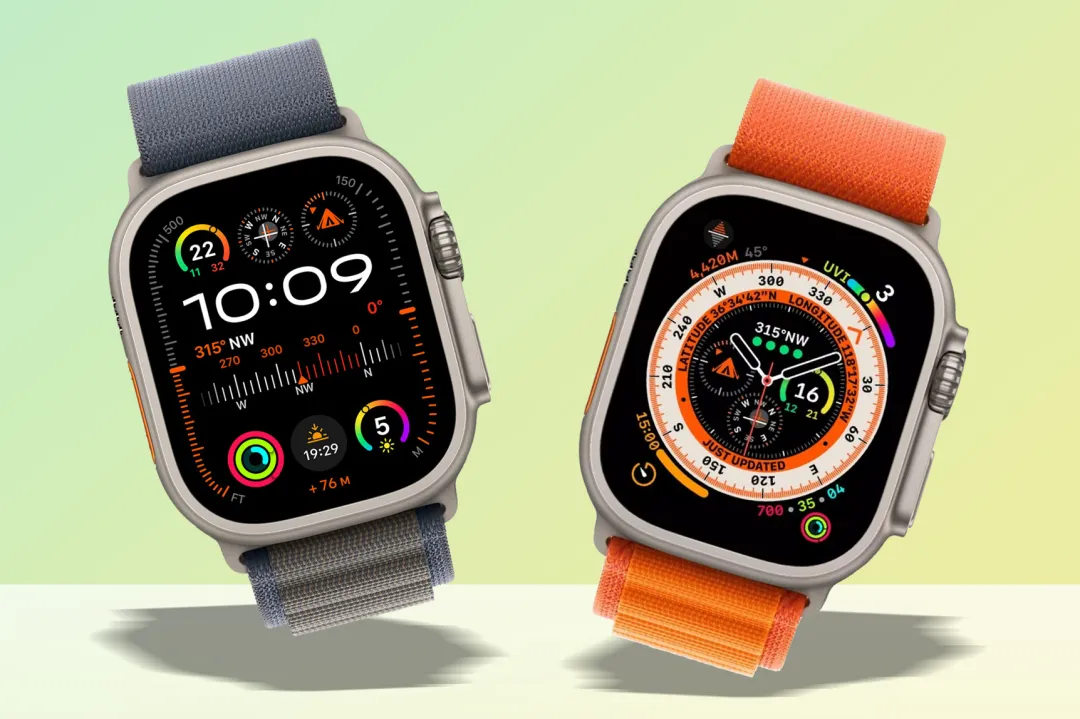
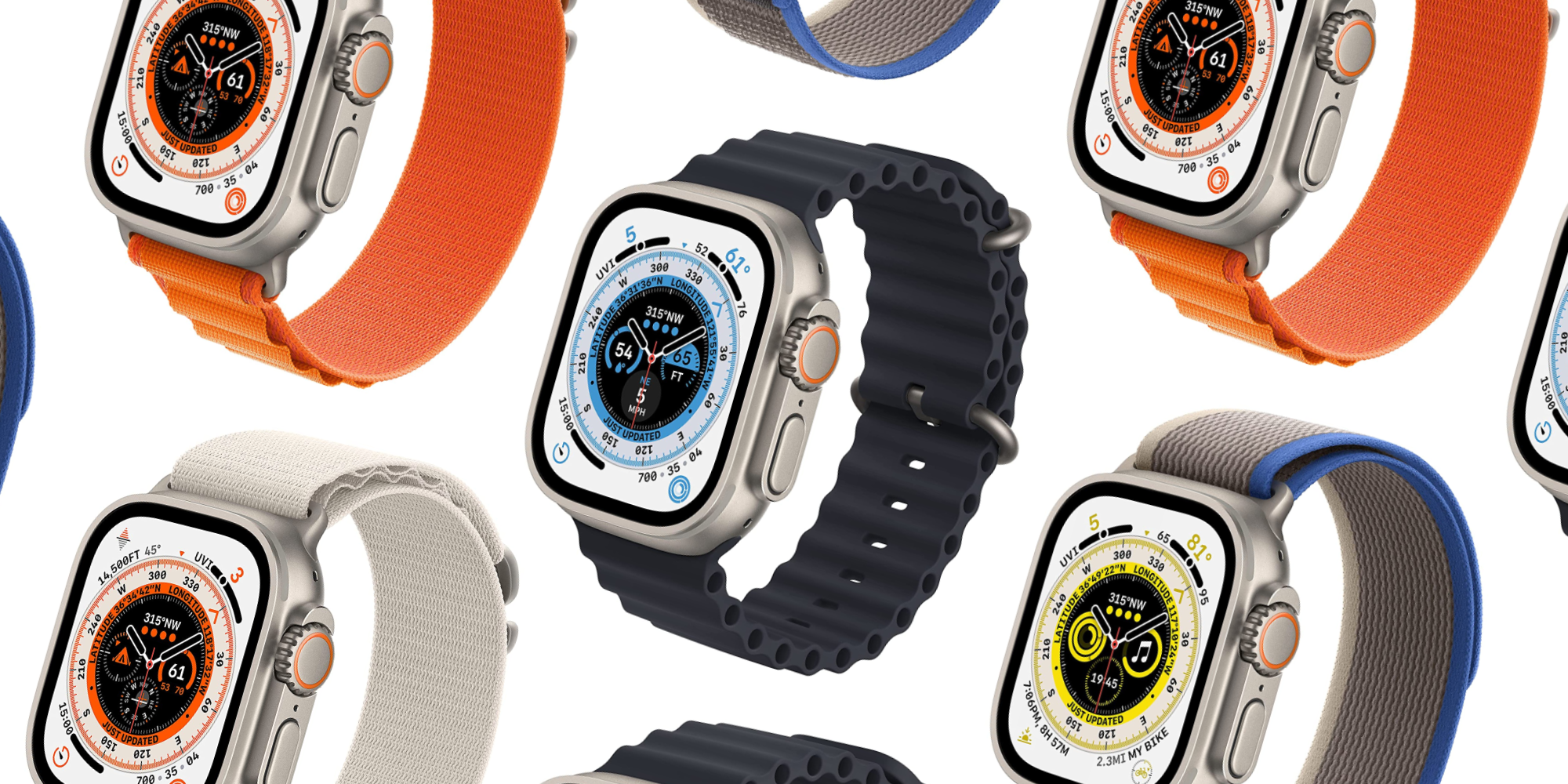
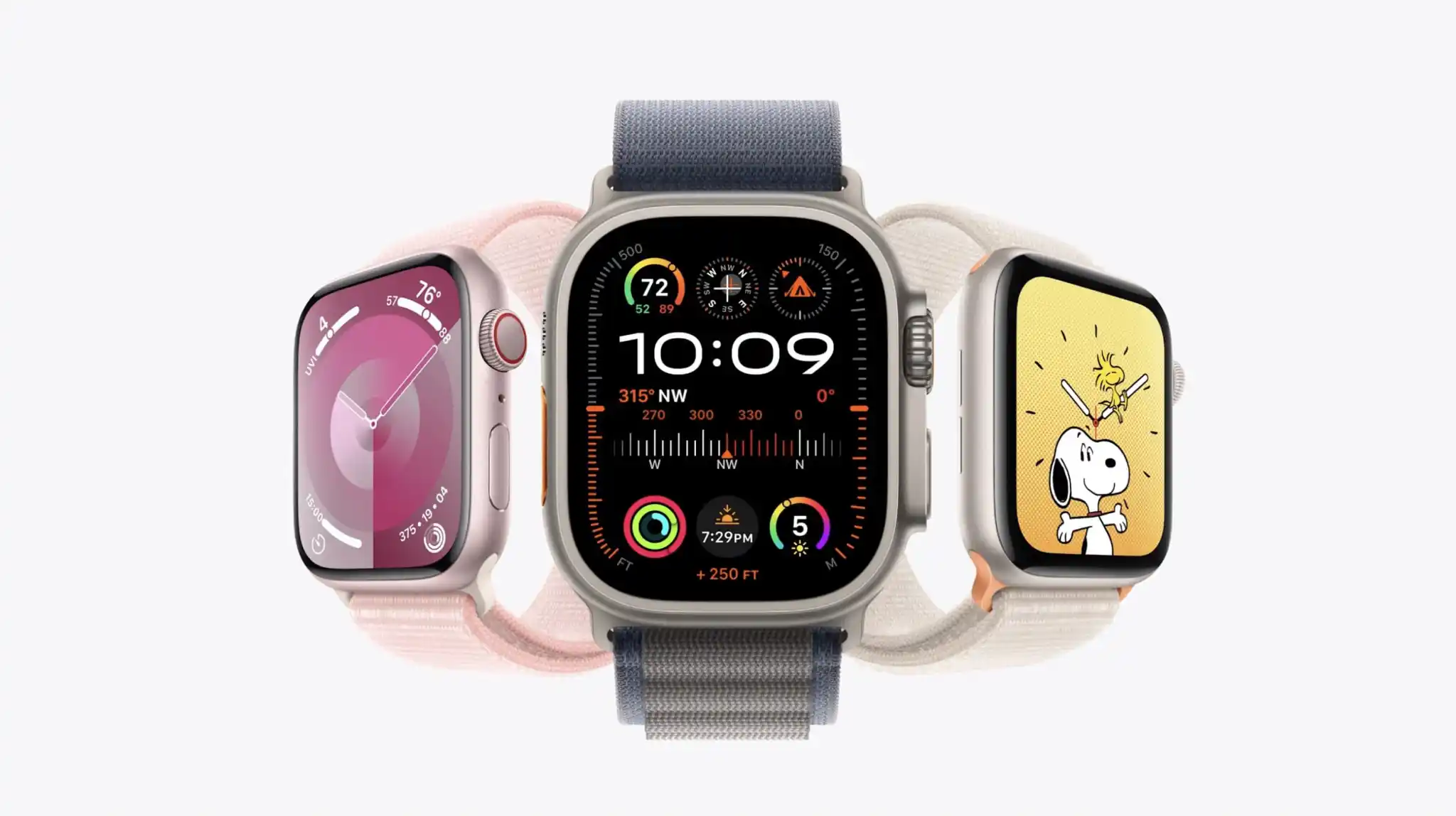
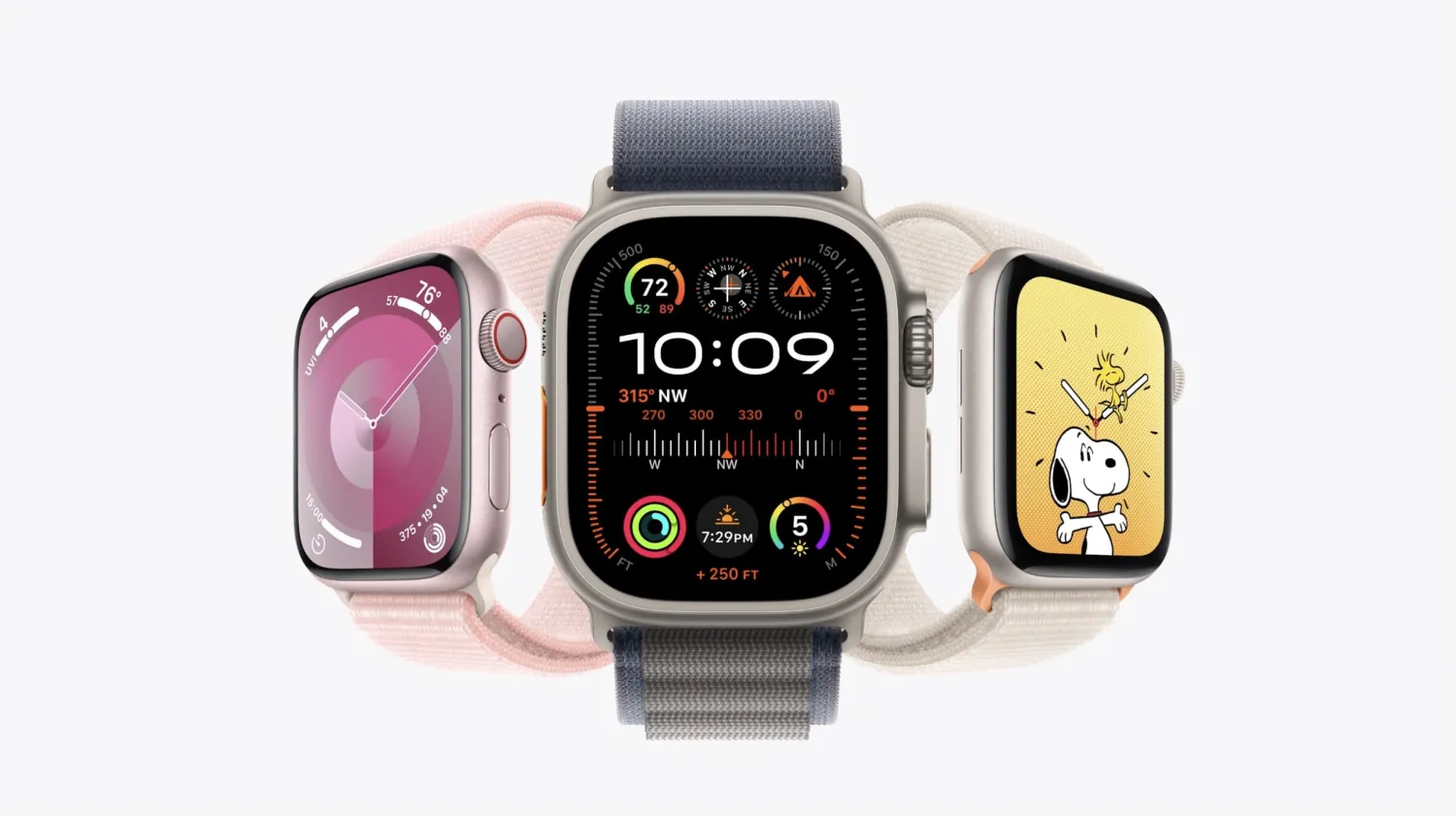
Apple Watch Ultra 2 has an identical physical design to the original Ultra and many of the core features and capabilities remain the same. But what sets them apart? Read along for a look at what’s different between Apple Watch Ultra 2 vs 1.
To be fair, the Pam “same thing” meme only applies to the exterior as there are a number of differences between the Ultra 2 and Ultra 1 when it comes to features, the SoC, and more.
But how meaningful those differences are in real-world use could end up feeling inconsequential for many people.
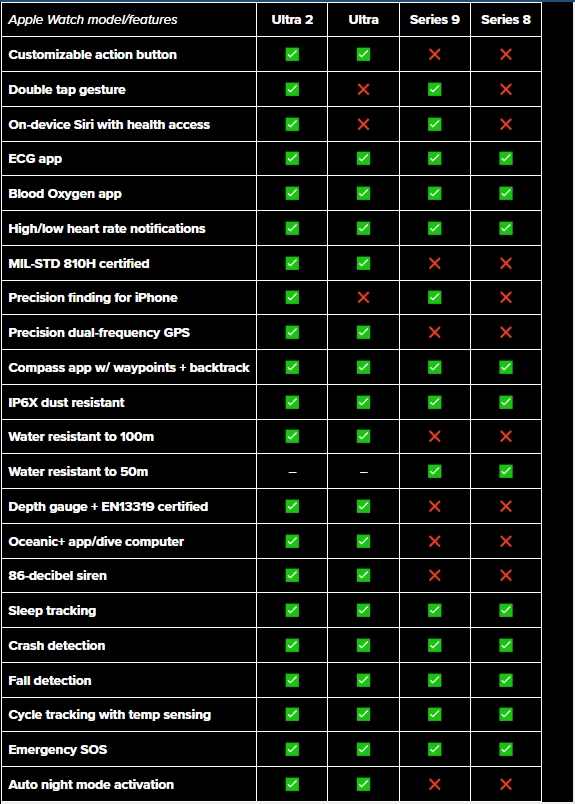
We’ll dig into all the nitty gritty details below. And to give the best perspective on the differences between all the recent models, we’ve included Apple Watch Ultra 2 vs 1 as well as Series 9 and 8 in all the charts.
Apple Watch Ultra 2 vs 1 and more
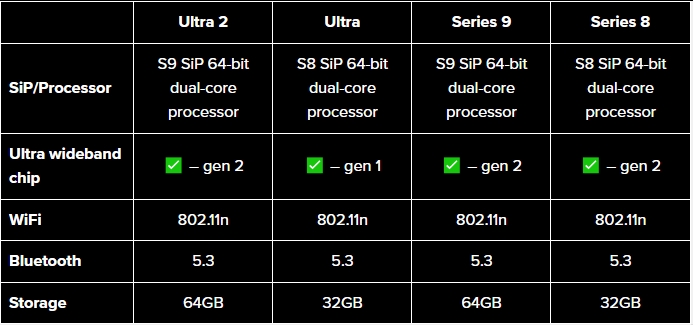
Processor, storage, more
Last year, Apple used the S8 64-bit dual-core processor in the Ultra and Series 8 which wasn’t that different from the S7 or S6 in the previous Apple Watches.
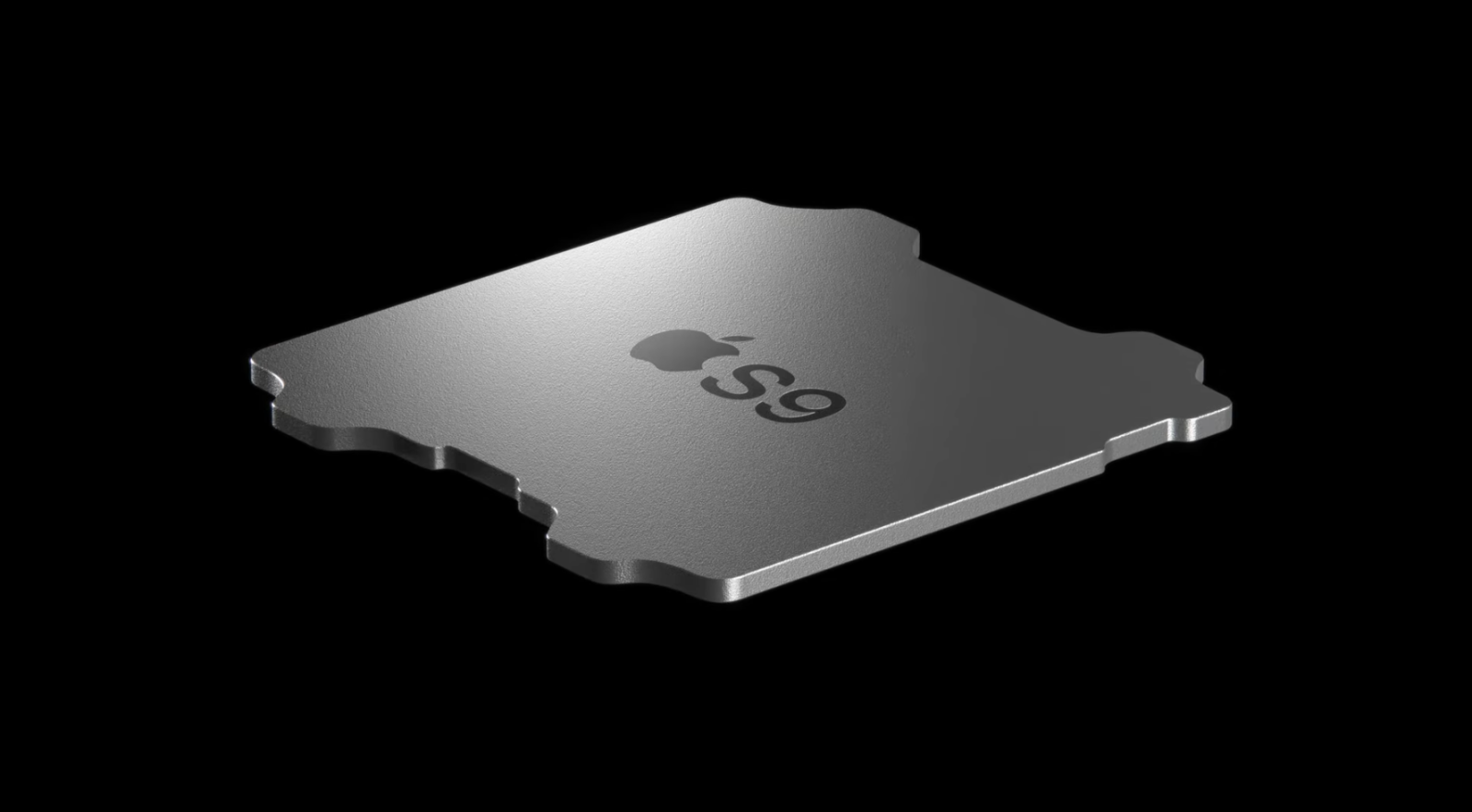
But with Series 9, Apple says the S9 SiP brings notable improvements across the CPU, GPU, and Neural Engine.
Apple didn’t share a specific measure of how much faster the CPU of the S9 is compared to S8, but it features 5.6 billion transistors – up 60% from S8.
For the S9 GPU, Apple says it’s 30% faster than the S8 and the Neural Engine is twice as fast.
Another benefit if you’re coming from a previous generation Apple Watch is a boost to 64GB of storage.
Case and display
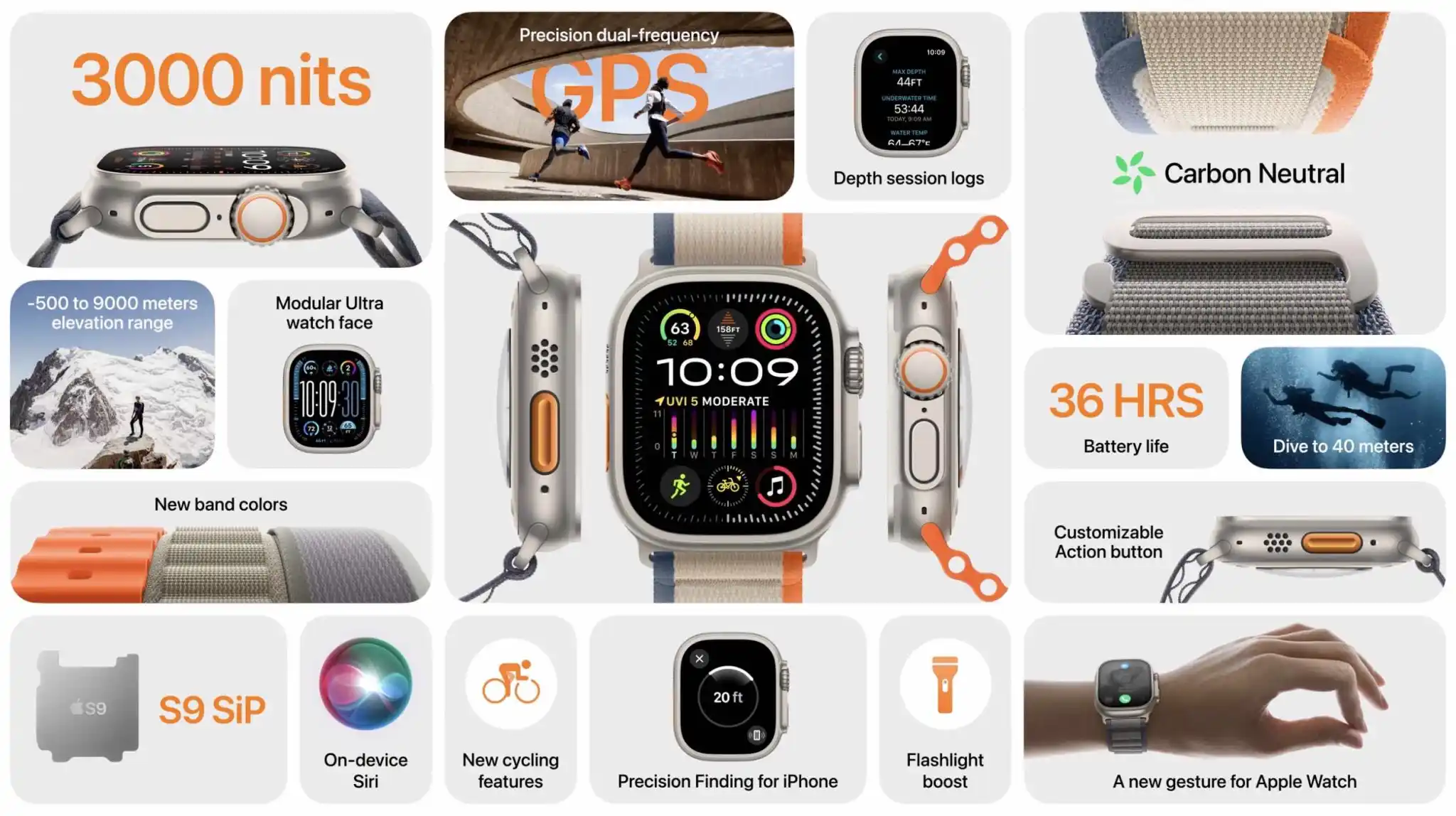
Apple Watch Ultra 2 has the same 49mm case as its predecessor with an identical 410 x 502 display resolution. Apple says it’s 27% bigger than the display on Series 4-6/SE. However, now it’s 50% brighter at an impressive 3,000 nits.
Meanwhile, Apple Watch Series 9 carries on with the same sizes that launched with Apple Watch Series 7. That’s 45 and 41mm cases and a larger display that’s 20% bigger than Series 4-6/SE and 50% larger than the Series 3 display.
Apple Watch band compatibility
When it comes to bands, any of them designed for 49, 45, and 44mm Apple Watches will work with Apple Watch Ultra 2 and vice versa.
With no changes to the band connection, that means all previous and new bands work with Series 9 and all older Apple Watches.
Battery life and charging
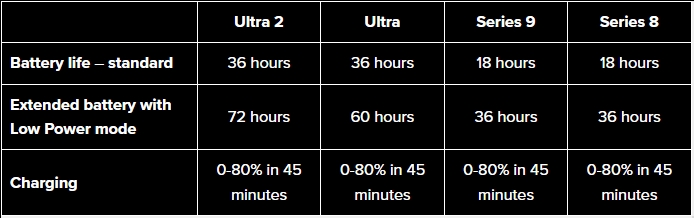
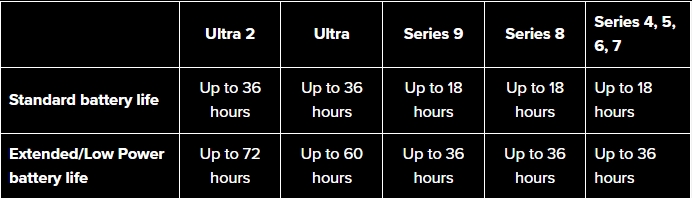
A major change with Apple Watch Ultra 1 was the biggest battery ever for the lineup. That was 36 hours of standard battery life and up to 60 hours of extended use with Low Power mode.
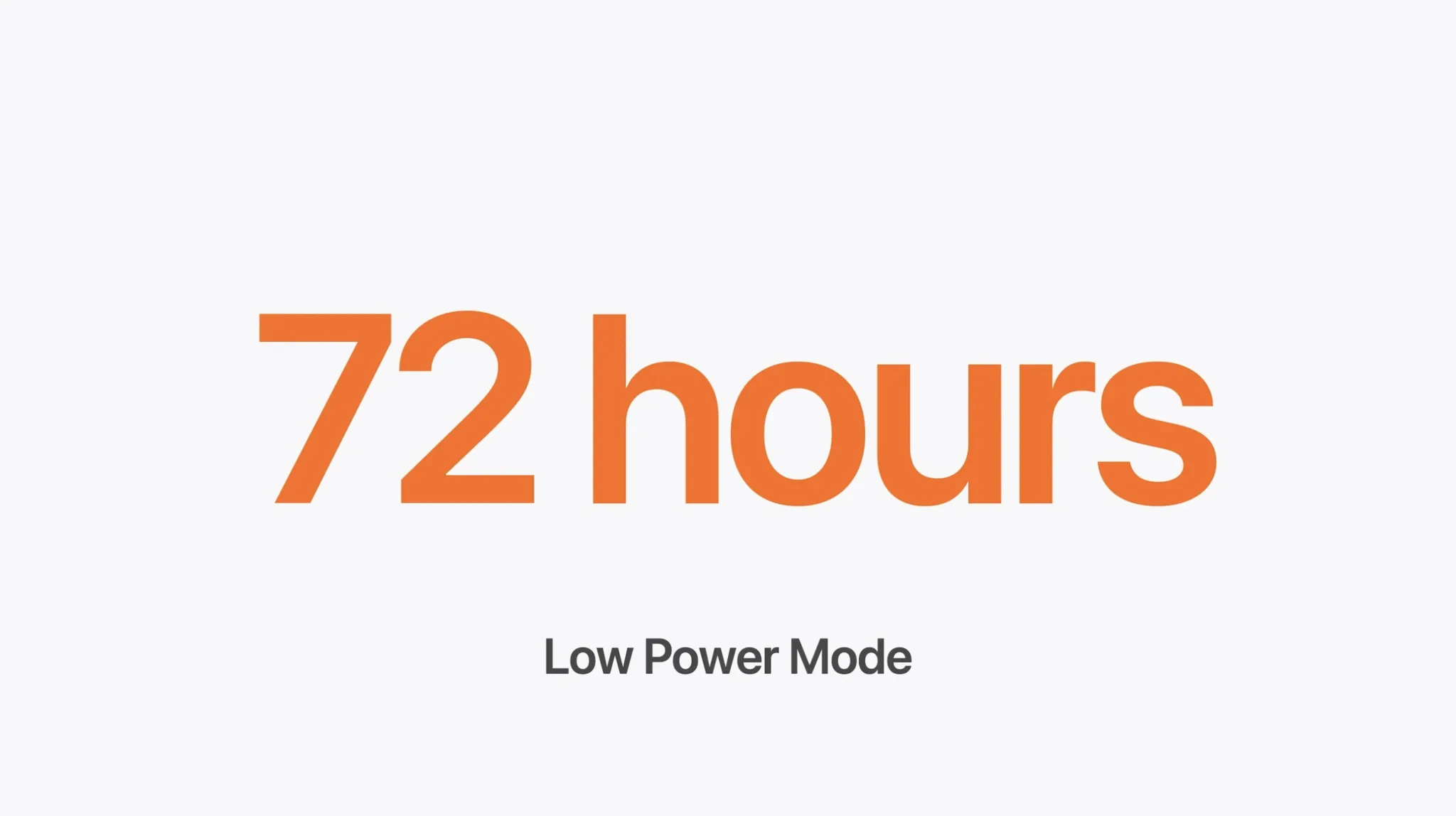
While Apple Watch Ultra 2 delivers the same 36 hours of standard use, it can give up to 72 hours with Low Power mode.
Notably, the Low Power mode is also available for Apple Watch Series 4 and later and doubles the battery life from 18 to 36 hours.
First introduced with Apple Watch 7 and continued with Apple Watch Ultra 2 and Series 9 is 33% faster charging than Series 6 and earlier. That means going from 0-80% in 45 instead of around 60 minutes for the other models.
If you’re interested in using Apple Watch Ultra 2/Ultra, Series 9, 8, or 7 for sleep tracking, you also get 8 hours worth of use from an 8-minute charge.
Apple Watch Ultra 2 vs 1 – Key features
The main new features you get with Ultra 2 are:
Double tap gesture support
On-device Siri with health access
Precision finding for iPhone
While the new Double Tap feature for Apple Watch Ultra 2 and Series 9 is neat, it turns out a similar capability is available for Series 3 and later.
Price
Apple Watch Ultra 2 is priced from $799 (Apple and more)
Series 9 starts from $399/$429 and up (Apple and more)
Apple Watch Ultra 2 vs Ultra 1 wrap-up
While Apple Watch Ultra 2 is an incredible wearable, it’s probably not different enough to be enticing for those who already have the predecessor.
However, if you’re thinking of upgrading from an Apple Watch Series 8 or earlier that may be a different story. You get a larger display, on-device Siri, the longest battery life in an Apple Watch, all of the latest and greatest health features, Action button, Double Tap gesture, and more.
The Apple Watch SE 2 is the cheapest way into Apple wearable ownership. It’s surrounded by technically more advanced models at higher prices, meaning it’s at risk of being overlooked. This would be a mistake, as what it should be doing is reminding you to really think about what you need from your smartwatch before settling on which model to buy. When you do this, there’s a good chance you’ll find the Apple Watch SE 2 is a stronger proposition than the others. Here’s why the Apple Watch SE 2 could be the smartwatch for you.
Disclaimer. We can not guarantee that the information on this page is 100% correct.
Apple Watch SE 2 design
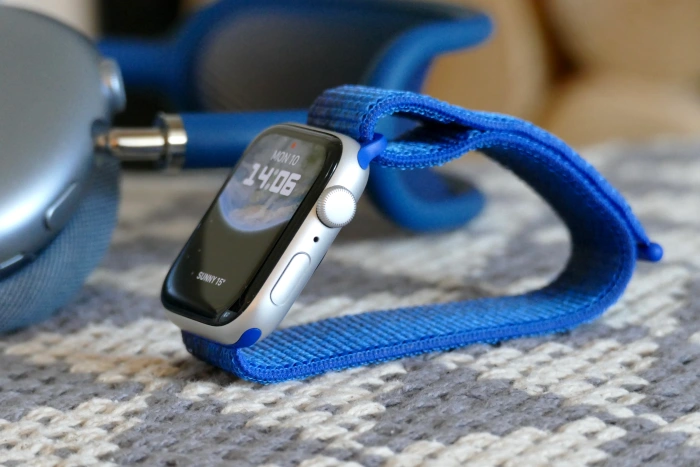
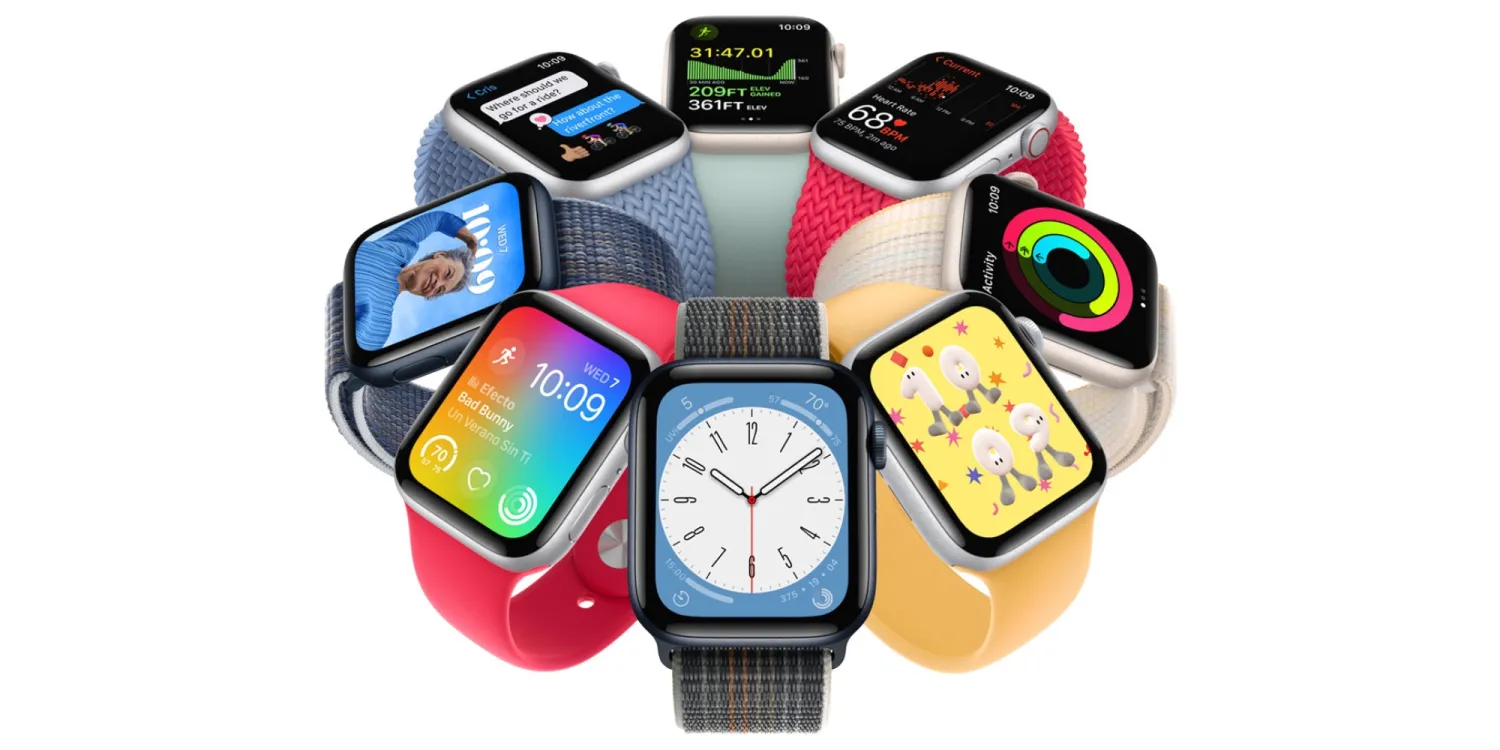
The Apple Watch SE 2 (or 2nd generation, as it’s also known) is made from aluminum and is shaped and sized exactly like the 1st-generation Apple Watch SE and Apple Watch Series 4, Series 5, and Series 6. It comes in Midnight, Starlight, or Silver colors, and has Apple’s tough Ion-X glass over the screen. There’s a choice of either 40mm or 44mm case sizes, and it’s the 44mm version in Silver you see in our photos.
It’s the back where things change compared to the older model. On the SE 2, the case back is made of a nylon composite in a color that matches the aluminum case, and although that sounds like a posh way of saying it’s made of plastic, it’s warmer and smoother to the touch than ordinary plastic — and that’s important when it’s against your skin.
The raised sensor array houses the second-generation optical heart rate sensor, which is the same one fitted to the first SE and the Series 5 watch, but it’s different from the third-generation sensor on the Apple Watch Series 8 and Apple Watch Ultra. If you own either the first SE or the Series 5, you won’t notice any difference when putting on the SE 2. It’s so light and comfortable that you forget it’s there until the wonderfully judged haptics tap your wrist. I’ve worn it day and night without it getting sweaty or irritating.
During my time wearing the SE 2, I’ve struggled to come up with negative points about the design and feeling when you wear it. The Series 4 shape was when Apple hit its stride with the Watch, and we gave it a perfect 10/10 score in 2018. The SE 2 takes that same winning design and squeezes in the latest technology. You can fit any Apple Watch band to the SE 2, and it works with any of the Apple Watch charging accessories you can buy. There’s no downside to the Apple Watch SE 2 when looked at from this perspective.
The shape, size, and screen haven’t drastically changed over the past four years, but they didn’t have to. The Apple Watch SE 2 has not only one of the most recognizable smartwatch designs out there, but is also one of the easiest and most comfortable watches to wear. It’s watch-like, but not so much that ergonomics take a back seat and it becomes fatiguing to wear or impossible to keep on overnight. If you want a smartwatch designed for the office, the gym, sleeping, or casually hanging out at the weekend, the Apple Watch SE 2 is it.
The thing is, that same statement applies to the Apple Watch Series 8, so shouldn’t you just buy that one?
Apple Watch SE 2 screen and performance
Apple uses the same S8 processor across all its latest smartwatches, so you get the identical level of performance whether you buy the cheapest SE 2 or the most expensive Apple Watch Ultra. The software is the same, too, with watchOS 9 installed on all three. Each uses the W3 wireless chip to connect to your phone, and the link is rock solid with a massive range. The SE 2 misses out on the ultra-wideband U1 chip, but since its functionality is still limited, you’re not really losing much at the moment.
However, the big difference most will notice between the SE 2 and the Series 8 is the lack of an always-on screen. The SE 2’s display stays black until you lift your wrist or a notification comes through, while the Series 8 shows a watch face at all times. The always-on screen remains one of the most compelling reasons to spend more to get the Series 8.
It looks glorious, but it doesn’t really add much outside of that visual punch and being able to always see the time at whatever angle your wrist is at. Raise your wrist, however, and the Apple Watch SE 2’s dark screen activates instantly, so you’re never waiting that long to see the time. You just have to accept the screen will go dark at all other times.
My Apple Watch is usually hidden under a sleeve. Not because I don’t like the way it looks, but because it’s coming into winter, so it doesn’t matter whether the screen is always active or not. My point is, think about how you will wear the Apple Watch, your usual choice of clothing, and even whether you’ve worn a Fitbit or other often screen-less fitness tracker in the past. By doing so, you may realize the lack of an always-on screen isn’t something you will actually notice.
Notifications reliably appear on the screen after a flick of your wrist when the delightful haptics alert you to an incoming message. You can see images from tweets, reply to some messages, read text in emails easily, and dismiss individual notifications with a simple swipe. Set the Apple Watch SE 2 up carefully, and you’re never bombarded with unwanted information. Calls are instantly recognizable, and the speaker is loud enough to be heard outside.
Apps are fast to download from the App Store, and the choice is surprisingly large. All of this is easy to manage either in the accompanying Watch app on your phone, or the Grid view on the watch. The one annoyance with watchOS 9 is how the power controls are now an extra step away. When you long-press the side button, you have to now press an awkwardly small icon in the top corner to access them, whereas the power slider previously appeared immediately. You can read more about how watchOS 9 functions in our Apple Watch Ultra and Series 8 reviews — and, remember, it’s all exactly the same.
Apple Watch SE 2 health and fitness tracking
The Apple Watch SE 2’s second-generation heart rate sensor doesn’t have an electrocardiogram feature, and it doesn’t track your blood oxygen either. The new temperature sensor isn’t on board here, so detailed ovulation estimates aren’t possible. You still get notifications for abnormally high or low heart rate, cycle tracking, fall and noise detection, crash detection, and basic sleep tracking. The smartwatch is swimproof to 50 meters, it handles the Backtrack feature adequately, and it supports the excellent new redesigned compass app. It also has the same altimeter, accelerometer, and gyroscope as the Series 8.
Tracking a workout couldn’t be easier. Press the Digital Crown to open the menu, select the Workout app, and tap your preference. The app highlights workouts you use often, so there’s rarely any need to scroll through the extensive list. Heart rate, active calorie burn, and time elapsed are all clearly shown, and all your music controls are just a swipe away. GPS connects in the background without any need to wait around before starting out on your walk, run, or cycle. It’s all instant, informative, and crucially, frictionless.
It’s where the Apple Watch, in general, excels. There’s no need to sync it with your iPhone — it just does it all for you. I haven’t questioned if new data has been uploaded from the Apple Watch SE 2 because it’s always completely up to date. You don’t have to think about it at all, and combined with the very comfortable design, it means the Watch SE 2 blends perfectly in with your life without a fuss. This should be a given, but it’s not at all in the world of smartwatches.
The Apple Health and Apple Fitness apps have some data overlap that makes finding what you want a little frustrating, plus you don’t get the same level of detail in the data as you do with a Garmin, Polar, or Fitbit product. On its own, the Apple Watch SE 2 is ideal for the casual exerciser and isn’t really for the marathon runner who demands masses of data — but third-party apps are there to provide more information should you want it. Tracking workouts back-to-back with the Apple Watch Ultra, I couldn’t see any meaningful differences in heart rate, calorie burn, or ease of use.
Apple’s Ring-based motivational system to reach your daily activity goals is very clear, but don’t expect the Watch or Apple’s apps to provide deep insight into where you can improve. If the smartwatch was pitched at hardcore exercisers, then this would be a concern, but it’s really not. The Apple Watch SE 2 suits people who aren’t interested in pushing any physical limits, and is instead ideal for people concerned about their overall health and want an accurate, easy-to-use tracker complete with an informative, not overly complex app platform behind it. If you want to see how much more accurate the Apple Watch Ultra’s GPS is over the SE 2, we cover it in detail in the Apple Watch Ultra review.
Apple Watch SE 2 battery and charging
There will be times you miss the always-on screen if you buy the Apple Watch SE 2, but there will be others when you’ll be thankful it’s not there, using a little bit more power from the battery. Apple states the Watch SE 2 gets the same 18 hours of use as the Series 8, but in my experience, unless you’re tracking GPS workouts every day, this is on the conservative side.
With a single non-GPS tracked workout, all the usual notifications, a permanent connection to your phone, and sleep tracking, the Apple Watch SE 2’s battery will last two full days. It may need Apple’s Low Power mode at the end of the second day, which deactivates certain features to extend remaining power, but not if you didn’t track your sleep.
Sleep tracking is something you may want to give up too, as the Apple Watch SE 2’s charging is slow, and doing so overnight is preferable. It uses the same magnetic puck as other Apple Watch models, but there’s no fast charging, and it takes more than two hours to go from a few percent to full capacity. It takes an hour less to fully charge the Series 8.
Apple Watch SE 2 price and availability
Upon launch last 2022 The Apple Watch SE 2 starts at $249 for the 40mm model with a Sport Loop, Solo Loop, or Sport Band. The 44mm SE 2 starts at $279 with the same band options. Add cellular connectivity, and the price goes up to $299 for the 40mm and $329 for the 44mm SE 2. In the U.K., the Apple Watch SE 2 starts at 259 British pounds for the 40mm version and 299 pounds for the 44mm model, while adding cellular will take the price to 319 pounds for the 40mm and 349 pounds for the 44mm.
Wondering if you need cellular? How often do you leave home, or want to leave home, without your phone? If the answer is never, then you probably don’t need it. If you want to go on a run without your phone, but still want to be in contact, it’s helpful. Remember you’ll pay about $10 per month extra to add it onto your phone contract.
How much cheaper is the Apple Watch SE 2 than the Series 8? If you want the 41mm version with a simple band, then it’s $399, or $429 for the 45mm version, making it $150 less expensive.
The Apple Watch SE 2 is probably all the Apple Watch you need
Don’t even think about buying a non-Apple Watch for your iPhone. None of the others that may work with iOS have the same level of integration — from replying to Messages to the use of the App Store tothe simplicity of setup. It makes wearables that aren’t the Apple Watch less helpful and, often, more annoying.
The choice comes down to which of the Apple Watches you should buy, and for once, the cheapest may very well be the best one for you. The ECG, blood oxygen monitoring, and always-on screen are very good features and do justify the additional cost of the Series 8 over the SE 2. But ask yourself if they are features you can justify for yourself. The ECG could be a lifesaver for some people, while blood oxygen monitoring only really becomes informative if you want to track sleep, but many people will simply never use them at all.
Don’t get caught up thinking the missing features make the Apple Watch SE 2 too basic either. The simplicity, and how so much happens in the background, is a massive part of its appeal. If you’ve looked hard and can’t see how the extra Series 8 features would fit into your life, then save your money and buy the Apple Watch SE 2. It does absolutely everything else the Series 8 can do almost faultlessly, and is a joy to wear and own.
Apple launched the Watch Series 8 last year, upgrading the Watch Series 7 with a new S8 chip, crash detection, and temperature sensor. And since rumors point to the Watch Series 9 carrying over the same design, we figured we should inspect how the Watch Series 8 holds in the long run.
Should you wait for the Watch Series 9, which could cost more without offering much, or should you get yourself a Watch Series 8 once it gets discounted? Here’s our long-term review of the Apple Watch Series 8 after over six months of usage to help you decide.
Disclaimer. We can not guarantee that the information on this page is 100% correct.
Features and Performance
The Apple Watch Series 8 is largely identical to its predecessor but comes with a new chip (S8 vs. S7), a temperature sensor, and crash detection. It also comes with the usual slew of health and fitness features, including real-time heart rate monitoring, blood oxygen level measurement, sleep tracking, ECG, sedentary reminder, steps counter, and indoor and outdoor workouts.
Aside from that, the Apple Watch Series 8 comes with camera and music controls, weather forecast, compass (with Backtracking), phone finder, stopwatch, countdown timer, fall detection, noise monitoring, and GPS (L1). The Watch Series 8 also has temperature sensing, which is only useful for females since it’s used for Cycle Tracking with retrospective ovulation estimates to help women better understand their menstrual cycle.
The Apple Watch Series 8 has 32GB of storage onboard, allowing users to download music on the smartwatch for offline playback. You can listen to them through the watch’s speakers if you feel adventurous, or connect the watch to any Bluetooth earphones to listen to music through the Apple Watch without requiring your iPhone.
This is useful when going for an outdoor workout since you don’t have to carry your iPhone with you, more so if you own the LTE model, which lets you make and answer calls without being connected to an iPhone.
Speaking of, the Apple Watch Series 8 comes with Apple’s W3 wireless chip and the U1 chip and supports Bluetooth 5.3 and Wi-Fi (2.4GHz and 5GHz) connectivity.
Talking about the health and fitness features, the Apple Watch Series 8 measures the heart rate automatically at an interval of one minute, and there’s no way to change it, which isn’t ideal since letting users increase the gap by even a few minutes would help extend the battery life. However, automatic heart rate measurement at an interval of one minute is recommended on most wearables for more accurate results, so I understand why Apple didn’t provide that option.
That said, if you don’t want to rely on data from automatic tracking, you can measure your heart rate manually whenever you wish through the Heart Rate app on the smartwatch. It’s fast and displays the resting heart rate, with a detailed analysis available in the Health app on the companion iPhone. The heart rate sensor recorded the pulse accurately most of the time, but it’s still best not to use it for diagnosis.
The Watch Series 8’s ECG sensor can generate an ECG similar to a single-lead electrocardiogram with the ECG app on the smartwatch. All you have to do is put your finger on the crown for 30 seconds, and like heart rate monitoring, you can find the ECG data in the Health app. I didn’t have any means of checking its accuracy, but regardless, we recommend you don’t use that data as a basis for diagnosis or treatment.
The SpO2 sensor on the Watch Series 8 can also measure blood oxygen levels throughout the day like the heart rate sensor, including in Sleep Focus and Cinema Mode. However, you can also take on-demand readings using the Blood Oxygen app on the smartwatch, which takes 15 seconds for the measurement. The readings were mostly accurate, and you can find the related data in the Health app. Just don’t use it for diagnostic purposes.
Next up is sleep tracking, which breaks down the total sleep hours into four stages – Core Sleep (aka Light Sleep), Deep Sleep, REM Sleep, and Awake. You get the previous night’s sleep metrics on the Apple Watch through the Sleep app, which shows your total hours of sleep, fall asleep and wake up times, and the time you spent in the aforementioned stages during your sleep. It also shows you the average sleep time for two weeks. A detailed analysis is available through the Health app on the iPhone, where the Sleep section also displays information about your respiratory rate and heart rate during sleep, along with other data, including the time you spent in bed, which I found interesting.
However, sleep tracking on the Apple Watch Series 8 was disappointing and unreliable in my experience. It did track the Awake times accurately, but not the fall asleep time.
The Watch Series 8’s sleep tracking algorithm clocks the sleep time even when you are lying on a couch or a bed watching videos on a phone/tablet and moving regularly. I’ve used smartwatches in the past with similar behavior, and I’d have been fine with the Watch Series 8 as well for that if it didn’t give me Stand Reminders when the algorithm thought I was asleep. It’s weird. The Health app also doesn’t let you edit the sleep record, meaning you are left with an overall inaccurate sleep analysis since the data used for that is incorrect. Apple lets you add sleep data through the Health app, so I hope the company will let users edit existing sleep records with future updates.
It’s also worth mentioning that the Apple Watch Series 8 doesn’t track afternoon naps even after you turn on the Sleep Focus mode, which is a bummer since even watches that cost less than half of the Apple Watch do that. Here’s hoping Apple will bring that functionality to some – if not all – of its smartwatches with a software update.
The Apple Watch Series 8 supports several indoor and outdoor workouts. I obviously couldn’t try all of them. I mostly used the Indoor Walk and Outdoor Walk workouts. And while the steps counted by both modes weren’t entirely accurate like most other smartwatches, the margin of error was minimal enough not to be a concern. However, the Indoor Walk used GPS for some reason, which I find unnecessary as that’s something more useful with outdoor workouts. The Outdoor Walk mode used GPS, but it didn’t trace the route of my walk and instead only pinned the starting point of my walk on the map, which I didn’t find useful.
Moreover, the Apple Watch Series 8 also asked me if I’d like to end my Indoor/Outdoor Walk despite me not slowing down or pausing for a few minutes for the algorithm to show that prompt. This started with the watchOS 9.2 update and still happens with watchOS 9.6.1.
Talking about the Watch Series 8’s LTE feature, I made and received calls through the smartwatch, and the people on the other end could hear me clearly when I brought the watch closer to my face when relying on the built-in microphone. The same goes for its speakers to listen to the folks on the other end. However, in a noisy environment, you can always connect the Watch Series 8 to any Bluetooth earphones for calls without requiring an iPhone due to its LTE connectivity. This also worked when I moved the SIM card from the companion iPhone to another device (provided it isn’t connected to the companion iPhone via Bluetooth), but that didn’t work for text messages.
The Apple Watch Series 8 LTE’s ability to let you make/receive calls, send text messages, and compose emails, in addition to doing a few other things without being connected to an iPhone, makes it a true extension of the iPhone.
The Backtracking on the Apple Watch Series 8 worked fine, but I obviously didn’t test its crash detection feature. However, over the months, we’ve found reports that it proved useful.
My only major complaint with the Apple Watch Series 8 after over six months of usage is its sleep tracking, which needs significant improvements. I hope this will be fixed with the next update. I’d also like Apple to introduce afternoon nap tracking.
Verdict
The Apple Watch Series 8 with cellular connectivity is a nice extension of an iPhone since it allows you to make and receive phone calls, send and receive texts, and do a few other things like checking and composing emails without being connected to an iPhone. You can also download music for offline playback and listen to it through the watch’s speakers or Bluetooth earphones without keeping it connected to an iPhone, which could come in handy when going for a run or working out.
The Watch Series 8 has a bright screen that’s legible outdoors under strong sunlight and sturdy build, which has held up well after over six months of usage. The same goes for the bundled straps. The smartwatch’s performance is also snappy, which, paired with good haptics, offered a pleasant experience.
However, notification management needs polishing, and UI navigation could be improved for a more convenient experience. I’d also like to see Apple release an app that serves as a one-stop solution for everything related to Apple Watches, eliminating the need for users to juggle between three different apps for different purposes.
So, a year later, should you buy the Apple Watch Series 8 or wait for the Watch Series 9? If rumors are to be believed, the Apple Watch Series 9 won’t come with significant upgrades since it’s said to be “basically unchanged” from the Watch Series 8. It’s expected to get a new chip based on Apple’s A15 SoC, which could bring performance and efficiency improvements to the smartwatch.
Considering that, and if you trust Apple to fix the software issues we mentioned with the subsequent software updates, I don’t see any reason not to buy it if you find a great deal on it, which is likely to happen soon as we inch closer to the September 12 Apple event since retailers would want to clear their old stocks at discounted prices before the Watch Series 9 arrives.
Pros
Lightweight and comfortable
Sturdy build
Bright screen with nice touch response
Snappy performance
50m water resistance
Nice haptics
LTE connectivity is one very convenient feature to have on a smartwatch
How to turn on double tap-like gesture control on almost any Apple Watch
One of the main new features of the Apple Watch Series 9 and Ultra 2 is something called “double tap” which lets users control the wearable by pinching their thumb and pointer finger. While the full functionality and new UI of the feature are indeed limited to the newest hardware, anyone with Apple Watch Series 3 and later can turn on double tap-like gestures to get the feature working for many of the same use cases right now, here’s how.
Here’s how Apple describes the new double tap gesture for Apple Watch Series 9 and Ultra 2:
With a new double tap gesture, users can easily control Apple Watch Series 9 using just one hand and without touching the display. Users can tap the index finger and thumb of their watch hand together twice to quickly and conveniently perform many of the most common actions on Apple Watch Series 9.
Apple says the new capability is made possible with the updated Neural Engine in the S9 SiP that’s able to better process data from the accelerometer, gyroscope, and optical heart rate sensor. Apple isn’t launching double tap for the new wearables right away but says the feature is arriving in October with a software update.
While it’s not exactly the same as the official double tap capability, Apple previously launched Accessibility features for Apple Watch Series 3 and later called AssistiveTouch and quick actions. These allow anyone to control their watch with gestures like a pinch, double pinch (same as double tap), clench, and double clench.
How to use double tap on any Apple Watch
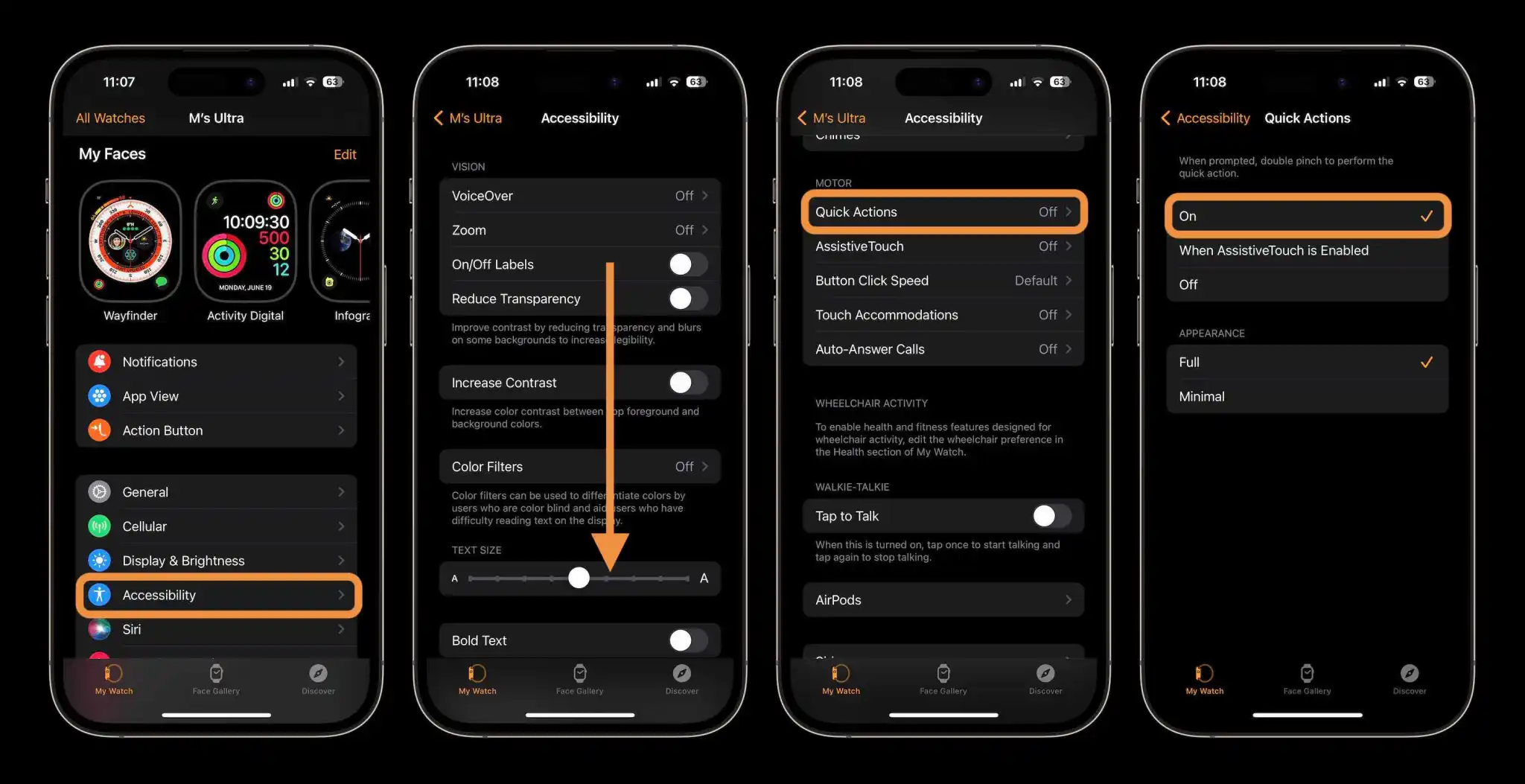
Option 1 – quick actions
Open the Watch app on your iPhone
Swipe down and choose Accessibility
Swipe down and tap Quick Actions (under Motor)
Tap On at the top to turn it on
Now, when available, you’ll be prompted to double pinch to perform a quick action
If you miss the prompt, keep your eye out for buttons that have a blue outline – that signifies you can use a double pinch/tap to select it
I’ve found this to work most of the time with an Apple Watch Ultra but sometimes I’ll have to do the double pinch (tap) gesture a second time for it to be recognized.
Quick actions are a neat way to check out what double tap is like. It doesn’t include all of the capabilities. For instance, Apple has shown that the official double tap with Series 9 and Ultra 2 includes the option to move from your watch face to the new widget UI, scroll through widgets and more with your double tap gesture.
However, many features are the same between the quick actions available for almost any Apple Watch and the new double tap that’s limited to the newest watches. Those include the ability to answer and end calls, take pictures with the camera control app, control workouts, and much more.
Here are two examples of quick actions in use:
Option 2 – AssistiveTouch
This is the full-featured gesture control that’s designed for those who have upper limb differences – but it can be used by anyone. It goes beyond both quick actions and the upcoming double tap feature.
This will take more time to learn but includes four gestures to control watchOS – pinch, double pinch, clench, and double clench. It also includes an action menu that can be invoked by a gesture that allows you to control almost any aspect of the wearable.
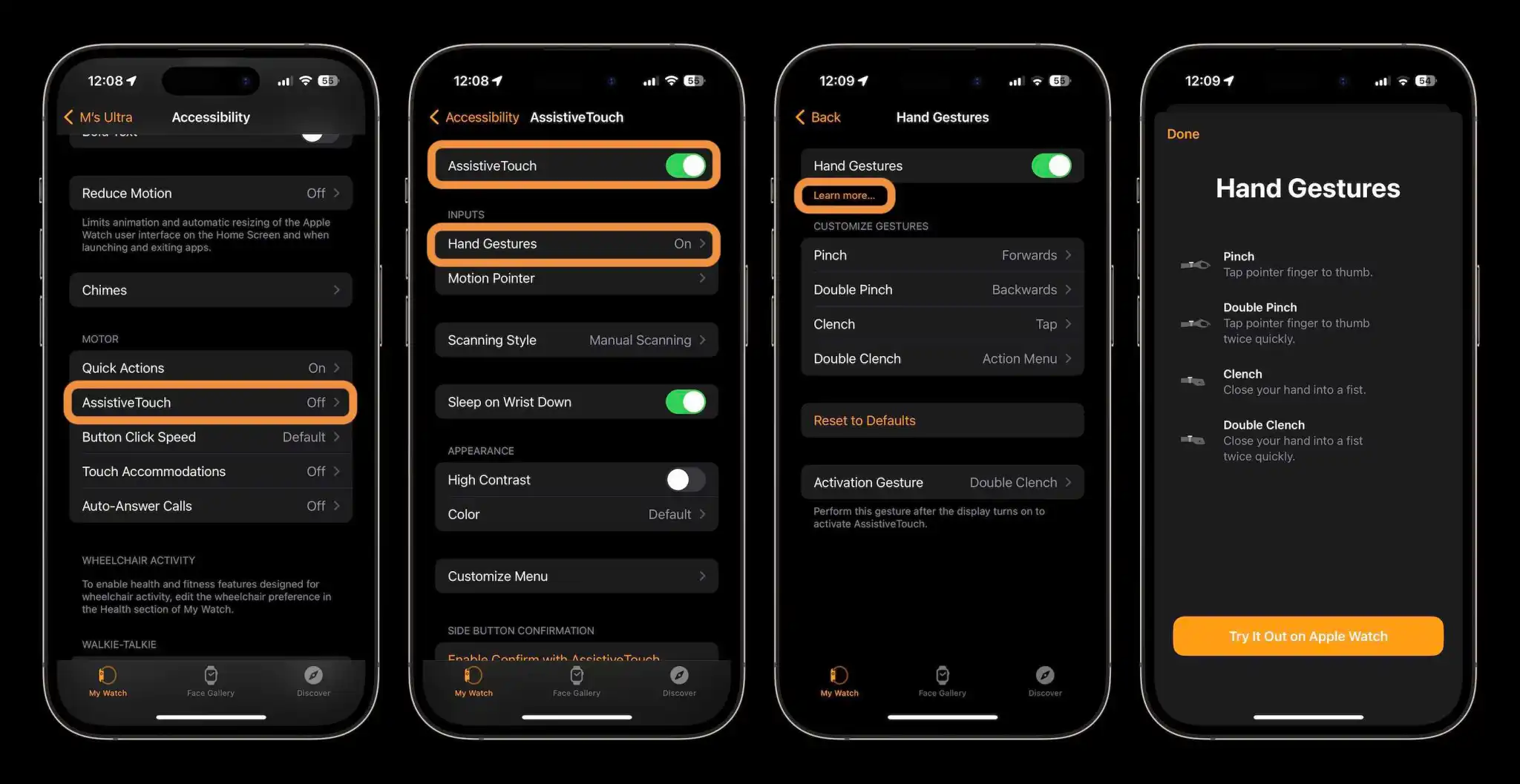
Open the Watch app on your iPhone
Swipe down and choose Accessibility
Swipe down and tap AssistiveTouch (under Motor)
Tap the toggle at the top to turn it on
Now tap Hand Gestures, and toggle those on at the top
Now you can customize what pinch, double pinch, clench, and double clench do
With AssistiveTouch, the default gesture for “activation” and the action menu is a double clench, you can change that at the bottom of the Hand Gestures menu
Apple Watch Series 9 and Ultra 2 battery life: Here’s what you get
Apple has officially unveiled its Series 9 and Ultra 2 wearables with updated Apple Silicon, new capabilities, and more. But how about runtime? Here’s what to expect with Apple Watch Series 9 and Ultra 2 battery life.
A big battery life bump arrived for most Apple Watches last year with watchOS 9 getting a Low Power mode for the wearable. That doubled the standard 18-hour battery to 36 hours.
And the original Apple Watch Ultra jumped onto the scene with a 36-hour normal battery life and up to 60 hours of use with Low Power mode and its own special option to use “Fewer GPS and Heart Rate Readings” setting.
Apple Watch Series 9 and Ultra 2 battery life
Now Apple Watch Series 9 and Ultra 2 are here and as it happens, the Series 9 keeps the same 18/36 hour battery life.
While the Ultra 2 has the same 36-hour battery as its predecessor, it’s more efficient with Low Power mode for a 72-hour battery rating (12 hours more than the original Ultra).
Here’s how Apple describes the Ultra 2 battery life:
“Battery life for days. When you’re on the second day of a backpacking trip, the final leg of a triathlon, or diving along a coral reef, the last thing you want to think about is running out of battery. With Apple Watch Ultra 2, you can take on almost anything and have energy to spare.”
Here’s how the all-new Apple Watch Weather app in watchOS 10 looks and works
Arriving with watchOS 10 is a redesigned Weather app that looks great, includes more weather metrics, and makes better use of the Apple Watch display to show more information. Follow along for how the new Apple Watch weather app works in watchOS 10.
Up until now, the native Weather app on Apple Watch has had a somewhat bland UI with limited meteorological data.
That changes as Weather in watchOS 10 brings an all-new design that looks sharp and is more immersive and informative.
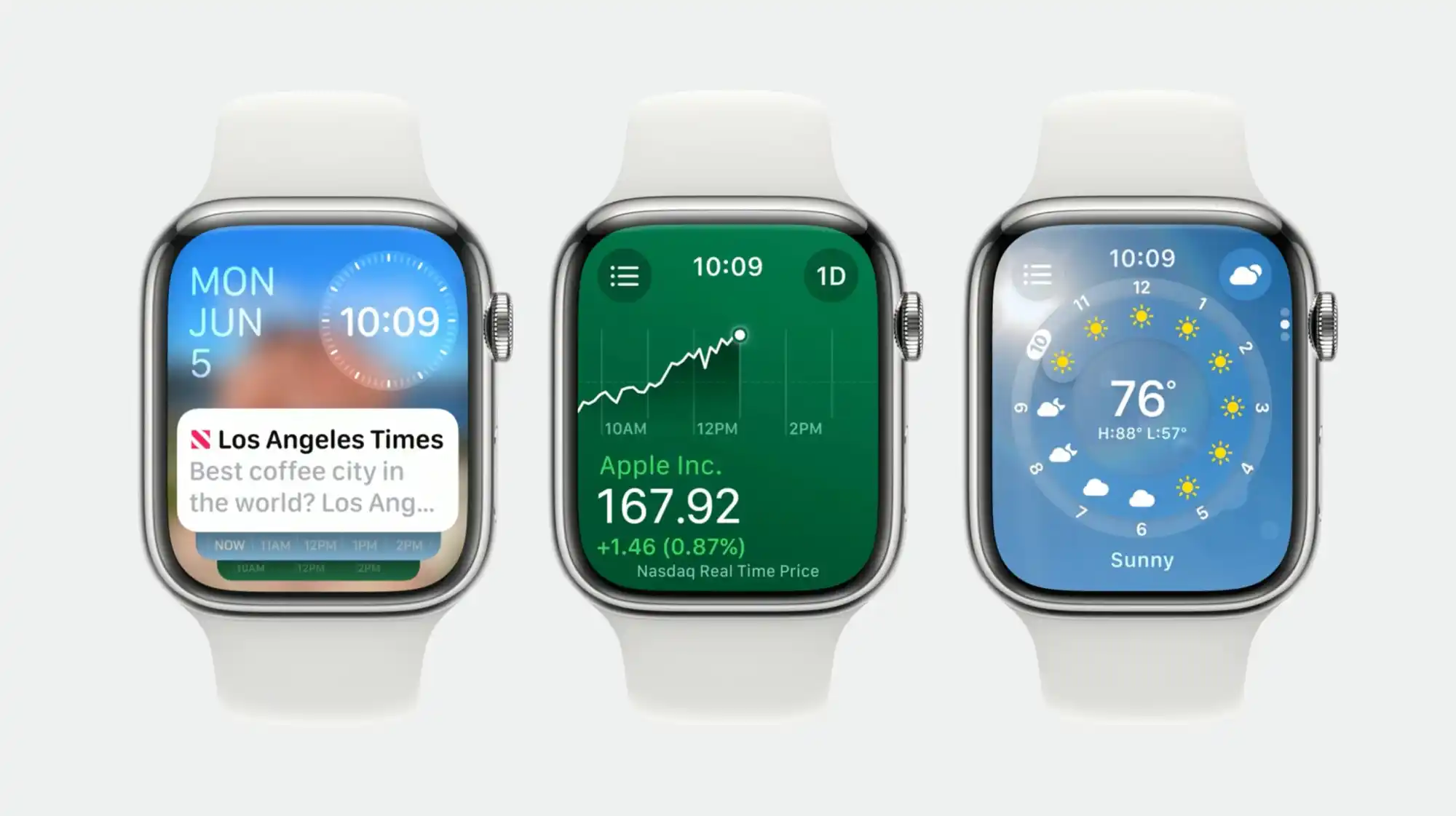
Apple says the overhaul makes better use of the Apple Watch display. There are now eight weather data categories you can view on your wrist (instead of three) with the main, hourly, or 10-day forecast UI. And the background of the app reflects the current weather conditions.
While there is a lot to love about the new Weather experience on Apple Watch, Apple does have some trust to rebuild when it comes to the Weather app’s general accuracy and reliability. Hopefully, that’s dialed in soon 😁. Let’s jump in!
How the new Apple Watch Weather app works in watchOS 10
watchOS 10 is available now in beta – but keep in mind if you do install it on your Apple Watch there’s no way to downgrade to watchOS 9.
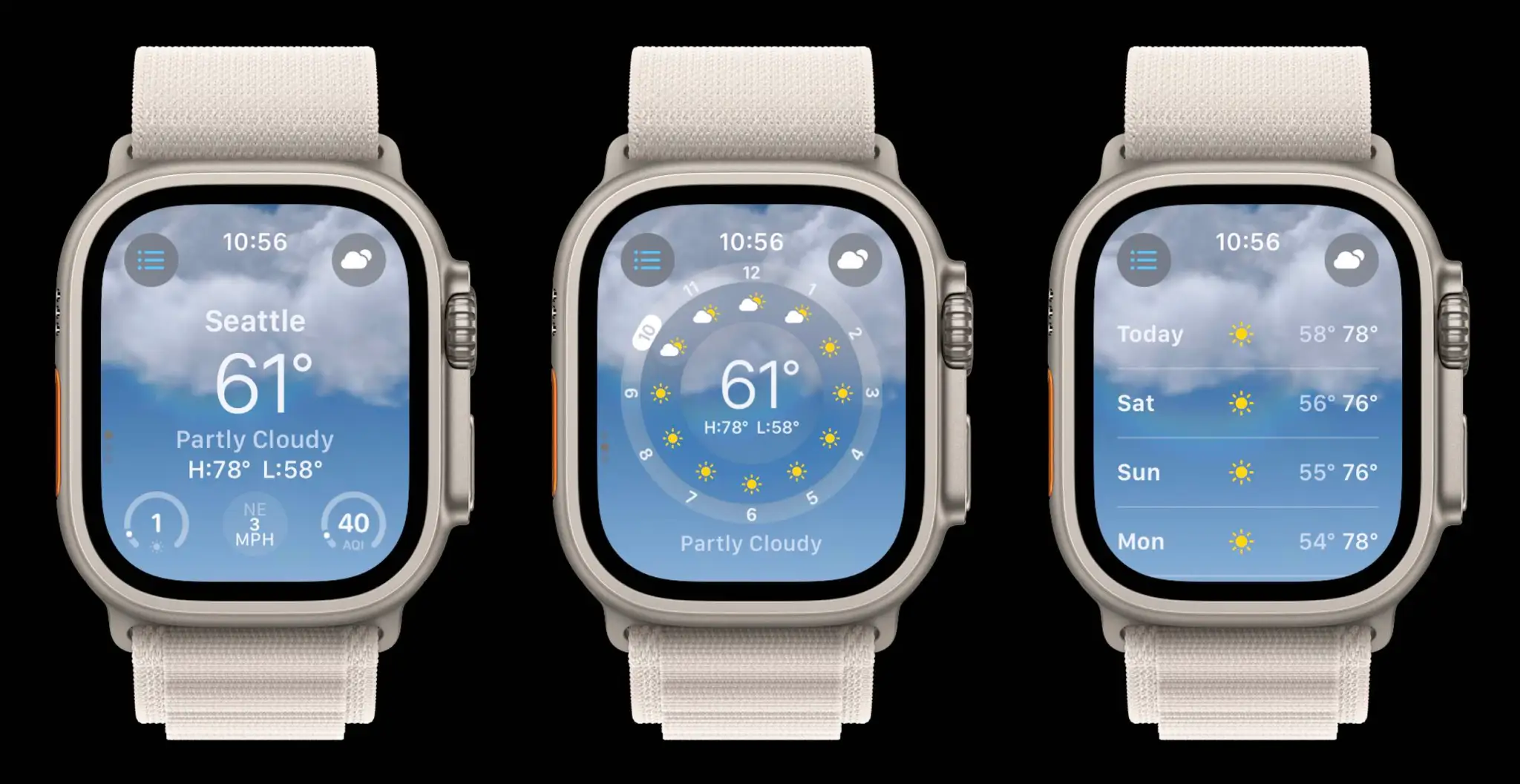
When you first open the Weather app in watchOS 10, you’ll see the main “Condition” screen
That includes time at the top, location, cloud cover, current temp plus high and low, UV index, wind, and AQI
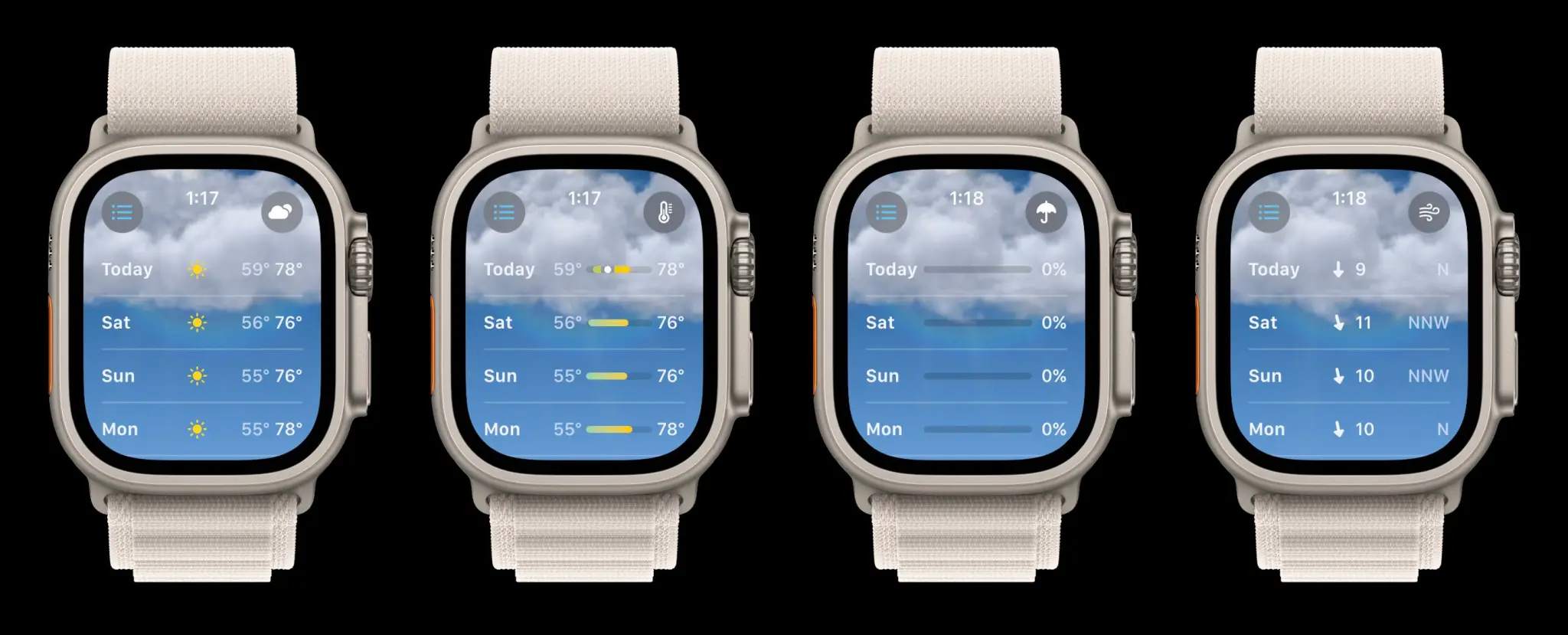
Swipe or scroll up to see an hourly look at sun/cloud forecast, and keep going to see the 10-day forecast
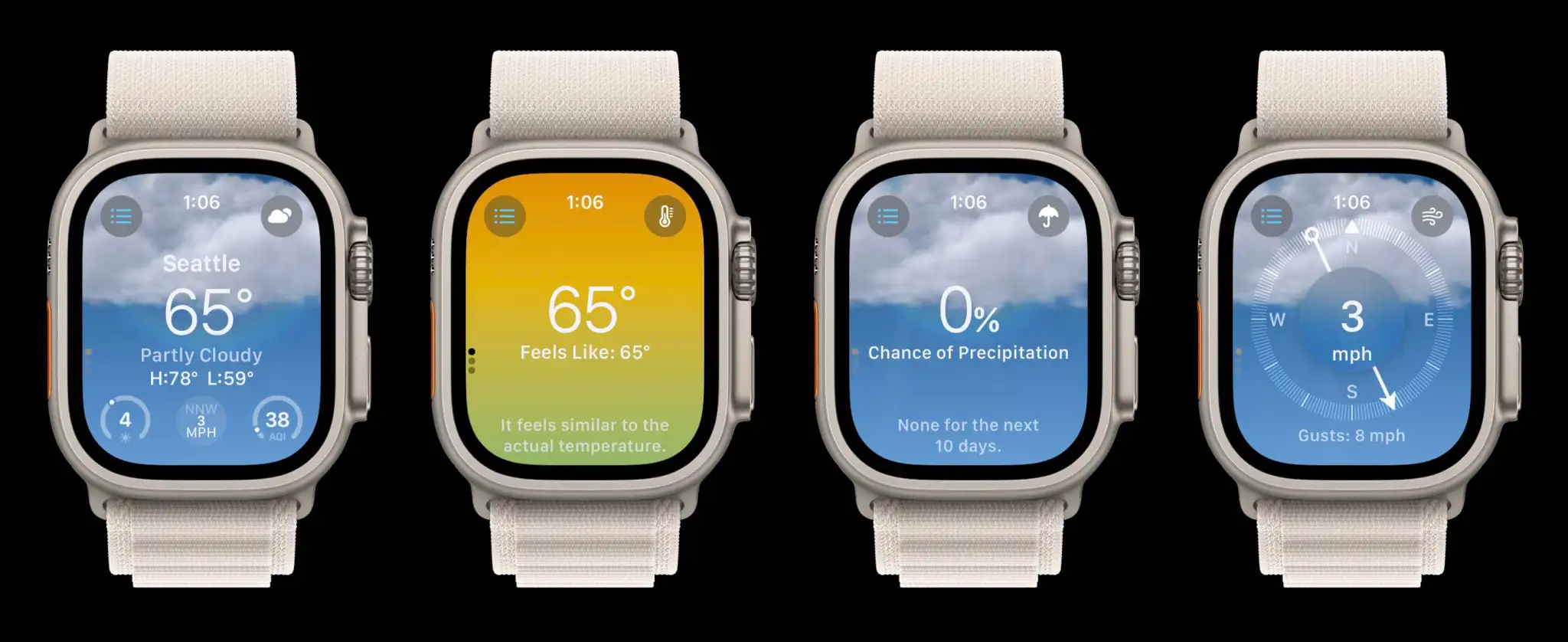
Tap the center of your screen to move through the different weather metrics
Or tap the cloud icon in the top right to change the weather data you’re viewing, which now includes:
Condition, Temperature, Precipitation, Wind, Ultraviolet Index, Visibility, Humidity, and Air Quality index
Tap the three-line icon in the top left corner to change location or add new ones
Here’s how the new Apple Watch Weather app works and looks in watchOS 10:
Swipe or scroll on the main “Condition” screen to see the hourly forecast for sun/clouds as well as the 10-day forecast.
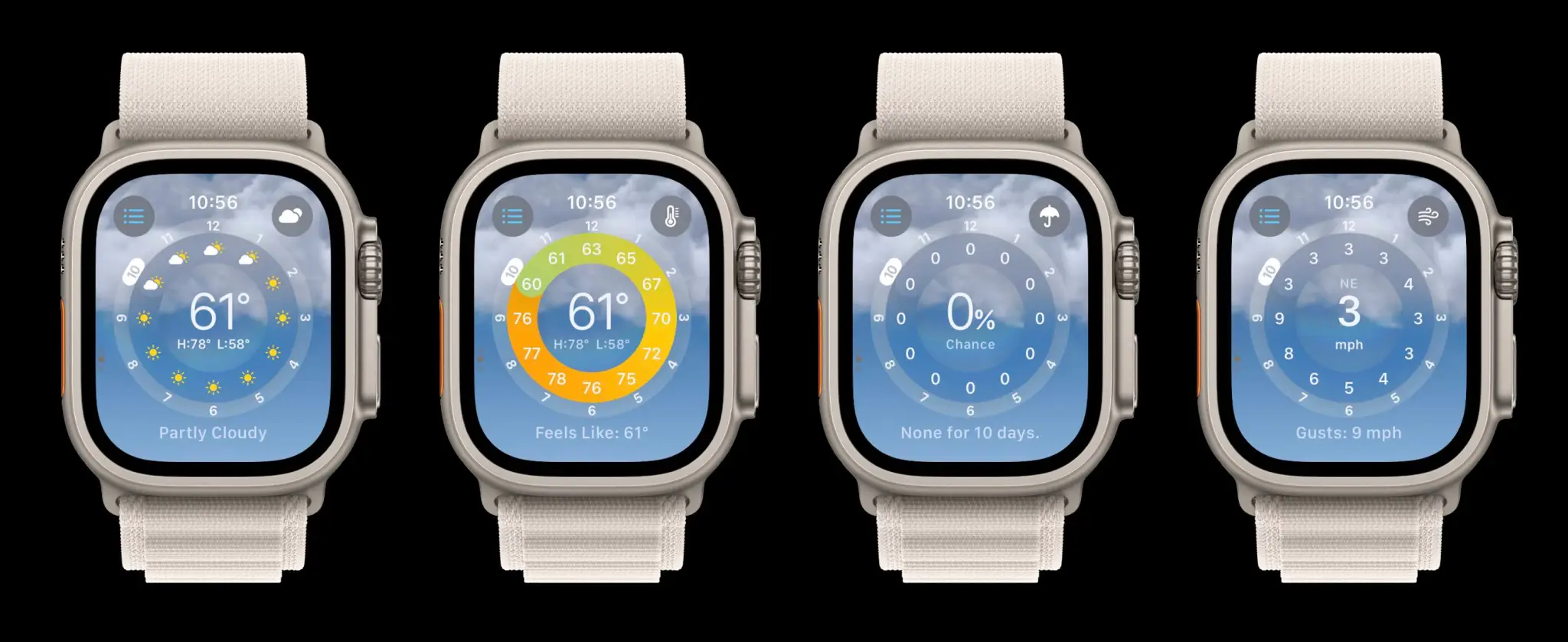
When you tap the screen, you’ll cycle through the eight different weather metrics. Here’s what it looks like to see all the data with the circular hourly UI:
If there’s a specific weather metric you want to look at, the fastest way to see it is by tapping the cloud (or other) icon in the top right corner:
Here’s a look at the eight different weather metrics with the main view (again, tap the screen to move through the data:
And here are all those metrics with the 10-day forecast view:
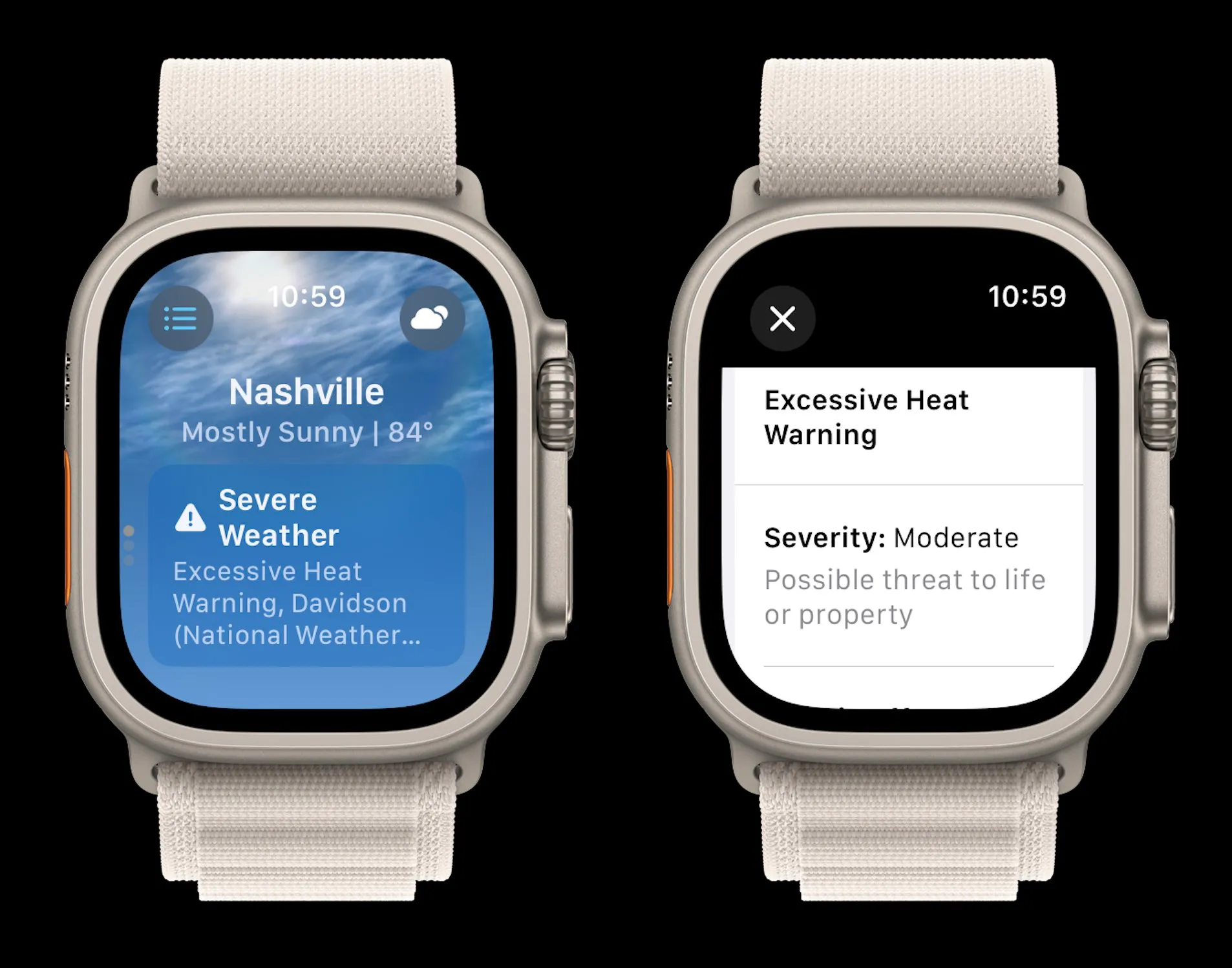
Severe weather alerts will show up on the main Apple Watch Weather app screen with the ability to tap to read the full announcement:
With a brand-new design that really makes use of the Apple Watch display, five additional weather metrics, and a much-improved overall UI, I think the new Weather app in watchOS 10 delivers an impressive experience.
We’re just a few days away from Apple’s special event when the company will announce the iPhone 15 and also new Apple Watch models. The rumors have been pretty consistent in pointing out that we shouldn’t expect any major changes to the Apple Watch this year. However, a new report from Bloomberg suggests that the Apple Watch Series 9 will feature an updated heart rate sensor, as well as other small hardware improvements.
New heart rate sensor coming to Apple Watch
This year, Apple is expected to introduce two new Apple Watches: Series 9 (which should be available in the same current sizes of 41 mm and 45 mm) and Ultra 2 (keeping the current size of 49 mm). Both are expected to look exactly like their previous generations, with Apple planning a redesigned Apple Watch for 2024.
Based on previous rumors, both the Apple Watch Series 9 and the Apple Watch Ultra 2 will have a new chip with a faster processor. Since the Apple Watch Series 6, Apple has been using the same processor for all Apple Watch models, including Series 8, Ultra, and 2nd generation SE.
But the new chip won’t be the only hardware change coming to this year’s Apple Watch models. Mark Gurman has heard from sources that all the new models will get “various sensors and internal components upgrades,” including a new version of the heart rate sensor. While the details are unclear, Bloomberg claims that the new sensor is more accurate.
The new Apple Watch Series 9 and Ultra 2 will also feature the U2 chip, a new version of Apple’s ultra-wideband chip that will enable “improved Find My capabilities.” The new chip is also expected to be added to the iPhone 15.
Another interesting detail shared by Gurman is that the new Apple Watch Ultra will also be available in an all-black version. The first generation is only available in grey, the natural color of titanium. Since the iPhone 15 Pro is rumored to have a new titanium frame, Apple may offer similar colors between the two devices.
More about the Apple event
Apple’s special event will be broadcast online on September 12, starting at 10 a.m. PT. There will also be a press event at Apple Park.
Apple Watch leather bands rumored to be discontinued as Series 9 launch nears
We’ve been hearing a lot of rumors when it comes to iPhone and Apple Watch accessories recently, as Apple will be holding a special event next week to introduce new products. And while some rumors have claimed that the company will replace the iPhone’s leather cases with new ones made of a different material, it seems that something similar may happen with Apple Watch leather bands.
Apple Watch leather bands may disappear for good
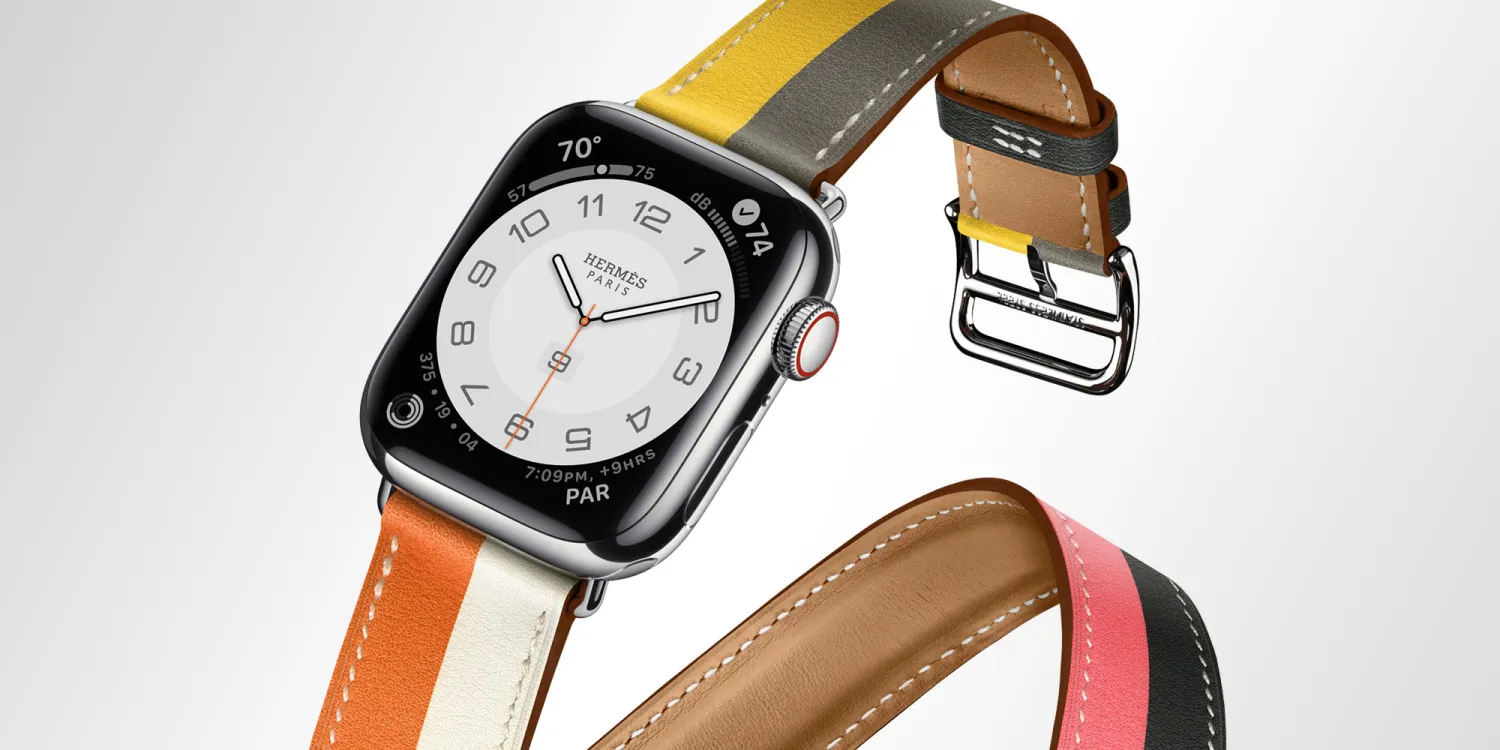
According to Bloomberg’s Mark Gurman, Apple is expected to “begin moving away from leather on its Apple Watch bands as well,” following a rumor that there will be no leather iPhone 15 cases made by Apple. More intriguingly, this could also put an end to the partnership between Apple and Hermès that began in 2015.
Update on that assumption: I’m told that Apple last month started offering employees its Hermes leather accessories (and leather link bands) at up to 90% off. Clearly some inventory clearing going on. The internal deal continues but everything is out of stock. https://t.co/fBrLlTY9kC
That’s because, according to Gurman, Apple has been offering discounts of up to 90% on Hermès leather bands to its employees. Typically, when Apple gives huge discounts on a product to its employees, it’s a sign that it might be going away soon – the company did the same with the original HomePod before discontinuing it in 2021.
Last week, reported that some of the official Apple Watch leather bands – including Modern Buckle and Hermès models (which are all made of leather) are sold out on Apple’s website. The classic Link Bracelet, which was introduced with the original Apple Watch, is also no longer available.
There was some speculation on the internet last year about the Hermès Apple Watch bands being phased out (which didn’t happen). Apple usually introduces new colors for Apple Watch bands with the launch of a new generation of the product. However, given everything that’s going on, we might see a more radical change in this year’s accessories.
New FineWoven accessories
One of the reasons Apple may have decided to abandon leather for good is the environment, as the leather’s carbon footprint is considerably high. Since Apple has always positioned itself as an environmentally friendly company, it would make sense to stop making leather accessories.
At the same time, a lot of customers buy leather cases and bands because of their premium quality. So would Apple let these consumers down? Or will we see a new material for these accessories? Of course, Apple could introduce accessories made of synthetic leather, but it seems that the company is looking for other alternatives.
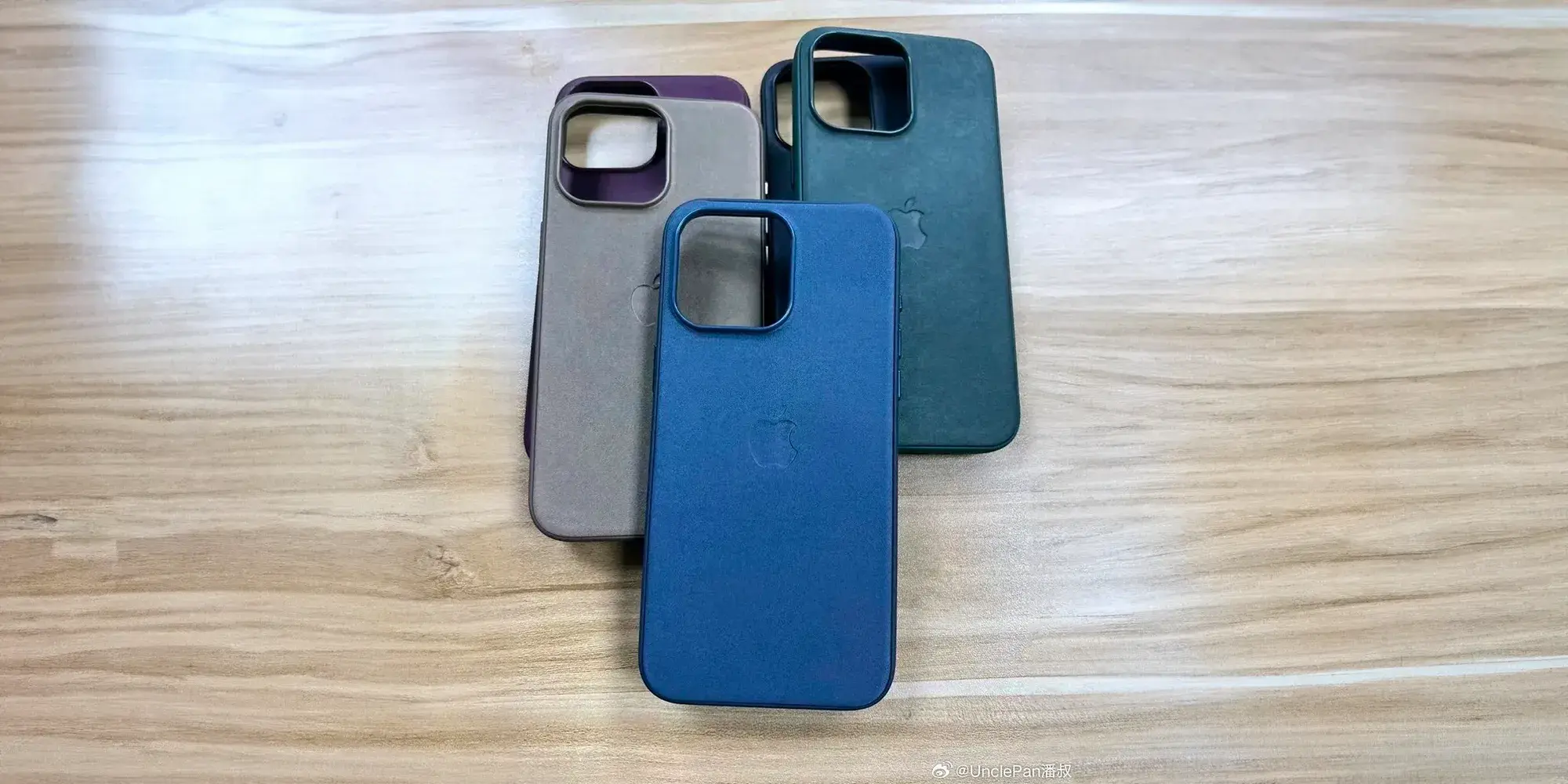
Last month, we heard from sources that Apple was going to introduce new iPhone cases made of another premium material to replace leather. Following this report, we saw images showing what would be Apple’s new “FineWoven” cases for the iPhone 15. If true, these new cases are made of a soft fabric material combined with regular silicone.
Will Apple introduce new “FineWoven” Apple Watch bands? We’ll find out the answer next Tuesday, September 12, when the company holds its special event to announce iPhone 15 and Apple Watch Series 9.
Some of the Apple Watch bands are currently unavailable ahead of Series 9 launch
Apple this week confirmed that it will hold a special event on September 12. Although the company never reveals in advance what will be announced at the event, we all know at this point that Apple will introduce the iPhone 15 lineup and also the Apple Watch Series 9, along with a new Apple Watch Ultra. And to corroborate the upcoming arrival of new Apple Watches, some watch bands are currently unavailable on Apple’s website.
New Apple Watch bands coming soon
As noted by Parker Ortolani, all four versions of the Apple Watch Link Bracelet are now unavailable online in the United States. Confirmed that the Modern Buckle bands and some of the Hermès models are also sold out. While you can still find these watch bands in stock in some of the Apple Retail Stores, this may not last long.
All four versions of the Apple Watch link bracelet are now unavailable online in the US. Handful of retail stores seem to still have stock. But they're sold out otherwise.
Typically, Apple introduces new bands with the launch of a new Apple Watch – so that’s why some bands sell out before a new Apple Watch is announced. But in this case, there’s one thing to keep in mind.
What Apple usually does is introduce new colors for existing watch bands. When it comes to the Link Bracelet, which is made of stainless steel and is only available in silver and space black, the fact that it is now sold out suggests that the Link Bracelet could be discontinued for good – these watch bands have been available since the very first Apple Watch.
Another possibility is that Apple will replace the Link Bracelet with a new, more modern version (since the current version was still made with the 38/42mm Apple Watches in mind) or simply relaunch it in new shades of silver and black.
Apple Watch Series 9 rumors
According to the rumors, the Apple Watch Series 9 won’t exactly be an exciting update. The new model will have a faster chip, but that may be the only new feature of this year’s Apple Watch. Apple also plans to introduce a new Apple Watch Ultra with the same faster chip. Other than that, both models will keep the same design as the current versions.
Apple reportedly considered introducing a new watch band mechanism with the Apple Watch Series 9, but the company is said to have postponed this change for a redesigned Apple Watch coming next year.
As for current Apple Watch bands, you can still find the Link Bracelet for sale on Amazon – at least for now.
Select Apple Watch Series 9 models will be first Apple products made with 3D printing process
Apple has been rumored to be considering 3D printing as part of its product design process, and a new report details how and when that change will happen. Mark Gurman at Bloomberg reports that Apple will deploy its first use of 3D printing as a test run of sorts with certain models of the upcoming Apple Watch Series 9.
Apple Inc. is testing the use of 3D printers to produce the steel chassis used by some of its upcoming smartwatches, according to people with knowledge of the matter, heralding a major change to how the company manufactures products.
The technique would obviate the need to cut large slabs of metal into the product’s shape.
The move is intended to both increase the speed at which product assembly can occur while decreasing the amount of environmental impact, Gurman reports. The report goes on to detail the process known as binder jetting:
The print is made with a powdered substance, which afterward goes through a process called sintering. That uses heat and pressure to squeeze the material into what feels like traditional steel. The exact design and cutouts are then milled like in the previous process.
The report emphasizes that not all Apple Watch Series 9 models will be made using the new 3D printing process. Apple is expected to contain the test run to select stainless steel models, which make up a minority of the watch hardware.
Supply chain analyst Ming Chi Kuo highlighted various firms involved in the 3D printing effort in July. Kuo pointed to the Apple Watch Ultra 2 as being the first product to use 3D printed device components, but Gurman reports that the Ultra watch casing itself won’t adopt the process until next year at the earliest.
Apple will announce the new Apple Watch Series 9 and Ultra 2 at the iPhone 15 event scheduled for September 12. Apple officially announced the event date on Tuesday, although
The Bloomberg piece also mentions Apple’s plans to drop leather from its phone case in favor of a new material, as we’ve been covering. Read the full report on Apple’s test run with 3D printing from Bloomberg here.
Rumor: Apple Watch Series 9 to be available in new color option alongside black titanium Ultra
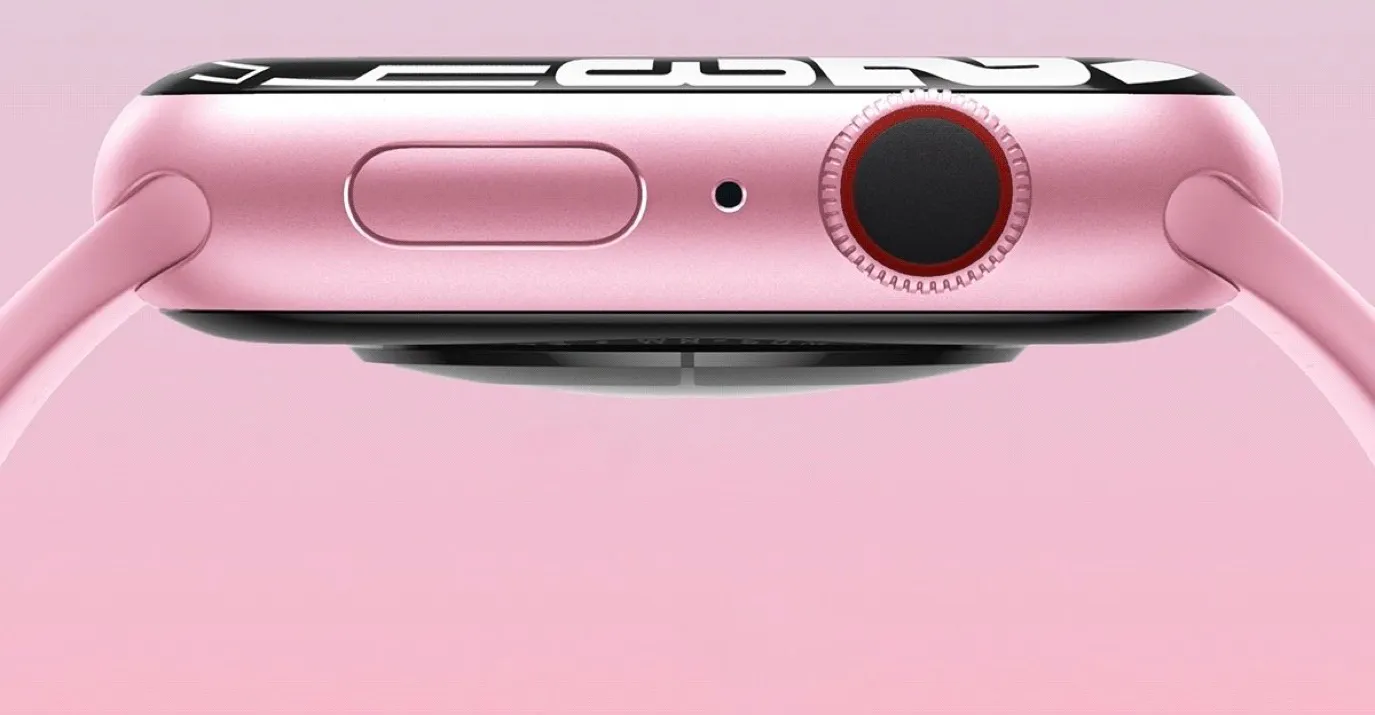
A new rumor today offers additional details about what to expect from this year’s updates to the Apple Watch lineup. For the Apple Watch Series 9, Apple is reportedly planning a new “pink” color option while the Apple Watch Ultra 2 will allegedly be available in a new black titanium color option.
The rumors come via ShrimpApplePro on Twitter, an account that has previously leaked accurate information about unreleased Apple devices.
Shrimp’s update – Apple Watch Series 9 Well, i wish i can see anything that is new outside but it looks the same
Added a pink color along with the other 4 colors with the same case material. There is a new box this time (better than nothing) more compact box. New chip i guess. pic.twitter.com/rh95TNuady
The source corroborates previous reporting from Bloomberg and says that the Apple Watch Series 9 (and presumably the Apple Watch Ultra 2) will be powered by a new processor for the first time since the Apple Watch Series 6. Bloomberg has previously said that this processor will offer a notable boost in performance.
In addition to the existing midnight, starlight, silver, and (PRODUCT)RED color options, ShrimpApplePro also says that the Apple Watch Series 9 will be available in a new “pink” color option. Stainless steel color options will remain the same, including gold, graphite, and silver.
The Apple Watch Series 9 will also reportedly use smaller packaging this year, presumably as part of Apple’s efforts to continue being more environmentally conscious.
Over the weekend, Bloomberg reported that Apple tested a black titanium color for the Apple Watch Ultra last year, but scrapped those plans. Bloomberg suggested the black titanium color could resurface this year with the second-generation Apple Watch Ultra, which ShrimpApplePro now echoes. “I can confirm this year we will have the black titanium this year along with the current standard titanium,” they posted on Twitter.
– Apple Watch Ultra 2 Same design. And I can confirm this year we will have the black titanium this year along with the current standard titanium. (MKBHD Edition) 🗿 pic.twitter.com/zxsVu0TYKX
And finally, ShrimpApplePro also reports that there’s “at least one new iPad coming,” which they say is likely the iPad mini 7. Since its redesign in September 2021, the iPad mini hasn’t received any updates, and rumors about a future generation have been sparse.
The most important questions to ask about the Apple Watch Series 7 aren’t about the Apple Watch Series 7, they’re about the Apple Watch you may already have.
That’s a gentle way of saying that if there’s nothing wrong with your current watch, there’s nothing in the Series 7 that should compel you to upgrade. If you’ve been waiting for some key features before buying your first Apple Watch.
The Apple Watch Series 7 is great. The larger screen and faster charging are the two headline features and both are welcome. The Apple Watch is in a class entirely of its own right now. Nothing else is as good for iPhone users and nothing like it is available for Android users.
Apple Watch design and screen
The Apple Watch Series 7 didn’t get a major redesign when launched. Instead, it looks almost identical to previous Apple Watches and maintains compatibility with all previous Apple Watch straps, although there are incredibly subtle changes in its overall size and curves.
There are new colour options available, including midnight (which apparently has a hint of blue in it), starlight (a cross between silver and gold), and dark green. Apple sent me the green one and in most light, it just looks grey — but every now and then it’ll pop and look visibly green.
The biggest change is the screen; it’s 20 per cent larger than the last few iterations of the Apple Watch. It does the thing all screen upgrades tend to do: make the older screen with its larger bezels look small.
When Apple first made the screen bigger way back on the Apple Watch Series 4, Some thought it made an appreciable difference in the experience and would even be worth upgrading for. Here, on the Series 7, Some just think the screen is really nice and looks better, but isn’t enough to justify an upgrade.
Apple has kept the always-on screen and says that it is brighter in ambient mode when indoors. That is: the overall max brightness hasn’t changed, but when you’re inside, the screen should look a little less dim.
The other design change on the Series 7 is that it’s more durable. The front crystal on all models is thicker and stronger against cracking. (It’s also more refractive, so you can catch a glimpse of some pixels at extreme angles.) The whole watch adds IP6X dust resistance for the first time and maintains the same water resistance to 50 meters.
Apple didn’t add any new health sensors to the Series 7. It still tracks heart rate and has a blood oxygen monitor and EKG. None of these sensors should be used for diagnostic purposes as the Apple Watch is not a medical device.
Apple Watch charging and battery
Apple is still targeting 18 hours of battery life on the Apple Watch Series 7. It’s enough to get through a day — maybe two if you turn off the always-on screen and don’t work out. In my tests, those numbers are borne out. I need to charge the Series 7 only a little less often than I need to charge my old Series 5 (which is starting to lose its battery capacity a bit).
Wish Apple had done more to improve battery life on the Series 7, especially since this is technically a redesign. Would have even taken the same size screen as last year’s model if it had meant getting longer battery life instead. There’s nothing wrong with the Apple Watch’s battery life, but I do wish that it aimed higher like the new iPhones did this year.
Instead, we got faster charging thanks to a redesigned charging puck that also uses USB-C. Lots of people have those wall adapters but may need to pick up a second one (or a multi-charger) since it’s not included in the box. (As an aside, the actual plug part of the Apple Watch charger is longer now, which Apple says is to manage heat.)
The charging is faster. Apple claims it’s 33 percent faster than the older cable and that sounds right to me. I have been able to juice up 20 per cent in just ten minutes several times and it has been easier to top off to a full charge in the morning while I putter around with coffee and breakfast. It makes it slightly more convenient to use the watch for sleep tracking since it’s easier to fit a quick charging session in.
Still and all, We would have preferred standard Qi charging to faster charging (if we had to choose). Qi charging mats are cheap and plentiful now, but integrating an Apple Watch charger adds cost and complexity. Older Apple Watch chargers will work just fine with the Series 7 but at a slightly slower charging speed.
WatchOS 8
There are a few features in WatchOS 8 that are exclusive to the Series 7, ostensibly because its larger screen makes them possible. The watch can fit just a little more text when reading a message, for example.
The two watch faces custom to the Series 7 are called “Contour” and “Modular Duo.” The former just put numbers out on the edges of the screen and would apparently look bad on screens with larger bezels, while the latter allows you to have two full-width complications stacked instead of just one.
The larger screen also allows for a new text-entry option: a miniature keyboard. You can tap or swipe on it and as long as autocorrect is doing its thing correctly, it works fine. It’s about as good as any smartwatch keyboard I’ve used, but still, others prefer dictating messages via Siri whenever possible.
Those are the Series 7-specific features, but WatchOS 8 has a few more things worth covering. It’s able to auto-detect outdoor bike workouts — and in testing, it managed to do that very well, even when I was hitting stoplights at every block. Wish Apple would make it easier to integrate the Watch’s workout data with cadence or power sensors on a bike, but cyclists are still on their own to figure out how to do that.
Apple says it’s also adjusting your calorie metrics if the watch believes you’re riding an e-bike. There’s no setting for it, it just detects if your heart rate is suspiciously low and your speed is remarkably high as you cruise up a hill. There’s also no indicator in your results if your calorie metrics were adjusted.
WatchOS 8 has a redesigned photos app and lets you send photos directly from the watch. It has an updated “Mindfulness” app with a “Reflect” feature that gives you some kind of prompt to meditate on, like “Recall a challenge you’ve overcome” and “Think about what sparks your creative energy.” As you can probably tell from the unnecessary scare quotes in the previous sentence, I don’t like it. I think meditation is a deeply personal — and for many people spiritual or religious — thing, and so I recoil whenever I see tech companies reducing the practice down to anodyne apps.
I’ve left the best for last: the Apple Watch lets you set multiple timers. You can set them in the timer app. You can set them with Siri. You can use Siri to name each timer. You can see all your timers stacked one after the other. It’s magical. It’s wonderful. It’s hilarious that it took until 2021 to make this happen and even more hilarious that the iPhone itself still can’t do it.
Seriously, though, multiple timers on the Apple Watch are great, especially for cooking. It means I don’t need to stay within earshot of the smart speaker in my kitchen if I’ve got something in the oven.
As what have said this every year for several years now because it’s true every year: the Apple Watch is the best smartwatch for iPhone users, by far. There are fitness trackers that fulfil niches not filled by the Apple Watch like Garmins for more serious athletes or Fitbits for people who want something simpler. But as a general computer-on-your-wrist, the Apple Watch Series 7 is challenged only by older Apple Watches.
If you have one of those older Apple Watches, I don’t think there’s anything here that should compel an upgrade. All the new features are very nice but not necessary. If there is something that’s bothering you about your current watch, then by all means go for it if you can afford it. Also, while the Series 3 is still kicking around for cheap, I don’t think it’s a great buy anymore. The Apple Watch SE is a better value.
There’s no reason that we should have an expectation of major year-on-year updates for the Apple Watch. These smaller iterations might not be what we’ve been hoping for — a big redesign with much more battery — but that doesn’t make the Series 7 bad on its own merits.
It’s a great watch — again, the best smartwatch. If it’s time for you to replace your watch (or buy your first one), you’ll love it. If it’s not time to replace your watch, it’s not time to replace your watch.
From a functionality and usability standpoint, smartwatches shouldn’t be miniature phones. Interactions should last seconds, with UI elements large and information highly glanceable, given the very physical constraints of a small screen size. One way modern apps abide by those tenets is in keeping to a single scrollable feed of content, while earlier apps opted for side-by-side windows/feeds that were roughly analogous to bottom bar tabs.
Wear OS 3 does a good job following those principles, and it’s very simple to use and pick up. In comparison, the Apple Watch tried to pack in too much, and it’s felt quite crufty for several generations now.
With watchOS 10, Apple has done a thorough redesign and created a design system for wearable apps. Info-dense applications don’t feel cramped, and it’s very obvious where to press. It works so well that I’m rethinking my expectations for what a watch app can be.
This layout/template works because it uses all the available space. It comes down to the Apple Watch being a rectangle and Wear OS watches being circular. The circle, while iconic and a point of pride for Google in designing the Pixel Watch, is constrained in terms of text layout and button placement.
The only Wear elements that really curve are the time and maybe watch faces that mimic analog clocks. Within the circular container, something like text and other graphics can only be placed in a square to ensure nothing gets cut off. The semicircle endcaps of a pill-shaped card do take up the left and right of the screen, but there’s no information placed there.
With watchOS 10, you’re able to place two in the top-left (back button or new message button) and right corners (now playing, etc.), while some apps even have FABs. It’s highly efficient, and the consistency trains users on where to tap.
Wear OS buttons cannot be placed in non-existent corners. For example, Messages’s Start chat button takes up a full line and is given equal importance to a conversation. The solution there would be a smaller button, like the one used for search by the Play Store. Another idea would be for apps to place vertical versions of those pill-shaped buttons on the left and right sides.
Meanwhile, the Apple Watch’s upcoming widget system is remarkably dense. In Wear OS, Tiles take up your entire screen and usually just show one piece of information. On watchOS 10, you can view two cards per screen, including heart rate with history, activity, sunset/sunrise, audio controls, timers, a compass, and much more.
This approach is so much better and is in large part due to Apple making it so that a swipe up from the watch face gives you widgets. Previously, that gesture took you to Control Center, which is now a side button press. (It’s annoying, as I think physical button presses are much less immersive.)
On Wear OS, Tiles are left/right swipes that eventually return you to the watch face. A swipe up on Google’s platform takes you to a notifications feed.
I think the approach Apple arrived at is so good that Google should consider changing its own. It makes more sense for notifications to be fullscreen, like Tiles currently, to show as much information as possible before you have to open it. An upward swipe for multiple widgets and/or mini-Wear OS Tiles would be highly glanceable.
Meanwhile, Wear OS could even consider placing circular complications here. The clever thing Apple has done with widgets always being a swipe up away is that you can set anything as your watch face. Fun options there include Mickey and Minnie Mouse, Snoopy, and fullscreen digital and analog clocks. Previously, I opted for something with a lot of complication slots, but now I just place the info I need in the widget feed.
The Apple Watch has always done more than Wear OS, but it was presented in an overwhelming manner. Now, it’s been thoroughly refined to fit elegantly. In comparison, what Wear OS has going for it is simplicity. That’s far from bad, but it might get old fast as we inevitably come to expect more from our wearables.
Apple Watch for kids is something parents are embracing more and more. The New York Times ran a story in September 2022 about Apple Watch adoption among children as young as five. Parents are finding the Apple Watch more appropriate for kids wanting smartphones.
The Apple Watch gives kids a way to stay in touch with parents, share location, and build responsibility without the full cost and risk of a smartphone. With school out for the summer, it may be time to consider adding more connectivity without the complexity of a phone.
Apple Watch for kids
The Apple Watch gives kids a way to stay in touch with parents, share location, and build responsibility without the full cost and risk of a smartphone.
With very limited access to the web and no social media apps, the watch can be a great starter device for kids if parents are looking for a manageable way to introduce technology early.
Family Setup for Apple Watch
Apple’s Family Setup feature allows parents to set up a cellular Apple Watch SE or Series 4 and higher from their iPhone. No iPhone required for the family member.
While the monthly connection fee is typically around $10 plus fees, T-Mobile has a kid-friendly plan with unlimited calling and 500MB/month that’s half the price with auto-pay. This is convenient if you’re already a T-Mobile subscriber and want to save on a watch plan for your child.
There’s even a special mode with Family Setup called Schooltime that restricts the Apple Watch during school hours. Parents can remotely manage this from their iPhone.
How to setup Apple Watch Schooltime to help improve focus
A welcome advancement for Apple Watch with watchOS 7 is Family Setup, a feature that lets an adult configure the wearable for a child who doesn’t have an iPhone. Family Setup includes multiple features to help manage your kid’s device, follow along for how to setup Apple Watch Schooltime.
Family Setup for Apple Watch is a great way to stay connected to your kids (or elderly parents) without them needing their own iPhone. And one of the new features that are focused on kids is the Schooltime mode (also available for anyone).
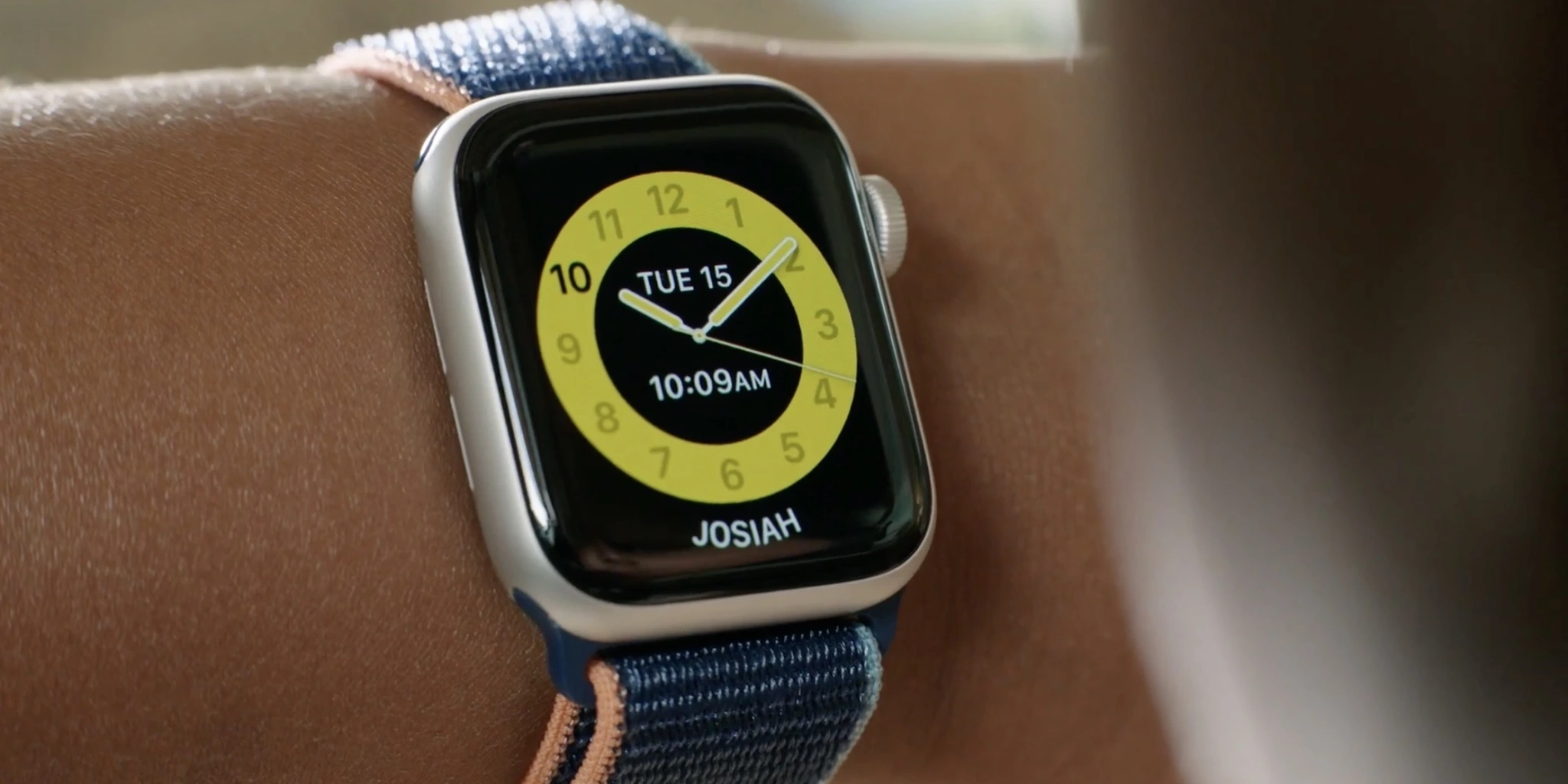
It allows parents to setup a school schedule for Apple Watch to remain on a simple yellow watch face that’s easy for teachers or adults to recognize and can be used whether kids are learning at home or back in their classrooms.
In addition to the yellow watch face, Schooltime mode puts on Do Not Disturb and restricts interactions to help kids (or anyone) stay focused.
What you’ll need to use Schooltime
Jump to the bottom of this post if you want to use Schooltime on your own Apple Watch.
To set it up on a child’s watch, you’ll need to be using Family Sharing and have a child’s Apple ID account setup that you’ll connect with their Apple Watch.
To use Schooltime, you need to set up your kid’s Apple Watch with Family Setup (more on Family Setup here). That requires a cellular Apple Watch Series 4, 5, 6, or SE. For the parent setting it up, you’ll need an iPhone 6s or later running at least iOS 14.
Note: You can also use Schooltime on your own Apple Watch if you are running watchOS 7.
How to setup Apple Watch Schooltime
You will get a prompt asking if you want to set up Schooltime while you’re going through the initial Family Setup, tap “Turn on Schooltime” if so (can skip to step 5 below)
If you are setting up Schooltime after Family Setup, head to the Apple Watch app on your iPhone (adult’s iPhone who did Family Setup) > Choose All Watches > Tap your kid’s watch
Tap Done, then tap Schooltime.
Tap “Turn on Schooltime”
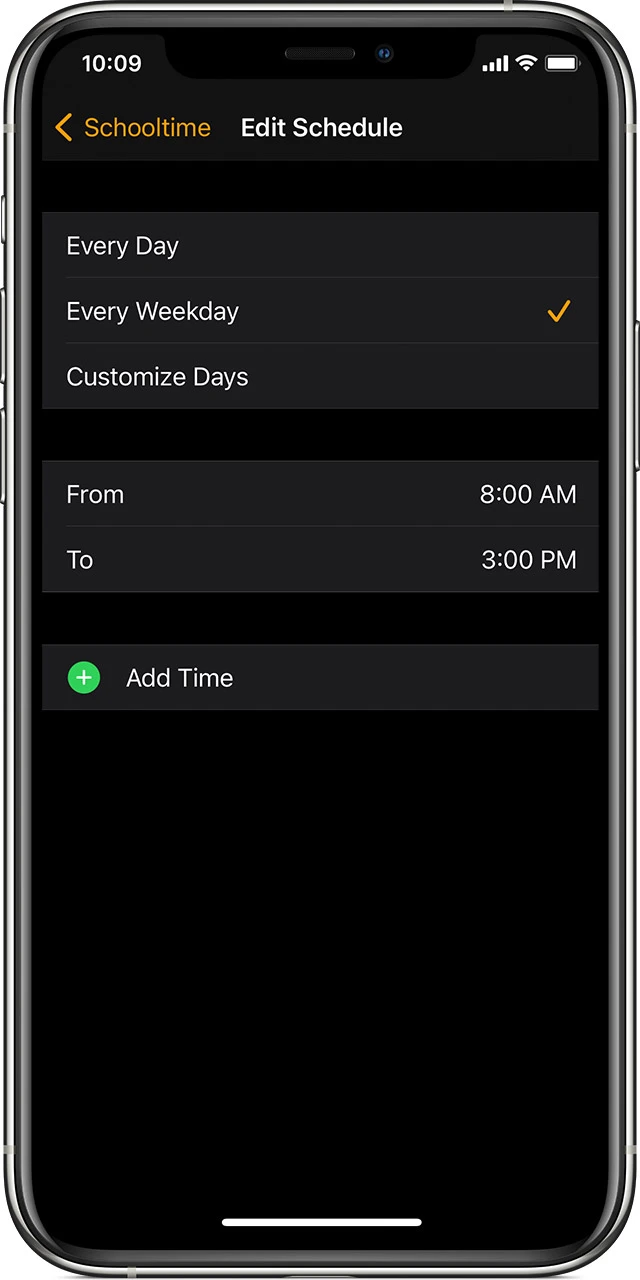
Choose “Edit Schedule”
Pick the days and times you’d like to use Schooltime for your kid
You can also choose “Add Time” to create multiple schedules like 8:00 am to 11 am — 12:00 p.m. to 3:00 pm
How to exit Schooltime
Schooltime can be exited by your child by turning their Apple Watch’s Digital Crown > tapping Exit
This is intentional by Apple so students can check Messages, Phone calls, etc.
As the parent, you can see how many times your kid has exited Schooltime during the day
Head to the Watch app on your iPhone > All Watches > Your kid’s watch > Schooltime
How to use Schooltime on any Apple Watch
If you want to use Schooltime as an alternative to Do Not Disturb or Theater Mode, you can add it to Control Center on Apple Watch
Swipe up from the bottom of your Apple Watch screen to open Control Center (can touch and hold the bottom as well)
Scroll to the bottom > tap Edit.
Tap the add button on the Schooltime button , choose Done
Now in Control Center you can tap the Schooltime button to turn it on
To exit Schooltime, turn the Digital Crown and tap Exit
Watch bands that fit kids
I happen to have a five-year-old who owns my heart. While I don’t think he’s quite ready for an Apple Watch, I was curious about watch band compatibility with kid-sized wrists. He happily let me borrow his little wrist for testing.
Any bands I already had weren’t fitting for a small wrist. Trying an Apple Watch band specifically made for kids worked great, though. For under $15, this Nike Sport style band with a buckle was a perfect fit.
Best Apple Watch prices for kids
As a trial introduction to the semi-smartphone world for kids, new Apple Watches can be a bit pricey. A new 40mm Apple Watch SE 2 with cellular goes for $299. That’s why hand-me-down watches with cellular are great for Family Setup.
Another option is shopping for second-hand Apple Watches from places like eBay, Facebook Marketplace, and Amazon’s refurbished inventory. I’ve found a 40mm cellular SE for $120 locally, and Amazon’s Renewed Store has very similar offers.
Recommended model
Just be sure to look for GPS + Cellular if you want to use Family Setup. 40mm or 41mm sizes are also more kid-friendly than 44mm or 45mm.
Also avoid Apple Watch Series 3 if you want to set up a watch for a child without an iPhone. You can find models with cellular for cheap, but they don’t receive software updates anymore. More importantly, they don’t work with Family Setup and require the wearer to have an iPhone.
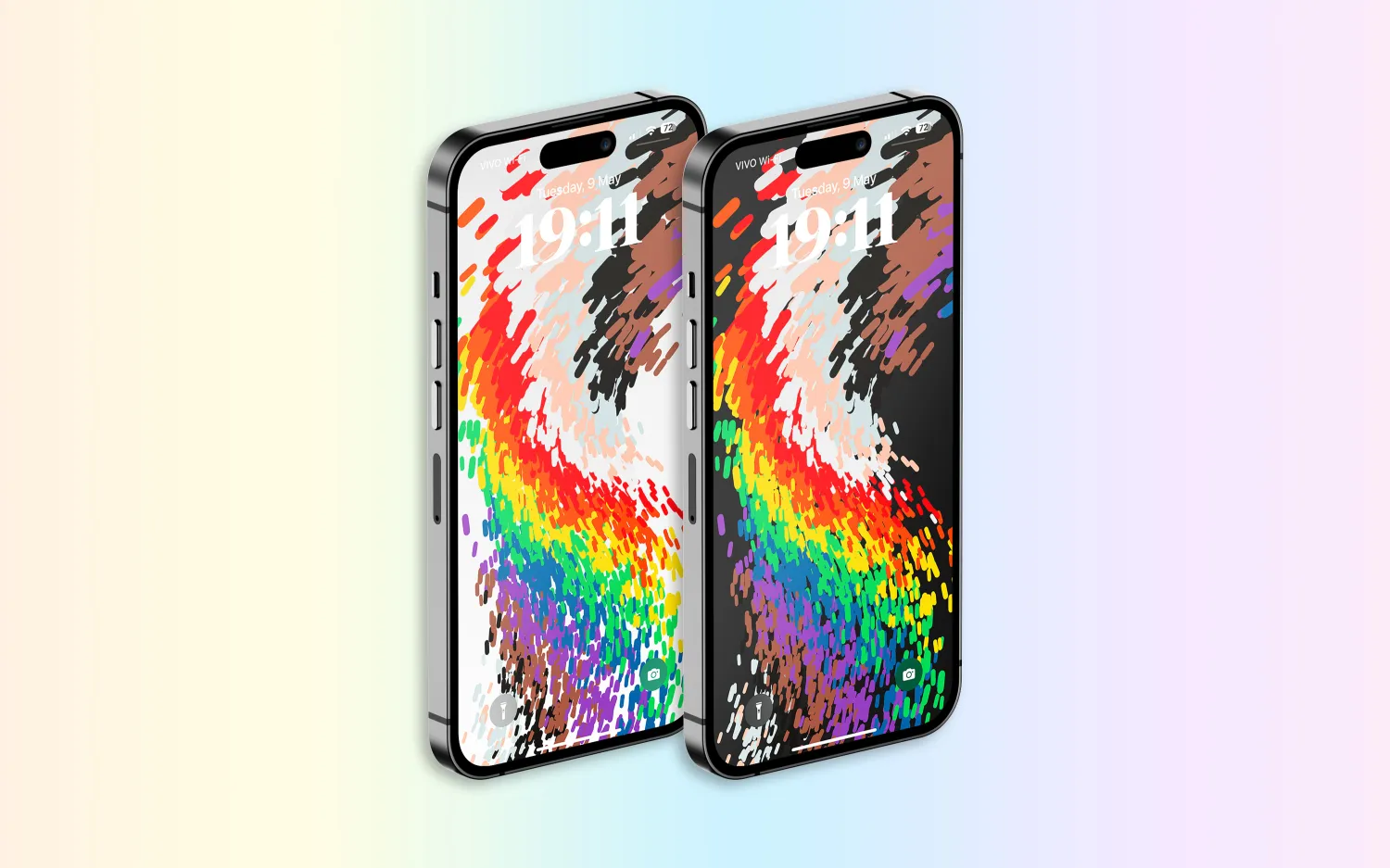
Following over a month of beta testing, iOS 16.5 is now available to the general public. This update includes changes to Apple News, the addition of a new “Pride Celebration” wallpaper, and more. Head below for the full release notes with details on bug fixes, new features, and more.
What’s new in iOS 16.5?
Here are Apple’s official release notes on iOS 16.5 new features and bug fixes. The build number for today’s update is 20F66.
A new Pride Celebration wallpaper for the Lock Screen to honor the LGBTQ+ community and culture
Sports tab in Apple News gives easy access to stories, scores, standings, and more, for the teams and leagues you follow
My Sports score and schedule cards in Apple News take you directly to game pages where you can find additional details about specific games
Fixes an issue where Spotlight may become unresponsive
Addresses an issue where Podcasts in CarPlay may not load content
Fixes an issue where Screen Time settings may reset or not sync across all devices
Earlier iOS 16.5 betas included the addition of a new Siri command for starting and stopping a screen recording. Apple removed this feature in subsequent iOS 16.5 betas, and it’s not included in the final version of the update.
iOS 16.5 will be the final major point-release update to iOS 16 before WWDC in June. This is where Apple will debut iOS 17 and release the first developer betas.
Apple is, however, expected to continue releasing updates to iOS 16 through the summer and likely even alongside iOS 17. iOS 16.6 is expected to enter beta testing soon.
You can update your iPhone by going to the Settings app, choosing General, then choosing Software Update.
watchOS 9.5 debuts with new Pride Celebration watch face
Alongside iOS 16.5, Apple has also released watchOS 9.5 for Apple Watch users today. The headlining change in this update is an all-new Pride Celebration watch face to honor the LGBTQ+ community and culture.
What’s new in watchOS 9.5?
watchOS 9.5 is rolling out now to all users. You can update your Apple Watch by going to Settings, choosing General, then choosing Software Update. You can also install the update via the Apple Watch companion app on your iPhone.
Here are Apple’s release notes for watchOS 9.5:
watchOS 9.5 includes new features, improvements and bug fixes, including a new Pride Celebration watch face to honor the LGBTQ+ community and culture.
And some more details on the new Pride Celebration watch face:
Inspired by multiple pride flags, this new watch face combines colors to represent the strength and mutual support of the LGBTQ+ movement. Mirroring the woven loops of the Sport Loop, each strand of vibrant thread contributes to the overall composition of the watch face. The colorful threads move as the Digital Crown on Apple Watch is rotated, the display is tapped, or the user’s wrist is raised.
The new Pride Celebration face included in watchOS 9.5 pairs with the similarly-designed wallpaper for iPhone users. The new wallpaper is included with iOS 16.5, which is also available starting today.
macOS Ventura 13.4 with new sports-related features
After months of beta testing, Apple has finally released macOS Ventura 13.4 to the public. The update, which is now available for macOS users, comes with new sports-related features, as well as a new system for installing beta software. Read on as we detail what’s new with macOS Ventura 13.4.
One big change coming with macOS Ventura 13.4 is the new system for installing betas that was introduced with iOS 16.4. The operating systems now asks for the Apple ID to show and download beta software updates.
macOS checks whether the account is associated with a developer or user registered in the public beta program. It then shows the beta update available for that program. With this change, regular users will no longer be able to install developer betas, for example.
macOS 13.4 full release notes
Sports feed in the sidebar of Apple News gives easy access to stories, scores, standings, and more, for the teams and leagues you follow
My Sports score and schedule cards in Apple News take you directly to game pages where you can find additional details about specific games
Resolves an issue where Auto Unlock with Apple Watch does not log you into your Mac
Fixes a Bluetooth issue where keyboards connect slowly to Mac after restarting
Addresses a VoiceOver issue with navigating to landmarks on webpages
Fixes an issue where Screen Time settings may reset or not sync across all devices
You can install macOS Ventura 13.4 by going to the Software Update menu in the System Settings app. It may take a while before the update shows up on your computer; make sure that your Mac is compatible with macOS Ventura.
The update build number is XXXXX.
OpenAI launches free ChatGPT for iPhone app with Whisper support and more
OpenAI has announced that it is releasing a dedicated iPhone app for its ChatGPT service. The app, which is available via the App Store, gives users the ability to use ChatGPT through a native app on their iPhone. The app is free to download and includes no ads. It’s currently only available in the United States, but OpenAI says availability will expand “in the coming weeks.”
ChatGPT for iPhone now available
As announced by OpenAI in a blog post, ChatGPT for iPhone will offer the same set of features as the web version of the service. This will include ChatGPT Plus support, which lets users subscribe to pay for more advanced versions of the service.
The app will also sync your ChatGPT history across all your devices, including the web. It also includes support for Whisper, OpenAI’s open-source speech-recognition system. This integration with Whisper enables voice input for the ChatGPT app on iPhone. The ChatGPT app is also completely ad-free.
As ChatGPT has gained popularity over the last six months, a number of copycat and scam apps have surfaced on the App Store. Apple has cracked down on these apps, in part by blocking apps that use “GPT” in their name. By releasing its own version of ChatGPT for iPhone, OpenAI hopes to directly control the experience of using the service on an iPhone.
Additionally, Microsoft’s Bing app for iPhone has seen a major boost in popularity since it added ChatGPT integration.
ChatGPT for iPhone is rolling out starting today to users in the United States. OpenAI availability will “expand to additional countries in the coming weeks.”

























 on the Schooltime button
  , choose Done