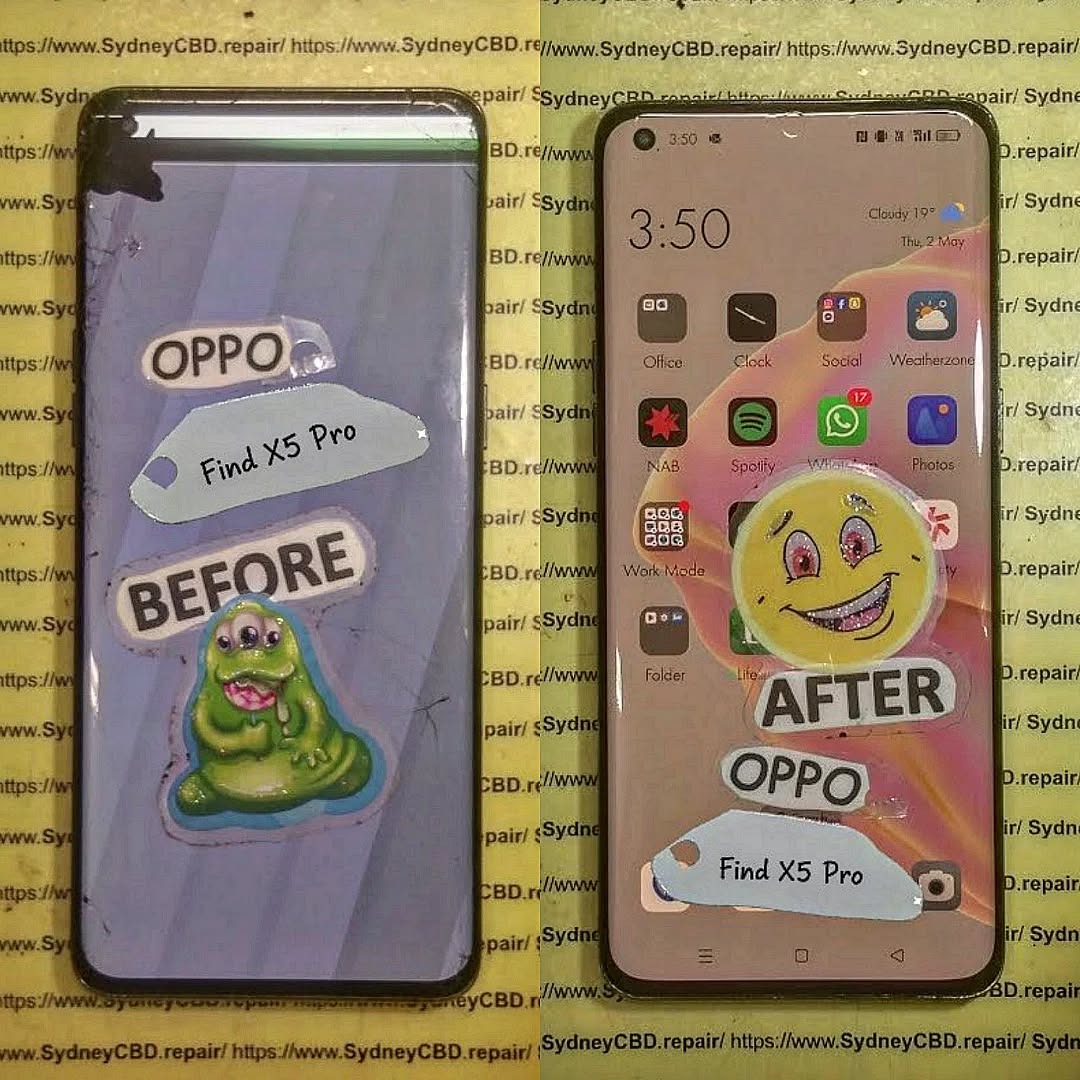
International Repair? Shipping Your Phone to Sydney CBD – Ultimate Guide + 12 Key Steps
If you’re thinking about sending your device overseas for repair, you’re not alone. Every year, thousands of customers choose Sydney CBD Repair Centre for trusted, expert-level phone repairs—some shipping their devices from countries like New Zealand, Singapore, Malaysia, the UK, and the USA. Whether you’re struggling with a cracked screen, battery drain, or display lines, this guide covers everything you need to know about international repair and shipping your phone to Sydney CBD safely and cost-effectively.
This detailed guide explains why this option is becoming a global trend, how the process works, what risks to avoid, and why Sydney CBD is a world-class repair destination backed by 6 consecutive awards and 2000+ 5-star Google reviews.
Introduction
Shipping your phone overseas for repair might sound overwhelming at first, but for many international customers, Sydney CBD Repair Centre has become the trusted solution for fast, high-quality, and reliable mobile repairs. Whether you’re dealing with a cracked screen, display line issues, battery problems, or a malfunctioning camera, finding a dependable repair shop in your country isn’t always easy. That’s why more and more users from New Zealand, Singapore, Malaysia, the UK, and the United States are choosing to send their devices directly to Sydney—home to one of the most reputable repair centres in the region.
Sydney CBD Repair Centre has earned its global reputation thanks to over a decade of consistent, professional service, thousands of satisfied customers, and an impressive record of 2000+ 5-star reviews. With 6 consecutive awards for excellence, same-day repairs, genuine replacement parts, and expert technicians, it’s no surprise that people worldwide trust this centre with their devices. By following the right steps and understanding the shipping process, international repair becomes safe, efficient, and highly cost-effective—often delivering better results than repair shops available locally.
This guide breaks down everything you need to know about international repairs, helping you make informed decisions while ensuring your device is handled with the highest level of care and expertise.
Sending your phone overseas might sound overwhelming, but once you understand the benefits, it becomes clear why this option makes sense for many international customers.
Global Trust Built on Expertise
Sydney CBD Repair Centre has spent more than a decade building a reputation for:
Professional, certified repair technicians
Fast, same-day service
High-accuracy diagnostics
Transparent pricing
Customers worldwide often struggle to find a reliable shop that uses genuine parts—especially for brands like Samsung, Google Pixel, and OnePlus. This is a major reason Sydney attracts international repair seekers.
Award-Winning Service That Stands Out
With 6 years of recognition as the Top Phone Repair Service in Sydney, the centre has earned international trust. What makes customers willing to ship from thousands of miles away?
Real reviews from real customers (2000+ positive ratings)
Genuine components sourced directly from authorized suppliers
90-day warranty on every repair
A no-nonsense approach to fixing even complicated issues
This level of reliability is rare, making Sydney CBD Repair Centre a go-to hub for repairs that require precision and quality.
Many countries rely heavily on third-party components, which may:
Reduce phone resale value
Affect touchscreen responsiveness
Cause color tinting or brightness issues
Fail faster
Sydney CBD Repair Centre commits to using only genuine or high-grade OEM parts, making international repair worthwhile for those seeking longevity and quality.
Repairs That Preserve Warranty and Longevity
Although shipping costs exist, choosing expert repair can:
Extend your phone’s life by 2–3 years
Restore factory-level performance
Prevent recurring failures from poor-quality parts
International customers appreciate that Sydney CBD Repair Centre follows manufacturer-aligned repair standards without unnecessary upselling.
Step-by-Step Guide: Shipping Your Phone Internationally to Sydney CBD
Here’s the full 12-step method to safely ship your device to Australia for repair.
Step 1 – Check Repair Eligibility
Before shipping, contact the centre:
Describe the issue
Share photos or videos
Request a repair quote
This prevents unnecessary shipping delays.
Step 2 – Backup and Reset Your Device
Always:
Backup via iCloud, Google Drive, or PC
Remove SIM and memory cards
Factory reset to protect your privacy
Step 3 – Package Your Phone for Safe Travel
Use:
Anti-static bag
Bubble wrap
Double-layered box
Fragile labels
Phones easily survive international travel when packaged properly.
Step 4 – Choose a Reliable Courier
Recommended options include:
DHL
FedEx
UPS
EMS
Pick services with delivery tracking and insurance.
Step 5 – Shipping Documentation Requirements
Most countries require:
Repair declaration
Value statement
Return shipping address
Clearly label your package as “Phone for Repair — No Commercial Value”.
Step 6 – Tracking Your Shipment
Monitor live updates and notify Sydney CBD Repair Centre when the package arrives. Repairs are typically completed same day.
How Much Does International Phone Repair Cost?
Common Price Ranges by Brand
Brand
Typical Repair (AUD)
iPhone
$150–$750
Samsung
$180–$650
Google Pixel
$160–$600
Oppo/Vivo
$120–$450
Prices depend on model, damage severity, and part availability.
Shipping Costs You Should Expect
International shipping ranges from $30–$110 AUD depending on:
Country
Courier
Insurance
Most international customers use budget tracked shipping to reduce cost.
Risks to Avoid When Shipping a Phone Overseas
Customs Delays
Avoid lengthy holds by:
Using accurate forms
Declaring the device as “Repair Item”
Avoiding high-value declarations
Counterfeit Repair Shops
Some overseas shops use cheap copy parts. Many customers ship to Sydney after experiencing:
Flickering screens
Short battery life
Touch sensitivity problems
Pink or green line issues on AMOLED displays
Sydney CBD Repair Centre avoids these risks with verified genuine components.
How Sydney CBD Repair Centre Ensures Safe and Fast Repairs
On average, shipping + repair takes 6–12 days depending on the courier and country.
2. Do I need to remove my Google or Apple ID?
Yes. It ensures privacy and allows full testing after repair.
3. Can I ship a water-damaged phone?
Yes, but declare it clearly. The centre evaluates water-damaged devices case by case.
4. Do you repair foldable phones internationally?
Yes, including Galaxy Z Fold and Z Flip models.
5. What if my phone doesn’t turn on before shipping?
That’s okay—technicians can diagnose once it arrives.
6. Will customs tax me?
Most countries won’t apply tax on repairs when paperwork is accurate.
Conclusion
Shipping your phone internationally for repair may seem unusual, but thousands of people now choose this option every year—especially when local repair quality isn’t up to par. With award-winning service, genuine parts, reliable technician expertise, and transparent pricing, Sydney CBD Repair Centre has become a trusted destination for global customers seeking safe, fast, and high-quality repairs.
If you want a repair done right the first time, shipping your device to Sydney is a smart investment in the long life of your phone.
David from Sydney CBD Repair Centre
“The Best place to fix mobile phones – 6 Years In A Row!”
Call: +61280114119
Website: https://SydneyCBD.repair/locate-us
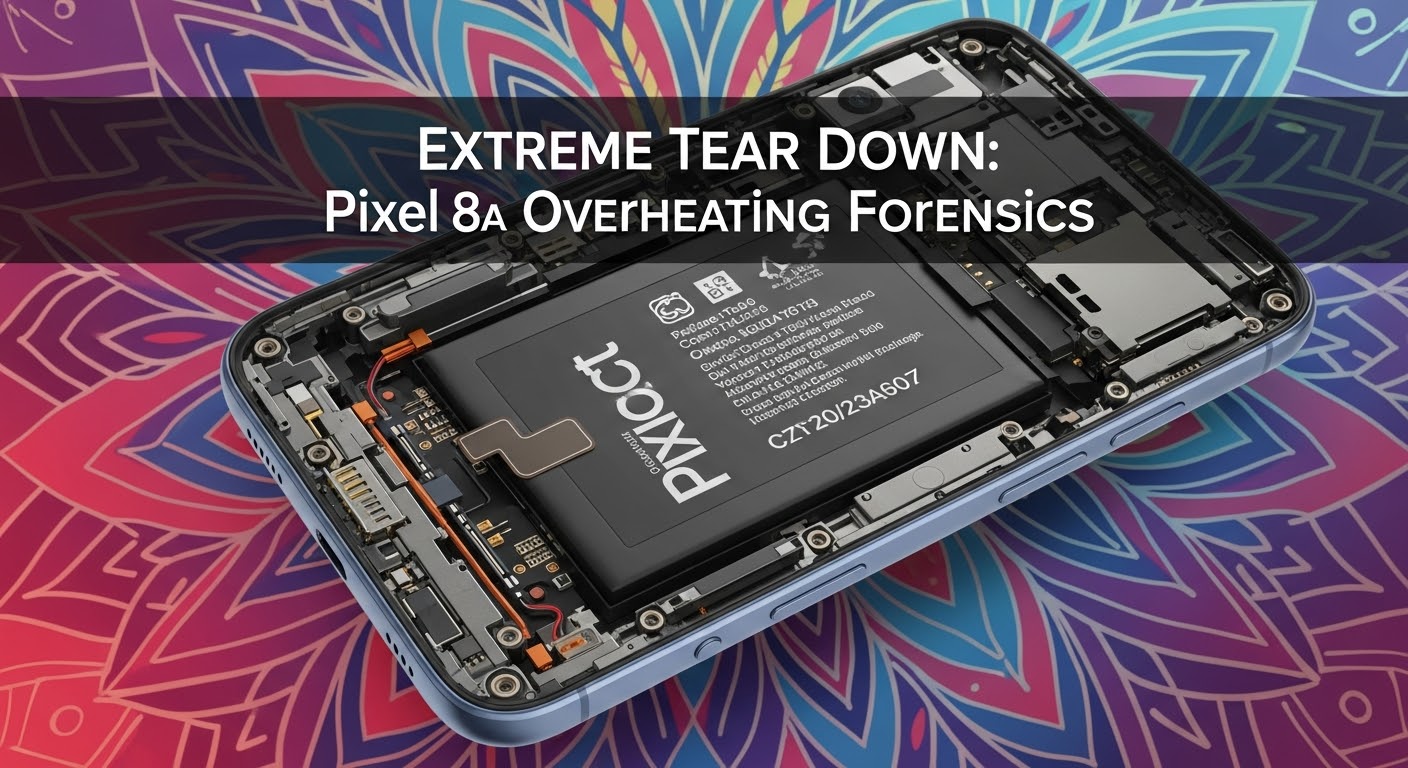
The Google Pixel 8a has earned praise for its compact design, vibrant display, and solid midrange performance. However, a growing number of users have reported overheating issues, which can compromise both device longevity and day-to-day usability. Understanding why the Pixel 8a heats up excessively requires dissecting both hardware and software elements, identifying triggers, and implementing effective solutions.
Overheating is not just uncomfortable; it can throttle performance, reduce battery lifespan, and occasionally force unexpected shutdowns. In this detailed analysis, we’ll examine the Pixel 8a’s architecture, thermal management, software influences, and real-world scenarios contributing to heat generation. We’ll also provide actionable solutions to help you keep your Pixel 8a cool and performing optimally.
A device’s hardware design is often the root cause of persistent overheating. The Pixel 8a uses a Google Tensor G3 chipset, combined with an optimized GPU and a mid-range battery, but these components can generate heat under load.
Processor and Chipset Analysis
The Tensor G3 processor is designed for AI and ML tasks, powering features like real-time translation and advanced camera algorithms. While efficient, it can produce substantial heat during gaming, video editing, or heavy multitasking. The integrated GPU also contributes to thermal load, particularly when running graphically demanding apps.
Thermal Management Components
Google employs multiple passive cooling mechanisms:
Graphite sheets: Spread heat across the device.
Thermal paste: Enhances heat transfer from the chipset.
Frame design: Helps dissipate heat naturally.
However, unlike some high-end devices, the Pixel 8a lacks an active cooling system, which means it can become hot quickly under sustained load.
Software and System-Level Causes
While hardware plays a major role, software issues frequently trigger overheating.
Firmware and Update Issues
Occasionally, Android OS updates or beta firmware versions can introduce background processes that spike CPU usage. Users often notice overheating shortly after updating their system software.
Third-Party Apps and Resource Drain
Certain apps—particularly games, streaming apps, and navigation apps—can demand high CPU and GPU usage. Background processes such as syncing, location tracking, or cloud backups can also increase device temperature.
Pixel 8a users typically experience overheating in the following conditions:
Gaming: Prolonged 3D or AR gaming sessions.
5G Usage: Streaming or downloading large files on 5G.
Charging: Fast charging combined with high device usage.
Environmental Factors: High ambient temperatures or direct sunlight exposure.
Diagnostics and Temperature Monitoring
Monitoring your device’s temperature is crucial to understanding overheating.
Built-in Android Tools
Battery stats: Check which apps consume the most power.
Device care: Provides system optimization tips.
Third-Party Monitoring Apps
Apps like CPU-Z, AccuBattery, and AIDA64 allow users to track CPU and battery temperature in real-time.
Power Consumption Breakdown
The Pixel 8a’s battery drains faster when heat levels rise, creating a vicious cycle: high power draw → heat → throttling → more power draw. Optimizing app usage, disabling unused background processes, and managing display brightness can significantly reduce this cycle.
Impact on Performance and Longevity
Overheating affects performance in several ways:
Thermal throttling: CPU slows down to prevent damage.
App crashes or slowdowns: Particularly during multitasking or gaming.
Cooling Solutions and Preventive Measures
To minimize overheating:
Avoid heavy gaming during charging.
Use apps in low-power mode when possible.
Keep the phone in cool environments, avoiding direct sunlight.
Remove bulky or insulating cases during high-load use.
Consider external cooling accessories like fan-equipped phone stands.
Repair and Professional Interventions
Persistent overheating may indicate hardware faults like:
Faulty battery
Defective thermal paste or heat spreader
Internal component issues
Sydney CBD Repair Centre provides expert diagnostics and repairs, including battery replacement, thermal management solutions, and chipset inspection. Their team ensures genuine parts and a 90-day warranty on repairs.
Visit for: Same-day express repairs, professional tech support.
Efficient chipset, but can throttle in extended gaming
OnePlus Nord 3
Good
Better heat distribution via vapor chamber
Xiaomi Redmi Note 13
Moderate
Adequate passive cooling, throttles under max load
Frequently Asked Questions (FAQs)
1. Why does my Pixel 8a overheat while charging?
Fast charging combined with usage generates additional heat. Avoid heavy gaming or streaming while charging.
2. Is overheating normal for the Pixel 8a?
Moderate heat during intensive tasks is normal, but persistent extreme heat requires diagnostics.
3. Can software updates fix overheating issues?
Yes, updates can optimize system processes and improve thermal management.
4. Will using a case cause overheating?
Some thick or insulating cases can trap heat. Consider removing the case during heavy use.
5. Can overheating damage my battery?
Yes, prolonged heat accelerates battery degradation and reduces overall lifespan.
6. When should I visit a repair center?
If overheating persists even under normal usage, it’s best to consult a professional technician to check hardware components.
Conclusion: Optimizing Your Pixel 8a
The Pixel 8a is a capable midrange device, but overheating is a reality under heavy usage. Understanding the root causes—from hardware limitations to software triggers—helps users take preventative steps. By monitoring temperature, managing app usage, and seeking professional repairs when needed, you can maximize performance, extend device lifespan, and enjoy a cooler, safer Pixel 8a experience.
David from Sydney CBD Repair Centre – The Best place to fix mobile phones as 6 Years In A Row! Top Mobile Phone Repair In Sydney. More than 2000 Positive Reviews on Google and Same Day Repairs.
📍 Visit us today for:
✓ Same Day Express Repairs
✓ Genuine Parts Guarantee
✓ Professional Technicians
✓ Competitive Pricing
✓ 2000+ 5-Star Google Reviews
✓ 6-Time Award Winner for Best Phone Repairs
Phone Repair Price Revelation: What Does it Really Cost? 15 Shocking Insights
Introduction to Mobile Phone Repair Costs
Mobile phones have become an integral part of our daily lives, and when they break, the cost of repair can be confusing and surprisingly high. Understanding what goes into the pricing of a phone repair is essential before making a decision. Factors like the type of repair, brand, and parts quality can all dramatically influence your final bill.
At Sydney CBD Repair Centre, we see customers often surprised by repair quotes—but knowledge is power. Let’s break down the most common phone repairs and what you can expect to pay.
High-end brands like Apple or Samsung command premium pricing due to parts scarcity and complex assembly. Mid-range phones tend to be cheaper to repair.
Age and Model of the Device
Older models may cost less in parts but higher in labor if parts are rare. New flagship phones usually cost more due to expensive components and specialized repair tools.
Quality of Replacement Parts
OEM (Original Equipment Manufacturer): Expensive but reliable
Aftermarket: Cheaper but may void warranty or reduce performance
Location and Service Center
Repairs in the CBD are generally higher than suburban areas, but they offer faster turnaround and genuine parts.
DIY vs Professional Repair Costs
DIY kits are available for screens, batteries, and ports. But risks include:
Invalidating warranties
Causing permanent damage
Additional costs if professional intervention becomes necessary
Professional services, like Sydney CBD Repair Centre, may cost more upfront but guarantee results and provide warranty coverage.
Warranty and Insurance Impacts
Phones under warranty or insurance plans can significantly reduce out-of-pocket expenses. Always check:
Coverage for accidental damage
Deductible fees
Repair center approval
Hidden Costs in Phone Repairs
Some repairs may include:
Diagnostic fees: $20 – $50
Labor charges: $50 – $150
Follow-up adjustments or replacements
How to Choose the Right Repair Center
Consider:
Customer reviews (2000+ 5-star Google reviews at Sydney CBD Repair Centre)
Turnaround time (same-day repairs available)
Warranty on parts and labor (90 days standard)
Tips to Reduce Phone Repair Costs
Use a protective case and screen protector
Avoid liquid exposure
Consider battery replacement before phone dies completely
Check local repair shops for promotions and loyalty programs
Google Pixel 7 water damage repair: $420, complete motherboard cleaning
FAQs
1. How long does a typical phone repair take?
Most screen or battery repairs are completed within 1–3 hours. Complex repairs may take 1–3 days.
2. Can water damage be fully repaired?
Partial repairs are possible. Severe exposure may require motherboard replacement.
3. Are aftermarket parts reliable?
They can work but may reduce display quality, touch sensitivity, or battery life.
4. Do professional repairs come with warranty?
Yes. At Sydney CBD Repair Centre, repairs come with a 90-day warranty.
5. Is DIY repair cost-effective?
Sometimes, but mistakes can lead to higher total costs. Professional repair is safer.
6. Does insurance cover accidental damage?
Most plans do, but coverage depends on policy terms and deductibles.
Conclusion
Understanding phone repair costs helps you make smarter decisions and avoid unnecessary expenses. From screen replacements to water damage fixes, knowing the factors and risks allows you to choose the right repair solution. Sydney CBD Repair Centre offers reliable, same-day repairs with genuine parts and a 90-day warranty. Walk in today and experience why we’re Sydney’s #1 choice for mobile phone repairs.
David from Sydney CBD Repair Centre – The Best place to fix mobile phones as 6 Years In A Row! Top Mobile Phone Repair In Sydney. More than 2000 Positive Reviews on Google and Same Day Repairs.
📍 Visit us today for:
✓ Same Day Express Repairs
✓ Genuine Parts Guarantee
✓ Professional Technicians
✓ Competitive Pricing
✓ 2000+ 5-Star Google Reviews
✓ 6-Time Award Winner for Best Phone Repairs
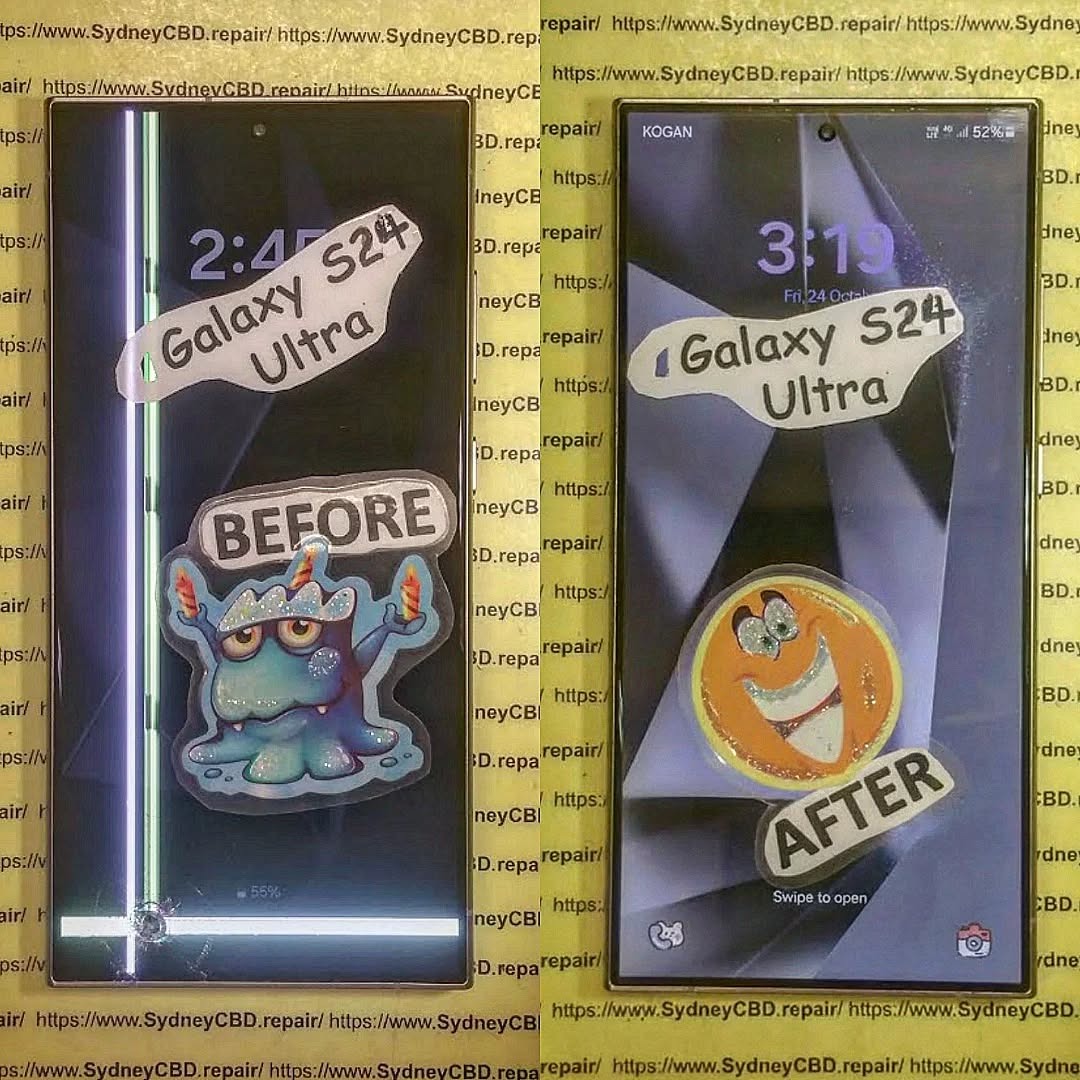
UNFIXABLE? Samsung S24 Ultra Green Line Mystery + Expert Insights + 15 Causes
Introduction
The Samsung S24 Ultra has taken the smartphone world by storm with its stunning display, cutting-edge features, and high-performance capabilities. Yet, even the most premium devices can encounter unexpected issues, and one of the most concerning for S24 Ultra users is the appearance of a persistent green line across the screen. This seemingly small defect can interfere with everyday usage, impact visual experience, and leave users wondering if their device is “unfixable.”
In this comprehensive guide, we will dive into the mystery of the Samsung S24 Ultra green line, exploring its possible causes—from software glitches to hardware defects—and providing practical solutions for both DIY troubleshooting and professional repairs. Whether you’re facing this issue for the first time or want to prevent it from occurring, this article will equip you with the knowledge to understand, diagnose, and address the green line effectively. By the end, you’ll know whether the problem can be permanently fixed and how to maintain your device to avoid future display anomalies.
The Samsung S24 Ultra is celebrated for its stunning AMOLED display, delivering vibrant colors, deep blacks, and ultra-smooth scrolling. AMOLED technology, especially the dynamic Super AMOLED panels used in the S24 Ultra, provides unmatched visual quality but also introduces unique vulnerabilities. One of the most reported issues among users is the appearance of a green line across the display. While initially subtle, this line can grow over time, affecting both usability and aesthetics.
The green line phenomenon is often associated with screen defects, whether from manufacturing or physical damage. Understanding your device’s display is crucial before attempting any fix.
AMOLED vs Super AMOLED Displays
Samsung’s AMOLED displays rely on individually lit pixels, which contribute to their high contrast ratio and energy efficiency. Super AMOLED, an advanced version, integrates touch sensors into the display layer, making the screen thinner and more responsive. However, these layers make the screen more susceptible to pixel-level defects, like the infamous green line.
Several factors contribute to the green line issue. Identifying the root cause can save time and money.
Hardware Defects
Factory defects remain one of the primary reasons. Even premium models like the S24 Ultra can occasionally have faulty display connectors, uneven pixel arrays, or internal layer misalignments. These issues typically manifest shortly after purchase and are usually covered under warranty.
Software Glitches
Sometimes, the green line is not physical but software-related. Firmware bugs, incompatible updates, or app conflicts can create display anomalies. A soft reset or firmware reinstallation often resolves these temporary issues.
Physical Damage
Dropping your device or applying pressure to specific areas can damage the display internally. Even if the glass appears intact, pressure can create permanent pixel damage, manifesting as lines on the screen.
Pixel Burn-in and Aging
Long-term usage can lead to pixel burn-in, especially with static images. Over time, certain areas of the screen may degrade faster than others, forming colored lines. While less common in new devices, it’s still a risk for heavy users.
Identifying if Your Device Is Affected
Knowing the signs of a green line early can prevent worsening damage.
Visual Inspection Techniques
Check the screen under different lighting conditions and angles. Green lines often appear brighter or more noticeable at higher brightness settings. Inspect for any physical distortions or pressure marks.
Using Samsung Diagnostic Tools
Samsung devices include a diagnostic mode accessible via the phone dialer or Settings. Navigate to Settings > About Phone > Diagnostics to test screen uniformity, touch sensitivity, and pixel performance. A green line in diagnostics indicates a physical screen issue.
DIY Troubleshooting Steps
Before rushing to a repair center, try these safe troubleshooting steps.
Soft Reset and Cache Clearing
Restarting the device can eliminate minor software glitches. Clearing cache through Settings > Storage > Cached Data can also help.
Safe Mode and App Conflict Resolution
Boot your S24 Ultra in Safe Mode to disable third-party apps temporarily. If the green line disappears, the issue may be caused by a recently installed app.
Professional Repair Options
If DIY attempts fail, professional repair is often the most reliable solution.
Screen Replacement Solutions
A defective display often requires a full screen replacement. Ensure that replacement parts are OEM-certified, as third-party panels may not offer the same color accuracy or touch sensitivity.
Repair Costs and Warranty Coverage
Repair costs for the Samsung S24 Ultra can vary. If your device is under warranty, check for coverage. Out-of-warranty repairs typically range from AUD $400–$650, depending on the service provider. Sydney CBD Repair Centre is an example of a trusted service provider offering genuine parts and same-day repairs.
Can a Green Line Be Permanently Fixed?
Understanding the realistic expectations of repair is key.
Cases of Permanent Fix
Some green lines are caused by software or minor connector issues. In these cases, updates or professional repair can permanently resolve the problem.
Situations Where It’s Truly Unfixable
Hardware failures such as damaged AMOLED layers are irreversible. In these instances, replacement is the only solution.
Preventing Display Issues in the Future
Protecting your device can prevent recurrence.
Proper Device Handling
Avoid dropping your phone, over-tightening cases, and exposing it to extreme temperatures.
Software Maintenance
Regularly update your device, reset software if necessary, and avoid prolonged static images on the display to minimize burn-in.
FAQs About Samsung S24 Ultra Green Line
1. Why did a green line appear on my Samsung S24 Ultra overnight?
Sudden green lines are usually caused by hardware defects, but software glitches or recent updates could also trigger this anomaly.
2. Is a green line covered under Samsung warranty?
Yes, if it is due to a manufacturing defect or hardware failure, most warranties will cover repair or replacement.
3. Can I fix the green line without professional help?
Minor software-related lines can sometimes be fixed via reset or firmware updates. Hardware-related issues require professional repair.
4. How much does a Samsung S24 Ultra screen replacement cost?
Out-of-warranty replacements typically cost AUD $400–$650. Prices vary based on location and service provider.
5. Will using a third-party screen affect my phone?
Yes, third-party screens may not match the original in color, touch sensitivity, or durability. OEM parts are recommended.
6. How can I prevent green lines in the future?
Avoid drops, limit static images, keep software updated, and handle your device with care to prolong screen lifespan.
Conclusion
The Samsung S24 Ultra green line mystery can be unnerving, but understanding its causes and available solutions can alleviate frustration. While some cases are permanently unfixable without screen replacement, many lines result from software or minor hardware issues that can be addressed effectively. Always rely on professional services like Sydney CBD Repair Centre for guaranteed quality and genuine parts. Maintaining your device with careful usage and regular software updates helps prevent future display anomalies.
Sydney CBD Repair Centre – Where Quality Meets Reliability. Call : +61280114119 | Website
WHAT HAPPENS NEXT? Unseen Damage From Screen Repair + 7 Critical Mistakes You Must Avoid
Introduction: The Hidden Side of Screen Repairs
Screen damage can happen to anyone. A sudden drop, an accidental bump, or even sitting on your phone can lead to a cracked screen that demands immediate attention. But what most users don’t realize is that screen repair is more than just replacing the glass—it involves delicate electronic systems that require precision and expertise.
At first glance, your phone might look and function perfectly after a repair. However, beneath the surface, unseen damage can develop over time—affecting your phone’s responsiveness, display brightness, and even battery life.
When done incorrectly, even minor missteps during a screen replacement can cause long-term harm. Let’s explore the unseen damage that can happen during or after screen repairs and how to avoid it.
Replacing a screen isn’t just a matter of swapping out parts. Modern smartphones are built with integrated circuits, touch sensors, proximity detectors, and other intricate components that work in harmony.
The Role of Micro-Connections and Internal Components
Every tap, swipe, and gesture depends on micro-connections between the digitizer (the touch layer) and your phone’s logic board. When a repair technician mishandles these components, even slightly, it can lead to problems like:
Ghost touches or unresponsive screens
Dimming or color inconsistency
Delayed touch feedback
This is why proper disassembly tools and expertise are crucial during screen repair.
Common Issues After Screen Replacement
Unseen damage often manifests gradually. Users may experience:
Battery draining faster than usual
Front camera malfunction or misalignment
Face ID or fingerprint sensor issues
Display flickering under sunlight
These problems often stem from cheap replacement parts or improper installation, both of which can compromise your device’s performance.
After a repair, your phone must undergo a full diagnostic check. Skipping this step is one of the most common yet dangerous mistakes.
How Skipping Testing Can Cause Long-Term Issues
Without diagnostics, small problems like sensor misalignment, loose connectors, or temperature irregularities go unnoticed. Over time, these can lead to:
Display freezing or lag
Accelerated battery wear
Internal corrosion from unnoticed microdamage
Professional repair centers like Sydney CBD Repair Centre perform a 20-point diagnostic test after every repair to ensure every component functions perfectly before handing the device back.
Mistake #2: Using Non-Genuine Parts
Many repair shops cut corners by using aftermarket or counterfeit screens that mimic OEM quality. While they may look the same initially, the differences become obvious after a few days of use.
The Difference Between OEM and Aftermarket Screens
Feature
OEM Screen
Aftermarket Screen
Brightness
True-to-original
Dull or tinted
Touch Sensitivity
Perfectly responsive
Laggy or inconsistent
Durability
Tempered and tested
Prone to cracks
Compatibility
100% match
May cause software conflicts
At Sydney CBD Repair Centre, only genuine parts are used—backed by a 90-day warranty for complete peace of mind.
Mistake #3: DIY Screen Repairs Without Expertise
You might think you’re saving money by fixing your phone yourself, but DIY repairs often lead to hidden internal damage that costs more to fix later.
The Hidden Costs of Attempting It Yourself
Cable tears during disassembly
Overheating due to improper adhesive removal
Waterproofing seals broken permanently
Battery punctures, which can cause dangerous short circuits
Without proper training and tools, even a small mistake can destroy a device worth hundreds of dollars.
Mistake #4: Overlooking Battery and Sensor Calibration
When your screen is replaced, battery and sensor calibration must be redone to ensure optimal performance.
How Improper Calibration Impacts Device Performance
Without proper calibration, your device might:
Show incorrect battery percentages
Have auto-brightness issues
Experience inaccurate proximity detection (like the screen staying on during calls)
Professional repair centers use specialized diagnostic software to recalibrate these systems—something DIY kits or unqualified shops can’t do.
Mistake #5: Failing to Address Water and Dust Resistance
Most modern smartphones come with IP67 or IP68 water resistance ratings, which can be compromised after screen replacement.
How Repairs Affect Your Device’s IP Rating
Improper resealing after repair allows microscopic water or dust particles to enter the device, causing corrosion, speaker damage, and short circuits over time.
Expert technicians reapply factory-grade waterproof seals, ensuring your device maintains its protection standards.
Mistake #6: Not Choosing a Certified Repair Centre
Your choice of repair shop determines whether your phone lasts or fails prematurely.
Why Expertise and Experience Matter
Certified technicians understand manufacturer repair guidelines, use anti-static environments, and follow strict part-handling protocols.
At Sydney CBD Repair Centre, over 2000 customers have rated their experience 5-stars for quality, speed, and reliability.
Mistake #7: Ignoring Early Warning Signs Post-Repair
Even after a seemingly successful repair, subtle issues can indicate hidden damage.
Common Symptoms That Indicate Deeper Damage
Screen flickers under dim light
Face ID or fingerprint not registering
Battery drains unusually fast
Phone heats up during idle
If you notice any of these, return to your repair centre immediately for inspection.
FAQs: Everything You Need to Know About Screen Repairs
1. How long does a professional screen repair take?
Most high-quality screen repairs take 30–60 minutes at trusted centres like Sydney CBD Repair Centre.
2. Does screen repair affect water resistance?
Yes, if not done properly. Always ensure resealing is done with factory-grade adhesives.
3. Are aftermarket screens really that bad?
They often compromise brightness, responsiveness, and longevity. OEM parts ensure the best results.
4. Can a bad screen repair affect my battery life?
Yes, poor installation or calibration can cause increased battery drain.
5. Will my warranty be voided after third-party repair?
Only if the repairer is unlicensed or uses non-genuine parts.
6. How do I know if my phone has unseen damage?
Look for performance changes—like slow touch response, camera blur, or sudden restarts.
Conclusion: Protect Your Investment with Expert Repairs
Your smartphone is more than a device—it’s your connection to work, family, and daily life. Don’t risk it with unqualified repairs. Unseen damage from screen repair can cost more in the long run than the repair itself. Always choose certified professionals who use genuine parts, perform full diagnostics, and provide post-repair support.
Why Sydney CBD Repair Centre Is the Trusted Name in Screen Repairs
🏆 6 Years in a Row – Sydney’s Best Phone Repair Service
📍 Located in the heart of Sydney CBD
📱 Genuine parts, expert technicians, and same-day service
⭐ 2000+ Google 5-Star Reviews
🛠️ 90-Day Warranty on All Repairs
A cracked or malfunctioning phone screen is more than just an inconvenience—it can make your device unsafe, unreliable, and frustrating to use. For many smartphone users, replacing a damaged screen is one of the most common repairs they’ll ever need. But not all replacement screens are created equal. That’s why understanding the truth about OEM phone screens versus aftermarket options is so important.
Your phone’s screen affects everything—from brightness and color accuracy to touch responsiveness and overall durability. Choosing the wrong replacement screen can leave you with glitches, shorter lifespan, and wasted money.
“OEM” stands for Original Equipment Manufacturer. This means the screen is produced by the same manufacturer that made your phone’s original display. For example, Samsung, Apple, and Google source their screens from highly specialized display makers like Samsung Display, LG, or BOE.
When you choose an OEM phone screen replacement, you’re essentially getting the same part your phone came with from the factory—ensuring compatibility, durability, and premium performance.
By contrast, aftermarket screens are third-party copies made by companies that do not manufacture for the brand. These can vary wildly in quality and often fall short of OEM standards.
When deciding between OEM and aftermarket phone screens, there are a few crucial factors to keep in mind:
Build Quality and Durability
OEM screens are built with stronger glass and tested for durability against drops and scratches. Aftermarket screens may look similar at first but often use cheaper materials that break more easily.
OEM screens deliver accurate colors, high brightness, and smooth touch sensitivity.
Aftermarket screens may appear dimmer, show washed-out colors, and even lag in touch response.
This can make a huge difference if you use your phone for photography, gaming, or professional work.
Compatibility With Phone Software
OEM displays are designed to work seamlessly with your phone’s operating system. Aftermarket versions can cause software glitches, unresponsive touch sensors, or incompatibility with features like Face ID or fingerprint recognition.
Common Myths About OEM Phone Screens
There are plenty of misconceptions about OEM phone screens. Let’s clear up a few:
Myth: OEM screens are just overpriced versions of aftermarket ones.
Truth: OEM parts undergo strict testing, ensuring safety and performance.
Myth: Aftermarket screens are “good enough” for daily use.
Truth: They may work short-term but often fail prematurely.
Myth: You can’t tell the difference between OEM and aftermarket.
Truth: Side-by-side, OEM displays have brighter colors, better clarity, and smoother touch sensitivity.
How to Spot Genuine OEM Phone Screens
Not all “OEM” screens sold online are truly original. Here’s how to check:
Ask for proof of authenticity from the repair centre.
Look for brand-specific markings or etched serial numbers.
Check warranty policies—real OEM screens usually come with a guarantee.
Beware of suspiciously cheap prices. If it’s too good to be true, it probably is.
For peace of mind, always visit a trusted repair centre that sources genuine parts.
The Hidden Costs of Using Cheap Aftermarket Screens
At first glance, aftermarket screens may seem like a bargain. But here’s what they can really cost you:
Frequent replacements due to poor durability
Reduced resale value of your phone
Battery drain issues caused by incompatible displays
Broken features like Face ID or fingerprint sensors
In the long run, choosing OEM saves you money and frustration.
Why Trusted Repair Centres Always Recommend OEM Parts
Better Customer Satisfaction
Repair shops that use OEM parts deliver better results and earn more repeat customers.
Long-Term Device Reliability
Phones repaired with OEM screens last longer, perform better, and face fewer technical issues.
This is why Sydney CBD Repair Centre and other top-rated service providers exclusively recommend OEM parts—they prioritize customer trust and device longevity.
Q1: Are OEM screens more expensive than aftermarket?
Yes, but they provide better performance, durability, and long-term value.
Q2: Will my phone warranty stay valid if I use OEM parts?
In many cases, yes. Using genuine parts ensures compliance with manufacturer standards.
Q3: Can aftermarket screens damage my phone?
They can cause compatibility issues, overheating, and even permanent damage.
Q4: How do I know if my repair centre uses OEM parts?
Ask for authenticity certification and check if they offer a warranty.
Q5: Do OEM screens improve resale value?
Absolutely. Phones with genuine parts fetch higher resale prices.
Q6: Is it worth paying extra for OEM?
Yes—because you’re paying for reliability, safety, and peace of mind.
Conclusion: Making the Smart Choice for Your Phone Repair
When it comes to phone screen replacements, OEM screens are the gold standard. They’re designed for your device, tested for durability, and guaranteed to deliver top-notch performance. While aftermarket options may look tempting, they come with hidden costs that can shorten your phone’s life.
For reliable and professional repairs, trust Sydney CBD Repair Centre—Sydney’s #1 choice for mobile phone repairs six years in a row. With genuine parts, expert technicians, and over 2000+ 5-star reviews, you can rest assured your device is in the best hands.
David from Sydney CBD Repair Centre – The Best place to fix mobile phones as 6 Years In A Row! Top Mobile Phone Repair In Sydney. More than 2000 Positive Reviews on Google and Same Day Repairs.
📍 Visit us today for: ✓ Same Day Express Repairs ✓ Genuine Parts Guarantee ✓ Professional Technicians ✓ Competitive Pricing ✓ 2000+ 5-Star Google Reviews ✓ 6-Time Award Winner for Best Phone Repairs
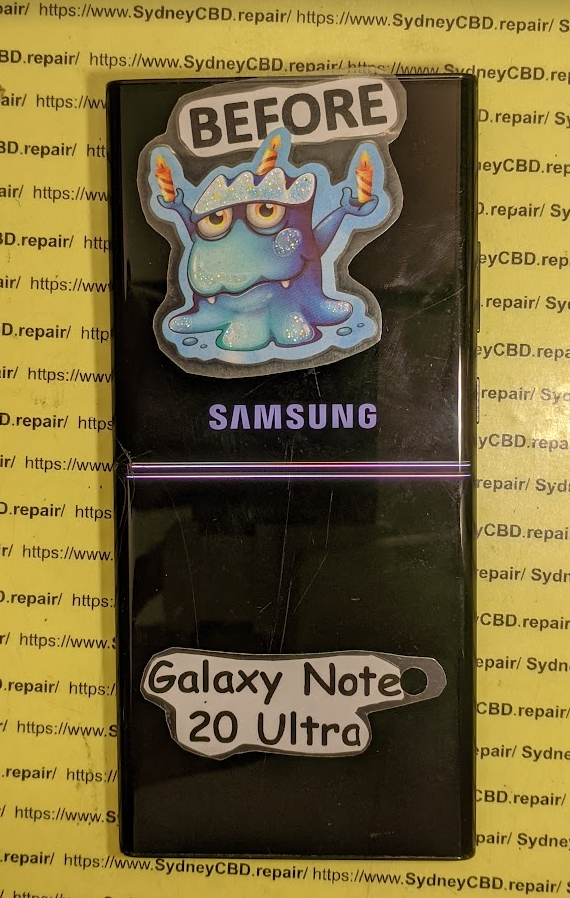
This blog post details the journey of a customer from Byron Bay, Australia, who needed his broken Galaxy Note 20 Ultra repaired. He chose to ship the device to Sydney CBD Repair Centre despite being closer to other repair shops because of the company’s reputation for using genuine parts and having exceptional customer service. The document then provides a step-by-step breakdown of the repair process, including the communication with the customer and the shipping of the device back to Byron Bay. The customer’s positive review highlights the company’s efficiency, quality, and customer satisfaction. Finally, the blog post discusses why Sydney CBD Repair Centre is a popular choice for mobile phone repairs, noting their five years as one of Sydney’s top three repair shops, their over 18,000 positive Google reviews, and their ability to offer same-day repairs.
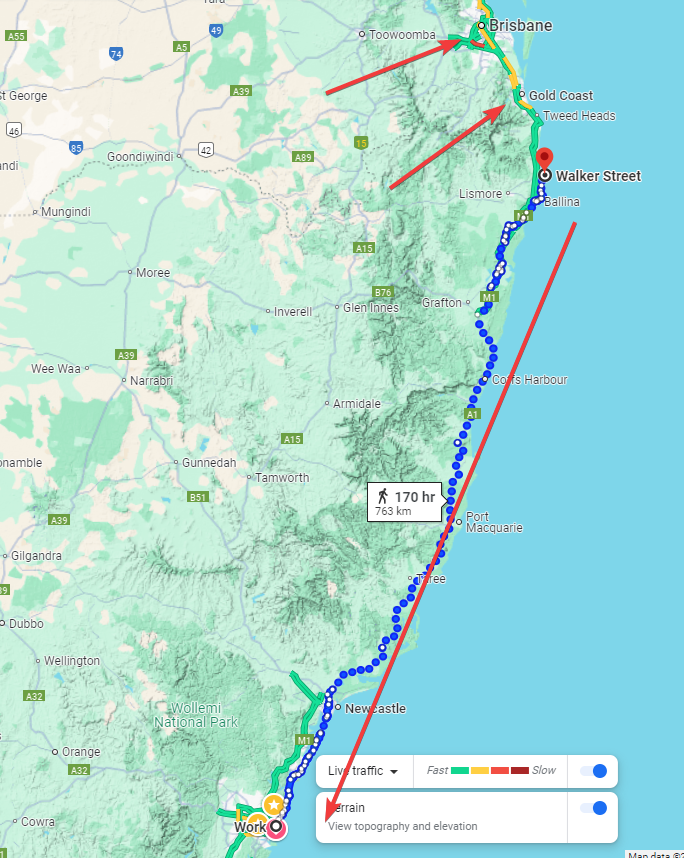
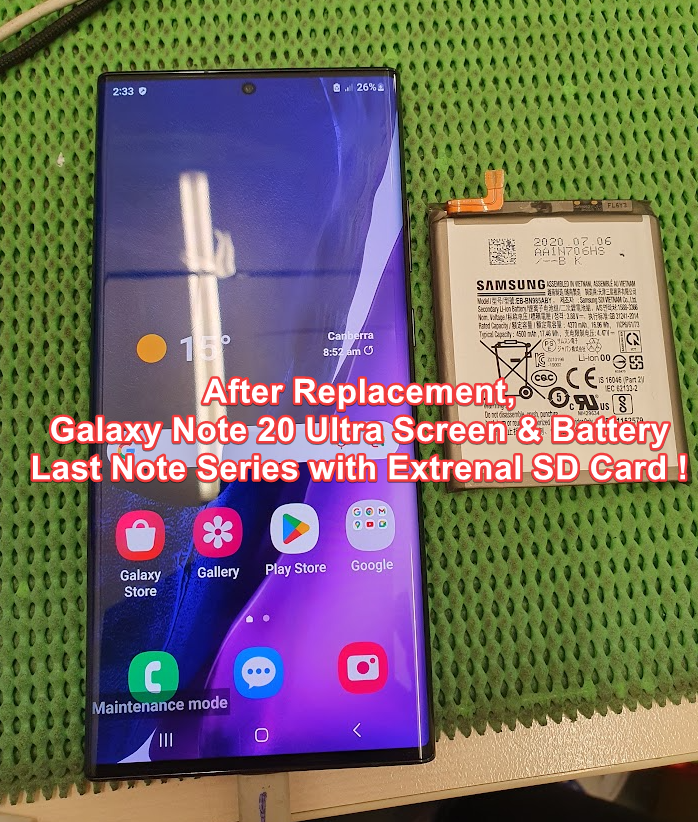
Arthur M., a resident of the beautiful Byron Bay, found himself in a frustrating situation. His Galaxy Note 20 Ultra, the last in the Galaxy Note series to feature an external SD card, had suffered a cracked screen and a dying battery. While there were repair shops closer to him in nearby Brisbane, he made a wise decision. After thorough research, Arthur chose Sydney CBD Repair Centre to restore his beloved device.
Why? Because Sydney CBD Repair Centre is renowned for its professional service, use of genuine parts, and exceptional customer reviews. Arthur was well aware that this would be the best place for his repair, even if it meant sending his phone across hundreds of kilometers.
Once Arthur made contact with Sydney CBD Repair Centre, the process was seamless. They gave him detailed instructions about how to ship his device, where to send it, and how to make the payment. Trusting Australia Post with his package, Arthur sent his Galaxy Note 20 Ultra on a journey from Byron Bay to Sydney.
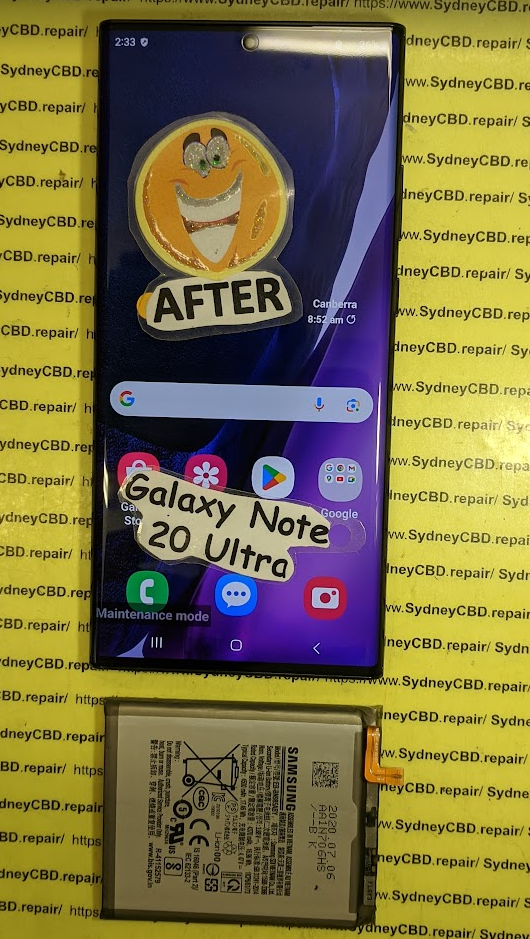
The next part of the story is where David, the expert technician at Sydney CBD Repair Centre, took swift action. That very morning, David replaced the broken screen and battery of Arthur’s phone, ensuring that the S-Pen worked flawlessly. To top it off, a complimentary screen protector was applied for extra protection.
By noon, David contacted Arthur to confirm the repair and verify the return delivery details. On the same day, Arthur’s phone was posted back to Byron Bay, wrapped in secure packaging and ready for the journey home.
Tracking History – Sydney to Byron Bay:
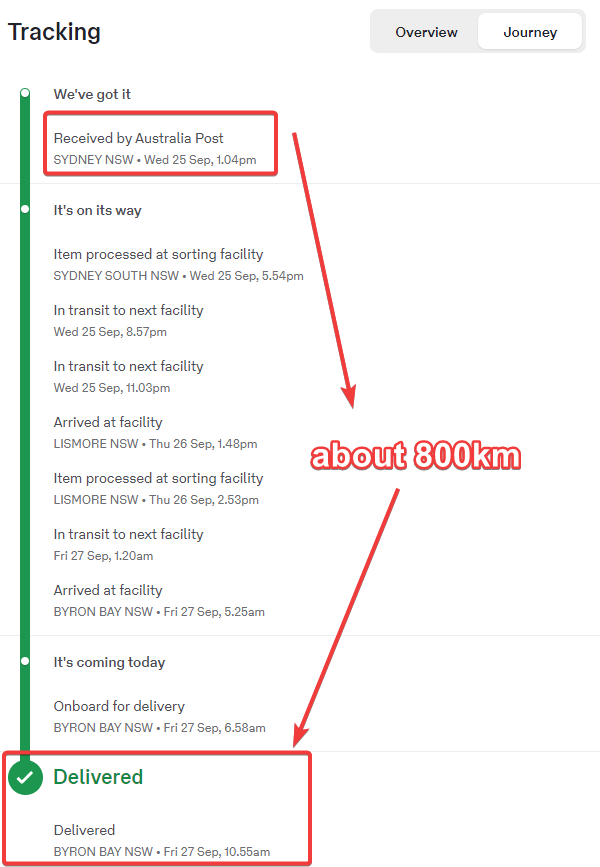
Wed, 25 Sep, 1.04 pm – “We’ve got it,” confirmed by Australia Post. The phone was back on the road to Byron Bay.
Thu, 26 Sep, 1.48 pm – The package arrived at Lismore.
Fri, 27 Sep, 10.55 am – Delivered! Arthur’s Galaxy Note 20 Ultra was finally home.
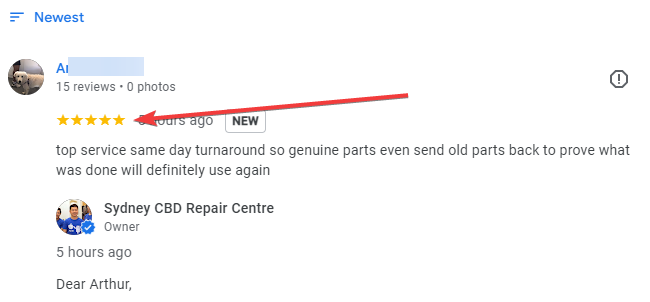
Arthur was ecstatic. His phone looked and worked as if it were brand new. Overjoyed by the fast, reliable service and the genuine parts used in the repair, he left a glowing 5-star review:
“Top service, same-day turnaround! Genuine parts, even sent the old parts back to prove what was done. Will definitely use again!”
For David and Sydney CBD Repair Centre, another happy customer and another Galaxy Note 20 Ultra brought back to life. Arthur’s wise decision to trust the best in the business was clearly worth the extra distance.
sydney-cbd-repair-centre-thank-you2.png
Sydney CBD Repair Centre: Recognized as one of the Top 3 Mobile Phone Repair Shops in Sydney for five years in a row, with over 18,000 positive reviews on Google. Same-day repairs with genuine parts!
How Sydney CBD Repair Centre Became the Go-To Repair Shop for a Galaxy Note 20 Ultra Owner from Byron Bay
Introduction
Byron Bay, a stunning coastal town in New South Wales, is renowned for its breathtaking beaches, laid-back lifestyle, and vibrant community. It’s not the first place you’d think of when it comes to mobile phone repairs, especially considering its distance from major cities like Sydney. Despite Byron Bay being relatively close to Brisbane with plenty of repair options there, one customer with a broken Galaxy Note 20 Ultra made the decision to send his device to Sydney CBD Repair Centre after extensive research.
Why would someone from Byron Bay bypass local and nearby repair shops to send their phone all the way to Sydney? The reasons are simple yet compelling. In this article, we dive into the customer’s journey, why Sydney CBD Repair Centre was the best choice, and how the entire process unfolded smoothly.
The Last of Its Kind: The Galaxy Note 20 Ultra
Why Is the Galaxy Note 20 Ultra So Special?
The Galaxy Note 20 Ultra holds a unique place in the smartphone world. It’s the last Galaxy Note model to feature an external SD card slot, a beloved feature for users needing expandable storage. Combine that with its powerful performance, and many owners still hold onto this model. Even years after its release, it’s a device that can be revitalized with the right repairs, like battery replacements and screen fixes.
The Importance of Keeping the Galaxy Note 20 Ultra in Working Condition
For many, the Note 20 Ultra is not just a phone; it’s a tool for productivity, creativity, and entertainment. The S Pen, powerful processor, and large screen make it ideal for professionals and artists alike. When something goes wrong with this device, finding a repair center that can handle it with care and expertise is essential.
Our customer, Arthur M**, from Byron Bay, knew his Galaxy Note 20 Ultra was worth repairing. After doing his research, he came across Sydney CBD Repair Centre. Despite the distance, Arthur chose this repair center because of its stellar reputation, expertise with high-end Samsung models, and the use of genuine parts.
Genuine Parts and Expertise
The quality of the parts used in a repair can make all the difference. Sydney CBD Repair Centre is known for its use of genuine parts, which reassured Arthur that his Galaxy Note 20 Ultra would receive the best possible care. Plus, with over 18,000 positive reviews and being recognized as one of the top 3 repair shops in Sydney for five consecutive years, the decision seemed clear.
How the Repair Process Worked: A Step-by-Step Breakdown
Step 1: Initial Contact
Arthur reached out to Sydney CBD Repair Centre, inquiring about the repair process. He was quickly provided with all the necessary details: where to send his device, how to make the payment, and what to expect. The communication was smooth and efficient, making the process straightforward.
Step 2: Posting the Device to Sydney
After confirming all the details, Arthur sent his Galaxy Note 20 Ultra via Australia Post. Here’s the tracking history of the device as it traveled from Byron Bay to Sydney:
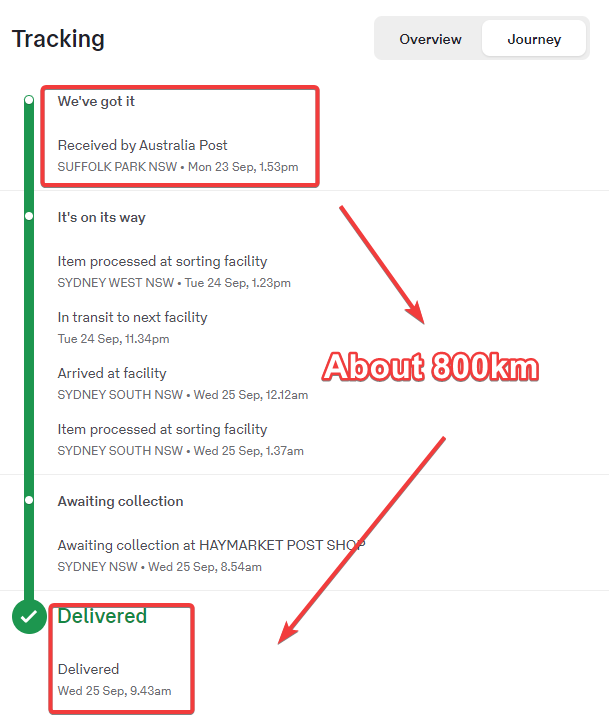
Received by Australia Post, Suffolk Park NSW – Mon 23 Sep, 1.53 pm
Processed at sorting facility, Sydney West NSW – Tue 24 Sep, 1.23 pm
Arrived at facility, Sydney South NSW – Wed 25 Sep, 12.12 am
Awaiting collection at Haymarket Post Shop, Sydney NSW – Wed 25 Sep, 8.54 am
Once the phone arrived at the repair center, David, one of the top technicians at Sydney CBD Repair Centre, got to work. The phone’s broken screen was replaced with a genuine Samsung screen, and the battery was swapped out for a new one. To ensure everything was working correctly, the S Pen function was tested, and a free screen protector was applied as an added bonus.
Step 4: Communication with Arthur
After completing the repairs, David contacted Arthur to confirm the delivery address and receiver name. The process was swift, and before long, the phone was ready to be sent back.
Step 5: Posting the Device Back to Byron Bay
Arthur’s repaired Galaxy Note 20 Ultra was sent back to Byron Bay the very same day. Here’s the tracking history from Sydney back to Byron Bay:
Received by Australia Post, Sydney NSW – Wed 25 Sep, 1.04 pm
Processed at sorting facility, Sydney South NSW – Wed 25 Sep, 5.54 pm
This review speaks volumes about the quality of the service offered by Sydney CBD Repair Centre. The use of genuine parts, the transparency in sending back the old parts, and the fast same-day turnaround are all key factors that led to this stellar review.
Why Sydney CBD Repair Centre Is the Best Choice for Phone Repairs
5 Years as One of Sydney’s Top 3 Mobile Phone Repair Shops
With a track record of excellence, Sydney CBD Repair Centre has been ranked among the top 3 mobile phone repair shops in Sydney for five years in a row. This achievement is a testament to their expertise, customer service, and consistent quality.
Over 18,000 Positive Reviews
It’s not just Arthur who had a great experience. With over 18,000 positive reviews on Google, Sydney CBD Repair Centre has built a reputation for excellence that spans across thousands of satisfied customers.
Same-Day Repairs
One of the standout features of this repair center is their ability to offer same-day repairs. In Arthur’s case, the repair was done and posted back within the same day, minimizing the time he had to be without his phone.
Conclusion
Arthur’s experience with Sydney CBD Repair Centre highlights the importance of choosing the right repair shop for your device, no matter how far away you are. The combination of genuine parts, expert technicians, and a commitment to customer satisfaction sets Sydney CBD Repair Centre apart from the competition. Whether you’re in Byron Bay or right in the heart of Sydney, this repair center is the go-to destination for quality mobile phone repairs.
FAQs
1. Why should I choose Sydney CBD Repair Centre over local repair shops?
Sydney CBD Repair Centre is renowned for its expertise with high-end devices and uses genuine parts, ensuring your device gets the best possible care. Their excellent customer service and fast turnaround make them worth considering, even if you’re far from Sydney.
2. How long does the repair process take?
In most cases, Sydney CBD Repair Centre offers same-day repairs, meaning your device will be fixed and sent back to you quickly.
3. Do they use genuine parts?
Yes, Sydney CBD Repair Centre uses genuine parts for all repairs, ensuring the highest quality and longevity for your device.
4. How do I send my phone for repair if I’m not in Sydney?
The process is simple. Contact Sydney CBD Repair Centre to receive details on how to send your device via Australia Post. Once your device arrives, it will be repaired and sent back to you promptly.
5. What if I have other issues with my device besides the screen?
Sydney CBD Repair Centre can handle a wide range of issues, from battery replacements to internal repairs. Just let them know what needs fixing, and they’ll provide a solution.
People also ask
What are the benefits of choosing Sydney CBD Repair Centre for Galaxy Note 20 Ultra repairs?
How does the cost of repairing a Galaxy Note 20 Ultra compare to purchasing a new phone with similar features?
What are the long-term advantages of maintaining a Galaxy Note 20 Ultra, considering its unique features like the external memory slot?
📱 **Galaxy Note 20 Ultra Overview**
-The Samsung Galaxy Note 20 Ultra is a high-end smartphone known for its large display, advanced camera system, and integrated S Pen stylus. It was released in August 2020.
💾 **Expandable Storage and S Pen**
-The Note 20 Ultra supports expandable storage via microSD and features an S Pen with 9ms latency, making it ideal for note-taking and drawing.
-If you value the S Pen and expandable storage, repairing might be worthwhile. Consider the repair cost against the price of a new device with similar features.
Here are the factors that influenced the customer’s decision to choose Sydney CBD Repair Centre for their Galaxy Note 20 Ultra repair, based on the provided sources:
Sydney CBD Repair Centre’s positive reputation: The customer, Arthur M., chose Sydney CBD Repair Centre after conducting research and discovering its excellent reputation. The repair center is known for its expertise in repairing high-end Samsung phones and for using genuine parts.
Use of genuine parts: Sydney CBD Repair Centre is known for using genuine parts, which gave Arthur confidence that his phone would receive the best possible care.
Positive customer reviews: Arthur was influenced by the repair center’s overwhelmingly positive reviews. Sydney CBD Repair Centre has over 18,000 positive Google reviews and has been recognized as a top-three repair shop in Sydney for five years running.
The sources also mention that Sydney CBD Repair Centre offers same-day repairs, which was likely a factor in Arthur’s decision. However, the sources do not explicitly state that this influenced his choice.
Sydney CBD Repair Centre differentiated itself from other repair shops by cultivating a strong reputation for professionalism, the use of genuine parts, and positive customer reviews. This emphasis on quality, combined with clear communication and a streamlined repair process, convinced Arthur, the customer from Byron Bay, to entrust his Galaxy Note 20 Ultra to them despite the distance.
Here’s a breakdown of the key factors:
Reputation and Expertise: Arthur’s research led him to Sydney CBD Repair Centre due to their stellar reputation and expertise in repairing high-end Samsung models. They have consistently been ranked among the top 3 mobile phone repair shops in Sydney for five years running, further solidifying their standing.
Genuine Parts: The use of genuine parts was a major deciding factor for Arthur. Sydney CBD Repair Centre emphasizes this, assuring customers that their devices will receive the best possible care. This commitment to quality is further evidenced by their practice of returning the replaced parts to customers, offering transparency and building trust.
Positive Customer Reviews: The abundance of positive customer reviews, exceeding 18,000 on Google, contributed to Sydney CBD Repair Centre’s appeal. These reviews, along with Arthur’s own positive experience, demonstrate a consistent track record of customer satisfaction.
Efficient Communication and Processes: From the initial inquiry to the final delivery, Sydney CBD Repair Centre maintained clear and efficient communication with Arthur. This, coupled with their streamlined repair process and commitment to same-day repairs, ensured a smooth and hassle-free experience for the customer.
In essence, Sydney CBD Repair Centre differentiated itself through a combination of technical expertise, a commitment to quality parts, transparent communication, and a customer-centric approach. This resonated with Arthur, who prioritized these factors over geographical proximity.
Implications of Customer Experience for Sydney CBD Repair Centre’s Success
The overwhelmingly positive customer experience detailed in the sources has several implications for the overall success of Sydney CBD Repair Centre:
Attracting Customers from Afar: Arthur’s willingness to ship his device from Byron Bay to Sydney, bypassing closer repair options, demonstrates the potential for Sydney CBD Repair Centre to attract customers beyond their immediate geographical location. This is largely due to their strong reputation for quality repairs and exceptional customer service.
Building a Loyal Customer Base: Arthur’s positive experience, culminating in a glowing 5-star review and his stated intention to use their services again, highlights how positive customer experiences can translate into repeat business and build brand loyalty.
Generating Positive Word-of-Mouth Marketing: Arthur’s positive review, added to over 18,000 others on Google, contributes to a strong online reputation that can attract new customers. This organic marketing is invaluable for building trust and credibility.
Justifying Premium Pricing: While the sources don’t mention specific prices, the use of genuine parts, same-day service, and excellent customer service potentially allows Sydney CBD Repair Centre to command a premium price point compared to competitors. Customers like Arthur are willing to pay more for the peace of mind and quality assurance that comes with a premium service.
Long-Term Business Growth: Continued positive customer experiences like Arthur’s can lead to sustained business growth for Sydney CBD Repair Centre. Their reputation for quality, speed, and customer care positions them as a leader in the competitive mobile phone repair market.