White Lines on Screen: Do you want to fix it or replace it? The Ultimate 2026 Guide
Introduction
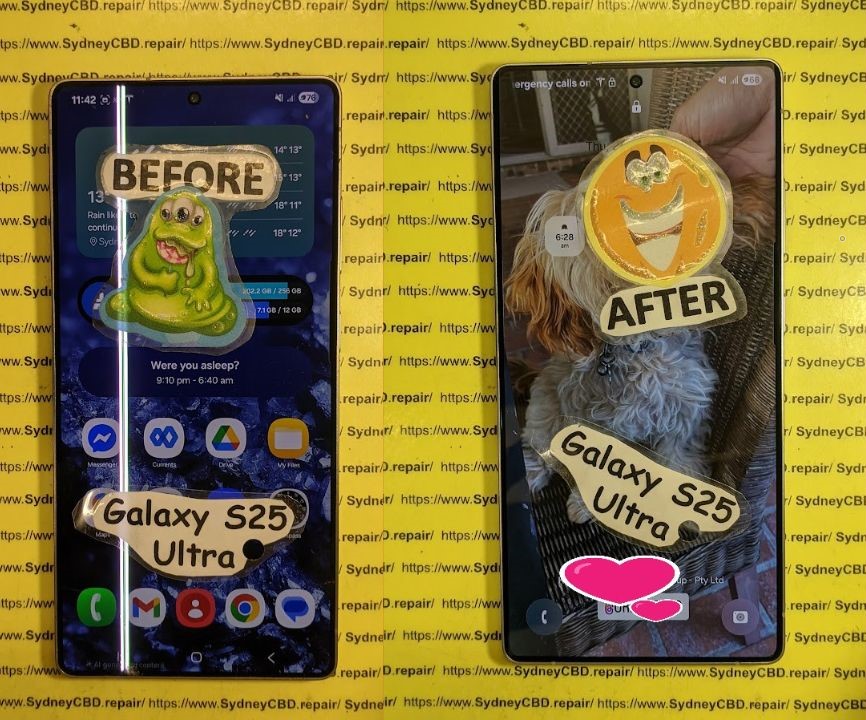
Seeing a white line on your phone screen can be frustrating and even alarming. Whether it’s a faint vertical streak or a bold horizontal bar cutting across your display, it usually means something’s not quite right—either with your phone’s hardware or software. Many smartphone users panic when this happens, thinking their device is beyond repair. However, that’s not always the case.
In many instances, a white line can be caused by minor software glitches, a loose display connector, or even temporary pixel issues—all of which can be fixed without replacing your entire screen. But if it’s a sign of deeper damage, knowing when to repair or replace your screen can save you time, money, and stress.
In this comprehensive 2026 guide, we’ll explore the main causes behind white lines on your screen, walk you through diagnostic steps, explain temporary and permanent fixes, and help you decide whether it’s best to repair or replace your device. Backed by expert insights from Sydney CBD Repair Centre, this article will give you the clarity and confidence to handle this issue the smart way.
So, if you’ve been staring at that stubborn line wondering what to do next, you’re in the right place. Let’s dive in and uncover the ultimate solution to white line screen problems once and for all.
A white line on your phone screen is more than just an annoying distraction—it’s often a warning sign that your device’s display or internal components are damaged. Understanding the root cause helps you decide whether it can be fixed or needs a full replacement.
Hardware-Related Causes
One of the most common reasons for a white line is physical damage to the display panel. If you’ve dropped your phone or applied excessive pressure on the screen, the LCD or OLED layers might be cracked internally. This disrupts the flow of electrical signals to specific pixels, creating vertical or horizontal white lines.
Another possible culprit is a loose or damaged flex cable connecting the display to the motherboard. These cables are fragile, and even a minor misalignment can cause flickering, ghosting, or white lines across your screen.
Software Glitches and Firmware Errors
Sometimes, the issue isn’t physical at all. A corrupted firmware update or a buggy app can interfere with your display’s performance. In these cases, white lines might appear temporarily or during certain operations, such as opening specific apps or changing brightness levels.
Manufacturing Defects or Screen Aging
If your device is older or has been repaired before, you might be experiencing screen degradation. Over time, exposure to heat, dust, and moisture can affect display uniformity. Certain models also have known display faults that cause persistent lines after extended use.
Before jumping to conclusions, it’s crucial to diagnose whether your white line problem is software-related or hardware-based.
Simple Tests You Can Try at Home
Restart your device – A quick reboot often clears minor glitches.
Boot in safe mode – If the line disappears, an app is likely causing the issue.
Screenshot test – Take a screenshot. If the white line appears in the image, it’s a software issue; if not, it’s hardware-related.
Connect to an external display – If the image looks normal externally, your internal screen needs repair.
When to Seek Professional Help
If you’ve done these tests and the white line remains, it’s time to consult a repair technician. Sydney CBD Repair Centre offers free diagnostics and can determine whether a simple reconnection or full screen replacement is needed.
Temporary Fixes for White Line on Screen
While these fixes aren’t permanent, they can temporarily alleviate the issue until you get professional help.
Restarting and Resetting the Device
Restarting your phone clears cache and refreshes system memory. If the issue persists, consider a factory reset—just remember to back up your data first.
Software Update or Rollback
If the white line appeared after an update, it might be a software bug. Try rolling back to a previous version or checking for the latest firmware update.
Pixel Repair and Screen Calibration Tools
There are apps and tools that can “massage” stuck pixels or recalibrate your display. While these can sometimes help, they don’t fix hardware-level damage.
Permanent Fixes: Repair vs. Replacement
When Screen Replacement Is Necessary
If the damage is caused by a cracked display, broken connector, or faulty panel, the only real solution is screen replacement. Attempting to repair individual pixels or solder points usually leads to more damage.
How Much Does Screen Replacement Cost?
Costs vary depending on your device model and screen type:
Brand
Estimated Cost (AUD)
Samsung Galaxy S Series
$380–$550
iPhone Models
$250–$500
Google Pixel
$320–$480
Oppo / Xiaomi
$200–$400
(Prices from Sydney CBD Repair Centre, 2026)
Choosing Between OEM and Aftermarket Parts
Opting for OEM screens guarantees original quality and brightness, while aftermarket screens may save money but sacrifice performance. Sydney CBD Repair Centre only uses genuine OEM parts with a 90-day warranty for peace of mind.
Professional Repair Process Explained
Step-by-Step Breakdown by Sydney CBD Repair Centre
Device inspection and free diagnostic
Safe disassembly and screen removal
Connector and motherboard testing
Genuine screen installation
Functionality and touch calibration
Final quality assurance test
Quality Assurance and Warranty
Every repair comes with a 90-day parts and labor warranty. Our technicians are certified professionals with years of experience, ensuring your device is restored to like-new condition.
DIY Repair: Risks and Considerations
Required Tools and Skills
DIY screen replacement requires:
Precision screwdriver set
Heat gun or separator
Suction tool and prying picks
Replacement screen (OEM preferred)
Why DIY Repairs Can Be Risky
Improper disassembly can cause additional damage to your battery, connectors, or sensors. You might also void your warranty. It’s best to leave this to professionals like Sydney CBD Repair Centre, where repairs are quick, affordable, and guaranteed.
How to Prevent White Lines in the Future
Safe Charging Habits and Screen Care
Overcharging or using faulty chargers can cause voltage spikes that damage the display. Always use certified charging accessories.
Using Genuine Accessories
Avoid cheap cables and cases that may put unnecessary pressure on your screen. Genuine accessories not only ensure performance but also protect your investment.
FAQs
1. Can a white line on my phone screen disappear on its own?
Sometimes, yes—if caused by software issues. However, physical damage requires professional repair.
2. How long does screen replacement take?
At Sydney CBD Repair Centre, most repairs are completed the same day, often within an hour.
3. Does screen replacement affect waterproofing?
Professional repair centres reseal the device properly to maintain its water resistance.
4. Can I use my phone with a white line?
Yes, but continued use might worsen the damage or lead to full display failure.
5. Are aftermarket screens reliable?
They can work temporarily but often lack brightness, touch sensitivity, and durability.
6. Is screen repair covered under warranty?
Manufacturer warranty typically excludes accidental damage, but repair shops offer independent warranties.
Conclusion: Trust the Experts at Sydney CBD Repair Centre
If you’re dealing with a white line on your phone screen, don’t ignore it. Whether it’s a simple connector issue or a damaged OLED panel, professional assessment is key.
At Sydney CBD Repair Centre, we provide genuine parts, same-day service, and transparent pricing—ensuring your device looks and performs like new.
👉 Visit us today for:
✓ Same Day Express Repairs
✓ Genuine Parts Guarantee
✓ 2000+ 5-Star Google Reviews
✓ 6-Time Award Winner for Best Phone Repairs
Diagnosing Black Screen And Green Line Glitches On Damaged OPPO Find X5 Pro Displays: 11 Powerful Fixes
Introduction
The OPPO Find X5 Pro is equipped with a high-end 6.7-inch curved AMOLED display designed for detailed images, smooth motion, and rich colour reproduction. OPPO’s specifications describe the panel as a 1 Billion Colour Bionic Display with a 120Hz dynamic refresh rate, while the company also lists Gorilla Glass Victus protection and WQHD+ resolution. (OPPO)
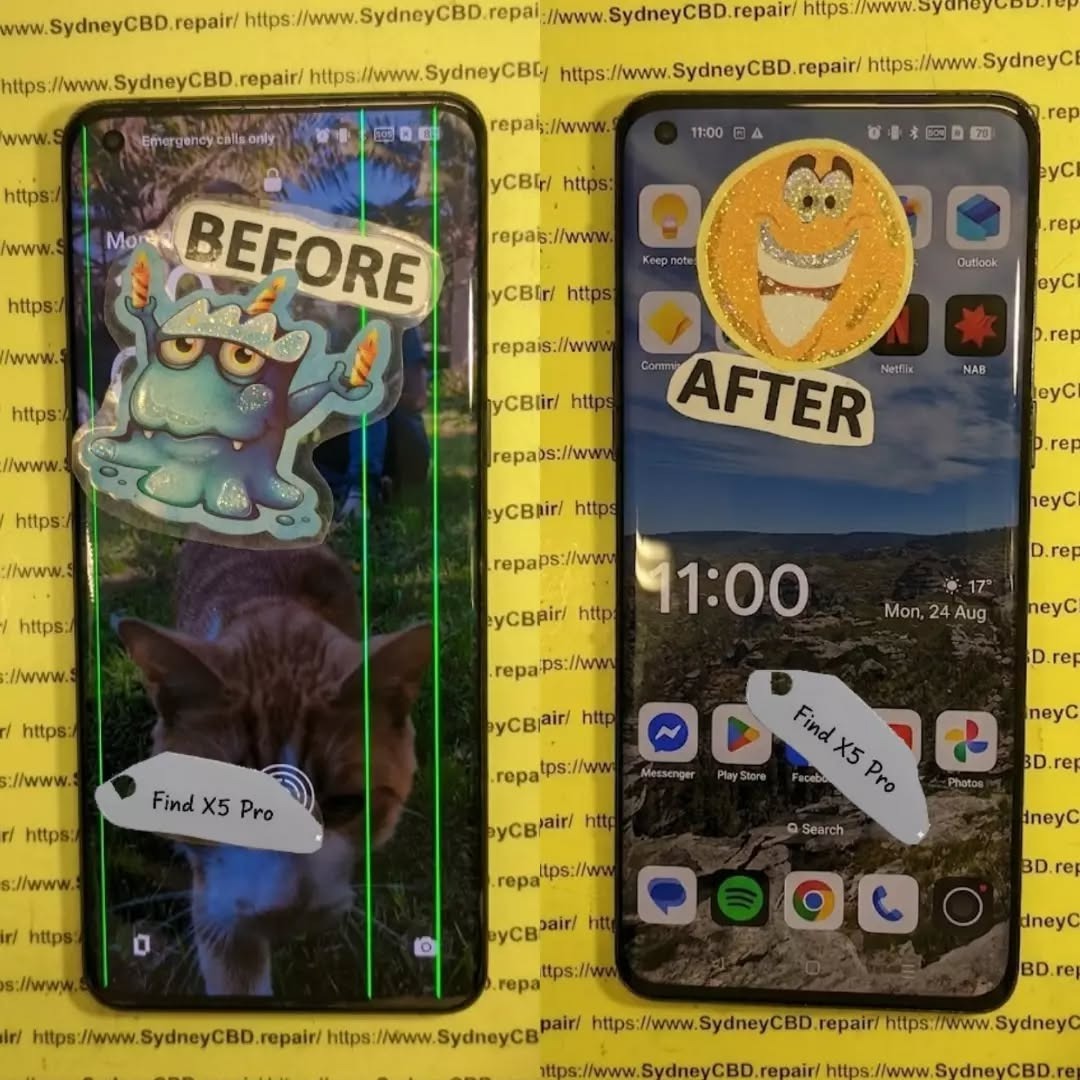
However, even a premium display can develop problems after a drop, impact, pressure, liquid exposure, overheating, or internal component failure. Two symptoms that deserve particular attention are a completely black screen and a persistent green line running vertically or horizontally across the display.
If your phone still vibrates, rings, receives notifications, or connects to a computer while the screen remains black, the problem may be concentrated in the display assembly rather than the entire phone. Likewise, a green line that remains visible after restarting the device can indicate a hardware-related OLED panel problem.
This guide explains how to diagnose these symptoms safely, distinguish software glitches from physical display damage, and determine when professional repair is the sensible next step.
The first step in diagnosing a display problem is understanding what you’re dealing with.
The OPPO Find X5 Pro uses a curved AMOLED display. Its official specifications list a 6.7-inch panel, 3216 × 1440 resolution, 10-bit colour depth, and an adaptive refresh rate that can operate up to 120Hz. OPPO also highlights its 1 Billion Colour Bionic Display technology and 8192-level brightness control. (OPPO)
That technology produces an excellent viewing experience, but an AMOLED panel isn’t indestructible.
A modern smartphone display consists of several layers and components working together. Depending on the exact fault, damage can affect:
The outer protective glass
Touch-sensitive layers
The AMOLED/OLED panel
Display driver circuitry
Flexible display cables
Connectors
Power circuitry
Mainboard display components
Software responsible for rendering images
A phone can therefore have a display that looks physically acceptable but has internal damage.
For example, a small impact near the edge of a curved screen may damage the panel underneath the glass. You might initially notice only a tiny line or flicker. Over time, however, additional pixels may stop working.
On the other hand, a phone that suddenly goes black after a fall may have suffered connector damage, panel damage, or a failure in the display power circuit.
That’s why simply looking at the glass isn’t always enough.
Why AMOLED Damage Can Look Different
AMOLED technology produces light at the individual pixel level. This means panel damage can create distinctive symptoms.
A damaged OLED panel might show:
Green or pink lines
Black spots
Flickering
Partial screen failure
Brightness abnormalities
Unusual colour patches
Ghost-like images
A completely black display
The symptom can also change depending on how much pressure the phone has experienced.
For example, if the display briefly works when the phone is flexed or squeezed, that’s not a sign that pressing the device is a good repair method. Instead, it may indicate an unstable internal connection or damaged panel.
In short, don’t press, bend, twist, or heat the phone to make the display work again.
That can turn a repairable fault into a more serious one.
1. Common Causes of Black Screen And Green Line Glitches
When diagnosing black screen and green line glitches on damaged OPPO Find X5 Pro displays, technicians generally begin by establishing what happened immediately before the problem appeared.
Accidental Drops and Impacts
Drops are among the most obvious causes.
The Find X5 Pro has a premium curved screen, and an impact can transfer force through the glass into the display assembly. Even when there isn’t a dramatic crack, the AMOLED panel underneath can be affected.
A drop onto:
A corner
A hard floor
The screen surface
The frame
A raised object
can produce different forms of damage.
A phone may continue operating normally while the display develops a green line or black section.
Pressure Damage
Pressure can be just as troublesome as an obvious drop.
Sitting on the phone, carrying it tightly in a pocket, or placing heavy objects on it can put stress on the curved panel.
This type of damage may initially appear as a thin line or flickering area.
Liquid Exposure
The OPPO Find X5 Pro has an IP68 rating under specified laboratory conditions, but water resistance isn’t the same as permanent waterproofing. OPPO itself describes the device as water and dust resistant. (OPPO)
Seals can deteriorate with age, previous repairs, impacts, or physical wear.
If the display problem appeared after liquid exposure, avoid repeatedly charging or powering the phone until it has been assessed.
Heat and Component Failure
Heat doesn’t automatically mean a screen is damaged, but excessive heat can contribute to electronic instability.
If a green line appears alongside:
Severe overheating
Random restarts
Charging problems
Display flickering
Battery swelling
the device should be inspected rather than repeatedly used.
Previous Screen Repair
A previous repair can also be relevant.
If the phone has already had a display replaced, possible causes include:
Damaged flex cable
Poor connector seating
Incompatible replacement part
Installation damage
Contamination around the connector
Defective replacement panel
This doesn’t mean every replacement screen is problematic. It simply means repair history should form part of the diagnosis.
A black screen doesn’t necessarily mean the entire phone has failed.
Before assuming the display needs replacement, determine whether the device itself is still operating.
Step 1: Check for Signs of Life
Try calling the phone from another device.
Listen for:
Ringing
Vibration
Notification sounds
Charging sounds
Haptic feedback
If the phone responds but the screen stays black, that’s useful diagnostic information.
It suggests that the motherboard and operating system may still be functioning.
Step 2: Perform a Forced Restart
A temporary system crash can make a perfectly functional display appear dead.
Use the manufacturer’s recommended restart procedure for your particular software version and device configuration.
If the phone restarts and the screen returns to normal, the original problem may have been software-related.
If the display remains completely black, continue with hardware-focused checks.
Step 3: Connect a Charger
Connect the phone to a known-good charger and cable.
Allow some time for charging.
However, don’t assume that a black screen automatically means the battery is empty. If the phone produces other signs of operation, the display itself may be the problem.
Step 4: Look for Faint Images
In a darker environment, inspect the screen carefully.
Don’t use excessive pressure.
If you can barely see an image under certain lighting conditions, the display may have a brightness or panel problem rather than a total software failure.
Step 5: Check for Recent Physical Damage
Think about what happened immediately before the failure.
Did the phone:
Fall?
Get squeezed?
Get wet?
Become unusually hot?
Receive a previous repair?
Develop a line before going black?
The timeline can provide valuable diagnostic evidence.
3. Diagnosing Green Line Glitches on the Display
A green line can be alarming because it often appears suddenly.
The most important question is whether the line is present across different screens and after restarting the phone.
A Persistent Green Line
If a green line appears:
On the lock screen
In apps
During startup
After restarting
At different brightness levels
there’s a stronger reason to suspect a display hardware issue.
A line that remains in exactly the same location is particularly important to document.
A Temporary Green Line
If the line appears briefly and disappears, possible causes can include:
Temporary software rendering issues
Display-driver instability
A loose or compromised connection
An emerging panel fault
Further testing is needed before deciding on a repair.
Take a Screenshot
A useful diagnostic trick is taking a screenshot while the green line is visible.
Then view that screenshot on another device.
If the line appears in the screenshot, the issue may involve software or the rendered image.
If the screenshot looks normal elsewhere while the physical phone still shows the green line, that points more strongly toward the physical display path.
This test isn’t perfect, but it’s useful evidence.
4. Software Problems Versus Hardware Display Damage
Not every display problem requires a screen replacement.
That’s why diagnosis matters.
Symptom
Possible Software Cause
Possible Hardware Cause
Temporary flicker
Yes
Yes
Persistent green line
Less likely
More likely
Completely black screen
Yes
Yes
Screen works after restart
Possible
Possible
Cracked glass with no image
Unlikely
Very likely
Touch works but image doesn’t
Unlikely
Likely
Green line after impact
Unlikely
Strong possibility
Problem only in one app
Possible
Less likely
Display changes when physically moved
Unlikely
Possible
This table isn’t a substitute for professional testing. It simply helps narrow down the possibilities.
Software Troubleshooting Worth Trying
Before paying for a repair, reasonable software checks can include:
Restarting the phone.
Installing available system updates when the display remains usable.
Checking whether the issue occurs in different applications.
Testing display behaviour at different brightness levels.
Taking screenshots.
Removing recently installed software if the problem began after an app installation.
Backing up important data.
If the phone has obvious physical damage and the display remains faulty across the operating system, don’t waste hours repeatedly resetting it.
A factory reset won’t repair a physically damaged OLED panel.
5. Safe Troubleshooting for Black Screen Problems
When a display is damaged, the goal is to gather information without making the problem worse.
Avoid Pressing the Screen
It can be tempting to press around a green line or black area to see whether it disappears.
Don’t.
Pressure can damage the OLED layers or cause cracks to spread.
Avoid DIY Heating Methods
Online repair videos sometimes suggest heating a phone to manipulate adhesives or connections.
That’s a job for trained technicians using controlled equipment.
A household hair dryer doesn’t provide the precision needed for professional display work.
Avoid Opening the Phone Without Experience
The Find X5 Pro has a carefully assembled internal structure.
Opening the device incorrectly can damage:
Back-cover materials
Flex cables
Wireless charging components
Battery
Display connectors
Water-resistant seals
If you’re not experienced with smartphone repair, professional diagnosis is safer.
Back Up Your Data
If the display still works intermittently, back up your important information immediately.
Prioritize:
Photos
Contacts
Messages
Documents
Authentication information
Important application data
A display that works today may stop working completely tomorrow.
6. When Does the OPPO Find X5 Pro Need a Screen Replacement?
A screen replacement may be appropriate when the AMOLED panel itself has suffered physical damage.
Common signs include:
Persistent green lines
Large black areas
No image despite phone activity
Severe flickering
Display bleeding
Dead sections of the panel
Touch and image failure after impact
Cracked display combined with visual problems
The key point is that the entire display assembly may need replacement even when the outer glass isn’t badly cracked.
Glass Damage Versus Display Damage
These are not always the same thing.
Glass-only damage may leave:
Image quality normal
Touch function normal
No lines
No black areas
Panel damage may cause:
Lines
Flickering
Black patches
Missing image
Touch problems
Colour distortion
If you have both cracked glass and display symptoms, replacing only the outer glass generally isn’t enough.
7. What Happens During a Professional Display Diagnosis?
A professional repair technician should diagnose the device before replacing expensive components.
A typical assessment may include:
Visual Inspection
The technician checks the:
Frame
Display
Back cover
Camera area
Charging port
Signs of liquid exposure
Functional Testing
The phone can be checked for:
Power
Charging
Touch
Display brightness
Colours
Cameras
Speakers
Microphones
Buttons
Connectivity
Connector Inspection
The display connection may be inspected for visible damage or contamination.
Test Display
Where appropriate, a known-good test display can help determine whether the original panel is responsible for the problem.
This is one of the most useful diagnostic methods because it separates display faults from motherboard-related faults.
Mainboard Assessment
If a test display doesn’t solve the issue, technicians may investigate display power and board-level circuitry.
That’s where professional tools and experience become especially valuable.
8. Choosing a Quality Replacement Display
If the diagnosis confirms panel failure, the replacement component matters.
A poor-quality screen can create new problems, including:
Inaccurate colours
Lower brightness
Poor touch response
Uneven illumination
Reduced refresh performance
Compatibility problems
Premature failure
For a premium device such as the Find X5 Pro, the display isn’t just a basic glass panel. OPPO’s official specifications emphasize its high-resolution AMOLED technology, 10-bit colour capability and adaptive refresh rate. (OPPO)
Ask the repair provider what type of replacement component will be installed and what warranty applies.
A reputable repair service should also explain whether the repair affects any water-resistance characteristics.
Warranty Matters
A written repair warranty provides useful protection if the replacement component develops a fault.
Before approving a repair, ask:
How long is the repair warranty?
Does it cover the display?
Are labour charges covered?
What happens if the replacement screen develops a line?
Is accidental damage excluded?
Will the device be tested before collection?
Clear answers are a good sign of professional repair practices.
9. Protecting Your Data Before a Screen Repair
Data protection is often overlooked when people focus on the broken display.
If the phone is still usable, back it up before handing it over.
If the display is only partially functional, you may still be able to transfer important files.
If the display is completely black, recovery options depend on whether the phone remains operational and what security features are enabled.
Don’t Automatically Factory Reset
A factory reset erases user data.
It doesn’t fix a physically damaged display.
Therefore, don’t reset the phone simply because the screen is black unless there is a specific reason to do so and your important information has already been backed up.
Use Official Support Where Appropriate
OPPO provides regional support and service-centre information. Its Philippines support site includes service-centre and warranty resources, while OPPO’s International Warranty Service information specifically lists the Find X5 series among supported products in applicable markets. (OPPO Support)
10. Preventing Future Green Lines and Black Screens
You can’t eliminate every possible display failure, but you can reduce avoidable damage.
Use a Protective Case
A good case should provide protection around the phone’s corners and edges.
This is especially important for a curved display.
Add Screen Protection
A suitable screen protector can help reduce scratches and minor surface damage.
However, no protector guarantees protection against a major impact.
Avoid Extreme Pressure
Don’t keep your phone underneath heavy objects.
Also avoid placing it in a pocket where it can be heavily compressed.
Keep the Phone Away From Unnecessary Heat
Don’t leave the phone in direct sunlight for long periods or expose it to avoidable high temperatures.
Deal With Damage Early
If a green line appears after an impact, don’t wait for the screen to become completely black.
Early diagnosis can help determine whether the issue is limited to the display or accompanied by other damage.
11. When Should You Stop Troubleshooting?
There’s a point where continued troubleshooting isn’t productive.
Consider professional assessment if:
The screen remains black after restarting.
The phone responds to calls but shows no image.
A green line remains after rebooting.
The problem began immediately after a drop.
The screen flickers continuously.
Touch works inconsistently.
The display has black patches.
The phone has been exposed to liquid.
A previous repair was performed.
The device becomes unusually hot.
In particular, a black screen combined with physical impact should be treated as a hardware problem until testing proves otherwise.
Trying random internet fixes can sometimes make things worse.
12. Black Screen And Green Line Repair: A Practical Decision Guide
Here’s a simple way to approach the problem.
Situation
Recommended Next Step
Phone works normally after restart
Monitor and check software
Green line disappears after restart
Investigate software first
Green line remains everywhere
Professional display diagnosis
Phone rings but screen stays black
Display and connector diagnosis
Screen broke after a drop
Hardware inspection
Display is black after liquid exposure
Stop unnecessary use and seek inspection
Touch works but image doesn’t
Display diagnosis
Previous screen repair was performed
Check replacement and connections
Phone is hot and display is failing
Stop use and seek professional assessment
This approach saves time because it starts with the simplest explanations before moving toward component-level diagnosis.
Frequently Asked Questions
1. Why does my OPPO Find X5 Pro have a green line?
A persistent green line can be associated with an OLED display fault, particularly when it remains after restarting and appears across multiple screens. Physical impact, pressure, panel failure, or internal display-related damage can be possible causes.
2. Can a software update remove a green line?
It depends on the cause. If the line is produced by a software rendering problem, an update may help. However, a physical OLED panel fault won’t normally be repaired by a software update.
3. My OPPO Find X5 Pro screen is black but the phone still rings. What does that mean?
If the phone rings or vibrates but doesn’t display an image, the operating system may still be functioning. The display assembly, connection, display power circuit, or another hardware component may need to be tested.
4. Can a black screen be fixed without replacing the display?
Sometimes. If the problem is caused by a temporary software crash or a connection issue, a display replacement may not be necessary. If the AMOLED panel itself is physically damaged, however, replacement is commonly required.
5. Should I press the screen when the green line appears?
No. Pressing or bending the display can worsen internal damage. It is better to document the symptom and have the device professionally assessed.
6. Does a cracked screen always need replacement?
Not necessarily. A cracked outer glass surface can sometimes leave the display and touch functions working. However, if the OLED panel has lines, black areas, flickering, or image failure, a more comprehensive display repair may be required.
7. Is the OPPO Find X5 Pro display repairable after a drop?
It can often be repaired, but the exact solution depends on the damage. A technician should determine whether the issue involves the screen assembly, connector, frame, or motherboard before recommending a replacement.
8. Will a factory reset fix a black screen?
A factory reset is not a reliable solution for physical display damage. If the screen became black after a drop or shows other hardware symptoms, professional diagnosis is more appropriate.
9. Can water damage cause display problems?
Yes. Liquid exposure can affect electronic components and connections. Although the Find X5 Pro has an IP68 rating under specified conditions, water resistance can be affected by physical damage, wear, age, or previous repairs. (OPPO)
10. Should I repair the phone immediately after a green line appears?
Prompt diagnosis is sensible, particularly if the line appeared after an impact or is accompanied by flickering, black areas, touch problems, or overheating. Getting the issue assessed early can help identify the actual cause before additional symptoms develop.
Conclusion
Diagnosing black screen and green line glitches on damaged OPPO Find X5 Pro displays requires more than simply looking at the glass.
The phone’s premium AMOLED panel contains multiple components that can fail independently. A green line may indicate a display-panel problem, while a completely black screen can result from software instability, display failure, connector damage, or another hardware issue.
Start with safe checks such as restarting the device, checking whether it responds to calls, testing the charger, and documenting when the problem occurs. If the issue began after a drop, pressure, liquid exposure, or previous repair, hardware damage should receive particular attention.
Most importantly, avoid pressing, bending, heating, or opening the phone without appropriate tools and experience.
If the display remains black or the green line persists, professional diagnosis can establish whether the problem requires a screen replacement or whether another component is responsible. Choosing a repair provider that explains the diagnosis, uses an appropriate replacement component, and offers a clear repair warranty can also help protect your investment.
The OPPO Find X5 Pro was designed around a high-resolution 120Hz AMOLED display, so restoring the correct display performance requires attention to both the replacement component and the repair process. (OPPO)
A damaged screen doesn’t necessarily mean your phone is beyond repair. With the right diagnosis and careful repair, many display problems can be resolved while preserving the rest of the device.
Final Repair Checklist
Before approving an OPPO Find X5 Pro display repair, ask:
Has the phone been fully diagnosed?
Is the problem definitely the display?
Has the connector been inspected?
Will the replacement panel be tested?
What warranty is included?
Will touch and display functions be tested after repair?
Will cameras, speakers, charging, and buttons be checked?
Has the condition of the frame been assessed?
Will the technician explain any limitations regarding water resistance after repair?
Taking a few minutes to ask these questions can save you from unnecessary expense and help ensure that the underlying problem—not just the visible symptom—is properly addressed.
David from Sydney CBD Repair Centre – The Best place to fix mobile phones as 7 Years In A Row! Top Mobile Phone Repair In Sydney. More than 2000 Positive Reviews on Google and Same Day Repairs.
We take pride in delivering exceptional repair services for all major phone brands including Apple, Samsung, Google, and more. Our expert technicians use only genuine parts and offer 90days warranty on repairs. Located in the heart of Sydney CBD, we’re your one-stop solution for all mobile device repairs.
Our commitment to excellence has earned us the trust of thousands of satisfied customers. Whether it’s a cracked screen, battery replacement, or water damage repair, we handle it all with professional care and expertise. Walk in today and experience why we’re Sydney’s #1 choice for mobile phone repairs.
Visit us for:
✓ Same Day Express Repairs
✓ Genuine Parts Guarantee
✓ Professional Technicians
✓ Competitive Pricing
✓ 2000+ 5-Star Google Reviews
✓ 7-Time Award Winner for Best Phone Repairs
Sydney CBD Repair Centre – Where Quality Meets Reliability.
Call : +61280114119
Website: Sydney CBD Repair Centre
RARE FIND FIX! Nothing Phone (3a) Full Display Assembly | Sydney CBD Repair Centre – 7 Expert Reasons to Choose Professional Repair
Introduction to Nothing Phone (3a) Screen Repairs
The Nothing Phone (3a) Full Display Assembly is one of the most important components of the device. It serves as the primary interface between the user and the smartphone, delivering vivid visuals, responsive touch controls, and the premium experience that Nothing devices are known for.
However, accidents happen. A sudden drop onto concrete, pressure from a crowded backpack, or unexpected liquid exposure can leave the display cracked, unresponsive, or completely unusable. When this occurs, replacing the Nothing Phone (3a) Full Display Assembly is often the most effective solution.
Modern smartphones feature highly integrated display systems. Unlike older devices where only the glass could be changed easily, today’s smartphones combine multiple layers into a single module. This design improves durability and image quality but also requires specialized tools and expertise for repairs.
At Sydney CBD Repair Centre, technicians handle advanced display replacements daily. Their experience with premium smartphones ensures every repair is completed with precision and care. Whether the damage is cosmetic or severe, professional intervention can restore the phone to excellent working condition.
Furthermore, a quality screen replacement not only improves usability but also protects the device’s long-term value. A damaged screen can worsen over time, affecting touch sensitivity, display clarity, and even internal components.
For users who rely on their phones for work, communication, entertainment, and navigation, restoring the screen quickly becomes a priority. Fortunately, professional repair services make the process straightforward and efficient.
The Nothing Phone (3a) Full Display Assembly is far more than a simple piece of glass. It is a sophisticated module consisting of several interconnected components working together.
Components Included in the Display Assembly
A complete display assembly generally includes:
Component
Function
Front Glass
Protects the display underneath
OLED/AMOLED Panel
Produces images and colors
Touch Digitizer
Registers touch input
Display Flex Cables
Connect display to motherboard
Adhesive Layer
Secures the assembly
Because these elements are fused together, replacing the entire assembly is often the safest and most reliable repair option.
Why the Display Is Critical
The display impacts almost every interaction with the device. Users depend on it for:
Calling and messaging
Social media browsing
Photography and video editing
Mobile gaming
Online banking
Business communication
A damaged display can significantly reduce productivity and enjoyment. That’s why replacing the Nothing Phone (3a) Full Display Assembly promptly is highly recommended.
Additionally, modern OLED displays provide exceptional contrast, brightness, and energy efficiency. Preserving these features requires high-quality replacement parts installed by trained professionals.
Common Causes of Display Damage
Despite improvements in smartphone durability, displays remain vulnerable to everyday accidents.
Accidental Drops
Drops continue to be the leading cause of screen damage. Even when a phone survives a fall without visible cracks, internal display layers may suffer damage.
Potential issues include:
Black spots
Touch failure
Flickering
Color distortion
Display separation
Pressure Damage
Phones are often stored in tight pockets, handbags, and backpacks. Excessive pressure can crack internal layers without visibly breaking the outer glass.
Pressure damage frequently results in:
Vertical lines
Dead areas
Screen discoloration
Touch responsiveness issues
Liquid Exposure
While many smartphones offer some degree of water resistance, liquid exposure remains a significant threat.
Liquids can cause:
Display flickering
Corrosion
Touchscreen malfunction
Complete display failure
In such situations, replacing the Nothing Phone (3a) Full Display Assembly may be necessary after a thorough diagnostic assessment.
Warning Signs Your Display Needs Replacement
Not all display issues are immediately obvious. Some symptoms gradually worsen over time.
Touchscreen Problems
If your phone stops responding accurately to touch inputs, the digitizer may be damaged.
Common symptoms include:
Delayed responses
Random touches
Dead zones
Multi-touch failures
Dead Pixels and Lines
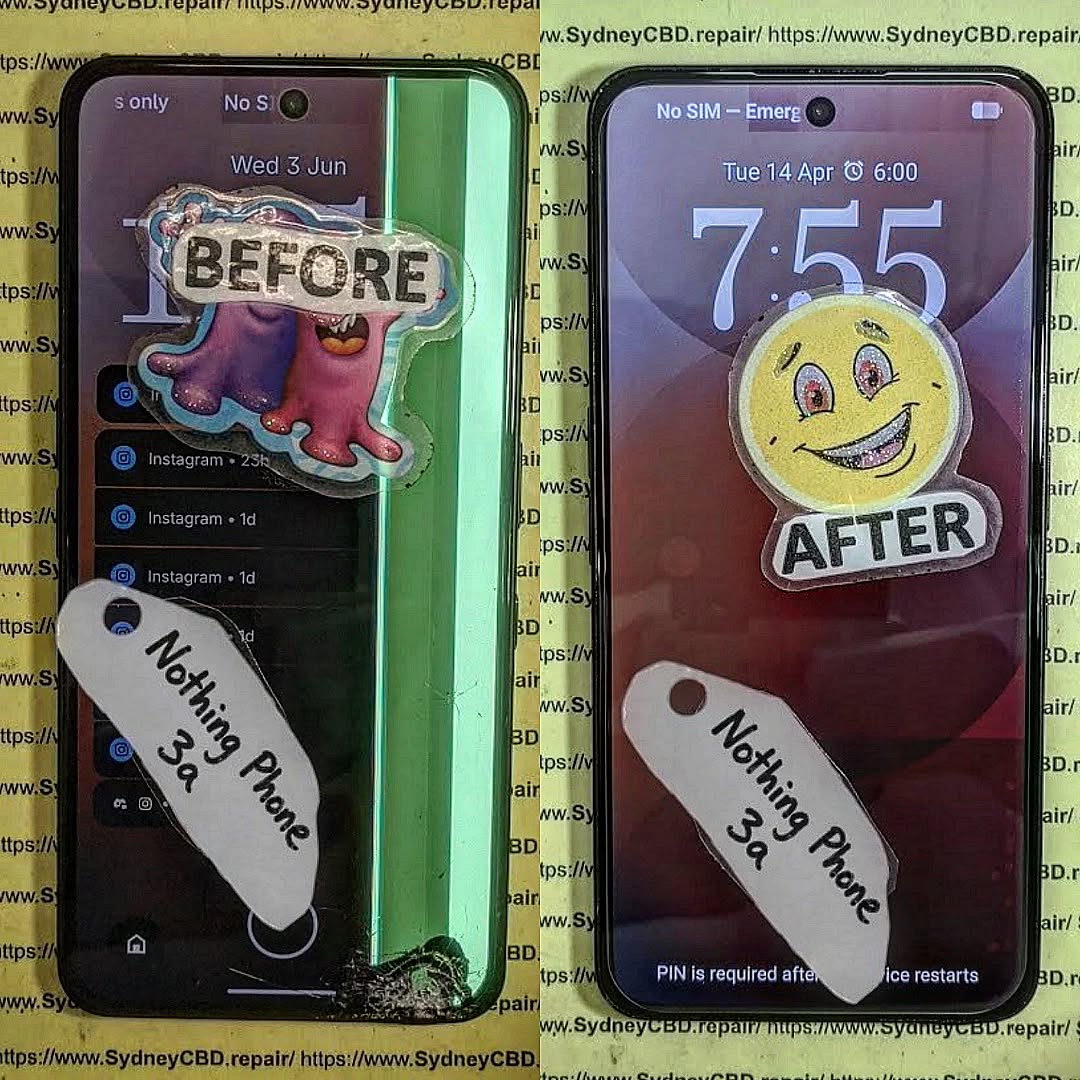
Vertical or horizontal lines often indicate internal display damage.
Watch for:
Green lines
Pink lines
White lines
Black spots
These defects typically cannot be repaired and require a new Nothing Phone (3a) Full Display Assembly.
Flickering Screens
Screen flickering may indicate:
Damaged OLED layers
Loose display connections
Internal impact damage
Ignoring flickering can lead to total display failure.
Benefits of Professional Display Assembly Replacement
Professional repairs provide numerous advantages over temporary fixes or amateur attempts.
Precision Repairs
Experienced technicians use:
Specialized tools
Manufacturer-grade procedures
Proper adhesive systems
Professional testing equipment
This ensures the Nothing Phone (3a) Full Display Assembly functions correctly after installation.
Genuine Quality Components
Quality replacement assemblies deliver:
Accurate color reproduction
Reliable touch sensitivity
Consistent brightness
Improved durability
Using inferior components may result in poor performance and reduced lifespan.
Professional repair centers carefully source quality parts that meet strict performance standards.
Sydney CBD Repair Centre Repair Process
Replacing a Nothing Phone (3a) Full Display Assembly involves a systematic process designed to ensure reliability.
Diagnosis
Every repair begins with a detailed inspection.
Technicians evaluate:
Display condition
Frame integrity
Battery health
Internal connectors
Water damage indicators
This comprehensive assessment helps identify all underlying issues.
Replacement Procedure
The replacement process typically includes:
Device disassembly
Battery isolation
Removal of damaged display
Surface preparation
Installation of new assembly
Reconnection of components
Secure reassembly
Each step requires careful attention to detail.
Quality Testing
Before returning the device, technicians verify:
Touch responsiveness
Brightness levels
Color consistency
Camera functionality
Sensor operation
Charging performance
These checks ensure the repair meets professional standards.
Why DIY Repairs Can Be Risky
Online repair tutorials may appear simple, but smartphone repairs have become increasingly complex.
DIY repairs often involve risks such as:
Flex cable damage
Battery punctures
Adhesive failures
Water resistance compromise
Frame damage
Furthermore, specialized tools are usually required for successful installation.
Without proper experience, replacing a Nothing Phone (3a) Full Display Assembly can become significantly more expensive if additional components are damaged during the process.
Professional repair services eliminate these risks and provide peace of mind.
Although lower-cost options may seem attractive initially, investing in professional repairs often delivers greater long-term value.
Quality repairs help:
Extend device lifespan
Preserve performance
Maintain resale value
Reduce repeat repair expenses
As a result, choosing an experienced repair provider is often the smartest financial decision.
Maintaining Your New Display
Once the Nothing Phone (3a) Full Display Assembly has been replaced, proper care can significantly extend its lifespan.
Recommended protection measures include:
Use a Quality Case
A shock-absorbing case reduces impact forces during accidental drops.
Install a Screen Protector
Screen protectors help prevent:
Scratches
Minor cracks
Surface wear
Avoid Excessive Pressure
Never place heavy objects on top of the phone.
Keep Away from Liquids
Even water-resistant devices can experience liquid-related damage.
Regular Cleaning
Use a microfiber cloth to remove dirt and oils without scratching the display.
Following these simple practices can help keep the display looking and functioning like new.
Why Sydney CBD Repair Centre Stands Out
When it comes to replacing a Nothing Phone (3a) Full Display Assembly, experience matters.
Sydney CBD Repair Centre offers:
Same-day repair solutions
Professional technicians
Quality replacement parts
Advanced repair equipment
Thorough quality control
Warranty-backed repairs
Excellent customer support
Customers trust the centre because of its commitment to quality workmanship and transparent service.
Additionally, the repair team continually updates its knowledge to stay current with evolving smartphone technologies.
For mobile users seeking dependable repairs, professional expertise remains the safest choice.
For additional smartphone care and repair information, visit the official Android support resources: Android Help Center
Frequently Asked Questions
1. What is included in the Nothing Phone (3a) Full Display Assembly?
The assembly generally includes the front glass, OLED display panel, touch digitizer, flex cables, and installation adhesive components.
2. How long does a display replacement take?
Most professional repairs can be completed on the same day, depending on part availability and device condition.
3. Can a cracked screen still be repaired if the touch works?
Yes. Even if touch functionality remains operational, replacing the damaged Nothing Phone (3a) Full Display Assembly is recommended to prevent further deterioration.
4. Will replacing the display restore original performance?
When quality components are used and installation is performed correctly, users can expect display performance comparable to the original screen.
5. Is DIY screen replacement recommended?
DIY repairs carry substantial risks due to the complexity of modern smartphones. Professional repairs are generally the safer option.
6. Can display damage affect other phone functions?
Yes. Severe impacts can affect internal connectors, sensors, cameras, and other components beyond the display itself.
7. How can I protect my replacement screen?
Using a protective case, screen protector, and careful handling practices can significantly extend display lifespan.
8. What causes green lines on smartphone screens?
Green lines are usually caused by OLED panel damage, impact stress, or display connector issues and often require replacement of the display assembly.
Conclusion
The Nothing Phone (3a) Full Display Assembly is a sophisticated component that plays a crucial role in everyday smartphone use. When damage occurs, professional replacement offers the most reliable path to restoring performance, appearance, and functionality.
From accidental drops and pressure damage to touchscreen failures and display flickering, screen issues can quickly disrupt daily life. Fortunately, expert repair services provide a safe and effective solution.
By choosing experienced technicians, quality components, and comprehensive testing procedures, users can enjoy confidence that their device will perform at its best once again. Whether the damage is minor or severe, timely intervention helps preserve the phone’s value and extend its useful lifespan.
David from Sydney CBD Repair Centre – The Best place to fix mobile phones as 7 Years In A Row! Top Mobile Phone Repair In Sydney. More than 2000 Positive Reviews on Google and Same Day Repairs.
We take pride in delivering exceptional repair services for all major phone brands including Apple, Samsung, Google, and more. Our expert technicians use only genuine parts and offer 90days warranty on repairs. Located in the heart of Sydney CBD, we’re your one-stop solution for all mobile device repairs.
Our commitment to excellence has earned us the trust of thousands of satisfied customers. Whether it’s a cracked screen, battery replacement, or water damage repair, we handle it all with professional care and expertise. Walk in today and experience why we’re Sydney’s #1 choice for mobile phone repairs.
Visit us for:
✓ Same Day Express Repairs
✓ Genuine Parts Guarantee
✓ Professional Technicians
✓ Competitive Pricing
✓ 2000+ 5-Star Google Reviews
✓ 7-Time Award Winner for Best Phone Repairs
Sydney CBD Repair Centre – Where Quality Meets Reliability.
Battery Swelling and Screen Lines: Why Replacing One Might Not Fix Both – 9 Powerful Facts Every Phone Owner Should Know
Introduction
Modern smartphones are powerful, sleek, and packed with advanced technology. However, they’re also delicate devices that can suffer from multiple hardware problems at once. Two of the most frustrating issues users face are battery swelling and screen lines. While these problems may appear connected, replacing one damaged component doesn’t always fix the other.
Many phone owners assume that a swollen battery is the direct cause of display lines or flickering screens. In some cases, that’s true. Yet the reality is often more complicated. A damaged display can remain faulty even after installing a new battery, while screen replacement alone may leave dangerous battery problems unresolved.
Understanding how these issues develop can save time, money, and stress. More importantly, it can help prevent further damage to your smartphone and protect your safety.
Battery swelling occurs when gases build up inside a lithium-ion battery. These gases create pressure that expands the battery pack, causing it to bulge inside the phone.
Smartphones today rely heavily on lithium-ion technology because it’s lightweight and efficient. However, these batteries degrade over time. Once damaged, they can become unstable and dangerous.
What Causes a Battery to Swell?
Several factors contribute to battery swelling:
Overcharging
Excessive heat exposure
Physical damage
Manufacturing defects
Aging batteries
Cheap replacement chargers
Power surges
Heat is one of the biggest culprits. Leaving a phone inside a hot car or constantly gaming while charging increases internal temperatures significantly. Over time, this stress damages the battery’s chemical structure.
Using low-quality charging accessories can also accelerate deterioration. Cheap cables and adapters may deliver unstable voltage, which harms battery cells.
Early Warning Signs of Battery Swelling
Spotting battery swelling early can prevent major damage. Common warning signs include:
Warning Sign
What It Means
Screen lifting from frame
Battery pushing against display
Phone overheating
Battery instability
Reduced battery life
Internal cell degradation
Random shutdowns
Power delivery issues
Thick or bulging back cover
Expanding battery pack
If you notice any of these symptoms, stop using the phone immediately and seek professional assistance.
That’s why reputable technicians replace swollen batteries immediately rather than attempting temporary fixes.
How Technicians Diagnose Both Problems
Professional repair technicians follow a detailed inspection process to identify the true source of the issue.
Accurate diagnosis prevents unnecessary repairs and saves customers money.
Professional Inspection Process
A complete diagnostic typically includes:
Visual inspection
Battery health testing
Display functionality checks
Internal connector examination
Thermal analysis
Charging circuit testing
Technicians may disassemble the device to inspect internal pressure damage.
Testing Internal Components
Specialized tools help determine whether the screen or motherboard has suffered permanent damage.
Technicians often test:
Component
Purpose
OLED panel
Detect pixel damage
Battery voltage
Measure battery stability
Display flex cable
Check signal transmission
Motherboard circuits
Identify shorts
Charging IC
Verify power management
Without these tests, replacing parts becomes guesswork.
Repair vs Replacement: Which Option Is Better?
Deciding whether to repair or replace a phone depends on several factors.
Sometimes repairing both the battery swelling and screen lines makes financial sense. Other times, replacement is the smarter choice.
When Repair Is Worth It
Repairing the device may be worthwhile if:
The phone is relatively new
Damage is limited
Genuine parts are available
The motherboard is intact
Repair costs remain reasonable
Flagship devices often justify repair because replacement phones cost significantly more.
When It’s Time for a New Phone
Replacement may be the better option when:
Repair costs exceed device value
The motherboard is damaged
Multiple components have failed
Water damage is severe
Battery swelling caused extensive internal stress
Older devices sometimes become unreliable even after repair.
Preventing Battery Swelling and Screen Lines
Preventative care dramatically reduces the risk of both battery swelling and screen damage.
Good habits extend smartphone lifespan and improve performance.
Charging Habits That Matter
Healthy charging practices include:
Avoid overnight charging constantly
Use genuine chargers
Keep battery levels between 20% and 80%
Avoid heavy gaming while charging
Disconnect chargers during overheating
These simple habits reduce battery stress significantly.
Environmental Factors to Avoid
External conditions also play a major role.
Avoid:
Direct sunlight exposure
Hot vehicles
Humid environments
Cheap charging accessories
Excessive phone pressure inside pockets
Protective cases can help minimize physical damage, but they won’t stop internal battery deterioration entirely.
Importance of Professional Repairs
DIY repairs may seem tempting, especially with online tutorials everywhere. However, modern smartphones are extremely delicate.
Improper handling can worsen both battery swelling and screen lines.
Professional repair centers offer:
Genuine replacement parts
Safe battery disposal
Proper adhesive sealing
Water resistance restoration
Warranty-backed repairs
Experienced technicians also identify hidden issues that casual users may miss.
For official safety guidance regarding lithium-ion batteries, visit Battery University.
Frequently Asked Questions
Can battery swelling cause green lines on a phone screen?
Yes. Battery swelling can place pressure on OLED displays, damaging delicate layers and causing green or white vertical lines.
Will replacing the battery remove screen lines?
Not always. If the display has already suffered permanent damage, screen lines may remain even after battery replacement.
Is a swollen phone battery dangerous?
Yes. Swollen lithium-ion batteries can leak, overheat, catch fire, or explode if ignored.
Why does my screen still flicker after replacing the battery?
The display connector, OLED panel, or motherboard may already be damaged from heat or internal pressure.
Can screen lines disappear on their own?
Temporary lines caused by loose connectors may disappear briefly. However, permanent OLED damage usually worsens over time.
Should I stop using my phone if the battery swells?
Absolutely. Continued use increases safety risks and may cause further internal damage.
Is it cheaper to repair or replace a phone with both issues?
It depends on the phone model and damage severity. High-end phones are often worth repairing, while older devices may be better replaced.
Conclusion
Battery swelling and screen lines are serious smartphone problems that frequently appear together. However, replacing one component doesn’t always solve the other issue.
A swollen battery can permanently damage a display, while a faulty screen repair may overlook dangerous battery instability. That’s why proper diagnostics matter so much.
Understanding the relationship between battery swelling and screen lines helps users make smarter repair decisions. More importantly, it protects both device performance and personal safety.
Professional technicians can accurately identify whether the battery, screen, motherboard, or multiple components require attention. Acting quickly often prevents further damage and reduces repair costs.
If your phone shows signs of swelling, overheating, or screen distortion, don’t ignore it. Early intervention can make all the difference.
David from Sydney CBD Repair Centre – The Best place to fix mobile phones as 7 Years In A Row! Top Mobile Phone Repair In Sydney. More than 2000 Positive Reviews on Google and Same Day Repairs.
We take pride in delivering exceptional repair services for all major phone brands including Apple, Samsung, Google, and more. Our expert technicians use only genuine parts and offer 90days warranty on repairs. Located in the heart of Sydney CBD, we’re your one-stop solution for all mobile device repairs.
Our commitment to excellence has earned us the trust of thousands of satisfied customers. Whether it’s a cracked screen, battery replacement, or water damage repair, we handle it all with professional care and expertise. Walk in today and experience why we’re Sydney’s #1 choice for mobile phone repairs.
Visit us for:
✓ Same Day Express Repairs
✓ Genuine Parts Guarantee
✓ Professional Technicians
✓ Competitive Pricing
✓ 2000+ 5-Star Google Reviews
✓ 7-Time Award Winner for Best Phone Repairs
Sydney CBD Repair Centre – Where Quality Meets Reliability.
Call : +61280114119
Website: Sydney CBD Repair Centre
Separating Glass vs Display: Can You Replace Only the Cracked Top Layer? 9 Powerful Facts You Must Know
Introduction
When a smartphone screen cracks, most people immediately assume the entire display needs replacement. However, that’s not always the case. Modern smartphones are built with multiple layers, including the outer protective glass, touch digitizer, and internal OLED or LCD display. Understanding the difference between these components is essential because separating glass vs display can dramatically affect repair costs, repair methods, and overall device performance.
In many situations, only the top glass layer is damaged while the display underneath continues to function perfectly. That means users may be able to replace only the cracked top layer instead of paying for a complete screen assembly replacement. This repair option can save money, preserve the original factory display, and reduce electronic waste. However, determining whether a device qualifies for glass-only repair requires proper inspection and professional expertise.
As smartphone technology continues to evolve, screens have become thinner, brighter, and more advanced than ever before. Unfortunately, these improvements also make repairs more delicate and technically demanding. A simple crack may hide deeper internal damage, while some shattered screens may still have fully functional OLED panels beneath them.
This article explores everything you need to know about separating glass vs display, including how smartphone screens are constructed, signs of glass-only damage, when a full display replacement is necessary, the repair process involved, and how professional technicians safely separate damaged glass from working displays. By the end, you’ll have a clear understanding of whether replacing only the cracked top layer is possible and whether it’s the right solution for your device.
Modern smartphones are engineering marvels. They combine advanced materials, touch-sensitive technology, and ultra-thin displays into a slim device that fits comfortably in your pocket. However, when a phone falls, users often panic after seeing cracks spread across the screen. Many immediately assume the entire display needs replacement. In reality, separating glass vs display is the key to understanding what repair is actually required.
What Is the Glass Layer?
The outermost part of your phone screen is the protective glass layer. This glass is designed to absorb minor impacts and scratches. Popular manufacturers like Apple and Samsung use strengthened glass technologies such as Gorilla Glass or Ceramic Shield.
This top layer acts like a shield. When dropped, it’s usually the first part to crack. Fortunately, cracks on the top layer don’t always mean the inner display is damaged.
Main Functions of the Glass Layer
Protects the OLED or LCD beneath
Prevents scratches and dirt buildup
Maintains touch sensitivity
Improves visual clarity
If the image underneath still looks perfect and touch remains responsive, there’s a good chance only the glass layer is broken.
What Is the Display Layer?
Beneath the glass lies the actual display. Depending on the phone, this may be an OLED, AMOLED, or LCD panel. This component generates images, colors, brightness, and animations.
When the display itself breaks, users may notice:
Black spots
Green lines
Flickering
Dead pixels
No image at all
At this stage, separating glass vs display becomes extremely important because the repair cost increases significantly once the panel is damaged.
How Touch Digitizers Work
Many modern phones integrate the digitizer into the display assembly. The digitizer detects touch input and converts it into commands.
In older phones, the digitizer was separate. Nowadays, manufacturers laminate the layers together to improve brightness and reduce thickness. This design improves user experience but makes repairs more complex.
The phrase “separating glass vs display” refers to determining whether only the outer glass is damaged or whether the internal display assembly is also broken.
Why Many People Confuse Glass and Display
At first glance, a cracked screen looks catastrophic. However, a phone can still function perfectly even when the glass is shattered.
Here’s why confusion happens:
Symptom
Glass Damage
Display Damage
Cracks visible
Yes
Sometimes
Touch works
Usually
Often fails
Image visible
Yes
Sometimes distorted
Black spots
No
Yes
Flickering
No
Yes
Green or purple lines
No
Yes
Understanding these differences can save users hundreds of dollars.
Signs That Only the Glass Is Damaged
You may only need a glass replacement if:
The touchscreen still works normally
Colors appear accurate
No black bleeding exists
Brightness remains stable
The display shows no flickering
This is the ideal scenario for a glass-only repair.
Signs That the OLED or LCD Is Broken
A full display replacement is likely necessary if you notice:
Ink-like black marks
Display discoloration
No touch response
Flashing screen
Partial image failure
Once the display is compromised, replacing only the glass won’t solve the problem.
Can You Replace Only the Cracked Top Layer?
The short answer is yes — but only under the right conditions. Separating glass vs display accurately is the first step.
Devices Compatible With Glass-Only Repairs
Many flagship devices support professional glass-only replacement, including selected models from:
Apple
Samsung
Google
Xiaomi
Professional technicians can remove the broken glass while preserving the original OLED underneath.
This process requires precision equipment and advanced expertise.
Cases Where Glass-Only Repairs Are Impossible
Sometimes a full replacement is unavoidable. This happens when:
The OLED is cracked
Touch sensitivity is lost
The frame is bent
Internal moisture exists
The display has pressure damage
In these cases, attempting a glass-only repair can worsen the problem.
Benefits of Replacing Only the Glass
There are several advantages to glass-only repairs.
Lower Costs
Replacing only the glass is usually cheaper than replacing the entire display assembly.
Original Display Retention
Users keep the original factory OLED panel, which maintains:
Better color accuracy
Original brightness
Smooth refresh rates
Factory calibration
Reduced Electronic Waste
Repairing only the damaged glass helps reduce unnecessary component disposal.
That’s a win for both your wallet and the environment.
How Professional Glass Separation Works
Glass-only repair is highly technical. It’s not something most people should attempt at home.
Specialized Equipment Used
Professional repair centers use advanced machines such as:
Separator machines
Vacuum laminators
Bubble removers
Heated plates
Precision wire cutting tools
These tools allow technicians to separate glass vs display safely without damaging the OLED panel underneath.
Risks of DIY Repairs
Watching online tutorials may make the process seem simple, but DIY attempts often end badly.
Common DIY Problems
Destroyed OLED panels
Dust trapped under glass
Uneven adhesive application
Touch malfunction
Face ID or fingerprint sensor issues
Modern displays are extremely delicate. One mistake can turn a minor repair into a costly replacement.
Why Experience Matters
Experienced technicians understand:
Heat sensitivity
Adhesive behavior
Flex cable positioning
OLED fragility
Pressure management
That expertise dramatically increases the chances of successful glass-only repair.
For more information about professional mobile repair standards, you can visit iFixit.
Glass-Only Repair vs Full Display Replacement
Choosing the right repair depends on the actual damage.
Cost Comparison
Here’s a general comparison:
Repair Type
Average Cost
Complexity
Glass-only replacement
Lower
High skill required
Full display replacement
Higher
Easier installation
OLED panels are expensive, especially on premium devices.
That’s why separating glass vs display properly can significantly reduce repair expenses.
Performance Differences
When done correctly, glass-only repairs preserve original performance because the factory OLED remains untouched.
Benefits include:
Better color reproduction
Factory brightness levels
Original touch responsiveness
Superior fingerprint performance
Cheap aftermarket screens may not deliver the same quality.
Durability and Longevity
Professional repairs using premium materials can last for years. However, low-quality adhesive or poor workmanship can lead to:
Lifting glass
Dust intrusion
Reduced sensitivity
Premature cracking
Choosing a reputable repair technician matters enormously.
Common Myths About Screen Repairs
There’s plenty of misinformation online regarding cracked screens.
Myth: Every Cracked Screen Needs Full Replacement
This is one of the biggest myths in the repair industry.
If the OLED still functions properly, glass-only replacement may be possible.
Separating glass vs display helps determine the correct repair path.
Myth: Cheap Repairs Are Always Good
Budget repairs sometimes use:
Inferior glass
Weak adhesive
Low-grade aftermarket screens
While the initial price looks attractive, poor-quality repairs can fail quickly.
Myth: Third-Party Parts Are Identical
Not all replacement parts are equal.
High-quality OLED panels cost more because they deliver:
Accurate brightness
Smooth refresh rates
Reliable touch response
Better battery efficiency
Extremely cheap displays often sacrifice quality to reduce cost.
How to Protect Your Screen After Repair
Once your device is repaired, prevention becomes critical.
Use Tempered Glass Protection
A quality tempered glass protector adds an extra impact layer.
Benefits include:
Scratch prevention
Minor drop protection
Easier cleaning
Reduced direct impact
Think of it as inexpensive insurance.
Avoid Pressure Damage
Many OLED failures happen due to pressure, not drops.
Avoid:
Sitting on your phone
Keeping phones in tight back pockets
Placing heavy items on devices
Pressure can crack internal layers without damaging the glass.
Invest in Quality Phone Cases
A strong protective case absorbs impact energy and reduces damage during accidental drops.
Look for:
Raised bezels
Shock absorption
Corner reinforcement
Certified drop protection
Good protection is far cheaper than another repair.
Frequently Asked Questions
Can separating glass vs display really save money?
Yes. If only the top glass is cracked and the OLED remains functional, glass-only repair is significantly cheaper than replacing the entire display assembly.
Is glass-only repair safe?
When performed by experienced professionals using proper equipment, yes. However, inexperienced repairs carry substantial risk.
How do I know if my OLED is damaged?
Signs include black spots, flickering, green lines, dead pixels, or image distortion.
Why are OLED screen replacements expensive?
OLED technology is costly to manufacture. Premium phones use advanced high-refresh displays with integrated touch technology.
Does a cracked glass protector mean my screen is broken?
Not necessarily. Sometimes only the tempered glass protector is damaged. Remove it carefully to inspect the actual display underneath.
Can water damage affect glass-only repairs?
Yes. Moisture can damage internal display layers and adhesives, making glass-only repairs unsafe or impossible.
Are original screens better than aftermarket replacements?
In most cases, yes. Original displays typically offer superior brightness, touch response, and durability.
Conclusion
Understanding the difference between the outer glass and the internal display can save smartphone users both money and frustration. Separating glass vs display is essential because not every cracked phone requires a complete screen replacement.
If your phone still shows a perfect image and touch functionality works normally, a glass-only repair may be the ideal solution. It preserves the original OLED, reduces costs, and minimizes electronic waste.
However, these repairs require professional skill and specialized machinery. Attempting DIY repairs without experience can easily destroy the display completely.
Whether you own an iPhone, Samsung Galaxy, or another flagship device, choosing a trusted repair specialist ensures your phone receives the correct diagnosis and highest-quality repair possible.
David from Sydney CBD Repair Centre – The Best place to fix mobile phones as 7 Years In A Row! Top Mobile Phone Repair In Sydney. More than 2000 Positive Reviews on Google and Same Day Repairs.
We take pride in delivering exceptional repair services for all major phone brands including Apple, Samsung, Google, and more. Our expert technicians use only genuine parts and offer 90days warranty on repairs. Located in the heart of Sydney CBD, we’re your one-stop solution for all mobile device repairs.
Our commitment to excellence has earned us the trust of thousands of satisfied customers. Whether it’s a cracked screen, battery replacement, or water damage repair, we handle it all with professional care and expertise. Walk in today and experience why we’re Sydney’s #1 choice for mobile phone repairs.
Visit us for:
✓ Same Day Express Repairs
✓ Genuine Parts Guarantee
✓ Professional Technicians
✓ Competitive Pricing
✓ 2000+ 5-Star Google Reviews
✓ 7-Time Award Winner for Best Phone Repairs
iPhone 15 Pro Max Screen Repair Challenge: 7 Shocking Truths About Fixing Apple’s Toughest Display
Introduction
The iPhone 15 Pro Max represents the pinnacle of Apple’s innovation — boasting a titanium frame, the stunning Super Retina XDR OLED display, and advanced Dynamic Island integration. But with all this premium engineering comes one big challenge: screen repair.
A cracked or malfunctioning screen on the iPhone 15 Pro Max isn’t just a cosmetic issue — it can affect touch sensitivity, color accuracy, and even Face ID functionality. Given the intricate layering of OLED panels and delicate display connectors, repairing or replacing this screen demands expertise, precision tools, and genuine components.
This article dives deep into the iPhone 15 Pro Max screen repair challenge, exposing the truths about cost, process, and pitfalls to avoid. You’ll also learn how Sydney’s most trusted repair shop — Sydney CBD Repair Centre — ensures flawless screen replacements using original-quality parts, expert calibration, and same-day turnaround.
Whether you’ve cracked your screen, noticed pixel issues, or just want to understand your options, this guide will help you make an informed decision — saving time, money, and your phone’s performance.
The iPhone 15 Pro Max boasts one of the most advanced displays in smartphone history — the Super Retina XDR OLED panel, offering 120Hz ProMotion refresh rate and peak brightness that can hit 2000 nits outdoors. Apple has raised the bar again, but with innovation comes complexity — and higher repair challenges.
What Makes the iPhone 15 Pro Max Screen So Expensive?
The screen isn’t just glass — it’s a multi-layered fusion of OLED, touch sensors, Dynamic Island technology, and ceramic shield glass. Replacing it requires advanced calibration tools and precision alignment to maintain True Tone, HDR, and Face ID functions.
Apple’s Super Retina XDR: A Technological Marvel
This display adapts pixel-by-pixel brightness, making color reproduction flawless. However, any unauthorized screen replacement can cause brightness imbalance or Face ID failure, which is why certified repair technicians are crucial for this model.
Fixing an iPhone 15 Pro Max screen isn’t your average phone repair — it’s an art. The titanium frame and curved edges mean even a small mistake can cause permanent damage to internal components.
Integrated Dynamic Island and OLED Layering
Unlike earlier models, the iPhone 15 Pro Max has tightly bonded OLED layers integrated into the Dynamic Island. This means replacing the display requires controlled heat and micro-suction tools to prevent damage.
Impact of Titanium Frame Design on Screen Removal
Apple’s titanium frame not only strengthens the phone but also increases adhesive grip, making screen separation much harder. Only professional tools can safely detach the screen without warping the frame or damaging internal circuits.
Common Causes of iPhone 15 Pro Max Screen Damage
Even with the strongest materials, accidents happen.
Drops, Pressure, and Accidental Cracks
A simple fall from waist height can cause micro-fractures beneath the glass. Over time, these small cracks can spread and cause full display failure.
Water Damage and Display Malfunction
Though water-resistant, the iPhone 15 Pro Max isn’t waterproof. Exposure to high humidity, rain, or spills can corrode the OLED layers, resulting in flickering or ghost touches.
iPhone 15 Pro Max Screen Replacement Options
When disaster strikes, you have two main repair paths: Apple-authorized service or trusted third-party repair specialists.
Official Apple Repair vs. Third-Party Repair Centres
Apple Stores guarantee originality but often charge premium prices and require longer waiting times. On the other hand, top-rated independent centres like Sydney CBD Repair Centre offer same-day service with genuine OEM parts — saving both time and money.
DIY Screen Replacement: Why It’s Not Recommended
You might find repair kits online, but the iPhone 15 Pro Max’s advanced adhesive and calibration systems make DIY attempts risky. A single misalignment can permanently disable Face ID or touch sensitivity.
Professional Screen Repair at Sydney CBD Repair Centre
At Sydney CBD Repair Centre, precision meets experience. With over 2000 verified Google reviews and six consecutive “Best Phone Repair” awards, they’ve built a reputation for quality and reliability.
Genuine Parts Guarantee and Warranty Support
Every iPhone 15 Pro Max repair includes genuine Apple-compatible parts and a 90-day warranty to ensure performance and reliability.
Same-Day Repairs and Expert Technicians
Most screen replacements are completed within the same day, thanks to advanced tools and skilled technicians trained on the latest iPhone models.
Step-by-Step Process: How Technicians Replace an iPhone 15 Pro Max Screen
Advanced Tools and Calibration Techniques
Carefully heat and detach the titanium-bonded screen.
Disconnect display cables using anti-static tools.
Install new OLED assembly with precision adhesive.
Calibrate Face ID, True Tone, and brightness profiles.
Testing and Post-Repair Quality Checks
After installation, technicians test touch response, color calibration, and waterproof sealing, ensuring your phone looks and feels brand new.
Cost Breakdown: iPhone 15 Pro Max Screen Repair in Sydney
Service Type
Average Cost (AUD)
Turnaround Time
Apple Store Official Repair
$799 – $899
3–5 Days
Sydney CBD Repair Centre
$499 – $599
Same Day
DIY Kit (Risky Option)
$350 – $450
Variable
Factors Affecting Repair Prices
Genuine vs. aftermarket parts
Technician experience level
Warranty inclusion and testing process
How to Save Money Without Compromising Quality
Always choose certified repair centres offering genuine OEM screens and warranty coverage. Avoid unverified shops using cheap replicas that degrade color accuracy.
Tips to Protect Your iPhone 15 Pro Max Screen
Best Screen Protectors and Cases in 2025
Invest in tempered glass with ceramic coating and impact-resistant cases that absorb shock. Popular brands like Spigen, ESR, and UAG provide excellent protection.
Smart Habits to Avoid Future Damage
Avoid charging near bed edges or uneven surfaces.
Keep your iPhone away from extreme heat.
Use microfiber cloths for cleaning — never paper towels.
FAQs – iPhone 15 Pro Max Screen Repair
1. Can I replace my iPhone 15 Pro Max screen myself?
Technically yes, but it’s not recommended. The intricate OLED bonding and calibration require professional tools.
2. Will third-party repair affect my Apple warranty?
Yes, if you’re still under AppleCare. However, trusted centres like Sydney CBD Repair Centre provide independent warranties.
3. How long does a screen repair take?
Most repairs are completed within 1–2 hours at professional centres.
4. Is Face ID affected after screen replacement?
Not if performed correctly using calibrated tools. Genuine part alignment ensures full functionality.
5. How do I know if my screen is genuine?
A genuine screen maintains True Tone, color depth, and smooth brightness transitions. Ask your repair centre for OEM certification.
6. What’s the average life of a replaced screen?
A properly installed screen can last as long as the original — often several years.
Conclusion – Restoring Brilliance to Your iPhone 15 Pro Max
Your iPhone 15 Pro Max deserves the best care possible. Whether you’ve cracked your screen or suffered pixel damage, the Sydney CBD Repair Centre provides premium-quality repairs, genuine parts, and unbeatable service.
✅ Same-Day Service
✅ 2000+ Five-Star Reviews
✅ 6-Time Best Phone Repair Winner
✅ Located in Sydney CBD
Pink or Green Line Screen Repair? 7 Proven Fixes You Should Know
Understanding Pink and Green Line Screen Issues
Pink or green lines appearing on your smartphone screen can be worrying. These vertical or horizontal lines typically indicate either a display connection issue or hardware damage, though sometimes software faults may be to blame. Regardless of the cause, the earlier you act, the better your chances of avoiding costly repairs.
Such lines often start faintly, perhaps visible only on a white background, and may gradually worsen over time. While minor cases might be temporary, persistent lines usually point to underlying LCD or OLED problems.
While any phone can experience line screen issues, the problem is more common in flagship models that use AMOLED or OLED panels. These include:
Samsung Galaxy S20, S21, and S22 Series
iPhone X, XS, 11 Pro, 12 Pro, and later
Google Pixel 6 and 7 Series
OnePlus and Oppo AMOLED devices
OLED screens, though vibrant and efficient, are more sensitive to physical damage and flex cable stress, which can result in pink or green vertical lines.
How to Diagnose the Problem Before Repair
Before rushing to a repair shop, perform these simple checks:
Check for Software Glitches
Reboot your device. If the lines disappear temporarily, it could be a software issue. Update your phone’s OS and check again.
Examine for Physical Damage
Look closely for cracks, dents, or moisture marks. These often indicate hardware problems requiring professional repair.
Use Display Testing Apps
Apps like Display Tester or Dead Pixel Test can help identify the extent of the screen defect and confirm whether it’s a software or hardware problem.
Common Software Fixes for Line Screen Problems
Sometimes, the solution is simpler than you expect.
Restart and Update Your Device
Restarting clears temporary memory glitches. Afterward, go to Settings → Software Update and ensure your system is current.
Factory Reset (When and How to Do It Safely)
If updating doesn’t work, a factory reset might. But back up your data first! Navigate to Settings → Reset → Factory Data Reset, and follow the prompts.
Safe Mode Testing
Boot your device in Safe Mode to rule out third-party apps. If the lines vanish in Safe Mode, an app is likely causing the issue.
Hardware-Based Fixes You Can Try
If software fixes fail, hardware repair is likely necessary.
Screen Connector Reseating
Sometimes the display connector gets loose. Reseating it requires opening the phone, which is best done by professionals to avoid further damage.
When to Replace the Display
If your screen shows persistent lines even after all troubleshooting, it’s time for a screen replacement. Using genuine OEM parts ensures quality and color accuracy.
Professional Repair vs. DIY
While DIY repair kits exist, they often lack proper tools and training. A certified technician ensures safe handling and long-lasting results.
Why You Shouldn’t Ignore Pink or Green Lines
Ignoring these issues can lead to:
Permanent pixel damage
Screen flickering or blackouts
Touch screen malfunctions
Complete display failure
Fixing the problem early saves you from costlier repairs later on.
Sydney CBD Repair Centre — Expert Line Screen Repair in Sydney
If your device is showing pink or green lines, Sydney CBD Repair Centre is your trusted solution.
Why Choose Us
Over 2000+ 5-Star Google Reviews
Awarded Best Phone Repair Shop in Sydney 6 years in a row
Same-Day Repairs for most devices
Our Genuine Parts & Warranty Promise
We use only genuine or OEM-quality parts and provide a 90-day warranty on all repairs, ensuring your device looks and feels brand new.
Customer Reviews & Service Excellence
Our customers consistently praise our expertise, speed, and honesty. Whether it’s a Samsung Galaxy, iPhone, or Google Pixel, we’ll fix your display lines fast.
1. Can pink or green lines go away on their own?
Sometimes they disappear temporarily, but recurring lines usually indicate hardware issues needing professional repair.
2. Is this problem covered under warranty?
If caused by a manufacturing defect, yes. But damage from drops or water exposure is typically not covered.
3. Can I keep using my phone with pink or green lines?
Yes, but it may worsen over time and could lead to full screen failure.
4. How long does the repair take at Sydney CBD Repair Centre?
Most screen replacements are completed within 1–2 hours for popular models.
5. Will a software update fix this issue?
In some cases, yes. Especially if the problem appeared after a firmware update or app crash.
6. How much does pink or green line screen repair cost?
Costs vary depending on model and screen type. You can get a quote directly from SydneyCBD.repair.
Conclusion: Restore Your Screen, Restore Your Peace of Mind
Pink or green lines on your phone screen are more than just an annoyance — they’re a warning sign. Whether it’s a Samsung Galaxy, iPhone, or Google Pixel, prompt repair ensures your device stays reliable and visually perfect.
Trust Sydney CBD Repair Centre, Sydney’s #1 phone repair experts, to bring your display back to life — fast, professionally, and with guaranteed quality.
David from Sydney CBD Repair Centre – The Best place to fix mobile phones as 6 Years In A Row! Top Mobile Phone Repair In Sydney. More than 2000 Positive Reviews on Google and Same Day Repairs.
📍 Visit us today for:
✓ Same Day Express Repairs
✓ Genuine Parts Guarantee
✓ Professional Technicians
✓ Competitive Pricing
✓ 2000+ 5-Star Google Reviews
✓ 6-Time Award Winner for Best Phone Repairs
Why Your Phone’s Screen Might Be Flawed: Common Issues + Expert Insights
🟦 Introduction: The Importance of Screen Quality
The screen is your smartphone’s main interface—if it’s flawed, your entire experience suffers. From swiping to scrolling, gaming to video streaming, a damaged or malfunctioning screen can turn your phone into a frustrating device.
Many users assume screen issues mean accidental drops or visible cracks, but there’s more than meets the eye. Let’s explore the most common screen problems and how to identify and fix them.
Ghost touch occurs when your phone starts acting on its own—tapping apps, typing random letters, or swiping without input.
Causes:
Faulty screen or digitizer
Incompatible screen protector
Moisture or static build-up
Fix:
Remove screen protector
Restart in Safe Mode
Seek expert repair if issue persists
🟦 Dead Pixels and Discoloration
A “dead pixel” appears as a black dot that never lights up. Stuck pixels show constant colors (red, green, blue), while discoloration may indicate LCD or OLED damage.
Causes:
Manufacturing defect
Pressure or impact damage
Overheating
Fix:
Use pixel-fixer apps (e.g., JScreenFix)
Screen replacement if pixel issues spread
🟦 Unresponsive Touchscreen
If your screen doesn’t react to touches, it’s either a software glitch, a damaged digitizer, or a hardware failure.
Try:
Reboot the device
Update the OS
Remove case or screen protector
If nothing works, visit Sydney CBD Repair Centre for diagnostics.
🟦 Flickering or Flashing Displays
Causes:
Loose LCD connector
Software bugs after updates
Battery problems
Solutions:
Turn off adaptive brightness
Update or roll back recent apps
Professional repair for hardware issues
🟦 Screen Burn-in or Image Retention
This is common in OLED displays where static images cause permanent shadows on the screen.
Prevention:
Use dark mode
Enable screen savers
Lower screen brightness
Fix:
Use apps like OLED Saver
Replace display if burn-in is severe
🟦 Low Brightness or Dimming Issues
If your screen seems too dim even at max brightness:
Causes:
Ambient light sensor issues
Power-saving modes
Screen degradation
Fix:
Adjust settings manually
Disable battery saver
Visit a technician if brightness stays low
🟦 Screen Freezing or Lag
Lag can feel like a screen issue but often points to CPU or RAM overuse.
Solutions:
Close background apps
Clear system cache
Factory reset if lag persists
🟦 Water Damage Effects on Display
If your phone got wet, screen problems may not appear immediately. Symptoms include:
Flickering
Unresponsiveness
Discoloration or ghosting
Fix:
Power off immediately
Do not charge
Visit Sydney CBD Repair Centre for water damage treatment
🟦 Software Bugs vs. Hardware Damage
Sometimes what looks like a screen problem is software-related.
Software Clues:
Issues resolved after reboot or Safe Mode
Problems after an update
Hardware Clues:
Physical cracks or flickering
No improvement after resets
🟦 How to Diagnose Your Screen Problem
Use this quick checklist:
Symptom
Likely Cause
Cracks or shattered glass
Drop or impact
Touch doesn’t respond
Digitizer failure
Colors distorted
LCD/OLED damage
Random touches
Ghost touch
Black areas
Dead pixels
Flickering
Loose connector
🟦 Can You Fix It Yourself?
While there are DIY kits available, fixing a screen isn’t simple. You risk:
Breaking internal components
Losing water resistance
Voiding warranty
If you’re not experienced, it’s safer and often more cost-effective to go professional.
🟦 When to See a Professional Repair Technician
Visit Sydney CBD Repair Centre when:
The screen is cracked or won’t respond
DIY solutions failed
The phone is under warranty or high-value
You need a genuine parts guarantee and same-day service
🟦 Prevention Tips to Protect Your Screen
Use a tempered glass screen protector
Install a shock-resistant case
Avoid extreme temperatures
Don’t keep your phone in tight pockets or bags with keys
❓ Frequently Asked Questions
1. Why does my screen have a black spot?
It’s likely a dead pixel or internal LCD damage.
2. Can a cracked screen affect touch sensitivity?
Yes, especially if the digitizer is also damaged.
3. Is ghost touch caused by moisture?
It can be. Static, water, or hardware failure may be responsible.
4. Should I keep using my phone if the screen is cracked?
You can, but it’s risky. Cracks can spread or cause injuries.
5. How much does a screen replacement cost?
It varies by brand and model. Call us at +61280114119 for a quote.
6. How long does it take to repair a screen?
At Sydney CBD Repair Centre, most screens are fixed the same day.
✅ Conclusion
From cracked glass to flickering displays, screen issues are common—but not unbeatable. Whether it’s wear and tear or water damage, identifying the cause early can save your phone and your wallet.
For trusted, fast, and guaranteed screen repairs in Sydney, visit Sydney CBD Repair Centre. With 2000+ positive reviews and award-winning service, we’ve earned our place as Sydney’s top mobile repair experts.
Replacing a Samsung S22 Screen: A Detailed Comparison + 7 Key Factors to Consider
📱 Introduction: Why Replacing a Samsung S22 Screen Requires Caution
The Samsung Galaxy S22 features a 6.1-inch Dynamic AMOLED 2X display—one of the best in its class. But when that stunning display cracks or shatters, choosing the right replacement method becomes crucial. A poorly done repair can compromise touch sensitivity, brightness, or even your phone’s structural integrity.
At Sydney CBD Repair Centre, we specialize in premium screen repairs with genuine parts and same-day service. But let’s explore all available options so you can make the best choice for your needs.
Minor scratches? A screen protector may help. But major damage demands a full replacement.
🔧 Option 1 – DIY Screen Replacement
Tools Needed:
Heat gun or hair dryer
Suction cup and plastic pry tools
Replacement OLED display assembly
Precision screwdriver set
Anti-static wrist strap
Pros:
Cheapest upfront cost
Flexibility to repair on your schedule
Cons:
Risk of damaging internal parts
No warranty or service guarantee
Very difficult without professional tools
💡 Warning: Samsung S22 screens are sealed with strong adhesive. DIY methods often result in fingerprint sensor damage or motherboard issues.
🧰 Option 2 – Third-Party Repair Shops
Pros:
Often more affordable than Samsung
Faster turnaround times
Convenient locations
Cons:
Many use aftermarket or copy screens
Limited or no warranty
Screen quality may differ (dull colors, low brightness)
Ask if they use OEM parts—if not, it’s a risk to performance and resale value.
🏢 Option 3 – Official Samsung Service
Pros:
Guaranteed OEM parts
Manufacturer warranty support
Full diagnostics included
Cons:
Can take 5-10 business days
Higher price (up to $450 AUD)
Often requires device drop-off or courier service
🛠️ Option 4 – Sydney CBD Repair Centre
Why We’re Different:
90-Day Warranty on Parts & Labour
Only Genuine Samsung Screens
2000+ Google 5-Star Reviews
Same-Day Express Repairs
Walk-in Friendly at Heart of Sydney CBD
💬 David Says: “We don’t just fix phones—we restore peace of mind. Whether it’s an S22 or S22 Ultra, we handle each repair with expert precision.”
💸 Cost Comparison Table
Repair Option
Estimated Cost
Parts Quality
Turnaround Time
DIY
$150–$220
Varies / Aftermarket
2–3 hours (if successful)
Third-Party (Low Tier)
$180–$300
Often Aftermarket
1–2 days
Official Samsung
$400–$450
OEM
5–10 business days
Sydney CBD Repair Centre
$330–$390
Genuine Samsung
Same Day
🔬 Quality Comparison
Feature
OEM Screen
Aftermarket Screen
Brightness
Excellent
Moderate
Touch Response
Precise
May lag
Durability
High
Lower
Fingerprint Sensor
Works as intended
Often fails
Color Accuracy
True-to-life
Washed out
⏱️ Time Comparison
Method
Average Repair Time
DIY
2–3 hours (if done right)
Local Shops
1–2 business days
Samsung
Up to 2 weeks
Sydney CBD Repair
1 Hour – Same Day
⚠️ Risk Factor Comparison
DIY Repair: High risk of damaging internal components
Low-Tier Shops: High chance of poor-quality screens
Samsung: Low risk but high cost and long wait
Sydney CBD Repair Centre: Low risk, high quality, fast service
🛡️ Warranty Considerations
Repair Type
Warranty
DIY
None
Third-Party Shops
Varies (7–30 days)
Samsung
Yes (6–12 months)
Sydney CBD Repair
Yes – 90 Days
We proudly stand behind our workmanship and use only genuine Samsung parts.
🙋♂️ FAQs
1. Can I replace only the glass on the Samsung S22?
No. The S22 screen is fused—glass, display, and touch layer must be replaced together.
2. Will I lose data during screen replacement?
Usually not. But it’s always wise to back up your data before repair.
3. Does screen replacement affect water resistance?
Yes—unless reassembled with professional-grade seals, which we provide at Sydney CBD Repair Centre.
4. Is the fingerprint sensor affected by screen changes?
Often yes, especially with non-genuine screens. We ensure full sensor functionality post-repair.
5. Can I repair my S22 screen if it’s still under Samsung warranty?
Yes, but only through authorized Samsung channels. Otherwise, the warranty may be void.
6. What if I tried to fix it myself and it failed?
Bring it to us—we’ve salvaged many DIY attempts with careful rework and diagnostics.
🧠 Final Thoughts
The Samsung S22’s screen is a premium piece of technology that deserves a careful, professional approach when damaged. While DIY and cheap repair options may seem attractive, they carry hidden risks—especially when dealing with flagship hardware.
For those seeking fast, trusted, and warrantied service, look no further than Sydney CBD Repair Centre. We’ve helped thousands of happy customers get back on their phones—fast and worry-free.