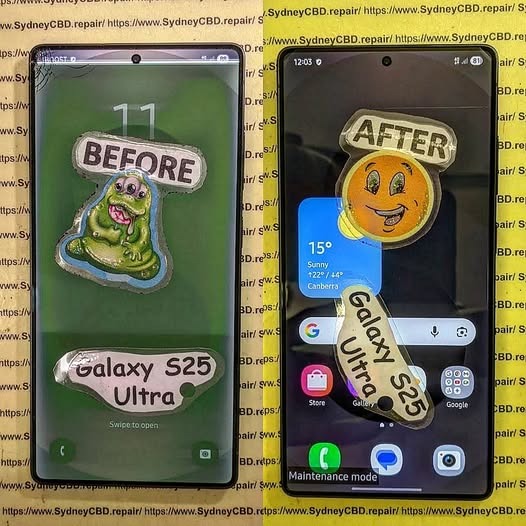
Restoring a Crushed Samsung Galaxy S25 Ultra Phone: From Total Wreck to Showroom Condition + Ultimate 10-Step Revival Guide
🔧 Introduction to Crushed Phone Restoration
Restoring a severely damaged smartphone might sound impossible—but with the right expertise, tools, and patience, even a completely crushed device can come back to life. This is especially true for flagship devices like the Samsung Galaxy S25 Ultra, which are engineered with high-end materials and modular repair potential.
In this guide, we’ll walk you through how professionals turn a total wreck into a device that looks and functions like it just came out of the box. Whether you’re a technician, a repair business owner, or simply curious, this deep dive offers practical insights grounded in real-world repair scenarios.
Choosing the right screen ensures optimal performance for your Samsung Galaxy S25 Ultra.
🔋 Step 5: Battery Inspection and Replacement
Crushed batteries are dangerous.
Look for swelling or punctures
Always replace compromised batteries
Use certified replacements
Safety should never be compromised.
🔬 Step 6: Logic Board Repair and Micro-Soldering
Common Board-Level Issues
Broken traces
Loose IC chips
Corrosion from exposure
Microsoldering can revive even severely damaged boards when done correctly.
📸 Step 7: Camera and Sensor Restoration
High-end phones rely heavily on camera systems.
Replace cracked lenses
Realign sensor modules
Test autofocus and stabilization
The Samsung Galaxy S25 Ultra is known for its advanced camera, so precision matters.
🧩 Step 8: Reassembly and Sealing
Reassembly involves:
Reconnecting all flex cables
Applying new adhesive seals
Ensuring waterproofing (where possible)
Proper sealing restores durability.
💻 Step 9: Software Testing and Calibration
After hardware repair:
Run diagnostic software
Calibrate sensors
Update firmware
This ensures the phone operates smoothly.
✅ Step 10: Final Quality Check and Cosmetic Finishing
Final steps include:
Cleaning the device
Polishing surfaces
Testing all functions
The goal? A phone that looks brand new.
💰 Cost vs Value: Is Restoration Worth It?
Restoring a crushed Samsung Galaxy S25 Ultra can be expensive, but it’s often cheaper than buying a new flagship.
Factor
Repair
Replacement
Cost
Moderate
High
Data Retention
Yes
No
Environmental Impact
Low
High
🛡️ Preventing Future Damage
To avoid repeating the ordeal:
Use rugged cases
Install tempered glass
Avoid extreme pressure situations
Prevention is always better than repair.
❓ Frequently Asked Questions
1. Can a completely crushed phone really be restored?
Yes, in many cases, even severely damaged phones can be restored with professional tools and expertise.
2. How long does restoration take?
Typically 1–3 days, depending on damage severity.
3. Is data recoverable after severe damage?
Often yes, especially if the logic board is intact.
4. Is it safe to use a repaired phone?
Absolutely—if repaired correctly using quality parts.
5. Will the phone be waterproof again?
It may regain some resistance, but not factory-level waterproofing.
6. Should I attempt DIY restoration?
Only for minor issues. Severe damage requires professionals.
🔚 Conclusion
Restoring a crushed Samsung Galaxy S25 Ultra is no small feat—but it’s far from impossible. With the right process, tools, and expertise, even the most damaged device can be transformed into a fully functional, visually stunning smartphone.
If you’re considering repair, weigh the costs, assess the damage, and trust experienced technicians to bring your device back to life.
David from Sydney CBD Repair Centre – The Best place to fix mobile phones as 7 Years In A Row! Top Mobile Phone Repair In Sydney. More than 2000 Positive Reviews on Google and Same Day Repairs.
We take pride in delivering exceptional repair services for all major phone brands including Apple, Samsung, Google, and more. Our expert technicians use only genuine parts and offer 90days warranty on repairs. Located in the heart of Sydney CBD, we’re your one-stop solution for all mobile device repairs.
Our commitment to excellence has earned us the trust of thousands of satisfied customers. Whether it’s a cracked screen, battery replacement, or water damage repair, we handle it all with professional care and expertise. Walk in today and experience why we’re Sydney’s #1 choice for mobile phone repairs.
Visit us for:
✓ Same Day Express Repairs
✓ Genuine Parts Guarantee
✓ Professional Technicians
✓ Competitive Pricing
✓ 2000+ 5-Star Google Reviews
✓ 7-Time Award Winner for Best Phone Repairs
Samsung Galaxy S25 Ultra Full Teardown and Screen Restoration in Sydney CBD: 15 Expert Techniques That Save Your Phone
Introduction
The Samsung Galaxy S25 Ultra is one of the most advanced smartphones ever released by Samsung Electronics. With its ultra-bright AMOLED display, titanium frame, AI-powered camera system, and premium design, this flagship device represents cutting-edge mobile engineering. However, even the toughest premium smartphones can suffer cracked screens, touch issues, or display damage after accidental drops.
That’s where Samsung Galaxy S25 Ultra full teardown and screen restoration in Sydney CBD becomes essential. Professional technicians use advanced tools, genuine components, and proven restoration methods to bring damaged devices back to life without compromising performance or reliability.
In busy city environments like Sydney, phones endure daily wear and tear. From accidental falls on pavement to pressure damage inside bags, screen failures are increasingly common. Fortunately, expert restoration services can completely revive the device while maintaining its premium functionality.
The Samsung Galaxy S25 Ultra features an advanced engineering structure designed for durability and performance. Unlike older devices, modern Samsung phones use layered internal assemblies that make repairs more challenging but more precise.
Key Components Inside the Device
Component
Function
AMOLED Display
Produces vivid visuals and touch responsiveness
Titanium Frame
Provides structural durability
Battery Module
Powers the device efficiently
Main Logic Board
Controls processing and communication
Camera Array
Captures ultra-high-resolution photos
Cooling System
Prevents overheating during heavy use
The Samsung Galaxy S25 Ultra full teardown and screen restoration in Sydney CBD process requires careful handling because every component is interconnected with delicate flex cables and adhesives.
Why Screen Damage Happens on Premium Smartphones
Even though flagship smartphones are built with stronger materials, they aren’t indestructible. In fact, premium curved-edge displays often become more vulnerable to impact.
Common Causes of Damage
Accidental drops
Sitting on the phone
Pressure inside backpacks
Water exposure
Poor-quality screen protectors
Heat expansion damage
Interestingly, many users assume minor cracks don’t require immediate repair. Unfortunately, small cracks often spread rapidly and may eventually damage the OLED layer underneath.
Hidden Risks of Ignoring Cracks
When users delay Samsung Galaxy S25 Ultra full teardown and screen restoration in Sydney CBD, additional issues may appear:
Sometimes the damage isn’t obvious. A phone may still function while internal components slowly deteriorate.
Major Warning Signs
Display Problems
Dead pixels
Screen flickering
Purple ink-like spots
Dim brightness
Partial black display
Touchscreen Issues
Delayed response
Ghost touching
Unresponsive areas
Random typing
Structural Damage
Bent frame
Loose glass
Exposed adhesive
Rear glass separation
If your phone shows these symptoms, professional Samsung Galaxy S25 Ultra full teardown and screen restoration in Sydney CBD should be performed immediately.
Tools Required for a Full Teardown
Professional repair technicians rely on specialized equipment to safely disassemble flagship devices.
Essential Repair Tools
Tool
Purpose
Heat Pad
Softens adhesive
Precision Screwdrivers
Removes internal screws
Plastic Pry Tools
Opens housing safely
Suction Cup
Lifts display panels
Anti-Static Mat
Prevents component damage
Isopropyl Alcohol
Cleans adhesive residue
Without these tools, DIY attempts often cause permanent motherboard damage.
Why Specialized Equipment Matters
Modern Samsung devices use extremely strong waterproof adhesive. Attempting removal without controlled heat may crack the rear glass or damage internal flex cables.
Professional repair labs in Sydney invest heavily in advanced repair systems to ensure safer restoration procedures.
Step-by-Step Samsung Galaxy S25 Ultra Full Teardown
The Samsung Galaxy S25 Ultra full teardown and screen restoration in Sydney CBD process follows a structured workflow designed to minimize risk.
Step 1: Device Inspection
Technicians first assess:
Frame condition
Display responsiveness
Internal pressure points
Battery health
Water damage indicators
This inspection determines whether additional repairs are necessary.
Step 2: Heating the Rear Panel
Controlled heat softens the factory adhesive. Technicians carefully apply suction tools and pry instruments to lift the rear glass without cracking it.
Step 3: Disconnecting the Battery
Battery disconnection is critical for safety.
Modern lithium batteries can become hazardous if punctured accidentally during screen restoration.
Step 4: Removing Internal Shields
The Samsung Galaxy S25 Ultra contains several protective covers secured with precision screws. These shields protect the motherboard and camera connectors.
Step 5: Detaching the Display Assembly
Technicians separate the damaged AMOLED panel from the frame using calibrated heat equipment.
This stage requires patience because excessive force can damage:
Fingerprint sensor cables
Touch IC components
Charging flex assemblies
Safe Battery Removal Procedures
Battery safety is one of the most overlooked aspects of smartphone repair.
Risks of Improper Battery Handling
A damaged lithium-ion battery may:
Swell unexpectedly
Overheat
Leak chemicals
Ignite under pressure
That’s why experienced technicians follow strict battery removal protocols during Samsung Galaxy S25 Ultra full teardown and screen restoration in Sydney CBD.
Professional Safety Measures
Technicians Use:
Heat-controlled environments
Anti-static gloves
Plastic-only pry tools
Fire-resistant safety containers
Professional repair centers also test battery voltage before reassembly.
Removing the AMOLED Display Assembly
Samsung’s Dynamic AMOLED technology delivers incredible visuals, but it’s also fragile.
Challenges During Display Removal
The OLED layer is extremely thin and bonded tightly to the chassis.
Improper removal can damage:
Display circuitry
Under-display fingerprint sensor
Frame integrity
Restoration Workflow
Heat application
Adhesive softening
Controlled panel separation
Residual adhesive cleaning
New screen alignment
Waterproof seal installation
The Samsung Galaxy S25 Ultra full teardown and screen restoration in Sydney CBD process requires precision alignment to ensure touch accuracy and display clarity.
Common Mistakes During Screen Restoration
DIY repairs may look easy online, but real-world repairs are much more complex.
Frequent DIY Errors
Mistake
Result
Using metal tools
Short circuits
Excessive heat
OLED damage
Cheap replacement screens
Poor display quality
Incorrect adhesive
Loss of waterproofing
Skipping battery disconnection
Electrical damage
Many users attempt repairs after watching short videos, only to create more expensive motherboard problems later.
Genuine vs Aftermarket Samsung Galaxy S25 Ultra Screens
One major decision during Samsung Galaxy S25 Ultra full teardown and screen restoration in Sydney CBD is choosing the right replacement display.
Genuine Samsung Displays
Benefits
Accurate color reproduction
Smooth refresh rates
Better durability
Proper brightness calibration
Full fingerprint sensor compatibility
Aftermarket Displays
Potential Drawbacks
Lower brightness
Inconsistent touch response
Reduced lifespan
Poor adhesive quality
Increased battery usage
Professional repair centers strongly recommend genuine OLED replacements whenever possible.
Premium repair labs use advanced restoration procedures to achieve factory-like results.
Precision Adhesive Alignment
Modern Samsung phones depend heavily on waterproof sealing adhesives.
Technicians use:
Laser alignment systems
Frame calibration tools
OEM-grade adhesives
These ensure the restored device maintains durability and structural integrity.
Display Calibration Testing
After installation, technicians test:
Color balance
Brightness uniformity
Touch sensitivity
Fingerprint scanner accuracy
Refresh rate performance
The Samsung Galaxy S25 Ultra full teardown and screen restoration in Sydney CBD process isn’t complete until all tests pass successfully.
Waterproofing and Adhesive Reinstallation
One of the biggest concerns after repair is waterproofing.
Can Waterproofing Be Restored?
Professional repair centers can significantly restore water resistance using premium sealing methods. However, no repaired device should be considered completely waterproof again.
Customers often worry about losing photos, contacts, and personal files.
How Professionals Protect Data
Experienced technicians avoid unnecessary software modifications during Samsung Galaxy S25 Ultra full teardown and screen restoration in Sydney CBD.
Standard Data Safety Procedures
Airplane mode activation
Minimal software access
No factory reset unless required
Secure workstation protocols
In most cases, screen restoration does not affect stored data.
Benefits of Professional Screen Restoration in Sydney CBD
There’s a huge difference between amateur repairs and expert-level restoration.
Advantages of Professional Technicians
Better Repair Quality
Professionals use:
Genuine components
Advanced equipment
Specialized diagnostics
Faster Turnaround
Many Sydney CBD repair centers complete Samsung Galaxy S25 Ultra full teardown and screen restoration in Sydney CBD on the same day.
Warranty Protection
Reliable repair shops provide warranties covering:
Display functionality
Touch responsiveness
Installation defects
How Long Samsung Galaxy S25 Ultra Repairs Take
Repair duration depends on the severity of the damage.
Typical Timeframes
Repair Type
Estimated Time
Basic Screen Replacement
1–2 hours
Full Teardown Restoration
2–4 hours
Water Damage + Screen Repair
1–2 days
Professional repair labs prioritize accuracy over speed.
Cost Factors for Samsung Galaxy S25 Ultra Repairs
Several variables affect pricing.
Main Pricing Factors
Display Quality
Genuine Samsung OLED panels cost significantly more than aftermarket screens.
Additional Damage
Extra repairs may include:
Frame replacement
Battery replacement
Charging port repair
Camera restoration
Labor Complexity
The Samsung Galaxy S25 Ultra full teardown and screen restoration in Sydney CBD process is labor-intensive due to the phone’s complex internal structure.
Preventive Tips After Screen Restoration
After repair, proper care helps extend device lifespan.
Recommended Protection Tips
Use Quality Accessories
Invest in:
Tempered glass protectors
Shockproof cases
Waterproof pouches
Avoid Extreme Temperatures
Heat can weaken adhesives and reduce battery longevity.
Keep the Device Dry
Even professionally restored phones shouldn’t be submerged intentionally.
Why Sydney CBD Repair Experts Stand Out
Repair professionals in Sydney are known for handling premium smartphone restorations with exceptional precision.
What Makes CBD Repair Centers Different?
High Repair Volume
Experienced technicians perform hundreds of flagship Samsung repairs regularly.
Access to Premium Parts
Leading repair centers source high-quality components from trusted suppliers.
Strong Customer Support
Customers benefit from:
Transparent pricing
Repair tracking
Warranty coverage
Honest diagnostics
Frequently Asked Questions
1. Can a cracked Samsung Galaxy S25 Ultra screen be fully restored?
Yes. Professional Samsung Galaxy S25 Ultra full teardown and screen restoration in Sydney CBD can restore both display functionality and appearance using high-quality replacement components.
2. Will my data be lost during screen restoration?
In most cases, no. Professional technicians usually preserve all user data unless severe motherboard damage requires advanced recovery procedures.
3. How long does the repair process take?
Most screen restorations are completed within a few hours, depending on parts availability and internal damage severity.
4. Are genuine Samsung screens worth the extra cost?
Absolutely. Genuine screens provide superior brightness, touch accuracy, color quality, and long-term durability compared to cheaper aftermarket displays.
5. Can waterproofing be restored after repair?
Professional technicians can restore much of the original sealing protection, although repaired phones should never be considered fully waterproof again.
6. What should I do immediately after cracking my screen?
Turn off the device if the display flickers or overheats. Avoid pressure on the damaged area and seek professional Samsung Galaxy S25 Ultra full teardown and screen restoration in Sydney CBD as soon as possible.
7. Is DIY repair recommended for flagship Samsung phones?
No. Modern Samsung Ultra devices contain delicate components and strong adhesives that require professional-grade tools and expertise.
Conclusion
The Samsung Galaxy S25 Ultra is an engineering masterpiece, but even premium smartphones need expert care after accidental damage. Professional Samsung Galaxy S25 Ultra full teardown and screen restoration in Sydney CBD ensures your device receives the precision handling, genuine parts, and advanced diagnostics necessary for long-lasting performance.
From AMOLED display replacement to waterproof resealing and full internal diagnostics, expert technicians help restore your smartphone safely and efficiently. While DIY repairs may seem tempting, professional restoration remains the smartest choice for protecting such a high-end investment.
Whether you’re dealing with cracked glass, touch failures, or complete display damage, experienced repair specialists in Sydney can bring your Samsung Galaxy S25 Ultra back to premium condition quickly and reliably.
Post-Article Message:
Thank you for reading this comprehensive guide on Samsung Galaxy S25 Ultra full teardown and screen restoration in Sydney CBD. Professional repairs not only restore your device’s appearance but also protect its long-term functionality and value.
David from Sydney CBD Repair Centre – The Best place to fix mobile phones as 7 Years In A Row! Top Mobile Phone Repair In Sydney. More than 2000 Positive Reviews on Google and Same Day Repairs.
We take pride in delivering exceptional repair services for all major phone brands including Apple, Samsung, Google, and more. Our expert technicians use only genuine parts and offer 90days warranty on repairs. Located in the heart of Sydney CBD, we’re your one-stop solution for all mobile device repairs.
Our commitment to excellence has earned us the trust of thousands of satisfied customers. Whether it’s a cracked screen, battery replacement, or water damage repair, we handle it all with professional care and expertise. Walk in today and experience why we’re Sydney’s #1 choice for mobile phone repairs.
Visit us for:
✓ Same Day Express Repairs
✓ Genuine Parts Guarantee
✓ Professional Technicians
✓ Competitive Pricing
✓ 2000+ 5-Star Google Reviews
✓ 7-Time Award Winner for Best Phone Repairs
Sydney CBD Repair Centre – Where Quality Meets Reliability.
Call : +61280114119
Website: Sydney CBD Repair Centre
Restoring Professional Grade Durability To A Shattered Samsung Galaxy S25 Ultra Display – Ultimate 10-Step Expert Repair Guide
Introduction
A shattered smartphone display can feel like the end of the road for even the most advanced device. However, restoring professional grade durability to a shattered Samsung Galaxy S25 Ultra display is entirely possible with expert repair techniques, genuine replacement components, and experienced technicians. The Samsung Galaxy S25 Ultra stands as one of Samsung’s most premium flagship devices, featuring cutting-edge AMOLED technology, ultra-fast responsiveness, and exceptional durability. Still, accidents happen.
Whether the damage comes from an unexpected drop, pressure inside a pocket, or impact against a hard surface, repairing the display quickly is essential. A cracked screen doesn’t just affect appearance—it can compromise touch sensitivity, weaken structural integrity, and expose the device to dust or moisture.
Fortunately, professional repair services can restore the Samsung Galaxy S25 Ultra to near-original condition. By using proper diagnostic tools and precision installation methods, technicians can bring back display clarity, responsiveness, and strength. In many cases, same-day repairs are available, helping users avoid long periods without their phones.
The Samsung Galaxy S25 Ultra display is one of the most advanced smartphone screens ever developed. Samsung engineered this device with a premium Dynamic AMOLED panel capable of delivering exceptional brightness, color accuracy, and ultra-smooth refresh rates.
Key Display Features
Feature
Benefit
AMOLED Technology
Rich blacks and vibrant colors
High Refresh Rate
Smooth scrolling and gaming
HDR Support
Better video viewing experience
Gorilla Glass Protection
Improved impact resistance
Edge-to-Edge Design
Premium visual aesthetics
Because the display is central to the user experience, even minor cracks can significantly reduce usability. That’s why restoring professional grade durability to a shattered Samsung Galaxy S25 Ultra display should never be delayed.
Even with strong protective glass, the Samsung Galaxy S25 Ultra can still suffer screen damage under certain conditions.
Frequent Causes Include
Accidental drops onto concrete
Pressure from sitting on the phone
Impact inside bags or backpacks
Falls from tables or countertops
Sharp object contact
Heat-related structural weakening
Interestingly, many users assume modern flagship phones are indestructible. While durable, no smartphone display is completely immune to damage.
Signs Your Samsung Galaxy S25 Ultra Needs Immediate Repair
Some damage appears obvious, while other problems develop gradually over time.
Common Warning Signs
Cracked or Spiderweb Glass
Visible cracks are the most common indicator.
Touchscreen Unresponsiveness
Dead spots or delayed touch input suggest internal damage.
Flickering Display
A flickering screen often points to AMOLED panel issues.
Black Spots or Bleeding Pixels
These signs usually indicate impact damage beneath the glass.
Green or White Lines
Vertical lines commonly appear after pressure damage.
Screen Separation
The display lifting away from the frame requires urgent repair.
Ignoring these warning signs can worsen the damage and increase repair costs.
Understanding AMOLED Technology in the Galaxy S25 Ultra
Samsung’s AMOLED technology is renowned worldwide for exceptional image quality. Unlike traditional LCD displays, AMOLED screens use self-lit pixels that individually illuminate.
Benefits of AMOLED Displays
Better battery efficiency
Superior contrast ratios
Deeper blacks
Faster response times
Thinner display construction
However, AMOLED panels are highly specialized. Restoring professional grade durability to a shattered Samsung Galaxy S25 Ultra display requires careful handling because even small installation errors can affect performance.
Manufacturing new phones consumes significant energy.
Longer Device Lifespan
Professional repairs keep devices functional for years.
Restoring professional grade durability to a shattered Samsung Galaxy S25 Ultra display is not only financially smart—it’s environmentally responsible too.
Choosing the Right Repair Centre
Not all repair centres offer the same quality standards.
What To Look For
Experienced Technicians
Choose specialists with Samsung repair expertise.
Genuine Parts
Always ask whether original-quality parts are used.
Warranty Coverage
Reliable repair centres stand behind their work.
Positive Customer Reviews
Strong customer feedback indicates service quality.
Fast Turnaround Times
Efficient repairs reduce inconvenience.
Selecting a trusted repair provider ensures your Samsung Galaxy S25 Ultra receives professional treatment.
Frequently Asked Questions
1. Can a shattered Samsung Galaxy S25 Ultra display be fully restored?
Yes. Professional technicians can restore the phone’s appearance, functionality, and durability using genuine-quality replacement parts and precision repair methods.
2. Will repairing the display affect waterproofing?
Professional repair centres attempt to restore original sealing as closely as possible. However, water resistance can never be guaranteed exactly like factory conditions.
3. Is it safe to keep using a cracked Samsung Galaxy S25 Ultra?
Using a cracked device can lead to worsening damage, moisture penetration, and potential injury from broken glass.
4. How much does Samsung Galaxy S25 Ultra screen repair usually cost?
Costs vary depending on part quality, repair complexity, and whether internal damage exists. Genuine AMOLED repairs typically cost more than standard smartphone screens.
5. Can the fingerprint sensor still work after screen replacement?
Yes. High-quality professional repairs maintain compatibility with the under-display fingerprint scanner.
6. How can I avoid future Samsung Galaxy S25 Ultra display damage?
Using a rugged case, tempered glass protector, and careful handling significantly reduces the risk of future cracks.
7. Is repairing better than replacing the phone?
In most cases, yes. Screen repair is far more affordable and environmentally friendly compared to buying a new flagship device.
Conclusion
The Samsung Galaxy S25 Ultra is an advanced premium smartphone designed for performance, durability, and exceptional visual quality. Yet even the strongest devices can suffer accidental damage. Thankfully, restoring professional grade durability to a shattered Samsung Galaxy S25 Ultra display is entirely achievable with professional repair services.
From restoring AMOLED brilliance to reinforcing structural integrity, expert technicians can breathe new life into damaged devices. By using genuine-quality components, advanced repair techniques, and proper sealing procedures, modern repair centres help users regain confidence in their smartphones without the high cost of replacement.
Investing in professional repair not only protects your device but also extends its lifespan, preserves valuable data, and contributes to environmental sustainability. When handled correctly, a repaired Samsung Galaxy S25 Ultra can continue delivering flagship-level performance for years to come.
David from Sydney CBD Repair Centre – The Best place to fix mobile phones as 7 Years In A Row! Top Mobile Phone Repair In Sydney. More than 2000 Positive Reviews on Google and Same Day Repairs.
We take pride in delivering exceptional repair services for all major phone brands including Apple, Samsung, Google, and more. Our expert technicians use only genuine parts and offer 90days warranty on repairs. Located in the heart of Sydney CBD, we’re your one-stop solution for all mobile device repairs.
Our commitment to excellence has earned us the trust of thousands of satisfied customers. Whether it’s a cracked screen, battery replacement, or water damage repair, we handle it all with professional care and expertise. Walk in today and experience why we’re Sydney’s #1 choice for mobile phone repairs.
Visit us for:
✓ Same Day Express Repairs
✓ Genuine Parts Guarantee
✓ Professional Technicians
✓ Competitive Pricing
✓ 2000+ 5-Star Google Reviews
✓ 7-Time Award Winner for Best Phone Repairs
WATER DAMAGE RECOVERY! Samsung Galaxy S25 Ultra Display and Component Precision Repair + Ultimate Guide 2026
Introduction
The Samsung Galaxy S25 Ultra is one of the most advanced smartphones ever created. With its premium AMOLED display, high-powered chipset, and sophisticated camera system, it’s built for performance and durability. However, even flagship smartphones can suffer severe problems after accidental liquid exposure. That’s where Samsung Galaxy S25 Ultra water damage recovery becomes critical.
Water damage can happen in seconds. A spilled drink, sudden rainstorm, swimming pool accident, or bathroom mishap may cause hidden corrosion inside the device. Even though the Samsung Galaxy S25 Ultra offers water resistance, no phone is entirely waterproof forever. Over time, seals weaken, adhesives degrade, and accidental impacts can compromise water protection.
Professional repair technicians now use advanced methods like ultrasonic cleaning, motherboard diagnostics, and micro soldering to restore water-damaged devices. These procedures help revive displays, charging systems, and internal components while protecting valuable user data.
In this detailed guide, we’ll explore the entire Samsung Galaxy S25 Ultra display and component precision repair process. You’ll also discover what causes internal damage, how experts diagnose problems, and why fast action dramatically increases recovery success.
Water damage affects smartphones differently depending on the type of liquid involved, exposure duration, and internal component sensitivity. While some devices survive brief splashes, others experience instant failures.
Common Causes of Liquid Damage
Several everyday situations can expose your Samsung Galaxy S25 Ultra to moisture:
Dropping the phone into water
Rain exposure during outdoor use
Spilled coffee or soft drinks
Steam from bathrooms or kitchens
Saltwater exposure at beaches
Sweat buildup during workouts
Interestingly, saltwater and sugary liquids are usually more destructive than clean water. They accelerate corrosion and leave conductive residue across sensitive circuits.
Early Warning Signs After Water Exposure
Sometimes the phone continues functioning temporarily after exposure. However, hidden issues may appear later.
Common symptoms include:
Symptom
Possible Cause
Screen flickering
Display connector corrosion
Ghost touch
Moisture affecting digitizer
No charging
Damaged charging IC
Overheating
Short circuit on motherboard
Camera fogging
Internal condensation
Speaker distortion
Water trapped in speaker mesh
If you notice these signs, immediate professional inspection is essential.
Why Immediate Action Matters
Time plays a massive role in successful Samsung Galaxy S25 Ultra water damage recovery. Corrosion begins almost instantly once liquid reaches internal circuits.
How Corrosion Begins Inside the Phone
Modern smartphones contain microscopic pathways carrying electrical signals across the motherboard. When water bridges those pathways, it creates unintended electrical connections.
This process causes:
Short circuits
Component overheating
Burned IC chips
Power failures
Permanent motherboard damage
Corrosion spreads like rust. Even tiny traces of moisture continue damaging the phone long after the initial accident.
Risks of Delayed Repairs
Many users make the mistake of waiting several days before seeking repair services. Unfortunately, delays often worsen internal damage.
Here’s what can happen:
Corrosion spreads further
Battery swelling develops
Display connectors deteriorate
Data becomes unrecoverable
Motherboard repair costs increase
Quick professional intervention dramatically improves recovery chances.
The display assembly is one of the most vulnerable parts affected by water exposure.
AMOLED Display Failure Symptoms
The Samsung Galaxy S25 Ultra uses a sophisticated AMOLED panel that delivers vivid colors and ultra-smooth refresh rates. However, moisture can severely impact the display system.
Common display problems include:
Green lines
Black spots
Flickering brightness
Touch response failure
Complete display blackout
Sometimes the display itself remains functional while flex cables or connectors become corroded.
Touchscreen and Flex Cable Issues
Flex cables carry signals between the display and motherboard. Water intrusion near these connectors often causes intermittent display behavior.
Technicians carefully inspect:
Display flex connectors
Backlight circuits
Touch IC chips
AMOLED control lines
Precision repair procedures help restore functionality without replacing unnecessary components.
Precision Repair Process for Water-Damaged Devices
Professional repair centers follow systematic recovery procedures to maximize success.
Initial Diagnostic Procedures
The first step involves complete device disassembly. Technicians inspect every component using magnification tools and specialized equipment.
Diagnostic checks include:
Voltage testing
Thermal imaging
Corrosion inspection
Power rail analysis
Display functionality tests
This process identifies both visible and hidden failures.
Ultrasonic Cleaning Techniques
One of the most important repair methods is ultrasonic cleaning. Specialized cleaning machines use high-frequency vibrations to remove corrosion from delicate motherboard components.
Benefits include:
Deep contaminant removal
Safe precision cleaning
Reduced corrosion spread
Improved electrical stability
This step is critical for successful Samsung Galaxy S25 Ultra display and component precision repair.
Component-Level Repairs
If corrosion damages specific chips or connectors, technicians perform targeted repairs.
Examples include:
Replacing charging ICs
Rebuilding damaged pads
Repairing broken traces
Replacing connectors
Restoring display circuits
These repairs require advanced soldering expertise and professional equipment.
Motherboard Recovery and Micro Soldering
The motherboard is the heart of the Samsung Galaxy S25 Ultra. Water damage here can affect every major function.
Common IC Components Affected
Several motherboard chips are especially vulnerable:
Component
Function
Power Management IC
Controls power distribution
Charging IC
Manages charging system
Audio IC
Handles sound functions
Display IC
Controls screen output
Wi-Fi IC
Wireless connectivity
Damage to any of these components may cause major device failures.
Precision Soldering Methods
Micro soldering involves repairing tiny electronic components under a microscope.
Technicians use:
Hot air rework stations
Precision soldering irons
Microscope magnification
Fine solder wire
PCB repair tools
This delicate process allows specialists to restore severely damaged boards.
Battery and Charging Port Restoration
Water damage often affects charging systems before other components.
Charging Failure Symptoms
A damaged charging system may show signs like:
Slow charging
No charging response
Moisture detection errors
Overheating while charging
Intermittent charging
Technicians inspect both the charging port and surrounding motherboard circuits.
Battery Safety Concerns
Lithium-ion batteries can become dangerous after water exposure. Internal short circuits may lead to swelling or overheating.
Warning signs include:
Battery bulging
Excessive heat
Rapid power drain
Random shutdowns
Replacing compromised batteries is essential for device safety.
Camera and Audio Component Repairs
Modern flagship phones contain sophisticated imaging and sound systems that are highly sensitive to moisture.
Lens Fogging and Camera Failure
Water vapor trapped inside camera modules often creates fogging. Over time, moisture damages autofocus motors and image sensors.
Repair procedures may involve:
Camera module replacement
Lens cleaning
Connector restoration
Sensor diagnostics
Speaker and Microphone Issues
Audio components frequently suffer after liquid exposure.
Typical problems include:
Muffled sound
Crackling speakers
Microphone failure
Reduced audio volume
Cleaning and replacing affected parts restores clear sound quality.
Data Recovery From Water-Damaged Samsung Phones
For many users, recovering photos, messages, and business files matters more than repairing the phone itself.
Professional Recovery Techniques
Experienced technicians use specialized tools to retrieve important data.
Methods include:
Temporary power restoration
NAND chip recovery
Board-level bypass techniques
Data extraction software
In severe cases, partial motherboard repairs may be necessary just to access stored information.
Preventing Permanent Data Loss
To protect your data:
Avoid turning the phone on repeatedly
Don’t attempt DIY charging
Seek immediate professional help
Backup recovered data immediately
Fast action significantly increases recovery success rates.
DIY Water Damage Myths
The internet is full of misleading advice regarding water-damaged smartphones.
Why Rice Doesn’t Work
Placing phones in rice is one of the most common myths. Unfortunately, rice doesn’t remove corrosion or trapped moisture inside sealed components.
Rice may actually:
Delay professional repairs
Introduce dust particles
Trap moisture internally
Professional cleaning remains the safest option.
Common Mistakes Users Make
Avoid these harmful actions:
Charging the phone immediately
Using a hairdryer
Freezing the phone
Shaking out water aggressively
Ignoring minor symptoms
These mistakes often worsen internal damage.
Benefits of Professional Samsung Galaxy S25 Ultra Repairs
Professional repair services offer major advantages over temporary fixes.
Genuine Parts and Warranty
Reliable repair centers use high-quality replacement components and proper repair procedures.
Benefits include:
Better durability
Improved display performance
Safer charging behavior
Manufacturer-grade compatibility
Professional warranties also provide peace of mind.
Long-Term Reliability
Proper repairs restore structural integrity and reduce future failure risks.
Experienced technicians ensure:
Internal cleaning
Correct adhesive sealing
Precision calibration
Full functionality testing
This comprehensive approach extends device lifespan considerably.
For official Samsung device support and care information, visit Samsung Support
Preventing Future Water Damage
Prevention is always better than expensive repairs.
Waterproofing Limitations
Even water-resistant devices have limitations. IP ratings apply only under controlled laboratory conditions.
Factors reducing resistance include:
Previous repairs
Physical drops
Aging adhesive seals
Extreme temperatures
Users should still treat their devices carefully around liquids.
Protective Habits for Daily Use
Here are smart habits to reduce risk:
Use waterproof pouches outdoors
Avoid bathroom steam exposure
Keep drinks away from devices
Dry phones immediately after splashes
Inspect damaged frames promptly
Simple precautions can prevent costly repairs.
Frequently Asked Questions
Can a Samsung Galaxy S25 Ultra survive water damage?
Yes, many devices can be successfully repaired if treated quickly. Immediate professional cleaning greatly improves recovery chances.
How long should I wait before turning on a wet phone?
Avoid powering it on entirely until inspected by a technician. Turning it on too soon can cause short circuits.
Does rice fix water-damaged phones?
No. Rice doesn’t remove corrosion or internal moisture effectively.
Can water damage affect the display only?
Sometimes. However, moisture often spreads beyond the screen and impacts the motherboard or battery.
Is data recovery possible after severe liquid damage?
In many cases, yes. Professional repair labs can often recover photos, contacts, and files even from heavily damaged devices.
How much does Samsung Galaxy S25 Ultra water damage repair cost?
Costs vary depending on affected components. Minor cleaning is cheaper than motherboard reconstruction or display replacement.
Can a water-damaged battery become dangerous?
Yes. Damaged lithium batteries may swell, overheat, or fail unpredictably. Professional inspection is important.
Conclusion
The Samsung Galaxy S25 Ultra is an impressive flagship smartphone, but water damage remains a serious threat to its advanced internal systems. From AMOLED display failures to motherboard corrosion, liquid exposure can quickly turn into a costly disaster if ignored.
Fortunately, modern Samsung Galaxy S25 Ultra display and component precision repair techniques offer highly effective recovery solutions. Ultrasonic cleaning, micro soldering, and advanced diagnostics now allow experienced technicians to restore many water-damaged devices that once seemed beyond repair.
Most importantly, acting quickly makes a huge difference. Immediate professional inspection reduces corrosion, protects valuable data, and improves repair success rates dramatically.
Whether you’re facing screen flickering, charging issues, speaker failure, or complete device shutdown, professional repair specialists can often restore your phone safely and efficiently. By understanding the repair process and avoiding common mistakes, you can maximize the chances of full recovery and extend the life of your Samsung Galaxy S25 Ultra.
David from Sydney CBD Repair Centre – The Best place to fix mobile phones as 7 Years In A Row! Top Mobile Phone Repair In Sydney. More than 2000 Positive Reviews on Google and Same Day Repairs.
We take pride in delivering exceptional repair services for all major phone brands including Apple, Samsung, Google, and more. Our expert technicians use only genuine parts and offer 90days warranty on repairs. Located in the heart of Sydney CBD, we’re your one-stop solution for all mobile device repairs.
Our commitment to excellence has earned us the trust of thousands of satisfied customers. Whether it’s a cracked screen, battery replacement, or water damage repair, we handle it all with professional care and expertise. Walk in today and experience why we’re Sydney’s #1 choice for mobile phone repairs.
Visit us for:
✓ Same Day Express Repairs
✓ Genuine Parts Guarantee
✓ Professional Technicians
✓ Competitive Pricing
✓ 2000+ 5-Star Google Reviews
✓ 7-Time Award Winner for Best Phone Repairs
While we’re looking forward to Samsung’s next batch of foldables, new reports are offering some insight into Samsung’s plans for the Galaxy S25 series including design changes and the possibility of a MediaTek chip.
Over the past couple of generations, Samsung’s “Ultra” Galaxy S flagship has taken on the identity of the Galaxy Note. That’s delivered significant changes to the design including the iconic squared off design that the Note was well known for.
Apparently, though, the Galaxy S25 Ultra may shift back.
Ice Universe says that the Galaxy S25 Ultra will ditch squared off corners, going back to a more rounded design which is compared to the ill-fated Galaxy Note 7. That implies the display may also no longer be flat, something that Samsung just finally adopted in the latest generation.
Beyond that, other rumors are swirling about what will be inside of the Galaxy S25 series. Financial News reports that Samsung is considering using MediaTek chips in some Galaxy S25 variants due to the increased cost of Snapdragon 8 Gen 4. It’s highly unlikely this would affect the Ultra model, but it’s a interesting to hear, as MediaTek chips have never made their way to Samsung flagships. The Galaxy Tab S10 is also rumored to be using a MediaTek chip in some capacity.
What about Exynos? While it was previously rumored that the Exynos 2500 would play a role, this latest report suggests that issues with chip yield may prevent Samsung from relying on the chip.
Thank you for using
Themify Popup
This is a sample pop up. Themify Builder or Builder Lite (free) plugin is recommended to design the pop up layouts.