The England COVID-19 passport is now more convenient for iOS users. According to a report by BBC, the NHS app has brought support to the Apple Wallet.
People in England can now store their COVID Pass in the NHS app, which, among other things, is used for COVID vaccination records. The government says this can be used at events and venues in England but not for international travel.
You can show the vaccination records contained within your NHS COVID Pass as proof of your COVID-19 status when travelling abroad.
In addition to your NHS COVID Pass, you will need to follow additional rules when travelling abroad.
For the European Union, on the other hand, the digital vaccine passport was released in June, allowing travelers from all 27 European Union countries to use their smartphone to prove that they have been vaccinated, have tested negative, or have recovered from COVID-19. It’s available for both iPhone and Android smartphones.
The increase of COVID-19 cases around the world, even in places where a great part of the population is vaccinated, has made governments step back and bring back some measures, such as wearing masks in public transportation or indoors.
In the US, some major tech companies are giving their workers the possibility to continue working from home. At Apple, the back-to-office campaign was pushed back to at least October, and masks are mandatory again for workers at its stores.
For the COVID passport in England, it’s important to note that it’s only available within the NHS app. The NHS COVID-19 app, for example, is used to inform whether you have COVID or not and ping other people you may have entered into contact with with the COVID-19 exposure notifications created in partnership with Apple and Google.
Update: An early version of this story mistakenly said the NHS app was for the UK but it’s for England only.
Apple introduced iOS 15 beta 2 and iPadOS 15 beta 2 to developers, which are the first updates since the initial release at WWDC 2021 earlier this month. Now that we have the new betas in our hands, here’s a look at what’s new in today’s updates.
Not available for some devices
According to the iPadOS 15 beta 2 release notes on the Apple Developer website, today’s release cannot be installed on the Wi-Fi + Cellular version of the 9.7-inch iPad Pro. The reason is unknown, but probably Apple found some serious issue and chose to skip this release for the affected iPad models.
Bug fixes for iCloud Private Relay
iCloud Private Relay makes web browsing more secure for iCloud subscribers, but this feature was causing some problems for users in beta 1. According to Apple in today’s release notes, iOS 15 beta “resolved an issue that caused iCloud Private Relay to function unexpectedly.”
New Maps icon
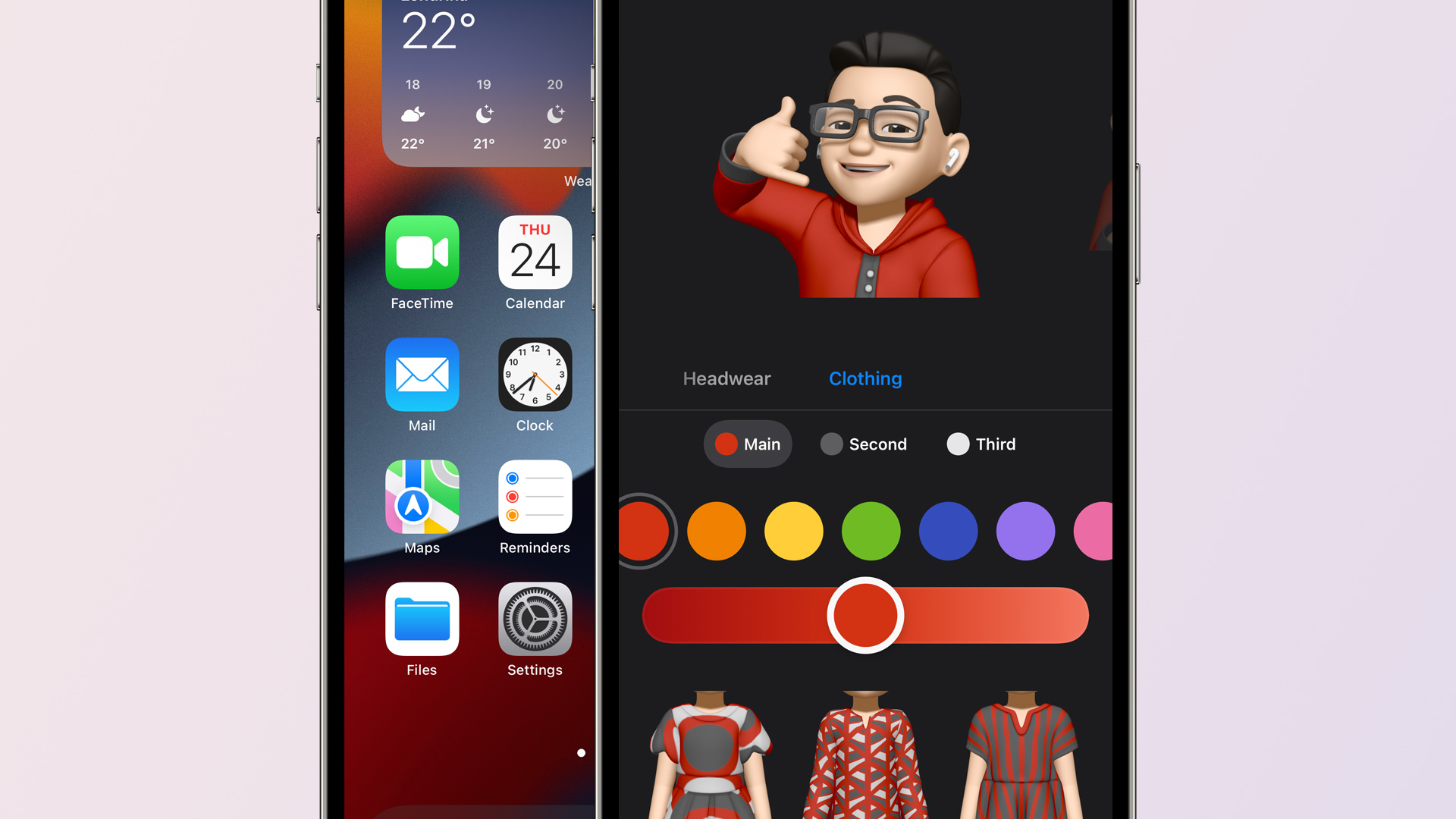
Apple revealed a new icon for its Maps app at WWDC 2021, but it was not included in iOS 15 beta 1. Now with beta 2, the new Maps icon is there. It also shows animated driving directions within the app.
Apple also mentioned earlier this month that Memojis would be updated with new looks, including the option to set a custom outfit. These options are now available with iOS 15 beta 2.
Welcome screen in the Weather app
When you open the Weather app in iOS 15 beta 2 for the first time, you will now see a welcome screen highlighting its new features and refreshed design.
Quick Note on iPad
Quick Note was already available in iPadOS 15 beta 1, but now with beta 2 users can swipe from the bottom right corner to trigger Quick Note.
Apple’s iPadOS 15 features page claims that you’ll be able to swipe a finger to access Quick Note, but this doesn’t seem to work in Dev 1. Hopefully it makes into a future update because I don’t always carry my Pencil. (Or it’s often out of charge. 😂) pic.twitter.com/PinUT70VZF
SharePlay is a new feature to let users share a song, video, or even the screen of their devices during a FaceTime call. This feature is now working with iOS 15 beta 2.
Lossless on HomePod removed
Apple has removed the option to enable Lossless audio on HomePod with iOS 15 beta 2. Previously there was an option to stream Lossless songs on HomePod within the Home app. Most likely this option has been temporarily removed due to some issue and will return in a future release.
Safari
Apple has brought back the Refresh button for the Safari address bar, but it only shows up when using a mouse or trackpad.
The Shortcuts app can now see what is displayed on the screen for receiving input from an app without the share sheet.
Also new in iOS/iPadOS 15 beta 2: Shortcuts, like Siri, can see what's displayed on screen.
There's a new 'Receive What's On Screen' option for Shortcuts. Enable this, and a shortcut will receive input from an app without the share sheet. Right now, it works in Safari. pic.twitter.com/wxrzDlavbY
Two weeks after unveiling iOS 15 and iPadOS 15 to the public at WWDC 2021, Apple is rolling out the second developer betas. iOS 15 beta 2 and iPadOS 15 beta 2 are now available to registered developers ahead of a public beta release in July and a release to everyone in the fall.
iOS 15 beta 2 details
iOS 15 beta 2 and iPadOS 15 beta 2 are available to developers via an over-the-air update in the Settings app. As usual, if the update does not immediately appear for download, keep checking, as it sometimes takes a few minutes to roll out to all registered developers. The build number for today’s iOS 15 beta 2 release is 19A5281h .
Apple’s new software version won’t be complete until the fall, at which point it will be released to the general public. Testers should still expect performance and stability issues when running the iOS 15 beta on primary devices for the time being.
In addition to the second developer betas of iOS 15 and iPadOS 15, Apple is also releasing tvOS 15 beta 2 for Apple TV and HomePod and watchOS 8 beta 2 for Apple Watch. The second beta of macOS Monterey is not yet available.
Following the release of iOS 14.5 to the public last month, multiple apps began asking users to enable the App Tracking option. With the latest version of the Twitter app for iOS, users are now being asked to enable tracking in order to receive “relevant ads.”
The new prompt was implemented with version 8.65 of the Twitter app, which is now available on the App Store. Once you install this version of the app, Twitter might ask you if you want to enable the App Tracking option. The social network argues that enabling tracking will let Twitter provide more relevant ads according to the content you like.
More choices for relevant ads on iOS 14.5. Keep ads relevant to you by allowing Twitter to track data from other companies on this device, like apps you use and websites you visit. You can decide if you’ll allow tracking in the iOS prompt and you can always change this later in your device settings.
By tapping the Continue button, the user is redirected to the iOS Settings app in the Tracking menu. There you can opt to enable App Tracking for Twitter or keep it disabled. By default, tracking for third-party apps is turned off.
With App Tracking Transparency, apps can no longer track users across other apps and websites without first asking them. Most apps use this data to display advertisements based on what the user searches for on the web or what they have installed on their device. According to a recent research, only a small amount of users have been letting apps track them with this new option.
At the same time, there are still multiple users who are not being able to access App Tracking Transparency settings in iOS due to the grayed out toggle — even after Apple said it fixed this issue with iOS 14.5.1.
One week after the release of iOS 14.5, Apple today is releasing iOS 14.5.1 to the public with bug fixes and performance improvements. Apple is also releasing iOS 12.5.3 for older iPhones that are not supported by iOS 14.5.
Today’s new release iOS 14.5.1 is available via an over-the-air update in the Settings app. As usual, if the update does not immediately appear for download, keep checking, as it sometimes takes a few minutes to roll out to all users. The build number for today’s release is 18E212.
iOS 14.5 was a major update for iPhone users, bringing new features such as App Tracking Transparency, Appel Watch Unlock, Siri improvements, and more. For such a big update, it is unsurprising to see Apple release a point update with bug fixes.
Apple says iOS 14.5.1 fixes a bug that prevented some users from seeing App Tracking Transparency prompts:
This update fixes an issue with App Tracking Transparency where some users who previously disabled Allow Apps to Request to Track in Settings may not receive prompts from apps after re-enabling it. This update also provides important security updates and is recommended for all users.
Notably, iOS 14.5.1 does not fix an issue that causes the App Tracking Transparency toggle in Settings to be grayed out. After updating to iOS 14.5.1, the “Allow Apps to Request to Track” toggle is still grayed out for some users in the Settings app.
iOS 14.5.1 is rolling out today and you can update by going to the Settings app on your device, choosing General, then choosing Software Update. Apple is also rolling out iPadOS 14.5.1 today as well.
Telegram founder Pavel Durov announced the app will add group video calls starting next month. This feature has been long anticipated by many Telegram users.
Telegram often taunts rivals over their tardiness to add new features but on video calls it has been a laggard, only adding the ability to make one-on-one video calls last August — rather than prioritizing a launch of group video calls, as it had suggested it would a few months earlier.
In an April 2020 blog post, to mark passing 400M users, it wrote that the global lockdown had “highlighted the need for a trusted video communication tool” — going on to dub video calls in 2020 “much like messaging in 2013”.
However it also emphasized the importance of security for group video calling — and that’s perhaps what’s caused the delay.
(Another possibility is the operational distraction of needing to raise a large chunk of debt financing to keep funding development: Last month Telegram announced it had raised over $1BN by selling bonds — its earlier plan to monetize via a blockchain platform having hit the buffers in 2020.)
In the event, rather than rolling out group video calls towards the latter end of 2020 it’s going to be doing so almost half way through 2021 — which has left videoconferencing platforms like Zoom to keep cleaning up during the pandemic-fuelled remote work and play boom (even as ‘Zoom fatigue’ has been added to our lexicon).
How secure Telegram’s implementation of group video calls will be, though, is an open question.
Durov’s post mades repeat mention of “encryption” — perhaps to make a subtle dig at Zoom’s own messy security claims history — but doesn’t specify whether it will use end-to-end encryption (we’ve asked).
Meanwhile Zoom does now offer e2e — and also has designs on becoming a platform in its own right, with apps and a marketplace, so there are a number of shifts in the comms landscape that could see the videoconferencing giant making deeper incursions into Telegram’s social messaging territory.
The one-to-one video calls Telegram launched last year were rolled out with its own e2e encryption — so presumably it will be replicating that approach for group calls.
However the MTProto encryption Telegram uses is custom-designed — and there’s been plenty of debate among cryptography experts over the soundness of its approach. So even if group calls are e2e encrypted there will be scrutiny over exactly how Telegram is doing it.
Also today, Durov touted two recently launched web versions of Telegram (not the first such versions by a long chalk, though) — adding that it’s currently testing “a functional version of web-based video calls internally, which will be added soon”.
He said the Webk and Webz versions of the web app are “by far the most cross-platform versions of Telegram we shipped so far”, and noting that no downloads or installs are required to access your chats via the browser.
“This is particularly good for corporate environments where installing native apps is now always allowed, but also good for users who like the instant nature of web sites,” he added, with another little nod toward enterprise users.
As reported by Yahoo Finance, Durov made the announcement via a text message posted to his official Telegram channel today. He wrote:
“We will be adding a video dimension to our voice chats in May, making Telegram a powerful platform for group video calls”.
“Screen sharing, encryption, noise-canceling, desktop and tablet support — everything you can expect from a modern video conferencing tool, but with Telegram-level UI, speed, and encryption. Stay tuned!”.
While Telegram usually taunts its competitors over their delay in offering new features, the app is behind WhatsApp, which already offers end-to-end encrypted video calls.
Also today, Durov touted two recently launched web versions of Telegram, adding that it’s currently testing “a functional version of web-based video calls internally, which will be added soon.”
“He said the Webk and Webz versions of the web app are ‘by far the most cross-platform versions of the app we shipped so far’, and noting that no downloads or installs are required to access your chats via the browser.”
While Telegram is focusing on this new feature, WhatsApp is currently testing ways to integrate Facebook Messenger and WhatsApp, as well as migrating chat history between an iPhone and an Android device.
There’s another virtual assistant you can call using your iPhone. Starting today, you can say “Hey Spotify,” with the Spotify app opened, to start playing a song, an album, or even a playlist.
Last month, reports surfaced that Spotify was working on enabling a hands-free wake word: “Hey Spotify”. Today, I received a notification in the Spotify app on my personal Galaxy S21 device that walked through the feature and how to enable it. Let’s look at what it is and what it does.
A notification was received by the Spotify app. It brought us to a screen that prompted us to turn on “Hey Spotify”. Saying the wake phrase will prompt Spotify’s built-in voice search while the screen is on and the Spotify app is open. This means that the app is continuously listening for the wake phrase. Spotify’s privacy policy for voice data usage states that Spotify says it only holds recordings and transcriptions of the searches that you perform when tapping the voice button or saying the wake phrase.
As you can see, there’s nothing much to do with the “Hey Spotify” feature apart from asking for things inside the app. Because the feature is only starting to roll out, not every user will be able to find it, but here’s where it should be:
To enable the “Hey Spotify” feature, tap the Settings icon on the Spotify homepage
Then click on “Voice Interactions
Click on the “Hey Spotify” toggle and that’s it
Now, when you’re using the app, you can just say the wake word to improve your listening experience.
This new “Hey Spotify” feature is in addition to the voice search feature that has previously been available for Premium users. The difference is that “Hey Spotify” is truly hands-free.
In the last several months, Spotify has announced several new things, such as its plans to add a HiFi subscription tier, combining music and podcasts on the same page, and a revamped design in all its iOS, Mac, and web apps.
The feature doesn’t really add any function outside of enabling Spotify’s own voice search for hands-free use. It’s just as easy to use” Hey Google” or “Hey Siri” on either Android or iOS to ask Spotify to listen to an artist, playlist, podcast, or album. Perhaps Spotify is hoping that users will be more inclined to user Spotify’s built-in voice search if it has a wake word to activate it.
Spotify’s voice search feature first launched back in 2019 for users on Spotify Premium and evidence of the Hey Spotify wake phrase was spotted as early as March 2020.
Apple Photos users are reporting a bizarre issue related to geotagging. The issue, which 9to5Mac has confirmed, centers around manually editing the location of an image and using exact latitude and longitude coordinates.
A variety of threads focused on this bug have surfaced on Apple’s Support forums . When you try to manually edit an image via Apple Photos and set the location as a specific latitude and longitude, the location will automatically jump to the reverse-geocoded location.
Here’s a quick explanation courtesy of Wikipedia on reverse geocoding:
Reverse geocoding is the process of converting a location as described by geographic coordinates (latitude, longitude) to a human-readable address or place name. Reverse geocoding permits the identification of nearby street addresses, places, and/or areal subdivisions such as neighbourhoods, county, state, or country.
What this means is that when you enter the latitude and longitude into the Photos app, the Photos app will attempt to convert this into a suggested location that could in practice be far away from the actual latitude and longitude.
Other describe their experience with this bug:
Apple Photos geotagging doesn’t seem to work properly anymore since a few months.
When manually editing the location of an image and using exact GPS Coordinates (Lat, Lon) then these coordinates are not being set for the image but only a Reverse-Geocoded location which could / will be far from the original location.
Example: When I try to geotag a picture with Coordinates “36.6972,24.4707” (Airport in Milos, Greece), I can only pick one entry, but this one entry is completely wrong.
In this user’s specific example, the Photos app suggestion is for the Aegean Sea, far away from the intended airport. 9to5Mac has seen similar incorrect suggestions across locations in the United States and the UK.
The problem appears to be tied to Apple Maps. When you enter latitude and longitude details in Apple Maps, it will show a suggested location for those details. The Photos app seems to be pulling in the first suggestion from Apple Maps, which again, could be inaccurate.
Apple has published its 2021 update to its Platform Security guide today along with refreshing the Apple Platform Security landing page. The latest guide goes in-depth on the new and updated security features that have arrived with iOS 14, macOS 11 Big Sur, Apple Silicon Macs, watchOS 7, and more. Apple has also launched an all-new Security Certifications and Compliance Center website and guide.
Apple has long held that secure software necessitates the foundation of security built into hardware. With the shift to using its own custom Apple Silicon in its first three M1 Macs starting last fall, the company has been able to realize that goal across its entire lineup of devices.
2021 Apple Platform Security guide
Device security is a never-ending mission and the latest Apple Platform Security guide details all the effort and changes Apple has implemented over the last year – highlighted by the guide growing 39 pages with this edition to a total of 196.
This documentation provides details about how security technology and features are implemented within Apple platforms. It also helps organizations combine Apple platform security technology and features with their own policies and procedures to meet their specific security needs.
While there a number of security updates that apply to existing/older devices, Apple Silicon has been notable with the M1 Macs allowing Apple to step up security to new levels when it comes to Data Protection via a rebuilt FileVault, System integrity, password protection, and more.
Another notable change in the last year has been the advanced BlastDoor security for iMessage (not specifically mentioned in the new security guide). While it was just recently discovered as present in iOS 14, we’ve learned Apple has built it into macOS Big Sur as well. It’s a totally under the hood change that users won’t notice, but it’s the biggest security improvement to iMessage since the service got end-to-end encryption.
Check out all the new topics added to the Apple Platform Security guide this year:
Memory safe iBoot implementation
Boot process for a Mac with Apple silicon
Boot modes for a Mac with Apple silicon
Startup Disk security policy control for a Mac with Apple silicon
LocalPolicy signing-key creation and management
Contents of a LocalPolicy file for a Mac with Apple silicon
Signed system volume security in macOS
Apple Security Research Device
Password Monitoring
IPv6 security
Car keys security in iOS
And here are all the security topics that have been updated:
Secure Enclave
Hardware microphone disconnect
recoveryOS and diagnostics environments for an Intel-based Mac
Direct memory access protections for Mac computers
One of the most attractive features of the popular password manager LastPass is that, if you choose to, you can use it pretty effectively without paying a dime. That comes to an end in March, as LastPass has just announced that its free tier will be restricted to only one device type starting next month.
LastPass works across nearly every platform, from Android to iOS to Windows to Mac, and that’s what makes it useful. For the most part, the services we use today are available on multiple platforms, so being able to use the service on both your mobile phone and your desktop/laptop computer is crucial to most users.
Starting on March 16, 2021, LastPass will start restricting its free service to only one device type, meaning those who sign up will be required to pick between accessing the service on their computer or their smartphone. The latter also includes LastPass access on tablets (iPads) and smartwatches. You’ll pick an “active device type” to decide on where you’ll use the service. For current free users, the first device type you log in to after March 16 will set your active type. You’ll have three chances to pick between device types before the choice is locked in. After that, you’ll need to sign up for LastPass Premium to access the service on two different platforms.
As a Free user, your first login on or after March 16 will set your active device type. You’ll have three opportunities to switch your active device type to explore what’s right for you. Please note, that all of your devices sync automatically, so you’ll never lose access to anything stored in your vault or be locked out of your account, regardless of whether you use computer or mobile devices to access LastPass.
Further, LastPass will also restrict some support options starting on May 17. Email support, most notably, will be restricted only to Premium customers and those with a LastPass family account. Free users will then be limited only to the LastPass Support Center for self-help resources.
Changes to LastPass Free
You’re spending more time online than ever before. Work. School. Connecting with family and friends. Each week, millions of LastPass users add millions of new passwords, notes, files, payment cards and more to their encrypted vault. We love being a part of the security routines of more than 20 million users across the world. As our community of users continues to grow, we need to adapt our offerings to keep up with the constantly evolving digital world. With that, we have some changes to our LastPass Free offering.
Here’s What’s Changing
We’re making changes to how Free users access LastPass across device types. LastPass offers access across two device types – computers (including all browsers running on desktops and laptops) or mobiledevices (including mobile phones, smart watches, and tablets). Starting March 16th, 2021, LastPass Free will only include access on unlimited devices of one type.
To further clarify what we mean by active device type, we’ve included two examples below:
Sarah is a Free user with Computers as her active device type. She can use LastPass on her laptop, desktop and her dad’s laptop (anyone’s computer!), but she can’t use LastPass on her phone, tablet, or smart watchunless she upgrades to LastPass Premium, which has unlimited device type access.
Steve is a Free user with MobileDevices as his active device type. He can use LastPass on his iPhone, Android work phone, tablet, and smart watch, but he can’t use LastPass on his desktop or laptop unless he upgrades to LastPass Premium, which has unlimited device type access.
As a Free user, your first login on or after March 16th will set your active device type. You’ll have three opportunities to switch your active device type to explore what’s right for you. Please note, that all of your devices sync automatically, so you’ll never lose access to anything stored in your vault or be locked out of your account, regardless of whether you use computer or mobile devices to access LastPass. Learn more about device types in our Support Center.
In addition to this change, as of May 17th, 2021, email support will only be available for Premium and Families customers. LastPass Free users will always have access to our Support Center which has a robust library of self-help resources available 24/7 plus access to our LastPass Community, which is actively monitored by LastPass specialists. Free users will continue to receive email support for technical issues until May 16th to assist through the transition of selecting an active device type. Learn more about our customer support offerings in ourSupport Center.
LastPass Premium is your single and secure one-stop shop to your digital life. It includes dark web monitoring, emergency access, unlimited device type access, a security score dashboard, dedicated personal support, advanced multi-factor authentication and more. At only $3 per month (billed annually), LastPass Premium enables you to not only store your passwords but also protect your digital life, which is more important than ever in this new era of working from anywhere. As a current Free user, you can upgrade to Premium now for an exclusive, limited time discount and receive Premium for $2.25 per month (billed annually). *
Next Steps for Free Users
We understand how much you rely on LastPass in your daily life, so we wanted to let you know well in advance and give you resources to make this adjustment easier. Here’s what you need to know:
Whether you continue using LastPass Free on one device type, or across all your devices types with LastPass Premium, we’re committed to offering you a best-in-class password management experience. We sincerely thank you for continuing to be part of our LastPass community.
*Additional Terms and Conditions: Advertised price valid for new users on their first year of LastPass Premium. Price not valid for renewals or existing customers and cannot be used for other LastPass plans, products or services.
The hype surrounding Apple’s next iPhone lineup has been slowly gaining traction in the passing months. According to a new leak from EverythingApplePro and Max Weinbach, Apple will finally bring Always-On Display functionality to its upcoming iPhone 13 series. The rumor suggests iPhone 13 units will use Samsung’s 120Hz LTPO (low-temperature polycrystalline oxide) displays and users will be able to have their battery percentage and time on display at all times.
There’s also talk of notifications appearing on the AOD by lighting up just a small portion of the screen. The new leak also mentions iPhone 13 will bring stronger MagSafe magnets preventing compatible accessories from unclipping. In addition to the previous camera leaks, there’s talk of an automatic Astro-photography mode which will switch on when it detects stars or other space objects in the sky.
Apple’s AirTags were also mentioned to launch in March of April and the Apple Watch Series 7 will gain blood sugar tracking.
This year’s iPhone 13 lineup will include an always-on display with a 120hz refresh rate, improved camera capabilities for astrophotography, stronger MagSafe magnets, and a finer matte finish on the back, according to leaker Max Weinbach
Always-on displays are typical in most flagship Android smartphones, and it allows users to see information on their screen at all times, without having to power on or unlock the device. Ever since the iPhone X, which was the first iPhone to feature an OLED display, many have speculated Apple will bring this feature to iPhone users.
OLED displays use less power than LCD displays, since each pixel is individually controlled, unlike LCD panels which use backlight and light up all pixels, even if it’s just to show a small piece of information on the screen. With OLED displays, Apple is able to only light up the pixels needed to show users the time, battery, or some form of indicator for app notifications, without using a significant amount of battery power.
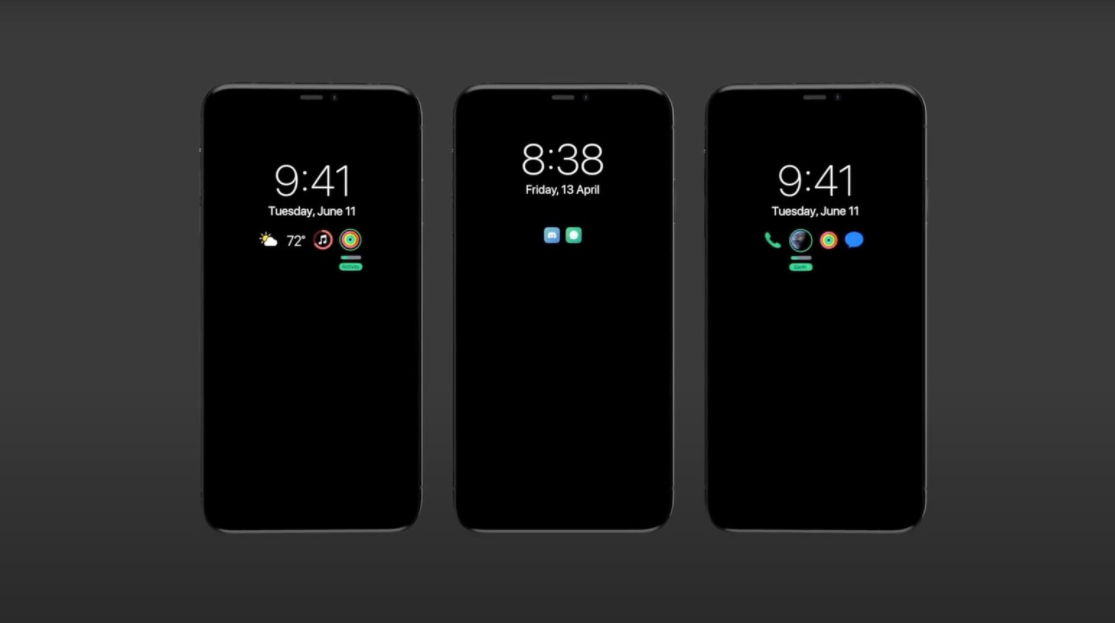
Weinbach claims that the always-on display will look like a “toned down lockscreen,” where the clock and battery charge are always visible, and past notifications are shown through “a bar and icons.” When users receive a notification, the notification will “pop up normally except that the screen will not entirely light up.” Instead, “it will display it just like you’re used to right now, except dimmed down and only temporarily,” according to the leaker.
The leaker also “confirms” that a 120hz ProMotion refresh rate is happening on the 2021 Pro iPhone models, a feature that was widely rumored to appear on the iPhone 12. An always-on and ProMotion display would not require a change in physical design, and that yields to the fact that Weinbach reports there will be no change to the actual chassis on the iPhone 13 compared to the iPhone 12 lineup. The only possible hardware change will be a matte back with a “grippier, more comfortable” feeling, similar to the finishing on the back of the Google Pixel series.
Internally, MagSafe will be getting “considerably” stronger, according to the leak. The iPhone 12 features MagSafe on the back that allows users to magnetically attach different accessories and offers an alternative way to charge the device, however, the magnets have been criticized by some for being weak. Apple’s looking to alleviate those concerns by adding stronger magnets, although the addition is not expected to be the sole reason for a rumored increase in device thickness. As for the cameras, Weinbach reports that Apple is increasing its efforts in astrophotography.
Astrophotography, the photography of astronomy, typically requires complicated camera setups to proficiently capture the night times dark sky. The integration of the ability into the iPhone is expected to be seamless, with the leak claiming the iPhone will automatically switch to the mode when it registers a user pointing to the sky. The mode will allow the phone to detect different artifacts such as the moon and stars and adjusts settings such as exposure accordingly. Corroborating Apple analyst Ming-Chi Kuo, the leak says the ultra-wide camera across the entire lineup will be getting an improved sensor and lens.
The newest information from the leaks points towards the ability to take portrait videos on this year’s iPhone. Users have been able to take portrait photos since the launch of the iPhone 7 Plus, but it has remained entirely limited to photos. Portrait mode adds a depth feel to your photos, blurring the background and keeping the center subject fully in focus. With videos, the task becomes much harder since the subject is actively moving, making it harder to add a depth effect in real-time.
The new information joins an already long list of features we’re expecting for the 2021 iPhone. A Bloomberg report suggests that the biggest headlining feature of the lineup will be the reintroduction of Touch ID on the iPhone. According to that report, Apple is testing burying the Touch ID sensor below the display, allowing users to unlock their device if Face ID is deemed unusable, such as when you’re wearing a mask. Unlike the iPhone 12 which saw delays due to the COVID-19 pandemic, the iPhone 13 is expected to launch on time in September.