How To Fix A Cracked Screen On Your Phone – Expert Repair Advice You Can Trust
📱 Introduction
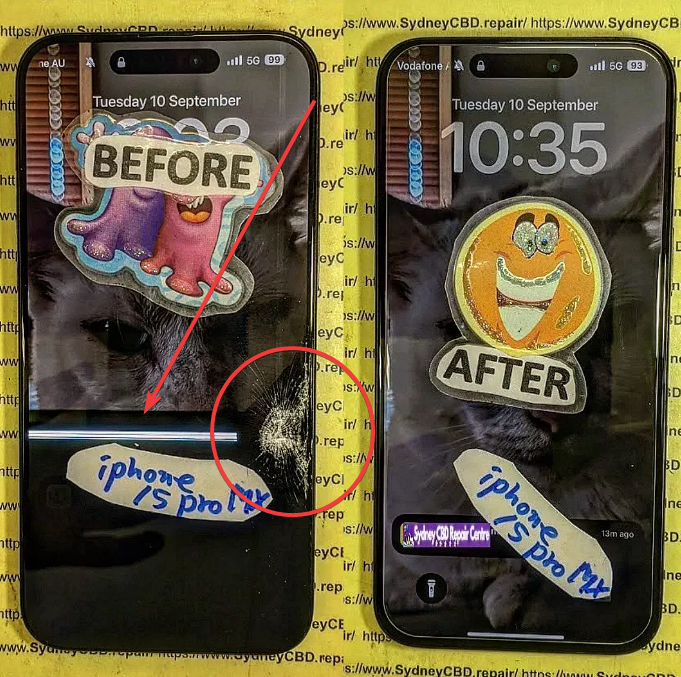
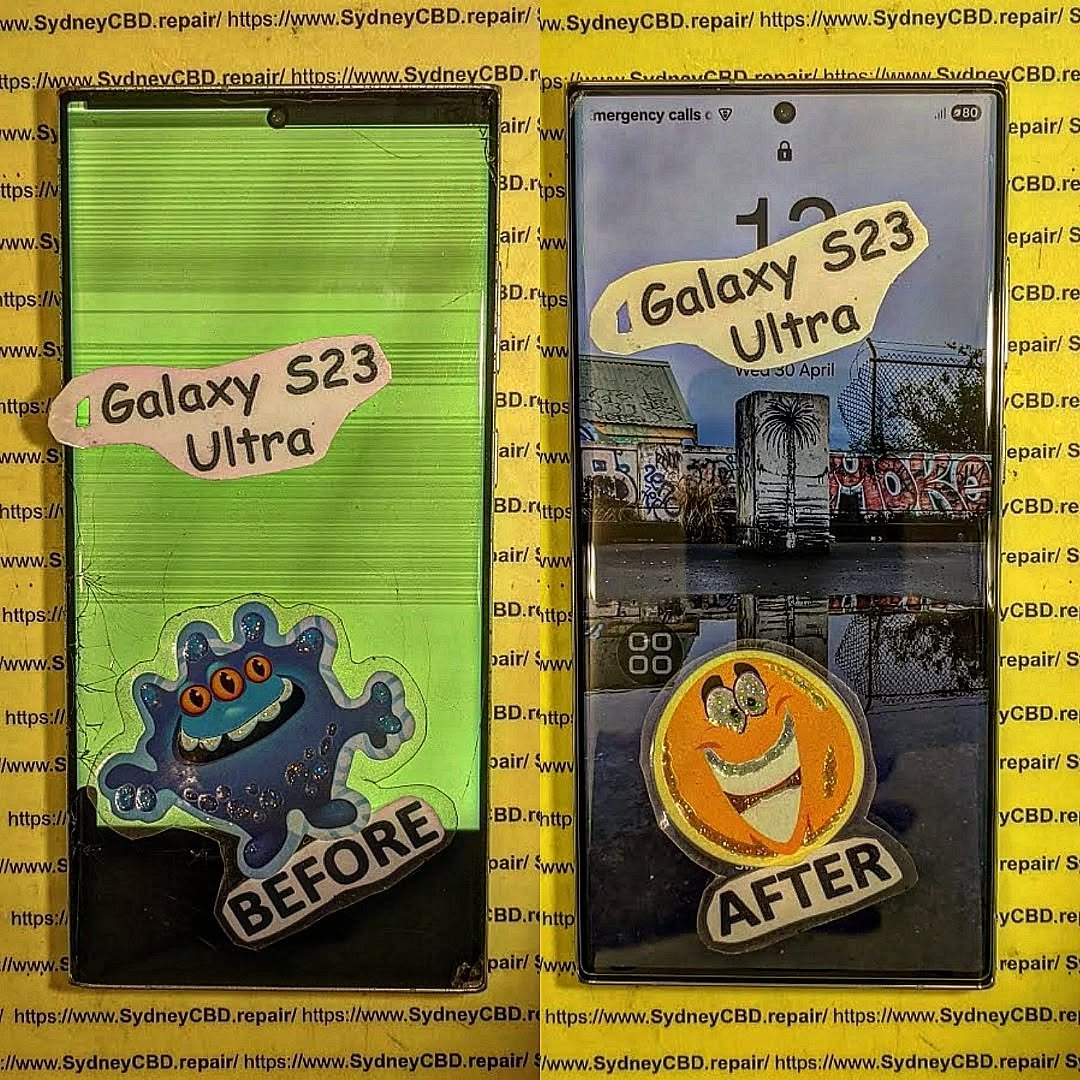
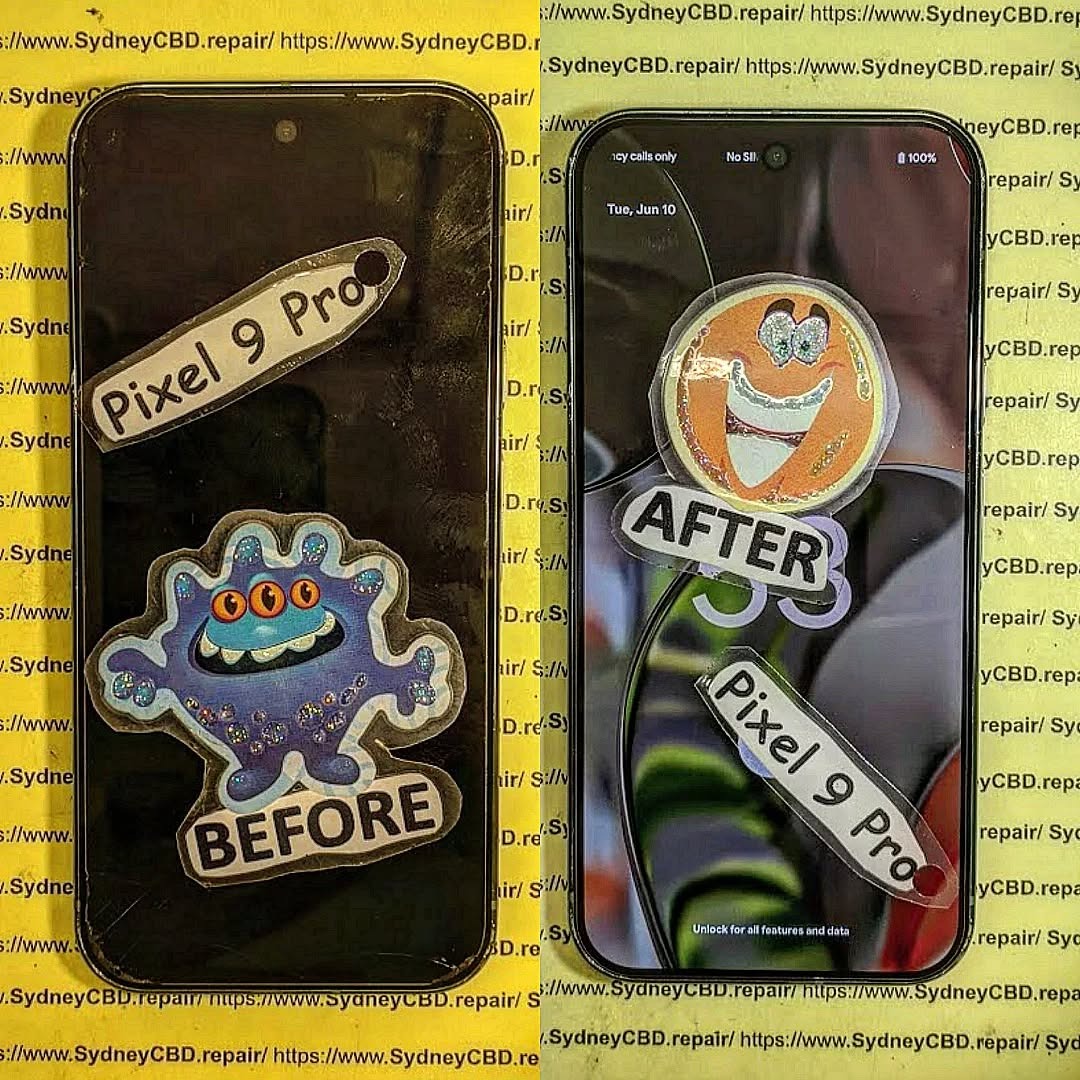
A cracked phone screen is one of the most common issues smartphone users face. Whether it’s a minor surface crack or a major shatter, it can affect usability, safety, and even your phone’s internal components.
So, what’s the best way to fix a cracked screen on your phone? In this guide, we’ll cover your repair options, cost expectations, and expert insights from Sydney CBD Repair Centre, Sydney’s most trusted repair shop.
🕵️ Assessing the Severity of the Crack
Surface Crack vs Deep Screen Damage
Not all cracks are created equal. Here’s how to distinguish them:
Surface Crack: Cosmetic damage; phone usually works fine
Deep Crack: May affect touch sensitivity or screen visibility
Shattered Screen: Cracked glass and broken display; urgent replacement needed
1. Can I keep using my phone if the screen is cracked?
Yes, but it’s not advisable. It may worsen and pose safety risks like glass splinters or internal damage.
2. Will fixing the screen erase my data?
No. Screen replacement doesn’t affect your data, but back up your phone just in case.
3. How do I know if the repair shop uses genuine parts?
Ask for transparency. Sydney CBD Repair Centre guarantees genuine parts and provides a warranty.
4. Is it cheaper to replace just the glass?
In some cases, yes. However, most modern phones require full screen assembly replacement.
5. Can a cracked screen affect battery life?
Yes. A damaged screen can put stress on your phone’s components and lead to battery drain.
6. What if my phone has water damage and a cracked screen?
We offer comprehensive diagnostics and can handle both issues in a single repair session.
✅ Conclusion
Cracked screens are frustrating—but they don’t have to be the end of your phone’s life. Whether you need a quick fix or a full screen replacement, the safest option is always professional repair.
Sydney CBD Repair Centre is your trusted partner in restoring your phone to like-new condition. With genuine parts, expert technicians, and same-day service, we’re Sydney’s go-to solution for all screen repair needs.
How To Choose The Right Phone Screen Replacement – Expert Tips for Quality & Longevity
📱 Introduction
Replacing a cracked or faulty phone screen is one of the most common repairs, but not all replacement screens are made equal. Choosing the right phone screen replacement can save you from repeated repairs, unresponsive touch issues, or poor display quality.
In this guide, we’ll explain everything you need to know before getting your screen replaced—from screen types and red flags to look out for, to choosing a professional repair centre like Sydney CBD Repair Centre, Australia’s trusted expert for screen repairs.
💡 Why Screen Quality Matters
Performance and Touch Sensitivity
A low-quality screen may respond slowly or inconsistently to touch, making navigation frustrating. Genuine screens provide smooth, lag-free interaction.
Display Brightness and Colour Accuracy
Cheap replacement screens often suffer from dull brightness or inaccurate colours—especially in sunlight. OEM screens maintain the original display’s vivid quality.
Durability and Longevity
Low-grade displays scratch and crack more easily. Choosing a quality screen means longer-lasting protection, especially if paired with a good case and screen protector.
Matches the original display in brightness, colour, and touch sensitivity
Typically more expensive but worth the investment
Offered by trusted repair shops like Sydney CBD Repair Centre
Aftermarket Screens
Third-party replicas, often manufactured overseas
May lack the same durability or clarity
Usually cheaper but less reliable
Touch issues and shorter lifespan are common
Refurbished Screens
Original screens salvaged and restored from used phones
Often a balance between cost and quality
Should be sourced from reliable technicians who test thoroughly
✅ Key Factors to Consider
Compatibility with Your Phone Model
Ensure the replacement screen matches your exact phone model—not just the brand. Even a tiny mismatch can affect fit and function.
Glass vs Display: Know What Needs Replacing
Sometimes only the outer glass is damaged, while the display underneath still works. A skilled technician can determine what needs replacing and help you save on costs.
Warranty and Return Policy
Always ask:
Is the screen covered by a warranty?
How long is the warranty?
What happens if it fails again?
Sydney CBD Repair Centre offers a 90-day warranty on all screen repairs.
⚠️ Red Flags to Avoid
Ultra-Cheap Pricing
If a screen replacement deal seems too good to be true—it probably is. Cheap parts often mean:
Phones like iPhones and Samsung Galaxies come with water resistance seals that must be carefully replaced during screen repair. Professionals ensure that the integrity is maintained.
🛠️ Why Choose Sydney CBD Repair Centre
2000+ Google Reviews & 6 Years as Top Repair Centre
David and the team at Sydney CBD Repair Centre are Sydney’s most trusted phone repair experts. With 2000+ 5-star reviews and 6 consecutive years of top-rated service, you can trust you’re in good hands.
OEM screens are the highest quality and closest to what your phone originally came with.
2. Are cheap screens worth it?
Not usually. They may cost less upfront, but you’ll likely face issues with performance, visibility, or durability.
3. How do I know if my screen is OEM?
Genuine repair centres will tell you the screen’s origin and often include branding on the part.
4. Can I replace the screen myself?
It’s risky. DIY repairs often lead to further damage or voiding your warranty.
5. What’s the difference between glass replacement and full screen replacement?
Glass-only replacement fixes surface cracks, while full screen replacement includes the touch and display layers—usually needed for major damage.
6. How long does screen replacement take at Sydney CBD Repair Centre?
Most screen replacements are done within a few hours, often on the same day.
✅ Conclusion
When it comes to phone screen replacement, the quality of the screen and the skill of the technician make all the difference. Don’t risk cheap parts or inexperienced repairs. Choose a repair centre that uses genuine components, provides transparent pricing, and backs their work with a solid warranty.
Sydney CBD Repair Centre ticks all the boxes. With expert technicians, same-day service, and a reputation built on excellence, they’re the smart choice for anyone looking to restore their phone’s screen to like-new condition.
Top Samsung Galaxy Z Flip 5 Screen Replacement Problems + Expert Fixes + 10 Common Issues
📱 Introduction
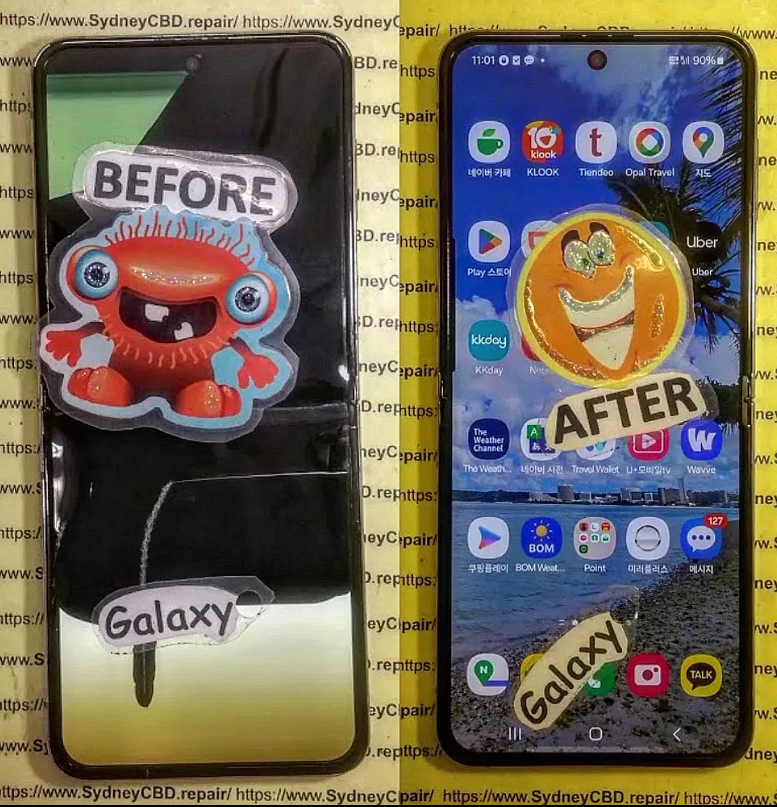
Foldable phones like the Samsung Galaxy Z Flip 5 have revolutionised smartphone design. But with innovation comes unique challenges—especially when it comes to screen replacement. If you’re experiencing issues with your Z Flip 5 display, you’re not alone.
In this comprehensive guide, we’ll cover the most common Samsung Galaxy Z Flip 5 screen replacement problems, what causes them, and the most reliable repair solutions available. Whether you’re a cautious user or someone already dealing with a cracked screen, you’ll walk away with everything you need to know.
🔍 Understanding the Samsung Galaxy Z Flip 5 Display
Broken-Galaxy-Z-Flip-5-Screen.png
Foldable Screen Technology Explained
The Z Flip 5 features a Dynamic AMOLED 2X display that folds in half—making it sleek, pocketable, and cutting-edge. This flexible screen uses ultra-thin glass (UTG) layered with a protective plastic film, making it more vulnerable than standard phone displays.
This is one of the most frequent complaints. Due to the delicate foldable glass, even a small drop can lead to significant cracks or shattered displays.
Symptoms:
Visible crack lines across the screen
Display blackouts or flickering
Ghost touch issues
2. Damaged Outer Cover Screen
The secondary screen is prone to scratches and cracks, especially without a proper case. Since it’s exposed, even keys in your pocket can cause damage.
3. Screen Not Responding to Touch
Touch sensitivity issues often emerge after a fall or due to internal flex cable damage. It can also be a software issue, but if persistent, likely hardware-related.
4. Dead Pixels or Display Lines
Dead pixels, green lines, or screen discoloration are typically signs of internal damage from impact or pressure.
5. Hinge Malfunction Causing Screen Stress
A faulty hinge can put undue stress on the foldable screen, resulting in warping or internal cracking over time.
Despite improvements, the Z Flip 5’s design makes it more susceptible to damage from drops compared to regular smartphones.
Improper Folding Habits
Forcefully closing or opening the phone can strain the display, eventually causing cracks or alignment issues.
Exposure to Heat or Moisture
Moisture can seep into hinge areas and cause internal corrosion. Similarly, heat can degrade the adhesive layers, affecting screen integrity.
🔎 Diagnosing a Faulty Z Flip 5 Screen
Visual Inspection
Check for:
Cracks or chips
Discoloration
Display flickering
Light bleeding around the hinge
Using Samsung’s Built-in Diagnostics
Samsung offers built-in diagnostics via the Samsung Members app, which can identify issues with the touchscreen and display pixels.
🧰 DIY vs Professional Repair: What to Choose?
DIY Repairs
While tempting, DIY repair kits for foldable phones are not recommended. You risk:
Further damaging internal components
Breaking the delicate UTG layer
Losing water resistance
Professional Repair
Certified repair shops use genuine parts and professional tools. This ensures the phone maintains functionality and resale value.
🔧 How to Choose a Reliable Repair Shop
Key Factors: Expertise, Warranty, and Parts
Ensure technicians are trained on foldable tech
Look for warranty-backed services
Demand genuine Samsung parts
Why Sydney CBD Repair Centre is a Trusted Choice
David from Sydney CBD Repair Centre leads a team that’s repaired thousands of Samsung devices. With over 2000+ Google reviews, same-day service, and genuine parts, they are the top choice in Sydney.
🔩 Samsung Galaxy Z Flip 5 Screen Replacement Process
Step-by-Step Breakdown of the Repair
Diagnostic Test
Safe Opening of Device
Disconnect Battery & Remove Old Screen
Clean Surface & Install New Display
Test New Display and Reseal
Estimated Time and Costs
Time: 2–3 hours (Same Day Available)
Cost: Varies by repair shop; Sydney CBD Repair Centre offers competitive pricing with warranty.
🛡️ Preventing Future Screen Problems
Best Practices for Foldable Devices
Avoid folding your device with foreign objects inside
Use both hands while folding/unfolding
Keep it in a padded case when not in use
Recommended Accessories and Cases
Samsung’s official Flip Suit Case
Screen protector designed for foldable phones
Waterproof pouches for humid environments
❓ FAQs
1. How much does it cost to replace the Galaxy Z Flip 5 screen?
Costs vary, but expect to pay around $400–$700 for a full screen replacement using genuine parts.
2. Is screen damage covered under Samsung warranty?
Only if you purchased Samsung Care+. Otherwise, accidental damage is typically not covered.
3. Can I still use the Z Flip 5 if the inner screen is cracked?
It may still function, but continuing to use a cracked screen can worsen the damage or affect touch sensitivity.
4. How long does screen replacement take at Sydney CBD Repair Centre?
Most repairs are completed within a few hours, with same-day service available in many cases.
5. Will replacing the screen void my warranty?
If done by an unauthorised repair shop, yes. That’s why it’s important to use certified professionals like those at Sydney CBD Repair Centre.
6. Can hinge issues be fixed during screen replacement?
Yes, technicians usually inspect and service the hinge mechanism during the replacement process.
✅ Conclusion
The Samsung Galaxy Z Flip 5 is a technological marvel—but like all foldables, it comes with its own set of vulnerabilities. Whether you’re dealing with a cracked screen, unresponsive touch, or hinge-related problems, getting professional help from a trusted repair centre is your safest bet.
Sydney CBD Repair Centre is your go-to for fast, reliable, and affordable Samsung screen replacements, offering genuine parts and expert service backed by warranty. Don’t risk further damage—get it fixed the right way.
Troubleshooting Common Smartphone Screen Issues: Expert Fixes from Sydney’s Top Repair Team
📱 Introduction: Screens Are More Fragile Than You Think
Smartphones are modern marvels, but their sleek glass screens can be vulnerable to everyday wear and tear. Whether it’s a minor scratch or a completely shattered display, screen issues are among the most common problems users face. But don’t panic — many screen-related problems can be diagnosed and fixed, especially if you catch them early.
⚠️ Most Common Smartphone Screen Issues
Cracked or Smashed Glass
This is the number one reason people seek screen repairs. A single drop can cause anything from a small crack to total shatter. Cracks not only look bad but can also:
Cause cuts on your fingers
Compromise water resistance
Spread further over time
Display Not Turning On
Sometimes the phone vibrates or rings, but the screen stays black. This could mean:
A dead battery
Display connector damage
Internal screen failure
Screen Flickering or Glitching
If your display flickers or flashes:
You might have a faulty display ribbon
Apps may be causing graphical conflicts
It could be a software bug or hardware malfunction
Touchscreen Not Responding
Non-responsive screens are often linked to:
Moisture or dirt under the glass
Faulty digitizer
Overheating
Ghost Touch Issues
Ghost touches occur when your phone acts like it’s being touched — even when it isn’t. This is usually due to:
Screen damage
Poor-quality screen replacements
System glitches
🔧 DIY Troubleshooting Tips You Can Try
Restart or Soft Reset
Sometimes, a simple restart clears up glitches. Hold down your power button and give your device a fresh start.
Screen Calibration Apps
Apps like “Touchscreen Repair” can recalibrate screen sensitivity, especially useful for ghost touch or lagging responses.
Safe Mode for App Conflicts
Booting into safe mode disables third-party apps. If the screen behaves normally here, a rogue app may be to blame.
Cleaning the Screen Surface
Use a microfiber cloth to remove dirt or grease. Moisture or grime can affect touch accuracy.
We use 100% original screens for all major phone brands — including Samsung, Apple, and Google — ensuring durability and perfect display quality.
Calibration for Touch & Fingerprint Sensors
After replacement, we recalibrate touch and fingerprint sensors, especially important for in-display readers like those in Samsung and Google Pixel phones.
90-Day Warranty on Repairs
Enjoy peace of mind with our 90-day guarantee. If your screen has issues post-repair, we’ll take care of it — no extra cost.
🛡️ Avoiding Screen Issues in the Future
Screen Protectors and Phone Cases
Invest in tempered glass screen protectors and shock-resistant phone cases. These small accessories can save you hundreds in repair costs.
Avoiding Water and Heat Exposure
Don’t leave your phone in hot cars or near water. Excess moisture or heat can cause internal damage, even without cracks.
Regular Software Updates
Keep your operating system updated. Some screen issues are software-related and get resolved with updates.
❓ FAQs
1. Can I fix a cracked screen without replacing it?
In most cases, a cracked screen needs full replacement, especially if the crack affects touch or visibility.
2. Why is my phone pressing itself?
This is likely a ghost touch issue. It could be caused by pressure on the screen, internal damage, or faulty screen replacements.
3. How long does a screen repair take?
At Sydney CBD Repair Centre, most screen repairs are done same day, often within 1–2 hours.
4. Will my fingerprint scanner still work after a screen repair?
Yes — if the repair is done professionally using genuine parts and proper calibration.
5. What’s the difference between original and aftermarket screens?
Original screens match your phone’s quality exactly. Aftermarket ones are cheaper but may lack touch sensitivity, brightness, or durability.
6. How do I know if my screen issue is hardware or software?
Try restarting in Safe Mode. If the issue disappears, it’s likely software. If not, it’s probably hardware-related.
✅ Conclusion: Don’t Let a Damaged Screen Slow You Down
Screen issues can range from mild annoyances to serious problems. Whether it’s a hairline crack or a blank display, don’t ignore the signs. Quick action can prevent bigger (and more expensive) issues. At Sydney CBD Repair Centre, we’re committed to giving your device the expert care it deserves — with genuine parts, same-day service, and a solid warranty to back it all up.
David from Sydney CBD Repair Centre – The Best Place to Fix Mobile Phones 6 Years in a Row! Top Mobile Phone Repair in Sydney. Over 2000 Positive Reviews and Same Day Repairs.
Replacing the Battery on a Samsung Galaxy Z Fold 5: Expert Tips, Costs & Best Practices
🔋 Introduction: Why Battery Health Matters on the Galaxy Z Fold 5
The Samsung Galaxy Z Fold 5 is a flagship foldable device combining cutting-edge design with multitasking power. But even with premium materials and advanced engineering, the battery inside your Fold 5 will degrade over time — typically after 12–24 months of regular use.
A weak battery doesn’t just limit usage time — it affects everything from processing speeds and heat management to charging consistency. If your Fold 5 is struggling to last a full day or shutting down unexpectedly, it may be time for a professional battery replacement.
🔎 How to Know When Your Fold 5 Battery Needs Replacement
Many users delay battery replacement until the phone becomes nearly unusable. But the sooner you recognize the signs, the easier (and safer) the fix.
⚡ Fast Draining Battery
One of the first signs of a failing battery is rapid charge loss — your phone may go from 100% to 20% in a matter of hours, even with light use.
🔥 Phone Overheating
Frequent or excessive heating during regular tasks (like web browsing or video calls) can indicate internal resistance in the battery, which needs attention.
📱 Swollen Battery Signs
Bulging at the screen or back panel is a serious hazard. A swollen lithium battery can damage the display, affect folding, or even become a fire risk.
🔌 Charging Inconsistencies
Is your phone charging too slowly, stuck at a certain percentage, or not responding to charging at all? These could all signal battery failure.
The Galaxy Z Fold 5 features dual batteries — one in each half of the device — with a combined capacity of 4,400 mAh. This dual setup allows for balanced weight distribution and seamless operation between both screens.
However, this also means:
More components to disconnect during repair
Greater risk of damaging flexible display components
Higher labor intensity and time required
Because of its foldable design, the Z Fold 5 battery replacement is significantly more complex than standard smartphones — making DIY solutions risky and unreliable.
🛠️ Can You Replace the Z Fold 5 Battery Yourself?
Technically, yes. Practically? Not recommended.
The Fold 5 features delicate inner screens, adhesives, and wiring that are easily damaged if mishandled. Attempting a DIY battery swap can result in:
Permanent screen damage
Loss of IPX8 water resistance
Voided warranty or repair coverage
Unless you’re experienced with high-end electronics and have the right tools, your best option is to seek a professional repair service with experience in foldables.
Unlike traditional phones with a single battery cell, the Z Fold 5 houses two interconnected batteries. Replacing them requires disassembling both sides and maintaining connection symmetry.
🧬 Delicate Internal Connections
Foldables use ultra-thin flexible circuits and ribbon cables that can tear with even slight force or improper disassembly.
💔 High Risk of Screen Damage
The inner foldable display is vulnerable during opening, prying, and heating. One mistake could cost over $800+ in screen damage alone.
💰 Cost of Replacing the Galaxy Z Fold 5 Battery in Sydney
The average cost of professional battery replacement for the Z Fold 5 at a trusted centre like Sydney CBD Repair Centre ranges between:
$280 to $380 AUD, depending on parts availability and labour intensity.
This includes:
Genuine Samsung battery components
Same-day repair (when booked in advance)
90-day warranty on parts and labour
Preservation of foldable screen integrity
Cheaper, unofficial repair shops may offer lower rates, but often use aftermarket batteries that degrade faster, overheat, or compromise your phone’s safety and performance.
🏆 Why Choose a Professional Repair Centre Like Sydney CBD Repair Centre
✅ Genuine Samsung Parts Guarantee
Sydney CBD Repair Centre only uses original batteries, ensuring your phone’s performance, safety, and charging consistency remain intact.
👨🔧 Certified Technicians & Same-Day Service
Certified technicians trained in foldable phone repair
More than 2,000+ Google reviews from happy customers
Same-day express repairs for most models
Transparent, competitive pricing with no hidden fees
📍 Convenient Sydney CBD location
📞 Book now: +61280114119
🌐 Visit us online
🧰 Step-by-Step Look at How Technicians Replace the Battery
Initial diagnosis and inspection
Heat application to safely loosen adhesives
Opening the phone carefully using specialised foldable tools
Disconnecting dual battery connectors from each half
Removal of old batteries without damaging the frame
Installation of OEM Samsung batteries
Adhesive resealing and reassembly
Battery testing and calibration
This process typically takes 1.5 to 2.5 hours, depending on workload and part readiness.
⏱️ How Long Does the Battery Replacement Take?
Walk-in customers: Same-day service, often under 2 hours
Mail-in repairs: 1–2 business days + return delivery
Pre-booked appointments: Fast-track priority
🔋 Battery Care Tips After Replacement
Avoid full discharges — keep battery between 20–80%
Use official Samsung chargers for consistent current flow
Disable fast charging unless needed, to reduce heat
Keep phone in moderate temperature conditions
Avoid overuse while charging to extend lifespan
❓ FAQs
1. How long does the new battery in a Z Fold 5 last?
On average, 18–24 months with moderate use before noticeable degradation.
2. Is the battery in the Z Fold 5 covered under warranty?
Only if the degradation is due to a manufacturing fault within the first 12 months.
3. Can a swollen battery damage the foldable display?
Yes. A swollen battery can exert pressure on the delicate internal screen, leading to permanent damage or warping.
4. Will my data be erased during battery replacement?
No — battery replacement does not affect your data, though it’s always wise to back up your phone before any repair.
5. Does Sydney CBD Repair Centre reseal the phone for water resistance?
Yes. Our technicians use OEM-grade adhesives and resealing techniques to maintain your phone’s original resistance levels.
6. Is it cheaper to go to Samsung directly for battery replacement?
Not necessarily. OEM service centres often charge 30–50% more and may take longer. We provide genuine parts at more competitive rates.
✅ Conclusion: Restore Performance with Professional Battery Replacement
If your Samsung Galaxy Z Fold 5 isn’t performing like it used to, a fresh battery might be the perfect solution. Instead of spending over $2,500 on a new device, consider restoring your phone’s power and performance with a professional battery replacement.
Sydney CBD Repair Centre is Sydney’s #1 choice for fast, reliable, and affordable foldable phone repairs. With genuine parts, certified expertise, and thousands of satisfied customers, you’re in safe hands.
Is It Worth It? Repairing vs Replacing Your Broken Phone – Cost, Convenience & Smart Choices
📱 Introduction: The Modern Dilemma of Broken Phones
A cracked screen, sluggish battery, or water damage is enough to make anyone wonder: “Should I fix my phone or buy a new one?” It’s a decision most smartphone owners will face sooner or later.
Phones are no longer just communication devices — they’re essential to how we work, navigate, take photos, and stay connected. With devices like the iPhone 14 Pro Max and Samsung Galaxy S23 Ultra reaching well over $2,000 AUD, replacement isn’t always an easy or affordable option.
In this article, we’ll explore the true costs of repair vs replacement, what you should consider before making the call, and why Sydney CBD Repair Centre is the trusted choice for thousands of satisfied customers across Sydney.
🧯 Types of Common Phone Damage That Prompt the Question
Not all damage is created equal. Here are the most common issues that leave users wondering whether it’s worth fixing their phone or moving on to a new device.
📉 Cracked Screens
The number one reason people seek phone repairs. Cracks vary from minor hairline scratches to fully shattered screens that compromise usability and safety.
🔋 Battery Issues
Does your phone die at 20%? Or struggle to last through the day? Battery wear is normal over time but easily fixable — often more affordably than you think.
💦 Water Damage
Dropped your phone in the sink, pool, or toilet? Water damage can affect both hardware and software. If caught early, professional cleaning and part replacement may restore full function.
🖥️ Software Failures or System Glitches
Frozen screens, random restarts, or update failures may not require a new phone at all. Often, a simple reset or system repair can bring your phone back to life.
💰 Cost Comparison: Repair vs Replacement
📱 Average Costs of Repairing Common Issues
Repair Type
Estimated Cost (AUD)
Screen Replacement
$150 – $500 (model-dependent)
Battery Replacement
$99 – $180
Water Damage Cleaning
$80 – $150
Charging Port Repair
$90 – $150
Software Fix
$60 – $100
These prices are typical at reputable centres like Sydney CBD Repair Centre, where you also benefit from same-day repairs and genuine parts.
💸 Cost of Buying a New Phone
New flagship smartphones from Apple, Samsung, and Google can cost between $1,200 to over $2,500 AUD, depending on storage, features, and brand.
For example:
iPhone 15 Pro Max 512GB – Around $2,199 AUD
Samsung Galaxy S23 Ultra – Starts at $1,949 AUD
Google Pixel 8 Pro – Around $1,699 AUD
Don’t forget — switching phones may also mean:
Buying new cases and accessories
Learning a new interface
Data migration headaches
Losing features you loved on the old model
📉 Depreciation and Trade-In Value Considerations
Phones depreciate fast. Within 12–18 months, the value can drop by 30–50%. So trading in your broken phone might only get you a fraction of its value — especially if the damage is significant.
Small issues like cracked glass, worn batteries, or faulty ports are usually quick, affordable fixes — especially when compared to the cost of a new phone.
💓 Emotional or Practical Attachment to Your Device
You might have irreplaceable photos, apps set up perfectly, or sentimental value attached to your phone. Keeping your device may simply feel more comfortable than upgrading.
🌱 Environmental Benefits of Repairing
E-waste is a massive global issue. Repairing extends your device’s life and helps reduce the demand for new resource-heavy production. Repair = sustainability.
🚫 When It Makes Sense to Replace Instead
📵 Outdated Hardware or End of Software Support
If your phone is more than 4-5 years old, it may no longer receive security updates or run new apps properly. In these cases, replacing may provide better performance and safety.
🧾 Repeated Repairs and Mounting Costs
If you’ve already spent hundreds fixing your phone and problems keep coming back, it might be time to cut your losses and upgrade.
⚠️ Major Internal or Logic Board Damage
If the motherboard or multiple core components are damaged, repairs may approach — or even exceed — the cost of replacement.
If your phone is relatively new (under 2 years old), repairing usually offers better value. For older models, balance repair cost with the device’s remaining life.
🔧 Cost and Availability of Repairs
Is your model easy to fix? Are genuine parts available? Centres like Sydney CBD Repair Centre offer parts and repairs for most major phone brands, including Samsung, Apple, Google, Oppo, and Xiaomi.
📱 Personal Usage Needs
If you’re a light user, a repaired phone will likely meet your needs just fine. Heavy users, gamers, or professionals might benefit more from a newer model.
📍 Real Case Study: Repair vs Replacement in Sydney
Case: Samsung S22+ with cracked AMOLED screen.
Repair Quote (Sydney CBD Repair Centre): $350 AUD
New Phone Cost: $1,499 AUD
Savings by Repairing: $1,149 AUD
Plus, the customer received:
Genuine screen with 90-day warranty
Repair completed in under 2 hours
No data loss or re-setup required
🛡️ The Role of Mobile Insurance and Warranties
Many phone owners forget that they may already be covered. Here’s how to check:
Manufacturer warranty: Usually covers defects, not accidents.
Carrier insurance plans: May offer low-cost repairs or free replacements.
Credit card protection: Some cards cover accidental damage if the phone was purchased with them.
Still, these services often come with excess fees, claim limits, or long wait times. Independent repair centres offer more control and faster turnaround.
🔧 DIY Repairs – Are They Ever Worth It?
In most cases, no.
DIY repair kits may seem affordable, but they:
Lack professional calibration tools
Risk damaging internal components
Void manufacturer warranties
Unless you’re skilled and experienced, leave it to the pros. A botched repair could cost you more than the original damage.
🏆 How Sydney CBD Repair Centre Helps You Decide Smartly
💡 Free Diagnosis and Honest Advice
Not sure if repair is worth it? Sydney CBD Repair Centre offers free, no-obligation diagnostics, helping you understand the issue before committing.
🛠️ Competitive Pricing and Same-Day Repairs
90-day warranty on all repairs
Same-day service on most phones
Genuine parts guarantee
Over 2000+ 5-star reviews on Google
📍 Conveniently located in the heart of the city: Locate Us
📞 Call us at: +61280114119
❓ FAQs
1. How do I know if my phone is worth repairing?
If your phone is less than 3 years old and the repair cost is under 50% of its current market value, it’s generally worth repairing.
2. Will repairing my phone void the warranty?
Repairs done by third parties may void manufacturer warranties, but Sydney CBD Repair Centre offers their own 90-day warranty for peace of mind.
3. Can data be lost during repairs?
Professional centres take precautions to preserve your data. However, always back up your phone before any repair, just to be safe.
4. Is screen replacement safe for waterproof phones?
Yes — when done by experienced technicians who reseal the device using proper adhesives to restore IP protection.
5. Can I claim my phone repair on insurance?
Yes, if your device is insured. Check your policy for details about coverage and excess fees.
6. Are aftermarket parts safe to use?
Only high-grade aftermarket parts are reliable. However, OEM parts (used at Sydney CBD Repair Centre) are always the safest and best-performing option.
✅ Conclusion: Make the Right Call for Your Phone and Wallet
Repairing your phone is often the most cost-effective, eco-friendly, and convenient option — especially for common issues like cracked screens or weak batteries. But if your phone is outdated, repeatedly malfunctioning, or beyond economical repair, replacing it may be the smarter move.
Before you make a costly decision, consult with trusted experts. Sydney CBD Repair Centre is here to help you weigh your options and get your device back in shape — fast.
Samsung S23 Plus Screen Repair Cost Analysis: Uncover the Truth Behind the Price + Expert Breakdown
📲 Introduction: The Growing Need for Samsung S23 Plus Repairs
The Samsung Galaxy S23 Plus is a powerhouse of innovation and design, featuring a stunning 6.6-inch Dynamic AMOLED 2X display that offers crystal-clear visuals and a buttery-smooth 120Hz refresh rate. However, as beautiful as it is, that screen is vulnerable to accidental damage.
From accidental drops on pavement to pressure cracks inside a pocket, many users find themselves seeking screen repair services — and asking the all-too-common question: Why is Samsung S23 Plus screen repair so expensive? Let’s break it down.
💡 Why the Samsung S23 Plus Screen is Expensive to Fix
Advanced AMOLED Display Technology
The Samsung S23 Plus boasts a Full HD+ Dynamic AMOLED 2X panel — not your average LCD. AMOLED screens provide deeper blacks and brighter colors, but they’re also more expensive to manufacture and replace.
Cost of production: AMOLED panels are thinner and more sensitive.
Delicate nature: Any mishandling during repair can render them unusable.
Screen Integration with Fingerprint Sensor
Unlike many smartphones, the Samsung S23 Plus integrates the ultrasonic fingerprint scanner directly beneath the display. This means:
Replacing the screen involves careful calibration.
Only high-quality parts can ensure the scanner works post-repair.
Water and Dust Resistance: The IP68 Factor
Samsung engineered this device to meet IP68 standards, making it dustproof and water-resistant. This seal can be compromised during screen repair, which:
Increases the time and precision needed during reassembly.
Prices for Samsung screen repairs vary, but here’s a breakdown of what typically makes up the total cost:
OEM vs Aftermarket Screens
OEM (Original Equipment Manufacturer): Usually costs AUD $400–$550, but offers guaranteed compatibility.
Aftermarket Screens: Cheaper, ranging AUD $250–$350, but may have color tint, lower brightness, or reduced touch sensitivity.
Type
Average Cost (AUD)
Pros
Cons
OEM
$400 – $550
Perfect fit, fingerprint sensor support
Expensive
Aftermarket
$250 – $350
Budget-friendly
May affect performance
Labour and Diagnostic Fees
Some repair centres charge a diagnostic fee ranging from $40–$80, while labour charges depend on:
Technician experience
Time required for disassembly and reassembly
Tools and technology used
Warranty and Post-Repair Support
Reputable shops like Sydney CBD Repair Centre offer 90-day warranties, which ensures peace of mind and protects your investment.
🏪 Where to Get Your Samsung S23 Plus Screen Repaired
Samsung Authorized Service Centres
Pros:
Official parts and procedures
Warranty remains intact (if within period)
Cons:
Expensive
Longer turnaround times
Independent Repair Shops
Pros:
Faster service
Competitive pricing
Cons:
Quality varies — choose a reputed one like Sydney CBD Repair Centre
DIY Repairs: Worth the Risk?
Though tempting, DIY repairs can:
Void your warranty
Damage the internal components
Fail to reseal waterproofing
🌍 Comparing Samsung S23 Plus Screen Repair Costs Globally
Country
Average Cost (USD)
Notes
USA
$280 – $400
OEM parts widely available
Australia
$300 – $420
Labour cost slightly higher
UK
£250 – £350
High-quality third-party repairs
India
₹18,000 – ₹27,000
Mostly aftermarket options
Global costs fluctuate due to import taxes, technician availability, and brand partnerships.
💡 Tips to Save Money on Screen Repairs
Use phone cases and tempered glass
Repair small cracks early to prevent spread
Compare quotes from reputable repair centres
Check if your credit card includes accidental damage coverage
Ask for refurbished OEM parts (cost-effective, still genuine)
🛡️ The Role of Insurance and Warranties in Screen Repair
Carrier or manufacturer insurance may cover accidental damage, but:
Excess fees apply
Limited number of claims per year
Check if screen damage is covered under your plan
Samsung Care+ is a great option, but if it’s expired, opt for reliable independent repair options.
🏆 How Sydney CBD Repair Centre Delivers Premium Samsung Repairs
Genuine Parts and Trained Technicians
All repairs use 100% genuine OEM parts for Samsung devices, preserving your phone’s integrity. Technicians are certified and experienced in delicate repairs like ultrasonic fingerprint integration.
Transparent Pricing and Same-Day Repairs
No hidden fees
Free diagnosis
Express same-day service
With over 2000+ Google Reviews and 6-time award-winning service, Sydney CBD Repair Centre has built a reputation you can trust.
1. How long does it take to replace a Samsung S23 Plus screen?
Most high-end repair shops, like Sydney CBD Repair Centre, offer same-day service — usually within 1 to 3 hours.
2. Will a third-party screen affect my phone’s performance?
Yes, especially if it’s low quality. Touch sensitivity, brightness, and fingerprint sensors may not work as expected.
3. Is screen replacement covered under Samsung warranty?
Only if there’s a manufacturing defect. Accidental damage is usually not covered unless you have Samsung Care+.
4. What’s the difference between OLED and AMOLED?
Both are similar, but AMOLED offers better contrast and consumes less power — and is used in S23 Plus.
5. Can a cracked screen be repaired without full replacement?
Not usually. Most cracks affect the digitizer and display, requiring a complete screen assembly replacement.
6. Is Sydney CBD Repair Centre cheaper than Samsung stores?
Yes. You can save up to 30–40% compared to authorized centres while still getting genuine parts and warranty.
✅ Conclusion: Quality Repair is an Investment
Investing in a quality screen repair for your Samsung S23 Plus isn’t just about restoring looks — it’s about performance, protection, and peace of mind. Whether you choose OEM or a high-grade aftermarket screen, always trust experienced technicians who stand by their work. In Sydney, Sydney CBD Repair Centre remains your top choice for affordability, speed, and service excellence.
✅ Introduction: The Power of DIY Smartphone Repair
In a world where smartphones are essential, even a minor issue can throw your whole day off. But here’s the good news: you don’t always need to rush to a technician for a fix. Many common smartphone problems can be solved right at home with the right tools, guidance, and patience.
Whether your phone’s screen is cracked, the battery is draining faster than ever, or your apps are constantly crashing, this comprehensive DIY repair tutorial will walk you through every major issue—and help you decide when it’s time to get expert help.
Let’s dive into 15 of the most frequent smartphone issues, learn how to troubleshoot them like a pro, and take control of your mobile life again.
Cracked screens are the most common smartphone repair issue worldwide. Whether it’s a minor scratch or a full spiderweb across your screen, dealing with screen damage promptly is crucial—not only for aesthetics but also to prevent internal component damage and injury.
⚠️ Safety First: Handling Broken Glass
Before attempting any repair, make sure to protect yourself:
Turn off the device to avoid short-circuiting.
Use gloves to prevent cuts from shards of glass.
Apply packing tape or a screen protector over the cracks if you’re delaying the repair.
🧰 Tools Needed for Screen Replacement
You’ll need a few essentials:
A heat gun or hairdryer (to loosen adhesive)
Plastic spudger or opening tools
Small Phillips and pentalobe screwdrivers
Suction cup
Replacement screen (make sure it’s compatible with your exact model)
ESD-safe tweezers and gloves
Pro Tip: Always opt for genuine parts to avoid touchscreen sensitivity issues and compatibility errors.
🛠 Step-by-Step DIY Screen Replacement
Follow these general steps. Exact procedures vary by model (e.g., iPhones differ from Samsungs), so check a model-specific video tutorial first.
Power off your phone.
Heat the screen edges gently with a heat gun.
Use a suction cup to lift the screen, then slide a plastic spudger around the edge to loosen the adhesive.
Disconnect battery cable first after removing the backplate or display.
Carefully detach display connectors.
Install the new screen, reconnect cables, and test functionality before sealing it.
Reapply adhesive, close the device, and power on.
Note: If you’re unsure about your skills, seek professional repair. Poor installation can result in a non-functional device or void warranties.
If you’re based in Sydney, check out Sydney CBD Repair Centre — experts in screen replacements using genuine parts and same-day service.
If all else fails, your best bet is a diagnostic test from a certified technician. For Sydney locals, David and his expert team at Sydney CBD Repair Centre offer precise diagnostics and same-day power issue repairs.
🔋 3. Battery Draining Too Fast? Here’s Why
Short battery life is a daily frustration for many users. While some degradation is natural over time, excessive battery drain can be fixed.
🔄 Calibrating Your Battery
Battery calibration helps your phone measure remaining power more accurately.
Use your phone’s Battery Usage settings to spot offenders and limit their background activity.
🔁 When to Replace Your Battery
Look out for these signs:
Swollen battery
Sudden power drops (e.g., 40% to 5%)
Overheating while charging
You can replace most smartphone batteries yourself with the right tools, though newer models make it tricky. If you’re not confident, trust a repair centre like Sydney CBD Repair Centre, which uses original batteries and provides a 90-day warranty.
🔥 4. Phone Overheating – How to Cool It Down
A hot phone isn’t just annoying—it can damage components and reduce battery life. Here’s how to keep it cool.
🔍 Identifying Heat Sources
Common culprits include:
Heavy gaming or video streaming
Charging while using device
Hot environments
App glitches or malware
❄️ Cooling Techniques for Android and iPhone
Close all background apps.
Switch to Airplane Mode to cut down processing.
Remove phone case to let heat escape.
Turn off Bluetooth, GPS, and NFC if not in use.
🛡 Preventative Measures
Avoid long gaming sessions in hot environments.
Keep your software updated.
Avoid third-party chargers and cables.
Don’t leave your phone in direct sunlight (e.g., car dashboards).
If overheating continues, it might be due to internal hardware faults. Professional diagnostics may be necessary.
🐢 5. Slow Performance and Lag Fixes
Nothing’s more frustrating than a slow smartphone—especially when you’ve invested a lot in it. Whether it’s laggy scrolling, delayed app launches, or freezing, these issues are often easy to fix with a few tweaks.
🧹 Clearing Cache and Bloatware
First things first—your phone needs a digital cleanup.
Clear cached data from apps via your phone’s storage settings.
Uninstall or disable bloatware—preinstalled apps you don’t use.
Use tools like Google Files or CCleaner (Android) for regular cleanup.
iPhone users can offload unused apps while retaining their data via Settings > iPhone Storage.
🔄 Software Updates & Factory Reset Tips
An outdated OS can cause compatibility issues, so ensure:
You’re running the latest system version.
You regularly update your apps.
Still lagging? Try a factory reset, but back up your data first:
Android: Settings > System > Reset > Factory data reset
iPhone: Settings > General > Transfer or Reset > Erase All Content and Settings
A reset can eliminate hidden bugs or malware causing sluggishness.
🧠 Upgrading Internal Storage or RAM (for some models)
If your phone allows expandable storage (like many Android models):
Move photos and apps to an SD card.
Delete old backups and files.
For rooted devices, some users opt for virtual RAM increase, but this isn’t for beginners.
For newer flagship devices with non-expandable memory, freeing up space and managing background apps is your best option.
💥 6. Apps Crashing? How to Stop It
Apps crashing randomly? You’re not alone. App instability can stem from various reasons, including bad updates, corrupted cache, or even insufficient memory.
🔄 App Conflicts and Compatibility Issues
If crashes began after installing a new app, there may be a conflict. Try:
Uninstalling the most recent apps.
Disabling unnecessary background apps.
Apps may also misbehave if your OS is outdated or if the app isn’t fully compatible with your phone model.
🔧 Update or Reinstall Troublesome Apps
A quick fix that works:
Go to App Settings > Storage > Clear Cache & Data.
Uninstall and reinstall the app from Google Play or App Store.
This often solves issues caused by corrupted app data.
📲 OS Compatibility Check
Make sure both your app and OS are updated. Developers push updates to match new Android or iOS versions. If your phone is too old, some newer apps may not run properly.
If you’re unsure, a technician at Sydney CBD Repair Centre can help determine if your phone needs a system update or full reset.
🌐 7. Wi-Fi or Data Connection Problems
Struggling with unstable connections or mobile data? It’s a common problem, but often very fixable without heading to a technician.
🧪 Diagnosing Network Settings
Check these first:
Airplane Mode isn’t enabled.
Wi-Fi and Data are turned on.
Router is working (try another device on the same network).
Then:
Forget the network and reconnect.
Restart your phone and router.
🔁 Resetting Network Configurations
For a deeper fix:
Android: Settings > System > Reset > Reset Network Settings
iPhone: Settings > General > Reset > Reset Network Settings
This clears saved Wi-Fi passwords and cellular settings, so have those on hand.
📶 Router vs. Phone Issue
Test with a different Wi-Fi or SIM. If other devices work fine on the same network, it’s your phone. If none do—it’s the router or signal provider.
🔇 8. No Sound or Microphone Not Working
Whether during calls or media playback, sound issues usually stem from hardware blockage or software misconfiguration.
🧼 Cleaning Speaker and Mic Ports
Dust and lint clogging the mic/speaker grill are surprisingly common.
Use a soft toothbrush or compressed air.
Avoid sticking metal objects inside ports.
Pro Tip: If water got in, don’t blow air forcefully—it might push liquid deeper. Let it dry thoroughly first.
⚙️ Software Troubleshooting
Ensure Do Not Disturb isn’t enabled.
Try Safe Mode to see if third-party apps are interfering.
Test mic/speaker via Voice Recorder app or YouTube.
🧩 Replacing Audio Components
If the issue persists after cleaning and software resets, the speaker or mic might be damaged.
Replacement parts are inexpensive.
Many models allow DIY mic/speaker swaps.
Seek expert help for soldered or glued-down components—Sydney CBD Repair Centre offers mic and speaker repair with OEM parts.
📸 9. Camera Not Working or Blurry Images
A smartphone’s camera is one of its most-used features, so any issue here is frustrating. Whether it’s not focusing, crashing, or showing a black screen, here’s how to fix it.
✨ DIY Lens Cleaning Tips
First, clean the lens gently using:
A microfiber cloth
A small dab of lens cleaner
Avoid paper towels or rubbing alcohol (they can scratch)
Sometimes it’s just smudges causing blurriness.
🔧 Resetting Camera App Settings
Go to App Settings > Camera > Clear Cache & Data
Reopen the app and try again
On iPhones, resetting settings via Settings > General > Reset > Reset All Settings can help too.
📷 Replacing Camera Modules
Still blurry or no image?
The camera module may be loose or damaged.
DIY camera replacements are possible on many Android models using a toolkit and YouTube guide.
iPhones require more care due to Face ID and TrueDepth sensors.
Pro Tip: Only trust genuine camera modules—cheap parts often fail quickly.
🖐️ 10. Touchscreen Not Responding? Here’s What to Check
A frozen or unresponsive touchscreen can render your phone almost useless. Luckily, there are several ways to troubleshoot before resorting to a screen replacement.
🧪 Screen Calibration and Sensitivity Settings
For Android:
Use apps like Touchscreen Repair or MultiTouch Tester.
Navigate to Settings > Display > Touch Sensitivity (on supported models).
For iPhone:
Restart the device.
Update iOS to the latest version.
Remove screen protectors or cases that might interfere with touch recognition.
📦 Removing Case or Screen Protector
Sometimes, screen protectors or rugged cases reduce touch sensitivity. Try:
Removing any tempered glass or plastic screen guard.
Testing touch response afterward.
🛠 When to Replace the Digitizer
If none of the above works:
Your digitizer (touch sensor) may be damaged.
This component often comes fused with the display—meaning you may need a full screen replacement.
For safe, same-day service with OEM parts, consider Sydney CBD Repair Centre. Their expert team ensures your touchscreen functions like new.
💧 11. Water Damage Recovery Steps
Water and electronics don’t mix. If your smartphone takes a dive into the sink, toilet, or pool, time is of the essence.
⏱ Immediate Actions After Exposure
Turn off the phone immediately.
Don’t press any buttons—this could push water deeper.
Remove the SIM, SD card, and battery (if removable).
Wipe it dry with a lint-free cloth.
Place the device in a sealed bag with silica gel packets for at least 24–48 hours.
Avoid rice—it’s less effective and can introduce dust or starch particles.
🧰 Disassembling for Drying
If you’re confident:
Open the back cover and unscrew internal components.
Disconnect the battery.
Use isopropyl alcohol (90%+) and a soft brush to clean corrosion.
Let it dry fully before reassembling.
🔧 What Parts May Need Replacing
Common casualties of water damage include:
Battery
Screen/digitizer
Motherboard or charging port
Speakers or mic
Sydney CBD Repair Centre specializes in water-damaged devices and can professionally diagnose and repair these components—with a high success rate.
🧲 12. Charging Port Issues and Fixes
Is your phone not charging properly or showing “Accessory Not Supported”? Your charging port might be dirty, damaged, or loose.
🧼 Cleaning the Port Safely
Turn off your phone.
Use a toothpick or ESD-safe brush to gently remove lint or dust.
Avoid using metal objects or blowing forcefully into the port.
⚙️ Software vs. Hardware Charging Faults
If cleaning doesn’t help:
Test with a new cable and adapter.
Try wireless charging if supported.
Boot in Safe Mode to rule out rogue apps.
If still no charge, your port may be physically worn out or disconnected internally.
🔧 When to Replace the Charging Port
Charging ports wear out over time due to daily plugging/unplugging. For many phones, it’s a standalone module and can be replaced easily. iPhones and USB-C Android phones often require:
Micro-soldering (for integrated ports)
Precision parts alignment
For a reliable and fast fix, Sydney CBD Repair Centre replaces charging ports using original-grade replacements—often within 1–2 hours.
📵 13. SIM Card Not Detected
A “No SIM” or “Invalid SIM” error is common and usually easy to resolve.
🔄 Cleaning and Re-inserting SIM
Power off your device.
Remove the SIM card.
Gently clean it with a microfiber cloth.
Re-insert it properly and restart the device.
🧰 Software Fixes
Try:
Airplane Mode toggle
Network settings reset
Carrier settings update (iPhone)
Still no luck? Try another SIM. If it works, the issue is with your card—not your phone.
🔧 SIM Tray or Reader Replacement
If the SIM reader pins are bent or the tray is damaged, professional repair is needed.
Sydney CBD Repair Centre offers quick SIM tray and reader replacements—restoring full signal functionality without hassle.
⚠️ 14. Error Messages and Boot Loops
Stuck on the Apple logo or Android boot screen? These software errors can often be solved without hardware repair.
🛠 Common Errors and What They Mean
iPhone: “Support.apple.com/iphone/restore” – typically iOS corruption
Android: “No command” or “System UI has stopped” – system crash
🔄 Safe Mode and Recovery Options
iPhone:
Use iTunes or Finder to force restore
Try DFU Mode for deeper-level repair
Android:
Enter Recovery Mode and wipe cache partition
Use ADB (Android Debug Bridge) for advanced troubleshooting
⚙️ When to Flash New Firmware
If system files are corrupt, reinstalling the firmware may help. This requires:
OEM software tools (e.g., Odin for Samsung)
Backup of your data (as it will be erased)
Or, let Sydney CBD Repair Centre handle it for you with data preservation and clean firmware flashing.
🆙 15. Software Update Failed
Failed updates are more than annoying—they can leave your device unusable.
🧰 Identifying the Problem
Common reasons include:
Insufficient storage
Low battery during update
Poor Wi-Fi or interrupted download
Jailbroken/rooted device
🔧 iOS vs. Android Update Fixes
iPhone:
Use iTunes or Finder to restore or update
Clear space by deleting unused apps or media
Android:
Use recovery mode to apply update from ADB or SD card
Flash firmware using tools like Odin (Samsung) or SP Flash Tool (MediaTek)
🧩 Tips for Successful Updates
Charge to 100% before starting
Ensure Wi-Fi is strong and stable
Clear space (at least 5–10 GB recommended)
Avoid jailbreaking or rooting for smoother updates
❓ FAQs
1. Is it safe to repair a phone at home?
Yes, basic repairs like battery or screen replacement are safe if you follow instructions, use the correct tools, and power down your device. However, repairs involving micro-soldering or motherboard components are best left to professionals.
2. What’s the most common smartphone issue?
Cracked screens and battery degradation are the most common. They account for over 50% of repairs handled by shops like Sydney CBD Repair Centre.
3. How long does a typical phone repair take?
It depends on the repair type. Screen and battery replacements take 30–90 minutes. Water damage diagnostics may require up to 48 hours.
4. Does DIY repair void my warranty?
If your phone is under manufacturer warranty, DIY repairs can void it. Using authorized repair services or those that use OEM parts—like Sydney CBD Repair Centre—can protect your device and warranty.
5. What’s the best way to protect my phone?
Use a shock-absorbent case, apply a tempered glass screen protector, avoid overcharging, and handle software updates promptly.
6. My phone has multiple issues. Should I still repair it?
Yes, a professional technician can often bundle repairs. At Sydney CBD Repair Centre, you can get discounted pricing for multiple issues repaired in one visit.
✅ Conclusion: Don’t Panic—Most Smartphone Issues Are Fixable!
Modern smartphones are robust, but not immune to damage. Whether you’re dealing with cracked glass, power issues, water damage, or performance slowdowns—there’s almost always a fix.
DIY repairs can save you money if done right, but for complex issues or guaranteed results, trust experts who have the right tools, parts, and experience.
🔧 Need Reliable Smartphone Repairs in Sydney?
David from Sydney CBD Repair Centre and his expert team have been the trusted choice in mobile repairs six years in a row!
We take pride in delivering exceptional repair services for all major phone brands including Apple, Samsung, Google, and more. Our expert technicians use only genuine parts and offer a 90-day warranty on repairs. Located in the heart of Sydney CBD, we’re your one-stop solution for all mobile device repairs.
Visit us for:
✓ Same Day Express Repairs
✓ Genuine Parts Guarantee
✓ Professional Technicians
✓ Competitive Pricing
✓ 2000+ 5-Star Google Reviews
✓ 6-Time Award Winner for Best Phone Repairs
The Ultimate Screen Repair Guide: Tips and Tricks for DIY Fixes + Expert Techniques + 10 Must-Know Hacks
Why Screen Damage Happens and How to Prevent It
Cracked screens are a frustratingly common issue for smartphone users. Most often, damage results from accidental drops, impact from keys or hard surfaces, or even sitting on your phone while it’s in your back pocket. Fortunately, you can reduce your risk significantly by investing in a sturdy case and a high-quality screen protector. Avoid placing your phone in your lap, and always be mindful when placing it near edges.
Additionally, extreme temperatures can weaken glass over time. Avoid exposing your phone to direct sunlight for long periods or leaving it in cold vehicles overnight. These small habits can help prolong your screen’s integrity and save you from costly repairs.
Essential Tools for DIY Screen Repair
Before diving into a repair, gather all the tools you’ll need. Here’s a list of essential items:
Precision screwdriver set
Plastic prying tools
Suction cup tool
Heat gun or hair dryer
Replacement screen
Anti-static wrist strap
Tweezers
Cleaning wipes or alcohol swabs
Pro Tip: If you’re new to repairs, purchase a complete screen repair kit tailored to your phone model. Kits usually include all tools and parts needed for a basic screen replacement.
Safety First: Precautions Before Starting a Repair
Safety should always be your top priority. Before opening your device, take the following precautions:
Power off your device completely
Discharge static electricity by wearing an anti-static wrist strap
Work on a clean, flat, well-lit surface
Keep small parts organized to avoid confusion later
Use a magnetic pad or labeled container to store screws
These steps will protect both you and your phone from accidental damage or electric shock.
Types of Screen Damage and How to Identify Them
Understanding what type of damage you’re dealing with is critical to fixing it properly.
Cracks vs. Shatters
Cracks usually occur in one area and may not affect the phone’s functionality. Shattered screens, on the other hand, involve spiderweb-like damage and can compromise both visuals and touch sensitivity.
LCD vs. Glass Damage
If your phone displays rainbow lines, dark spots, or remains black even though it’s powered on, it’s likely your LCD is damaged. If it’s only the surface that’s broken but everything functions well, it’s probably just the glass.
DIY Screen Repair: Step-by-Step Instructions
For iPhone Users
Remove the two bottom screws using a Pentalobe screwdriver.
Use a suction cup to slightly lift the screen.
Insert a prying tool to gently open the screen casing.
Disconnect the battery and screen cables.
Replace the screen and reassemble carefully.
For Android Users
Due to brand variation, steps can vary. However, general guidelines include:
Use a heat gun to soften adhesive.
Pry open the back cover.
Disconnect internal cables and screws.
Replace the broken screen.
Reassemble and test thoroughly.
Note: Always follow a detailed guide or video specific to your device model.
Temporary Fixes: What to Do Until You Can Replace Your Screen
If you’re waiting for a new screen or can’t repair it right away, try these short-term solutions:
Apply clear tape over the cracked area to avoid cuts
Use a screen protector to hold glass together
Disable touch sensitivity for areas that malfunction
Connect a USB mouse via OTG if the screen is unresponsive
These are only stop-gap solutions, so prioritize a full replacement as soon as possible.
Common Mistakes to Avoid During a DIY Repair
Rushing the process
Skipping documentation steps (photos help!)
Using excessive force when opening the device
Forgetting to disconnect the battery
Losing or mixing up screws
Being patient and methodical can be the difference between a successful repair and a bricked phone.
When to Call the Pros: Knowing Your Limits
DIY isn’t for everyone. If you’re dealing with:
Water-damaged screens
Severe internal hardware issues
Broken fingerprint sensors or Face ID components
Phones under warranty
It’s best to consult professionals like Sydney CBD Repair Centre. With over 2000 five-star reviews and same-day service, they offer peace of mind and guaranteed quality.
Screen Repair Cost Comparison: DIY vs Professional
Repair Method
Average Cost
Pros
Cons
DIY Repair
$50 – $150
Affordable, educational
Risk of further damage
Professional Repair
$150 – $350
Reliable, guaranteed parts and labor
More expensive upfront
The Importance of Using Genuine Replacement Parts
Genuine parts ensure:
Proper fit
Long-lasting durability
Full compatibility
Preservation of device warranty (in some cases)
Aftermarket parts may be cheaper but often come with hidden downsides like poor display brightness, touch lag, or faster degradation.
Tools vs. Kits: Which One Should You Get?
Option
Description
Best For
Individual Tools
Buying tools separately as needed
Experienced users with some tools
Repair Kits
Complete package with parts/tools
Beginners or one-time repairs
If this is your first time, start with a repair kit that includes instructions and proper screwdrivers.
Expert Tips for a Successful Screen Replacement
Watch a repair video specific to your device
Label your screws and parts
Double-check connections before sealing the screen
Test before final assembly
Don’t force anything—patience is key
FAQs About Screen Repair
Q1: Can I repair a screen without tools?
No, proper tools are necessary to safely open and repair your device.
Q2: Is it cheaper to repair or replace a phone?
Repairing is usually much cheaper, especially if the phone is under 3 years old.
Q3: What if I replace the screen but it doesn’t turn on?
Check all cable connections. If issues persist, it may be the LCD or motherboard.
Q4: Can I use super glue for small cracks?
Avoid it! Super glue can damage your touch functionality and internal components.
Q5: Will a cracked screen get worse over time?
Yes. Cracks spread and can lead to full display failure. Repair ASAP.
Q6: Does DIY repair void my warranty?
Yes, most manufacturers void the warranty once the phone is opened by the user.
DIY screen repair is not only cost-effective but also empowering. With the right tools, guidance, and a little patience, anyone can learn to fix their phone. However, know your limits—when in doubt, call a trusted expert like David from Sydney CBD Repair Centre, Sydney’s top-rated mobile phone repair service for 6 years in a row.
Same-day repairs, genuine parts, and over 2000 glowing reviews prove why Sydney CBD Repair Centre is where quality meets reliability. Visit us today for professional screen repair services!
If you’re reading this, chances are you were enjoying VIVID Sydney 2025 — the city’s biggest festival of lights, music, and ideas — when disaster struck. VIVID transforms Sydney into a kaleidoscope of color, drawing locals and tourists alike. But in the excitement of snapping photos or navigating the crowds, one slip is all it takes for your phone to plummet to the pavement.
The Unfortunate Accident — A Cracked Pixel 8a Screen
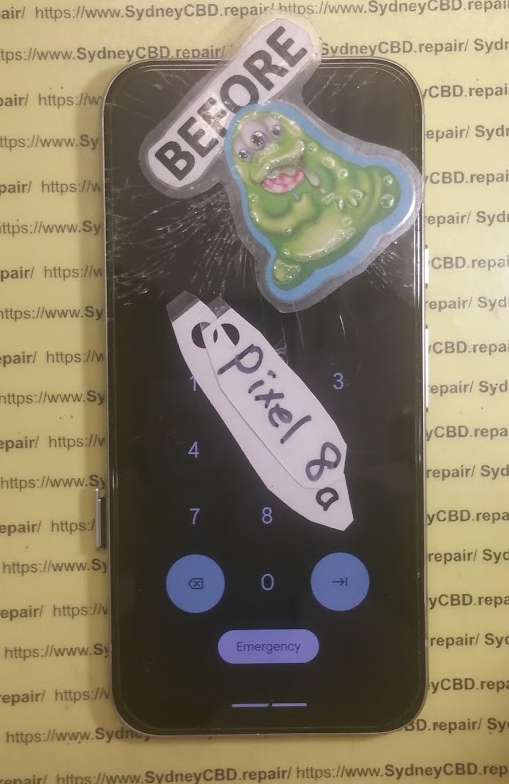
Boom. Your shiny Google Pixel 8a just met the unforgiving concrete near Circular Quay. The screen’s spider-webbed. You’re panicking. Can it be saved today so you don’t miss another night of light shows? Yes, it can — thanks to Sydney CBD Repair Centre.
💥 Why Google Pixel 8a Screens Are Prone to Damage
Broken-Pixel-8a-Screen-Replacement.png
The Reality of Modern Smartphone Glass
Phones today are beautiful, sleek, and…fragile. Despite Gorilla Glass and other marketing lingo, no glass is truly “drop-proof.” Your Pixel 8a, while brilliant in performance, is no exception.
Common Pixel 8a Screen Issues After a Drop
Cracked or shattered display
Unresponsive touchscreen
Black screen but the phone still vibrates
Flickering or ghost touches
Sound familiar? Don’t worry — we’ve seen it all and fixed it all.
⏱️ The Urgency of Quick Repairs During VIVID Sydney
Fixed-Broken-Pixel-8a-Screen-Replacement.png
You Don’t Want to Miss the Lights for a Broken Screen
With just a few days to soak up VIVID’s magic, the last thing you want is to waste time searching for a trustworthy repair shop. We’re open and ready for walk-ins.
Navigating Sydney Without a Working Phone — Nightmare!
Trying to get around without Google Maps, Uber, or even the flashlight? It’s frustrating and risky. Your phone isn’t just for fun — it’s essential.
🏆 Why Choose Sydney CBD Repair Centre?
6 Years in a Row – Sydney’s Top Repair Experts
We’re not just good — we’re award-winning. Named one of Sydney’s top 3 mobile phone repair shops for six consecutive years, we’ve earned the trust of the community.
Over 1900 Glowing Google Reviews
Don’t just take our word for it — 1900+ happy customers have left 5-star reviews. That’s a LOT of fixed phones!
Located Right in the Heart of Sydney
Steps from Town Hall and close to all major transport, you’ll find us in the thick of the action — perfect if you’re coming from VIVID hotspots like Darling Harbour or The Rocks.
⚡ The Same Day Repair Promise
Walk-In, Walk-Out — Fixed in Hours, Not Days
Forget the typical “leave it with us for a week” story. Most Pixel 8a screen repairs are done in under 2 hours. Fast, flawless, and stress-free.
How We Do It So Fast
Our expert technicians are laser-focused. With genuine parts in stock and years of experience, we don’t guess — we fix.
🔧 Genuine Google Pixel 8a Parts Only
No Cheap Knockoffs – Only Quality Components
We never use subpar aftermarket screens for Google Pixel devices. Period.
Why Genuine Parts Matter for Pixel Phones
Non-original parts can affect touch sensitivity, brightness, and even cause glitches. With genuine parts, your phone works like new — no compromise.
👨🔧 Meet David – The Face Behind the Magic
Passion, Precision, and Pixel Repair Perfection
David isn’t just another technician. He’s a master craftsman with years of experience and a love for tech. His obsession with quality shows in every repair.
🛡️ Our 90-Day Warranty – Your Peace of Mind
What’s Covered
We back our work. If something goes wrong with the part or repair, we fix it — free of charge.
Hassle-Free Warranty Process
No red tape. No drama. Just good, honest service.
💬 What Customers Say About Us
Real Reviews from Real People
“Dropped my Pixel during VIVID and thought the night was over. Found these guys on Google and walked out in 90 mins with a perfect screen. Total lifesavers!”
“Best repair shop in Sydney. Fair pricing, friendly service, and no BS.”
Stories of Pixel Screen Repairs During VIVID
We’ve rescued dozens of Pixel phones during VIVID over the years. You’re not alone — and we’ve got your back.
💰 Affordable Pricing and Cash Discounts
Quality Repairs That Don’t Break the Bank
Premium service doesn’t have to mean premium prices. We keep things competitive so everyone gets quality repairs.
Save More by Paying in Cash
Ask us about our cash discount — it’s our way of giving back to smart spenders.
📱 Other Repairs We Offer
Apple, Samsung, OPPO, ASUS and More
We fix all major brands — not just Google. Got an iPhone or Galaxy that needs TLC? We do it all.
From Battery Swaps to Water Damage Fixes
Cracked screens, dead batteries, charging port issues, water damage — we’ve seen and solved every smartphone issue under the sun.