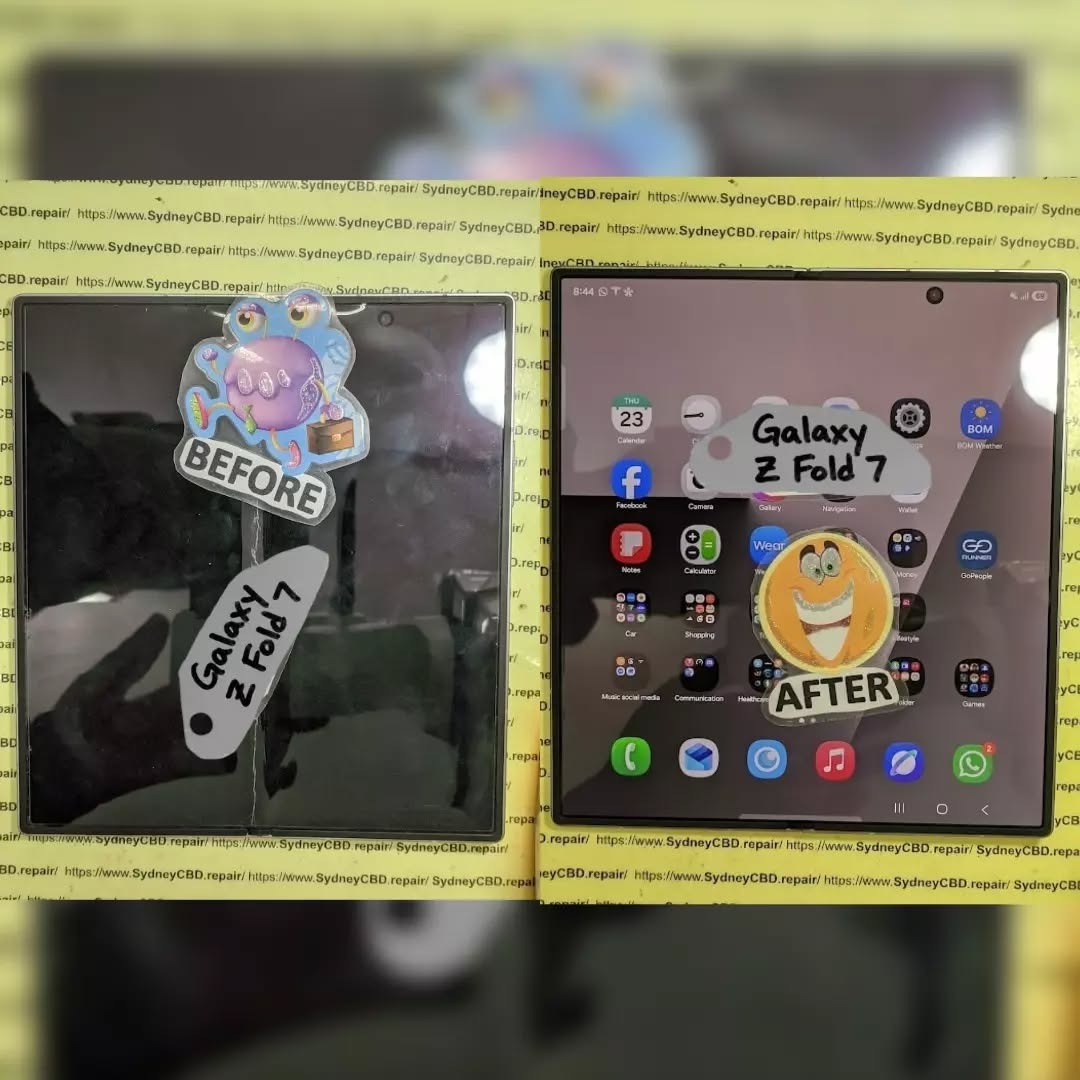
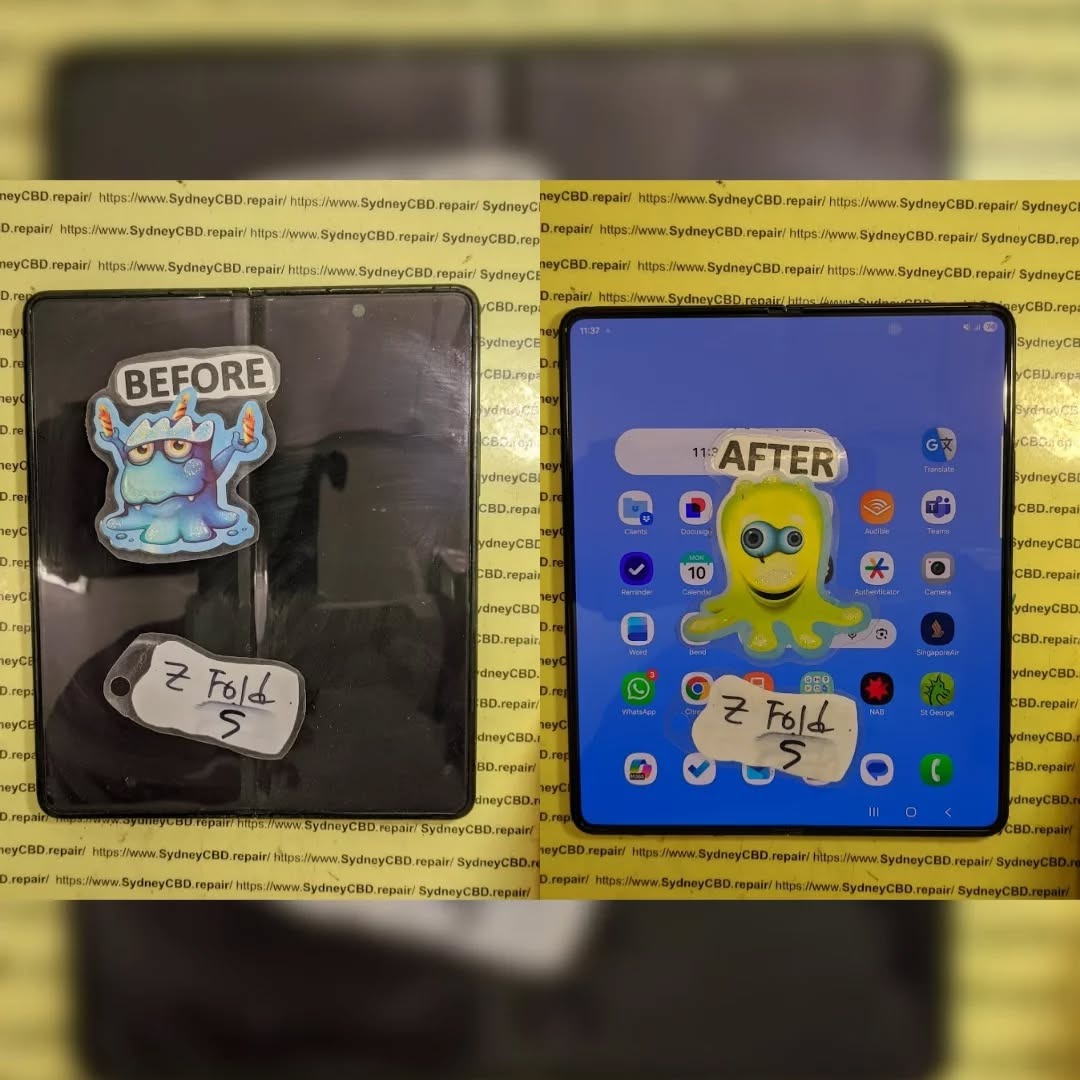
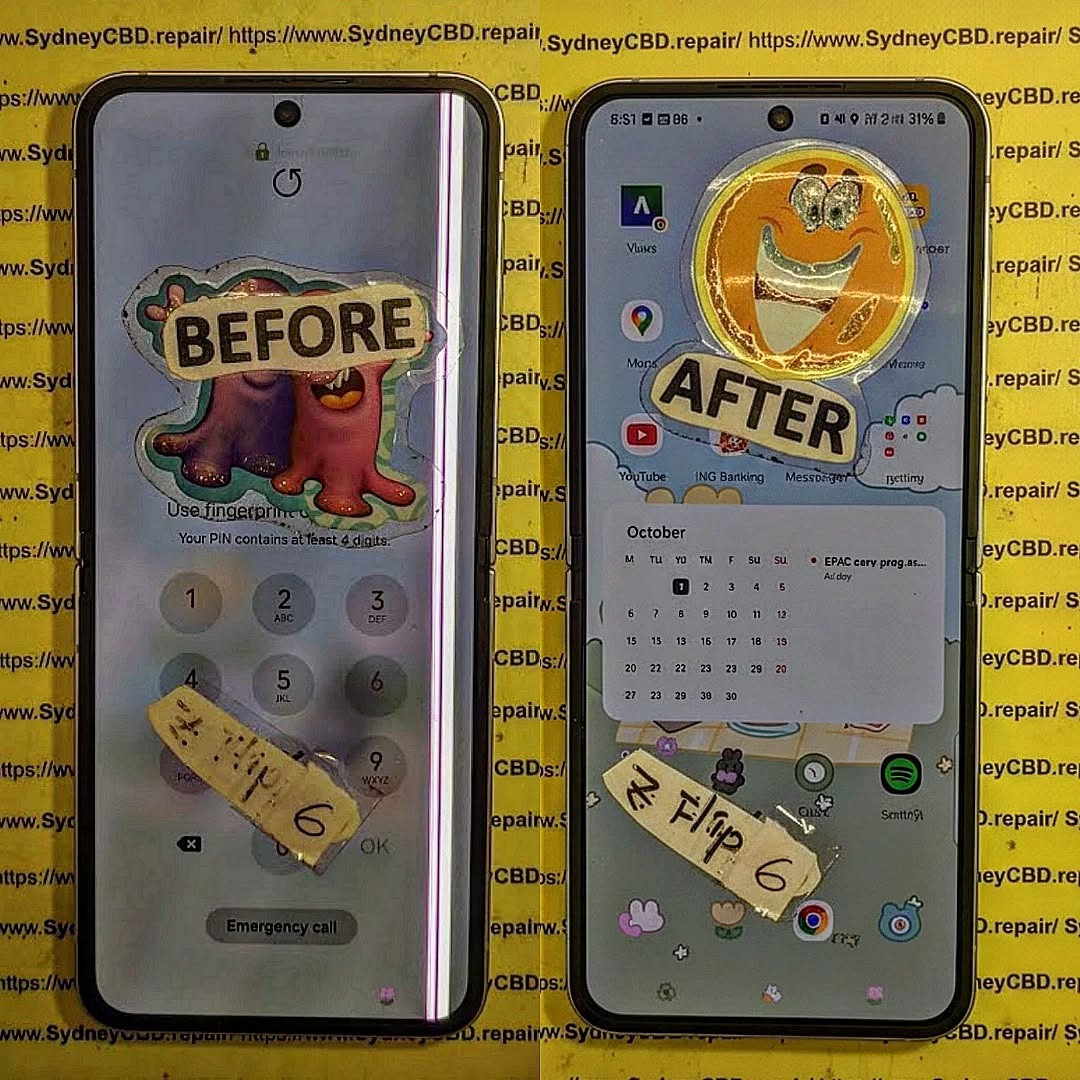
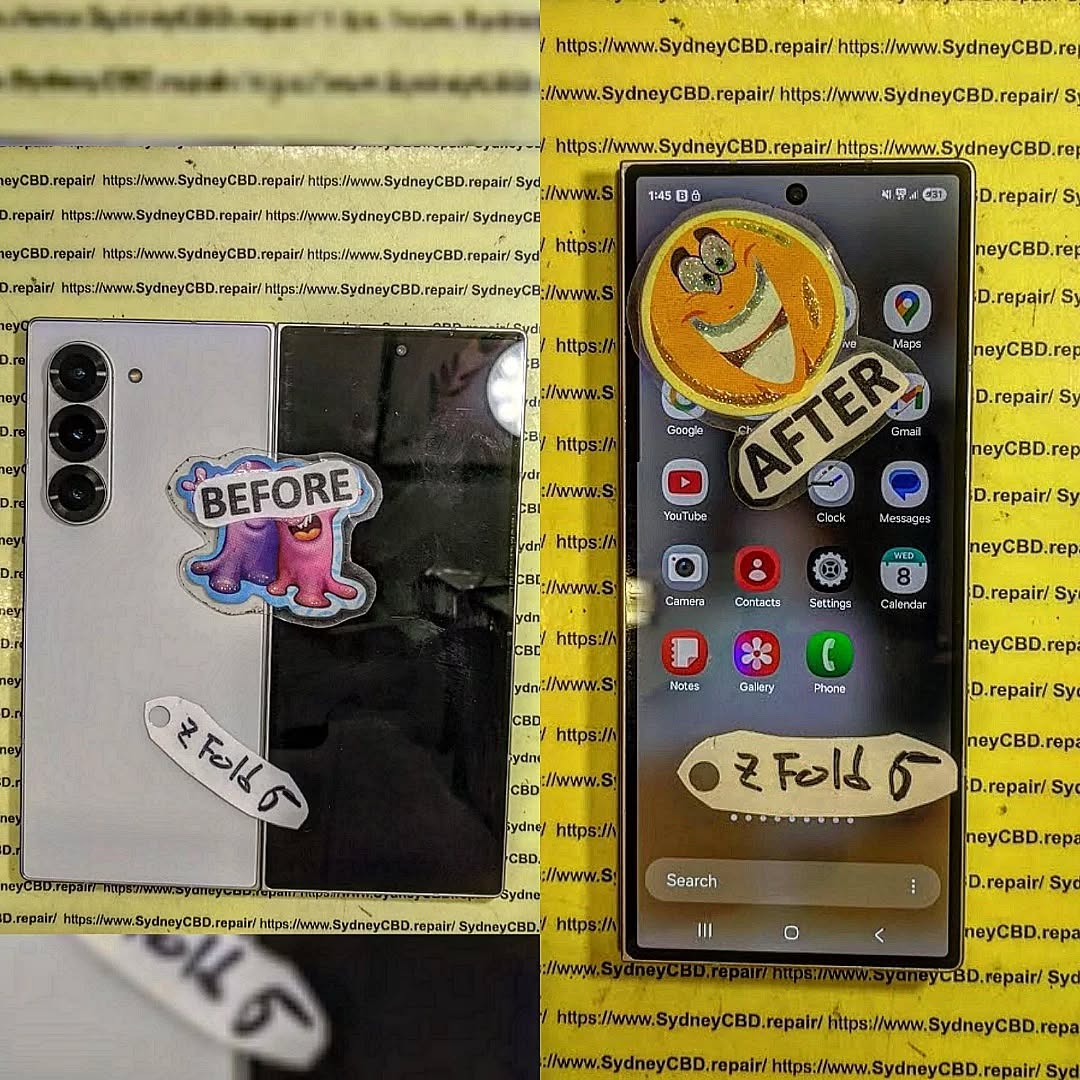
In 2026, foldable smartphones are no longer just futuristic concepts — they’re mainstream marvels of engineering. Brands like Samsung, Google, and Huawei have refined their foldable models, offering users larger displays in compact forms. But as innovation surges, so does the complexity of repairs, especially when it comes to foldable phone screen repair.
These devices rely on flexible OLED panels, intricate hinge systems, and ultra-thin glass layers. While these technologies allow stunning versatility, they also make foldable screens more fragile and expensive to fix. Understanding how these screens work and how they’re repaired is crucial for both users and technicians.
Foldable smartphones have dominated the premium market in 2026, with Samsung Galaxy Z Fold 6, Google Pixel Fold 2, and Oppo Find N3 leading the charge. Each model showcases incredible flexibility, durability, and multitasking performance. However, despite these advancements, foldable phone screen repair remains one of the most challenging aspects of maintenance.
The popularity of these phones has driven demand for specialized repair centers — like Sydney CBD Repair Centre, which has spent years perfecting its techniques for delicate foldable devices.
Foldable phones introduce unique challenges that traditional smartphones never faced. Let’s explore the most common problems owners encounter.
Creasing and Cracking Problems
Over time, repeated folding can cause visible creases across the screen. In severe cases, these creases evolve into cracks that distort display quality and touch response. Early detection and professional intervention are essential to prevent complete screen failure.
Display Separation and Pixel Damage
Display separation occurs when internal layers detach due to mechanical stress. This can lead to pixel burnouts or entire sections of the screen going dark. Only trained technicians using manufacturer-approved equipment can address these issues effectively.
Touch Sensitivity Failures
The touch sensors embedded within foldable displays are thin and complex. Even minor damage can cause dead zones or erratic touch behavior. Recalibration often requires software tools exclusive to authorized repair centers.
Why Foldable Screen Repairs Are Different
Repairing a foldable screen is unlike fixing a flat smartphone. The components are layered in intricate sequences and built with flexible materials that demand precision.
Flexible OLED Display Layers Explained
Foldable screens use Flexible OLED (Organic Light Emitting Diode) panels — made to bend without breaking. These screens integrate multiple layers including a polarizer, flexible substrate, and protective coating. Damage to any layer can compromise display integrity.
Ultra-Thin Glass (UTG) vs. Plastic Screens
Manufacturers now prefer Ultra-Thin Glass (UTG) for foldable screens due to its improved durability. However, UTG is still more delicate than traditional Gorilla Glass. Proper handling during foldable phone screen repair is crucial to avoid microfractures.
Specialized Tools and Techniques Required
Repairing these displays requires specialized tools like heat-controlled separators, lamination machines, and optical adhesives. This isn’t a job for amateurs — even minor mistakes can permanently damage a $2,000 device.
How Professionals Repair Foldable Screens
Repairing a foldable screen demands surgical precision and patience.
Step-by-Step Process of Screen Replacement
Diagnosis: The technician examines screen damage and hinge performance.
Disassembly: Carefully removes the back panel, hinge covers, and flexible display connections.
Screen Removal: The damaged screen is heated and detached using controlled temperature equipment.
Cleaning and Preparation: Residual adhesive is cleaned off to ensure a smooth new installation.
New Screen Installation: A genuine replacement screen is fitted and aligned with the hinge system.
Testing: The new screen undergoes fold-cycle testing and touch calibration.
Calibration and Fold Mechanism Testing
Once installed, the phone is tested for uniform brightness, touch sensitivity, and hinge flexibility. This ensures that the device functions as if it just came out of the factory.
DIY Foldable Screen Fixes – Are They Worth It?
While YouTube tutorials might make foldable repairs look simple, DIY attempts often end in disaster. These devices require high-precision equipment and anti-static workstations. Attempting a home repair can worsen damage and void your warranty. Always seek professional foldable phone screen repair from certified experts like Sydney CBD Repair Centre.
Cost of Foldable Phone Screen Repair in Sydney 2026
The cost of repairing foldable phone screens varies depending on the model:
Brand/Model
Approx.
Repair Cost (AUD)
Samsung Galaxy Z Fold 6
$850 – $1,100
Samsung Galaxy Z Flip 6
$700 – $950
Google Pixel Fold 2
$900 – $1,200
Oppo Find N3
$750 – $1,000
While expensive, using genuine replacement screens ensures durability and compatibility — something only authorized repair centers can guarantee.
Choosing the Right Repair Centre
When your foldable phone needs a screen repair, expertise matters.
Why Sydney CBD Repair Centre Leads the Way
With over 2000 five-star reviews and six consecutive awards, Sydney CBD Repair Centre is Sydney’s #1 choice for foldable phone repairs. Their technicians use only genuine OEM parts, backed by a 90-day warranty.
Genuine Parts and Warranty Assurance
Cheap imitations can cause irreversible damage to foldable phones. Sydney CBD Repair Centre guarantees that every repair uses authentic parts — ensuring quality, safety, and peace of mind.
Preventive Maintenance for Foldable Phones
To prolong your foldable phone’s life:
Avoid folding the screen with pressure or sharp objects nearby.
Keep the hinge clean and dust-free.
Use manufacturer-approved screen protectors.
Avoid exposing the phone to extreme temperatures.
Small precautions can save you from costly foldable phone screen repair bills.
Future of Foldable Display Repairs
As foldable technology matures, so will repair techniques. Companies like Samsung and Google are developing self-healing materials and modular components to make future repairs easier and cheaper. Soon, screen replacements could take mere minutes — revolutionizing the repair industry.
FAQs About Foldable Phone Screen Repair
1. Can a foldable phone screen be repaired if cracked?
Yes, professional technicians can replace cracked foldable screens using genuine parts and specialized tools.
2. How long does it take to repair a foldable screen?
Most repairs at Sydney CBD Repair Centre are completed within the same day, depending on parts availability.
3. Is foldable screen repair covered by warranty?
Manufacturer warranties usually don’t cover physical damage, but repair shops like Sydney CBD Repair Centre offer their own 90-day warranty.
4. Why are foldable screen repairs so expensive?
The materials, complexity, and calibration involved make these repairs more costly than standard phones.
5. Can water damage affect the foldable screen?
Yes. Water can corrode the delicate display layers and hinges. Immediate professional attention is recommended.
6. Are third-party repairs safe?
Only if done by certified experts using genuine parts — like those at Sydney CBD Repair Centre.
Conclusion: Where Innovation Meets Expertise
Foldable phones represent the future of mobile technology — elegant, flexible, and powerful. Yet, they require a higher level of care and technical skill when damaged. For reliable foldable phone screen repair in Sydney, trust the experts at Sydney CBD Repair Centre, where technology meets precision and customer satisfaction always comes first.
Step by Step Samsung Galaxy Z Fold 7 Inner Screen Assembly and Display Replacement: 11 Essential Steps
Introduction
Replacing the inner display on a foldable smartphone is very different from replacing a conventional flat phone screen. The Samsung Galaxy Z Fold 7 inner screen assembly and display replacement process involves a flexible AMOLED panel, precision adhesives, delicate connectors, and a hinge area that requires careful handling.
The Galaxy Z Fold7 features an 8-inch Dynamic AMOLED 2X main display with a 2184 × 1968 resolution and adaptive refresh rate up to 120Hz. Samsung also redesigned the device around a thinner, lighter structure and an updated hinge system.
Because of that construction, an inner-screen replacement should generally be treated as a specialist repair rather than a casual DIY project. The steps below are intended to explain the professional workflow, preparation, inspection, and testing involved. Always use the appropriate manufacturer-approved procedures and replacement components for the exact model.
The Galaxy Z Fold7 isn’t built like a standard slab-style smartphone. Its main screen is a flexible foldable display designed to repeatedly bend around the device’s central hinge. Samsung lists the main display as an 8-inch Dynamic AMOLED 2X panel with 120Hz adaptive refresh.
That construction creates several important repair considerations.
A traditional smartphone screen can often be separated from its frame using controlled heat and appropriate prying techniques. A foldable display, however, has a much more complicated structure. Excessive pressure, incorrect tool placement, contamination, or improper adhesive handling can turn a simple display replacement into additional damage.
The inner screen is also significantly more expensive than many conventional smartphone displays. Samsung’s current U.S. repair pricing page lists separate Fold7 inner-screen repair and inner screen-module replacement prices, illustrating how the selected repair method and component can affect the final cost. Prices vary by region, service type, warranty status, and repair provider.
Key Galaxy Z Fold7 Display Specifications
Feature
Galaxy Z Fold7 Main Display
Display size
8.0 inches
Technology
Dynamic AMOLED 2X
Resolution
2184 × 1968
Refresh rate
Up to 120Hz adaptive
Display type
Foldable/flexible main display
Cover display
6.5-inch Dynamic AMOLED 2X
Main display purpose
Folded/unfolded multitasking and media
These specifications matter because replacement testing shouldn’t stop at simply checking whether the screen turns on. A properly completed repair should also be evaluated for touch response, brightness, color uniformity, folding behavior, refresh behavior, and general display stability.
Diagnosing the Problem Before Replacing the Screen
Before beginning a Samsung Galaxy Z Fold 7 inner screen assembly and display replacement, diagnose the actual failure.
A black screen doesn’t automatically mean that the display assembly is defective. The problem could involve a connector, software issue, board-level fault, physical impact, or another component.
Start with a visual inspection.
Look for:
Cracks or visible damage
Black spots or ink-like spreading
Vertical or horizontal lines
Flickering
Dead pixels
Touch failures
Display discoloration
Brightness abnormalities
Damage around the center fold
Display problems that appear only when folding
If the phone still displays an image, test as many functions as possible before opening it.
Check Touch Response
Open a drawing application or another suitable touch-testing interface and slowly move a finger across the entire inner display.
Pay particular attention to the central folding region and edges.
If certain areas don’t respond, document their location before the repair.
Check the Display While Folding
A foldable display should be assessed in several positions rather than only when completely open.
Observe whether:
The display works while fully open.
The display remains stable while partially folded.
The image changes unexpectedly around the hinge.
Touch input remains consistent.
Flickering occurs during movement.
This information can help determine whether the problem is isolated to the panel or related to another part of the foldable assembly.
Tools and Replacement Components
A professional repair environment should use appropriate precision tools and manufacturer-compatible parts.
Typical equipment may include:
Precision screwdrivers
Plastic opening tools
Approved opening picks
Suction equipment where appropriate
ESD-safe equipment
Tweezers
Magnification
Cleaning materials approved for electronics
Replacement adhesive
Display assembly or appropriate replacement component
Protective work mat
Inspection lighting
The exact tools and disassembly sequence can vary according to the service documentation and replacement assembly being used.
Why Genuine or Approved Parts Matter
The replacement component should match the Galaxy Z Fold7 model and regional variant where required.
Samsung’s Philippine support information states that its authorized service centers use genuine Samsung parts for repairs.
This is particularly important for a foldable phone because the display isn’t simply a piece of glass. Compatibility involves the panel, electronics, flex connections, physical dimensions, adhesives, and interaction with the phone’s software and hardware.
Before opening the device, protect the customer’s data and establish a record of the phone’s condition.
Back up important data whenever the device is operational.
Record:
Existing cracks
Frame damage
Camera condition
Cover-screen condition
Inner-screen condition
Buttons
Charging function
Speakers
Microphones
Cameras
Wireless connectivity
General device condition
If the phone is being handed to a service center, Samsung recommends using Maintenance Mode to restrict access to personal data during repair.
Step 1: Power Down and Secure the Device
The phone should be shut down using the appropriate procedure before internal work begins.
Remove external accessories and keep the work area clean.
Avoid placing unnecessary pressure on the inner display. A foldable screen can be damaged by pressure even when there isn’t obvious external cracking.
A clean, organized workspace also reduces the chance of losing tiny components.
Step 2: Carefully Access the Device
Professional disassembly begins by gaining access to the internal structure using the approved procedure for the Galaxy Z Fold7.
This is where repair technicians need to be especially careful.
The Fold7 is only about 4.2 mm thick when unfolded, excluding the main-screen frame, and 8.9 mm when folded. Samsung lists its weight at 215 grams.
That thin construction leaves less room for careless tool movement.
Never force an opening tool into an unknown area. A tool inserted too deeply can damage internal components, flex cables, or other layers.
Step 3: Disconnect the Relevant Connections
Once the correct internal access point has been reached, the relevant connectors must be identified and handled carefully.
The general principle is simple:
Disconnect power and relevant display connections before attempting to remove the damaged display assembly.
Connectors should be lifted using appropriate tools rather than pulled by their cables.
This is one of those moments where patience pays off. A connector that seems stubborn should be inspected rather than forced.
Step 4: Remove the Damaged Inner Display Assembly
The damaged display assembly is then separated according to the appropriate service procedure.
This is the most delicate stage of the operation.
A foldable display should not be treated like a conventional rigid glass panel. Avoid bending, twisting, puncturing, or applying concentrated pressure to the flexible display layers.
Important Safety Principle
Never use excessive force simply because an assembly isn’t separating.
If a component doesn’t release as expected, stop and identify what is still holding it.
Potential causes include:
Remaining adhesive
A connector
A retaining component
A frame section
An overlooked attachment point
Trying to “muscle through” the process can cause secondary damage.
Step 5: Inspect the Frame and Hinge
Once the damaged assembly has been removed, inspect the supporting structure before installing the replacement.
Look for:
Bent frame sections
Foreign particles
Adhesive residue
Hinge-area damage
Deformation
Liquid contamination
Damaged connectors
Missing or damaged fasteners
Samsung says the Fold7 uses an Armor FlexHinge with a multi-rail structure designed to distribute stress and support the thinner foldable design.
That makes hinge inspection an important part of the repair.
If the underlying structure is damaged, simply installing another display may not provide a reliable long-term repair.
Step 6: Prepare the Replacement Display Assembly
Before installation, compare the replacement assembly with the removed component.
Check:
Model compatibility
Physical dimensions
Connector arrangement
Visible damage
Flex cable condition
Display surface
Frame alignment
Protective films
Adhesive condition
Don’t remove protective material unnecessarily early.
Keeping the replacement component protected until the installation stage reduces the chance of scratches, dust contamination, or accidental handling damage.
Keep the Work Area Dust-Free
Dust is a small problem that can become a big problem beneath a display assembly.
Even a tiny particle can create:
A visible bump
Uneven pressure
Poor adhesive contact
Cosmetic defects
Localized stress
Therefore, cleanliness isn’t just about appearance. It can directly affect the quality of the finished repair.
Step 7: Position and Align the New Display
The replacement display should be positioned carefully according to the appropriate repair procedure.
Alignment is critical.
Before final adhesion or securing, verify that:
Edges are correctly positioned.
The central fold area is correctly aligned.
Connectors can reach their mating points.
The display sits evenly.
No flex cable is trapped.
No debris is underneath the assembly.
Don’t rush this stage.
A few extra minutes spent checking alignment can prevent the need to repeat a complicated repair.
Step 8: Reconnect the Display and Internal Components
After the replacement assembly is correctly positioned, reconnect the required components in the prescribed sequence.
Each connector should sit correctly before pressure is applied.
Never press directly on delicate flex cables.
After connections are restored, inspect the work visually before proceeding with final reassembly.
Connector Inspection Checklist
Check
What to Look For
Connector seating
Fully and evenly seated
Flex cable
No tears, sharp bends, or crushing
Contact area
Clean and free of debris
Routing
Cable follows the intended path
Nearby components
Nothing trapped underneath
Step 9: Test the New Inner Display
Testing before final closure is one of the most valuable steps in any screen replacement.
Power the device using the approved service procedure and test the replacement display.
Check the following:
Image Quality
Display a white, black, red, green, and blue screen if suitable diagnostic tools are available.
Look for:
Dead pixels
Lines
Flickering
Uneven brightness
Color abnormalities
Black spots
Image retention or other unexpected behavior
Touch Response
Test the entire panel.
Move across:
Top edge
Bottom edge
Left edge
Right edge
Center
Fold region
The touch system should respond consistently.
Refresh and Motion
Where applicable, verify smooth scrolling and normal display behavior.
The Fold7 main display supports an adaptive refresh rate up to 120Hz.
Step 10: Reassemble the Device
Once the replacement display has passed preliminary tests, complete the remaining reassembly according to the appropriate service instructions.
Check every component before closing the device.
A good technician doesn’t simply put the screws back and call it a day.
The final inspection should include:
Screw placement
Connector seating
Adhesive positioning
Flex routing
Frame alignment
Hinge movement
Cover display condition
Camera condition
External buttons
Step 11: Perform Final Functional Testing
After complete reassembly, perform another full test.
This second test is important because a device can work before final closure but develop an issue if something is incorrectly positioned during reassembly.
Test:
Inner display
Cover display
Touchscreen
Folding/unfolding
Charging
Cameras
Speakers
Microphones
Wi-Fi
Bluetooth
Cellular connectivity
Buttons
Fingerprint functionality where applicable
Folding Test
Open and close the phone carefully.
Do not repeatedly cycle the hinge unnecessarily. A small number of controlled checks should be enough to confirm normal operation.
Watch the inner screen while changing the device position.
The display should remain stable without unexpected flickering, lines, or touch failures.
Common Samsung Galaxy Z Fold7 Screen Replacement Mistakes
Even experienced technicians need to work carefully on foldable devices.
Here are some common mistakes to avoid.
Using Excessive Heat
Foldable displays contain sensitive components and materials. Excessive heat can create additional problems.
Use only the approved service method and temperature guidance applicable to the specific repair.
Prying Too Deeply
An opening tool should never be inserted farther than necessary.
Deep insertion can damage internal components.
Touching Display Surfaces Unnecessarily
Fingerprints, dust, and oils can complicate final inspection.
Use appropriate clean handling practices.
Ignoring Frame Damage
If the frame or hinge has been damaged by the original impact, installing a new screen alone may not resolve the underlying problem.
Skipping the Pre-Repair Test
Without a baseline test, it can be difficult to determine whether another component developed a problem during the repair.
Skipping the Post-Repair Test
A screen that turns on isn’t necessarily a successful repair.
Touch, brightness, color, folding behavior, connectivity, and other functions should also be checked.
Inner Screen Assembly vs Display-Only Replacement
One important consideration is whether the repair provider is replacing only the screen or an entire display assembly/module.
These approaches can differ in:
Parts availability
Labor requirements
Repair complexity
Price
Warranty terms
Expected turnaround time
Samsung’s published U.S. repair pricing demonstrates that Fold7 inner-screen repairs and inner screen-module replacement can have different prices.
Because prices and service options differ by country, the best approach is to obtain a repair quotation based on the exact damage and model.
How Much Does Galaxy Z Fold7 Inner Screen Repair Cost?
There isn’t one universal worldwide price.
The cost can depend on:
Country
Repair provider
Warranty status
Insurance or protection plan
Display-only versus module replacement
Additional frame or hinge damage
Availability of replacement components
For example, Samsung’s U.S. support page currently lists separate pricing for the Galaxy Z Fold7 inner display repair and inner screen-module replacement.
Those U.S. prices shouldn’t be used as a direct quotation for Australia, the Philippines, or another market.
For an official repair route in the Philippines, Samsung provides a service-center locator and states that its authorized centers use genuine Samsung parts.
Professional Repair vs DIY Replacement
The Galaxy Z Fold7 inner screen is not an ideal beginner repair.
A professional repair is especially worth considering when:
The phone contains important data.
The display has severe physical damage.
The hinge is damaged.
The frame is bent.
The replacement part is expensive.
You don’t have foldable-phone repair experience.
The device may still be under warranty or protection coverage.
You need a repair warranty.
A DIY attempt may appear cheaper initially, but a damaged replacement display, connector, hinge component, or frame can increase the total repair cost.
In short, this is a job where the cheapest approach isn’t always the least expensive approach.
How to Find an Authorized Samsung Repair Center
Samsung Philippines provides an official service-center locator for mobile devices. Its support page states that there are more than 100 authorized service centers across the Philippines and explains how to search by city, town, or postal code.
When requesting service, provide the technician with a clear description of:
What happened
Whether the phone was dropped
Whether the inner display still works
Whether touch works
Whether the cover screen works
Whether the phone has liquid exposure
Whether the hinge feels normal
This information can make diagnosis more efficient.
Samsung Galaxy Z Fold7 Inner Screen Replacement Checklist
Use this checklist when evaluating a completed repair.
Test
Pass Condition
Inner display
Clear image
Touch
Responsive across panel
Brightness
Consistent
Colors
No obvious abnormalities
Pixels
No unexpected dead areas
Fold area
Stable during movement
Hinge
Opens and closes normally
Cover display
Fully operational
Cameras
Working
Speakers
Working
Microphones
Working
Charging
Working
Connectivity
Working
Physical assembly
No gaps or loose parts
Frequently Asked Questions
1. Can the Galaxy Z Fold7 inner screen be replaced?
Yes, the inner display can be serviced, but the procedure is significantly more complicated than replacing a conventional smartphone screen. Samsung provides repair options for the Fold7 inner screen in supported markets.
2. Is Galaxy Z Fold7 inner screen replacement a DIY repair?
It’s possible to find repair procedures and replacement components, but the inner foldable display is delicate. For most users without professional foldable-device repair experience, an authorized or experienced repair technician is the safer option.
3. What size is the Galaxy Z Fold7 inner screen?
The Galaxy Z Fold7 has an 8-inch main display with a 2184 × 1968 resolution and a maximum adaptive refresh rate of 120Hz.
4. Can I replace only the cracked surface layer?
The correct repair method depends on the nature of the damage and the available service parts. A cracked or malfunctioning foldable display may require an appropriate screen or display-module replacement rather than a simple glass replacement.
5. How do I know whether my display or motherboard is damaged?
A complete diagnosis is required. If the phone has image, touch, or connector-related symptoms, a technician should test the display and associated hardware before ordering replacement parts.
6. Does screen replacement restore water resistance?
You shouldn’t assume that a repaired phone has exactly the same water-resistance performance as a factory-sealed device. The outcome depends on the repair method, components, seals, and service procedure. Samsung lists the Galaxy Z Fold7 as IP48-rated, but that rating should not be interpreted as a guarantee after third-party repair.
7. Should I repair the hinge at the same time?
If the hinge or frame has visible damage, it should be inspected before installing a replacement display. A damaged supporting structure may cause problems with a new display.
8. Is the Galaxy Z Fold7 display covered by warranty?
Warranty coverage depends on the market, warranty terms, cause of damage, and condition of the device. Accidental physical damage is often treated differently from manufacturing defects. Check the warranty terms applicable to your country and device.
9. How long does a Fold7 screen repair take?
Turnaround time varies according to the repair provider, part availability, diagnosis, and whether additional components are damaged. Some service providers offer same-day service, while others may require more time.
10. Where can I get official Samsung Fold7 repair support?
Samsung Philippines provides an official service-center locator and repair-support information.
Conclusion
The Samsung Galaxy Z Fold 7 inner screen assembly and display replacement is a precision repair that requires significantly more care than a standard smartphone screen replacement.
The most important principles are straightforward: diagnose the fault before replacing parts, protect the flexible display, use compatible components, keep the work area clean, avoid excessive force, inspect the hinge and frame, and thoroughly test the phone after installation.
The Galaxy Z Fold7 combines an 8-inch flexible Dynamic AMOLED 2X inner display with a thin foldable structure, making careful handling especially important.
For users without professional foldable-phone repair experience, an authorized Samsung service center or qualified specialist can reduce the risk of additional damage. Samsung’s Philippine service network provides an official starting point for customers seeking repair assistance.
A successful repair isn’t simply about making the screen light up again. It’s about restoring reliable display performance, touch response, folding behavior, structural integrity, and overall functionality while protecting the rest of the device.
For professional assistance with Samsung Galaxy Z Fold7 and other mobile-device repairs, Sydney CBD Repair Centre provides repair services for major smartphone brands.
David from Sydney CBD Repair Centre – The Best place to fix mobile phones as 7 Years In A Row! Top Mobile Phone Repair In Sydney. More than 2000 Positive Reviews on Google and Same Day Repairs.
We take pride in delivering exceptional repair services for all major phone brands including Apple, Samsung, Google, and more. Our expert technicians use only genuine parts and offer 90days warranty on repairs. Located in the heart of Sydney CBD, we’re your one-stop solution for all mobile device repairs.
Our commitment to excellence has earned us the trust of thousands of satisfied customers. Whether it’s a cracked screen, battery replacement, or water damage repair, we handle it all with professional care and expertise. Walk in today and experience why we’re Sydney’s #1 choice for mobile phone repairs.
Visit us for:
✓ Same Day Express Repairs
✓ Genuine Parts Guarantee
✓ Professional Technicians
✓ Competitive Pricing
✓ 2000+ 5-Star Google Reviews
✓ 7-Time Award Winner for Best Phone Repairs
Sydney CBD Repair Centre – Where Quality Meets Reliability.
The $2000 Mistake: Repairing a Samsung Galaxy Z Fold 5 With Non-Genuine Parts
Introduction: The High Stakes of Smartphone Repairs
In today’s fast-paced digital world, smartphones like the Galaxy Z Fold 5 are more than just communication tools—they are lifestyle devices, productivity hubs, and personal entertainment centers. With prices hovering around $1,800–$2,000, any damage can feel catastrophic. One wrong move during repair—especially opting for non-genuine parts—can quickly turn into a $2,000 mistake.
Non-genuine components may seem cost-effective initially, but they often compromise performance, reliability, and safety. Whether it’s a cracked screen, battery issue, or water damage, understanding the stakes is crucial before handing your premium device over to any repair shop.
The Galaxy Z Fold 5 is Samsung’s flagship foldable smartphone, designed with cutting-edge technology that blends innovation with fragility. Its unique design requires careful handling during repairs, as even minor errors can cause long-term damage.
Folding Screen Technology Explained
At the heart of the Z Fold 5 is its foldable OLED display, capable of bending without cracking—yet extremely delicate. Unlike traditional rigid screens, foldable displays use ultra-thin layers that demand specialized handling. Non-genuine replacements may not replicate the exact folding mechanics, leading to issues like dead pixels, uneven folding, or premature wear.
Internal Hardware and Sensors
Beneath the foldable screen lies a complex arrangement of sensors, connectors, and chips. Components like the in-display fingerprint sensor, hinge motors, and cameras are precisely calibrated. A subpar part or an inexperienced repair attempt can misalign these, resulting in malfunctioning sensors, uneven touch response, or hinge failure.
Non-Genuine Parts: What Are They?
Non-genuine, or aftermarket, parts are components produced by third-party manufacturers. These parts are often marketed as “compatible” or “OEM-like,” but they rarely match the quality of original Samsung parts.
Common Non-Genuine Parts Used
Repair shops often use non-genuine parts to cut costs. Common replacements include:
Foldable screens
Batteries
Side buttons and volume keys
Camera lenses and modules
Charging ports and internal connectors
While cheaper, these parts rarely offer the durability and performance of original components.
Cost vs. Quality Tradeoff
A non-genuine screen replacement may save $200–$400 upfront, but the tradeoff is enormous. These screens can flicker, lose brightness, or fail entirely within months. Batteries may overheat or degrade faster, and even minor internal connectors may cause functionality loss. In the long run, the total cost of repeated repairs can exceed the price of a professional repair using genuine parts.
The Hidden Risks of Non-Genuine Repairs
Opting for aftermarket parts is not just a financial risk—it’s a potential hazard to your device and personal safety.
Shortened Device Lifespan
Substandard materials wear out quickly. Non-genuine displays may peel, become unresponsive, or warp, while cheap batteries often fail sooner, leading to device shutdowns or swelling. Your $2,000 phone can end up feeling like a $500 device within months.
Warranty and Insurance Issues
Samsung’s official warranty explicitly voids coverage if non-genuine parts are used. Likewise, many insurance policies will deny claims on phones repaired with aftermarket components. Choosing non-genuine parts could make you responsible for 100% of future repair costs.
Safety Hazards
Cheap batteries are particularly dangerous—they can overheat, leak, or even explode. Poor-quality screens may crack or shatter unpredictably, posing risk of injury. Non-genuine parts compromise the strict safety standards built into the Galaxy Z Fold 5, which are designed to protect both the device and its user.
To avoid the $2,000 mistake, it’s vital to know how to differentiate genuine Samsung components from cheap substitutes.
Visual and Functional Indicators
Screen clarity: Genuine screens maintain uniform brightness and colors. Non-genuine displays may appear dull or patchy.
Touch response: Original parts have smooth, accurate touch sensitivity; aftermarket parts can be laggy or uneven.
Hinge movement: Non-genuine parts can create stiffness or unusual gaps in folding.
Using Samsung Authorized Service Centers
The safest approach is to seek repairs through Samsung Authorized Service Centers or certified repair shops. They verify authenticity with serial numbers, provide factory-tested parts, and ensure your device maintains warranty coverage.
Repair Cost Breakdown
Understanding realistic costs can prevent falling for cheap, risky alternatives.
Screen Replacement Costs
Genuine screen replacement: $650–$800
Non-genuine screen replacement: $300–$400 (often fails within months)
Battery & Component Costs
Genuine battery replacement: $120–$180
Non-genuine battery: $50–$80 (risk of overheating or reduced lifespan)
When calculating potential future repairs due to failed aftermarket parts, the “savings” quickly vanish.
Expert Repair Strategies
Professional repair shops prioritize precision, safety, and long-term reliability.
Certified Technicians and Tools
Trained technicians use specialized tools for folding screens and internal connectors. They adhere to ESD safety standards, avoiding static damage to sensitive circuits. Using non-genuine parts circumvents these standards and increases failure risk.
Step-by-Step Screen Replacement
Power off the device
Carefully remove back cover without damaging hinges
Disconnect battery
Detach foldable screen using heat and precision tools
Test touch, fold, display quality, and battery function
Skipping any step or using cheap components can cause permanent malfunction.
Preventing Damage in the First Place
Avoiding repair is always better than repairing poorly.
Protective Cases & Screen Protectors
Invest in foldable-friendly cases and screen protectors. Some brands specialize in foldable displays, providing protection without restricting the hinge.
Usage Habits for Longevity
Avoid extreme folding angles
Keep away from liquids
Don’t overload device with heavy apps or excessive heat
Use certified chargers to avoid battery stress
External Resources & Samsung Guidelines
For official repair guidance, Samsung provides detailed information for authorized service: Samsung Galaxy Z Fold 5 Support. Following these guidelines ensures safety and keeps your warranty intact.
Frequently Asked Questions (FAQs)
Q1: Can I save money with non-genuine parts?
A1: Short-term savings exist, but long-term costs often surpass the price of genuine repairs. Risk of repeated failures makes it a poor investment.
Q2: How can I tell if a part is genuine?
A2: Look for factory-quality finish, proper touch response, correct hinge alignment, and purchase from authorized centers.
Q3: What happens if my warranty is voided?
A3: Samsung may refuse repairs or replacements, leaving you fully responsible for future repair costs.
Q4: Are non-genuine batteries dangerous?
A4: Yes. Cheap batteries can overheat, swell, or leak, posing safety risks.
Q5: Is DIY repair with aftermarket parts safe?
A5: Not recommended. The Z Fold 5 requires specialized tools and experience; mistakes can permanently damage the device.
Q6: Can I switch back to genuine parts after a non-genuine repair?
A6: Yes, but previous damage may complicate installation. It’s often more costly and requires certified technicians.
Conclusion
Repairing your Galaxy Z Fold 5 with non-genuine parts is more than a financial risk—it’s a $2,000 mistake waiting to happen. From shorter device lifespan to safety hazards and voided warranties, the downsides far outweigh initial savings. Choosing genuine components, certified repair services, and preventive care ensures your device remains functional, safe, and long-lasting. Investing in quality now avoids costly repairs and protects your valuable device.
When it comes to high-end foldable phones, cutting corners is never worth it. Protect your investment with expert repairs, genuine parts, and informed choices.
David from Sydney CBD Repair Centre – The Best place to fix mobile phones as 7 Years In A Row! Top Mobile Phone Repair In Sydney. More than 2000 Positive Reviews on Google and Same Day Repairs.
We take pride in delivering exceptional repair services for all major phone brands including Apple, Samsung, Google, and more. Our expert technicians use only genuine parts and offer 90days warranty on repairs. Located in the heart of Sydney CBD, we’re your one-stop solution for all mobile device repairs.
Our commitment to excellence has earned us the trust of thousands of satisfied customers. Whether it’s a cracked screen, battery replacement, or water damage repair, we handle it all with professional care and expertise. Walk in today and experience why we’re Sydney’s #1 choice for mobile phone repairs.
Visit us for:
✓ Same Day Express Repairs
✓ Genuine Parts Guarantee
✓ Professional Technicians
✓ Competitive Pricing
✓ 2000+ 5-Star Google Reviews
✓ 7-Time Award Winner for Best Phone Repairs
Inside a Foldable Screen Repair: The Ultimate Samsung Galaxy Challenge (Proven 7-Step Breakdown)
Introduction
Foldable smartphones represent one of the biggest leaps in mobile technology, and Samsung Galaxy foldable devices sit right at the forefront of that innovation. They offer a stunning blend of portability and productivity, transforming from a compact phone into a tablet-sized display in seconds. However, behind this impressive design lies a hidden reality that many users only discover when something goes wrong. Inside a foldable screen repair is a level of complexity that far exceeds anything seen in traditional smartphone servicing.
Unlike standard glass screens, foldable displays are built from multiple ultra-thin, flexible layers that must move perfectly in sync with a precision-engineered hinge. Even minor damage can affect not just the screen, but the entire folding mechanism, touch sensitivity, and display performance. A small drop, trapped dust, or everyday wear can quickly turn into a serious and costly problem if not handled correctly.
This article takes you inside a foldable screen repair to uncover why Samsung Galaxy foldable devices present such a unique challenge. From understanding how the technology works to exploring the risks, costs, and professional repair process, you’ll gain clear, practical insights into what it really takes to restore these advanced devices. Whether you’re a foldable phone owner or simply curious about the technology, this guide explains everything in a straightforward, easy-to-understand way—without the guesswork.
Foldable smartphones have changed the mobile industry almost overnight. Samsung Galaxy Fold and Galaxy Z Fold devices represent cutting-edge innovation, blending phone portability with tablet-sized displays. However, inside a foldable screen repair, technicians face one of the most complex challenges in modern electronics.
Unlike traditional glass screens, foldable displays use ultra-thin glass layered with flexible polymers. This design allows the screen to bend thousands of times, but it also introduces vulnerabilities. Even minor pressure or debris can lead to visible creases, dead pixels, or full display failure.
What’s more, Samsung’s foldable devices integrate the screen directly with the hinge system. That means damage rarely affects just one component. Instead, issues often cascade, impacting touch responsiveness, display brightness, and structural alignment. Understanding this technology is crucial before diving deeper into the repair process.
Samsung foldable displays rely on a multi-layer structure. At the top sits a protective polymer layer, followed by ultra-thin glass, AMOLED pixels, digitizers, and flexible substrates underneath. Each layer must move in harmony during every open and close motion.
The hinge mechanism synchronizes this movement. It distributes stress evenly across the screen, preventing sharp bends. However, when dust, sand, or micro-particles enter the hinge, friction increases. Over time, this friction can press against the screen from beneath, causing internal cracks that aren’t visible at first glance.
Inside a foldable screen repair, technicians must account for all these layers. Replacing just the outer display isn’t enough. Calibration, pressure testing, and hinge alignment are mandatory steps to restore factory-level performance.
Why Foldable Screens Are More Fragile
Let’s be honest—foldable screens aren’t as forgiving as standard smartphone displays. While Samsung has made massive improvements since the first Galaxy Fold, fragility remains part of the equation.
The flexibility that makes these devices exciting also makes them sensitive. A small drop that wouldn’t faze a slab phone can cause significant damage to a foldable. Even closing the phone with debris inside can lead to permanent marks or dead zones.
That’s why inside a foldable screen repair, technicians often discover hidden damage. What appears to be a simple crack may reveal hinge misalignment or internal pressure points once the device is opened.
Common Causes of Foldable Screen Damage
Foldable screen damage rarely comes from one dramatic incident. Instead, it’s usually the result of accumulated stress over time.
Everyday Wear and Tear
Daily folding and unfolding naturally wears down components. Although Samsung rates its hinges for hundreds of thousands of folds, real-world conditions vary. Humidity, dust, and temperature changes all play a role in screen degradation.
Minor scratches on the protective layer can eventually develop into cracks. Touch sensitivity may decline gradually, making it harder to detect problems early.
Impact, Pressure, and Hinge Stress
Drops remain a leading cause of damage. Even with a case, the hinge can absorb shock unevenly, transferring force directly to the display. Sitting on a folded phone or placing it in a tight pocket also adds pressure where it shouldn’t exist.
Inside a foldable screen repair, hinge stress is one of the first things professionals check. If ignored, replacing the screen alone won’t solve the issue long-term.
Inside a Foldable Screen Repair Process
This is where things get serious. A foldable screen repair isn’t just a remove-and-replace job. It’s a carefully choreographed process that demands precision, patience, and experience.
Initial Diagnostic Inspection
Every repair starts with diagnostics. Technicians test touch responsiveness, display brightness, hinge smoothness, and software calibration. They also inspect for micro-cracks and pressure marks under magnification.
This step determines whether the damage is limited to the screen or extends to the hinge and frame. Skipping diagnostics can lead to incomplete repairs and repeat failures.
Disassembly of a Samsung Foldable Device
Disassembling a foldable phone is significantly more complex than a standard smartphone. Adhesives are stronger, components are densely packed, and cables are fragile.
The back cover, battery, speakers, and hinge covers must be removed in a specific order. Any mistake can damage flex cables or compromise water resistance.
Hinge and Frame Assessment
Once opened, technicians inspect the hinge assembly. Bent rails, worn brushes, or trapped debris are common findings. If the hinge isn’t restored to proper alignment, the new screen will fail prematurely.
Inside a foldable screen repair, this assessment is often the difference between a lasting fix and a costly comeback.
Screen Replacement and Calibration
After removing the damaged display, the replacement screen is installed with extreme care. Alignment is critical. Even a fraction of a millimeter off can cause uneven folding or pressure points.
Calibration follows. Technicians test touch accuracy, color balance, brightness uniformity, and folding smoothness. Only after passing these checks is the device reassembled and sealed.
Tools and Expertise Required for Foldable Repairs
Foldable repairs aren’t for amateurs. They demand tools and training far beyond standard phone repairs.
Specialized Equipment
Professional repair centres use heating plates, precision clamps, hinge alignment tools, and OEM-grade adhesives. Anti-static environments and magnification tools are also essential.
Without these, the risk of damaging internal layers skyrockets.
Technician Skill and Training
Experience matters. Technicians must understand Samsung’s design philosophy and repair protocols. According to Samsung’s official support documentation, improper handling can void warranties and cause irreversible damage. This is why trusted repair centres invest heavily in ongoing training and certification.
Risks of DIY Foldable Screen Repair
It’s tempting to save money by attempting a DIY repair. However, foldable devices raise the stakes considerably.
Common DIY Mistakes
Using incorrect tools, overheating adhesives, or misaligning the hinge are frequent errors. Many DIY attempts result in damaged flex cables or shattered replacement screens.
Long-Term Damage Risks
Even if the phone powers on, improper repairs can shorten the lifespan of the device. Uneven pressure leads to creases, dead pixels, or touch failures within weeks.
Inside a foldable screen repair, professionals often see devices made worse by DIY attempts, increasing overall repair costs.
Cost Breakdown of Samsung Foldable Screen Repairs
Foldable screen repairs aren’t cheap, but understanding the costs helps set realistic expectations.
Parts vs Labor Costs
The display itself is the most expensive component. Genuine Samsung foldable screens cost significantly more than standard AMOLED panels. Labor costs reflect the time, skill, and risk involved.
Warranty and Value Considerations
Using genuine parts and professional service protects your investment. Many reputable centres offer warranties on repairs, providing peace of mind and long-term value.
Professional vs Authorized Repair Centres
Choosing where to repair your foldable device matters.
Why Experience Matters
Authorized and highly experienced independent centres understand the nuances of foldable repairs. They follow strict procedures and use quality parts.
Choosing a Trusted Repair Partner
Look for proven reviews, transparent pricing, and clear warranty terms. A trusted centre won’t cut corners, especially with something as delicate as a foldable screen.
FAQs
How long does a foldable screen repair take?
Most professional repairs take 2–4 hours, depending on damage severity and parts availability.
Can a foldable screen be repaired, or must it be replaced?
In most cases, the screen must be fully replaced due to its layered structure.
Is foldable screen repair covered under warranty?
Accidental damage usually isn’t covered, but manufacturer defects may be.
Will my phone fold the same after repair?
Yes, if repaired correctly with proper hinge alignment and calibration.
Are third-party repairs safe for Samsung foldables?
They can be, provided the repair centre is experienced and uses genuine parts.
How can I prevent future foldable screen damage?
Avoid debris, use protective cases, and handle the device gently when folding.
Conclusion
Inside a foldable screen repair lies one of the most advanced challenges in modern smartphone servicing. Samsung Galaxy foldables push technological boundaries, but they demand expert care when things go wrong.
From diagnostics to hinge alignment and screen calibration, every step matters. While costs may be higher than traditional repairs, professional service ensures longevity, performance, and peace of mind. In the end, trusting experienced technicians isn’t just smart—it’s essential.
David from Sydney CBD Repair Centre – The Best place to fix mobile phones as 7 Years In A Row! Top Mobile Phone Repair In Sydney. More than 2000 Positive Reviews on Google and Same Day Repairs.
We take pride in delivering exceptional repair services for all major phone brands including Apple, Samsung, Google, and more. Our expert technicians use only genuine parts and offer 90days warranty on repairs. Located in the heart of Sydney CBD, we’re your one-stop solution for all mobile device repairs.
Our commitment to excellence has earned us the trust of thousands of satisfied customers. Whether it’s a cracked screen, battery replacement, or water damage repair, we handle it all with professional care and expertise. Walk in today and experience why we’re Sydney’s #1 choice for mobile phone repairs.
Visit us for:
✓ Same Day Express Repairs
✓ Genuine Parts Guarantee
✓ Professional Technicians
✓ Competitive Pricing
✓ 2000+ 5-Star Google Reviews
✓ 7-Time Award Winner for Best Phone Repairs
Foldable Fixes: Decoding the Z Flip 6’s Touchscreen Mystery + 10 Expert Solutions
Introduction
The Samsung Z Flip 6 has taken the world of foldable smartphones by storm, blending sleek design with cutting-edge technology. Its compact form factor, combined with the innovative foldable AMOLED touchscreen, offers users a unique and versatile mobile experience. However, like all advanced devices, the Z Flip 6 is not immune to technical challenges. One of the most common issues reported by users is touchscreen unresponsiveness, ranging from minor delays to complete touch failure.
Understanding the intricacies of the Z Flip 6 touchscreen is essential for both troubleshooting and preventive care. With a delicate balance between hardware and software, even small glitches can affect performance. Whether caused by software conflicts, physical stress on the foldable display, or environmental factors, touchscreen issues can disrupt daily usage and cause frustration.
This comprehensive guide, Foldable Fixes: Decoding the Z Flip 6’s Touchscreen Mystery, will explore the root causes of touchscreen problems, provide expert solutions, and offer practical tips to maintain optimal performance. By the end of this article, users will not only learn how to fix common issues but also discover how to extend the lifespan of their foldable device while keeping it responsive and reliable.
In addition to step-by-step solutions, this guide integrates preventive measures, real-world examples, and FAQs to ensure that every Z Flip 6 owner can confidently handle touchscreen challenges and enjoy a smooth foldable experience.
The Samsung Z Flip 6 represents the pinnacle of foldable smartphone technology. Its dynamic AMOLED display folds seamlessly, allowing for a compact design without compromising functionality. Unlike traditional smartphones, foldables rely on flexible substrates and multiple layers to maintain both durability and touch sensitivity.
The Foldable AMOLED Display Explained
The Z Flip 6 features a flexible AMOLED panel that bends at the hinge without causing pixel damage. This screen uses an ultra-thin glass layer with a plastic cover, making it more susceptible to pressure and scratches than conventional glass phones. While revolutionary, this design comes with unique challenges that can affect touch responsiveness.
Common Touchscreen Issues
Users often report:
Unresponsive or “dead” touch areas
Ghost touches (screen reacts without contact)
Delay in gesture recognition
Issues after software updates or environmental exposure
These problems may stem from hardware vulnerabilities, software conflicts, or environmental factors like dust and moisture.
One of the most frequent causes of touchscreen issues is software glitches. Conflicting apps, firmware bugs, or corrupted cache files can temporarily impair touch functionality. Regular updates are critical to maintaining responsiveness.
Hardware Damage
Physical impacts, accidental drops, or pressure near the hinge can disrupt the touch layer. Even minor creases or scratches on the ultra-thin glass may interfere with the screen’s sensitivity.
Environmental Interference
Foldable devices are sensitive to extreme temperatures, high humidity, and debris. Using the phone in such conditions can cause temporary touch failures or long-term damage.
10 Expert Solutions to Fix Z Flip 6 Touchscreen Issues
Solution 1: Restart and Reset
Restarting your device can resolve temporary glitches. For persistent problems, a soft reset may help recalibrate the touch sensors.
Solution 2: Update Software
Check for the latest Samsung One UI updates. Updates often include bug fixes that enhance touchscreen stability.
Solution 3: Calibrate Touchscreen
Although Android devices lack a native calibration tool, third-party apps can help recalibrate touch sensitivity, improving responsiveness.
Solution 4: Clear Cache
System cache can become corrupted, leading to touch lag. Clearing the cache from recovery mode restores performance without erasing personal data.
Solution 5: Remove Problematic Apps
Some apps can conflict with system processes. Identifying and removing them often solves ghost touch issues.
Solution 6: Factory Reset
When all else fails, a factory reset can resolve software-related touch problems. Backup important data beforehand.
Solution 7: Check for Physical Damage
Inspect the screen for scratches, dents, or hinge issues. Even subtle damage can disrupt the touch layer.
Solution 8: Professional Repair Services
Certified repair centers like Sydney CBD Repair Centre provide genuine replacement parts and professional expertise.
Solution 9: Use Screen Protectors Wisely
Not all screen protectors are foldable-friendly. Use compatible films to avoid interference with touch sensitivity.
Solution 10: Environmental Awareness
Avoid exposing your Z Flip 6 to extreme heat, moisture, or dust. Store it properly and avoid over-tight folding.
Preventive Measures to Maintain Touchscreen Longevity
Regular Cleaning Techniques
Use microfiber cloths and gentle cleaning solutions. Avoid harsh chemicals that can degrade the ultra-thin glass.
Proper Folding Habits
Fold gently and avoid pressing hard near the hinge. Consistent care prevents stress on the foldable layers.
Software Maintenance Tips
Regularly update software, remove unused apps, and clear cache to maintain optimal performance.
FAQs About Z Flip 6 Touchscreen Issues
1. Why does my Z Flip 6 screen sometimes not respond to touch?
Software glitches, physical damage, or environmental factors can cause temporary unresponsiveness.
2. Can a factory reset fix touchscreen problems?
Yes, a factory reset often resolves software-related issues but should be used as a last resort.
3. Are foldable screens more fragile than regular smartphones?
They are more sensitive due to the flexible layers and ultra-thin glass, though modern designs are increasingly durable.
4. How do I prevent ghost touches?
Keep the screen clean, update software, remove problematic apps, and avoid environmental extremes.
5. Can screen protectors affect touch sensitivity?
Yes, always use protectors designed for foldable devices to maintain responsiveness.
6. Where can I get professional Z Flip 6 repairs?
Certified centers like Sydney CBD Repair Centre offer reliable repairs with genuine parts.
Conclusion
The Z Flip 6 is a marvel of foldable technology, but its touchscreen requires careful handling. Combining preventive care, software maintenance, and expert repairs ensures longevity and responsiveness. By understanding the causes and solutions for touchscreen issues, users can enjoy a seamless foldable experience for years to come.
David from Sydney CBD Repair Centre – The Best place to fix mobile phones as 6 Years In A Row! Top Mobile Phone Repair In Sydney. More than 2000 Positive Reviews on Google and Same Day Repairs.
We take pride in delivering exceptional repair services for all major phone brands including Apple, Samsung, Google, and more. Our expert technicians use only genuine parts and offer 90days warranty on repairs. Located in the heart of Sydney CBD, we’re your one-stop solution for all mobile device repairs.
Our commitment to excellence has earned us the trust of thousands of satisfied customers. Whether it’s a cracked screen, battery replacement, or water damage repair, we handle it all with professional care and expertise. Walk in today and experience why we’re Sydney’s #1 choice for mobile phone repairs.
Visit us for:
✓ Same Day Express Repairs
✓ Genuine Parts Guarantee
✓ Professional Technicians
✓ Competitive Pricing
✓ 2000+ 5-Star Google Reviews
✓ 6-Time Award Winner for Best Phone Repairs
Will the Galaxy Z Fold 6 Change Repairs? 12 Key Insights
The Galaxy Z Fold 6 represents a major leap in foldable smartphone technology. With its advanced hinge design, ultra-thin glass, and cutting-edge software, this device is poised to redefine not just user experiences but also repair processes. For repair professionals and consumers alike, understanding the nuances of repairing such a sophisticated device is critical. In this article, we dive deep into the factors that make the Galaxy Z Fold 6 both innovative and challenging in the world of phone repairs.
Introduction to the Galaxy Z Fold 6
Samsung has consistently pushed the boundaries of foldable smartphones. The Galaxy Z Fold 6 brings together sleek design, a larger foldable display, and enhanced durability features. Its ultra-thin glass (UTG) and reinforced hinge make it more resilient than its predecessors, but they also introduce unique challenges when it comes to repair.
For repair centers like Sydney CBD Repair Centre, staying ahead of these changes ensures customers continue to receive same-day express services with genuine parts. The first mention of “Galaxy Z Fold 6 repairs” highlights the growing importance of understanding foldable-specific technology for repair experts and consumers alike.
The journey of foldable smartphones began with experimental designs, often plagued by fragile displays and cumbersome hinges. The first-generation Galaxy Fold faced criticism for its screen durability, but each subsequent release brought improvements.
With each iteration, Samsung addressed weaknesses in hinge mechanisms, screen layers, and software optimization. The Galaxy Z Fold 6 builds upon these advancements with a focus on repairability, durability, and consumer usability. However, foldable devices remain more complex to service than standard smartphones due to their multiple moving parts and layered displays.
Several features distinguish the Galaxy Z Fold 6 from its predecessors:
Enhanced Hinge Design: The new hinge reduces crease visibility and increases lifespan.
Ultra-Thin Glass: UTG provides a smooth touch experience but is delicate.
Software Integration: Fold-specific features require calibration after repairs.
Durability Enhancements: Improved water and dust resistance.
These innovations improve the user experience but simultaneously increase repair complexity. Technicians must use specialized tools and follow precise protocols to avoid further damage.
The Impact on Screen Repairs
One of the most critical challenges with the Galaxy Z Fold 6 is screen repair. Foldable displays are inherently more fragile than standard smartphones, and improper handling can lead to permanent damage.
Ultra-Thin Glass Technology
Ultra-thin glass (UTG) is a hallmark of the Galaxy Z Fold 6. While it offers a smooth, premium touch experience, it is highly susceptible to scratches, cracks, and pressure damage. Repairing UTG screens requires precise heat application and delicate separation from the AMOLED layer.
Touchscreen Sensitivity Issues
After screen replacements, calibration is essential. Incorrect installation can result in unresponsive touch zones or ghost touches. Repair centers must use foldable-specific diagnostic tools to ensure touchscreen accuracy post-repair.
Cost Implications for Consumers
Screen replacements for foldable devices are significantly more expensive than conventional smartphones. While the Galaxy Z Fold 6 offers enhanced durability, users can expect repair costs ranging from $450 to $700 USD for the internal foldable display, depending on warranty and service provider.
Hinge Mechanism Innovations
The hinge of the Galaxy Z Fold 6 has been redesigned for durability and smoother folding. However, this introduces new challenges for repair technicians.
Durability Tests and Results
Samsung claims the hinge can withstand 300,000 folds, but real-world usage exposes vulnerabilities such as dust accumulation or mechanical wear. Laboratory tests indicate increased longevity, yet repair professionals must remain vigilant when servicing this component.
Repair Complexity of Hinge
Repairing or replacing the hinge requires partial disassembly of the device, including screen removal, battery detachment, and precise alignment. Misalignment can cause creasing or affect folding mechanics, making this repair technically demanding.
Battery Replacement Considerations
Battery replacement in the Galaxy Z Fold 6 is more intricate due to its slim, dual-cell design.
Safety Concerns in Repairs
Lithium-ion batteries in foldable phones are placed close to sensitive components. Improper handling can lead to swelling, punctures, or short circuits. Certified technicians follow strict safety protocols, including ESD-safe environments and protective insulation.
Service Costs and Availability
Battery replacement costs range between $120-$200 USD. Availability of genuine parts is limited initially, meaning repair centers must source authentic batteries from trusted suppliers to maintain warranty compliance.
After hardware replacements, calibration software ensures screen responsiveness and hinge performance remain optimal. These tools are often OEM-specific and require professional training.
Impact on Third-Party Repair Shops
Some software features may be restricted by Samsung, limiting third-party repair options. Updates may also disable or limit functionality if repairs are not performed through authorized channels, emphasizing the importance of certified repair centers.
Accessory and Component Availability
Repair efficiency is also influenced by the availability of components and accessories.
OEM vs Third-Party Parts
Genuine Samsung parts ensure durability and compatibility. Third-party components may be cheaper but can compromise device integrity, particularly the foldable screen and hinge.
Supply Chain Considerations
Global supply chain challenges may delay parts availability, affecting repair turnaround times. Sydney CBD Repair Centre proactively stocks critical components to ensure same-day repairs for foldable devices.
Repairability Ratings & Reviews
Industry assessments provide insights into repair feasibility.
Sydney CBD Repair Centre Scores and Analysis
The Galaxy Z Fold 6 received a repairability score of 4/10, indicating moderate difficulty. Screen replacement and hinge repair remain the most challenging tasks.
Real-World Repair Experiences
Technicians report that foldable-specific training, precise tools, and access to genuine components are essential. Repair centers without these resources risk voiding warranties or causing irreversible damage.
Environmental Impact of Repairs
Repairing foldables has implications for sustainability.
Encouraging Longer Device Lifespans
Repairing instead of replacing devices reduces e-waste. Foldable repairs, while costly, extend device life and reduce environmental impact.
Recycling Programs
Samsung and other OEMs offer trade-in and recycling programs. Repair centers participate in responsible recycling of damaged components, further promoting sustainability.
FAQs about Galaxy Z Fold 6 Repairs
Q1: How durable is the Galaxy Z Fold 6 screen?
A: The UTG screen is more resilient than previous models but remains fragile compared to standard smartphones. Proper handling is essential.
Q2: Can I repair the Galaxy Z Fold 6 myself?
A: DIY repairs are not recommended due to complex hinge mechanics and sensitive screen layers. Professional service ensures safety and functionality.
Q3: How much does a screen replacement cost?
A: Average replacement costs range from $450 to $700 USD, depending on parts and service provider.
Q4: Are third-party repair parts safe to use?
A: Third-party parts may compromise performance. Genuine parts are recommended to maintain durability and warranty.
Q5: How long does a battery replacement take?
A: Certified technicians can replace the battery in 30–60 minutes, depending on component availability.
Q6: Does software calibration affect repair quality?
A: Yes. Calibration ensures touchscreen sensitivity and hinge performance are restored post-repair.
Conclusion
The Galaxy Z Fold 6 introduces significant innovations that enhance user experience but complicate repairs. From ultra-thin glass to advanced hinge mechanisms and fold-specific software, repair centers must adapt with specialized tools, training, and genuine components.
Despite higher repair costs, foldable repairs extend device lifespan, promote sustainability, and ensure optimal performance. Consumers benefit from professional services, while repair technicians have the opportunity to evolve their expertise with cutting-edge devices.
As foldable technology matures, repairs will become more standardized, reliable, and accessible, ensuring that devices like the Galaxy Z Fold 6 remain both innovative and serviceable.
David from Sydney CBD Repair Centre – The Best place to fix mobile phones as 6 Years In A Row! Top Mobile Phone Repair In Sydney. More than 2000 Positive Reviews on Google and Same Day Repairs.
We take pride in delivering exceptional repair services for all major phone brands including Apple, Samsung, Google, and more. Our expert technicians use only genuine parts and offer 90days warranty on repairs. Located in the heart of Sydney CBD, we’re your one-stop solution for all mobile device repairs.
Our commitment to excellence has earned us the trust of thousands of satisfied customers. Whether it’s a cracked screen, battery replacement, or water damage repair, we handle it all with professional care and expertise. Walk in today and experience why we’re Sydney’s #1 choice for mobile phone repairs.
Visit us for:
✓ Same Day Express Repairs
✓ Genuine Parts Guarantee
✓ Professional Technicians
✓ Competitive Pricing
✓ 2000+ 5-Star Google Reviews
✓ 6-Time Award Winner for Best Phone Repairs