When To Upgrade you Phone vs. Repair your Phone: The Phone Cost-Benefit Analysis + Ultimate 2026 Guide
Introduction:
Phones have become indispensable, blending communication, productivity, and entertainment into one sleek device. But when something goes wrong—be it a cracked screen, dead battery, or slow performance—you face a common dilemma: should you repair or upgrade? Understanding the cost-benefit analysis of this decision can save you both money and frustration. Let’s break it down, step by step.
Several key factors should guide your choice. Evaluating these objectively will make the decision easier.
Age of Your Phone
Older phones often struggle with software updates and app compatibility. Most smartphones last about 3–5 years before performance degradation becomes noticeable. If your device is nearing this threshold, upgrading might provide a longer-term solution than patching issues repeatedly.
Type of Damage
The kind of damage matters significantly. A cracked screen or failing battery can often be repaired affordably. Water damage or motherboard issues, however, may cost more than a new device. Understanding repair complexity is essential for making a smart decision.
Cost of Repair vs Replacement
Compare repair costs to a new phone. For example, replacing an iPhone battery might cost $100–$150, whereas a new model could be $800+. If repair costs exceed 50% of the new device’s price, upgrading may be more practical.
Budget is always a major factor. Understanding the real costs of repairing versus upgrading will help you make a financially sound decision.
Repair Cost Analysis
Repair Type
Typical Cost (USD)
Notes
Screen Replacement
100–300
Depends on model and quality of parts
Battery Replacement
50–150
Usually straightforward
Water Damage Repair
150–400
Often unpredictable
Motherboard Repair
200–600
Sometimes nearly the cost of a new phone
Upgrade Cost Analysis
Upgrade Option
Average Cost (USD)
Notes
Latest Flagship
800–1200
High-end performance and features
Mid-Range
400–700
Decent performance, limited premium features
Trade-In
100–400
Can offset new device cost if old phone is functional
Hidden Costs
Time spent transferring data
Learning curve on new features
Replacement of accessories (cases, chargers, earbuds)
Performance & Feature Gaps
Sometimes your phone is functional but outdated. Consider whether its performance or missing features justify an upgrade.
Software Support & Updates
Manufacturers often limit OS updates after 3–5 years. Without updates, apps may crash or security vulnerabilities may remain unpatched.
Hardware Limitations
Older phones may struggle with multitasking, camera quality, or storage. If these limitations interfere with daily use, upgrading could offer better efficiency and user experience.
Environmental & Sustainability Perspective
Repairing your device can reduce e-waste and environmental impact. Upgrading creates more waste unless you responsibly recycle your old device. Consider eco-friendly repair shops or donation programs.
DIY vs Professional Repairs
Choosing between repairing yourself or hiring a professional is crucial.
DIY Repair Tips
Use genuine parts
Follow step-by-step video guides
Understand warranty implications
Professional Repair Advantages
Quality assurance with genuine parts
Warranty protection (e.g., 90 days at Sydney CBD Repair Centre)
Expert troubleshooting for complex issues
Timing Your Upgrade Strategically
Purchasing a new device just before a major release can save money through trade-in deals or seasonal promotions. Awareness of the market cycle is a simple but effective strategy.
Case Studies: When Repair Makes Sense
Battery Replacement – Device performs well but dies quickly. Repair is cost-effective.
Screen Crack – Minor cosmetic damage; function remains intact. Repair is cheaper than replacement.
Case Studies: When Upgrading Makes Sense
Outdated OS – Phone cannot run essential apps. Upgrade improves functionality.
Motherboard Failure – Repair cost is nearly equal to new phone price. Upgrading is smarter.
FAQs
1. How do I know if my phone repair is worth it?
Compare the repair cost to the price of a new device. Repairs under 50% of a new phone’s cost are usually worth it.
2. Can repairing my phone improve its resale value?
Yes, fixing cosmetic or performance issues can increase resale price and appeal.
3. Is it environmentally better to repair or upgrade?
Repairing reduces e-waste and extends the device lifespan, making it more eco-friendly.
4. How long does a typical phone repair take?
Simple repairs like battery or screen replacement can be same-day; complex issues may take a few days.
5. Are DIY repairs safe?
They can be, if you follow instructions carefully and use genuine parts, but professional repairs are safer and often warrantied.
6. How often should I upgrade my phone?
Typically every 3–5 years, depending on performance needs, software support, and repair history.
Conclusion
Deciding when to upgrade vs repair boils down to balancing costs, device performance, personal needs, and environmental considerations. By carefully evaluating repair costs, upgrade benefits, and hidden expenses, you can make a financially and practically sound decision. Remember: sometimes repairing is smarter, sometimes upgrading is essential—but informed choices always win.
For expert repairs in Sydney with genuine parts and same-day service, visit Sydney CBD Repair Centre.
David from Sydney CBD Repair Centre – The Best place to fix mobile phones as 7 Years In A Row! Top Mobile Phone Repair In Sydney. More than 2000 Positive Reviews on Google and Same Day Repairs.
We take pride in delivering exceptional repair services for all major phone brands including Apple, Samsung, Google, and more. Our expert technicians use only genuine parts and offer 90days warranty on repairs. Located in the heart of Sydney CBD, we’re your one-stop solution for all mobile device repairs.
Our commitment to excellence has earned us the trust of thousands of satisfied customers. Whether it’s a cracked screen, battery replacement, or water damage repair, we handle it all with professional care and expertise. Walk in today and experience why we’re Sydney’s #1 choice for mobile phone repairs.
Visit us for:
✓ Same Day Express Repairs
✓ Genuine Parts Guarantee
✓ Professional Technicians
✓ Competitive Pricing
✓ 2000+ 5-Star Google Reviews
✓ 7-Time Award Winner for Best Phone Repairs
The Phone Repair Horror Stories: Water Damage Edition | Sydney CBD Centre – Shocking 12 Real-Life Cases
Introduction: Why Water Damage Is Every Phone Owner’s Nightmare
Phone repair horror stories water damage cases are some of the most heartbreaking situations we see at Sydney CBD Repair Centre. One moment, your phone is working perfectly. The next, it’s silent, black, and possibly beyond repair. Water damage doesn’t just affect the screen—it attacks the heart of your device, slowly corroding internal components even after the phone appears “dry.”
What makes phone repair horror stories water damage scenarios so shocking is how common they are. From spilled coffee to sudden downpours, water finds a way. Even phones advertised as “water-resistant” aren’t immune. And sadly, many users make mistakes in panic, turning a fixable device into a total loss.
In this article, we’ll share real-world phone repair horror stories water damage cases, explain what actually happens inside your phone, and show how expert intervention can save devices that seem doomed. We’ll also give you prevention tips so you don’t become the next cautionary tale.
Water damage isn’t always immediate. In fact, many phone repair horror stories water damage cases begin with a device that seems fine—until days later.
How Water Enters Modern Phones
Despite sleek designs and sealed frames, smartphones still have entry points:
Charging ports
Speaker grilles
SIM trays
Microphone holes
Once water gets in, it spreads quickly through capillary action. Minerals in water create corrosion on logic boards, leading to delayed failures.
Why “Water-Resistant” Doesn’t Mean Waterproof
Water resistance ratings like IP67 or IP68 are tested under controlled conditions. Real life isn’t controlled. Drops, pressure, saltwater, and temperature changes all reduce resistance over time. Many phone repair horror stories water damage cases involve phones that were supposedly “safe” near water.
Horror Story #1–3: Everyday Accidents That Destroy Phones
These phone repair horror stories water damage cases start with simple, everyday mistakes.
The Toilet Drop Incident
It sounds funny—until it happens to you. A customer dropped their phone into a toilet, fished it out, wiped it, and kept using it. Two days later, the screen flickered, then died. Urine and cleaning chemicals accelerated corrosion. By the time it reached us, the logic board was severely damaged.
Rainstorm Gone Wrong
Another phone repair horror stories water damage case involved heavy rain. The phone wasn’t submerged, just soaked in a pocket. Moisture seeped inside, short-circuited the display connector, and killed the screen. Early repair saved the device—but barely.
The Swimming Pool Disaster
Chlorinated water is brutal. One customer swam with their phone “for just a minute.” The phone turned on afterward but failed within hours. Chlorine residue corroded connectors, making repair complex and costly.
Horror Story #4–6: Extreme Water Damage Cases
Some phone repair horror stories water damage cases are truly extreme.
Seawater Corrosion Catastrophe
Seawater is the worst enemy. Salt accelerates corrosion at lightning speed. In one case, a beachgoer rinsed their phone with tap water after seawater exposure—thinking it helped. It didn’t. Salt crystals had already formed inside, destroying multiple components.
Washing Machine Survival Myth
A viral myth claims phones can survive washing machines. One didn’t. The phone completed a full wash and spin cycle. While it powered on briefly, internal damage was extensive. Repair cost exceeded replacement value.
Flood-Affected Devices
Floodwater contains mud, sewage, and chemicals. Flood-related phone repair horror stories water damage cases are often unsalvageable. Still, early professional cleaning sometimes recovers data, which can be priceless.
Horror Story #7–9: DIY Fixes That Made It Worse
Panic leads to bad decisions. Many phone repair horror stories water damage cases are worsened by DIY attempts.
The Rice Myth Damage
Rice absorbs surface moisture, not internal corrosion. One customer left their phone in rice for three days. Corrosion spread unchecked. When opened, the logic board was beyond saving.
Hair Dryer Heat Disaster
Heat warps components and pushes moisture deeper. A phone exposed to a hair dryer had melted connectors and a warped battery—making repair impossible.
Charging While Wet
This is one of the fastest ways to kill a phone. Electricity plus water equals short circuits. Several phone repair horror stories water damage cases involve instant logic board failure after charging.
Horror Story #10–12: When Repairs Came Too Late
Timing matters.
Delayed Professional Help
Waiting “to see if it dries” allows corrosion to spread. One phone came in two weeks after exposure. What could’ve been a clean and minor repair turned into a full board replacement.
Data Loss Tragedies
Photos, contacts, business data—gone. In some phone repair horror stories water damage cases, users only realize the loss after it’s too late. Early intervention often saves data even if the phone can’t be fully restored.
Fake Repair Shops
Cheap, unqualified repairs cause more harm. We’ve seen devices with missing screws, damaged shields, and incorrect cleaning—making proper repair impossible.
At Sydney CBD Repair Centre, we follow industry-approved procedures supported by manufacturer guidelines and years of experience. According to resources like iFixit’s repair guides, professional cleaning is essential for water-damaged electronics.
Professional Water Damage Repair Process
Our process includes:
Immediate power isolation
Full device disassembly
Ultrasonic cleaning
Board-level diagnostics
Component replacement
Thorough testing
This systematic approach turns many phone repair horror stories water damage cases into success stories.
Cost vs Replacement: What’s Smarter?
Repair is often cheaper than replacement—especially for flagship phones. However, severe corrosion may push costs higher. We always give honest advice, prioritizing data recovery and value.
Prevention Tips from Repair Experts
Use waterproof pouches near water
Avoid charging in humid environments
Back up data regularly
Seek professional help immediately after exposure
Prevention is cheaper than becoming another phone repair horror stories water damage statistic.
Frequently Asked Questions
1. Can a water-damaged phone be fully repaired?
Yes, if treated quickly. Many phone repair horror stories water damage cases are reversible with early professional care.
2. Should I turn my phone off after water exposure?
Absolutely. Powering it on increases damage risk.
3. Does rice really work?
No. It’s a myth and often worsens outcomes.
4. Is saltwater damage repairable?
Sometimes, but it’s the most destructive type of water damage.
5. How long does professional repair take?
Typically 1–3 days, depending on severity.
6. Will I lose my data?
Not always. Early repair often saves data even if hardware fails.
Conclusion
Phone repair horror stories water damage cases are shocking, but they’re also educational. Water damage doesn’t have to mean the end—if you act fast and trust professionals. At Sydney CBD Repair Centre, we’ve turned countless disasters into recoveries through expertise, honesty, and care.
If your phone meets water, don’t panic. Power it off and bring it to experts who know how to fight corrosion before it wins.
David from Sydney CBD Repair Centre – The Best place to fix mobile phones as 7 Years In A Row! Top Mobile Phone Repair In Sydney. More than 2000 Positive Reviews on Google and Same Day Repairs.
We take pride in delivering exceptional repair services for all major phone brands including Apple, Samsung, Google, and more. Our expert technicians use only genuine parts and offer 90days warranty on repairs. Located in the heart of Sydney CBD, we’re your one-stop solution for all mobile device repairs.
Our commitment to excellence has earned us the trust of thousands of satisfied customers. Whether it’s a cracked screen, battery replacement, or water damage repair, we handle it all with professional care and expertise. Walk in today and experience why we’re Sydney’s #1 choice for mobile phone repairs.
Visit us for:
✓ Same Day Express Repairs
✓ Genuine Parts Guarantee
✓ Professional Technicians
✓ Competitive Pricing
✓ 2000+ 5-Star Google Reviews
✓ 7-Time Award Winner for Best Phone Repairs
The Chain Reaction Repairs: Why Changing Your Screen Might Break Your Charging Port – 9 Surprising Risks
Introduction
Smartphones have become essential tools in everyday life, helping us stay connected, productive, and entertained. However, despite their advanced technology, they remain delicate devices. A single drop can shatter a display, making screen replacement one of the most common smartphone repairs worldwide. At first glance, replacing a cracked screen may seem like a simple and isolated fix. Yet in reality, modern devices are built with tightly integrated components, meaning one repair can sometimes trigger unexpected problems.
This is where the concept of chain reaction repairs comes into play. In many cases, technicians discover that fixing one part of a smartphone can affect another. For example, it may sound surprising, but changing your screen might break your charging port if the repair process disrupts internal connectors, structural alignment, or delicate ribbon cables. Because today’s smartphones are engineered to be ultra-thin and compact, components such as the display, battery, charging module, and motherboard are closely interconnected inside the device.
As a result, even a routine repair requires careful handling, precise tools, and professional expertise. Without proper techniques, small mistakes—like applying too much pressure during installation or using low-quality replacement parts—can lead to additional hardware failures. Understanding how chain reaction repairs occur is important for both technicians and smartphone owners, as it highlights why professional diagnostics and experienced repair services are essential.
In this article, we’ll explore the hidden risks behind smartphone repairs, explain why changing your screen might break your charging port, and reveal how skilled technicians prevent these issues from happening. By the end, you’ll gain a deeper understanding of smartphone repair processes and learn how to protect your device from costly secondary damage.
Smartphones today are incredibly advanced devices. Inside a slim frame, dozens of delicate components work together in a tightly packed design. Because of this complexity, a simple repair can sometimes trigger unexpected issues. This phenomenon is known as chain reaction repairs.
One of the most common situations occurs when replacing a cracked screen. At first glance, a display repair should only affect the display. However, technicians occasionally discover that changing the screen might break your charging port or cause other unrelated problems.
This article explores why chain reaction repairs happen, how a screen replacement can affect other components, and what professional technicians do to prevent it.
A chain reaction repair occurs when fixing one component unintentionally affects another part of the device. This happens because smartphone components are interconnected both physically and electronically.
Modern devices from companies like Apple, Samsung, and Google are built with compact internal layouts. Components such as the display, battery, charging port, motherboard, and speakers are stacked and connected with delicate ribbon cables.
Because of this design, repairing one component often requires removing several others first.
A typical screen replacement involves several steps:
Heating the device adhesive
Opening the display panel
Disconnecting battery connectors
Removing display flex cables
Installing a new screen
Reassembling the device
Although this procedure sounds straightforward, the internal components are extremely fragile.
For example:
Flex cables can tear easily
Connectors may loosen
Internal brackets can shift
If a technician isn’t careful, these issues can lead to chain reaction repairs.
Why Multiple Components Are Connected
Smartphone manufacturers prioritize thinness and durability. As a result, components are stacked tightly together.
Many parts share the same structural frame, including:
Component
Connection Type
Risk During Repair
Screen
Flex cable to motherboard
Cable damage
Charging port
Sub-board connection
Misalignment
Battery
Adhesive mount
Puncture risk
Speaker
Frame mounted
Displacement
Because everything is interconnected, disturbing one component can accidentally affect another.
How Screen Repairs Can Damage Charging Ports
One surprising outcome of chain reaction repairs is charging port failure after a screen replacement.
While the screen and charging port seem unrelated, they often share structural mounting points and internal pathways.
Shared Internal Connectors
Many smartphones use modular designs where the charging port sits on a sub-board connected to the motherboard through a ribbon cable.
During a screen repair:
The battery must be disconnected
Connectors near the bottom of the phone are exposed
Flex cables may be temporarily moved
If a connector is bent or partially unplugged, the charging port might stop working.
Common symptoms include:
Phone not charging
Loose charging cable
Intermittent power connection
These issues are classic examples of chain reaction repairs.
Pressure and Frame Alignment
Another reason changing your screen might break your charging port is frame pressure.
Smartphone frames act as the structural support for many components. When replacing a screen, technicians sometimes apply pressure to secure the display.
However, excessive pressure can:
Bend internal brackets
Shift the charging port module
Damage solder points
If the port becomes slightly misaligned, charging cables may not connect properly.
Common Mistakes That Trigger Chain Reaction Repairs
While professional technicians follow strict procedures, mistakes can still occur—especially during DIY repairs.
Using Excessive Force
One of the most common causes of chain reaction repairs is applying too much pressure.
For example:
Pulling adhesive too quickly
Forcing connectors
Bending flex cables
These actions can damage nearby components.
Even a slight tear in a ribbon cable can disrupt the charging system.
Low-Quality Replacement Parts
Not all replacement screens are created equal.
Cheap parts may:
Have thicker frames
Use poor connectors
Require extra pressure during installation
This increases the risk that changing your screen might break your charging port.
High-quality parts, on the other hand, fit precisely and reduce stress on internal components.
Real Examples of Chain Reaction Repairs
Professional repair shops frequently encounter cases where one repair reveals another issue.
Charging Port Failure After Screen Replacement
Imagine this scenario:
A customer brings in a smartphone with a cracked screen. After replacing the display, the technician tests the device and discovers that the phone no longer charges.
Upon inspection, they find:
A flex cable slightly disconnected
Charging board shifted during repair
Dust trapped near the connector
This is a classic chain reaction repair situation.
Battery and Speaker Issues After Repair
Other components can also be affected.
For example:
Original Repair
New Issue
Cause
Screen replacement
Battery draining quickly
Battery connector disturbed
Screen replacement
Speaker not working
Flex cable pinched
Screen replacement
Charging failure
Port misalignment
These situations highlight how tightly integrated modern smartphones have become.
Professional Techniques to Avoid Chain Reaction Repairs
Experienced technicians use several strategies to prevent chain reaction repairs.
Proper Diagnostic Procedures
Before any repair begins, professionals run diagnostic tests.
These checks include:
Charging tests
Battery health checks
Speaker functionality
Sensor testing
This helps identify pre-existing problems before the repair.
Correct Tool Usage
Precision tools are essential.
Professional repair labs use:
Anti-static tweezers
Controlled heat machines
Microscope inspection
Torque-controlled screwdrivers
Organizations like iFixit provide professional repair guides that emphasize safe handling techniques.
These tools and guides significantly reduce the chances of chain reaction repairs.
Why Professional Repair Shops Reduce Risks
Professional repair technicians have experience dealing with complex devices.
Benefits of professional repairs include:
Accurate diagnostics
High-quality parts
Warranty coverage
Advanced tools
Experienced technicians also understand the internal layout of popular smartphone models, allowing them to avoid damaging sensitive components.
In many cases, professional repairs actually prevent chain reaction repairs by identifying hidden issues before they become serious.
Preventive Measures Before Screen Replacement
If you’re planning a screen replacement, there are several steps you can take to minimize risks.
1. Choose an Experienced Technician
Experienced repair shops understand the risks associated with chain reaction repairs.
2. Request Pre-Repair Testing
A quick diagnostic check ensures the charging port works before the repair begins.
3. Avoid DIY Repairs
DIY kits may seem convenient, but they often increase the risk of chain reaction repairs due to improper tools.
4. Use High-Quality Parts
Premium screens reduce installation pressure and alignment problems.
Frequently Asked Questions
1. Can replacing a screen really break a charging port?
Yes. Because smartphone components are tightly connected, changing your screen might break your charging port if connectors shift or internal components are stressed.
2. Why do phones have so many interconnected parts?
Manufacturers design smartphones to be thin and compact. This means many components share structural and electrical connections.
3. Are chain reaction repairs common?
They aren’t extremely common, but they do occur—especially during DIY repairs or when low-quality parts are used.
4. How can I avoid chain reaction repairs?
Choose a professional repair technician, request diagnostics, and ensure high-quality replacement parts are used.
5. Should charging ports be tested after a screen repair?
Absolutely. Professional technicians always test charging, speakers, cameras, and sensors after completing repairs.
6. Are some phones more prone to chain reaction repairs?
Yes. Ultra-thin smartphones and foldable devices often have more delicate internal layouts.
Conclusion
Modern smartphones are engineering marvels. Their compact design allows powerful technology to fit into a slim device. However, this complexity also creates risks during repairs.
As we’ve explored, chain reaction repairs can occur when fixing one component affects another. In some cases, changing your screen might break your charging port due to connector movement, frame pressure, or installation errors.
Fortunately, these issues can usually be avoided through professional repair practices, proper diagnostics, and high-quality replacement parts.
By understanding how smartphone components interact, both technicians and consumers can make smarter repair decisions and prevent unnecessary damage.
David from Sydney CBD Repair Centre – The Best place to fix mobile phones as 7 Years In A Row! Top Mobile Phone Repair In Sydney. More than 2000 Positive Reviews on Google and Same Day Repairs.
We take pride in delivering exceptional repair services for all major phone brands including Apple, Samsung, Google, and more. Our expert technicians use only genuine parts and offer 90days warranty on repairs. Located in the heart of Sydney CBD, we’re your one-stop solution for all mobile device repairs.
Our commitment to excellence has earned us the trust of thousands of satisfied customers. Whether it’s a cracked screen, battery replacement, or water damage repair, we handle it all with professional care and expertise. Walk in today and experience why we’re Sydney’s #1 choice for mobile phone repairs.
Visit us for:
✓ Same Day Express Repairs
✓ Genuine Parts Guarantee
✓ Professional Technicians
✓ Competitive Pricing
✓ 2000+ 5-Star Google Reviews
✓ 7-Time Award Winner for Best Phone Repairs
The Tech Trends 2026: Future of Smartphone Repair and Modularity – Revolutionary Insights + 10 Key Developments
Introduction to Smartphone Modularity
The smartphone industry is entering a transformative era, with repairability and modularity taking center stage. In 2026, consumers, manufacturers, and repair services are increasingly embracing modular designs and advanced repair technologies, aiming to extend device lifespan, reduce electronic waste, and enhance user experience. This article explores the latest trends, innovations, and insights that will define the future of smartphone repair.
Smartphone modularity refers to devices designed with replaceable or upgradeable components. Unlike traditional smartphones, modular phones allow users to swap batteries, cameras, or screens without replacing the entire device. The concept has been around for over a decade, with early attempts like Google’s Project Ara, but only recent advancements in materials, software, and repair ecosystems have made modular designs practical.
Modular smartphones are gaining attention because they address key consumer pain points: expensive repairs, rapid device obsolescence, and environmental concerns. By 2026, modularity will become an essential feature rather than a niche offering.
Key Takeaways:
Modular smartphones reduce repair costs and downtime.
Users can customize or upgrade components as technology evolves.
Environmental benefits include lower e-waste and fewer discarded devices.
Smartphone repair has evolved from simple screen and battery replacements to sophisticated diagnostics and component-level fixes. Traditional repair models required certified technicians and extensive labor. However, new technologies are streamlining repair processes.
Modern Repair Approaches:
Certified Technician Networks: Professionals trained in modular repairs and AI diagnostics.
Robotic and Automated Repairs: Machines capable of handling micro-components with precision.
Predictive Maintenance: AI tools that forecast potential failures before they occur.
By 2026, repairs will be faster, safer, and more cost-effective, empowering consumers to maintain devices longer.
1. Cost Efficiency: Replacing a single component costs less than buying a new device.
2. Environmental Impact: Modular phones generate less electronic waste and promote recycling.
3. Upgradeability: Users can improve camera quality, battery life, or storage without purchasing a new phone.
4. Extended Device Lifespan: Modular designs slow obsolescence, making phones functional for years.
5. Customization Options: Consumers can personalize devices to match specific needs or aesthetics.
Emerging Repair Technologies
Advanced technologies are reshaping how smartphones are repaired:
AI Diagnostics: Uses algorithms to identify faults with pinpoint accuracy.
Robotic Repairs: Machines capable of micro-soldering and component replacements.
Predictive Maintenance: Monitors device health to prevent breakdowns.
Augmented Reality Guides: Step-by-step repair instructions via AR glasses or apps.
These technologies not only improve efficiency but also enhance user confidence in DIY or professional repairs.
Role of Software in Repairability
Software plays a critical role in modern smartphone repair. Firmware diagnostics, over-the-air updates, and AI-assisted troubleshooting help technicians and users identify and fix problems without invasive disassembly.
Examples include:
OTA Diagnostics: Updates that detect and fix bugs remotely.
AI Repair Assistants: Guides users to solve minor hardware or software issues.
Smart Component Monitoring: Alerts users when a part is failing or nearing end-of-life.
Sustainability and Eco-Friendly Practices
Eco-conscious consumers are driving demand for sustainable smartphones:
Recycling Programs: Manufacturers reclaim old components for reuse.
Biodegradable Materials: New polymers and metals reduce environmental impact.
Extended Lifespan Devices: Modular designs naturally lead to fewer discarded phones.
These practices align with global sustainability goals and appeal to environmentally aware users.
Consumer Trends Driving Modularity
Consumers are no longer content with disposable devices. Key trends include:
Customization Culture: Users want phones tailored to their needs.
DIY Repair Enthusiasm: Rising popularity of user-led fixes and tutorials.
Tech-Savvy Communities: Forums and apps support shared knowledge on modular devices.
These trends ensure modularity and repairability remain central to smartphone innovation.
Regulatory Landscape and Standards
Governments worldwide are enforcing “Right to Repair” laws, which empower consumers and third-party repair shops:
EU and US Initiatives: Mandating access to repair manuals and spare parts.
Industry Certifications: Standardizing repair procedures and component quality.
Such policies make modular devices more viable and trustworthy for consumers.
Global Market Outlook
The modular smartphone market is projected to grow significantly:
North America & Europe: High consumer awareness and repair laws fuel adoption.
Asia-Pacific: Manufacturing hubs benefit from cost-efficient modular production.
Investment Opportunities: Startups and tech giants explore modular ecosystems.
Analysts predict a compound annual growth rate of over 12% for modular smartphone sales by 2030.
Challenges Facing Modular Design
Despite benefits, modularity faces obstacles:
Compatibility Issues: Components must be universally compatible.
Design Complexity: Integrating modularity without bulkiness is challenging.
Consumer Education: Users must understand repair and upgrade options.
Overcoming these challenges is crucial for widespread adoption.
Case Studies of Modular Phones
Fairphone: Known for ethical sourcing and replaceable components.
Google Project Ara (Concept): Early vision for fully modular smartphones.
Moto Z Series: Modularity through attachable “Moto Mods.”
These examples highlight lessons learned and inspire future designs.
Future Predictions
Looking ahead:
AI-powered repairs will diagnose and fix devices autonomously.
Fully modular ecosystems will integrate smartphones, tablets, and wearables.
Extended smartphone lifespans will become standard, reducing e-waste significantly.
FAQs About Smartphone Repair and Modularity
Q1: Are modular smartphones more expensive?
A1: Initial costs may be higher, but long-term savings from repairs and upgrades offset expenses.
Q2: Can I repair a modular smartphone myself?
A2: Yes, with AR-guided tutorials and AI support, DIY repairs are increasingly feasible.
Q3: Are modular phones environmentally friendly?
A3: Absolutely. They reduce e-waste and encourage recycling of components.
Q4: Will all future smartphones be modular?
A4: Likely not all, but modular designs will become mainstream in premium and mid-range segments.
Q5: How do repair shops benefit from modularity?
A5: Shops can offer faster, cheaper, and higher-quality repairs with standardized modules.
Q6: Where can I learn more about modular smartphone trends?
A6: External resources like TechRadar provide detailed reports on innovations in modular design and repairs.
Conclusion
The future of smartphone repair is modular, sustainable, and tech-driven. From AI-assisted diagnostics to user-friendly modular components, 2026 will see devices that are easier to repair, upgrade, and maintain. This shift not only benefits consumers financially but also reduces environmental impact and fosters a culture of innovation. Repairability and modularity are no longer optional—they’re the defining trends of the next generation of smartphones.
David from Sydney CBD Repair Centre – The Best place to fix mobile phones 7 Years In A Row! Top Mobile Phone Repair In Sydney. More than 2000 Positive Reviews on Google and Same Day Repairs.
✓ Same Day Express Repairs
✓ Genuine Parts Guarantee
✓ Professional Technicians
✓ Competitive Pricing
✓ 2000+ 5-Star Google Reviews
✓ 7-Time Award Winner for Best Phone Repairs
The Debunking Repair Myths: What Really Happens When Your Phone Breaks? + 10 Surprising Truths
Introduction: The Rise of Phone Repair Myths
Smartphones are more than just gadgets—they’re essential extensions of our daily lives. Yet, the moment a screen cracks, a battery swells, or water spills, panic sets in. Unfortunately, widespread myths often guide how users react to these issues. Many believe that DIY fixes are always cheaper, non-original parts are just as good, or that a water-damaged phone is doomed. These misconceptions can lead to costly mistakes, prolonged device downtime, and even permanent damage.
This article dives deep into the top 10 repair myths and the real truths behind them. By understanding what actually happens when your phone breaks, you’ll be empowered to make informed decisions and protect your investment.
Many users think that fixing a phone themselves saves money, but the reality is more nuanced.
Hidden Costs of DIY Repairs
DIY repair kits might seem affordable, but hidden costs quickly add up. You’ll need precision tools, replacement parts, adhesives, and sometimes even magnification devices. Mistakes are common, and one wrong move can damage internal components, turning a simple repair into a full replacement scenario.
Warranty Voiding Issues
Opening a phone yourself almost always voids the manufacturer warranty. That means any future issues, even unrelated to your repair, could cost you the full replacement price. Professional repair services ensure devices are fixed without invalidating warranty coverage.
Some believe cheaper third-party components are just as effective. This is far from true.
Risks of Third-Party Parts
Third-party screens or batteries often lack quality controls. A low-quality battery may overheat or swell, while a poorly calibrated display can compromise touch sensitivity. This puts not only the device but also your safety at risk.
How Genuine Parts Extend Device Life
Genuine replacement parts maintain the original performance and longevity of your device. Using OEM components ensures proper battery life, display quality, and functionality, giving you peace of mind and preserving resale value.
Myth 3: Water Damage Means Total Loss
Water exposure doesn’t automatically spell doom for your phone.
Steps Professionals Take to Recover Devices
Expert technicians use specialized drying techniques, ultrasonic cleaning, and board-level repairs to restore functionality. Quick action can often salvage devices that might seem hopeless.
When Water Damage Is Irreversible
In severe cases—such as prolonged exposure to saltwater or corrosion on essential circuitry—repairs may be impossible. However, most spills are recoverable with professional intervention.
Myth 4: Screen Cracks Don’t Affect Function
A small crack may seem harmless, but it can cause hidden damage.
Microfractures and Touch Issues
Cracks create microfractures that can interfere with the digitizer, resulting in unresponsive touch areas or ghost touches.
Long-Term Damage from Cracks
Over time, cracks can worsen, allowing dust and moisture inside, potentially leading to more serious hardware failures and reducing the device’s lifespan.
Myth 5: Battery Replacement Is Complicated
Battery issues are common, but many avoid replacement due to perceived difficulty.
Signs Your Battery Needs Replacement
Look for swelling, sudden shutdowns, poor battery life, or overheating. These are clear indicators that a new battery is needed.
How Technicians Replace Batteries Safely
Professional technicians use safe, structured processes, including disconnecting the old battery carefully, installing genuine replacements, and testing for voltage and capacity. This ensures safety and optimal performance.
Myth 6: All Repairs Take Weeks
Time is a crucial factor, and many believe professional repair is slow.
Same-Day Repair Services
Many repair centers offer same-day service for common issues like screen replacements, battery swaps, or charging port repairs. Professional technicians can often complete tasks in under an hour.
Factors Affecting Repair Time
Complex issues, rare parts, or water-damaged devices may require longer repairs, but transparent service centers will provide accurate time estimates.
Myth 7: Repair Costs Are Always Overpriced
Repairing your device doesn’t have to break the bank.
Why Prices Vary
Costs vary based on brand, part quality, and technician expertise. High-quality services may charge more, but you get reliability and genuine parts.
How to Avoid Overpaying
Compare local repair centers, check reviews, and confirm part authenticity. Avoid “too cheap to be true” services—they often result in repeat repairs.
Myth 8: Software Issues Require a New Phone
Many users panic when their phone freezes, assuming a replacement is needed.
Common Fixes Without Replacement
Software problems are often resolved with system resets, firmware updates, or cache clearing. These fixes save time and money without hardware replacement.
When Device Replacement Is Necessary
If software issues are caused by hardware faults—like a failing motherboard—replacement may be the only solution. Diagnostic services can clarify the problem.
Myth 9: Insurance Covers Everything
Phone insurance provides peace of mind but has limitations.
Typical Insurance Policies
Most policies cover accidental damage but exclude wear-and-tear, unauthorized repairs, or water damage beyond certain limits. Deductibles also apply.
Alternative Solutions
Professional repair centers often provide cost-effective options outside insurance, including warranty-backed repairs using genuine parts.
Myth 10: One Repair Fixes All
A single repair doesn’t always address the root cause.
Importance of Diagnostics
Full diagnostics help identify underlying problems. For instance, a cracked screen may hide battery or motherboard damage that requires attention.
Preventive Maintenance Tips
Regular cleaning, case protection, software updates, and avoiding DIY mishaps help prevent repeated issues and extend your phone’s lifespan.
FAQs
Q1: Can I safely repair my phone at home?
A: Minor fixes like screen protectors are safe, but opening devices can void warranties and risk damage. Professional repair is safer.
Q2: Are third-party batteries safe?
A: Low-quality third-party batteries may overheat or degrade quickly. Always use OEM or certified replacements.
Q3: How long does water damage repair take?
A: Depending on severity, minor water damage can be fixed within hours. Severe corrosion may take days.
Q4: Does insurance cover all phone repairs?
A: Not always. Insurance often excludes wear-and-tear or unauthorized repairs. Review your policy carefully.
Q5: Why is my replacement screen unresponsive?
A: This may occur if the digitizer isn’t calibrated or if a third-party part was used. Genuine parts and professional installation prevent this.
Q6: How often should I replace my phone battery?
A: Typically every 2–3 years, or sooner if you notice swelling, overheating, or rapid battery drain.
Conclusion
Phone repair myths are widespread, but understanding the truth can save money, prevent stress, and extend the life of your device. DIY may seem cheap, but hidden costs, voided warranties, and safety risks make professional services the better option. Genuine parts, diagnostics, and preventive maintenance ensure your phone performs at its best.
For reliable repairs in Sydney, trust Sydney CBD Repair Centre for same-day service, genuine parts, and expert technicians. Avoid myths and ensure your phone stays functional, safe, and long-lasting.
David from Sydney CBD Repair Centre – The Best place to fix mobile phones as 7 Years In A Row! Top Mobile Phone Repair In Sydney. More than 2000 Positive Reviews on Google and Same Day Repairs.
We take pride in delivering exceptional repair services for all major phone brands including Apple, Samsung, Google, and more. Our expert technicians use only genuine parts and offer 90days warranty on repairs. Located in the heart of Sydney CBD, we’re your one-stop solution for all mobile device repairs.
Our commitment to excellence has earned us the trust of thousands of satisfied customers. Whether it’s a cracked screen, battery replacement, or water damage repair, we handle it all with professional care and expertise. Walk in today and experience why we’re Sydney’s #1 choice for mobile phone repairs.
Visit us for:
✓ Same Day Express Repairs
✓ Genuine Parts Guarantee
✓ Professional Technicians
✓ Competitive Pricing
✓ 2000+ 5-Star Google Reviews
✓ 7-Time Award Winner for Best Phone Repairs
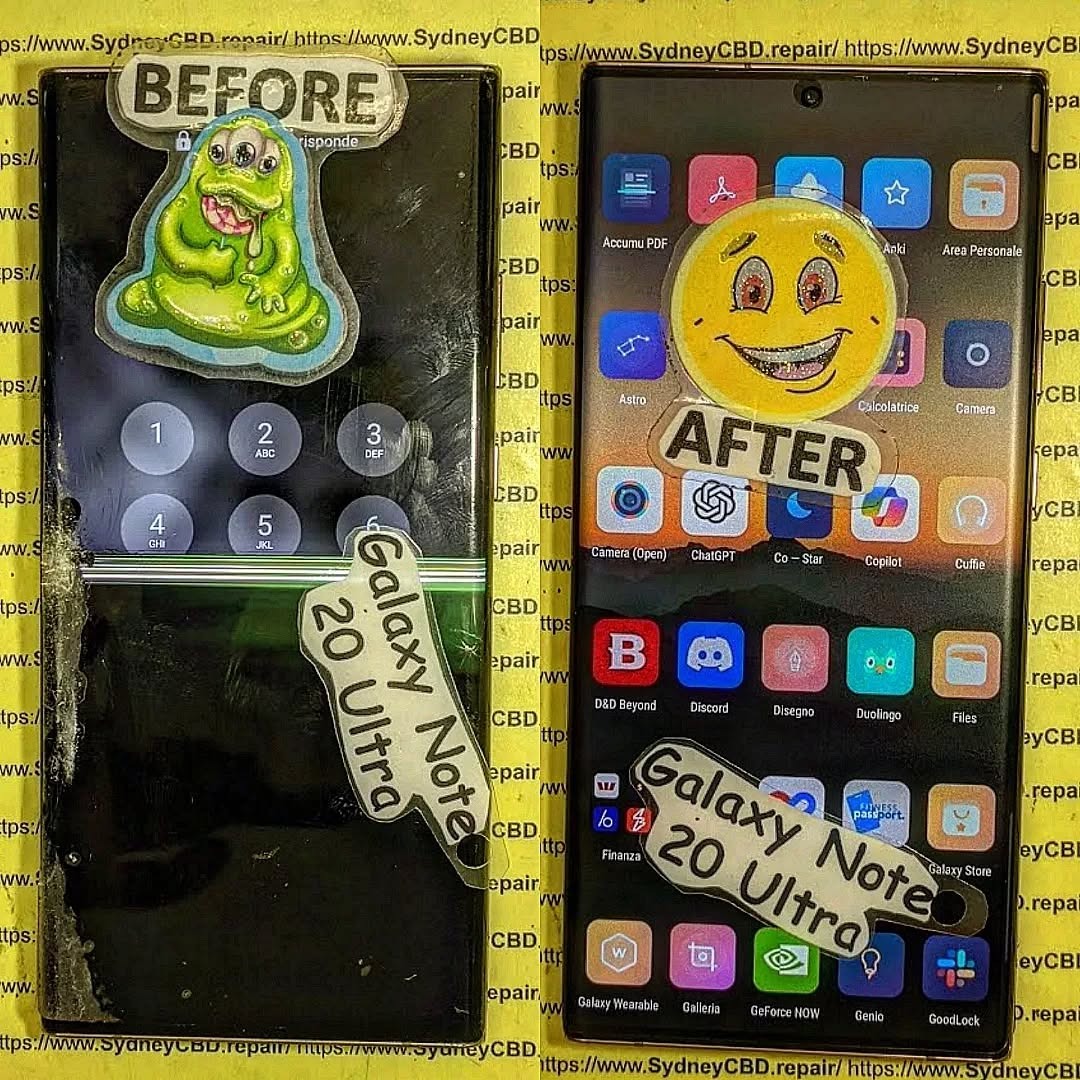
Reviving the Samsung Galaxy Note 20 Ultra: Is Your Older Flagship Worth Repairing? 10 Smart Insights
Introduction
The Samsung Galaxy Note 20 Ultra remains one of the most iconic smartphones of its generation. Launched in 2020, it combined cutting-edge technology, a stunning design, and the productivity-focused S Pen, making it a favorite for professionals, creatives, and tech enthusiasts alike. But as the years go by, even the most robust devices begin to show signs of wear and tear. Cracked screens, battery degradation, and software slowdowns are common issues that many Note 20 Ultra owners face.
So, the big question arises: is it worth repairing an older flagship like the Note 20 Ultra, or should you simply invest in a new device? Repairing your device can save money, extend its lifespan, and even reduce electronic waste, but it requires careful consideration of repair costs, part quality, and the type of issues affecting your phone.
In this guide, we’ll explore everything you need to know about reviving the Note 20 Ultra. From common problems and repair costs to professional repair tips and maintenance advice, this article will help you make an informed decision. Whether you’re contemplating a DIY fix or heading to a certified repair center, we’ll provide insights, tips, and real-world examples to help your device feel almost brand new again.
The Samsung Galaxy Note 20 Ultra remains one of the most revered flagship smartphones of its generation. Released in 2020, this powerhouse combined premium design with top-tier performance. However, as with any older device, time takes its toll. Screens crack, batteries degrade, and software can slow down. If you’re wondering whether reviving the Note 20 Ultra is worth the investment, you’re in the right place. This guide dives deep into repairs, costs, and strategies to get your device running like new again.
The Note 20 Ultra set the bar high in the smartphone market. Featuring a stunning 6.9-inch Dynamic AMOLED 2X display, a powerful Snapdragon 865+ or Exynos 990 processor, and the beloved S Pen functionality, it became a favorite among productivity enthusiasts and tech aficionados alike. Its premium build, featuring Gorilla Glass Victus and a stainless steel frame, promised durability, yet nothing is invincible.
Even years after its launch, the Note 20 Ultra still holds up in terms of performance, camera quality, and display technology. Its combination of features and aesthetic design ensures it remains a device worth considering for repair rather than replacement, especially if you want to extend its life and avoid unnecessary e-waste.
Like all devices, the Note 20 Ultra experiences wear over time. Understanding these issues is key to deciding whether a repair makes sense.
Screen and Display Problems
One of the most frequent problems is a damaged display. The Note 20 Ultra’s AMOLED screen delivers exceptional color and contrast, but it’s susceptible to cracks from drops. Users also report ghost touches or flickering after water exposure. Replacing the display often resolves these issues, restoring both touch responsiveness and vibrant visuals.
Battery and Charging Concerns
Over time, the battery’s maximum capacity naturally declines. This can result in shorter screen-on time and slower charging speeds. Some users encounter fast-charging failures or overheating. Replacing the battery with a genuine Samsung component can bring back original performance levels, sometimes at a fraction of the cost of a new phone.
Water Damage and Internal Corrosion
Despite IP68 water resistance, accidental exposure to water or moisture can occur. Signs include erratic touch input, camera fogging, or device failure. Water damage repair is complex and usually requires professional intervention. Technicians can clean and replace affected internal components to restore functionality.
Repair vs Replacement: Making the Smart Choice
Deciding whether to repair or replace your Note 20 Ultra depends on several factors, including cost, performance, and personal preference.
Financial Considerations
Repairs can range from $150 to $500 depending on the issue. For instance, screen replacement may cost more than battery replacement but is still cheaper than purchasing a new flagship device. Compare the repair cost to current market prices for a refurbished or new equivalent. Often, repair is the economical and sensible route.
Environmental Impact
Repairing your device is an eco-friendly choice. Extending the life of your Note 20 Ultra reduces electronic waste and the carbon footprint associated with manufacturing new devices. For sustainability-conscious users, this factor alone may tip the balance toward repair.
DIY Repairs: What You Can Do at Home
Some minor issues can be handled without professional help, but caution is essential.
Battery Calibration: Reboot and reset battery stats to extend lifespan.
Software Updates: Keep your device updated to prevent slowdowns.
Cleaning: Use isopropyl alcohol and microfiber cloths for ports and surfaces.
DIY repairs can save money, but avoid opening the device for major internal repairs unless you have proper tools and experience.
Professional Repairs: When Expertise Matters
Certain repairs require expertise:
Screen Replacement: AMOLED screens are fragile and expensive.
Water Damage: Internal corrosion requires specialized cleaning.
Motherboard Issues: Only trained technicians should handle.
Certified centers, like Sydney CBD Repair Centre, provide genuine parts, warranties, and professional service. They ensure the device is restored safely, maintaining performance and longevity.
Finding Quality Replacement Parts
Using genuine Samsung components is critical. Aftermarket parts can be cheaper, but they may compromise display quality, touch sensitivity, or battery life. Look for reputable suppliers and certified repair centers to guarantee compatibility and longevity.
Maintaining Your Device After Repair
Once repaired, taking proactive steps prolongs life:
Use a high-quality case and screen protector.
Avoid excessive heat or moisture.
Regularly clear cache and background apps.
Perform battery calibration every few months.
Consistent maintenance ensures that your Note 20 Ultra continues performing optimally.
Software Optimization and Updates
Even with hardware repaired, outdated software can hinder performance. Ensure you:
Install the latest One UI updates.
Remove unused apps and bloatware.
Perform regular system optimization.
Software upkeep complements hardware repairs, making your device feel nearly new.
User Experiences: Stories from the Field
Many users have successfully extended their Note 20 Ultra’s life:
Emma, 32: Replaced battery and screen, regained full-day battery and flawless display.
James, 28: Water damage repair restored camera and touch functionality.
Raj, 40: Opted for professional repair over replacement, saving over $600.
These real-world cases demonstrate the tangible benefits of repair versus replacement.
Frequently Asked Questions
1. How much does a Note 20 Ultra screen replacement cost?
Typically, $300–$500 depending on parts and labor.
2. Can water damage be fully repaired?
Yes, with professional cleaning and component replacement, though success depends on damage severity.
3. Are aftermarket parts safe for repairs?
They can be used, but genuine parts ensure optimal performance and longevity.
4. How long does a battery replacement last?
A new genuine battery usually lasts 18–24 months with proper care.
5. Is repairing environmentally friendly?
Absolutely. It reduces e-waste and energy consumption compared to manufacturing new devices.
6. Can software updates improve an old Note 20 Ultra?
Yes, updates can enhance speed, security, and battery optimization.
Conclusion: Is It Worth It?
Repairing your Note 20 Ultra is often a smart choice. With professional repairs, genuine parts, and regular maintenance, your device can function like new, saving money and supporting sustainability. For owners who value performance and design, revival is not just feasible—it’s rewarding.
David from Sydney CBD Repair Centre – The Best place to fix mobile phones as 7 Years In A Row! Top Mobile Phone Repair In Sydney. More than 2000 Positive Reviews on Google and Same Day Repairs.
We take pride in delivering exceptional repair services for all major phone brands including Apple, Samsung, Google, and more. Our expert technicians use only genuine parts and offer 90days warranty on repairs. Located in the heart of Sydney CBD, we’re your one-stop solution for all mobile device repairs.
Our commitment to excellence has earned us the trust of thousands of satisfied customers. Whether it’s a cracked screen, battery replacement, or water damage repair, we handle it all with professional care and expertise. Walk in today and experience why we’re Sydney’s #1 choice for mobile phone repairs.
Visit us for:
✓ Same Day Express Repairs
✓ Genuine Parts Guarantee
✓ Professional Technicians
✓ Competitive Pricing
✓ 2000+ 5-Star Google Reviews
✓ 7-Time Award Winner for Best Phone Repairs
The Fake Screen Trap: Comparing Sydney CBD Genuine Parts vs Cheap Online Imports – 9 Shocking Truths Every Phone Owner Must Know
Introduction
Replacing a damaged smartphone screen might seem straightforward, but choosing the wrong replacement can cost far more than the initial savings. This guide explains the differences between genuine replacement parts and inexpensive imported alternatives, helping you make an informed decision before your next repair.
A cracked smartphone screen is one of the most common accidents affecting modern devices. Whether you own an iPhone, Samsung Galaxy, Google Pixel, or another flagship phone, replacing a damaged display quickly becomes a priority.
Unfortunately, many consumers unknowingly fall into what repair professionals call the fake screen trap.
Online marketplaces are flooded with replacement screens advertised as “OEM Quality,” “Original Grade,” “Premium LCD,” or even “Factory Genuine.” While these descriptions sound reassuring, many are misleading. The result is a repair that may initially appear acceptable but develops problems weeks or months later.
This is where understanding Sydney CBD genuine parts vs cheap online imports becomes essential.
Professional repair centres invest in high-quality components because they understand that a smartphone display is far more than a piece of glass. It is one of the most sophisticated parts of the device, integrating:
High-resolution OLED or LCD technology
Precision touch sensors
Ambient light sensors
Under-display fingerprint technology
Display drivers
Colour calibration
Protective coatings
Power management circuitry
Replacing this advanced technology with an inferior copy can dramatically reduce your phone’s overall performance.
Throughout this guide, we’ll compare genuine replacement parts with inexpensive imported alternatives and explain why the cheapest repair often becomes the most expensive one.
Cheap replacement screens dominate online marketplaces for one simple reason—they’re profitable.
Manufacturers can produce copy displays at a fraction of the cost of genuine service parts by reducing production expenses through:
Lower-quality OLED materials
Cheaper LCD panels
Basic touch controllers
Inferior glass
Reduced quality control
Simplified colour calibration
Lower manufacturing tolerances
These savings allow online sellers to advertise replacement screens for prices that seem almost unbelievable.
For example, you may find two replacement displays for the same phone model:
Screen Type
Average Market Price
Genuine Service Pack
Premium pricing
OEM Refurbished Original
Mid-range
High-Quality OLED Copy
Lower
Incell LCD
Budget
TFT LCD Copy
Cheapest
At first glance, paying significantly less appears to be a smart financial decision.
However, price alone tells only part of the story.
Professional repair technicians regularly encounter customers who initially chose the cheapest repair available, only to return weeks later because the replacement screen developed faults such as:
Flickering displays
Ghost touch
Dead pixels
Touch delay
Green lines
Screen lifting
Excessive battery drain
Fingerprint reader failures
Many of these issues stem directly from the lower-quality components used in budget replacement screens.
Many consumers assume every repair shop uses the same replacement parts. In reality, there are significant differences between genuine service parts and aftermarket copies.
A genuine display is manufactured to meet the original device specifications. These screens are engineered to provide:
Accurate colour reproduction
Proper brightness levels
Reliable touch responsiveness
Long-lasting durability
Full compatibility with device software
Consistent performance
Factory-level fit and finish
Professional repair centres that prioritise quality understand that the display is one of the most critical components of a smartphone.
A premium replacement restores the phone to near-original performance rather than simply making it usable again.
OEM vs Genuine Service Pack
This topic often causes confusion.
Some sellers advertise “OEM” screens even though the components were never supplied through official service channels.
Here’s a simplified comparison:
Feature
Genuine Service Pack
OEM Claim
Cheap Copy
Factory calibration
✔
Sometimes
Rarely
Original brightness
✔
Usually
No
Accurate colours
✔
Usually
Often poor
Premium glass
✔
Sometimes
No
Reliable touch
✔
Usually
Variable
Software compatibility
Excellent
Good
Inconsistent
Understanding these differences helps consumers avoid misleading advertising.
Not every screen described as “OEM” delivers genuine flagship performance.
Refurbished Original Displays
Another option sometimes available is a refurbished original display.
This involves taking an authentic factory display with damaged outer glass, replacing only the glass while preserving the original OLED panel.
When completed by experienced specialists using professional equipment, refurbished originals can deliver excellent results because the most important display components remain genuine.
However, refurbishment quality varies considerably. Poor workmanship can introduce dust, bubbles, uneven lamination, or reduced durability.
For this reason, choosing an experienced repair provider remains just as important as selecting the right replacement part.
How Cheap Online Screens Are Manufactured
Most inexpensive replacement screens are designed with one primary objective: reducing manufacturing costs.
Every component is evaluated for potential savings, including:
Display substrate
Driver IC
Adhesive quality
Glass hardness
Polarising layers
Digitiser assembly
Connector quality
Protective coatings
Individually, these compromises may appear minor.
Collectively, they significantly affect the user experience.
For example, lower-quality OLED materials often produce:
These issues may not appear immediately after installation but become increasingly noticeable with everyday use.
As smartphone technology continues to evolve, the tolerance for manufacturing inaccuracies becomes even smaller. Modern flagship devices rely on tightly integrated hardware and software, meaning even slight deviations from original specifications can affect performance.
Part 2
Display quality, touch performance, durability, hidden costs, and warranty differences
In this section:
Display quality comparison
Touch sensitivity
Fingerprint compatibility
Durability testing
Hidden costs
Warranty differences
Continuing the article:
Display Quality Comparison
One of the biggest differences between Sydney CBD genuine parts vs cheap online imports becomes obvious the moment the screen turns on.
Many budget replacement displays look acceptable indoors under normal lighting. However, once compared side-by-side with a genuine display, the differences become difficult to ignore.
Brightness and Outdoor Visibility
Modern flagship phones are designed to remain readable in bright sunlight. Genuine OLED panels can achieve very high peak brightness levels, allowing users to comfortably read messages, navigate maps, and view photos outdoors.
Cheap copy displays often struggle in the same conditions.
Common complaints include:
Dim outdoor visibility
Grey-looking blacks
Washed-out colours
Uneven brightness across the screen
Poor HDR performance
Colour Accuracy
Professional photographers, designers, and content creators particularly notice colour inaccuracies.
Genuine displays are factory-calibrated to reproduce colours accurately. In contrast, many inexpensive imports display:
Over-saturated reds
Green-tinted whites
Blue-shifted greys
Inconsistent colour temperature
Reduced contrast
Resolution and Sharpness
Some budget screens advertise the same resolution as the original display, yet text and images still appear softer.
This happens because panel quality, sub-pixel arrangement, and manufacturing precision affect perceived sharpness.
Quick Comparison
Feature
Genuine Display
Cheap Import
Outdoor brightness
Excellent
Often poor
Colour accuracy
Factory calibrated
Variable
Black levels
Deep OLED blacks
Greyish blacks
Sharpness
Crisp
Sometimes soft
HDR quality
Excellent
Limited
Touch Sensitivity: The Difference You Feel Every Day
Display quality matters, but touch performance affects every interaction with your phone.
Professional repair technicians frequently test replacement screens by typing quickly, scrolling rapidly, and performing multi-touch gestures.
Genuine displays typically provide:
Instant touch response
Accurate typing
Smooth scrolling
Reliable gaming performance
Consistent edge sensitivity
Cheap imports often show:
Delayed response
Missed touches
Accidental touches
Keyboard errors
Inconsistent sensitivity near the edges
Why Gamers Notice the Difference
Mobile gamers are usually the first to complain about low-quality replacement screens.
Fast-paced games require precise input timing. Even small touch delays can affect performance, making genuine displays the preferred choice for heavy users.
Fingerprint Sensor Compatibility
Many modern smartphones use under-display fingerprint sensors.
These systems rely on precise optical or ultrasonic technology working through the display itself.
With genuine parts, fingerprint recognition is usually:
Fast
Accurate
Consistent
Reliable in different lighting conditions
With cheap imports, users may experience:
Frequent fingerprint failures
Repeated enrolment attempts
Slow unlocking
Complete sensor incompatibility
Important
For devices such as Samsung Galaxy and Google Pixel models, display quality can directly affect fingerprint sensor performance.
Durability Comparison: Which Screen Lasts Longer?
A replacement screen isn’t truly affordable if it fails after a few months.
Professional repair centres often see significant lifespan differences between genuine and budget displays.
Genuine Displays
Stronger glass
Better adhesive bonding
Higher-quality OLED materials
Improved heat management
Lower failure rates
Cheap Imports
More prone to cracking
Screen lifting issues
Premature OLED failure
Green lines appearing over time
Touch layer degradation
Real-World Failure Rates
While exact numbers vary by manufacturer, repair technicians consistently report that low-cost copy screens return for warranty claims far more frequently than genuine replacements.
The Hidden Costs of Cheap Screens
Many consumers focus only on the initial repair price.
However, the true cost of a cheap screen often includes:
Hidden Cost
Impact
Second repair
Paying twice
Lost productivity
Phone unavailable again
Poor resale value
Lower device value
Battery drain
More charging required
Fingerprint issues
Daily frustration
Display failure
Potential data access problems
When Cheap Becomes Expensive
Imagine paying for a budget screen replacement, then needing another replacement six months later.
The total cost can easily exceed what a genuine repair would have cost initially.
Repair Warranty Differences
Warranty terms often reveal how much confidence a repair provider has in its parts.
Professional Genuine-Part Repairs
Longer warranty periods
Better failure coverage
More consistent support
Lower claim rates
Cheap Import Repairs
Shorter warranties
More exclusions
Higher dispute rates
Greater risk of repeat repairs
A Useful Rule
If a repair shop is willing to stand behind a genuine display with a strong warranty, that’s often a good sign the parts are built to last.
How Professionals Identify Fake Smartphone Screens
Not all replacement smartphone screens are created equal. While many aftermarket displays look convincing at first glance, experienced repair technicians can often identify a fake or low-quality screen within minutes. By combining visual inspection, diagnostic tools, and hands-on testing, professionals can determine whether a display is genuine, refurbished, or an aftermarket copy.
Here are the most common methods used by professional repair technicians.
1. Check the Display Brightness
One of the easiest ways to identify a fake screen is by comparing its brightness with a genuine display.
Original OLED and high-quality LCD panels are designed to produce excellent brightness levels, even in direct sunlight. Cheap aftermarket screens often appear noticeably dimmer and struggle with outdoor visibility.
Professionals typically test the screen by:
Setting brightness to maximum
Viewing the display under strong lighting
Comparing it with a known genuine device
A screen that looks dull or washed out may indicate a lower-quality replacement.
2. Examine Colour Accuracy
Colour reproduction is another important indicator.
Genuine displays are factory-calibrated to provide accurate colours and consistent white balance. In contrast, fake screens may show:
Yellow or blue-tinted whites
Oversaturated colours
Poor contrast
Grey-looking blacks instead of true black on OLED panels
Technicians often display colour test images to identify inconsistencies.
3. Test Touch Responsiveness
The digitiser is responsible for registering touch input. Low-quality replacement screens frequently use inferior touch controllers, resulting in inconsistent performance.
Professional technicians test for:
Missed touches
Delayed response
Ghost touches
Multi-touch accuracy
Edge sensitivity
Smooth scrolling
Typing quickly on the keyboard and performing rapid swipe gestures can quickly reveal touch-related issues.
4. Inspect the Glass Quality
The quality of the front glass can reveal a great deal about a screen’s origin.
Professionals look for:
Uneven thickness
Poor oleophobic coating
Surface imperfections
Visible distortions
Weak edge finishing
Genuine replacement screens generally have a smoother finish and better resistance to fingerprints and minor scratches.
5. Verify Display Resolution
Some aftermarket screens advertise the same resolution as the original but fail to deliver the same level of detail.
Technicians inspect:
Small text
Fine icons
High-resolution photographs
Sharpness of interface elements
A genuine display produces crisp, clear images without noticeable pixelation or softness.
6. Check Under-Display Fingerprint Performance
Many modern smartphones use optical or ultrasonic fingerprint sensors integrated beneath the display.
A fake or incompatible screen may cause:
Slow fingerprint recognition
Frequent authentication failures
Difficulty registering fingerprints
Complete sensor malfunction
Professional repair shops always test fingerprint functionality after completing a screen replacement.
7. Inspect Flex Cables and Connectors
Experienced technicians often identify fake screens before installation simply by examining the internal components.
They check:
Flex cable quality
Connector alignment
Printed serial numbers
Manufacturing labels
Solder quality
Overall construction
Genuine service parts generally have cleaner manufacturing and more consistent markings than low-cost copies.
8. Use Professional Diagnostic Software
Many repair centres use specialised diagnostic tools to test the display after installation.
These tests can evaluate:
Touch accuracy
Dead pixels
Brightness uniformity
Colour consistency
Sensor operation
Display communication with the motherboard
Diagnostic software helps confirm that the replacement screen performs as expected.
9. Assess Fit and Finish
A genuine screen should fit the device precisely.
Warning signs of an aftermarket screen include:
Uneven gaps around the frame
Poor adhesive alignment
Raised edges
Light leakage
Loose installation
A properly fitted display should sit flush with the phone’s frame and maintain the original appearance.
10. Evaluate Long-Term Performance
Some issues only become apparent after days or weeks of use. Professional repair centres understand the common warning signs of inferior screens, including:
Green lines developing over time
Flickering displays
Random touch inputs
Premature OLED burn-in
Screen lifting due to poor adhesive
Excessive battery consumption
These recurring problems are far less common with genuine, high-quality replacement parts.
Signs Your Smartphone May Have a Fake Screen
If you’ve recently had your phone repaired, watch for these warning signs:
The display appears dim even at full brightness.
Colours look unnatural or inconsistent.
Touch input is delayed or inaccurate.
The fingerprint sensor works inconsistently.
Battery life has noticeably decreased.
The screen flickers or develops lines.
The display lifts away from the frame.
The glass scratches more easily than expected.
Why Professional Inspection Matters
Although some aftermarket screens can appear similar to genuine parts, the differences often become evident through careful testing and daily use. Experienced technicians have the tools, knowledge, and experience to identify low-quality components before they cause further problems.
Choosing a reputable repair centre that uses high-quality replacement parts can help preserve your smartphone’s display quality, touch performance, durability, and resale value—ultimately saving you money and frustration over the long term.
How to Choose a Trustworthy Repair Centre
Selecting the right repair centre is just as important as choosing the right replacement part. A high-quality screen installed by an inexperienced technician can still lead to poor performance, while a genuine replacement fitted by a skilled professional can restore your smartphone to near-original condition.
With so many repair shops advertising “premium” or “OEM-quality” repairs, knowing what to look for can help you avoid costly mistakes. Here are the key factors to consider when choosing a trustworthy repair centre.
1. Look for Experienced Technicians
Experience matters when repairing modern smartphones. Today’s devices feature advanced technologies such as OLED displays, under-display fingerprint sensors, Face ID systems, and water-resistant seals that require specialist knowledge.
A reputable repair centre should employ technicians who:
Have extensive experience with multiple smartphone brands
Stay up to date with the latest repair techniques
Use professional repair equipment
Follow manufacturer-recommended procedures where applicable
Perform thorough testing before returning the device
Experienced technicians are also better equipped to identify hidden issues that may not be immediately visible after accidental damage.
2. Ask About the Quality of Replacement Parts
Not all replacement parts are the same. Before approving a repair, ask exactly what type of screen will be installed.
A trustworthy repair centre should clearly explain whether they use:
Genuine service pack parts
Original refurbished displays
Premium aftermarket OLED panels
Budget aftermarket LCD replacements
They should also be transparent about the advantages, limitations, and pricing of each option rather than simply offering the cheapest available screen.
3. Choose a Repair Centre That Offers a Warranty
A comprehensive warranty demonstrates confidence in both the parts used and the workmanship provided.
Before proceeding, ask:
How long is the warranty?
What does it cover?
Are replacement parts included?
Is labour covered?
Are there any exclusions?
A reputable repair centre will explain its warranty policy clearly and provide documentation for your records.
4. Read Customer Reviews
Online reviews can provide valuable insight into the quality of a repair business.
Look for consistent feedback regarding:
Repair quality
Customer service
Honest pricing
Turnaround times
Warranty support
Professional communication
Pay attention to how the business responds to customer concerns, as this often reflects its commitment to service after the repair is completed.
5. Ask About Diagnostic Testing
Professional repair centres don’t simply replace a damaged screen and hand the phone back.
Comprehensive testing should include:
Display quality
Touch responsiveness
Front and rear cameras
Speakers and microphones
Charging functionality
Face recognition or fingerprint sensor performance
Proximity and ambient light sensors
Wireless connectivity
Thorough testing helps ensure every feature operates correctly before the device is returned.
6. Check the Repair Environment
A clean, organised workshop is often a good sign of professional standards.
Quality repair centres typically invest in:
Anti-static workstations
Precision repair tools
Microscope inspection equipment
Dust-controlled environments
Professional adhesive systems
Proper equipment reduces the risk of accidental damage during the repair process and contributes to a higher-quality result.
7. Avoid Unrealistically Cheap Prices
While everyone appreciates a good deal, prices that seem too good to be true often are.
Extremely low repair prices may indicate:
Inferior replacement parts
Limited quality control
Minimal testing
Inexperienced technicians
Short or limited warranties
Rather than focusing solely on price, consider the overall value, including part quality, workmanship, warranty, and long-term reliability.
8. Look for Transparency
A trustworthy repair centre should be willing to answer your questions honestly and explain the repair process in plain language.
They should clearly communicate:
The type of replacement part being used
Expected repair time
Total repair cost
Warranty coverage
Any potential risks or limitations
Transparency builds confidence and helps customers make informed decisions.
Many professional repair centres offer same-day repairs for common smartphone models. However, speed should never come at the expense of quality.
A reliable repair provider will take the time to:
Carefully disassemble the device
Install the replacement screen correctly
Replace adhesives where necessary
Test all phone functions
Perform a final quality inspection
A repair completed properly the first time is far preferable to needing a second repair due to rushed workmanship.
10. Choose a Repair Centre with a Strong Reputation
Longevity and community trust are strong indicators of quality. Businesses that have served customers for many years and built a solid reputation are more likely to stand behind their work.
Signs of a reputable repair centre include:
Years of industry experience
Thousands of positive customer reviews
Transparent pricing
High-quality replacement parts
Skilled technicians
Reliable warranty support
Professional customer service
These factors provide peace of mind that your smartphone is in capable hands.
Frequently Asked Questions (FAQs)
1. How can I tell if my phone has a genuine replacement screen?
A genuine replacement screen typically offers excellent brightness, accurate colours, smooth touch responsiveness, and a perfect fit within the phone’s frame. If your display appears unusually dim, has poor colour reproduction, or experiences touch issues after a repair, it may be an aftermarket replacement. The best way to confirm is to ask your repair provider what type of screen was installed and whether it comes with a warranty.
2. Are cheap aftermarket screens always bad?
Not necessarily. Aftermarket screens vary significantly in quality. Some premium aftermarket OLED panels can provide satisfactory performance for everyday use. However, very low-cost screens often compromise on brightness, durability, touch sensitivity, and colour accuracy. Understanding the quality level of the replacement part is more important than simply choosing the lowest price.
3. Why is a genuine screen replacement more expensive?
Genuine replacement screens are manufactured to meet the original specifications of the device. They undergo strict quality control, use premium materials, and are designed to provide factory-level performance. While the initial repair cost is higher, genuine parts generally offer better durability, fewer performance issues, and a longer lifespan, making them a worthwhile investment for many users.
4. Will replacing my screen affect Face ID or the fingerprint sensor?
It depends on the phone model and the quality of the repair. On many modern smartphones, features such as Face ID and under-display fingerprint sensors require precise installation and compatible replacement parts. An experienced technician using high-quality components should test these functions after the repair to ensure they continue working correctly.
5. How long should a quality screen replacement last?
A professionally installed, high-quality replacement screen should last for years under normal use. Its lifespan will depend on factors such as accidental drops, exposure to moisture, and everyday wear and tear. Choosing durable replacement parts and using a quality screen protector and protective case can help maximise the life of your repaired device.
6. Does using a cheap replacement screen affect battery life?
It can. Lower-quality displays may consume more power due to inefficient display components or poor calibration. This can result in faster battery drain compared to a genuine or premium-quality replacement screen. If you notice a significant reduction in battery life after a screen repair, the replacement display could be one of the contributing factors.
7. Is it worth repairing an older smartphone with a genuine screen?
In many cases, yes. If your smartphone still performs well and meets your daily needs, investing in a genuine or high-quality replacement screen can extend its useful life by several years. Compare the repair cost with the price of replacing the entire device to determine the best value for your situation.
8. What questions should I ask before approving a screen repair?
Before proceeding, ask the repair centre:
What type of replacement screen will be installed?
Is it genuine, refurbished original, or aftermarket?
How long is the warranty?
Will all phone functions be tested after the repair?
How long will the repair take?
Are there any additional repair costs if hidden damage is discovered?
A trustworthy repair provider will answer these questions clearly and transparently.
9. Can a fake screen damage my phone?
While a fake screen may not immediately damage your device, poor-quality components can cause ongoing problems such as excessive battery drain, unreliable touch performance, overheating, display flickering, or fingerprint sensor failures. Inferior installation or low-quality adhesives may also increase the risk of future repairs.
10. Why should I choose a professional repair centre instead of buying a screen online?
A professional repair centre provides far more than just a replacement part. Experienced technicians use specialised tools, perform comprehensive diagnostic testing, ensure proper installation, and back their workmanship with a warranty. Purchasing a screen online may seem cheaper initially, but incorrect installation or low-quality parts can lead to additional costs, reduced performance, and repeat repairs. Choosing a reputable repair centre offers greater peace of mind and helps ensure your smartphone performs as intended after the repair.
Conclusion
Your smartphone is one of your most valuable everyday devices, and choosing the right repair centre can significantly affect its performance, lifespan, and resale value.
Instead of selecting a repair shop based solely on the lowest advertised price, look for a provider that prioritises quality parts, experienced technicians, transparent communication, comprehensive testing, and dependable warranty support.
A professionally repaired device not only looks better but also performs more reliably, helping you avoid repeat repairs and unexpected costs. Investing in quality from the outset is often the most cost-effective decision in the long run.
David from Sydney CBD Repair Centre – The Best place to fix mobile phones as 7 Years In A Row! Top Mobile Phone Repair In Sydney. More than 2000 Positive Reviews on Google and Same Day Repairs.
📍 Visit us today for:
✓ Same Day Express Repairs
✓ Genuine Parts Guarantee
✓ Professional Technicians
✓ Competitive Pricing
✓ 2000+ 5-Star Google Reviews
✓ 7-Time Award Winner for Best Phone Repairs
Beyond the Screen: Replacing Shattered iPhone 15 Pro Back Glass Without Laser Tools – 15 Proven Steps for a Remarkable Repair
Introduction to iPhone 15 Pro Back Glass Replacement
The iPhone 15 Pro back glass replacement process has become a popular topic among smartphone repair enthusiasts and professional technicians alike. While many repair shops use expensive laser machines to remove damaged glass, it’s entirely possible to perform an iPhone 15 Pro back glass replacement without laser tools when the proper methods and precautions are followed.
A shattered rear glass panel isn’t just a cosmetic issue. Cracks can expose internal components to moisture, dust, and debris. Over time, these contaminants may affect charging coils, wireless charging performance, and overall device reliability.
Fortunately, advancements in repair techniques have made iPhone 15 Pro back glass replacement more accessible than ever. With patience, precision, and the right equipment, technicians can restore a device’s appearance and functionality without relying on costly laser technology.
In this guide, we’ll explore the complete process, discuss the tools required, examine common challenges, and provide expert insights gathered from years of professional repair experience.
Apple’s decision to use glass on premium devices serves several important purposes:
Enables wireless charging
Supports MagSafe accessories
Enhances premium aesthetics
Improves signal transmission
Provides a high-end feel
The rear panel of the iPhone 15 Pro integrates seamlessly with the titanium frame, creating a sophisticated and durable design. However, despite its strength, glass remains vulnerable to impact damage.
Common Causes of Back Glass Damage
Most cases requiring iPhone 15 Pro back glass replacement result from:
Cause
Impact Level
Accidental drops
High
Pressure damage
Medium
Vehicle accidents
High
Improper storage
Medium
Repeated stress
Low
Even protective cases can’t guarantee complete protection. One unfortunate drop onto concrete can leave the rear glass severely shattered.
Laser machines are designed to burn away adhesive underneath damaged glass. While effective, they can cost thousands of dollars and require specialized training.
Traditional manual repair methods rely on:
Controlled heat
Precision scraping
Adhesive softening
Mechanical separation
Many independent repair professionals continue to perform iPhone 15 Pro back glass replacement successfully using manual techniques.
Advantages of Manual Techniques
Repairing without a laser offers several benefits:
Lower equipment costs
Greater accessibility
Portable repair capability
Easier entry for repair businesses
Reduced upfront investment
For smaller repair centers, manual methods remain a practical and profitable solution.
Essential Tools for the Job
Safety Equipment Checklist
Safety should always come first.
Recommended protective equipment includes:
Safety glasses
Cut-resistant gloves
Respirator mask
Anti-static wrist strap
Heat-resistant mat
Broken glass fragments can become airborne during removal, making protective gear essential.
Specialized Repair Tools
For effective iPhone 15 Pro back glass replacement, technicians commonly use:
Tool
Purpose
Heat gun
Softening adhesive
Precision tweezers
Removing fragments
Plastic pry tools
Safe separation
Metal scraper
Adhesive removal
Isopropyl alcohol
Cleaning surfaces
Suction cup
Controlled lifting
Adhesive strips
Reinstallation
UV adhesive
Securing replacement glass
Having quality tools significantly improves repair outcomes.
Preparing the Device Before Repair
Data Protection and Backup
Before beginning any iPhone 15 Pro back glass replacement, ensure all important data is backed up.
Recommended backup methods include:
iCloud backup
Computer backup
External storage solutions
Although rear glass repairs generally don’t affect stored data, preparation reduces risk.
Workspace Preparation
An organized workspace contributes greatly to repair success.
Key preparation steps include:
Adequate lighting
Dust-free environment
Magnetic screw mat
Proper ventilation
Stable work surface
Professional technicians understand that preparation often determines repair quality.
Step-by-Step iPhone 15 Pro Back Glass Replacement Process
Device Disassembly
The first stage involves opening the device safely.
Key actions include:
Power off the phone.
Remove external screws.
Carefully separate the display.
Disconnect the battery.
Access internal components.
Disconnecting power minimizes accidental short circuits.
Removing the Damaged Glass
This stage requires patience.
Technicians typically:
Apply controlled heat
Soften adhesive gradually
Remove loose fragments
Lift remaining sections carefully
Avoid damaging internal modules
One of the most important aspects of iPhone 15 Pro back glass replacement is maintaining precise temperature control. Excessive heat can damage nearby components.
Cleaning Adhesive Residue
After glass removal, significant adhesive residue remains.
The cleaning process usually involves:
Plastic scraping
Solvent application
Precision cleaning
Surface inspection
A clean frame ensures proper bonding of the replacement glass.
Installing New Back Glass
Installation requires accuracy and attention to detail.
Steps include:
Applying fresh adhesive.
Aligning replacement glass.
Applying uniform pressure.
Allowing curing time.
Reassembling the device.
Proper alignment is crucial for maintaining water resistance and aesthetics.
Common Challenges During Repair
Adhesive Removal Issues
Adhesive can be surprisingly stubborn.
Common problems include:
Uneven residue
Hardened adhesive
Frame contamination
Surface scratches
Professional technicians often spend more time cleaning adhesive than removing glass itself.
Component Protection
Nearby components require constant attention:
Wireless charging coil
MagSafe assembly
Battery
Cameras
Flex cables
Damage to these components can significantly increase repair costs.
Risks of DIY Repairs
Although DIY repairs can be rewarding, several risks exist.
Potential Problems
Damage to Internal Components
Without experience, users may accidentally damage:
Charging coils
Camera systems
Internal cables
Battery assemblies
Reduced Water Resistance
The factory seal is difficult to replicate perfectly.
Even after successful iPhone 15 Pro back glass replacement, original water resistance ratings may not be fully restored.
Personal Injury
Broken glass presents risks such as:
Cuts
Eye injuries
Burns
Chemical exposure
Proper safety practices are essential.
When DIY Makes Sense
DIY repair may be suitable if:
You have repair experience.
You possess proper tools.
Device value is lower.
Professional repair costs exceed budget.
Otherwise, professional service may be the safer option.
Benefits of Professional Repair Services
Professional repair providers offer several advantages.
Expertise
Experienced technicians understand:
Adhesive behavior
Heat management
Component protection
Reassembly procedures
Specialized Equipment
Repair centers often use:
Professional heating systems
Microscopes
Precision alignment tools
Advanced diagnostics
Warranty Coverage
Many professional repairs include warranties that provide peace of mind and long-term protection.
Faster Turnaround
Experienced technicians can often complete iPhone 15 Pro back glass replacement within a few hours rather than an entire day.
Cost Comparison and Value Analysis
Understanding repair costs helps consumers make informed decisions.
Repair Option
Estimated Cost Range
DIY Repair
Low to Medium
Independent Repair Shop
Medium
Manufacturer Repair
Medium to High
Factors Affecting Cost
Several variables influence pricing:
Glass quality
Labor complexity
Regional market rates
Additional damage
Warranty coverage
Choosing the cheapest option isn’t always the best value. Quality workmanship often saves money over time.
Maintenance Tips After Replacement
Following repair, proper care can extend the life of the new glass.
Use a Protective Case
A quality case absorbs impact energy and reduces future damage risk.
Install Protective Accessories
Consider:
Camera lens protectors
Shock-resistant cases
Corner reinforcement accessories
Avoid Extreme Temperatures
Excessive heat and cold may weaken adhesive over time.
Handle With Care
Simple habits can significantly reduce future repair needs:
Avoid placing phones on hard edges.
Keep devices away from crowded pockets.
Use both hands when possible.
Proper maintenance protects your investment.
Frequently Asked Questions
1. Can iPhone 15 Pro back glass replacement be done without a laser machine?
Yes. Skilled technicians commonly perform iPhone 15 Pro back glass replacement using controlled heat, manual tools, and specialized adhesives.
2. How long does the repair take?
Most professional repairs take between one and three hours depending on damage severity and technician experience.
3. Will wireless charging still work after replacement?
Yes. When performed correctly, wireless charging and MagSafe functionality should operate normally.
4. Is the repair waterproof afterward?
While technicians can restore sealing, factory-level water resistance cannot always be guaranteed.
5. Is replacing the back glass cheaper than replacing the entire housing?
In most cases, yes. Replacing only the damaged rear glass is generally more cost-effective.
6. What is the biggest challenge during the repair?
Removing adhesive residue safely without damaging surrounding components is often the most time-consuming part.
7. Can shattered back glass affect phone performance?
Indirectly, yes. Cracks may allow dust and moisture ingress, potentially affecting internal components.
8. Should I repair cracked back glass immediately?
Prompt repair is recommended to prevent further damage and maintain device integrity.
Conclusion
The process of iPhone 15 Pro back glass replacement without laser tools demonstrates that professional results are achievable using traditional repair methods. While laser systems offer convenience, they aren’t the only path to a successful repair. Careful preparation, proper tools, controlled heating, and meticulous cleaning remain the foundations of quality workmanship.
Whether you’re an aspiring technician or a device owner exploring repair options, understanding the repair process helps you make informed decisions. A properly executed iPhone 15 Pro back glass replacement restores both the appearance and functionality of the device while extending its usable lifespan.
As repair techniques continue to evolve, manual glass replacement remains a valuable skill that combines technical expertise, patience, and precision. When done correctly, the results can be every bit as impressive as those achieved using far more expensive equipment.
External Resource: For official device information and support, visit Apple Support
David from Sydney CBD Repair Centre – The Best place to fix mobile phones as 7 Years In A Row! Top Mobile Phone Repair In Sydney. More than 2000 Positive Reviews on Google and Same Day Repairs.
We take pride in delivering exceptional repair services for all major phone brands including Apple, Samsung, Google, and more. Our expert technicians use only genuine parts and offer 90days warranty on repairs. Located in the heart of Sydney CBD, we’re your one-stop solution for all mobile device repairs.
Our commitment to excellence has earned us the trust of thousands of satisfied customers. Whether it’s a cracked screen, battery replacement, or water damage repair, we handle it all with professional care and expertise. Walk in today and experience why we’re Sydney’s #1 choice for mobile phone repairs.
Visit us for:
✓ Same Day Express Repairs
✓ Genuine Parts Guarantee
✓ Professional Technicians
✓ Competitive Pricing
✓ 2000+ 5-Star Google Reviews
✓ 7-Time Award Winner for Best Phone Repairs
Sydney CBD Repair Centre – Where Quality Meets Reliability.
Call : +61280114119
Website: Sydney CBD Repair Centre
Titanium Frame iPhone 15 Pro Back Glass Restoration After Severe Impact Damage: 7 Powerful Steps for a Stunning Recovery
Introduction to iPhone 15 Pro Back Glass Damage
The Titanium Frame iPhone 15 Pro Back Glass Restoration After Severe Impact Damage process has become increasingly important as more users rely on their smartphones for work, communication, entertainment, and photography. While the iPhone 15 Pro introduces a highly durable titanium frame, the back glass remains susceptible to cracking, shattering, and structural damage after significant impacts.
A damaged back glass isn’t just a cosmetic concern. It can affect wireless charging, compromise internal protection, reduce resale value, and expose sensitive components to dust and moisture. Fortunately, modern restoration techniques allow technicians to restore even severely damaged devices to near-original condition.
In this guide, we’ll explore everything you need to know about Titanium Frame iPhone 15 Pro Back Glass Restoration After Severe Impact Damage, including causes, repair methods, prevention tips, and expert recommendations.
The iPhone 15 Pro combines premium engineering with cutting-edge materials. However, despite its durable construction, back glass remains one of the most commonly damaged components.
When a severe impact occurs, the force is often transferred through the device, causing the glass panel to crack or shatter. Even when the titanium frame survives relatively unscathed, the rear glass may absorb enough energy to fracture.
Some common symptoms include:
Spider-web cracks
Missing glass fragments
Sharp edges
Wireless charging issues
Dust intrusion
Cosmetic degradation
Prompt restoration helps prevent additional damage and preserves the device’s functionality.
Titanium offers several advantages over traditional aluminum and stainless steel frames.
Material
Strength
Weight
Corrosion Resistance
Aluminum
Moderate
Light
Good
Stainless Steel
High
Heavy
Excellent
Titanium
Very High
Light
Excellent
The titanium frame in the iPhone 15 Pro provides exceptional structural integrity while reducing overall device weight.
Benefits include:
Improved impact resistance
Reduced flexing
Enhanced durability
Better handling comfort
These characteristics help protect internal components during accidental drops.
Common Misconceptions About Titanium Frames
Many users mistakenly believe titanium makes smartphones indestructible.
The reality is different.
While titanium significantly improves frame durability, the back glass remains vulnerable to:
Point impacts
Sharp object strikes
High-force drops
Vehicle accidents
Compression damage
Therefore, Titanium Frame iPhone 15 Pro Back Glass Restoration After Severe Impact Damage remains a necessary service despite the stronger frame design.
Addressing damage early often prevents secondary failures.
When performed correctly, Titanium Frame iPhone 15 Pro Back Glass Restoration After Severe Impact Damage can significantly extend device lifespan.
Risks of DIY Back Glass Repairs
Many online tutorials make repairs appear easy.
Unfortunately, DIY attempts often create additional problems.
Common risks include:
Battery punctures
Camera damage
Adhesive contamination
Misalignment
Frame scratches
Wireless charging failures
Without professional equipment, achieving factory-quality results becomes extremely difficult.
Hidden Costs of DIY Repairs
Users frequently underestimate:
Tool expenses
Replacement part quality
Time investment
Risk of further damage
Professional service often proves more economical in the long run.
Cost Factors Influencing Repairs
Several variables affect restoration pricing.
Damage Severity
More extensive damage requires additional labor.
Frame Condition
Bent or distorted frames increase repair complexity.
Component Damage
Additional repairs may involve:
Cameras
Charging coils
Batteries
Internal brackets
Replacement Part Quality
Premium parts generally offer:
Better fit
Improved durability
Enhanced appearance
Obtaining an accurate diagnosis ensures realistic repair expectations.
Maintaining Your Restored iPhone 15 Pro
After restoration, proper care helps maximize longevity.
Recommended practices include:
Use a Protective Case
A high-quality case absorbs impact energy.
Install a Rear Protection Film
Additional protection minimizes future scratches.
Avoid Extreme Temperatures
Temperature fluctuations may weaken adhesives over time.
Regular Cleaning
Keeping the device clean helps maintain its appearance and functionality.
Handle With Care
Although durable, no smartphone is immune to damage.
Consistent maintenance extends the benefits of Titanium Frame iPhone 15 Pro Back Glass Restoration After Severe Impact Damage.
Preventing Future Back Glass Damage
Prevention remains the most cost-effective strategy.
Invest in Quality Accessories
Consider:
Shockproof cases
Tempered glass protectors
Protective skins
Develop Better Habits
Avoid placing phones:
On unstable surfaces
Near edges
In overcrowded bags
Use Secure Storage
Dedicated pockets reduce accidental drops.
Consider Professional Advice
Many repair specialists offer recommendations tailored to your usage habits.
For additional smartphone protection guidance, visit the official Apple Support website.
Frequently Asked Questions
1. Can severely shattered iPhone 15 Pro back glass be restored?
Yes. In most cases, professional technicians can restore severely damaged back glass using specialized equipment and replacement components.
2. Does the titanium frame usually need replacement?
Not necessarily. Titanium frames often survive impacts that destroy the back glass. Technicians assess frame integrity during inspection.
3. Will wireless charging still work after restoration?
Yes. Properly performed repairs preserve full wireless charging functionality.
4. How long does the restoration process take?
Many professional repair centers complete repairs on the same day, depending on damage severity and parts availability.
5. Is it safe to continue using a phone with shattered back glass?
It’s not recommended. Broken glass can expose internal components and increase the risk of further damage.
6. Can moisture enter through cracked back glass?
Yes. Even small cracks can allow moisture and dust to enter the device.
7. Does professional restoration affect phone performance?
No. When completed correctly, performance remains unchanged while appearance and protection are restored.
8. Is repairing the back glass better than replacing the entire phone?
In many cases, yes. Restoration is often significantly more affordable than purchasing a new device.
Conclusion
The Titanium Frame iPhone 15 Pro Back Glass Restoration After Severe Impact Damage process plays a crucial role in preserving one of today’s most advanced smartphones. While the titanium frame delivers impressive durability, the back glass remains vulnerable to severe impacts, drops, and pressure-related accidents.
Professional restoration offers a reliable solution that restores appearance, functionality, and protection. By choosing experienced technicians, using quality replacement parts, and following preventive measures, users can significantly extend the lifespan of their devices.
Ultimately, timely restoration not only improves aesthetics but also safeguards the valuable technology inside the phone, ensuring it continues performing at its best for years to come.
David from Sydney CBD Repair Centre – The Best place to fix mobile phones as 7 Years In A Row! Top Mobile Phone Repair In Sydney. More than 2000 Positive Reviews on Google and Same Day Repairs.
We take pride in delivering exceptional repair services for all major phone brands including Apple, Samsung, Google, and more. Our expert technicians use only genuine parts and offer 90days warranty on repairs. Located in the heart of Sydney CBD, we’re your one-stop solution for all mobile device repairs.
Our commitment to excellence has earned us the trust of thousands of satisfied customers. Whether it’s a cracked screen, battery replacement, or water damage repair, we handle it all with professional care and expertise. Walk in today and experience why we’re Sydney’s #1 choice for mobile phone repairs.
Visit us for:
✓ Same Day Express Repairs
✓ Genuine Parts Guarantee
✓ Professional Technicians
✓ Competitive Pricing
✓ 2000+ 5-Star Google Reviews
✓ 7-Time Award Winner for Best Phone Repairs
Why Cheap Aftermarket Screens Fail: Comparing Quality at Sydney CBD Repair Centre – 11 Eye-Opening Facts
Introduction to Screen Replacement Quality
Smartphones have become an essential part of daily life. Whether you’re communicating with clients, capturing memories, managing finances, or navigating through the city, your phone screen plays a critical role in every interaction. Unfortunately, cracked or damaged screens are among the most common smartphone issues worldwide.
When replacing a damaged display, many consumers are tempted by low-cost repair offers. At first glance, a cheaper screen replacement may seem like a smart financial decision. However, the reality is often very different. Understanding Why Cheap Aftermarket Screens Fail: Comparing Quality at Sydney CBD Repair Centre can help smartphone owners avoid costly mistakes and maintain their device’s performance.
Many low-cost repair providers use inexpensive aftermarket screens designed to reduce expenses. While these screens may initially appear similar to original displays, their quality often falls significantly short of manufacturer standards. Over time, users begin noticing reduced brightness, poor touch response, inaccurate colors, and premature failures.
Professional repair providers understand that screen quality directly impacts customer satisfaction. That’s why experienced technicians focus on sourcing reliable components and implementing strict quality-control procedures. Investing in quality repairs helps extend the lifespan of your smartphone and ensures optimal functionality.
Furthermore, consumers should recognize that screen replacement is more than simply swapping one panel for another. The display is deeply integrated with the device’s touch sensors, brightness controls, facial recognition systems, and overall user interface. A poor-quality replacement can interfere with multiple device functions.
As we explore Why Cheap Aftermarket Screens Fail: Comparing Quality at Sydney CBD Repair Centre, you’ll discover the differences between genuine and aftermarket displays, the hidden costs associated with low-quality repairs, and how professional repair services protect your investment.
A genuine screen is manufactured according to the original specifications established by the smartphone manufacturer. These displays are designed to match factory standards for:
Color accuracy
Brightness
Touch responsiveness
Durability
Power efficiency
Compatibility
Genuine displays undergo rigorous testing and quality assurance processes before reaching consumers.
What Is an Aftermarket Screen?
An aftermarket screen is produced by third-party manufacturers rather than the original device maker. While some premium aftermarket screens can perform reasonably well, cheaper versions are often built using lower-quality materials and less stringent production standards.
The biggest issue isn’t necessarily that a screen is aftermarket—it’s that many budget repair shops choose the lowest-cost option available.
As a result, users frequently encounter:
Delayed touch response
Screen flickering
Dead pixels
Reduced brightness
Poor viewing angles
Shorter lifespan
Understanding these distinctions is essential when evaluating repair options and learning Why Cheap Aftermarket Screens Fail: Comparing Quality at Sydney CBD Repair Centre.
One of the primary reasons cheap aftermarket screens fail is the use of lower-grade materials. Manufacturers of budget screens often reduce production costs by using less durable glass, lower-quality digitizers, and cheaper display components.
These materials are more susceptible to:
Cracking
Scratching
Internal damage
Heat-related failures
Weak Touch Sensitivity
Touch responsiveness is a critical part of the smartphone experience. Cheap screens frequently use lower-quality digitizer technology, resulting in:
Missed touches
Delayed responses
Ghost touches
Inconsistent scrolling
Users often notice these problems immediately after installation.
Color Accuracy Problems
Premium smartphone displays are calibrated to provide vibrant and accurate colors. Cheap aftermarket displays often struggle to reproduce these colors correctly.
Common complaints include:
Washed-out images
Oversaturated tones
Yellowish displays
Inconsistent color balance
Reduced Brightness Levels
Outdoor visibility becomes significantly worse when using low-quality screens. Inferior displays often have weaker backlighting systems and lower brightness output.
Consequently, users may find it difficult to view content in bright sunlight.
The Hidden Costs of Cheap Screen Repairs
At first glance, saving money on a repair seems appealing. However, the long-term costs often outweigh the initial savings.
Frequent Replacements
Low-quality displays tend to fail earlier than premium alternatives. Instead of lasting several years, some aftermarket screens may develop issues within months.
This leads to:
Repeat repairs
Additional downtime
Increased frustration
Loss of Device Value
Devices fitted with poor-quality screens may lose resale value. Buyers often inspect display quality before purchasing a used smartphone.
Signs of a low-quality replacement can reduce buyer confidence and lower resale prices.
Increased Repair Expenses
Repeated repairs quickly add up. What initially appeared to be a budget-friendly option may ultimately cost more than a professional repair performed correctly the first time.
This is one of the strongest arguments supporting Why Cheap Aftermarket Screens Fail: Comparing Quality at Sydney CBD Repair Centre.
Comparing Screen Quality at Sydney CBD Repair Centre
Genuine Parts Standards
Professional repair providers prioritize quality and reliability. High-grade replacement components are selected to meet strict performance standards and maintain device functionality.
Key benefits include:
Superior image quality
Reliable touch response
Better durability
Improved compatibility
Professional Installation
Even the highest-quality screen can perform poorly if installed incorrectly.
Comprehensive testing ensures every repaired device functions correctly before being returned to the customer.
Testing commonly includes:
Touch sensitivity verification
Brightness evaluation
Face ID or fingerprint testing
Sensor calibration
Display uniformity checks
Performance Comparison Table
Feature
Cheap Aftermarket Screen
Quality Replacement Screen
Touch Response
Inconsistent
Smooth and accurate
Brightness
Reduced
Factory-like performance
Color Accuracy
Poor
Excellent
Durability
Low
High
Battery Efficiency
Reduced
Optimized
Viewing Angles
Limited
Wide
Lifespan
Shorter
Longer
User Experience
Compromised
Premium
How Low-Quality Screens Affect User Experience
The impact of a poor-quality display extends beyond aesthetics.
Users may experience:
Reduced Productivity
Typing becomes slower when touch sensitivity is inconsistent. Tasks requiring precision become frustrating.
Eye Strain
Poor brightness control and inaccurate color reproduction can contribute to visual discomfort during prolonged use.
Battery Drain
Many low-quality screens consume more power than properly engineered replacements, reducing battery life.
App Performance Perception
Although the phone’s processor remains unchanged, laggy touch response can create the impression that the entire device has become slower.
These issues further illustrate Why Cheap Aftermarket Screens Fail: Comparing Quality at Sydney CBD Repair Centre and why quality matters.
Common Myths About Cheap Screen Replacements
Myth 1: All Screens Are the Same
This is one of the most widespread misconceptions. Significant differences exist in manufacturing quality, materials, and performance.
Myth 2: A Cheaper Repair Saves Money
Short-term savings often lead to long-term expenses through repeated failures and additional repairs.
Myth 3: Customers Can’t Tell the Difference
Most users notice display differences immediately, particularly regarding brightness, color quality, and touch responsiveness.
Myth 4: Aftermarket Always Means Bad
Not all aftermarket screens are poor quality. However, extremely cheap aftermarket displays often present significant reliability concerns.
Why Professional Repair Services Matter
Professional repair providers offer advantages that extend beyond replacing a broken component.
Benefits include:
Expert diagnosis
Quality parts sourcing
Warranty protection
Skilled workmanship
Comprehensive testing
Professional technicians understand device architecture and can identify underlying issues that may not be immediately visible.
Additionally, reputable repair centres maintain accountability and stand behind their work.
For consumers seeking long-term reliability, professional repairs provide peace of mind and improved device performance.
Signs Your Phone Has a Low-Quality Aftermarket Screen
Not sure whether your screen replacement is high quality?
Watch for these warning signs:
Touch Delays
The screen responds slowly or inconsistently to input.
Brightness Problems
The display appears dim even at maximum brightness.
Poor Color Reproduction
Colors appear faded, unnatural, or overly saturated.
Screen Separation
The display begins lifting from the frame.
Flickering
Intermittent flashing or brightness fluctuations occur.
Dead Zones
Certain screen areas fail to register touch input.
If several of these symptoms appear, the display may be a low-grade aftermarket replacement.
How to Choose the Right Repair Centre
Selecting a reputable repair provider is essential.
Consider the following factors:
Check Reviews
Look for consistent positive customer feedback.
Ask About Parts
Request information regarding replacement screen quality and sourcing.
Verify Warranty Coverage
Reliable repair providers offer warranties that protect customers against defects.
Evaluate Experience
Choose technicians with proven expertise and established repair processes.
Consider Transparency
Professional repair centres explain repair options clearly and honestly.
Making an informed choice reduces the likelihood of experiencing the problems discussed in Why Cheap Aftermarket Screens Fail: Comparing Quality at Sydney CBD Repair Centre.
Frequently Asked Questions
1. Why do cheap aftermarket screens fail faster?
They are often manufactured using lower-quality materials and less rigorous quality-control standards, making them more susceptible to defects and damage.
2. Can a cheap screen affect battery life?
Yes. Poorly designed displays may consume more power, resulting in faster battery drain.
3. Are all aftermarket screens bad?
No. Some premium aftermarket screens perform well. Problems usually arise with extremely low-cost options.
4. How can I identify a low-quality replacement screen?
Look for touch issues, poor brightness, inaccurate colors, flickering, and reduced durability.
5. Is professional installation important?
Absolutely. Proper installation ensures optimal performance, reliability, and longevity.
6. Does a quality screen replacement improve resale value?
Yes. Devices repaired using high-quality components generally retain more value and attract greater buyer confidence.
7. How long should a quality replacement screen last?
A high-quality replacement screen can last for years when properly installed and cared for.
Conclusion
Understanding Why Cheap Aftermarket Screens Fail: Comparing Quality at Sydney CBD Repair Centre is essential for anyone considering smartphone repairs. While low-cost repair options may seem attractive initially, the long-term consequences often include reduced performance, poor durability, increased repair costs, and diminished user satisfaction.
A smartphone display is one of the most important components of the device. Choosing quality replacement parts and professional installation helps maintain performance, reliability, and overall value. Consumers who prioritize quality over short-term savings typically enjoy a better experience and avoid the frustrations associated with repeated repairs.
For additional information about smartphone display technology, visit the official resource from the OLED Association.
David from Sydney CBD Repair Centre – The Best place to fix mobile phones as 7 Years In A Row! Top Mobile Phone Repair In Sydney. More than 2000 Positive Reviews on Google and Same Day Repairs.
We take pride in delivering exceptional repair services for all major phone brands including Apple, Samsung, Google, and more. Our expert technicians use only genuine parts and offer 90days warranty on repairs. Located in the heart of Sydney CBD, we’re your one-stop solution for all mobile device repairs.
Our commitment to excellence has earned us the trust of thousands of satisfied customers. Whether it’s a cracked screen, battery replacement, or water damage repair, we handle it all with professional care and expertise. Walk in today and experience why we’re Sydney’s #1 choice for mobile phone repairs.
Visit us for:
✓ Same Day Express Repairs
✓ Genuine Parts Guarantee
✓ Professional Technicians
✓ Competitive Pricing
✓ 2000+ 5-Star Google Reviews
✓ 7-Time Award Winner for Best Phone Repairs